August 28, 2025, 11:00 – 11:30 AM Pacific – Eloqua Data Enrichment with Clay
Unlock More Value from Your Eloqua Data with Clay.com
Join us for this month’s Eloqua Office Hours as we explore how to enrich and enhance your contact and account data using Clay.com and n8n, without a native Eloqua connector.
We’ll show how you can:
Use Eloqua Webhooks with Clay’s HTTP API for Contact enrichment
Bring n8n.io into the mix when Clay alone isn’t enough for Account data
Apply enrichment results back into Eloqua for cleaner leads and richer profiles
Depending on your use case, you can get surprisingly clever with these tools—automating what used to be manual work and unlocking smarter targeting.
Key Takeaways
Embed ethical AI into privacy programs before regulations tighten
Prioritize data minimization — set retention limits and restrict access
Use differential privacy and federated learning to protect identities
Document fairness transparency accountability — train teams companywide
Offer clear notices and consent for AI data use
AI Governance for Privacy Programs: A Practical Guide
AI now powers everything from segmentation and lead routing to customer service and forecasting. Teams want that velocity—faster analysis, smarter targeting, fewer manual steps—while customers and regulators want proof that their rights are respected. The tension is real: innovative use cases can stumble on unclear ownership, vague reviews, or excessive data collection. Trust erodes quickly when models are trained on information people didn’t expect you to use, when consent is hard to verify, or when privacy controls exist only on paper.
This guide shows how to turn values into working guardrails with AI governance for privacy programs. You’ll translate principles into a clear AI governance policy, apply data minimization and data hygiene best practices from intake through retention, adopt privacy-preserving AI patterns where they make sense, and operationalize consent management for AI so approvals are auditable across systems. The result is a program that helps product, marketing, legal, and security move faster together—shipping responsibly, proving accountability, and protecting people without slowing the business.
What Is Responsible AI Governance in Privacy?
Responsible AI governance aligns how your organization designs, builds, and operates AI with your privacy obligations. It clarifies ownership, guardrails, and accountability so product and marketing teams can innovate responsibly. A well-structured AI governance policy translates principles into actions—roles, workflows, approvals, and audits—so compliance is not an afterthought.
Why It Matters Now
Customers expect control. Regulators expect proof. Executives expect safe speed. Strong governance creates a common language across legal, security, marketing, and data teams to reduce risk and accelerate delivery. It turns values into repeatable practices and helps demonstrate ethical AI practices without slowing teams to a crawl.
How to Implement (Step-by-Step)
Establish ownership and scope Create an executive sponsor and a cross-functional working group. Define which models, vendors, and processes are in scope for review and monitoring.
Translate principles into policies Use your privacy framework to define rules for fairness, transparency, and accountability. Document a durable AI governance policy with decision gates—use cases allowed, restricted, or prohibited—and approvals for new data sources or model changes.
Build privacy by design into data Apply data minimization from the start: collect only what’s necessary, with clear purpose and retention. Complement with data hygiene best practices such as access controls, encryption, and routine audits.
Apply privacy-preserving techniques Adopt privacy-preserving AI approaches where feasible: de-identification, aggregation, and testing for re-identification risk. When appropriate, consider techniques like differential privacy or federated training; when these are out of scope, document why and the compensating controls.
Operationalize consent and transparency Operationalize consent management for AI so people know when and how their data may train or inform models. Provide layered notices, easy opt-outs, and auditable records of consent across systems.
Measure, monitor, and improve Define review cadences for model performance, drift, and incidents. Track both technical metrics and program metrics such as approval cycle time and issue closure rate. Close the loop with training and playbooks.
Best Practices
Do
Use a clear intake process and risk tiering so higher-risk use cases get deeper review.
Document data flows and vendors so you can prove how information moves.
Pilot privacy-preserving AI patterns in limited scopes before scaling.
Keep policies concise and actionable; pair them with checklists.
Don’t
Treat governance as a one-time project or a blocker owned by “legal.”
Collect data “just in case”—data minimization reduces risk and cost.
Launch models without monitoring plans or incident procedures.
Conclusion
If you’re ready to operationalize governance that protects privacy and enables growth, 4Thought Marketing can help align policy, process, and platforms. Our 4Thought Marketing team dedicated with 4Comply; designs consent workflows, review checkpoints, and reporting that fit your stack—so responsible AI becomes a habit, not a hurdle. Responsible AI isn’t about saying “no”—it’s about building confidence to say “yes” safely. And organizations want to innovate with data. But trust is fragile and oversight is complex. Therefore, AI governance for privacy programs gives teams practical rules, privacy-preserving AI patterns, and clear consent pathways so you can scale impact without compromising people’s rights.
Frequently Asked Questions (FAQs)
What is the difference between a principle and a policy?
A principle states intent (e.g., fairness). A policy specifies enforceable rules and owners—what’s allowed, required, and prohibited.
How does privacy-preserving AI affect model quality?
Handled thoughtfully, techniques like aggregation and de-identification can protect individuals with minimal impact on accuracy. Pilot, measure, and iterate.
Where does minimizing data fit in existing projects?
Bake it into intake and design reviews: define purpose, fields required, sources allowed, and retention up front. Remove or mask anything unnecessary.
Who should own consent management for AI?
Usually privacy and marketing operations co-own it, with engineering support. The key is shared KPIs and auditable records.
Key Takeaways
Automate DSARs → ensure timely and accurate compliance.
Centralize requests → create a single source of truth.
Customize workflows → fit your unique business processes.
Verify identities → prevent unauthorized data access securely.
Build customer trust → handle data requests transparently.
Mastering rights fulfillment workflows through DSAR automation
Every business strives to build lasting customer trust, and handling personal data with care is a critical part of that promise. When you respect data subject rights, you show customers you value them, strengthening loyalty and brand reputation. Yet, the reality of managing each data request manually is complex and risky. Juggling spreadsheets and emails often leads to missed deadlines and human error, putting both your compliance status and customer relationships on the line. This is why a streamlined approach is essential. Mastering rights fulfillment workflows through DSAR automation transforms this challenge from a resource drain into a powerful tool for building brand integrity.
What Are Rights Fulfillment Workflows?
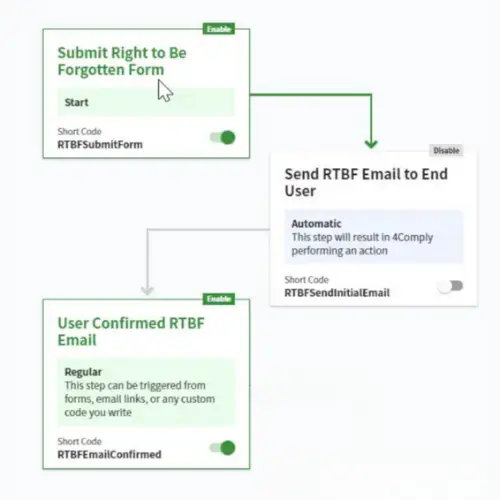
At its core, a rights fulfillment workflow is the end-to-end process a company uses to respond to a Data Subject Access Request (DSAR). When a customer asks to see, correct, or delete their personal data, it triggers a legal obligation for you to act. An effective workflow ensures these requests are received, verified, tracked, and fulfilled accurately and on time. While this can be done manually, modern privacy compliance demands a more robust solution. DSAR automation systematizes these steps, creating a seamless, auditable, and efficient process that minimizes risk and ensures nothing falls through the cracks.
Why Are They Critical for Your Business?
Beyond simple compliance, a well-managed rights fulfillment workflow is a cornerstone of customer trust. In an era where data privacy is a primary concern for consumers, demonstrating a commitment to protecting their rights is a powerful differentiator. Efficiently handling customer data requests shows that you are a responsible steward of their information, which builds brand loyalty. Conversely, a clunky or slow process can lead to customer frustration, brand damage, and severe penalties under regulations like GDPR and CCPA. A streamlined workflow isn’t just a legal shield; it’s a business asset that reinforces your reputation for integrity.
How to Implement an Effective DSAR Workflow
Implementing a structured workflow transforms how you manage DSARs, turning a potential compliance headache into a streamlined operation. The process generally involves four key stages:
Intake: It starts with a centralized and easily accessible portal or form where users can submit their requests. This avoids the chaos of requests coming through various channels like emails or support tickets.
Verification: Before providing any data, you must securely verify the identity of the person making the request. This crucial step prevents unauthorized access and potential data breaches.
Data Discovery: Once verified, the next step is to locate and gather all the relevant personal information from your various systems. This is often the most time-consuming part of the manual process.
Fulfillment: Finally, the collected information is delivered securely to the user in a clear and understandable format. For deletion requests, this stage involves ensuring the data is permanently removed from your systems.
Best Practices for Managing Data Subject Rights
To truly excel at privacy compliance, consider these best practices:
Automate Where Possible: Leverage DSAR automation tools like 4Comply to handle the repetitive, time-consuming tasks of verification, data discovery, and tracking.
Maintain a Clear Audit Trail: Keep detailed records of every request, action taken, and communication. This is essential for demonstrating compliance if an audit occurs.
Train Your Team: Ensure everyone who handles personal data understands the importance of data subject rights and knows the correct procedures to follow.
Be Transparent: Clearly communicate your data privacy policies to users and keep them informed about the status of their requests throughout the fulfillment process.
Build Customer Trust with 4Comply
Navigating the complexities of privacy compliance and rights fulfillment can be daunting, but you don’t have to do it alone. The right tools can transform your workflow from a manual burden into a seamless, automated process that builds customer trust and ensures you meet your legal obligations.
If you’re ready to take control of your DSAR automation, 4Comply offers a robust solution designed to manage the entire lifecycle of data subject requests.
Ready to see how it works? Request a personalized demo of 4Comply today!
Frequently Asked Questions (FAQs)
A user emailed asking for their data. What’s the absolute first step?
Verify the user’s identity. Before you access, send, or delete any information, you must have a secure process to confirm the person is who they say they are. This prevents a potential data breach.
How long do you have to respond to a data request under GDPR?
A month. Under GDPR, you have one calendar month from the date you receive the request to provide a response. This timeframe can be extended by up to two additional months for complex requests, but you must inform the user of the extension within the first month.
Why is just emailing data back to a user a security risk?
Email is not an inherently secure channel for transferring sensitive personal data. It can be intercepted, sent to the wrong address, or accessed on an insecure device. Fulfilling a data request requires a secure delivery method to protect the user’s privacy and your business from liability.
How do data rights differ between major privacy laws like GDPR and CCPA?
While core principles like the right to access and delete data are similar, the specifics vary greatly. Major laws like Europe’s GDPR and California’s CCPA have different response timelines, user verification standards, and penalties. This makes a flexible, region-aware compliance strategy essential for global businesses.
Does the ‘right to be forgotten’ apply to data in backups?
This is a complex area, but generally, yes. While you may not need to immediately erase data from disaster recovery backups, you must ensure the data is quarantined and not restored into your live systems. Eventually, it must be permanently deleted as the backup lifecycle expires.
How can you prove you have complied with a deletion request?
The only way to prove compliance is by maintaining a secure, unalterable audit trail. This log should record the initial request, the identity verification steps, the actions taken to delete the data, and the final confirmation sent to the user. This trail is your essential legal record.
Modern B2B teams want faster launch cycles and tighter CRM alignment, and many look to Marketo Engage for standardized programs, ABM, and reliable analytics continuity. But switching from Eloqua is rarely a lift-and-shift—field models diverge, program channels map imperfectly, and consent or deliverability can slip if the move is rushed. That’s why this guide outlines an Eloqua to Marketo migration you can run step by step—discovery, mapping, pilot, cutover, and stabilization—using clear quality gates to preserve attribution, opt-ins, and campaign velocity.
What is an Eloqua to Marketo migration?
An Eloqua to Marketo migration is a structured replatforming of audiences, assets, automations, and reporting from Eloqua into Marketo Engage. The objective is continuity: transfer account and contact data, custom objects. Maintain consent, attribution, scoring, and funnel health while modernizing your stack. A strong plan defines scope, sequencing, owners, and quality gates to keep risk low.
Why switch from Eloqua to Marketo?
Teams switch when they want tighter CRM alignment, richer ABM, or simpler program architecture. If you are evaluating a switch from Eloqua to Marketo, consider Marketo vs Eloqua on four dimensions: data model, channels, governance, and ecosystem. Your findings should feed the business case and the plan that sets expectations for time, cost, and ROI.
Planning your migration strategy
Start with a current-state assessment. Audit data structures, custom fields, segments, integrations, and automation workflows in Eloqua. Align stakeholders across marketing, sales, IT, and compliance to confirm scope and success criteria. Set clear goals for Marketo adoption, including campaign velocity, lead management precision, and reporting clarity. Identify resource gaps and training needs early so your Marketo implementation for former Eloqua users starts smoothly. In practice, some objects aren’t apples to apples between the platforms—like program membership, shared lists, or custom objects—so using a partner familiar with both systems reduces surprises and speeds translation.
Pre-migration checklist
Complete a data inventory: people, accounts, custom objects, lists, and activity histories.
Map Eloqua fields to Marketo fields; normalize picklists and naming conventions.
Review dependencies: lead scoring, segments, and shared lists that may need reconfiguration.
Prioritize data cleansing: remove duplicates, outdated records, and non-compliant profiles.
Document scope, timelines, owners, and risks; publish a communication plan.
How does the Eloqua to Marketo transition process work?
Think in phases. This blueprint converts complexity into predictable sprints:
Design and mapping – Create your Eloqua to Marketo data migration schema: field-by-field mappings, picklist normalization, program channel mapping, and success step conversions. Document how lead statuses, program membership, and campaign types translate.
Build and configure – Stand up workspaces or partitions, branding domain, SPF, DKIM, DMARC, CRM sync rules, and Sandboxes. This is where Marketo implementation for former Eloqua users shines—align engagement programs and smart campaigns to your existing buyer journey.
Migration and QA – Execute the data migration for a pilot cohort. Validate consent states, unsubscribe flags, channel tags, and UTMs. Rebuild email and page templates only where needed; refactor nurtures into engagement programs. Extend testing to forms, routing, and alerts.
Cutover – Freeze changes in Eloqua, enable program syncs, and switch DNS for branded tracking links. Run parallel sends for one cycle to confirm deliverability and attribution. Announce migration completion to stakeholders with clear rollback criteria.
Stabilize and optimize – Monitor volumes, spam complaints, bounces, and campaign performance. Update the plan with lessons learned. Schedule a 30-day retrospective focused on analytics parity and team workflows.
Data Quality, Privacy, and Compliance
Validate field formats and required attributes during mapping. Confirm opt-in status and regional preferences so consent translates accurately. Document lawful bases and retention rules to align with GDPR and CCPA. Use secure transfer protocols and limit access during migration to reduce risk. Treat the Eloqua to Marketo data migration as a governance exercise as much as a technical one.
Training and Adoption
Transitioning means new workflows and reporting. Create a role-based training plan that covers program setup, segmentation, engagement programs, and reporting in Marketo. Provide hands-on workshops and quick-reference guides. Encourage knowledge transfer through internal champions and office hours so former Eloqua users become confident in Marketo.
Best practices for a Resilient Plan
Preserve consent first: ensure lawful basis, opt-in timestamps, and regional preferences migrate cleanly during the move.
Refactor, do not clone: engagement programs replace many Eloqua campaign patterns—use this as a modernization moment.
Design for operations scale: standardize program templates, channel tags, and reporting so the implementation accelerates onboarding.
Prove parity fast: track a golden cohort from first touch to pipeline to verify KPIs survived the switch.
Communicate clearly: publish a week-by-week update during the migration to maintain confidence.
Common Pitfalls and How to Avoid Them
Poor data mapping leads to data loss or misclassification; verify mappings with samples.
Lack of sandbox or phased testing allows errors to propagate; pilot first, then scale.
Insufficient communication creates rework; run weekly check-ins and publish decisions.
Ignoring privacy requirements risks violations; validate consent data at every step.
Inadequate training slows adoption; schedule role-based sessions and follow-ups.
Post-migration Stabilization and Optimization
Conduct a full audit of automations, triggers, segments, and reports. Manually test forms, emails, and landing pages in their new context. Monitor CRM sync health and tracking links. Leverage new Marketo capabilities such as engagement programs and dynamic content. Define new benchmarks for opens, clicks, MQLs, and pipeline so you can measure lift after optimization.
Update your Marketo migration plan with lessons learned and a 30-day retrospective; codify improvements into templates, SLAs, and QA checklists. Ready to move? Book a 45-minute migration assessment with 4Thought Marketing. We’ll validate scope, propose a pragmatic Marketo migration plan, and outline an implementation that protects deliverability and reporting from day one.
Frequently Asked Questions (FAQs)
What is the best way to migrate from Eloqua to Marketo?
Use a phased approach anchored by a documented plan: discovery, mapping, pilot, cutover, and stabilization. This reduces risk for global teams in the US, EU, India, and APAC.
How long does this migration take?
Most mid-market replatforms take 8–12 weeks, depending on asset volume and integrations. A disciplined plan shortens timelines and protects deliverability.
What data and assets migrate from Eloqua to Marketo?
People, accounts, custom objects, program membership, templates, and consent. Prioritize accuracy, then selectively rebuild nurtures and preference centers to fit Marketo patterns.
Do I need a dual-run cutover when moving to Marketo?
For complex stacks, yes—parallel sends confirm inbox placement and reporting before you fully switch.
How should I compare the two platforms?
Score requirements for CRM sync, engagement programs, ABM, and governance. “Marketo vs Eloqua” findings should guide whether to switch from Eloqua to Marketo now or later.
Key Takeaways
Pilot first to de-risk AI adoption in marketing operations.
Harden data contracts and consent to protect decisions.
Explainability earns trust—log features, sources, and outcomes.
Train roles, not people: playbooks, guardrails, reviews.
Marketing operations teams are under pressure to prove impact quickly, and AI promises gains in targeting, orchestration, and productivity. And most organizations already have data, platforms, and motivated teams. But pilots stall when foundations are shaky, trust is fragile, and responsibilities are unclear. Therefore, treat AI as an operating capability with governance, measurement, and change enablement—not as a side project.
What problems actually slow adoption?
AI initiatives in marketing ops typically stall for a small set of predictable reasons. In practice, the blockers cluster into eight buckets: unclear outcomes, brittle data and consent posture, integration bottlenecks, privacy/security ambiguity, low explainability, change saturation, fuzzy ownership, and weak measurement. Here’s the short list you can diagnose against:
Unclear outcomes. Requests start as “add AI” instead of a defined decision, metric, and user.
Brittle data & consent. Inconsistent IDs, missing consent, and weak lineage make models fragile.
Integration bottlenecks. Legacy flows and custom fields block real-time triggers and enrichment.
Low explainability. No model cards, test harnesses, or business-readable justifications undermine trust.
Change saturation. More tools without fewer steps; the day-to-day job doesn’t actually get easier.
Fuzzy ownership. No clear owners for training data, model governance, and quality; drift follows.
Weak measurement. Teams track clicks, not cycle time, effort saved, or incremental lift.
Why do these frictions persist?
Three patterns keep resurfacing:
Misaligned incentives. Leaders want innovation; front-line teams prioritize stability. If incentives reward throughput over learning, experiments lose oxygen.
Martech sprawl. Years of point tools created overlapping data flows and unclear ownership, so new initiatives must route through brittle automations before value appears.
Risk without guardrails. Without clear policies for data retention, prompt safety, and audit logging, teams fear compliance issues and delay decisions.
How can marketing operations unblock adoption?
AI progress accelerates when you treat it like a product with guardrails, clear ownership, and an evidence loop. Start small, connect outcomes to live systems, and measure what changes for customers and operators. Use this sequence to move from slideware to shipped value:
Run a readiness assessment. Score data quality, consent posture, lineage, access, integration maturity, and risks.
Prioritize a use‑case backlog. Define 6–10 opportunities; size impact vs. effort; pick two to pilot.
Define guardrails & ownership. Set consent policies, prompt safety, and logging; assign owners for data, model governance, and rollout.
Design the target architecture. Standardize IDs and event schemas; build real‑time pipes; plan Marketo/Eloqua connections to activate decisions.
Pilot like a product. Ship a thin slice to a real team; publish runbooks and acceptance criteria; hold weekly reviews.
Enable the change. Provide role‑based training, prompts, checklists, and quick‑reference guides; ensure fewer steps than before.
Instrument and iterate. Track time‑to‑value, reuse rate, assist rate, and incremental revenue; harden, then scale.
Best practices that consistently work
Start with a target decision: the precise moment AI helps and who benefits.
Standardize data contracts with deterministic keys, event schemas, and SLA monitoring.
Prove safety early by demonstrating consent filtering and PII minimization.
Design for explanation with business-readable justifications, confidence, and fallbacks.
Automate review loops to capture human feedback and update playbooks.
Productize onboarding so each model has an owner, roadmap, and support.
Call to action
If your roadmap is long on ambition but short on wins, focus on the conditions that make value repeatable. 4Thought Marketing can help stand up the essentials—consent and data guardrails, working integrations, and a pilot-to-production motion—so teams see value quickly. Ask about our AI Readiness Sprint, consent orchestration with 4Comply, and packaged integrations for Marketo and Eloqua.
Conclusion
AI can deliver outsized gains, and the conditions for success are within reach. But without ownership, guardrails, and measurement, even good ideas stall. Therefore, build a thin slice of the future—complete with governance and change management—then scale the patterns that work.
Frequently Asked Questions (FAQs)
What is AI adoption in marketing operations?
A structured rollout of models, prompts, and automations that improve marketing decisions and execution across the funnel. Success depends on data quality, integrations, and governance—not just tools.
Which data issues most often block progress?
Inconsistent IDs, missing consent, weak lineage, and manual handoffs. Strong data governance and event standards reduce rework and accelerate launches.
How does privacy compliance affect deployment?
Privacy and consent management set guardrails for training data, prompts, and outputs. Clear policies and automated filtering enable faster approvals and safer experiments.
Where should we start to accelerate adoption?
Begin with a readiness check, then pilot two high-impact use cases. Prove value with cycle-time and revenue lift, then expand using documented patterns.
How do Eloqua and Marketo integrations help?
They connect predictions and content to campaigns, segments, and routing so insights change real experiences—not just reporting.
What change management steps matter most?
Role-based training, clear ownership, visible explainability, and published runbooks with dashboards that show what changed, why, and how to override.
Key Takeaways
Design your opener so AI email summaries echo intent.
Lead with the ask — owner and deadline immediately.
Add a TLDR on line two with decision.
Front load first 140 characters with facts and amounts.
Use descriptive links — label attachments clearly before sign off.
You want messages that are quickly understood across inboxes and time zones, and AI email summaries promise to help busy readers scan your note in seconds. But these systems can flatten nuance, miss intent, or clip crucial details—especially when formatting, links, or tone get in the way. Therefore, write with summary engines in mind so human readers—and the machines that assist them—both get the right message the first time. When you design for AI email summaries, your first line becomes your most valuable real estate.
What is actually happening to your emails?
Two things shape understanding before anyone reads deeply: the message preview (first 1–3 body lines) and AI summaries (Outlook Copilot / Gmail Gemini) that condense long threads.
Outlook (Microsoft 365 + Copilot): Shows a summary card at the top of long threads with citations back to specific emails; can summarize common attachments. Won’t summarize encrypted or certain sensitivity‑labeled messages; scoped to the primary mailbox.
Preview lines: Outlook’s list view pulls the start of the body. Layout/density settings change how many lines display, but the first ~140 characters do the heavy lifting.
Gmail for Workspace: Offers “Summarize this email” on long threads. Same rule: clear, factual line one and descriptive links get surfaced.
Bottom line: Subject + first 1–3 lines + a TL;DR determine what humans and models act on. Make that area the single source of truth.
Why should you make your emails Summary-proof?
Misreads cost money: A clipped CTA or truncated price can delay approvals or stall deals.
Time zones amplify confusion: When recipients read on the go, they decide from the Summary whether to open or snooze.
Compliance risk is real: Regulated teams need clear disclaimers and auditable wording; hallucinated highlights are a problem.
Marketing efficiency depends on clarity: If your team relies on email marketing AI to prioritize replies, the wrong Summary means the wrong follow-up. Many marketing teams now route escalations using email marketing AI, so precision in your opening lines matters twice.
How to write emails that survive AI readers
Start with the ask in sentence one. State the action, owner, and deadline. For example, “Please approve the Q3 budget by Friday at 18:00 IST so we can place the order.”
Front-load vital details in the first ~140 characters. That’s the fragment most summarizers weigh heavily, and it’s the snippet AI email summaries often quote verbatim.
Use a Summary after line one. Example: “Sum Up — 2 options, I recommend Option B; need a yes/no today.” This boosts the chance that AI email summaries echo your real message.
Keep subjects’ machine-scannable. Pattern: [Action] + [Object] + [When]. Example: “Approve vendor contract — ACME — by Aug 22.” Avoid jokes or wordplay in the subject.
Format for extraction. Use short paragraphs, simple bullets, and plain punctuation. Avoid nested tables and tiny fonts from pasted docs.
Name things consistently. Use canonical project names, currency codes (USD, INR, EUR), and ISO-style dates (2025-08-22) to reduce misreads.
Make links descriptive. Replace “here” with “Statement of Work (PDF)” so a model knows what the link represents.
Don’t hide the CTA in signatures or banners. Place it in body text near the top.
State privacy and sensitivity explicitly. Example: “Internal use only; do not forward outside ACME.”
Best practices checklist (copy/paste into your template)
Subject = intent first: Approve/Review/Decide.
First line = ask + owner + date.
Summary within line two (or a bold label in rich text; include the plain words “Summary” in the text version).
One idea per paragraph; bullets ≤ 6 items.
Call out numbers, dates, and amounts with units (₹, $, %, days).
Use direct verbs; avoid sarcasm and double negatives.
Put decisions and next steps above threads and signatures.
Provide a plain-text version if you send HTML.
Before sending, skim the auto-generated preview your client shows; adjust line one if the preview buries the ask.
For marketers, pre-flight test with common tools; check how Apple Mail AI summaries, Gmail AI features, and mobile lock-screen previews render your first two lines.
Pilot with AI readers internally and capture what AI email summaries display so you can tune your first 140 characters.
Compliance and brand protection
Include necessary disclaimers in plain language, not images.
Avoid sensitive data in subjects. Put IDs and account numbers only in the body if required, and mask where possible.
Log what changed: “Updated pricing from ₹1.2M to ₹1.15M based on volume.” Machines latch onto numerals—use that to your advantage.
For automation teams, align email templates with review workflows so audits can show exactly what was requested and when.
GEO optimization tips (works for US, EU, and India recipients)
Normalize dates to YYYY-MM-DD and include local day names when timing matters: “Mon, 2025-08-25 (US morning, EU afternoon, India evening).”
Offer local currency equivalents if the amount is material.
If sending multilingual, put the primary language first and keep the first 140 characters semantically equivalent across versions.
Conclusion
You can’t control how every model compresses text, and inbox features will keep evolving. But by structuring your subject, line one, and TL;DR for extractive and abstractive systems, you reduce misreads and speed up decisions. Therefore, treat summary-readability as a design constraint—your emails will work harder for humans and machines alike, and your team will move faster regardless of client or platform. When in doubt, write your opener so AI email summaries would faithfully echo your CTA, and remember that 4Thought Marketing can help you operationalize this standard across teams.
For structured implementation, 4Thought Marketing’s Email Summary‑Readability Audit provides diagnostics, a practical playbook, and pre‑flight guardrails for Outlook and Google Workspace; if desired, we can also produce exemplar first‑line and TL;DR patterns to jump‑start adoption.
Frequently Asked Questions (FAQs)
How do I make summaries show my CTA?
Put the ask, owner, and deadline in your first sentence, then add a TL;DR on line two.
Do Apple Mail AI summaries and Gmail AI features read images?
Rely on text. Use descriptive links and avoid image-only disclaimers.
How should I format dates and amounts for global teams?
Use yyyy-mm-dd and currency codes (INR, USD, EUR) with units and percentages.
Will email marketing AI route replies better if I change my opener?
Yes. Clear first lines improve priority scoring and reduce misrouted follow-ups.
How do Eloqua AI email optimization and Marketo Engage AI features fit?
Align templates and first-line patterns so scoring and routing models capture intent consistently.
Key Takeaways
Score the journey: sequence, synergy, stickiness.
Add team signals and integrations to see intent.
Keep it explainable—show what moved the score.
Set thresholds → trigger plays you’ll actually run.
Start small, measure lift, and tune monthly.
Your portfolio spans multiple products, and revenue depends on how customers stitch them into daily workflows. A multi-product PLG score turns scattered signals into a PLG scoring model operators can act on. Teams often track an account health score and run Eloqua and Marketo lead scoring, yet expansion is driven by cross-product usage and collaboration—the patterns that convert activity into timed, targeted actions.
What is the multi-product PLG score?
A composite built from how customers move across products and work as a team. Core inputs:
Adoption sequences (what starts the journey, what consistently follows)
Feature synergy (pairs/clusters used in the same window)
Stickiness across tools (repeat multi-product use vs one-offs)
Point rules on single features flatten behavior and miss timing. A PLG scoring model that incorporates the cross-product pattern and collaboration becomes an early, defensible indicator for upsell, cross-sell, and save plays. Explainability is essential so sales and success can see which events moved the number.
How to build the score (fast path)
Instrument the event dictionary (feature used, integration added, workspace created) with reliable user/team/product IDs.
Select 4–6 inputs from the signals above; set light initial weights and test on a sample cohort.
Define thresholds and actions: tiers (nurture, assisted, high-touch) with specific outreach, offers, and handoff rules.
Enable real-time triggers for material score changes; log the reason each trigger fired.
Explain & improve: show local drivers to field teams; use feedback to tune inputs and thresholds.
What are Best practices & governance?
Cadence: monthly drift check, quarterly retrain with change log.
Overrides: allow exceptions with guardrails and approvals; maintain an audit trail.
Documentation: model card, training snapshots, validation results.
Feedback loops: capture false positives/negatives from sales and success and fold into the next retrain.
Is marketing automation suitable? It depends.
Marketing automation can absolutely accept product events and power scoring-driven programs—but suitability depends on latency, volume, identity complexity, and model type.
Use MA alone when you have a small set of high-value events, near-real-time to daily latency, rules-based logic, and person-level updates that roll up cleanly.
Supplement MA (warehouse/CDP + scoring service) when you need sequence-aware or graph-aware scoring across multiple products, robust account-level rollups, heavier event volumes, or sub-minute reactions. Compute externally; write the score back for orchestration.
Can I push in-app product usage to Marketo/Eloqua for scoring?
Yes. Define a compact event dictionary, stream to your CDP or warehouse, normalize IDs, and sync scoring fields into the systems of action. Smart Campaigns/Program Canvas can react immediately. Teams typically map usage into Marketo lead scoring for behavioral adjustments and Eloqua lead scoring for structured engagement inputs, qualify into lifecycle stages, and alert sales. Start with a handful of high-value events and a closed-loop report to verify lift.
Future-ready extensions
Market-aware adjustments for pricing or competitor moves
Cold-start aids (transfer learning) for new products
Coverage expansion to include partner usage and marketplace add-ons
Conclusion & next steps
Growth depends on seeing the whole pattern—how products and people come together, in what order, and with what staying power. A multi-product PLG score embedded in a PLG scoring model gives you an actionable signal instead of a noisy dashboard. Put it to work by auditing events, defining a lean schema, wiring thresholds to concrete plays, and enabling real-time triggers with explanations so every move is timely and defensible. Keep the account health score current for executive roll-ups, and align lifecycle programs with Eloqua and Marketo scoring so marketing automation and field execution move in lockstep.
If you want a fast start, 4Thought Marketing can lead a focused sprint to map your product graph, finalize inputs and thresholds, pilot on a controlled segment, and return a model card plus playbooks ready to deploy.
Frequently Asked Question (FAQs)
What is a multi-product PLG score?
A multi-product PLG score combines signals from how customers move across products and collaborate as a team. Core inputs include adoption sequences, feature synergy, stickiness across tools, integration depth, and collaboration intensity.
Why use a PLG scoring model?
A PLG scoring model turns cross-product behavior and collaboration into a single, defensible signal for prioritization. It supports tier thresholds and playbooks while keeping explanations visible to sales and customer success.
How does an account health score relate to a PLG scoring model?
An account health score provides an executive-friendly roll-up of retention and expansion risk, while a PLG scoring model focuses operationally on cross-product behavior and collaboration to trigger specific actions.
Can I push in-app product usage to Marketo/Eloqua for scoring?
Yes. Define a compact event dictionary, stream events to your CDP or warehouse, normalize IDs, and sync fields into systems of action. Teams commonly map product usage into Marketo lead scoring for behavioral adjustments and Eloqua lead scoring for structured engagement inputs.
Is marketing automation suitable for PLG scoring?
It depends on latency, volume, identity complexity, and model type. Marketing automation can ingest key product events and support rules-based scoring; when you need sequence-aware or graph-aware scoring at account level and lower latency, compute externally and write the score back for orchestration.
Key Takeaways
Dark patterns in data collection are manipulative design tactics or hidden AI-discovered correlations that can lead to non-compliant data use.
GDPR consent compliance requires explicit opt-in consent, while CCPA data compliance requires transparent, simple opt-outs.
Privacy compliance automation helps ensure discovered patterns are acted on legally and ethically.
Ethical automation builds customer trust by aligning AI use with clear data privacy best practices.
Companies can avoid dark patterns by auditing touchpoints, validating insights with consent records, and automating governance.
Companies today are racing to collect more customer data, and AI-powered marketing automation makes it easier than ever to uncover hidden behavioral patterns that humans might miss. And while these insights can drive personalization and growth, they often come at a cost when businesses rely on manipulative UX or act on AI-discovered correlations without clear permissions. But these dark patterns in data collection put organizations at risk of privacy violations, regulatory fines, and customer backlash. Therefore, the real opportunity is not in how much data can be captured, but in how responsibly it is used—with automation ethics ensuring GDPR compliance, CCPA compliance, and lasting customer trust.
What are Dark Patterns in Data Collection?
Dark patterns in data collection are tactics or processes that trick or pressure users into sharing data they might not have freely chosen to provide. Examples include pre-ticked consent boxes, confirmshaming (“No thanks, I don’t care about my privacy”), and hidden or hard-to-find unsubscribe links.
Today, the concept also covers hidden or invisible data correlations discovered by AI, such as customers who only engage with offers on paydays, audiences clicking more frequently at certain times of day, and links between webinar attendance and high-value purchase intent. These patterns aren’t inherently negative—the risk lies in how organizations act on them without a clear compliance framework.
Why Do Dark Patterns Clash with GDPR and CCPA Compliance?
Dark patterns undermine user autonomy and directly conflict with global privacy laws. GDPR consent compliance requires explicit, informed, and freely given consent; pre-checked boxes and bundled permissions violate this principle. CCPA compliance demands transparency and easy opt-outs; burying an unsubscribe link or complicating an opt-out flow obstructs user choice. Even if AI uncovers a valid behavioral correlation, using it without explicit consent can fall outside lawful processing rules. Regulators are increasingly cracking down on such practices, issuing fines for misleading consent mechanisms and reinforcing user awareness of how data is handled.
How Do AI and Automation Tools Uncover These Patterns?
Modern AI tools process massive volumes of engagement data—clicks, opens, site visits, timing, and device type—and can uncover correlations no human team could easily detect. Examples include discovering that webinar attendees prefer shorter nurture sequences, or that early-morning engagement predicts higher likelihood of event sign-ups. The real question isn’t just what AI can find, but how it is used; responsible use requires privacy compliance automation to ensure every pattern is checked against permissions before being acted on.
What are Best Practices for Ethical Automation in Data Use?
Audit every touchpoint and remove manipulative consent designs (confirmshaming, bundled consent, hidden opt-outs).
Validate insights with consent; just because a pattern exists doesn’t mean you can act on it.
Communicate transparently; frame personalization as a benefit, not surveillance (“We thought this might interest you”).
Automate governance so privacy rules are embedded in workflows and violations can’t happen.
Apply global standards across GDPR, CCPA, LGPD, PDPA and beyond; customers everywhere expect a privacy-first approach guided by best practices.
How 4Thought Provides the Solution?
Marketers don’t have to choose between powerful AI insights and privacy compliance. 4Thought Marketing makes both possible. 4thoughtCX uncovers the hidden patterns that drive engagement and ROI, while 4Comply ensures each insight is filtered through compliance rules, validated against consent, and documented with audit trails. Together, they enable ethical automation, transparent campaigns, and globally compliant marketing strategies. Don’t let dark patterns in data collection turn into compliance risks—use discovery responsibly and build brand trust that lasts.
Conclusion
AI and automation can reveal powerful, previously hidden data patterns, and these discoveries can transform customer engagement when applied responsibly. But when they are used without transparency or consent, they shift quickly from opportunity to liability, undermining both compliance and brand credibility. Therefore, companies that embrace automation ethics, leverage privacy compliance automation, and follow global best practices for data privacy not only avoid dark patterns in data collection but also build sustainable customer relationships and long-term brand authority.
Frequently Asked Questions (FAQs)
What are dark patterns in GDPR and CCPA data collection?
Dark patterns in GDPR and CCPA compliance are manipulative UX or automation practices, such as hidden opt-outs or pre-ticked consent boxes, that trick users into sharing data. They violate explicit consent requirements and increase compliance risks.
Why do dark patterns create risks for privacy compliance automation?
Dark patterns undermine the purpose of privacy compliance automation by bypassing transparency and consent. Even if AI uncovers hidden behavioral correlations, acting on them without permission violates GDPR consent compliance and CCPA data compliance.
How can AI tools like 4thoughtCX uncover hidden data patterns ethically?
AI tools such as 4thoughtCX analyze large datasets to reveal patterns humans miss. To stay ethical, businesses must align these discoveries with GDPR and CCPA compliance rules and use automation tools like 4Comply to enforce customer consent before applying insights.
What are the best practices to avoid dark patterns in data collection?
Businesses should: 1. Audit forms and flows to remove manipulative tactics. 2. Align AI insights with explicit user permissions. 3. Use privacy compliance automation to enforce GDPR consent compliance and CCPA opt-out rules. 4. Communicate data use transparently with customers.
How does 4Thought Marketing build trust through ethical automation?
4thoughtCX uncovers engagement-driving patterns, while 4Comply ensures insights are applied lawfully. This balance enables marketers to leverage AI for growth without violating privacy laws, creating trust and sustainable customer relationships.
From Big Data to Big Responsibility
We’re generating more data than ever in history, and marketing automation thrives on this abundance — powering personalization, segmentation, and campaign optimization at scale. With every customer interaction, there’s an opportunity to deliver more relevant, timely, and engaging experiences.
Yet, the same explosion of data brings increasing privacy risks, stricter global regulations, and rising expectations for transparency. Manual compliance processes can’t keep pace without slowing campaigns or introducing costly errors. Integrating data privacy automation into your marketing operations — especially within platforms like Eloqua and Marketo — ensures every campaign is driven by accurate, compliant, and up-to-date customer data, safeguarding trust and growth while supporting privacy best practices.
What is Data Privacy Automation?
Data privacy automation uses advanced technology to streamline consent managementand data subject request handling. For marketing operations, this means:
Real-time data accuracy across all integrated platforms.
Reduced manual work so marketing teams can focus on strategy instead of repetitive admin.
Privacy automation becomes the invisible infrastructure that keeps marketing automation running smoothly — without introducing compliance risks. For organizations that prioritize marketing data compliance, this approach ensures campaigns remain impactful while adhering to regulatory requirements.
Where Privacy Automation Meets Marketing Automation
Marketing automation thrives on accurate, permission-based data. But without a robust privacy backbone, even the most advanced campaigns risk delays, data gaps, or regulatory violations. Here’s where automation bridges the gap:
1. Consent Management
Automated consent management ensures every marketing list, campaign, and personalization rule uses data with clear permission to proceed.
Real-time updates flow directly into marketing automation platforms like Eloqua or Marketo.
Customers feel in control, which strengthens trust and engagement rates.
2. DSAR Fulfillment
When a data subject request comes in, privacy automation tools can locate, compile, and process the required data without derailing campaign schedules.
Reduced legal exposure and faster turnaround times.
Seamless documentation for audit readiness.
The Role of 4Comply in Data Privacy Automation
4Comply is more than just a compliance tool — it’s a privacy intelligence engine that integrates seamlessly with marketing automation systems, including Eloqua, Marketo, and others.
With 4Comply, you can:
Centralize Consent & Preference Data – Synchronize permissions across platforms so every campaign is compliant by design.
Automate DSAR Workflows – Ensure rapid, accurate responses without burdening your marketing or IT teams.
Enable Privacy-by-Design Marketing – Bake privacy compliance into every automation rule, segmentation, and personalization logic.
By bridging the gap between privacy compliance and marketing execution, 4Comply allows marketing teams to scale outreach without risking regulatory missteps.
Scaling for the Future
Marketing and compliance don’t exist in separate silos — they evolve together. As organizations expand into new regions, add more products, and engage with diverse audiences, the complexity of managing privacy preferences and fulfilling requests multiplies.
Scaling without automation often means hiring more staff, building manual workarounds, and relying on error-prone processes that slow down campaigns. But with privacy automation integrated directly into your marketing stack, scaling becomes frictionless.
With 4Comply connected to Eloqua or Marketo, your systems can:
Adapt to regional privacy rules automatically, applying the correct consent model based on the customer’s location.
Synchronize permissions across channels in real time, so whether the customer opts out via an email preference center or a landing page form, the change is instantly reflected across your campaigns.
Handle higher DSAR volumes without pulling marketing staff away from campaign execution.
Easily extend compliance workflows to new tools, data sources, or market segments as your marketing automation grows.
This integration ensures that your privacy program isn’t just keeping pace with growth — it’s enabling it.
Why This Matters Now
The marketing landscape is in a state of constant acceleration. Campaign velocity, personalization depth, and data-driven targeting are only as strong as the trust customers place in your brand. And trust is fragile.
Without automated privacy safeguards:
Your Eloqua or Marketo campaigns could accidentally email unsubscribed contacts.
Segmentations may include customers who opted out, risking regulatory penalties.
DSAR fulfillment could delay time-sensitive campaign launches.
By contrast, 4Comply ensures that your marketing automation is always working with verified, compliant data. Every list pull, every segmentation rule, and every personalization token is powered by live consent data, eliminating the lag between customer preference changes and campaign execution.
In a world where regulations like GDPR, CCPA, and emerging privacy laws shift frequently, automation is the most reliable way to keep marketing agile, accurate, and compliant.
Your Next Step
If your marketing automation runs on Eloqua or Marketo, integrating 4Comply is the fastest way to ensure every campaign is compliant from the moment it launches. Our platform is built to:
Plug directly into your existing marketing workflows without disrupting campaign schedules.
Automate privacy compliance tasks so your team can focus on creativity and strategy, not data policing.
Give compliance and marketing leaders a shared view of customer consent, DSAR status, and data handling practices.
Conclusion
Marketing automation delivers speed, precision, and scalability, but it can only perform at its best when fueled by compliant, consent-driven data. Without privacy automation, permissions may lag behind, DSAR requests can disrupt schedules, and regulatory risks can creep in — eroding both performance and trust.
By integrating 4Comply into Eloqua or Marketo, you can streamline consent management, automate DSAR fulfillment, and scale compliance seamlessly alongside your campaigns. It’s a smarter, faster way to protect your brand while accelerating results. Contact us today to see how 4Comply can help you turn privacy compliance into a strategic advantage for your marketing operations.
Imagine designing a great email marketing campaign, only to have most of your recipients lose interest because of the microscopic text size on their screens. Or generating demand from a social media campaign but losing out on conversions because of unnavigable landing pages that do not adjust to a device’s screen size. Utilizing responsive design can significantly enhance user experience.
Campaign strategies need to include optimizing emails, landing pages, and websites for various screen sizes and keeping visitors engaged. Responsive design provides the solution for a seamless experience across devices.
What is Responsive Design?
In today’s digital landscape, implementing responsive design is crucial for improving accessibility and ensuring that users have a positive interaction with your content, regardless of the device they are using.
Responsive design is the process of designing emails, landing pages, and websites that adapt to the end user’s screen as well as its orientation. It uses fluid layouts, flexible grids, responsive images, and CSS media queries to ensure that your emails and website landing pages render correctly on the end user’s device display. It even delivers a seamless viewing experience if a user switches the orientation of their device from portrait to landscape mode.
Why is Responsive Design Important?
Emails, landing pages, and websites are a critical part of a potential customer’s journey to conversion. The longer they spend with your content, the more likely they are to turn into strong leads and convert.
Viewing content on desktops is easy because of the large screen size. However, when users access their emails on their mobile devices, things can get a little tricky. Text, images, and buttons are much smaller, and thus harder to navigate and click.
Apart from the device itself, email clients (the programs that emails are viewed on) also display emails differently. So, an email that is formatted for Gmail will not look the same on Outlook, for example.
Similarly, landing pages need to render quickly and efficiently regardless of the device used to access them to provide a consistent user experience.
Lower Bounce Rates
Research shows that even a 0.1s improvement in loading speed can increase conversions by 10%. Mobile users are even more impatient. According to Google, as page load time goes from one second to 10 seconds, the probability of a mobile site visitor bouncing increases by 123%. Without fixing this, you can lose out on conversions even when potential customers make it to your landing page.
Better User Experience
Forbes reports that 88% of users are less likely to visit a website after they’ve had a bad experience. Since your landing page is often their first interaction beyond email and digital marketing, it’s vital that your landing page delivers. Google recommends having fewer than 50 individual pieces of content on your mobile page for an optimal user experience.
Higher Credibility
Stanford research shows that well-designed websites with great user experiences build credibility with potential clients. Responsive design helps your website’s landing pages look clean and professional to build the trust necessary to generate leads.
Improved SEO Rankings
Google uses mobile-first indexing for its SEO rankings. Optimizing landing pages for mobile gives them a better chance of ranking higher.
Future-Proof Pages
New devices flood the market every day. Responsive design means your landing page and website adapt to the latest technology without revisiting the design.
What are Responsive Design Best Practices
Responsive emails and landing pages must be carefully planned to suit the needs of your target audience and their devices. A few elements to consider include:
Mobile-First Design
You want your content to look great whether it is viewed on a 6.5-inch screen or a 20-inch one. Similarly, it needs to account for screens with different resolutions. The size of the screen will determine the breakpoints your page needs for a clear flow. Design breakpoints for different standard screen sizes, like mobile, laptops, and desktops.
Designing emails and landing pages for the smallest screens first allows you to structure and prioritize content so that vital information appears first. It also helps design a mobile-friendly navigation system right from the start.
Responsive Images, Logos, & Fonts
Use responsive images to optimize load times and enhance user experience. Use SVG images for icons or logos. Their small file size also helps optimize page loading speed and performance while still looking good on screens of all sizes.
Font sizes for mobiles may look too large on desktops or vice versa. Choose a font size that is user-friendly for both.
Touch-Friendly Buttons
The ability to click that all-important CTA button easily is an important aspect of emails and landing pages. Interactive elements like buttons and links need to be clearly highlighted with enough space around them to prevent them from being tapped accidentally as users scroll on their smartphones. Another option is to turn all links into click-friendly buttons.
Similarly, typing is difficult on mobile devices. To make landing pages even more phone-friendly, keep your forms short and offer dropdowns as much as possible.
Test Across Devices
Test your responsive design across multiple devices and screen resolutions to ensure it is working as intended. You should also check it against different email clients and browsers and tweak it as necessary.
How to Optimize Your Engagement Rates
Great user experiences can boost your engagement rates and drive conversions. Make the most of your marketing efforts with well-designed emails and landing pages! Contact the experts at 4Thought Marketing today to get started.
Why Do We Need COPPA Compliance?
The recent surge of data privacy laws shows an increased awareness of online privacy risks. But the conversation about children’s online privacy long predates even the GDPR. The Children’s Online Privacy Protection Act (COPPA) was passed in 1998 and entered full effect in 2000. The law requires businesses to adhere to very strict and specific rules when collecting, using, or disclosing personal information from children under the age of 13. Non-compliance with COPPA can lead to substantial fines and legal repercussions. Much like the GDPR, enforcement of these requirements is taken very seriously. Marketing professionals absolutely need to understand the law’s implications and how to navigate them effectively.
What Is COPPA & Why Is It Important?
Simply put, COPPA was designed to give parents more direct control over what information companies can collect about their children online. It applies to websites, mobile apps, online services, and other digital platforms that target children under 13 or have actual knowledge that they collect information from children. The Federal Trade Commission enforces this law, and failure to comply can result in hefty fines.
For marketers, understanding COPPA compliance is crucial, especially if your target audience includes children or if you operate on platforms where children may be present. Compliance is not just a legal obligation. It’s a matter of ethical responsibility to protect vulnerable users.
Key Requirements of COPPA
COPPA sets out a clear framework for businesses to follow:
Notice and disclosure: Organizations must provide a clear and comprehensive privacy policy describing their information practices regarding children’s data. This policy must outline what data is collected, how it’s used, and with whom it’s shared.
Parental consent: Before collecting personal information from children under 13, businesses must obtain verifiable parental consent. This might involve requiring parents to sign a consent form, use a credit card, or verify their identity through various secure means.
Data minimization: Only collect the data necessary for the activity or service being provided. Avoid collecting extraneous information, as it increases risk and could lead to compliance issues.
Access and deletion rights: Parents have the right to review the information collected from their children, request changes, or ask for the data to be deleted. Businesses must provide a mechanism for parents to exercise these rights.
Confidentiality and security: Implement robust measures to protect the collected data. This includes maintaining the confidentiality, security, and integrity of personal information.
Data retention and deletion: Retain children’s data only as long as necessary for the purpose for which it was collected and securely delete it afterward.
6 Steps to COPPA Compliance
To help marketing professionals navigate COPPA Compliance requirements effectively, the FTC offers a 6-step compliance plan:
Determine if your business is covered by COPPA: Review your audience and data collection practices. If your website, app, or service is directed toward children under 13, or you have actual knowledge of collecting data from this age group, COPPA applies to you.
Post a comprehensive privacy policy: Ensure your privacy policy is prominently displayed and clearly describes your data collection, usage, and disclosure practices. This policy should be easily understandable to both children and parents.
Notify parents before collecting data: Before collecting any personal information on users under 13, inform their parents that you will be doing so. Explain how you collect the data, what you’re collecting, and how you’ll use it.
Obtain verifiable parental consent: This step may involve sending parents a direct notice explaining your data practices and requiring a consent form, credit card verification, or other approved methods. 4Thought Marketing streamlined consent management system makes this easy.
Honor parents’ ongoing rights: Once a parent has provided consent, they must have the ability to review, change, or delete their child’s personal information. Create a straightforward process for parents to exercise these rights. Using 4Comply to manage ongoing DSARs will ensure that parents can access their child’s data at any time.
Implement security measures: Protect children’s personal information using secure data storage methods, encryption, and regular security audits. Ensuring confidentiality and data integrity is non-negotiable.
COPPA compliance is subject to regulatory changes, so it’s important to regularly review your policies and practices to ensure ongoing compliance. Stay informed about updates to COPPA requirements and adjust your strategies accordingly. 4Thought Marketing will help you stay up to date on anything new. Our specific compliance products are built to ease it.
Best Practices for Marketing Professionals
Maintaining COPPA compliance requires vigilance and a commitment to ethical data handling. For your marketing team, the most important things to remember include:
Practice data minimization: Collect only the information that is necessary for your service or product. Avoid gathering sensitive data that isn’t essential, as this can minimize risk and make compliance easier.
Use age-screening mechanisms: Implement age-gating techniques, such as asking for a date of birth before collecting any data. This can help prevent inadvertent data collection from children under 13. Never encourage children to lie about their age online.
Train your team: Educate your marketing, customer service, and IT teams on COPPA’s requirements. Regular training ensures that everyone understands their role in protecting children’s privacy.
Regularly audit data practices: Conduct periodic reviews of your data collection and usage practices to ensure they align with COPPA requirements. Address any issues promptly to maintain compliance.
Partner with COPPA-compliant service providers: If you rely on third-party service providers or platforms, ensure they also comply with COPPA regulations. This includes advertising networks, data analytics providers, and customer engagement tools. Track all your activities and theirs in a secure record (like 4Comply’s legal activity vault) so you can prove compliance if challenged.
Keeping Kids’ Privacy in Mind
Ultimately, COPPA compliance is not just about following legal requirements—it’s about building trust with your audience. By demonstrating a commitment to protecting children’s privacy, you establish credibility and foster a positive brand reputation. This trust can translate into long-term customer loyalty and a competitive edge in the market.
Sales and marketing need to work together—but common sales and marketing alignment mistakes get in the way. Below are six pitfalls you can spot fast and practical fixes you can apply this quarter. Sales and marketing alignment is the operating system for growth: shared definitions (ICP, MQL/SQL/SAL), a simple service-level agreement (SLA), and unified KPIs so leads move quickly from interest to opportunity to revenue. When teams prevent common sales and marketing alignment mistakes, handoffs get faster, win rates rise, and pipeline becomes more predictable.
1) The Marketing Expertise Trap
You are a marketing professional, dedicated to the art and science of marketing. A copy of Claude Hopkins’ Scientific Advertising sits in a prominent place on your office bookshelf. You use Eloqua and other sophisticated marketing automation tools. You’ve run events with hundreds or thousands of attendees. You’ve delivered hundreds of drip and nurture campaigns while earning multiple certifications. You’re proud of your accomplishments, and rightly so. But don’t fall into the expertise trap.
When you meet with your sales reps, you’re probably out of your domain. Your marketing expertise can come across as “educating” sales—dazzling them with automation and MQL volume—rather than aligning to their daily reality. Unless you speak in terms that show you understand how sales works, you risk sounding out of touch.
Fix — Speak sales’ language and priorities Adopt the vocabulary sales uses: pipeline creation, SQL acceptance rate, meetings set, win rate, and time-to-close. Bring 1–2 quick stories that link your programs to those outcomes (e.g., “webinar X drove 12 new opportunities and reduced time-to-first-meeting by 3 days”). Save marketing jargon for internal sessions.
2) Fighting Over KPIs: Marketing vs. Sales Qualified Leads
Historically, sales and marketing argue over KPIs. Marketing points to MQLs generated last month; the VP of Sales counters that referral leads close faster. Meanwhile, growth goals suffer while both teams defend their dashboards.
Sales leaders watch talk time, activity metrics (calls, meetings), and interactions that move deals forward. Page views and time on site may feel distant from that reality. And the tech stack fuels confusion—when exactly does a prospect become a lead ready for sales?
Marketing may call a lead “sales-ready” after three activities (download, email open, social interaction). Sales pushes back, noting that many of those contacts aren’t BANT-qualified.
Fix — Share one journey-wide scorecard Agree on a lean set of shared KPIs: MQL quality, SQL acceptance rate, opportunity creation, pipeline value, win rate, and sales cycle time. Use closed-loop reporting so sales can reference the content that influenced opportunities (e.g., “this case study was cited in 28% of won deals”). This reframes the discussion away from volume toward business outcomes—reducing common sales and marketing alignment mistakes tied to KPI silos.
3) No Clear Lead Definition
Marketers equate traffic, event attendance, and asset downloads with “leads.” Sales lives in a world of quota and accelerators. If you host a great webinar and many attend, are they all “leads”? From a marketing perspective, yes. From sales, not necessarily. If sales feels swamped by low-quality names, they’ll naturally cherry-pick—and real opportunities may be left on the table.
Fix — Define MQL/SAL/SQL + set an SLA Create clear lifecycle definitions together and automate the handoff in Eloqua and your CRM:
SQL: sales-validated need and timing (BANT/MEDDIC elements present). Add a simple 24-hour follow-up SLA for accepted MQLs. If a contact doesn’t meet the threshold, nurture until they do. This single page of definitions and response times eliminates one of the common sales and marketing alignment mistakes that causes the most friction.
SAL (Sales Accepted Lead): SDR/AE validates fit and basic need.
4) Not Seeking Feedback from Sales
At the start of the fiscal year, everyone’s aligned: win key accounts, build the brand, grow share. A few months later, each team pursues its own plan. Resentment builds quietly; suspicions emerge about who’s “missing the number.” Left alone, that resentment erodes performance.
Fix — Install a monthly feedback loop Don’t wait until quarter-end. Book a 45-minute monthly sync with sales leaders and SDRs. Bring a tight agenda:
Top customer questions and objections this month
Which assets helped advance deals (and which didn’t)
Content gaps to fill quickly (one-pager, case snippet, objection-handling email)
Patterns from lost deals worth addressing in nurture Report back the following month on what changed. This habit prevents alignment drift—another of the common sales and marketing alignment mistakes.
5) Sales and Marketing Technology Frustrates Cooperation
Marketing owns CRM, Eloqua, and the database. Sales relies on Salesforce and tools like Yesware, Outreach, or Salesloft for prospecting. If platforms don’t talk, insights die in silos. Even basics like email deliverability learnings don’t transfer—so both teams repeat avoidable mistakes (hello, Gmail Promotions tab).
Fix — Integrate and surface context where sales works Map fields and events from Eloqua into CRM so reps see score, last marketing touch, and high-intent behaviors next to the contact. Share deliverability insights both ways (subject lines, send times, domain health). Stand up shared dashboards (MQL→SQL flow, SLA compliance, pipeline created) to replace anecdote with data and reduce tech-driven common sales and marketing alignment mistakes.
6) Sales and Marketing Incentives Are Not Aligned
It’s tempting to pay both teams only on revenue. Or to comp Marketing on MQL volume alone. Both approaches can backfire—blurring accountability or encouraging low-quality volume.
Fix — Use a balanced Marketing scorecard Blend revenue influence with quality and velocity metrics: demo requests, SQL acceptance rate, influenced pipeline/ARR, and content utilization. Keep revenue as a shared north star, not the only lever for Marketing compensation. This directs effort toward the behaviors that actually help sales win.
Conclusion: Take Ownership of the Alignment Problem
Since Marketing owns the top of the funnel, it’s on you to set the system: shared definitions, a simple SLA, one scorecard, and a monthly feedback loop. Do that consistently and the common sales and marketing alignment mistakes that slow pipeline will disappear—replaced by faster handoffs, higher win rates, and fewer “who dropped the ball?” conversations.
Start with formal alignment techniques such as ironing out complimentary goals and streamlining sales and marketing software.
Connect with your sales team frequently. Find out how they win and lose and work together on solutions.
By proactively engaging sales, you will realize two benefits. First, you will avoid complaints about the marketing department appearing out of touch with customer relations. Second, you will be better informed to adjust your marketing tactics and methods to suit the needs of sales.
If your sales and marketing teams are struggling to work together, then we invite you to contact us. Let us share our experience working with many sales and marketing teams to work better together and improve sales and marketing outcomes.
April 3, 2026 | Page 1 of 1 | https://4thoughtmarketing.com/articles/page/10