Boost your Eloqua skills through real-world examples. This month we’re tackling challenges in segmentation and data management. Join us to learn about mapping data to multi-select picklists and improving data quality during Eloqua list uploads.
We discuss:
Improving segmentation by mapping multiple values from a Title field to a multi-select picklist
Optimizing Eloqua list uploads while applying standards and improving data quality
The Eloqua Upload Wizard from 4Thought Marketing is a game-changing tool for companies seeking to enhance their lead generation efforts. By streamlining the process of importing data, it can drastically reduce the time required to process new leads. This was especially true for Catalent, a global healthcare company who needed to improve the process for importing leads from their content syndication partners.
Challenge
Like many businesses, Catalent collected lead data from customers who opted in to communications. The challenge arose when the data arrived from their partners, each in different formats and each using different data standards. This forced the Catalent team to continually repeat a lengthy manual process to apply data standards and prepare the data for import into Oracle Eloqua. Even then, Eloqua’s default list upload feature would often accept data that did not conform to their standards, further complicating the issue. The company soon turned to 4Thought Marketing for help.
Solution: The Eloqua Upload Wizard
4Thought’s team had the solution: the Eloqua Upload Wizard cloud app. The Eloqua Upload Wizard is designed to address data management challenges with its ability to handle large volumes of data with ease. The tool can also identify and address errors in uploaded data to improve the system over time.
The Upload Wizard was designed with these benefits in mind:
Enhanced efficiency: The Upload Wizard allows organizations to manage large volumes of data more efficiently, reducing the time required to process and analyze data lists.
User friendliness: Uploading data does not require specific Eloqua training to use. Any user can upload files with simple training, distributing the work to multiple employees.
Customization: With extensive customization options, the Upload Wizard can adapt to the specific needs of each customer.
Error management: The tool helps in addressing errors and improving the system over time, minimizing troubleshooting efforts and making the resolution process easier.
Easy implementation: The process of developing requirements for the Upload Wizard is relatively straightforward, especially for organizations with a well-defined standard operating procedure (SOP).
Scalability: As data volumes continue to grow, the Upload Wizard is designed to scale with the needs of an organization, ensuring that it remains a valuable tool in the face of increasing data management challenges.
Results: More Efficient Lead Generation for Catalent
With the Eloqua Upload Wizard, what used to take Catalent’s marketing team up to 30 days can now be accomplished in just a few hours. This allows them to act on leads more quickly, get them to sales sooner, and close deals faster to gain a competitive edge in their industry.
One team member described her positive experience with the Upload Wizard, saying, “Due to having the Upload Wizard, we’re able to tackle data uploads with ease and in record time.” She also highlighted the app’s troubleshooting capabilities. “As I receive notifications of errors in the file, I can update a table or picklist with the correct value. Now the troubleshooting has minimized tremendously, and the resolution is much easier.”
For more details on the Upload Wizard solution, watch our recorded webinar where we talked with several members of the Catalent team.
Make your workday easier! Contact our team today to learn more about the Eloqua Upload Wizard.
Uploading data into marketing automation systems like Oracle Eloqua can quickly become complicated. As marketers know, there’s far more to the contact list upload process than just clicking a button. Some data might be in the wrong format and need to be converted. Other data might overwrite important information when uploaded and requires creating additional columns for processing. Any and all uploaded data must meet your pre-established standards.
Manually reviewing the data can catch most of these errors. Unfortunately, this is not always a practical solution. Manual review is a time-consuming and error-prone process and requires the attention of a pre-trained professional. Only they can correctly manage pre-validations and pre-processing requirements. If you’re required to import several different files, from different vendors, in different formats and the problem grows exponentially.
You need a solution that automates all of the manual pre-processing and allows people minimal training to successfully upload the data. Fortunately, we have a solution: the Eloqua Upload Wizard.
The Upload Wizard from 4Thought Marketing is my new best friend. It reduced the time required to process new leads from days to minutes and to get them into the hands of sales much faster.
The Eloqua Upload Wizard is a custom Eloqua cloud app that allows any trained user to upload contact lists to Eloqua. Based on your unique requirements, it can be configured to enforce policies and validations before the data goes to the marketing automation system. We have also seen our customers successfully use the Eloqua Upload Wizard in several different ways, including:
Reposting validated records to an internal system for tracking before uploading
Creating templates for future uploads
Enforcing custom upload notifications and error reporting
Automating uploads through the validation rules and processing via SFTP
Allowing internal users to upload data to the marketing automation system without the need for a license for each resource
Allowing subcontractors or partners to upload data to the marketing automation system without providing access to the system and the data
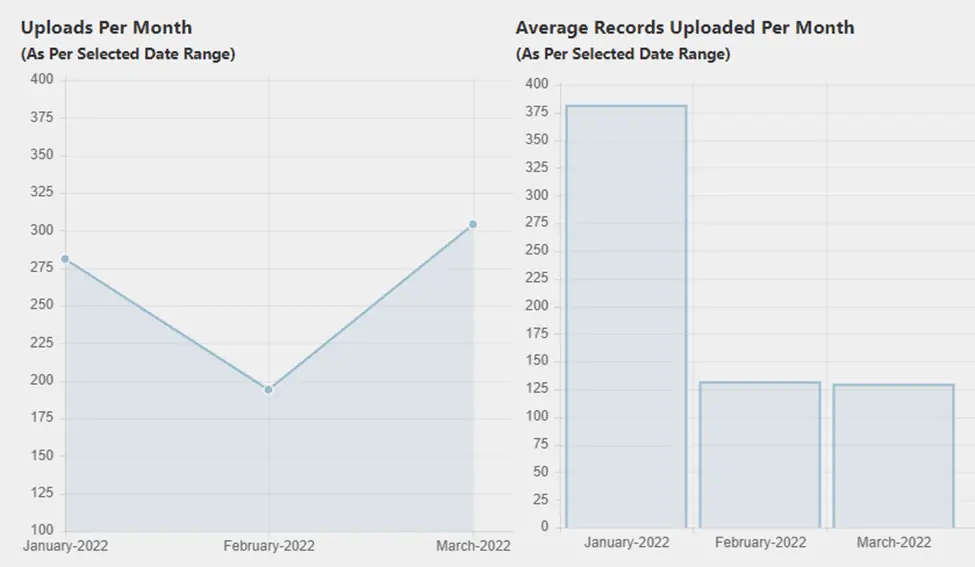
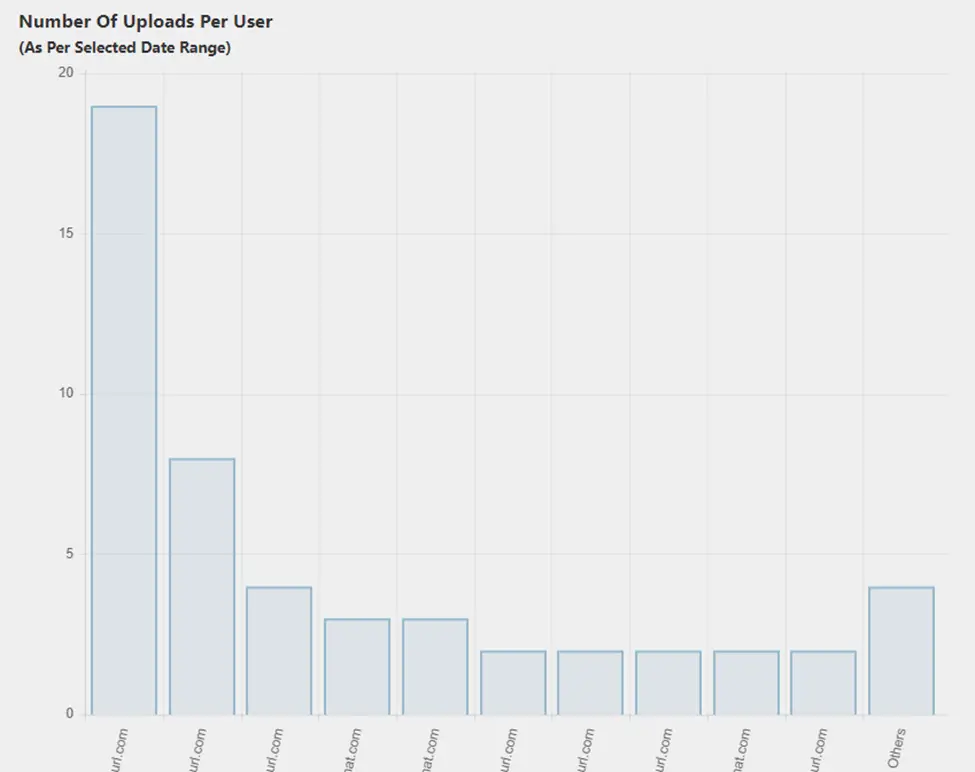
Eloqua Upload Wizard Dashboard: Tracking your Uploads for Quantity & Quality
You’ll want to ensure that all the data you upload to your marketing automation system meets your internal quality standards. The Upload Wizard dashboard allows managers to track this and more, including:
The number of records processed in a given time period
How many uploads each user has performed
The number of records rejected, bounced, or updated
The number of newly added records
Enforcing Privacy Laws in Uploads
Privacy-conscious companies can also configure the Eloqua Upload Wizard to enforce requirements based on the country and region of the records to be uploaded. For example, for records from the EU, the Upload Wizard can trigger additional validation to ensure the corresponding consent information is included in the upload. Any records that don’t meet these requirements would be marked as an error due to consent issues. This helps to protect your company from accidentally violating a relevant privacy law and potentially incurring a fine.
Save Yourself Some Time
With the Eloqua Upload Wizard, you and your team can enjoy a streamlined upload process, spending significantly less time on manual quality control. Interested in hearing more? Contact us today for more information on our suite of custom-built cloud apps.
April 2, 2026 | Page 1 of 1 | https://4thoughtmarketing.com/articles/tag/upload-wizard/