Two new Eloqua Cloud Apps recently joined the 4Thought Marketing family. Custom Object Regex and Custom Object Count. Let’s take a closer look at each of them.
CO Count Cloud App
Imagine your in a meeting with the product team discussing a new project. They want to email customers about an upcoming change to their accounts. And because they may have more than one account, they plan to include copy letting them know the change applies to “one or more of their accounts.” And then, near the end of the meeting, they ask:
“Instead of just mentioning one or more, could we include the actual number of accounts this applies to automatically?”
Yesterday, you responded that you could, but only if they provide the counts for each email so that you could upload the data into Eloqua. Sadly, they state it won’t be possible given their tight schedule.
But today, your answer could be, “not a problem,” if you have the CO Count Cloud App from 4Thought Marketing.
Here’s how it works.
Create a new or select an existing contact field to hold the count total
Create a new custom object program and drop the CO Count Cloud App on to the program canvas
Configure CO Count to find the correct CO records and then specify the contact field to store the total.
Run your program
It couldn’t be any simpler to merge the total count of matching custom object records in emails and on landing pages.
CO Regex Cloud App
Ever needed to apply additional formatting to a custom object (CO) field? Or split a value into multiple fields? Or how about validating that a field value is in the correct form?
The new CO Regex Cloud App from 4Thought Marketing can do all three.
Let’s take a look at three specific examples:
Field Validation
The app can validate if a particular field must be in a specific format: Select the “Validate” option in the “Regular Expression Type” and select one field, which will be updated the True or False when a record is processed.
For example: the following regular expression validates that a text has the format of an email address: /^([^@s]+)@((?:[-a-z0-9]+.)+[a-z]{2,})$/i
Split
The app can take the value from a field and split it into multiple fields using a Regular Expression.
For example: for a field that contains “10 cats, 20 dogs, 40 fish.” If you need to split based on the digits with the following expression D+: The result will be:
10 cats
20 dogs
40 fish
Transform
The app allows you to transform the value of a field and executes a Regex transformation.
For example: with the following regular expression: .*(snot).* if the field value is “My network does not work.” The result will be ” not”
Contact Us if you are interested in our Cloud Apps, or any of our other products and services.
About 4Thought Marketing
4Thought Marketing is a product innovator specializing in the Oracle Marketing Cloud. We help customers translate business objectives into strategies that produce results. Our services include Marketing Automation and Compliance Consulting, Marketing Technology Best Practices, Oracle Eloqua Cloud Apps and Add-ons, Integrations, Campaign Services, Staff Augmentation, Data Management, and Eloqua Implementations.
In our last article, we spoke about the impact of not having or an incomplete compliance monitoring solution. In today’s post, we’re going to talk about our next common mistake: too many marketing automation tools.
Too Many Marketing Automation Tools
In the past decade, there has been an explosion in the marketing software industry. Whether you are interested in optimizing online advertising, email performance, or website conversions, there are thousands of tools to consider. Since 2011, it’s grown so large that Chief Martech published the “2019 Marketing Technology Landscape Supergraphic” with over 7,000 products.
If you examine websites run by Fortune 500 brands using tools like BuiltWith and SimilarTech, they will show you just how many different platforms are used. For these companies, a typical marketing technology stack can include traffic measurement, website optimization, data append, behavioral analytics, and tools to track identity across multiple devices and platforms.
For a Fortune 500 company, running multiple marketing automation tools often makes sense because they have the expertise and resources to use them effectively. However, smaller companies should be wary of taking on too many tools if they do not have the knowledge or people to use them effectively.
Unused marketing automation software wastes money and may slow website performance. Above all, we encourage you to regularly assess your suite of marketing tools. At the very least, we recommend running some A/B tests to selectively disable certain web technologies to see their impact on your conversions.
Tip: Just as you can have too much of a good thing when it comes to marketing automation tools, you can also have too little. If you have gone over a year without testing a new tool, it is time to get back to the market. To guide you through this exploration, check out our past article: The seven “Must Have” partner apps for Oracle Eloqua.
Marketing automation systems and tools are powerful technologies that can help drive desired outcomes. However, don’t get distracted by shiny new tools or grow hesitant from past mistakes. Start with good segmentation and segmentation strategy. Third, take time to examine your data and avoid personalization mistakes. And fourth, make certain you are following your inbound marketing strategy. Fifth, don’t forget or have an incomplete compliance monitoring solution. And finally, make sure you don’t have too many marketing automation tools.
In our final article, we’ll discuss relying exclusively on your own internal resources.
GDPR has been in effect for almost a year. And now in 2020, the California Consumer Privacy Act (CCPA) is law. Also, increasingly customers are demanding more control over their customer experience. As a result, marketing automation programs and processes that ignore these either compliance or customer requirements will suffer.
If you have a significant presence in Europe, you will want to develop a proactive monitoring process. For instance, you will need to monitor data deletion requests when an EU resident asks to be deleted from your company’s records. Further, you also need to be able to explain how your Eloqua marketing automation processes individual data.
Relying on so-called black box processes where you cannot explain the results can potentially impact your company financially. Don’t get caught like those mentioned by Neil Hodge at Compliance Week in his article, “What can we learn from the biggest GDPR fines so far.”.
On the other hand, if you have minimal exposure to GDPR, you may choose to take a more gradual approach. Start with educating yourself further on GDPR compliance for marketers. Track your consent metrics and review your stored data regularly. Progress, no matter how small or gradual, will only help you here.
Marketing automation systems and tools are powerful technologies that can help drive desired outcomes. However, don’t get distracted by shiny new tools or grow hesitant from past mistakes. Start with good segmentation and segmentation strategy. Then take time to examine your data and avoid personalization mistakes. Be certain to understand and leverage your inbound marketing strategy. And finally, don’t forget or have an incomplete compliance monitoring solution.
In our last article on common marketing automation mistakes, we discussed the importance of personalization testing and a checklist to ensure consistent quality. In today’s post, we’re going to talk about our next common mistake: no inbound marketing strategy.
Inbound Marketing Strategy
What can your marketing automation platform deliver without leads? Nothing! Optimizing settings, improving your system integrations and the rest will fall short if you don’t capture leads. Unfortunately, there are some marketers out there who are so excited about marketing automation that they neglect to support it with an inbound marketing strategy.
In his article “21 Best Inbound Marketing Strategies,” Brian Downard describes it as the creation of content and incentives that reach your prospects by addressing their specific pain points and generating requests for more information.
Your Inbound Strategy might consist of:
Reviewing segments, like those discussed in our first post, Failed Segmentation, and determining which channel your prospects are most likely to respond through.
Attracting visitors through blogs, social, digital advertising, live events, and webinars.
Converting leads with specific offers and calls to action.
Closing opportunities through integration, automation, and analytics to refine processes.
Delighting customers and turning them into advocates.
Summary
Marketing automation systems and tools are powerful technologies that can help drive desired outcomes. However, don’t get distracted by shiny new tools or grow hesitant from past mistakes. Start with good segmentation, examine your data to avoid personalization mistakes, and then follow your inbound marketing strategy.
In our next article, we’ll discuss missing or incomplete compliance monitoring
In previous articles, we covered the importance of good segmentation and a solid segmentation strategy. In today’s post, we’re going to talk about our next common mistake, Weak Personalization Testing.
Have you ever received an email that began, “Dear FNAME?”
It is astonishing that such basic personalization mistakes still happen. In fact, we’ve seen examples in our own mailboxes as recently as November 2019. And as you use more custom fields in your email, then you run a higher chance of personalization mistakes. In addition, this mistake ruins your ability to make a good impression with a prospect. As a result, everything else you have worked on – the list, the copy, the offer, and the design – are much less effective.
Here are two general ways you can avoid this mistake.
First, become fanatical about cleansing and improving your marketing data. The first step lies in recognizing the value of obtaining high-value data through your inbound programs.
Second, create a campaign checklist and require staff to use it before pressing SEND.
If you need added motivation to invest in personalization data and programs, consider these findings reported by Social Media Today:
When an email is not personalized, 52% of customers say they’ll find somewhere else to go (Source: ActiveTrail Benchmark 2017)
Segmented, targeted and personalized emails generate 58% of all revenue (source: DMA)
Summary
Marketing automation systems and tools are powerful technologies that can help drive desired outcomes. However, don’t get distracted by shiny new tools or grow hesitant from past mistakes. Start with good segmentation. And then take time to examine your data and avoid personalization mistakes.
In our next article, we’ll discuss not having an inbound marketing strategy and its impact on your marketing campaigns.
Having a segmentation strategy has always been a marketing basic. Long before Eloqua, or even the internet, identifying your top, key audiences and what messages you should convey to them has been core to marketing. And of course, many still do this today, and even take it farther with “Buyer Persona’s” and additional levels of segmentation.
However, despite its long and common history, many today have become so enamored with technology, that they have forgotten to invest time in this basic requirement.
Can you, off the top of your head,
List your top 3-6 audience segments or Buyer Personas?
State the primary messages and goals for each?
Know exactly and easily how to pull them out of Eloqua?
Have a rough idea of the quantities in each?
If you haven’t covered this basic, but are working on other things more advanced; Stop. Get this right. Then resume your next fancy technical initiative.
Other Segments to Consider:
Industry. You can use standard definitions of industries like the North American Industry Classification System or create your categories (e.g., venture-backed enterprise software startup companies funded in the last 24 months).
Geography. The most popular options for geographic segmentation are country, state/province, city, and postal code.
Job Level. Choose prospects with Manager or VP in their titles (e.g., sales manager, sales VP).
Job Role. Choose prospects in Sales or Marketing (e.g. marketing VP, Sr Director of Sales).
Activity. Choose segments based on their engagement with your marketing (e.g., prospects who have attended a webinar).
Use An External Tool
If you are working with large marketing lists with more than 10,000 contacts, then manual segmentation may be challenging. To help marketers discover new marketing segments, we developed 4Segments. It allows you to visually review your segmentation options, so you can visualize your segments and how they interact with each other. In addition, 4Thought Marketing offers Job Title Beautification and Normalization apps for Eloqua that cleanup the job title field so you can easily segment by job level and job role.
Summary
Marketing automation systems and tools are powerful technologies that can help drive desired outcomes. However, don’t get distracted by shiny new tools or grow hesitant from past mistakes. As discussed here, start with good segmentation grounded in a well-crafted segmentation strategy.
Personalized Customer Communication with Eloqua Custom Objects
With Eloqua Custom Objects (CO), you can easily segment and send hyper-personalized, time-appropriate customer communication.
Consider, for a moment, a recent email, website experience, or web advertising that you clicked on. Do you recall why you found that content compelling enough to respond? Perhaps it was a seasonal offer, arriving within an appropriate time window. Or was it to a topic or product you own or are considering, and you felt the time was right to act? Or did you receive it after making a purchase?
Let’s contrast this to a time when you received a generic offer or email about something out of the blue for something you don’t own or have no interest in. Of course, this happens all the time. And clearly, the best outcomes occur when the offer matches your most recent area of interest.
When someone makes a purchase, it’s an excellent time to explore additional offers and upsell opportunities. Below is one possible campaign.
Automating Follow-Up Offers After Purchase
Consider how you would build a campaign using the detailed information stored in Eloqua CO records, including purchase history, areas of interest, and open leads. When a customer makes a purchase, but don’t own a maintenance contract, you could make a follow-up offer using information stored in CO records. Your campaign design could also support multiple products and feel timely and relevant through personalization.
To make the campaign work, you need data stored in the CO record moved to the contact record. Unfortunately, Eloqua does not make it easy to move data from custom objects to a contact record. One option is to build a separate integration that finds and updates the contact record with their last purchase. At 4Thought Marketing, we’ve created a better solution, the CO to Contact Updater Cloud App.
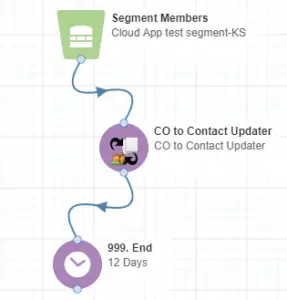
Here’s how it could work for the annual support contract upsell promotion campaign in Eloqua. First, a “feeder/segment” watches for new product purchases that don’t include support. Next, the CO to Contact Updater App finds the CO Record for that purchase, copies all the necessary data required for email personalization such as product name and purchase date into the contact record. The email merges these fields creating a personalized email offer, and the campaign sends it to the contact.
Sample Campaign Canvas and Configuration
Using the CO to Contact Updater App from 4Thought Marketing, it’s easy to create campaigns that automate personalized email offers, using the latest sales data stored Eloqua custom objects.
Available for both Campaign and Program Canvas
The CO to Contact Updater App works in the campaign canvas or a contact-based program canvas. A separate version that works in a CO-based program is also available.
What we’ve shown above is just one example of moving data between CO records and Contacts to enable personalization. While Oracle Eloqua is a powerful platform, it does not have solutions for every use case. 4Thought Marketing has a wide variety of cloud apps to make moving data much more flexible than you may have thought possible. You are only limited by your imagination using cloud apps to create new custom solutions to meet new requirements.
For example, we also have Custom Object Input Feeders, CO Form Submitters, and CO Deleter apps (and many others) that can help you take your Eloqua Custom Object development to a new level.
Contact usfor a price list of all our apps or for more information on these apps, or if you have a special need that you just can’t seem to solve via the built-in Eloqua functionally — a custom-built cloud app could deliver everything you’ve been wanting.
Despite the social media tsunami of recent years, email is still the mainstay for most digital marketing campaigns. Long may it last as an essential channel for customer engagement. But in the new age of Customer Experience Management (CXM), it struck me that it hasn’t evolved to keep pace with spiraling customer expectations and legislative compliance.
Why is that?
In my opinion, the answer is simple: Email communications remains stuck in the marketing domain. The philosophy of customer experience (CX) tells us to ignore our organizational silos – marketing, sales, and service – and focus on the customer’s journey with our brand. Consequently, our traditional internal walls are getting thinner as we take a more holistic view of our customers. Yet, historically, customer subscription preferences remain part of the marketing process, where the customer’s journey usually begins.
Does it matter?
The consequence of this is that subscription preferences are often skewed towards customer acquisition with sales conversion and customer service is left to build their own customer preference data. This fractured view of customer information causes an all-too-familiar, disjointed customer journey.
Like me, you’ve probably been amazed that – even with big brands – the left hand doesn’t know what the right hand is doing. We’ve all had a critical service issue with our telco or utility, but they still bombard us with email offers, oblivious to our ongoing problems.
What’s the answer?
Subscription Management needs to evolve. More specifically it needs to move to the center of your customer data platform so that your customer’s preferences are transparent to all outward-facing departments. In many organizations that I meet, this rebalancing is way overdue and would solve many aspects of dysfunctional customer journeys.
It’s better for customers too. Allowing access to their preferences in a single, centralized portal allows them to specify the frequency and type of communications they want. For example, with my utility provider, I prefer to receive urgent service announcements (like planned maintenance) by mobile text messages, but marketing offers through email; I don’t want to receive any messages about ‘dual fuel’ if I’m all-electric!, but I’m keen to hear about renewable energy. I’m sure you get my point!
The more your brand stretches its old email preference systems to meet the overall needs of the customer, the worse the situation becomes. Customer satisfaction plummets and system maintenance costs increase.
How do you make the leap?
At 4Thought Marketing, we’re increasingly seeing this issue as customer expectations skyrocket. We specialize in solving many of the issues at the leading edge of digital marketing and customer experience with Eloqua and the Oracle Marketing Cloud.
Data quality is crucial for every organization. It affects almost every part of your marketing activities, from email deliverability and lead conversion to revenue generation. And you cannot accurately target and personalize your campaigns without complete and accurate data. You can dramatically improve data quality by eliminating dirty data before it enters your system.
However, Eloqua marketers face many challenges using the built-in Eloqua list upload process:
Eloqua does not perform data validation for list uploads
If multiple marketers are importing data, the chance for poor data quality can increase
Multiple imports may be required for list uploads to fully update Eloqua
Let’s examine each of these issues in more detail.
No Validation of Incoming Data
Eloqua does not validate data as it’s imported into the system. This means several things:
Dirty data, which would optimally be kept completely out of the system, is potentially allowed in.
Compliancelaws likeGDPRare not applied. It may be illegal to import some contacts. And these contacts are best kept out of Eloqua.
Fixing dirty data is often easier while it’s still in a spreadsheet! And often mass changes are faster in Excel.
After uploading dirty data, your integrations can quickly spread the bad data to other systems, or trigger unwanted data errors.
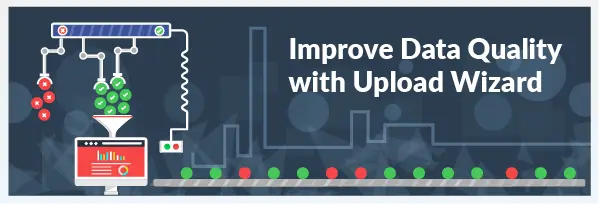
The Upload Wizard Cloud app from 4Thought Marketing solves all of these data import issues. Any bad or non-compliant data can be stopped right at the point of entry, without slowing down importing of your good data. And only contact records with bad data are “rejected” and provided to the marketer for further review. As a result, they only need to check the data that needs correcting.
Multiple marketers importing without validation can result in very dirty data
For many organizations, multiple marketers perform data imports. And often they are in different offices, geographic areas, and even time zones. As a result, it’s even more important to systematically remove dirty data as part of the upload process. The benefits include:
Uniform application of validation rules by all team members regardless of location
Protects from importing non-compliant data regardless of who performs the import
It reduces management/oversight headaches. “You didn’t clean your list again, Joe!”
Remove the need for multiple uploads
With Eloqua, you may need to upload a file more than once. For example: First to add the contacts to your system. Second, associating those contacts to a marketing campaign. And third, associating them to a custom object. Having to upload the same list multiple times is tedious and inefficient.
However, with the 4Thought Marketing Upload Wizard, all of those are minimized to a single, clean contact upload. In that single upload, you can:
Add contacts to multiple new or existing shared lists
Associate contacts to external marketing campaigns/activities such as trade shows or conferences
Link contacts or upload part of the data to custom objects
…all, while simultaneously validating data quality!
Conclusion
The Upload Wizard Cloud App from 4Thought Marketing helps Eloqua marketers improve data quality by eliminating bad data at the source. It removes bad data automatically for every employee using the tool regardless of location. Specific versions for GDPRor other compliance regulations are also available. All of the Upload Wizard Cloud Apps automatically protect and apply appropriate rules and notifications. And it reduces the time it takes for you and your colleagues to improve data quality at the source.
Another added advantage is that data can be imported by non-Eloqua users, thereby potentially empowering folks in sales or other marketing departments to import data, without risking the overall quality of your data.
Contact usfor more information about the Upload Wizard. We offer a wide range of Eloqua Cloud App add-ons to improve and extend your Eloqua capabilities.
Key Steps for Improving Eloqua Segmentation
The first page in your marketing operations playbook probably stresses the three R’s: Get the right message to the right people at the right time. And it goes without saying that sending an email that isn’t timely or relevant won’t generate the desired results.
For your campaign to work, you need accurate segmentation data in order to pull the correct list of contacts for your campaign. Ask yourself, do you have the correct information and is it standardized for accurate segmentation?
How good is your Geographic information including Country, City, Zip/Postal Code? If your products or services vary by region, getting this wrong might confuse your customers and cause awkward questions for your sales team.
Can you target the correct people within an organization? If you’re just using Job Title, this may not be accurate enough. Marketers who divide and standard Titles into Job Level and Job Role are at the top of their game.
What about Industry classifications, area of Interest, and organization Size? If your game is this strong, you’re ready for the big leagues.
As a marketer, you must have accurate data. For example, it does you no good if you try to pull a list of prospects who reside in the United States, are Directors or Vice Presidents or higher and work in the Healthcare industry if your data is incomplete, inaccurate and not standardized.
Oracle Eloqua offers many ways to standardize data as it enters your system. It’s always best to normalize the data as it comes into your system, whether on forms, list uploads or from other systems. However, we all know that data inputs are not always well controlled, and so inaccurate or non-standard data can creep in. Using the Eloqua Contact Washing Machine App will go a long way to solving that problem. But using it alone may not be enough. Sometimes what you need is fresh talent, some new players for the team.
At 4Thought Marketing, we offer Data Normalization Apps for Oracle Eloqua that add new capabilities to your data management process.
We offer two Data Normalization apps that easily standardize your State and Country fields into your standard list of values (either 2, 3 characters or full name). Another pair of apps will parse your Job Title field (normally a free text field) into the standard list of 8-10 values for Job Level and Job Function.
If you’re struggling to win the results you desire using your current playbook, consider adding some new talent and technologies to up your game.
Contact usfor a price list of all our apps or for more information on these apps, or if you have a special need that you just can’t seem to solve via the built-in Eloqua functionally — a custom app could deliver everything you’ve been wanting.
Improve Your Eloqua Data
Just how do you improve your Eloqua data? It’s something every Marketing Automation professional deals with all the time. Because data comes from a wide variety of sources including Form Submissions, Lists, and other systems, sometimes, the data is not in the format you want or need.
For example, you might have two fields that you want to combine into one field for segmentation purposes or for field merge onto an email or Landing Page.
You might have values in a field from one source and needs to be modified before storing them in another field. Or The requirement might be to shorten the length of a text field; or remove certain character strings; or format your phone field to a specific format.
While some of these are possible within built-in tools in Oracle Eloqua, they are not always as flexible to meet your requirements, or easy to use.
To help our customers, we created a number of Eloqua Cloud Apps that can help. Don’t struggle with your formatting and manipulating your data – find an app to do it for you, and remove that problem.
You’ve got bigger problems to solve than formatting data. Improve your Eloqua data using cloud apps from 4Thought Marketing.
Contact usfor more information on our cloud apps, or if you have a special need that you just can’t seem to solve via the built-in Eloqua functionally — a custom app could deliver everything you’ve been wanting.
You
want to optimize your marketing campaigns and get results faster. Do you need
to hire a new agency to accomplish those gains? Not necessarily. You might
achieve your objectives with better marketing automation.
Why You Need Marketing Automation Experiments
According to G2 Crowd, a business software reviews website, there are hundreds of marketing automation software tools on the market. The entire marketing technology
If
you include the options made possible by tools like Zapier,
which allows you to connect virtually any part of any application to any other
application, the possibilities expand exponentially.
How
can you make smart choices on which automation tools are right for your market?
Reading reviews and lists of product features helps. Yet that doesn’t tell you
much on how that tool will behave in your environment.
To
help you evaluate marketing tools quickly, we recommend carrying out five day
experiments. Each quarter, experiment with a new marketing automation app, tool
or process. If you find something that works well, continue implementation. If
it doesn’t, you have only invested a few days in testing it .
For
marketing leaders and managers, there is another reason to pursue marketing
experiments. It is an excellent way to grow your team with a challenge. It is
also an opportunity for your team to own a project and lead it. Just think
about your junior marketing staff. They may have joined the organization and
spent most of their time working on marketing campaigns and projects that
others have created. With this process, everyone on the project team will have
the chance to work on a new project.
Are
Five Days Enough For An Experiment?
A
single work week is enough time to launch a small project and test the results.
For the best results, prepare in advance. Complete other projects ahead of
time. Let your key stakeholders in sales, operations and other areas know that
you will return to their requests after your experimentation week is over. With
that preparation work done, get started with the steps below.
What
if you find that an interesting marketing automation tool simply cannot be
implemented in a week? There are two ways to address that reality. First, you
could set aside those tools and focus on smaller scale Software As A Service
tools instead. Look for companies that have a pricing page on their website
rather than custom pricing developed by a sales representative. Second, if you
want to pursue a larger scale solution, adapt this framework to develop an
in-depth demo with the vendor.
Schedule Tip: Determine steps 1-2 on the first day of the week. That will give you three days to run the experiment itself.
Step
1) Choose a marketing objective
You
need to know what you are aiming at in your experiment.
Do you want to move the needle on a
tactical measure like increasing email marketing open rates?
Alternatively, you might focus on
using marketing automation to further a different goal such as developing your
marketing automation program.
Do you want to save time on
marketing tasks like cleaning or segmenting lists?
Tip:
Do not let your enthusiasm for a shiny new tool dictate your objective!
Step
2) Choose the risk level for your marketing automation experiment.
You
have a few options available to consider depending on your risk appetite.
Launch An Experiment With Your Current Platform.
If you have a powerful platform in place like Oracle Eloqua, consider testing one of its capabilities. We have found that few clients have fully exploited all of their existing platform’s features. For example, you may want to explore the Oracle Sales Cloud Integration app enhancements available in Eloqua. This is the lowest risk type of marketing automation experiment because you are not adding any new software.
Extend Your Platform With An Add-On or App.
Did you know that you can use third-party apps to extend Eloqua’s
capabilities? To find out more, check out our related article: 7 must-have apps
for Oracle Eloqua. This is a medium risk marketing automation experiment where
you combine something known and something unknown.
Experiment With A Brand New App.
With
this approach, the sky’s the limit. Since there are more than 100 marketing
automation tools on the market, you may feel overwhelmed with the available
options. Refer back to your objective from step one to guide your choice.
Since you are moving into new territory, this is the highest risk
marketing automation experiment. Don’t worry – you are limiting your risk
exposure by keeping this to the one-week timeframe.
3) Launch the test
Now
that you have chosen your objective and risk level, it is time to launch the
test!
If
you are in a risk averse organization, start by running a simulation with with
dummy data to identify technical problems. However, do not let that be your
entire test.
As a rule of thumb, we recommend running your
marketing automation test with 1,000 prospects. That will give your experiment
some measure of statistical validity.
4)
Adjust the test mid-flight
As
results from your campaign come in, make adjustments as needed. This step is
critical if you see no results at all. For example, if your email open rate
drops to zero or you see zero ad impressions.
Look
for these warning signs and adjust accordingly.
Corrupt data. Before you start your marketing
automation test, create a copy of your database to experiment on. Before writing off the app, check to
see if a configuration or programming error contributed to the problem.
Non-delivery of email or advertising. Compare
delivery rates
to your standard operating model. Check if
integrations between apps are working correctly.
Technical errors. Expect these errors to happen
when you test something new. Fix as much as you can and continue with the
experiment.
Customer complaints. Use your judgment to assess
this point. Are the complaints about accessibility (e.g. a customer cannot open a web
page) or something else? If the complaints are about the copy or
offer, that doesn’t tell you anything about whether the automation experiment
was a success.
Stakeholder complaints. If other departments
complain that marketing is non-responsive to their needs during the experiment,
that’s a warning sign. You can reduce the chances of this situation by engaging
your stakeholders prior to starting the experiment.
5)
Assess the test results
At
the end of the five-day experiment, review your results. To make the most of
your review process, use the following tips.
Seek An Outside Perspective.
Invite someone from outside the experiment group to look at the results. They
will help you overcome blind spots in examining the test results.
Develop Lessons Learned. What
would you do again? What would you avoid? Integrate these lessons in your
marketing operations.
Consider Further Investment. If
your marketing experiment involved a new application or outside resource, you
have an investment decision to make. Is there
merit in scaling up the test? If so, what budget and resources would be
involved? For instance, can you double the scale of your marketing experiment
(e.g. 1,000 prospects to 2,000 prospects) to see if the experiment holds up at
scale. .
What
Should You Do If The Test Doesn’t Accomplish Results?
Don’t
feel bad if this happens! Few marketing automation experiments deliver
perfectly against expectations. While tests help you to grow, recognize their
limits. If you want to save 5% of work time or increase conversions by 1-3%,
marketing automation experiments may provide what you need.
If
you are seeking a more transformational change, you may need an outside
perspective on your business. Contact us to schedule a discussion.
April 9, 2026 | Page 1 of 1 | https://4thoughtmarketing.com/marketing-automation/page/18/