
deleting eloqua contacts when why how

Why Delete Eloqua Contacts?

It’s a good idea to clean up your Eloqua contact database every so often. Over time, many contact records are created, and not all contacts are created equally. Oracle charges per contact, so deleting Eloqua contacts that you never use from your list is a good financial strategy.

There are several additional reasons to delete contacts, including:

  • The law! Privacy regulations like the GDPR require companies to obtain consent before processing (read “storing”) data. If you don’t have consent in one form or another, you might be required by law to delete contact information.
  • Hard bouncebacks waste space: Once a contact has been flagged as a hard bounceback, it only takes up space in your records. You’re much better off simply deleting it.
  • Reduce Cost: A leaner contact list means reduced subscription costs.
  • Deliverability score: Reaching out to long-inactive contacts increases your changes to get flagged as spam, resulting in a lower deliverability score and in ALL of your emails being less likely to reach their destination!
  • Faster processing, better metrics: Removing inactive contacts will speed up processing times, improve your metrics (since you won’t be sending emails to uninterested contacts), and provide you and your management team with a better view of your pipeline.
  • Remove SPAM and test records: Use segments to identify spam domains and test records and remove them automatically.

Deleting Eloqua Contacts

You can either delete your contacts manually, or implement an automated process. The manual approach requires continuous effort and monitoring, and of course, there will always be the chance of human error. Topliners has a detailed outline of the steps required for a manual approach.

On the other hand, automation presents a far simpler process. 4Thought Marketing created the Contact Deleter with Archive cloud app which removes unwanted contacts automatically in the background. Simply set it up, let it run, and watch your database clean itself up. This app gives you the upper hand to delete any part of your contact list based on criteria that you define. You can have different instances of the app running to deal with different groups of Contacts you wish to delete. Best of all, this app not only deletes the Contacts, but it also creates an archival backup on your SFTP server. Just remember to check your archived record periodically to make sure you don’t accidentally delete contacts you want to keep.

What About Related Custom Objects?

If you have custom objects related to contacts you’re deleting, these custom objects likely need to be deleted as well. Fortunately, 4Thought Marketing’s suite of Eloqua apps includes these solutions:

Why Archive Your Deleted Contacts?

If you ever require the deleted data for unforeseen situations, it’s always good to have an automatic backup system. This archive also ensures you can prevent legitimate contacts from being accidentally lost forever.

Clean Up Your Eloqua Contact List

It’s easy and cost-effective to get started with the 4Thought Marketing Contact Deleter app. After a simple installation process, this powerful tool can quietly run in the background to keep Eloqua clean.

Our Cloud Apps are available individually or in groups, and are simple to implement directly from within Oracle Eloqua. Find out more or get a demo and see for yourself.


Happy Groundhog Day!


Do you ever feel in marketing, like you’re rerunning the same campaigns, the same landing pages, sending the same emails and most importantly getting the same results every day?


Bill Murray, has exactly the same problem in the movie “Groundhog Day”.  He ends up mindlessly repeating the same day OVER and OVER again until it seems he might go crazy.  We all have days like that, right?


Halfway through the movie, Bill Murray figures out what he has to do to get out of his boring cycle…

It’s the same thing Marketers aim to do: build a real relationship.

It seems so simple, and so obvious.  Most marketers know this already.


But just like us, despite knowing that building a relationship is the key to success, Bill’s problem doesn’t easily go away.

He tried to date Andie Macdowell lots of ways.  Most of them fail… humorously and spectacularly, while we, the audience, laugh and enjoy his attempts, because it is clear; Poor Bill didn’t know HOW to build a real relationship.

Do you?

Many boring days go by as Bill tries everything to build a relationship.  He tries all the obvious stuff.  Flowers.  Chocolates.  Poetry.  All with minimal success.


 Finally he has his first breakthrough

  1. The Secret is Personalization

Bill tries to romance Andie over and over, and fails until he starts to personalize the experienceHe starts to care about what SHE is interested in and what SHE wants.  He begins learning about Andie (his prospect) and tailors what he’s doing to what fascinates her.


And suddenly something magical happens…. HIS DAY STARTS TO GET MORE INTERESTING!

Why?  Because he is getting better results.  Andie is responding!

Wouldn’t your day go better if you were continually getting better results?


Bill then progresses even farther when he realizes…

2.  He’ll have to try lots of things

Listening is half the battle.  But then you have to test lots of things to match up what you’re hearing with what really works.   Bill tries ALL sorts of things that SEEM like they’ll work at first, but don’t.

But that’s ok, because learning what his prospect DIDN’T want is also important!

You too will need to try lots of relevant personalized things… and they won’t all work.

But some will.  Track those.  Use those and then…


The final step is:

3.  You need to Practice it. Tune it.  Perfect it.

In the final stage, Bill figures out what he needs to do.  But it’s just not smooth enough.  He says a wrong word here, makes a misstep there.  There are rough edges that he has to figure out.


This is just like a nurture campaign.  Even after you’ve figured out the main personalized elements that will resonate with your Buyer Persona, you still need to adjust the exact wording.   Swap out the subject line a few times, and change the size of the picture, for example.


Finally Bill graduates!  All his work of figuring out that:

  1. Building a relationship is the key
  2. Personalization is the essence to building a relationship
  3. Testing many things to really connect the personalization
  4. Tune and perfect the personalization

These all pay off and Bill’s day ends, he and Andie continue on with wonderful lives.

How will your day end?


In a recent blog post, we discussed the amazing power behind Oracle Eloqua Custom Objects (COs – also known from their legacy name initials as CDOs).  As an Oracle Partner, we often are asked what can be done with the data in COs. Unfortunately, the answer is very little when you look at out-of-the-box functionality within Oracle Eloqua.

With the new Program Canvas, you have the ability to add CO records to a program and perform a limited number of decisions or actions on the data.  You can compare the value in a single field to create a decision tree; you can perform some basic update rules; and you can now delete a CO record.  But we have found that Oracle Eloqua users are very creative, and want to use COs in a wider range of functions.

Some examples we have come across lately include:

  • Perform arithmetic calculations on fields within a record, or across records
  • Compare the value of two different fields within a record, or again, across records
  • Update fields on linked Contact records from data in a CO record
  • Update fields in a CO record from linked Contact records
  • Lookup data in a CO and match it to the Contact record data to determine the correct sales rep
  • Append values from different fields within a record, or, of course, across records
  • Perform a wide variety of date filters and manipulations, such as:

    • Find all records with a renewal before a certain date
    • Find all records created in the past NN weeks
    • Add 2 weeks to a date field
    • And many more

The amount of data manipulation that is requested on CO data is endless.  As stated at the beginning of this blog post, Oracle Eloqua just does not have the functionality built into the system to meet these needs.

That’s where Cloud Actions, Decisions, Apps, and Connectors come into play. Using the development platforms and API capabilities provided by the Oracle Eloqua system, sharp developers can create apps that perform these and many more functions.

At 4Thought Marketing, we have built dozens of custom and product-worthy Cloud Apps to meet these needs.  If you have tried everything that Oracle Eloqua has provided and still cannot meet your business goals, it’s probably worth a call to see what we can do for you.  We haven’t yet found a CO problem that we can’t solve.

We’d love to hear your ideas and help you realize them. Reach us at 888-ELOQUA4 (888-356-7824) or click on Contact Us.


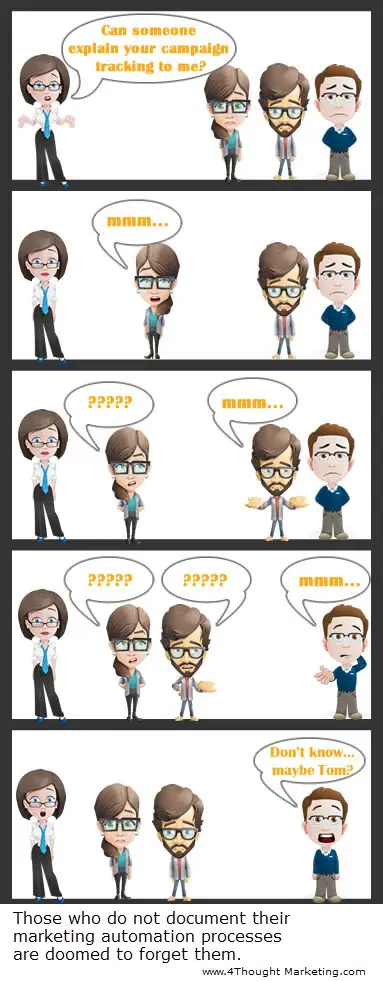
Cartoon Blog PostWe’ve been helping more of our customers with Marketing Automation Process Definition lately.  It seems obvious… well done, marketing automation gets quite complicated.  When you add in Executive Change, Software Upgrades, Personnel Turnover, and just plain old communication, keeping on top of the new world of Eloqua and CRM and maybe a couple of other systems without processes becomes almost impossible.

But still many marketers are unused to this level of complexity and have yet to realize that creating processes that successfully bridge the sales-marketing gap, communicate well to both executives and agencies doesn’t come easily.

If you’re still at the very early stages of Marketing Automation, perhaps you and everyone in your department can still keep it all in your head.  But at some point you’ll want to convey what’s happening to executives, new team members, or agencies, and when you do, well defined processes are the answer.

This cartoon makes the point well.


4Thought Marketing Logo   April 9, 2026 | Page 1 of 1 | https://4thoughtmarketing.com/marketing-automation/page/19/