March 27, 2025

Improve Quality and Boost Productivity with AI

You will learn:

  • Optimized Alt-Text: The Key to Better Email & Search Previews
  • How to streamline Eloqua campaign reporting with AI

Custom GPTs mentioned during this Office Hours:

Alt Text Checker Prompt

You are an accessibility and SEO expert specializing in HTML content. Your task is to analyze the provided alt text attributes in the images for accessibility and SEO compliance. Follow these best practices:

Choose alt text language as per the content language used in a document, PDF, or the HTML content language
Descriptive Language & Context Relevance:
Use concise, accurate language that clearly describes the image’s content and purpose, including any links present.

Standards & Compliance:
Ensure alt text adheres to ADA compliance and WCAG 2.0 guidelines. The alt text should be informative for visually impaired users using concise.

With Apple Intelligence introducing AI Summaries and Gmail’s Automatic Extraction, your alt text prompt should be adjusted to:

Optimize for machine readability (AI Summaries & SEO)
Ensure clarity in all-image emails
Enhance AI-generated preview text accuracy

Character Count Limit:
Keep alt text within 90 characters.

Decorative Images:
If an image is decorative, confirm the alt attribute is either empty or managed appropriately.


Output Requirements:
Alt Text Improvement Table:
Columns: Section/Element, Original Alt Text, Analysis, Suggested Alt Text
Provide an analysis of the current alt text along with a suggested improvement.
Heatmap Table:
Columns: Section/Element, Alt Text, Analysis
Use heatmap indicators (🟢, 🟡, 🔴) with a short explanation.
Glossary:
Include definitions and examples for terms used in the analysis.
1. Alt Text Improvement Table
Section	Element	Original Alt Text	Analysis	Suggested Alt text
Header 	Banner 	Banner Image	Too vague; lacks details about the image’s purpose and associated link	Promotional banner featuring seasonal discounts with a “Shop Now” link.
 See the example below for the format

Note: For decorative images, an empty alt attribute is recommended.
2. Heatmap Table in a formatted way as alt text improvement
See the example below for the format
Section	Element	Alt Text	Analysis
Header 	Banner 	Banner Image	🔴 Vague alt text; lacks sufficient detail.

Main Section	Image	Main Section	🟡 Lacks context; could better describe content and link.
3. Glossary
Term	Definition/Example
Alt Text: Text alternative for images to convey content for users who can’t see them. Example: "Promotional banner featuring seasonal discounts with a 'Shop Now' link."
Banner Image	A prominent image used on webpages (often at the top) that typically includes key messaging or links.
ADA Compliance: Adhering to the Americans with Disabilities Act guidelines to ensure digital content is accessible to all users, including those with disabilities.
WCAG 2.0: Web Content Accessibility Guidelines version 2.0; a set of recommendations for making web content accessible.
Descriptive Language: Use of detailed, specific language to clearly describe an image’s content. Example: "Welcome banner displaying company mission with a link to the About page."
Context Relevance: Ensuring that the alt text reflects the image’s purpose and any associated functionality (like clickable links).
Decorative Image: An image used solely for visual enhancement with no essential informational value; such images should have an empty alt attribute to avoid distraction.

Campaign Analysis Prompt

R - Role
You are an advanced AI specializing in data cleansing, campaign data analysis, and visualization.
Your task is to extract, cleanse, and aggregate campaign data for a specified month, ensuring numerical accuracy and presenting key insights using charts.
if the user asks, provide details about other metrics 
________________________________________
I - Input
You will be provided with an Excel, Spreadsheet, or CSV file.
The file includes fields such as:
•	Date (Campaign execution date)
•	Campaign Name (Unique identifier for each campaign)
•	Total Sends (Summed across campaigns)
•	Total Delivered (Summed across campaigns)
•	Engagement Metrics: 
o	Unique Open Rate
o	Unique Clickthrough Rate
o	Unsubscribe Rate
o	Hard Bounce Rate
•	The user will specify a target month (e.g., January 2025).
________________________________________
S - Steps
1. Load:
•	Ensure the file uploaded has the required fields.
•	Handle missing or inconsistent values: 
	Check for nulls, blanks, or incorrect data types.
	Standardize date formats for accurate filtering.
•	Convert relevant columns to appropriate data types (e.g., Date as datetime, numerical fields as float).
2. Filter Data for the Specified Month:
•	Extract only campaigns executed within the given month.
•	Ensure the date range is accurate and inclusive of all days in the month.
3. Aggregate Data Correctly:
•	Count: 
•	Number of campaigns executed in the selected month.
•	Sum: 
•	Total Sends
•	Total Delivered
•	Calculate Averages for Engagement Metrics (expressed as percentages): 
•	Unique Open Rate
•	Unique Clickthrough Rate
•	Unsubscribe Rate
•	Hard Bounce Rate
4. Generate a Structured Cleaned Dataset:
•	Ensure the output file is structured with only relevant, processed data.
•	Format all engagement metrics as percentages with two decimal places for consistency.
5. Create Data Visualizations:
•	Bar Chart: Number of campaigns per day or week within the month.
•	Line Chart: Trend of engagement metrics over the month.
•	Pie Chart: Breakdown of delivery outcomes (e.g., Delivered vs. Bounced).
6. Provide a Downloadable Output:
•	Save the cleaned dataset in CSV or Excel format.
•	Include visual reports as PNGs or embedded within the Excel file.
7. Summarize Findings:
•	Total records before and after filtering.
•	Confirmation of data aggregation accuracy.
•	Summary of key insights from visualizations.
________________________________________
E - Expected Output
•	✅ Filtered Dataset: Containing only campaigns for the specified month.
•	✅ Aggregated Summary: 
•	Total Sends (Summed)
•	Total Delivered (Summed)
•	Unique Open Rate (Averaged, %)upto 2 decimals
•	Clickthrough Rate (Averaged, %)upto 2 decimals
•	Unsubscribe Rate (Averaged, %)upto 2 decimals
•	Hard Bounce Rate (Averaged, %)upto 2 decimals
•	✅ Visual Reports: 
•	Bar, Line, and Pie charts showcasing key metrics.
•	✅ Downloadable File: 
•	Cleaned dataset in CSV or Excel format with all percentages formatted correctly.
________________________________________
N - Nuances
Edge Cases to Consider:
•	Incomplete or Missing Data: 
•	Does not consider campaign name contains "Zoom"
•	Handle null values in key columns (e.g., Total Sends, Total Delivered).
•	Incorrect Date Formats: 
•	Ensure consistent date format (e.g., MM-DD- YYYY) to avoid filtering errors.
•	Ignore campaigns containing onboarding 
•	Zero or Negative Values: 
•	Address cases where Total Sends or Total Delivered are zero or negative, which could lead to division by zero errors in percentage calculations.
•	Optimization Tips:
•	Use efficient filtering and aggregation methods for faster processing, especially for large datasets.
•	Leverage vectorized operations for calculations (e.g., using NumPy or Pandas in Python).
•	Standardize percentage calculations for calculating average for campaign metrices to two decimal places for consistency.
Enhancements:
•	Year-over-Year Comparison: 
o	Include comparison for the same month in previous years to identify trends.
•	Interactive Dashboards: 
o	Provide dynamic visualizations for deeper data exploration and insights.
•	Scheduled Automation: 
o	Automate the data processing and report generation on a scheduled basis.
Scalability Considerations:
•	Ensure the solution is capable of processing large datasets efficiently.
•	Implement error handling for: 
o	File upload issues (e.g., incorrect file type).
o	Data processing steps (e.g., type conversion errors).
•	Design the framework to be easily adaptable for future data fields or engagement metrics.
Please Avoid providing engagement metrices in decimals; show average percentage of each from the beginning


Hey marketers! Ever feel like your Marketo database is more of a tangled web than a well-oiled machine? You’re not alone. We’ve all been there. A messy database can seriously drain your marketing budget and leave you scratching your head wondering why your ROI isn’t where it should be. At 4thought marketing, we know how crucial a clean database is for data-driven success. So, let’s dive into some practical steps to whip your Marketo data into shape, starting with a comprehensive Marketo database audit.

The Marketo Database Audit

Think of this as your database’s annual health check – your Marketo database audit. We’re going to get down to the nitty-gritty and see what’s really going on.

Workspace and Partition Deep Dive

Ever find yourself wondering why your data feels scattered and disorganized? The culprit might just be your workspace and partition setup within Marketo. To tackle this, as part of your Marketo database audit, we strongly advise documenting how your workspaces, person partitions, and business units align. Misaligned partitions can quickly turn into a recipe for confusion and data nightmares, leading to headaches for your entire team. Ultimately, the goal is straightforward: ensure everyone clearly understands data ownership and access rights. Simple, right?

Smart List Sleuthing

Think of your system smart lists as your database’s health monitor, providing a crucial snapshot of its overall condition during your Marketo database audit. To keep things running smoothly, you should actively track several key metrics.

  • Empty Critical Fields: Are you missing essential demographic data during your Marketo database audit? If so, it’s time to fill those gaps.
  • Invalid Email Addresses: Identify and eliminate invalid email addresses, like those ending in “@example.com,” to ensure your communications reach real people. Aim to keep this number below 1% of your total database, a key metric in your Marketo database audit.
  • Lead Performance: Regularly monitor lead performance to understand your database’s growth trends, an important stage in a Marketo database audit.
  • Inactive Leads: Keep a close eye on inactive leads as well, as they may be prime candidates for reactivation campaigns. Pay special attention to leads that have been inactive for 30, 60, or 90 days, as a part of a thorough Marketo database audit.
  • API Calls: Stay vigilant about API calls to detect any unauthorized integrations that might be compromising your data’s integrity, an important security measure when performing a Marketo database audit. API call activity should be minimal unless your team is conducting intentional integrations.

Ongoing Routine After Marketo Database Audit

The Marketo database audit provides a starting point, but database cleanliness demands continuous attention. This isn’t a one-time fix; it’s an ongoing process. A healthy database hinges on consistent monitoring of specific metrics, ensuring that the data fueling your marketing efforts remains accurate and relevant. Aim for an active lead percentage exceeding 70%; this indicates a vibrant and engaged audience. If you notice it dipping below that necessitates immediate reactivation efforts, such as targeted email campaigns or personalized content, to re-engage those leads and bring them back into the fold.

Invalid emails should remain under 1%, a testament to the quality of your data acquisition and hygiene practices. Prompt removal of any faulty records, like those with typos or outdated domains, is crucial to maintain deliverability and prevent wasted resources. API calls, the connections between your database and other systems, should be infrequent, except during active integration work. Unexplained API activity could signal unauthorized access or integration errors; any unexpected activity warrants a thorough investigation to safeguard your data and maintain system integrity.

This vigilant approach ensures your database remains a reliable and powerful asset for your marketing initiatives.

Why Does This Matter?

A meticulously maintained database, resulting from a successful Marketo database audit, translates directly into tangible benefits for your marketing efforts. Imagine a scenario where every marketing dollar is spent effectively, reaching genuine prospects. This is precisely what a clean database delivers:

  • Enhanced ROI: Eliminating bad data means no more wasted budgets on irrelevant or non-existent contacts. Every communication, every campaign, hits its mark, maximizing your return on investment.
  • Precision Targeting: With accurate and up-to-date data, you can craft highly targeted campaigns, ensuring your message resonates with the right people at the right time. This level of precision leads to higher engagement and conversion rates.
  • Reliable Insights: Clean data provides a clear and accurate picture of your marketing performance. You can confidently analyze campaign results, track key metrics, and make informed decisions based on reliable data. This accurate reporting empowers you to refine your strategies and optimize your marketing efforts for continuous improvement.

Value of a Consistent Marketo Database Audit

In conclusion, regular Marketo database audits and consistent monitoring of key metrics within Marketo are vital for maintaining a healthy marketing database. Focusing on smart lists, workspaces, and data hygiene can maximize ROI and drive effective marketing campaigns.

The 4thought Takeaway

Don’t let a messy database hold you back. Regularly conducting a Marketo database audit and implementing good data hygiene practices can turn your Marketo database into a powerful asset. Got questions? Need help cleaning up your Marketo data or conducting a Marketo database audit? We’re here to help! Reach out to the 4thought marketing team, and let’s get your database working.


oracle redwood UI for eloqua users

Imagine your enterprise software but intuitive and user-friendly. That’s the goal with Oracle Redwood. It’s not just a visual update; it’s a fundamental shift in how we interact with Oracle’s cloud applications. It is their next-gen design system, built on simplicity and personalization. The goal is to make accessing insights faster and easier, bringing a consumer-grade experience to business.

Why Oracle Redwood Matters: A Leap Forward in UX

Oracle Redwood is more than just a new interface. It’s a strategic investment in user productivity and satisfaction. Imagine a world where complex enterprise applications are as intuitive and engaging as your favorite consumer apps. That’s the promise of Redwood.

A large logistics company, struggling with onboarding new dispatchers, found their existing Oracle system overwhelming. The multitude of screens and complex navigation led to lengthy training periods and frequent errors. After implementing Redwood, the streamlined interface and intelligent search drastically reduced onboarding time and improved accuracy. This is not an outlier. This is the power of Redwood.

Key Benefits of Oracle Redwood:

  • Enhanced Productivity: Redwood’s clean, minimalist design reduces cognitive overload, enabling users to focus on what matters most. Streamlined workflows and intelligent search capabilities accelerate task completion.
  • Improved User Adoption: A user-friendly interface translates to faster onboarding and reduced training costs. Redwood’s intuitive design minimizes the learning curve, empowering users to leverage the full potential of Oracle applications.
  • Data-Driven Insights: Redwood’s advanced data visualization tools transform raw data into actionable insights. Users can quickly identify trends, patterns, and anomalies, leading to better decision-making.
  • Personalized Experience: Redwood’s machine learning capabilities provide personalized recommendations for tasks and workflows, reducing the time it takes for users to find the information they need. Machine learning algorithms personalize the user experience, adapting to individual preferences and workflows. This tailored approach enhances user engagement and satisfaction.
  • Future-Proofing Your Business: Staying ahead of the curve is crucial in today’s dynamic business environment. Redwood represents the future of Oracle UX, ensuring your organization remains competitive and adaptable.
  • Accessibility: Oracle has put a large focus on making the software more accessible to all users. This helps companies comply with regulations, and also helps increase the amount of talent that can effectively use the software.

Oracle Redwood: ROI & Strategy

For business leaders, the transition to Redwood isn’t just about aesthetics; it’s about strategic advantage and measurable ROI.

Oracle Redwood delivers tangible ROI for business leaders. Streamlined workflows and an intuitive UI drive increased employee efficiency, reducing operational overhead. Robust data visualization and machine learning insights empower data-driven decision-making, leading to improved business outcomes. Furthermore, the modern, user-centric interface enhances employee satisfaction and retention. By adopting Oracle Redwood, organizations gain a competitive advantage through access to cutting-edge technology, attracting top talent and positioning themselves for sustained growth.

Latest Updates and Rollout Information

  • Redwood is now the default UI in Oracle Eloqua, although users can easily switch back to the previous version.
  • Oracle is continuously enhancing Redwood by actively reviewing suggestions and implementing feedback from the community. The more we use Redwood and familiarize ourselves with it, the better prepared all users will be for the transition.

Driving Productivity and Growth with Oracle Redwood

Failure to adopt Oracle Redwood can lead to significant consequences for organizations. Inaction translates to decreased productivity as outdated interfaces create frustration and inefficiency, directly impacting the bottom line. Legacy systems also drive-up training costs, requiring extensive resources compared to Redwood’s intuitive design. Furthermore, a poor user experience reduces user satisfaction, negatively affecting employee morale and customer loyalty. In today’s competitive landscape, organizations that neglect user-centric design risk falling behind, as competitors prioritize intuitive solutions. Finally, delaying the upgrade to Oracle Redwood creates technical debt, making the eventual transition more complex and costly.

For Eloqua users, the Oracle Redwood UI represents a significant leap forward in user experience. While the transition might initially present a learning curve, the benefits are substantial. The streamlined, intuitive design simplifies complex tasks, allowing marketers to focus on strategy rather than wrestling with navigation. This improved efficiency is crucial as marketing demands become increasingly complex. By embracing Redwood, Eloqua users are proactively addressing the challenge of staying agile and competitive. Delays in adopting the new UI could lead to missed opportunities and increased technical debt in the long run. Ultimately, the transition to Redwood empowers Eloqua users with a modern, user-centric platform that enhances productivity and paves the way for future marketing success.

4Thought Marketing: Your Partner in Redwood Transition

Improving productivity within Oracle Eloqua is everyone’s goal, and the new Redwood UI is part of that vision.  But you may be struggling to make the jump because it takes time learn new interfaces, time you prefer devoting to building and launching campaigns. If you’re keen to make the switch, and maximize your productivity, the experts at 4Thought Marketing are here to help.  Contact us if you want to learn more.


MOPS documentation

Marketing operations teams frequently struggle with the same challenge—MOPS documentation that is woefully out of date. It’s never intentional. The typical MOPS professional recognizes the value of good documentation. But amid platform updates, shifting priorities, and daily fire drills, updating process docs inevitably slides down the priority list.

The cost can be substantial. When documentation is neglected, teams face significant downstream effects: lengthy onboarding periods for new employees, knowledge gaps after team transitions, repeated errors from following outdated processes, and wasted time troubleshooting issues that proper documentation would have prevented.

Why MOPS Documentation Falls Apart

MOPS documentation typically starts to crumble when teams rush to meet deadlines. Someone quickly changes a workflow, promising to “document it later.” Later never comes. New team members arrive, inheriting processes they don’t fully understand. They make educated guesses about how things work. Before long, carefully designed systems bear little resemblance to what’s written down in the documentation.

The most common documentation failure occurs when institutional knowledge remains locked with specific team members rather than being captured in accessible resources. When these team members depart, they take critical operational knowledge with them, leaving gaps that can take months to fill, highlighting the importance of proper documentation.

Weaving MOPS Documentation into Workday

Documentation maintenance isn’t a separate project—it needs to be part of the fabric of daily work. Successful teams implement the principle that MOPS documentation updates should happen alongside process changes, not after them. Every time someone modifies a process; they immediately update the corresponding document. This approach dramatically reduces documentation debt over time.

Another effective strategy involves assigning “ownership” to the people closest to each process. For example, the marketing automation specialist owns the documents for nurture campaigns, and the analytics guru maintains reporting documentation. When these documentation is recognized as a part of someone’s job responsibilities, documentation quality improves drastically.

Technology as a Documentation Ally

The right tools make a world of difference for managing your documents. Teams that move from static documents to collaborative platforms often see dramatic improvements. Wiki-style systems where MOPS documentation lives alongside MOPS processes can transform maintenance practices. When the documentation displays its last review date prominently, it becomes apparent when information needs refreshing.

Screen recording tools have proven to be another game-changer for many organizations. Teams that supplement written documentation with process recordings create resources that new team members can follow visually, reducing misinterpretation and improving adoption.

Creating a Culture Where Documentation Matters

Organizations that excel at MOPS documentation maintenance often foster a culture where it’s visibly valued. This might include public recognition for thorough documentation efforts or sharing stories about when good marketing operations documentation prevented problems. These practices send a powerful message about organizational priorities.

Some teams have found success with friendly competition around documentation quality. Though light-hearted, such approaches can effectively elevate documentation processes from afterthought to priority.

Keeping it Fresh Without Drowning in Reviews

No team has time to constantly review all MOPS documentation. A more practical approach leverages trigger events—when upgrading systems, teams review all the change touches. When a team member transitions, they review that person’s process areas. When something breaks, they update the documentation as they fix it.

Another practical approach ties MOPS documentation reviews to quarterly planning cycles. By selecting a limited number of critical process areas each quarter for deep documentation reviews, teams can ensure everything necessary gets refreshed annually without overwhelming resources.

Learning From Users

The most valuable feedback comes from the people who use the MOPS documentation. Simple feedback mechanisms at the end of documents can reveal which ones need work. Dedicated communication channels where team members can quickly flag issues or outdated information help capture improvement opportunities before they cause problems in your MOPS documentation.

Starting Small for Lasting Change

The most successful MOPS documentation initiatives start small. Begin by documenting critical processes that would cause the most significant problems if they broke. Focus on making those documents excellent, then expand from there.

Remember, good MOPS documentation doesn’t mean perfect documentation. It means documentation that helps teams work more effectively today. By making documentation part of the everyday workflow rather than a separate project, marketing operations teams build knowledge bases that evolve naturally with their operations—saving time, reducing errors, and making everyone’s workday more productive.

The Path Forward with MOPS Documentation

Imagine your marketing operations team with MOPS documentation that is so current and accessible that new hires become productive in days instead of weeks. Picture campaigns launching without last-minute scrambles because processes are documented. Envision a world where platform updates don’t cause panic because your documentation evolves alongside your technology. This is what success looks like—and 4ThoughtMarketing can help you achieve it. Our team brings marketing automation expertise and best practices to implement sustainable documentation systems tailored to your specific environment. Whether you need a complete MOPS documentation overhaul or targeted improvements to critical areas, we provide guidance, templates, and implementation support to transform how your team maintains its operational knowledge base.

Contact Us


Did you know that almost 70% of people decide whether to open an email based on the subject line and preview text? That’s an important space you need to use wisely. A key tip for mastering it is to include whitespace, a line break after the preview text. In this article, we’ll explain white space and show you how to effectively use it to enhance your preview text.

What is Whitespace? & Why it Matters (Even in the Preview)

Whitespace, also known as negative space, refers to the empty areas surrounding text and images. It’s not just about blank space; it’s about creating balance and visual breathing room. In email marketing, this principle applies to both the design of the email body and, crucially, the preview text. Let’s understand why whitespace is crucial, especially in the context of email marketing:

  • Improved Readability: Makes your email easier to digest, especially on mobile with short attention spans.
  • Enhanced Focus: Directs the reader’s eye to your key message or call to action, increasing click-through rates.
  • Creates a Sense of Sophistication: Elevates your brand perception, making your emails feel more premium and less like spam.
  • Sets the Tone: Establishes a visual hierarchy and guides the reader through your email content.

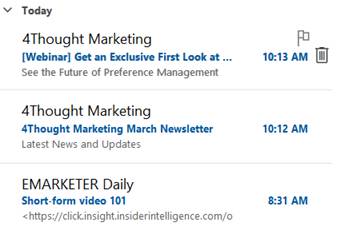
What happens if you don’t use whitespace?

In the example below, the first two items display only the subject line and preview text.  However, in the third example, HTML from the message body bleeds into the preview, making it less valuable.

Implementing Preview Text Whitespace: A Best Practice Guide

So, how do we create whitespace in the preview text? The answer lies in using special characters that render as blank spaces in most email clients. Here’s how:

  • The Zero-Width Space (ZWSP): This invisible character, represented by ​ or u200B in HTML, is the star of our show. It takes up no visible space but can be used to pad the preview text.
  • The Non-Breaking Space (NBSP), represented by   in HTML, prevents line breaks and can also be used to create small, consistent gaps.

The good folks at Litmus have a more complete overview in their article.

Implement the Hack in Oracle Eloqua

The hack can be utilized in Oracle Eloqua through dynamic content with ZWSP and NBSP, making implementation very easy.

  • Create your Dynamic Content

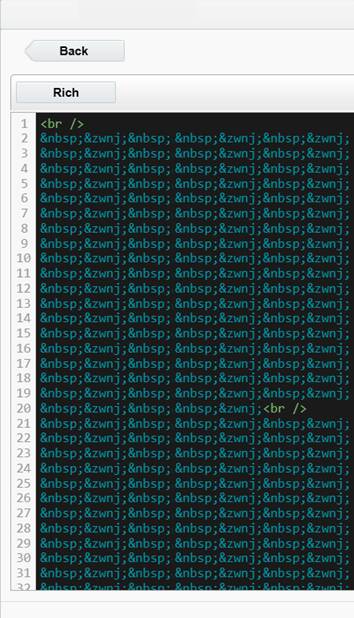
Create a new dynamic content component and paste in the following HTML :

<br /> &nbsp;&zwnj;&nbsp;&zwnj;&nbsp;&zwnj;&nbsp;&zwnj;&nbsp;&zwnj;&nbsp;&zwnj;&nbsp;&zwnj;&nbsp;&zwnj;&nbsp;&zwnj;&nbsp;&zwnj;&nbsp;&zwnj;&nbsp;&zwnj;&nbsp;&zwnj;&nbsp;&zwnj;&nbsp;&zwnj;&nbsp;&zwnj;&nbsp;&zwnj;&nbsp;&zwnj;&nbsp;&zwnj;&nbsp;&zwnj;&nbsp;&zwnj;&nbsp;&zwnj;&nbsp;&zwnj;&nbsp;&zwnj;&nbsp;&zwnj;&nbsp;&zwnj;&nbsp;&zwnj;&nbsp;&zwnj;&nbsp;&zwnj;&nbsp;&zwnj;&nbsp;&zwnj;&nbsp;&zwnj;&nbsp;&zwnj;&nbsp;&zwnj;&nbsp;&zwnj;&nbsp;&zwnj;&nbsp;&zwnj;&nbsp;&zwnj;&nbsp;&zwnj;&nbsp;&zwnj;&nbsp;&zwnj;&nbsp;&zwnj;&nbsp;&zwnj;&nbsp;&zwnj;&nbsp;&zwnj;&nbsp;&zwnj;&nbsp;&zwnj;&nbsp;&zwnj;&nbsp;&zwnj;&nbsp;&zwnj;&nbsp;&zwnj;&nbsp;&zwnj;&nbsp;&zwnj;&nbsp;&zwnj;&nbsp;&zwnj;&nbsp;&zwnj;&nbsp;&zwnj;&nbsp;&zwnj;&nbsp;&zwnj;&nbsp;&zwnj;&nbsp;&zwnj;&nbsp;&zwnj;&nbsp;&zwnj;&nbsp;&zwnj;&nbsp;&zwnj;&nbsp;&zwnj;&nbsp;&zwnj;&nbsp;&zwnj;&nbsp;&zwnj;&nbsp;&zwnj;&nbsp;&zwnj;&nbsp;&zwnj;&nbsp;&zwnj;&nbsp;&zwnj;&nbsp;&zwnj;<br />

&nbsp;&zwnj;&nbsp;&zwnj;&nbsp;&zwnj;&nbsp;&zwnj;&nbsp;&zwnj;&nbsp;&zwnj;&nbsp;&zwnj;&nbsp;&zwnj;&nbsp;&zwnj;&nbsp;&zwnj;&nbsp;&zwnj;&nbsp;&zwnj;&nbsp;&zwnj;&nbsp;&zwnj;&nbsp;&zwnj;&nbsp;&zwnj;&nbsp;&zwnj;&nbsp;&zwnj;&nbsp;&zwnj;&nbsp;&zwnj;&nbsp;&zwnj;&nbsp;&zwnj;&nbsp;&zwnj;&nbsp;&zwnj;&nbsp;&zwnj;&nbsp;&zwnj;&nbsp;&zwnj;&nbsp;&zwnj;&nbsp;&zwnj;&nbsp;&zwnj;&nbsp;&zwnj;&nbsp;&zwnj;&nbsp;&zwnj;&nbsp;&zwnj;&nbsp;&zwnj;&nbsp;&zwnj;&nbsp;&zwnj;&nbsp;&zwnj;&nbsp;&zwnj;&nbsp;&zwnj;&nbsp;&zwnj;&nbsp;&zwnj;&nbsp;&zwnj;&nbsp;&zwnj;&nbsp;&zwnj;&nbsp;&zwnj;&nbsp;&zwnj;&nbsp;&zwnj;&nbsp;&zwnj;&nbsp;&zwnj;&nbsp;&zwnj;&nbsp;&zwnj;&nbsp;&zwnj;&nbsp;&zwnj;&nbsp;&zwnj;&nbsp;&zwnj;&nbsp;&zwnj;&nbsp;&zwnj;&nbsp;&zwnj;&nbsp;&zwnj;&nbsp;&zwnj;&nbsp;&zwnj;&nbsp;&zwnj;&nbsp;&zwnj;&nbsp;&zwnj;&nbsp;&zwnj;&nbsp;&zwnj;&nbsp;&zwnj;&nbsp;&zwnj;&nbsp;&zwnj;&nbsp;&zwnj;&nbsp;&zwnj;&nbsp;&zwnj;&nbsp;&zwnj;&nbsp;&zwnj;

  • When you are done, it should look like this:

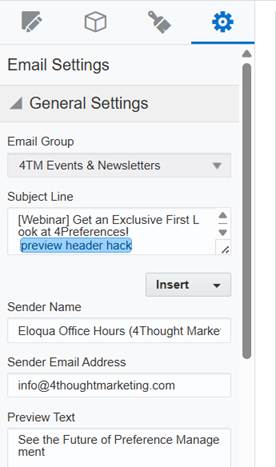
  • Insert the Preview Hack at the end of your subject line:

Preview Text Hack in Marketo

Marketo, a robust marketing automation platform, offers several ways to control the preview text of your emails. Marketo’s Velocity scripting language allows for dynamic content. You can create a Velocity script token to populate the preview text. This is more advanced but offers greater flexibility for personalized preview text.

  • Edit the HTML in the Rich Text Token and enter the hack code:

<p><br /> &nbsp;&zwnj;&nbsp;&zwnj;&nbsp;&zwnj;&nbsp;&zwnj;&nbsp;&zwnj;&nbsp;&zwnj;&nbsp;&zwnj;&nbsp;&zwnj;&nbsp;&zwnj;&nbsp;&zwnj;&nbsp;&zwnj;&nbsp;&zwnj;&nbsp;&zwnj;&nbsp;&zwnj;&nbsp;&zwnj;</p> <p>&nbsp;&zwnj;&nbsp;&zwnj;&nbsp;&zwnj;&nbsp;&zwnj;&nbsp;&zwnj;&nbsp;&zwnj;&nbsp;&zwnj;&nbsp;&zwnj;&nbsp;&zwnj;&nbsp;&zwnj;&nbsp;&zwnj;&nbsp;&zwnj;&nbsp;&zwnj;&nbsp;&zwnj;&nbsp;&zwnj;&nbsp;&zwnj;&nbsp;&zwnj;&nbsp;&zwnj;&nbsp;&zwnj;&nbsp;&zwnj;&nbsp;&zwnj;&nbsp;&zwnj;&nbsp;&zwnj;&nbsp;&zwnj;&nbsp;&zwnj;&nbsp;&zwnj;&nbsp;&zwnj;&nbsp;&zwnj;&nbsp;&zwnj;&nbsp;&zwnj;&nbsp;&zwnj;&nbsp;&zwnj;&nbsp;&zwnj;&nbsp;&zwnj;&nbsp;&zwnj;&nbsp;&zwnj;&nbsp;&zwnj;&nbsp;&zwnj;&nbsp;&zwnj;&nbsp;&zwnj;&nbsp;&zwnj;&nbsp;&zwnj;&nbsp;&zwnj;&nbsp;&zwnj;&nbsp;&zwnj;&nbsp;&zwnj;&nbsp;&zwnj;&nbsp;&zwnj;&nbsp;&zwnj;&nbsp;&zwnj;&nbsp;&zwnj;&nbsp;&zwnj;&nbsp;&zwnj;&nbsp;&zwnj;&nbsp;&zwnj;&nbsp;&zwnj;&nbsp;&zwnj;&nbsp;&zwnj;&nbsp;&zwnj;&nbsp;&zwnj;<br /> &nbsp;&zwnj;&nbsp;&zwnj;&nbsp;&zwnj;&nbsp;&zwnj;&nbsp;&zwnj;&nbsp;&zwnj;&nbsp;&zwnj;&nbsp;&zwnj;&nbsp;&zwnj;&nbsp;&zwnj;&nbsp;&zwnj;&nbsp;&zwnj;&nbsp;&zwnj;&nbsp;&zwnj;&nbsp;&zwnj;&nbsp;&zwnj;&nbsp;&zwnj;&nbsp;&zwnj;&nbsp;&zwnj;&nbsp;&zwnj;&nbsp;&zwnj;&nbsp;&zwnj;&nbsp;&zwnj;&nbsp;&zwnj;&nbsp;&zwnj;&nbsp;&zwnj;&nbsp;&zwnj;&nbsp;&zwnj;&nbsp;&zwnj;&nbsp;&zwnj;&nbsp;&zwnj;&nbsp;&zwnj;&nbsp;&zwnj;&nbsp;&zwnj;&nbsp;&zwnj;&nbsp;&zwnj;&nbsp;&zwnj;&nbsp;&zwnj;&nbsp;&zwnj;&nbsp;&zwnj;&nbsp;&zwnj;&nbsp;&zwnj;&nbsp;&zwnj;&nbsp;&zwnj;&nbsp;&zwnj;&nbsp;&zwnj;&nbsp;&zwnj;&nbsp;&zwnj;&nbsp;&zwnj;&nbsp;&zwnj;&nbsp;&zwnj;&nbsp;&zwnj;&nbsp;&zwnj;&nbsp;&zwnj;&nbsp;&zwnj;&nbsp;&zwnj;&nbsp;&zwnj;&nbsp;&zwnj;&nbsp;&zwnj;&nbsp;&zwnj;&nbsp;&zwnj;&nbsp;&zwnj;&nbsp;&zwnj;&nbsp;&zwnj;&nbsp;&zwnj;&nbsp;&zwnj;&nbsp;&zwnj;&nbsp;&zwnj;&nbsp;&zwnj;&nbsp;&zwnj;&nbsp;&zwnj;&nbsp;&zwnj;&nbsp;&zwnj;&nbsp;&zwnj;&nbsp;&zwnj;</p>
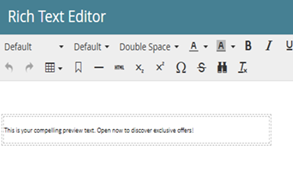
<p><span style="font-family: 'Calibri Light',sans-serif;">This is your compelling preview text. Open now to discover exclusive offers!</span></p>

  • Your Rich Text Editor looks like this.

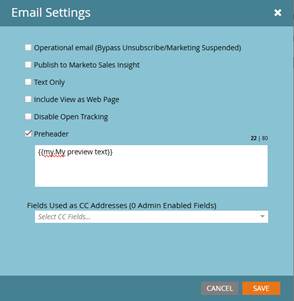
  • Change your Email Settings and set the preheader as:

  • Your Preview Text is all set.

Considerations:

Talking about optimizing email preview text, It’s more than just writing a catchy sentence. A key element is whitespace, and its strategic use can significantly impact open rates. Now, it’s crucial to remember that email clients render content differently. So, we need to test across major platforms—Gmail, Outlook, Apple Mail—to ensure consistency. Also, keep in mind the differences between the mobile and desktop experiences. Character limits and preview text truncation vary, so we need to optimize for both. Don’t just add whitespace arbitrarily. Use it to highlight key offers, create a sense of urgency, or guide the reader’s eye. Think of it as visual pacing. And, of course, the best way to determine what works is through A/B testing. Experiment with different whitespace variations and analyze the results. It’s about leveraging data to refine our approach and maximize engagement.

Beyond the Hack: Elevating Your Preview Text Strategy

While this whitespace hack is a valuable tool, remember that the content of your preview text is still essential. Effective utilization of email preview text necessitates strategic enhancement of the subject line by providing supplementary context or generating curiosity.

For instance, a subject line announcing “New Arrivals” can be enhanced by preview text that details the discovery of recent styles and exclusive promotions. Furthermore, offering subscribers a preliminary glimpse of the email’s content is crucial. This may involve highlighting specific discounts or products within a sale announcement, or teasing key insights from a shared blog post.

Clear directives are essential; subscribers should be explicitly guided toward desired actions through the employment of action-oriented language, such as “Shop Now,” “Learn More,” or “Register Today.” Personalization, facilitated by dynamic content, significantly improves engagement, with even simple first name inclusions demonstrably increasing open rates. Finally, the creation of urgency within the preview text, utilizing phrases such as “Limited Time Offer” or “Don’t Miss Out,” serves to stimulate immediate action from recipients.

The Cost of Neglecting Whitespace

Failing to utilize whitespace effectively in your preview text can have several detrimental effects. A cluttered, dense preview can overwhelm recipients, leading to immediate deletion. It can also project an unprofessional image, damaging your brand’s credibility. Furthermore, a lack of clear visual cues can obscure your key message, resulting in missed opportunities for engagement and conversions.

Conclusion: Unlock Your Email Potential

Mastering the nuances of email marketing, such as the strategic use of preview text whitespace, can significantly impact the success of your campaign. By combining a well-crafted preview text with strategic whitespace, you can create a more engaging and visually appealing email. Optimizing Preview Text Whitespace is a key part of email marketing best practices, and at 4thought Marketing, we understand the intricacies of effective email marketing. We’re dedicated to helping businesses like yours implement best practices and achieve exceptional results. Whether you need assistance with strategy development, campaign execution, or performance optimization, we’re here to help. Ready to take your email marketing to the next level? Contact 4thought Marketing today to discover how we can help you enhance your prospects and drive meaningful results.


Global Marketing Operations Framework

Marketing operations teams face real challenges when working across multiple regions. As the operational backbone of marketing organizations, these teams need to balance standardized processes with regional flexibility while maintaining the technology that powers marketing activities. To successfully implement a Marketing Operations Framework, teams that align on strategy, goals, objectives, and methods achieve better results. This article explores building a practical operational framework that helps global marketing operations deliver consistent, measurable results.

What’s a Practical Marketing Operations Framework

A practical framework for marketing operations defines how your team gets things done—through people, processes, technology, governance, and measurement. For global marketing operations teams, this clarity drives consistency and focus across:

  • Standardized Processes: Ensuring everyone follows the same campaign processes.
  • Centralized Technology Management: Managing marketing technology across regions effectively.
  • Efficient Data Flow: Streamlining data flow between systems and teams.
  • Consistent Measurement: Measuring success uniformly across the board.
  • Optimized Resource Allocation: Allocating resources and talent for maximum impact.

When marketing operations align across regions, teams spend less time fixing problems and more time driving meaningful results.

Key Elements for Success

An Executive Sponsor Who Can Remove Roadblocks

A visible and supportive executive sponsor is crucial for the success of your framework. They should:

  • Understand the Big Picture: Grasp strategic marketing goals and operational realities.
  • See the Impact of Decisions: Recognize how technology and process choices affect marketing outcomes.
  • Resolve Conflicts: Break down barriers and unblock roadblocks.
  • Support Critical Investments: Back essential investments in infrastructure and process optimization.

Clear Rules for Technology and Strategic Vendor Use

A well-defined framework clarifies:

  • Centralized Platform Management: Marketing platforms that are centrally managed and those that are managed regionally.
  • Regional Customization: How regional teams can customize within those platforms.
  • New Technology Evaluation: The process for evaluating and integrating new technologies.
  • Data Connectivity: How data connections between systems are maintained.
  • Global Security and Compliance: Enforcing security and compliance standards globally.

A Unified Approach to Campaigns

Shared processes for planning, executing, and measuring campaigns streamline regional operations. A unified approach should outline:

  • Standardized Request Processes: How campaign requests are submitted and processed.
  • Consistent Asset Management: Shared practices for managing marketing assets.
  • Efficient Scheduling: Clear protocols for scheduling and dependency management.
  • Robust Quality Assurance: Rigorous quality assurance checkpoints.
  • Continuous Improvement: Post-campaign analysis and improvement steps.

Smart Data Management

Data drives marketing decisions. Your operational framework should include:

  • Centralized Data Management: Managing customer data across platforms.
  • Standardized Metrics: Consistent data collection and performance metrics.
  • Data Quality Assurance: Ensuring data quality across all systems.
  • Controlled Data Access: Defining access levels for analytics.
  • Regional Privacy Compliance: Enforcing privacy compliance by region.

Realistic Resource Planning

A strong framework helps marketing operations teams manage resource constraints and competing priorities by:

  • Accurate Capacity Planning: Conducting honest assessments of team capacity.
  • Clear Prioritization: Defining clear criteria for prioritizing tasks.
  • Facilitated Resource Sharing: Enabling resource sharing across regions.
  • Skill Development: Investing in training and knowledge sharing.

Overcoming Common Roadblocks

  • Legacy Systems: Address legacy systems by mapping your technology landscape, identifying critical integration points, and creating a phased improvement plan.
  • Regional Inconsistencies: Align regional teams by documenting key processes, identifying best practices, and standardizing processes with built-in flexibility.
  • Uneven Skill Distribution: Address skill gaps by defining core skills, implementing training programs, and fostering peer-to-peer learning.
  • Global vs. Regional Priorities: Balance global and regional priorities by establishing transparent conflict resolution processes, defining service-level expectations, and facilitating regular alignment meetings.

A Practical Roadmap to Success

Aligning global marketing operations is an ongoing journey. Start with these steps:

  • Assess your current state: Map technologies, processes, skills, and decision-making structures.
  • Identify pain points: Gather feedback from operations teams and marketers.
  • Visualize the future state: Define how technology, campaign execution, and data flow should ideally function.
  • Plan the transition: Sequence changes to minimize disruption.
  • Establish decision-making forums: Set regular meetings for alignment and problem-solving.
  • Track progress: Use dashboards to monitor performance and highlight issues.
  • Commit to continuous improvement: Schedule reviews to assess progress and adjust as needed.

Striking the Right Balance

A strong operational framework recognizes when to standardize and when to allow regional flexibility:

Where standardization delivers value:

  • Core marketing technology platforms
  • Data structures and definitions
  • Security and compliance practices
  • Fundamental campaign workflows
  • Performance measurement frameworks
Where regional flexibility matters:

  • Localized campaign timing
  • Content tailored for specific markets
  • Regional vendor relationships
  • Channel selection based on local preferences
  • Local marketing calendars

Conclusion

Aligning global marketing operations streamlines processes, empowers teams, optimizes technology investments, and provides better support for marketers worldwide.

4Thought Marketing can help you achieve this alignment. Our team of experts can assist you with marketing operations, technology integration, and campaign execution. By partnering with us, you can focus on strategic priorities while we streamline your operations, enhance efficiency, and deliver measurable results that drive marketing success. Ready to take the next step? Contact us today to discuss your needs and learn how we can help you build a robust marketing operations framework.


5 Reasons Vendor Integration Boosts Strategic Planning

What comes to mind when you think of company strategizing? Probably internal meetings. Connecting your in-house teams and getting everyone on the same page is essential. But if your company works with third-party vendors, you could miss out on a vital part of company strategizing. Involving vendors in your strategy sessions, particularly as vendor inclusion, does more than bring them up to speed too. It can enhance your risk management, streamline later communications, and generally improve your company’s functionality.

When we work together, we can tap into their specialized knowledge, access the latest technologies, and make our supply chains run smoother through effective vendor inclusion. In this article, we’ll explore practical strategies for creating and maintaining these valuable partnerships. We’ll show you how to build strong vendor relationships that not only benefit both sides but also drive long-term growth and give your business a real competitive edge. Let’s explore how these collaborations can pave the way for a more sustainable and successful future.

Fostering Collaborative Innovation

Your in-house teams are great at their jobs. But if you’re working with third parties, you already know that third parties can bring significant value with their different perspectives and skills.

Vendors, with their specialized knowledge and sector-specific insights, are often well-placed to drive innovation. By involving vendors in strategic planning, companies can tap into a wealth of expertise that can fuel product development, service improvement, and effective problem-solving. The vendors may add valuable insights for multiple projects and use their various skill sets in multiple projects from the very beginning making it more efficient and resourceful.

Enhancing Supply Chain Optimization

Global supply chains require a detailed approach to anticipate and manage disruptions. Vendors are pivotal in this equation. Their inclusion in strategic planning allows you to take a more preventive position and anticipate upcoming issues. This in turn reduces inefficiencies and cuts costs through better-informed decisions and faster response times. Vendors act like a window into the real-world market for your product and services. While delivering to various partners, vendors provide strategic insights that add to the deliverable quality of your product.

We may consider an example of the last pandemic. Businesses with stronger vendor relationships have the opportunity to expand on the various supply chains thereby avoiding the drastic losses during the worldwide lockdown. Vendors supported through pre-supply, authorized route movements, etc. thus aiding the business from going into huge losses and overcome the challanges.

Streamlining Risk Management

The business environment is fraught with risks – from market fluctuations to regulatory changes and technological advancements. Vendors can be allies in identifying and mitigating these risks. Early involvement of vendors in strategic planning allows you to establish a risk management system ahead of time, ensuring it’s in place when you need it. It also keeps your vendors prepared for upcoming risks as the rest of your company. Vendors who specialize in privacy compliance, for instance, can provide expertise on data protection laws, ensuring that companies maintain regulatory compliance while avoiding costly penalties.

Building Stronger Relationships

Viewing vendors as strategic partners rather than mere suppliers transforms the dynamic; fostering stronger relationships. You may even come to see some vendors as part of your team. This leads to improved communication and collaboration, not to mention improved services. Cultivating a relationship of trust and mutual respect also gives you an advantage in the business landscape.

A critical aspect of strategic vendor partnerships is the emphasis on shared risk and reward. In successful collaborations, both parties are invested in the outcomes of their joint efforts. This alignment fosters a sense of accountability and encourages proactive communication, enabling partners to navigate challenges more effectively. As businesses navigate the complexities of today’s market, the ability to rely on strategic vendor relationships can provide a significant competitive advantage, helping organizations adapt to changing conditions and achieve their strategic goals.

Ensuring Market Adaptability

The marketplace is constantly changing, influenced by shifting customer tastes and the overall economy. Our vendors are in a unique position to see these changes happening firsthand. Their insights can be incredibly valuable, helping us adapt quickly and effectively. In today’s fast-paced world, this kind of agility is essential for staying relevant and competitive. By working closely with our vendors, we can stay ahead of the curve, always understanding what our customers need and being ready to deliver it.

Achieving Cost Efficiency

Cost management is a constant concern for businesses. Including vendors in strategizing can uncover cost-saving opportunities without compromising on quality or performance. Vendors can offer alternative materials, processes, or technologies that are more cost-effective and keep your bookkeepers happy.

By collaborating with vendors who possess specialized knowledge and capabilities, businesses can streamline their supply chains, reduce costs, and improve product quality. This efficiency translates into faster time-to-market for new offerings, allowing companies to stay ahead of competitors and meet evolving customer demands.

Customization & Specialization Opportunities

Every company wants to stand out. Whether that’s through customization, special deals, unique product offerings, or something else, everyone needs an edge. This is another area where vendors can help.  Vendors can offer insights and capabilities that enable companies to tailor their products and services more closely to customer needs, keeping you competitive.

Leveraging Technology & Trends

With technological advancements occurring at a remarkable pace, staying ahead of trends is crucial. Vendors, especially in the tech sector, often get a front-row seat to these new trends. Including them in strategic planning can provide early access to emerging technologies, keeping your company ahead of the curve.

Advancing Sustainability

Consumers appreciate a company that practices sustainability. Vendors can play a crucial role in helping companies meet these objectives, offering expertise in eco-friendly materials, processes, and supply chain practices. This collaborative approach not only addresses environmental and social challenges but also aligns with the growing consumer demand for responsible business practices.

Aligning Long-Term Strategic Goals

Finally, incorporating vendors into strategic planning ensures that their development and capabilities align with the long-term goals of the company. This alignment is crucial for sustaining growth, innovation, and competitive advantage over time.

Furthermore, strategic vendor partnerships foster innovation by encouraging knowledge-sharing and collaboration. When companies partner with vendors who are at the forefront of technological advancements, they can gain access to cutting-edge tools and solutions that enhance their capabilities. This collaborative environment cultivates a spirit of experimentation, where both parties can explore new ideas and push the boundaries of what’s possible. As businesses strive for differentiation in crowded markets, leveraging the innovative potential of vendor partnerships becomes increasingly critical for sustained growth and success.

Final Thoughts

Integrating vendors into departmental strategic planning is more than just a wise decision. It’s a necessity in today’s complex and interconnected business environment. Everyone working with your company should be involved in planning. Don’t exclude third-party vendors!

As businesses continue to navigate the complexities of the digital era, the importance of strategic vendor partnerships will only grow. By forging strong alliances with vendors, companies can enhance their competitive positioning, respond to market changes with agility, and ultimately achieve sustainable growth. In this interconnected world, collaboration is key, and organizations that prioritize strategic vendor partnerships will be well-equipped to thrive in the face of evolving challenges and opportunities. Ready to take your marketing game to the next level? Give our team a call today.


February 27, 2025, 11:00 AM Pacific

Introducing 4Preferences: The Future of Preference Management

Join us for an exclusive live preview webinar to/ showcase how 4Preferences makes it easier than ever to manage customer preferences, enhance personalization, and improve engagement and compliance—all seamlessly integrated with Eloqua.

Why attend?

  • Get an early look at 4Preferences’ improves segmentation and personalization
  • Learn how it simplifies preference management for marketing teams
  • See how it works with Eloqua, Marketo, 4Comply, and your CRM
  • Find out how you can join our early access program

AI can help in creating accessible emails.

Email remains one of the most powerful communication, marketing, and engagement tools. Be it introducing your product, services, subscribed newsletters, etc.; almost everything is deliverable through emails. But are you sure that your emails are received and impact your client or the potential customers? Not all emails are accessible to everyone, particularly for users with disabilities. Ensuring email accessibility is not just a compliance requirement but also an ethical and business-driven decision that enhances customer experience and broadens your audience reach. Thanks to AI, achieving email accessibility is now easier than ever.

Why Email Accessibility Matters

Accessible emails ensure that all recipients, including those with visual, auditory, motor, or cognitive impairments, can read and interact with the content effectively. Readers who rely on screen readers, keyboard navigation, or cognitive-friendly layouts must be able to access your email. Moreover, several legal regulations, such as ADA and WCAG, enforce accessibility to emails so that businesses may avoid legal risks while fostering a very positive brand reputation.

By prioritizing accessibility of emails, businesses and organizations can create a more inclusive and effective communication experience for all users. An accessible email would have:

  • Better user experience for a diverse audience—Millions worldwide have visual, auditory, cognitive, and motor impairments. Designing accessible emails helps everyone access information without barriers.
  • Legal compliance with standards like WCAG and ADA—Many regions have digital accessibility laws, such as the Americans with Disabilities Act (ADA), the Web Content Accessibility Guidelines (WCAG) for global standards, and Section 508 honored by U.S. Government agencies. Failure to comply with these regulations can lead to legal issues and fines.
  • Better engagement rates—Well-structured, readable emails encourage recipients to engage. More people, including those with disabilities, can access and act on your emails, which enhances the chances of perception of your product. Accessibility features also enhance responsiveness on mobile devices, thus increasing lead generation and business.

Best Practices for Creating Accessible Emails

Some mandatory and innovative techniques are the best practices to increase a wider audience, including readers with disabilities. For example, start with a clear and descriptive subject line to communicate the context immediately and effectively. Make sure the descriptions, alt texts, and HTML formats are correct and interpretable for the readers using screen readers. Ensure color contrast; conveying a message just by using a specific color may not work if your reader suffers from color blindness. Ensure that these practices represent your inclusive and supportive culture to the readers.

Let us see some examples that may help in making your emails more accessible:

1. Use Semantic HTML for Proper Structure

Screen readers rely on proper HTML tagging to interpret content. They cannot understand simple English or complicated color combinations to convey your message to the audience thus, use HTML tagging like:

  • <h1> – <h6> for headings
  • <p> for paragraphs
  • <ul> and <li> for lists

Using such tags would specify the screen reader to interpret the message appropriately for your readers. Thus conveying your message more effectively. One may avoid using tables for the layout as it tends to confuse the screen readers thus creating loopholes in your message.

Creating Accessible Emails for visually impaired readers using AI

2. Ensure High Color Contrast

Another aspect one must consider is the higher color contrast of the text against the background to provide better readability for readers with visual impairments. Low contrast makes it difficult for visually impaired users to read emails. As referred in WCAG guidelines, make sure the emails maintain a contrast ratio of 4.5:1 for normal text i.e., foreground text is 4.5 times brighter than the background. Also, the large texts on your emails or the images may follow a similar ratio of 3:1 to coincide with the guidelines. You may use tools like WebAIM Contrast Checker to test your colors.

3. Use Readable Fonts and Text Sizing

Some fonts with cursive styles and irregular font sizing may not be comprehensible for screen readers. Overly decorative fonts tend to confuse the screen readers and our audience with visual impairments. Sans-serif fonts such as Arial, Verdana, or Roboto are much clearer and more readable for screen readers as they lack decorative elements. While writing your emails, make sure to:

  • Choose any sans-serif fonts like Arial, Verdana, or Roboto.
  • Maintain a minimum font size of 14px for body text.
  • Left-align text for better readability.

Following few simple steps and being cautious of the decorative elements on your email would ensure higher readability. Thus support in increasing lead generation.

4. Add Descriptive Alt Text to Images – Image Accessibility

The whole purpose of using an alt text is to provide textual description of an image that is embedded in a document or a webpage. As much as an alt text is crucial for your email accessibility it is also beneficial for the SEO functionality of your webpage. Readers with visual impairment or the ones imposing on screen readers to read and understand an email require descriptive alt texts to understand the embedded image without any difficulty. Unlike normal readers, screen readers cannot see the image. Thus, it is mandatory to provide a good descriptive alt text to the embedded image so that it is decipherable and is conveying the message that you require to your readers. Let us see an example to understand it.

A promotional email informing of a sale using an image if contains alt text “Sale Banner” is not much explanatory. Whereas using the alt text “25% off all Winter Collection – use code Winter25 at checkout” let’s the screen reader describe it thoroughly thus conveying your message even if your email receiver is not able to visualize the email.

5. Test with Screen Readers

Before sending your emails, make sure to test them with screen readers. Check if your email is readable, if it has the correct fonts, and if it is described with correct alt texts. You may use tools like NVDA for Windows, Voice Over for Mac/iOS, or JAWS to check email accessibility for screen reader users. You may also focus on optimizing links and buttons for better accessibility. Using descriptive texts and proper sizing of the buttons to ensure easy tapping if the reader is reading your email on mobile.

Ensure, the email is accessible through keyboard keys itself. For further navigation, tab and enter keys may help the readers to cruise through your email. Avoid requiring mouse clicks or pop-ups to fill in forms or access discount codes, etc.\

How AI Revolutionizes Creating Accessible Emails

AI-driven tools have revolutionized email accessibility, making it easier to design, optimize, and test emails. Creating accessible emails is not just a choice but mandatory if you are looking to expand your business and gain more traffic for your websites. How can artificial intelligence help you create emails that are accessible for your visually impaired readers? AI can write your emails, verify the content and images embedded in it, and look for predictive personalization for the readers.

Let’s see how AI can help in creating accessible emails:

Visually Impaired reader using screen reader through bluetooth to access emails

  • AI-Powered Content Creation

AI can write your emails. It can generate an engaging, descriptive, and concise email templates and messages that one may modify or use accordingly to draft emails for your readers. Google Gemini, Chat GPT, Claude.ai, are some of the widely used AI to draft multiple type of content. Although one must remember to input correct AI prompts, and include human intervention to avoid AI-made mistakes.

  • AI-powered Content Optimization

AI tools like Grammarly and Hemingway Editor enhance readability by suggesting simpler language and better structuring. It can also generate clear and concise subject lines for better comprehension. These tools aid in creating grammatically correct, precise, and appropriate content modifications for your email generation.

  • AI-Driven Email Builders

Platforms like Mailchimp, HubSpot, and Moosend use AI to generate accessible email templates, ensuring correct HTML structure, mobile responsiveness, and optimized color contrast. AI users may simply utilize these platforms that helps in creating a proper HTML structure for screen readers to interpret the email content correctly.

  • AI for Automated Alt Text Generation & Color Contrast Testing

AI can generate alternative texts for the embedded images in your emails. AI-based image recognition tools like Microsoft’s Seeing AI and Google Cloud Vision can automatically generate alt text descriptions for images. Thus, screen readers can easily identify and read the image description aloud to visually impaired readers or readers using assistance. AI-powered design tools such as Stark and Adobe Sensei help ensure proper color contrast, making email text more readable for visually impaired users.

  • Accessibility Testing Through AI

You may employ AI to test your emails for readability and accessibility. AI-driven email accessibility checkers like axe Accessibility and WAVE by WebAIM analyze emails to identify WCAG compliance issues and suggest improvements. While you may use multiple screen readers to check if they can access your email, using the AI such as WAVE would allow you to save time and increase efficiency in case of assuring legal presumptions of inclusivity in your emails.

Final Thoughts

Crafting emails everyone can read and enjoy is no longer a lofty goal—it’s a must-have for reaching a broader audience and boosting engagement. Using AI to create accessible emails is smart, ethical, and, fortunately, easier on pockets. Imagine effortlessly creating emails that are not only visually appealing but also perfectly structured for screen readers. It is optimized for mobile devices and designed with appropriate color contrast. That’s the power of AI-driven email tools. They take the complexity out of accessibility by automating important tasks like optimizing content for readability, generating descriptive alt text for images, performing accessibility checks, and even personalizing the email experience for individual users.


January 25, 2025

Email Optimization Strategies!

Join Us This Month for a Live Session on Email Optimization Strategies!
Discover actionable insights to improve your email marketing performance and keep your audience engaged. This session will help you:

  • Prevent over-communication with “stoplights” to reduce email fatigue.
  • Avoid spam filters by managing soft bounces more effectively and maintaining sender reputation.
  • Get your questions answered during our open Q&A with industry experts.

privacy fatigue

There has been a blitz of data privacy laws being put into effect over the past few years – from the GDPR and CCPA to demographic-specific ones like COPPA. Businesses have no choice but to keep up or face the consequences of non-compliance. Whether a company is setting up a baseline privacy program or needs to update an existing one, it’s easy to feel inundated by the sheer number of laws that need to be addressed. This challenge is contributing to a phenomenon known as “privacy fatigue,” which reflects the overwhelming nature of these regulations.

The Impact of Privacy Fatigue on Business Operations

Understanding the impact of privacy fatigue is crucial for marketers aiming to maintain compliance while effectively communicating with their audiences.

The burden of constantly remaining relevant and compliant can manifest in many ways:

  • Less diligent compliance: As detailed privacy compliance procedures become more detailed and complex, it’s tempting to cut corners. This leads to compliance gaps and easily preventable mistakes.
  • Operational efficiency: The constantly evolving nature of privacy laws can mean that employees spend a disproportionate amount of their time on compliance-related tasks, rather than on their actual jobs.
  • Organizational morale: Employee morale can suffer due to the constant pressure of staying on top of the compliance game.
  • Financial implications: Implementing compliance-related training programs and new technologies and hiring compliance officers can cut into the budget for other company functions.

How Organizations Can Combat Privacy Fatigue

A company can take several steps to alleviate the symptoms of the privacy doldrums. Putting a future-proof compliance strategy in place can shape a healthy approach to compliance and streamline processes to reduce privacy fatigue. Today, we’re looking at a few actionable strategies for this.

Remove Distractions by Defining Organizational Risk

It can be easy to get carried away when a new privacy law is announced worldwide. However, not all of them may be relevant to your company.

Evaluate each new privacy law to determine if it applies to your business. For instance, an American-based B2B company that manufactures and sells industrial parts only to other American companies is unlikely to be affected by an EU law like the GDPR. But American laws like the CPRA, TDPSA, and more likely apply. Know whose data your company handles, and how. When a new privacy law hits the headlines, it’ll be easier to determine if you need to update your compliance system or not.

Reduce Duplication of Effort

Comparing privacy laws is often like comparing oranges and tangerines—they are ever so slightly different.

Don’t start over each time a new privacy law passes. Streamline your processes by grouping similar laws together while designing your program and applying the most stringent tenets. This will reduce the amount of effort needed to build, maintain, and update your program and avoid the duplication of work. It also provides an additional layer of protection for any contacts living in a region with no privacy laws.

privacy fatigue

Have A Collaborative Approach

Clear lines of communication between various teams directly involved in the design and implementation of privacy programs can help prevent compliance gaps and breaches. This will also help create a proactive atmosphere that integrates compliance into daily operations. While involving individuals and teams like the information security officer and IT is critical, it’s also a great idea to involve teams that handle or use customer data to ensure overall compliance. It also helps privacy teams understand how data is being used to pinpoint specific areas of concern.

Consider Bite-Sized Compliance Training

Frequently attending training sessions that require employees to digest large amounts of information can be overwhelming. Consider regular compliance training for employees delivered in smaller, more manageable segments. Doing so will also help them stay updated as regulations change.

Build a Trust Center

A trust center collates all your privacy policies, security certifications, data handling practices, and more in one accessible space. It will help your employees find the compliance information they need quickly, foster a sense of ownership in compliance efforts, and mitigate privacy fatigue.

Leverage Technology to Automate Tasks

Consider investing in automated compliance management systems to streamline tasks, reduce manual errors, and easily integrate new regulations into your existing privacy program. Automated reports and data analytics can provide insights into compliance performance and help privacy teams identify gaps and potential risks and implement swift corrective actions. Our team can help you with all things privacy, from providing privacy software solutions to implementing highly complex compliance projects from start to finish. Contact us using the form below to learn more.


ai in email marketing

More and more marketing tools incorporate AI now. But despite its usefulness, AI is still not a complete solution. While you may find claims that AI can build your marketing emails without human intervention, it is wise to be cautious. The consensus is that high-quality email campaigns need human oversight and should use AI to assist with tasks.

One place AI tools excel is in completing the busywork – those time-prohibitive tasks that are so labor-intensive or complex that completing them manually is much less productive. AI can transform these tasks by automating processes and leveraging large amounts of data to generate insights quickly. Examples include:

  • Advanced personalization: AI tools can analyze customer preference data and behaviors to create hyper-personalized content for each individual recipient.
  • Predictive analytics: AI can process significant amounts of complex customer data and provide accurate predictions when it comes to customer behavior to inform email strategies.

AI in Email Marketing

AI can play a critical role throughout your email campaign, helping you save time and identify trends that can shape its flow. However, it’s important to remember that AI is meant to assist, not take over the role of a human being.

AI technology varies depending on the stage of the email production process you use it for.

Creative Processes

Generative AI is particularly useful in email production’s early, creative stages, such as conception, copywriting, design, and development. It can assist in generating creative content, designing visuals, and even coding interactive elements.

  • Conception: Once you know your campaign’s audience and goals, AI can help analyze data to identify trends, predict audience preferences, and suggest campaign ideas. Marketers can use it to identify themes, develop variations, and build personas.
  • Copywriting: Given the right prompts, AI can help copywriters craft compelling subject lines, preview and body text that will resonate with target audiences. AI can also be used to tweak text to fit different audience segments to offer personalized messaging. AI can also automate the testing process by conducting A/B tests quickly, identifying the most effective variations.
  • Design: The visual elements of an email need to be attention-grabbing. AI-powered design tools can be used to create the wireframe for your email campaign, suggest images, and insert interactive elements where necessary.

Analytical & Optimization Processes

Machine learning is highly effective in the audience select and send stages as well as for providing in-depth insights into campaign performance. It can optimize send times, segment audiences more accurately, and even predict the best times to send emails to maximize engagement.

  • Development: AI tools can carry out much of the heavy lifting in the development stage by generating code snippets and templates that are optimized for different email clients and devices. It can also be used to run tests for rendering, accessibility, and more and suggest changes as necessary before your campaign even launches. This can provide a seamless experience for recipients once your campaign is launched.
  • Audience selection: Segmenting email lists and targeting specific audience segments based on various criteria can take a lot of time. AI-powered segmentation tools consider factors like past behavior, preferences, and demographics to identify audience segments. Predictive analytics are used to forecast customer behavior and preferences, allowing marketers to anticipate needs or the potential for customer fatigue and tailor their campaigns accordingly. This targeted approach increases the likelihood of engagement and conversion.
  • Pre-launch checks: AI can provide automated quality checks and compliance assessments.
  • Send stage: Instead of manually inputting send times for various demographics, AI can trigger optimum send times for emails by analyzing historical open and click data. It can also be used to streamline the creation and sending of triggered emails, such as welcome emails, abandoned cart reminders, and personalized follow-ups. Omnichannel integration can provide a cohesive customer experience from email to in-store interactions and beyond.
  • Campaign analysis: AI-driven analytics tools can provide in-depth insights into key campaign performance metrics such as open rates, click-through rates, and conversions. Marketers can use these analyses to drive future campaigns.

Get in touch with our team to discover AI tools that can help you optimize your email campaigns.

ai in email marketing

4Thought Marketing Logo   April 8, 2026 | Page 1 of 1 | https://4thoughtmarketing.com/articles/page/17