Prioritize quick wins that reduce friction across handoffs and systems.
Embed governance and measurement to scale repeatable, reliable execution.
Use AI selectively to speed analysis and workflows, not add noise.
Eloqua Engage is reshaping how modern marketing teams connect with prospects and customers by simplifying personalization and streamlining campaign execution. Many organizations recognize the need for efficient engagement, but they often struggle with fragmented tools, limited resources, and inconsistent messaging. By leveraging Eloqua Engage as a unified platform, marketers can overcome these hurdles, drive more relevant interactions, and accelerate business outcomes without sacrificing compliance or scalability.
What Does Eloqua Engage Offer?
Eloqua Engage is a sales tool that makes it easy for B2B sales teams to send personalized emails to prospects and customers using templates created by their marketing team. Sales managers can leverage reporting capabilities to see how their reps are using the tool and what results they are getting. The marketing team can also use reporting to make improvements to increase conversions.
Increased sales productivity: Engage helps sales reps save time by providing a library of pre-built email templates that they can customize to fit their needs. This eliminates the need to start from scratch with every email.
Improved email personalization: Engage allows sales reps to effortlessly personalize their emails with dynamic content, such as the recipient’s name, company, and job title. This can help to improve the open and click-through rates of emails.
Better brand consistency: Engage templates ensure that emails sent by sales reps are consistent with the company’s brand and marketing messaging without burdening sales with creating or managing templates.
Enhanced tracking and reporting: Engage provides detailed monitoring and reporting capabilities for both sales and marketing. Sales managers can see how their reps use the tool and what results they are getting. Marketing can view clicks, run tests, and make improvements to improve the sales process and increase sales performance.
Using Eloqua Engage Effectively
To get the most out of Eloqua Engage, your team should consider the following:
Build a library of email templates: During campaign planning, your sales and marketing teams should discuss messaging that will support campaigns, then build email templates to streamline the processing for sales to send follow-up emails.
Provide sales with Engage training: As part of the campaign launch, provide training to sales on how to use the tool, how it can save them time, and how it provides key metrics to sales leadership about their usage and results.
Leverage reporting for continuous improvement: Oracle Eloqua offers detailed tracking and reporting capabilities for Engage activities and peformance. Review metrics with underperforming sales team members on how to use Engage more effectively. In addition, highlight positive results and ask high-performing reps to share their best practices.
Eloqua Engage: An Essential Tool for Eloqua Users
To summarize, Eloqua Engage is a powerful sales tool that can help B2B sales teams increase productivity, improve email personalization, and achieve better results. Marketing can support sales efforts by making it easier for sales to send brand-consistent emails quickly, and sales leadership can review usage and performance metrics to drive higher results. If your team relies on Eloqua to create and run marketing campaigns, Eloqua Engage is a must-have.
Eloqua Engage helps marketing and sales teams create, personalize, and send approved emails that align with brand standards, making customer communication faster and more consistent.
How does Eloqua Engage improve personalization?
It provides pre-approved templates and dynamic content tools, enabling users to tailor messages to different audiences while maintaining compliance and avoiding errors.
Can Eloqua Engage integrate with CRM systems?
Yes, Eloqua Engage integrates seamlessly with CRMs like Salesforce and Microsoft Dynamics, ensuring that sales reps can send targeted emails directly from their CRM environment.
What are the benefits of using Eloqua Engage for sales teams?
Sales teams gain access to marketing-approved emails, reducing the time spent writing from scratch while ensuring consistency, compliance, and better engagement with prospects.
Is Eloqua Engage suitable for global campaigns?
Absolutely. Eloqua Engage supports multi-language templates and global compliance requirements, making it ideal for organizations running campaigns across multiple regions.
How does Eloqua Engage support compliance?
It enforces the use of approved templates, tracks usage, and ensures that all emails adhere to brand, legal, and privacy standards, reducing regulatory risks.
Did Someone Say Oracle Eloqua Merge Contacts?
No, your eyes are not deceiving you. Up until this very moment, you probably only imagined, wished, even begged for an easy way to merge Eloqua contact records and preserve activity history. Since 2015, over 4,300 Eloqua users upvoted this idea on TopLiners.
Let that sink in: Merge Contacts, and Preserve Activity History*. Bada Bing, Bada Boom.
Introducing the Eloqua Merge Contacts Cloud App
You might at first wonder how that could happen – well, here’s one example how: The first time they filled out a form, they gave their name as [email protected]. Then, a couple of weeks, or months later, they come back as [email protected]. All of their contact data is the same – but now you have two email addresses for the same person.
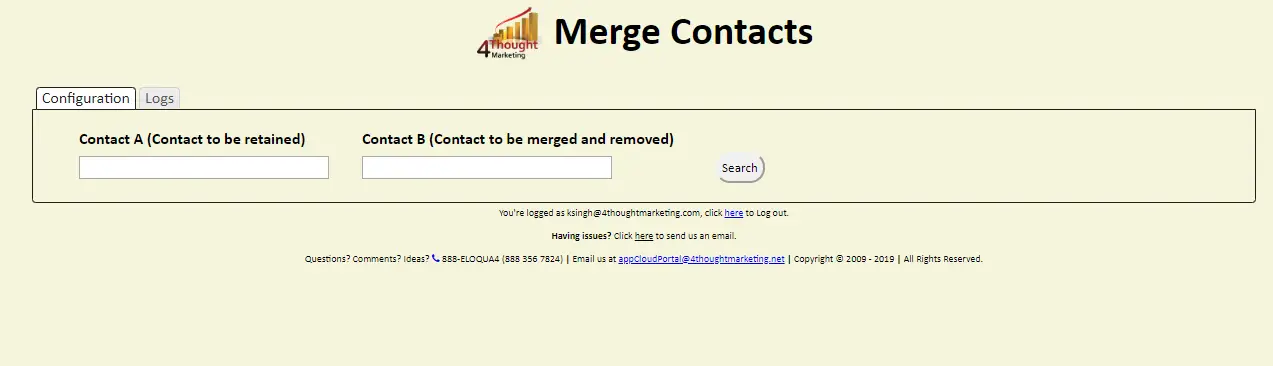
Merging contacts is easy using the Eloqua Merge Contacts Cloud App from 4Thought Marketing.
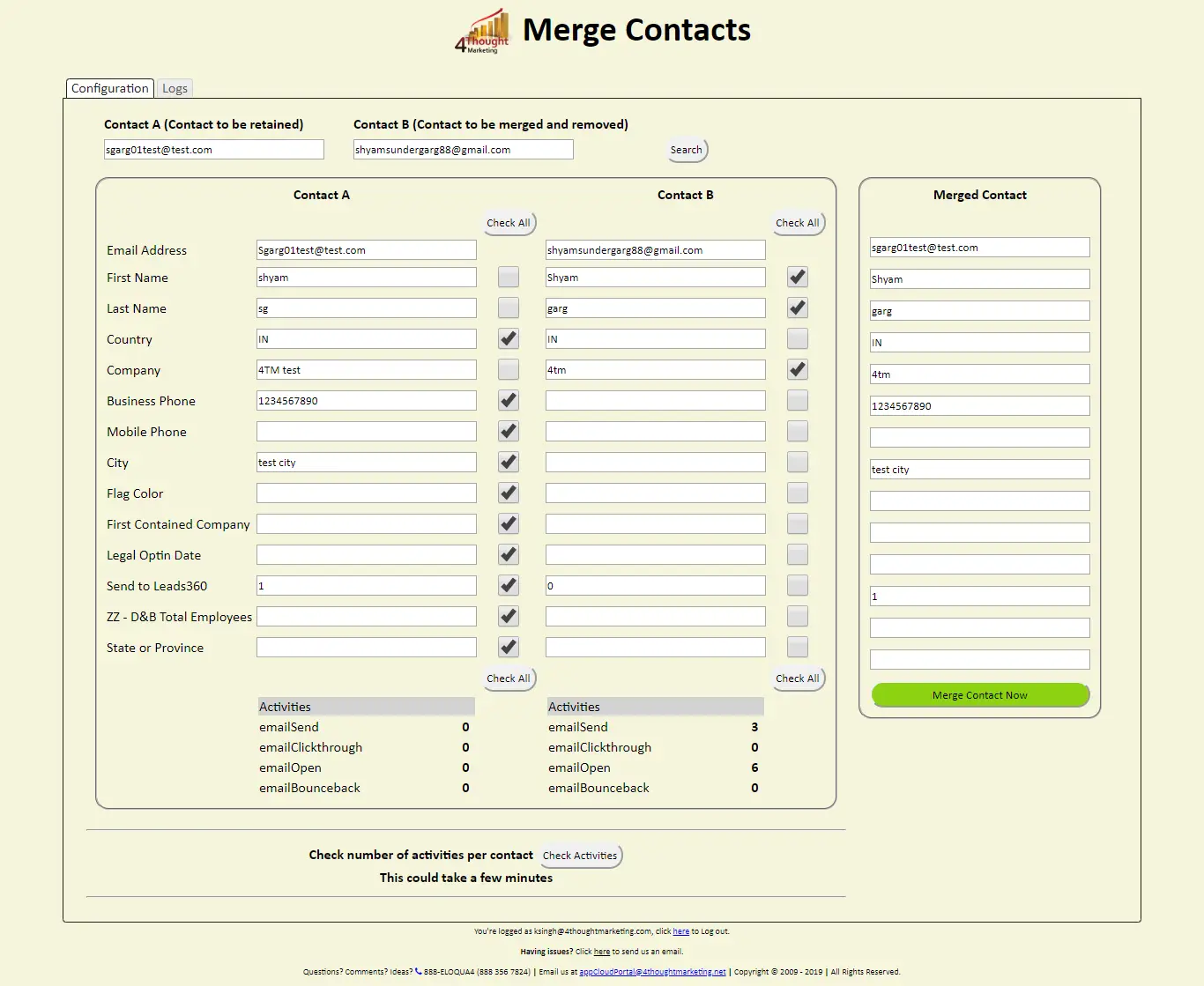
1. Select the records to merge
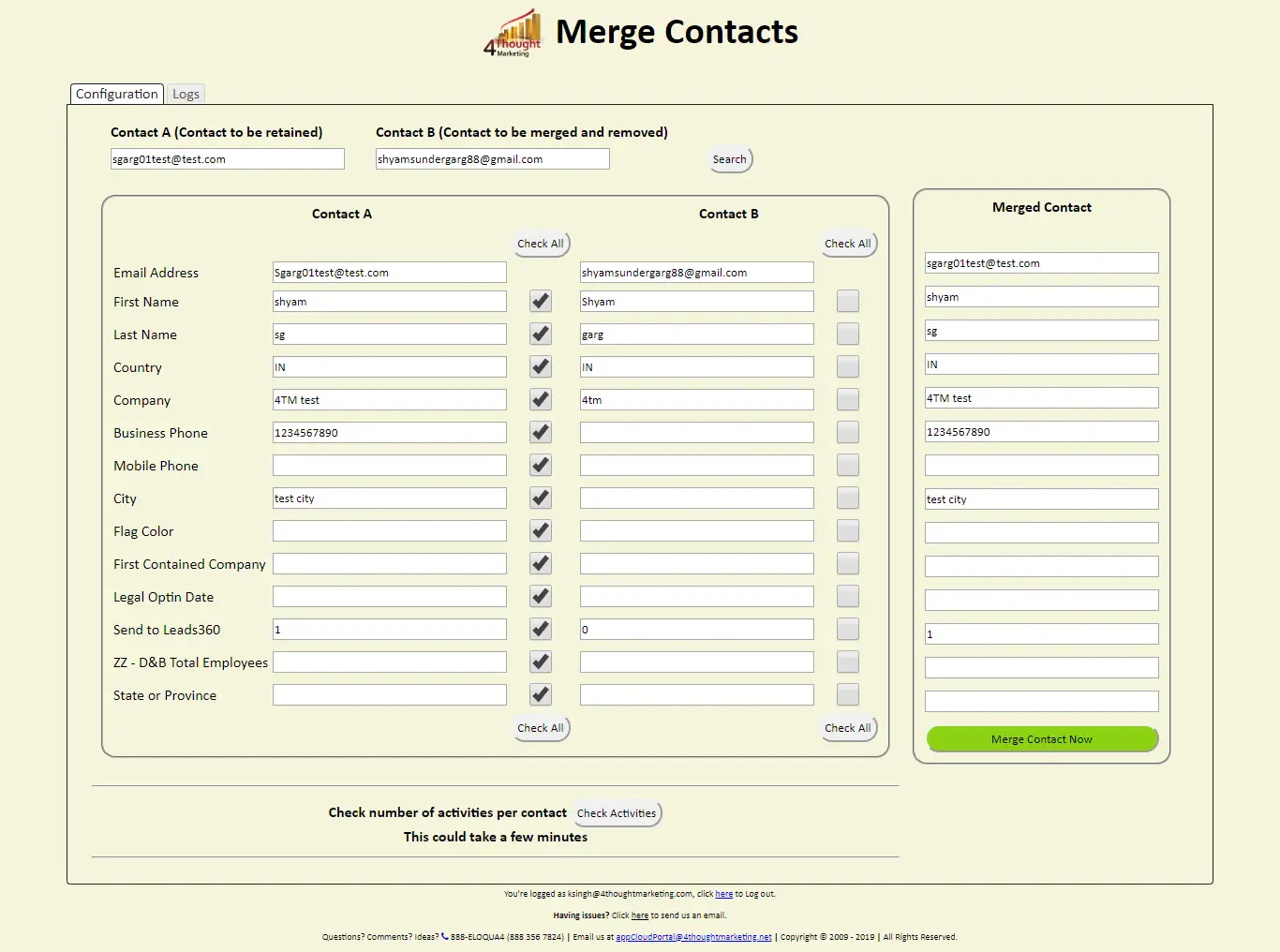
2. Select the fields to preserve from the original or the duplicate contact record
3. Retrieve existing records for each contact, choose which fields will be preserved
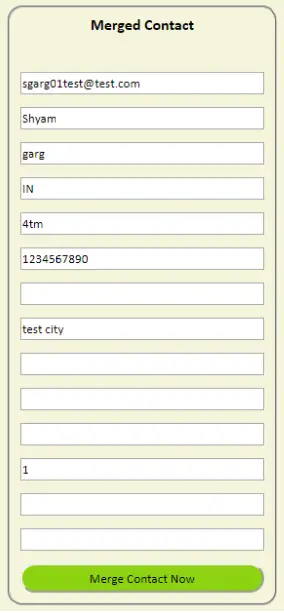
4. Preview how the merged contact record will appear, and make any necessary adjustments.
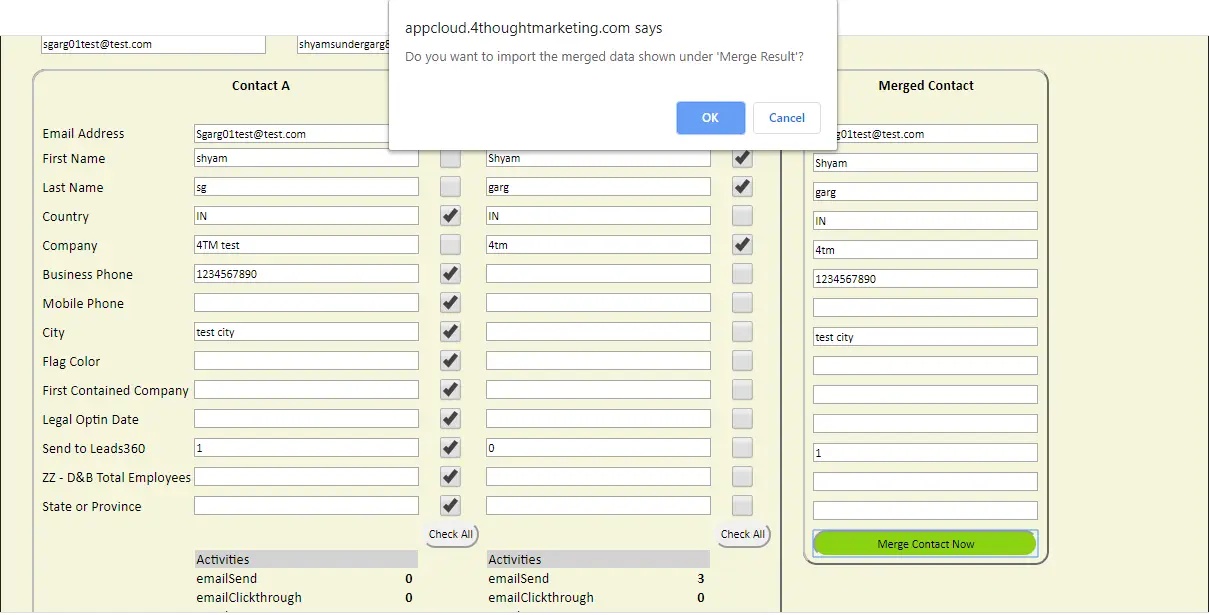
5. When ready, select Merge, and the processing will begin.
Processing takes from 2-3 minutes, but can also take longer depending on the number of activities. Activities from the merged contact will be re-created as new external activities in Eloqua.
Please Contact us if you are interested in our Merge Contact Cloud App, or any of our other products and services.
An Eloqua marketing campaign checklist helps prevent underperforming marketing campaigns from frustrating the teams that developed them and the companies that see little to no return on their investment. Unfortunately, there is no “silver bullet” that makes a marketing campaign a massive success every time. However, there are a few steps you can take to give yourself a better chance. For Eloqua users, one of the most essential steps is to create a marketing campaign checklist to follow during development.
Using an Eloqua marketing campaign checklist is essential for ensuring that your campaigns are successful and yield positive results. This Eloqua marketing campaign checklist helps you track all important aspects of your campaign.
Setting the Stage
You have an event next week, and not nearly as many people have registered as you’d hoped. What do you do?
While you might be tempted to send out another email blast to drum up interest, this can backfire. Your prospects and customers may be annoyed to receive another marketing email and might complain or even unsubscribe. Unfortunately, by now, this marketing campaign is likely a lost cause.
Implementing an Eloqua marketing campaign checklist can greatly enhance your marketing strategy, ensuring every element is in place before launching.
A comprehensive Eloqua marketing campaign checklist ensures that no detail is overlooked, allowing for a smoother execution of your marketing efforts.
The best thing to do to avoid a repeat is to understand what went wrong and how to fix your mistakes in the future. Let’s look at this step by step.
Step 1: Clarify Your Initial Campaign Goal
What, exactly, do you want to accomplish with this campaign?
To answer this question, remember the SMART framework. Your goal with any marketing campaign should be:
Specific: “Get more people to attend the webinar” is a vague, unhelpful goal. “Increase webinar registrations by 25%” gives you something concrete to aim for.
Measurable: This ties back in with having a specific goal. With numbers in mind, you’ll know if you hit your target and how significantly you missed or exceeded the goal.
Attainable: As nice as it would be, very few marketing campaigns result in 100% conversion. Be realistic about what you can accomplish without setting the bar too low or too high.
Relevant: What are the current market conditions? If a recession is looming, conversion rates might be lower.
Time-based: Set a definite timeframe for your goal. This lets you analyze your results and move on to better campaigns sooner.
These all sound basic, but many marketers are tempted to skip these steps. If you’re unsure how to set ambitious but realistic goals, consider using results from past campaigns to guide your planning.
Step 2: Assess Your Campaign Resources
The resources available for your campaign significantly impact your ability to reach your goals. For our purposes, we’ll consider three kinds of resources: data, tools, and skills.
Data quality and quantity: Generally speaking, aim for a list of 400-1000 contacts as the minimum threshold to run a test. If you have a smaller contact list, consider moving to a highly personalized account-based marketing approach.
Tools: What marketing automation, email marketing, and related tools do you have available to run your campaign? If your available tools are limited, it may be more difficult to run a demanding campaign.
Your experience level: If you are about to run a campaign to drive attendance at an event and you’ve never done that before, you may need to adjust your expectations. Likewise, if you are proficient in marketing automation but have weaker copywriting skills, this skill mix will affect the kinds of campaigns you can run. Consider partnering with another person who has the marketing skills you lack. Or seek help from an outside agency.
Step 3: Identify Barriers to Campaign Success
With an Eloqua marketing campaign checklist, you can easily track your resources and identify areas for improvement based on past campaigns.
After identifying your available resources, it’s time to look more closely at potential barriers. Risks are inevitable, and identifying potential obstacles upfront can help you identify, understand, and manage them to achieve your goals. For example:
Alignment with sales: If you don’t take the time to align with the sales team, they may perceive your campaign as a waste of time. We take a look at how to avoid 6 Common Sales & Marketing Alignment Mistakes.
Market sophistication: If the market is already saturated, your campaign may struggle. However, if your copy and messaging help distinguish your solution from your competition, customers may be more interested in your offerings.
Step 4: Perform a Sanity Check
The next step is to evaluate your initial goal in light of the barriers and resources you have identified. Go back to the SMART framework for a bit. Does the campaign goal still make sense? Is it achievable? If not, adjust the scope or timeline accordingly. Don’t forget to check back with your stakeholders and get their input.
Using an Eloqua marketing campaign checklist helps in identifying barriers early, allowing teams to pivot their strategies accordingly.
The importance of aligning your sales strategy with your Eloqua marketing campaign checklist cannot be overstated, as it enhances overall effectiveness.
Step 5: Remove Duplicates and Errors from Your Marketing Data
Bad data hurts marketing results in two ways. First, low-quality data means fewer appropriate prospects will see your message. Second, you will find it difficult to measure your results accurately and determine ROI.
To improve your marketing data, use the following techniques:
Clean your data: For Eloqua users, we recommend using the Contact Washing Machine. It’s a free tool included with Eloqua that helps ensure data coming into your system is as clean as possible
Assess the age of your marketing data: The accuracy of business contact data gradually declines over time as people move to new roles. If you are targeting businesses, keep in mind that the average employee tenure is 4-5 years, according to the Bureau of Labor Statistics.
Manually review: Yes, we suggest you manually review your campaign data set. Pick a few dozen contacts from your list and review them manually.
You might also consider using the Friendly CSV tool to clean your email list. It can help you remove “LLC” and similar data from company names and make other simple changes.
Your Eloqua marketing campaign checklist should include a verification step to ensure all data is accurate and up-to-date.
Step 6: Evaluate Need to Enrich Your Data
Does your marketing data only contain a name and email address? Two data points per contact are not much to build a campaign. Here are some options to consider:
Use a third-party data provider for lead enrichment: For B2B leads, you might find better data using solutions like BuiltWith.com for technology insights.
Build your own data enrichment tools: Besides paid services, you can also build solutions using the data you already have. For example, if you collect job title on every form, create a program to evaluate and segment your data by job function and level using data lookups and lookup tables. You can also use Eloqua Cloud Apps from 4Thought Marketing to populate job level and job role.
Adjust your campaign goal to get more insights: Instead of a direct sales call to action, make a content offer to your prospects. For example, you might offer a webinar aimed at an executive audience (e.g., “What CFOs Need to Know About Presenting to The Board”). Based on who responds to the offer, you will have a higher degree of confidence about which of your contacts fits an executive profile. The registration data will also help enrich your contact data.
Step 7: Check Privacy & Compliance Requirements
Businesses must consider how to address privacy and compliance regulations. Depending on where you do business, you may be subject to GDPR or other privacy laws. Any campaign should ensure compliance with the relevant privacy and data regulations.
Depending on the data you’ve collected, it might be tricky to determine where each contact lives and what laws apply. Check the IP address they used to subscribe or engage with your content for a rough idea of their location.
Step 8: Verify Your Campaign Tracking
Without tracking, you cannot tell if your marketing campaign succeeded. Ideally, you will want to track multiple metrics to identify relevant changes. In an email marketing campaign, you could track open rates, clicks, and replies. In a direct response style campaign, you may focus on the number of orders.
To verify your campaign tracking is correctly configured, send out messages to an internal company email list. We recommend sending it to at least two different email accounts.
Step 9: Start with a Small Marketing Test
Some marketing campaigns – such as running an annual event – do not lend themselves to smaller tests. For online marketing campaigns, we recommend you use the 10% rule. If you plan to engage 1,000 prospects, first send a test campaign to 100 contacts. In this test campaign, verify all the technology works properly and gauge market response to a degree. You might even want to start with a smaller campaign experiment.
Step 10: SLO – Subject Line Optimization
In an email campaign, you should test at least two subject lines. You may find that one variation yields significantly improved open rates. Likewise, you should consider testing multiple variations for a webinar landing page. And don’t forget using subject line testing tools like SubjectLine.com.
Step 11: STO – Send Time Optimization
Obviously, people check their email at different times. And with the sheer number of emails most people receive now, your targeted messages can get buried under so many others that the recipient may never see them. But there’s a way around this. A certain add-on tool for Eloqua can determine when your customers are most likely to engage with your messages and schedule the emails to arrive at the best time possible.
Whether you program your STO tool yourself or purchase it from Eloqua, take advantage of this opportunity! Don’t let your messages get buried.
Always refer back to your Eloqua marketing campaign checklist during the campaign launch to monitor performance and track progress.
Step 12: Adjust Your Content
Good subject lines get email opens. Good email content gets clicks and purchases. If you find your contacts are opening your emails but not taking any further steps, your email content may need an update.
This is also important to consider if your marketing team uses AI for content creation. Obviously AI-generated content looks and feels unnatural, and will be a turn-off to customers. Anything AI-generated in your marketing campaigns should be subject to the same level of editing and scrutiny as anything else. Use an AI detection tool as well – if the tool picks up on AI influence, you still have work to do.
Step 13: Launch Your Campaign
After you’ve carefully considered the items above, you should be ready to launch your marketing campaign! After completion, refer back to the first few steps of the checklist. Ask yourself how you performed against your goals – what went smoothly and where did you encounter problems. The insights you gain from this analysis will help you to plan your next campaign more effectively.
Step 14: Keep Improving Your Checklist
A checklist shouldn’t remain static. After each campaign, examine what went well and how to improve future campaigns. Make a point of asking how to update your checklist to drive better results based on your most recent experience.
Conclusion
An Eloqua marketing campaign checklist helps improve performance. While your checklist will be unique, it likely shares some common elements, including goal setting, resource analysis, risk assessment, and sanity checks. Ensure that your Eloqua marketing campaign checklist is thorough and effective to achieve the best results.
Ready to take your marketing campaigns to the next level? Get in touch with our team today and start using an Eloqua marketing campaign checklist to its full potential.
By updating your Eloqua marketing campaign checklist with each campaign, you ensure continuous improvement and a better chance of success.
In conclusion, an Eloqua marketing campaign checklist is vital for ongoing success in your marketing efforts, helping you adapt and refine your approach.
Between user-provided data and data enrichment, Eloqua users generally have very little trouble populating Job Title fields. But related fields, such as Job Function or Job Level, present a bit of a challenge. Out-of-the-box values may not meet your company’s needs. And if you’re only able to choose one Job Function value per user, how do you know which is the correct one?
Fortunately, there’s a relatively simple solution. Check out this excerpt from our January 2024 Eloqua Office Hours session for a quick demo.