batch and blast

Batch and blast email campaigns certainly require far less time to put together than more personalized messages. But as most marketing experts understand, the tradeoff isn’t worth it. Batch and blast messages are known to produce significantly less revenue than personalized emails sent to interested contacts.

However, simply knowing that personalized messages perform better is just the first step. The real challenge comes when making the transition from the low-performing but easy batch and blast strategy to more demanding personalized campaigns. Here’s what eleven industry experts have to say.

Allocate More Time & Resources

Patrick Beltran,
Marketing Director, Ardoz Digital

From my experience, one of the main hurdles with transitioning to personalized email marketing, as opposed to the more generic batch-and-blast campaigns, is that it requires considerably more time and effort. This is especially challenging for small businesses that often struggle with limited time and resources to maintain consistency in their marketing efforts. Thankfully, there are now tools available to help streamline this process.

For instance, we use automated campaign tools and platforms like Townsquare Interactive’s business management platform, which allows us to handle our email marketing efforts from top-of-funnel to bottom. This platform integrates an inbox, calendar features, customer relationship management tools, and automated email and SMS messaging, providing everything necessary to grow our subscriber base effectively.

Additionally, we focus on prioritizing high-impact activities. We concentrate on email marketing strategies that align closely with our business goals and offer the most significant return on investment. We ensure that every email includes strong calls to action, tied to conversion activities like booking a demo or purchasing a product or service. This has helped us make the most of our efforts in email marketing by directly influencing our business outcomes.

Navigate Privacy & Compliance Issues

Marc Bishop, Director, Wytlabs

A significant challenge in personalized email marketing is navigating the increased privacy concerns and ensuring compliance with regulations such as GDPR. Customers are more sensitive about how their data is being used, and rightly so. To tackle this, we have made transparency a core part of our email strategies, ensuring that our communications clearly state how we use data and providing customers with easy options to control their privacy preferences. This helps build trust and ensures that we comply with legal standards, thereby protecting our business and our customers’ rights.

Ensure Data Cleanliness & Reliability

Jonathan Buffard,
Digital Marketing Director, Bottom Line Marketing Agency

If you want to get more from your email marketing, personalization is the name of the game. But it’s not without its challenges. One of the biggest hurdles is ensuring your data is clean, uniform, and reliable. The amount of personalization you implement depends on how many data points you have for your contacts.

Your audience data properties need to be consistently formatted and correctly inputted. Behavioral segmentation must be spot-on; targeting folks based on actions like adding to a shopping cart or clicking on a product requires precise and accurate segment creation.

Keeping your data updated is crucial. Customer behaviors and preferences evolve, and your segmentation must dynamically reflect these changes. Implementing real-time data-tracking and updating systems can help maintain the relevance and accuracy of your personalized campaigns.

In short, transitioning to personalized email campaigns means paying close attention to data integrity and segmentation accuracy. Nail these aspects, and you’ll unlock the true power of personalization, driving better engagement and results from your email marketing efforts.

Manage Increased Data Complexity

Josh Bluman, Co-Founder, Hoppy Copy

That would be managing the increased complexity in data and segmentation. Personalized campaigns require more detailed customer data and sophisticated segmentation strategies to ensure that each email is relevant to the individual recipient.

For instance, you’ll need to invest in tools and processes for gathering and analyzing customer data to create tailored content. This might mean integrating CRM systems, enhancing your email marketing platform’s capabilities, and developing more granular customer profiles. Initially, it can be a bit overwhelming, but the payoff is worth it: personalized campaigns tend to see higher engagement and conversion rates than generic batch-and-blast emails. Investing in the right technology and processes will help you effectively manage this complexity and deliver more impactful, personalized content.

Produce Creative & Relevant Content

One challenge marketers might face is the need for creative and compelling content that resonates with diverse audiences. Unlike batch-and-blast campaigns, which rely on a one-size-fits-all message, personalized campaigns require tailored content that aligns with individual customer interests and stages in the buyer’s journey. This necessitates a deeper understanding of customer personas and their motivations, which can be resource-intensive. Marketers may struggle to consistently produce high-quality, relevant content for every segment, making it crucial to establish a strong content strategy that emphasizes creativity and adaptability.

Balance Personalization & Scalability

One significant challenge when shifting from batch-and-blast to personalized email campaigns is effectively segmenting your audience and creating relevant content for each segment. Start small, measure results, and continuously refine your approach based on performance data. The transition requires a deep understanding of your customer base, often involving collecting and analyzing vast amounts of data. This can be overwhelming, especially for smaller teams or those with limited data analytics capabilities.

Creating multiple versions of content tailored to different segments is time-consuming and resource-intensive. It requires a delicate balance between personalization and scalability to ensure the effort remains manageable and cost-effective. We tackled this by starting with broad segmentation based on user behavior and gradually refining our approach. We developed content blocks that could be mixed and matched for different segments, which helped streamline the process.

Integrate & Manage Vast Data

When shifting from batch-and-blast to personalized email campaigns, one significant challenge marketers can expect is managing and integrating the vast amounts of data required to create truly personalized experiences. Personalization demands a deep understanding of individual customer preferences, behaviors, and interactions, which involves collecting, analyzing, and acting on data from various sources.

We faced this challenge head-on when we moved from generic email campaigns to more personalized approaches. Here’s how we addressed and overcame this challenge:

Firstly, we recognized the need for a robust data management system. Our existing infrastructure was not equipped to handle the detailed segmentation and dynamic content needs of personalized campaigns. We invested in a comprehensive CRM system integrated with our email marketing platform. This allowed us to centralize customer data, track interactions, and segment our audience based on specific criteria such as past behaviors, interests, and demographic information.

The next step involved ensuring data accuracy and completeness. Inaccurate or incomplete data can lead to ineffective personalization and even damage customer trust. We undertook a thorough data-cleaning process, removing duplicates, filling in missing information, and regularly updating our database to ensure it reflected the most current and relevant customer details. Creating personalized content at scale was another significant challenge. Unlike batch-and-blast campaigns, which rely on a single message sent to everyone, personalized campaigns require multiple versions of emails tailored to different segments.

To manage this, we developed a content strategy that included dynamic content blocks within our emails. These blocks automatically adapted based on the recipient’s profile and behavior, allowing us to deliver relevant messages without manually creating countless variations. Another crucial aspect was ensuring seamless integration across all touchpoints.

Personalization is not limited to email but extends to all customer interactions, including website visits, social media engagements, and customer service interactions. We used marketing automation tools to track these interactions and trigger personalized emails based on real-time behaviors, such as abandoned carts or recent purchases.

Ensure Content Relevance & Timing

A challenge is ensuring that the personalized content is not only relevant but also timely. The effectiveness of a personalized email campaign can diminish if the content reaches the recipient at the wrong time. To address this, we utilize predictive analytics to understand optimal timing for engagement based on past interactions. This data-driven approach ensures that our emails are not only relevant but also timely, increasing the likelihood of engagement and conversion.

Address High Initial Costs

James Owen, Co-Founder
& Director, Click Intelligence

The biggest challenge of switching to personalized email marketing is the initial costs. Batch-and-blast campaigns have a lower initial cost. This may make you doubt switching to personalized campaigns.

However, it is important to remember that email marketing will cost you less in the long run. Sending out mass emails is not as effective as a customized approach. Though your upfront costs will be lower, you will not convert as many customers.

Personalized email marketing has a higher initial cost because it requires specialized software. Your audience will engage more with your campaign, and you will save money. Customers will also have a more positive view of your brand when they do not see you as spam.

Deliver the Right Message

Batch-and-blast email has had its time… but today’s consumer opens up their email desktop every morning, and “delete, delete, delete.” If we have time, we also “unsubscribe.” The only effective marketing delivers the right message to the right people at the right time…when they’re already thinking of you. But there are more ways to do this than just PPC. Successful marketers will take the time to find and develop this kind of promotion because it just works better. These include: social media marketing, affiliate marketing, video marketing, referral marketing, and messages on hold.

Create a Single Customer View

Amir Elaguizy, CEO and Co-Founder, Cratejoy, Inc

In my experience, one of the toughest parts of prioritizing personalization over traditional batch-and-blast email campaigns is creating a single customer view. When you try to find common threads across different channels, the goal is to form a clearer image of who your customers truly are by integrating their data into one unified customer profile. However, research indicates that marketers often struggle to link data effectively to individual customer profiles. This challenge stems largely from the diverse data sources and types that need to be consolidated.

For example, a customer’s interaction on social media, their purchase history, and email engagement metrics must all be synchronized without discrepancies. Often, the technology or the systems in place aren’t fully equipped to handle this level of integration seamlessly. Moreover, ensuring data accuracy and consistency across channels can be a daunting task, as errors in data can lead to misguided personalization efforts that, rather than delight, might alienate customers.

If you’re still relying on batch and blast messages, it’s time to make the switch. Get in touch with our marketing experts today to develop a game plan.

dynamic content

Email marketing still ranks among the most effective forms of marketing. With a remarkable ROI of $36 for every $1 spent, it has more than proven its worth. But part of that success comes from a specific aspect of email marketing: personalization.

Emails structured around a customer’s specific interests boast a significantly improved open rate and ROI compared to generic emails. And for marketers to take full advantage of this, they can turn to dynamic content.

What is Dynamic Content?

Dynamic content refers to digital content that changes and adapts based on various factors, such as user behavior, preferences, and real-time interactions. Unlike static content, which remains the same for all users, dynamic content provides a tailored experience for each individual. This goes hand-in-hand with segmentation. A few common examples include:

  • Content based on preferences: Personalizing emails with content relevant to a contact’s preferences avoids clutter and irrelevant information, providing a better user experience. For instance, an email can have different sections dynamically inserted based on the recipient’s indicated interests, such as different images or text tailored to their preferences.
  • Geographic relevance: Companies operating in multiple regions can use dynamic content to connect customers with local representatives. This is also a good way to promote live events near the recipient.
  • Industry-specific engagement: Emails can be tailored with images and content relevant to the recipient’s industry. For example, a furniture resale company might use dynamic images linked to specific types of furniture that interest the recipient, making the communication more relevant and avoiding unnecessary information.

Outcomes of Using Dynamic Content

Marketers who take advantage of dynamic content and personalization can see improvement very quickly. A few of the most prominent changes could include:

  • Enhanced user experience: Tailoring interactions to individual preferences and behaviors makes communications feel personal and directly relevant.
  • Increased engagement: Personalized content is more engaging, leading to higher interaction rates.
  • Higher conversion rates: Relevant information and tailored calls-to-action make it easier for recipients to connect with resources and make decisions.
  • Customer retention and loyalty: Personalized campaigns foster deeper connections with recipients, encouraging repeat business.
  • Data-driven decision making: Dynamic content provides real-time feedback and analytics, helping marketers make strategic decisions and align strategies with audience preferences.
  • Optimized marketing efforts: Continuous improvement through data-driven insights ensures that each campaign is more targeted and effective, maximizing marketing ROI.

Implementing Dynamic Content: A Checklist

To successfully implement dynamic content, consider the following checklist:

  • Default criteria rule: Ensure there is a generic default version of the email for recipients who do not meet any specific criteria.
  • Content style and fonts: Consistent styling and fonts are crucial to avoid rendering issues.
  • Data accuracy: Keep dynamic content updated and relevant to customer needs.
  • Live testing: Test dynamic content live to ensure all criteria are functioning correctly and to mitigate any issues before launching campaigns.

Dynamic Content: A Game-Changer

Dynamic content transforms a generic email into a highly personalized message that the recipient will appreciate. In turn, this improves user experience, boosts engagement, and ultimately achieves higher conversion rates. The near-instantaneous feedback from contacts also tells you what to change in future campaigns. For any marketer taking advantage of email marketing, dynamic content is a must.

To learn more about implementing dynamic content in your campaigns, or to get some expert help, contact the 4Thought Marketing team today.

dynamic content

dynamic content

Any marketer knows that personalizing emails goes a long way toward conversion. Customers appreciate content tailored to their needs and interests. And for Eloqua users, there’s a straightforward way to approach email personalization: dynamic content. See what exactly dynamic content is and what it can do in this excerpt from our March 2024 Eloqua Office Hours session.

Want to start leveraging dynamic content yourself but aren’t sure where to start? Schedule a meeting with our Eloqua experts to get on the right track.


welcome emails

As marketing algorithms change and trends evolve at a rapid pace, one timeless strategy endures: welcome emails.

Marketers may be tempted to overlook welcome emails in favor of more flashy tactics, but this decision comes from not understanding the true impact a welcome email can have. It holds a unique position in the marketer’s toolkit, offering a direct line of communication to new subscribers and an opportunity to make an unforgettable first impression. Let’s look a little closer at what makes a welcome email so important and what to keep in mind while building one.

Understanding the Impact of a Well-Crafted Welcome Email

Welcome emails are not just another item to check off your marketing to-do list. They are the cornerstone of building lasting relationships with your audience.

A significant part of this impact comes from customer expectations. Most people (roughly 75% of those surveyed in one study) expect a welcome email after signing up for a newsletter, creating an account, or otherwise beginning a relationship with your organization. Customers are then more likely to open and read the expected email—anywhere from 50-86% more likely than they are to open an email newsletter. And the momentum continues. Over the next 6 months, your new contact is more likely to open and read emails from your organization, keeping them engaged.

Welcome Email Best Practices

At its core, a successful welcome email is not just a generic greeting, but a personalized and value-driven message that resonates with the recipient. When crafting your welcome emails, consider the following best practices to maximize their impact:

  • Personalization: Address subscribers by name and tailor the content of your welcome email to their interests or preferences whenever possible. Personalization goes a long way toward making recipients feel valued and understood.
  • Clarity and simplicity: Keep your messaging clear, concise, and focused on the value proposition. Avoid overwhelming subscribers with too much information or unnecessary details.
  • Immediately valuable information: Give your new contact something they can immediately use. For instance, your welcome email might include a discount code for their first purchase or information about finalizing their account setup.
  • Call to action (CTA): Include a clear and compelling call to action in your welcome email to prompt recipients to take the next step, whether it’s making a purchase, exploring your website, or following you on social media.
  • Mobile optimization: With more emails being opened on mobile devices than ever before, it’s essential to ensure that your welcome emails are fully optimized for mobile viewing. Test your emails across different devices and screen sizes to ensure a seamless experience for all subscribers.

Additionally, remember that the welcome email is just the first step. Follow-up emails and integration into your marketing automation campaigns will further solidify the connection to your subscribers. Your goal is to keep them engaged and interested in your brand long after the welcome email has been opened. The welcome email is your hook—it’s far from the only step in the process.

Incorporating Effective Welcome Emails into Your Email Marketing

We all love it when our marketing emails get opened and read. We forge better connections with our subscribers and we bring in more revenue from sales. But as recent history proves, many marketing emails go ignored or unopened. That’s why a welcome email can be so critical. With the initial hook, you can much more easily capture your contacts’ attention as well as drive engagement and conversions.

Are your current welcome emails not quite doing the trick? We can help you figure out why. Contact us today to schedule an email efficacy evaluation and get your marketing campaigns back on track.

welcome emails

eloqua email templates

Templates offer a streamlined approach to producing emails and landing pages, saving valuable time while ensuring brand consistency across communications. By leveraging predefined layouts and designs, marketers can quickly create on-brand assets, focusing on content without worrying about formatting or design standards. This efficiency accelerates the production process and upholds a professional and cohesive brand image in every interaction, making templates essential for effective and efficient marketing campaigns.

When creating landing pages and emails, Eloqua users can use the HTML or Design Editor to create and modify templates. This article will focus on how templates can be locked or unlocked, providing even more control over the look and feel.

Eloqua Email Template Types

Eloqua includes two primary types of templates: locked or unlocked. Unlocked templates give users total control over the finished email by giving them a complete look and feel. All users have to do is update the content. Meanwhile, locked templates offer a more controlled environment that restricts access to the backstage code, preventing changes that may impact how pages and emails are rendered within browsers or email clients.

Both template types have pros and cons, so your choice will depend on your requirements and team skills.

Locked Eloqua Email Template

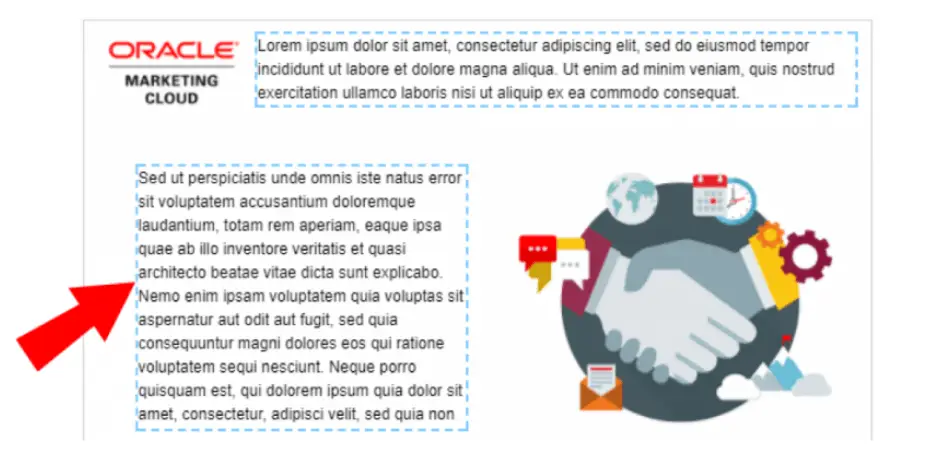
When using locked email templates, the administrator or template designer selects in advance the parts of the email that will be editable or removable by the user. Then, when the template is used, the asset creator gets a simplified experience. There are three ways to designate template sections editable:

  • Right-click sections of the template in the preview window to designate them as editable.
  • Add two properties to the code in the HTML pane. You can specify which components can be removed or edited by adding the attributes elq-edit=”true” and elq-delete=”true.” Only the HTML source editor offers this option.
  • Move to protected content in settings. From here, you can decide whether users can alter the layout, default style, or email design.
Eloqua email templates

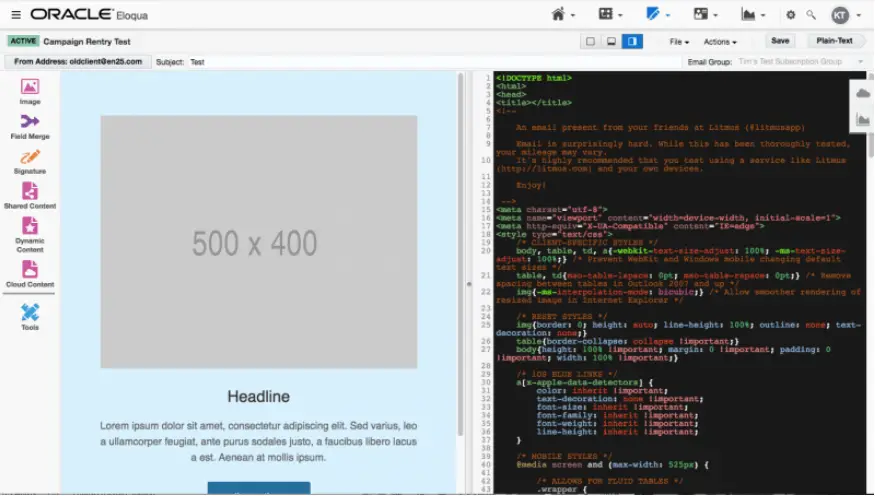
Highlighted sections with dotted lines can be edited when users create a new Oracle Eloqua Email asset.

Advantages of Using a Locked Eloqua Email Template

Locked Eloqua email templates offer several potentially helpful advantages, including:

  • Locked templates let you expressly designate which parts of the cannot be changed. Administrators and designers can then ensure that certain elements, including layouts, logos, or legal disclaimers, cannot be edited.
  • Organizations can ensure that only authorized individuals alter the templates to render correctly on all clients by restricting access to the CSS.
  • Locked templates offer a simple user interface. Users can only point and click on editable areas, immediately informing them of what can be modified and how.
  • Eloqua users cannot access the HTML and CSS backstages of the email designer in a Locked template. Not only does this allow users to make edits without needing to understand coding, but it also prevents accidental edits to the code.

Potential Difficulties With a Locked Eloqua Email Template

Of course, a locked email template may not be the best choice for every campaign. A few potential challenges to consider include:

  • The more complex or intricate the email design becomes, the harder the template will be to edit.
  • Because locked templates don’t allow as much editing flexibility, administrators must anticipate as many use cases as possible and create templates for each one.
  • Users can only access more sophisticated features, such as dynamic content or signatures, if those features are already included in the template. Even then, users cannot swap the component out for another of its kind.
  • To develop locked templates, many users choose to use the source editor. Using tags that Eloqua does not officially support can lead to issues, such as using Eloqua Engage secure templates.
  • There is no way to quickly fix an email asset because there is no access to the underlying code. The only solution is troubleshooting the template and then completely rebuilding the asset.
  • You’ll probably need to make frequent modifications over time because ISPs alter how email clients display messages, which is annoying if you need to send an email out immediately.

Unlocked Email Templates

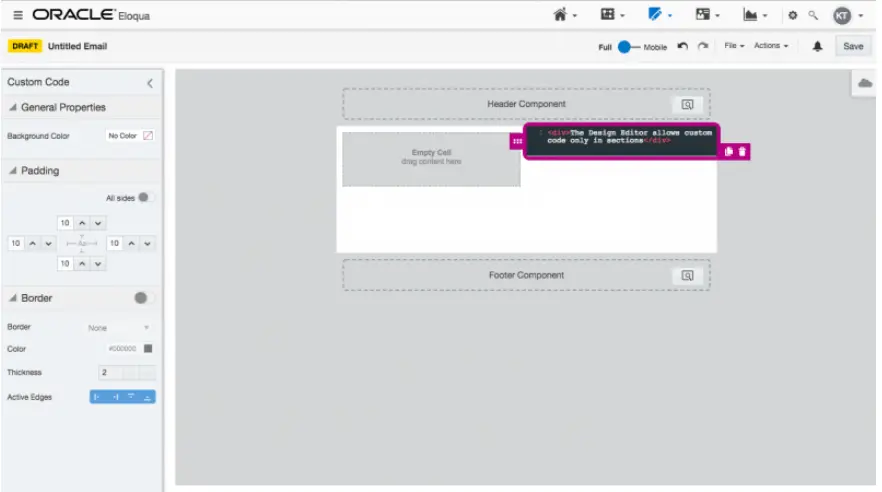
Only the Source Editor, which offers complete access to the underlying code, offers truly unlocked templates. Despite allowing users to apply custom code to editable parts, the new Design Editor does not let you view or modify the overall code.

eloqua email templates

Advantages of Using an Unlocked Eloqua Email Template

More advanced Eloqua users will find many advantages to using an unlocked Eloqua email template. For example:

  • Users with the necessary skills have total control over the email asset since they have access to the underlying code. As a result, the user can design more intricate layouts than those that could be achieved when utilizing locked templates or the Design Editor. The responding behavior of the asset is likewise subject to more user control.
  • All email technologies offered by Eloqua, including dynamic content, shared content, signature layouts, and others, are entirely accessible to users.
  • Unlocked templates can be deployed more quickly and efficiently than Locked templates since they are less complex.
  • When a developer has access to all the underlying code, any flaws can be rapidly identified and fixed.

Potential Difficulties with an Unlocked Eloqua Email Template

Of course, an unlocked email template isn’t for everyone. A few potential hurdles to keep in mind include:

  • Eloqua administrators need to put more business practices in place because users now have total authority over the email, ensuring that outgoing emails adhere to brand standards.
  • It can be intimidating initially because the user interface incorporates all of the Oracle Eloqua email components. Because it is less straightforward, new users must learn what each function accomplishes.
  • Even minor HTML or CSS code modifications can significantly change the final email’s layout. Coding for Outlook and Gmail can be particularly challenging. Some people may make tiny modifications without comprehending the potential consequences because the underlying code is accessible.

Choosing the Right Email Template

Your choice of using locked or unlocked Eloqua email template will depend on several factors: the nature of your campaigns, the amount of required customization, the skill levels of your Eloqua users, and the amount of time you have. Consider your needs at the start of each marketing campaign. Choosing the right templates will make your final campaign smoother.

Want some extra help getting your email design program off the ground? Contact us today to schedule expert Eloqua training.


dynamic content

Any marketer knows the impact personalized email marketing can have on revenue generation. Customers appreciate marketing materials designed specifically around them and their interests. One way this personalized content is made possible is through a critical part of email marketing: dynamic content.

While dynamic content is not difficult, doing it correctly can be complicated. It involves multiple steps and processes that must work together to produce an effective result. Today, we will explore the key steps in the dynamic content creation process and why they are important.

What Does Dynamic Content Look Like?

Simply put, dynamic content refers to a personalized marketing email based on a particular customer’s behavior or attributes. Examples of dynamic content might include:

  • An email reminding customers of forgotten items in their shopping cart, encouraging them to return and complete the purchase. Some businesses may include a discount code or other incentive to return.
  • An alert that a product the customer has previously added to their wish list is on sale (or the sale is ending soon).
  • A message suggesting products related to something the customer has previously purchased. For instance, a customer who just bought a grill might get an email suggesting particular tools or accessories used for outdoor cooking.
dynamic content

Dynamic Content: An Overview

A birds-eye view of creating dynamic content involves these steps:

  1. Creative brief: The process of creating dynamic content starts with a request from a marketer identifying the target audience and the content they want to deliver to that audience. This information is typically documented in a brief, which provides draft content for each recipient.
  2. Content creation: The next step is for copywriters and designers to build the content based on the brief. They create content relevant to each target audience and ensure it meets the brief’s goals.
  3. Coding and data management: Once the content has been created, it is handed over to the production team. They configure the marketing systems with content, configure the rules for use, and ensure it works with the data to achieve the desired results. This step is critical and requires close attention to detail to ensure all instructions are followed correctly.
  4. Testing and quality assurance: Before sending the email, it must be tested to ensure it works as expected. This includes checking for technical issues and ensuring the email meets quality standards.
  5. Previews and feedback: The email must be proofed by the requestor and legal team to ensure that the final product meets all legal and compliance requirements. Previews must be made available to non-technical stakeholders with the power of approval, even if they may not have a technical background.

Understanding Dynamic Content Creation

Creating Dynamic Content is a multi-step process that requires collaboration and communication between multiple teams. But when done correctly, it’s also far from difficult. By following these key steps and ensuring that everyone involved is informed and educated on their responsibilities, you can create dynamic content that delivers the results you want for your email marketing campaigns.

Not sure how to build dynamic content for your email marketing campaigns? We can get you on the right track. Contact our marketing experts and start improving your marketing efforts today.


4Thought Marketing Logo   February 13, 2026 | Page 1 of 1 | https://4thoughtmarketing.com/articles/tag/email-personalization/