lead generation vs. demand generation

Lead generation and demand generation may sound like the same thing. In practice, they can be similar. However, the differences are critical for any marketer to understand. Let’s compare lead generation vs. demand generation and see how they differ, and what that looks like practically.

What is Demand Generation?

lead generation vs. demand generation

Marketers must view demand generation as the bigger picture and lead generation as one element of the wider demand generation function.

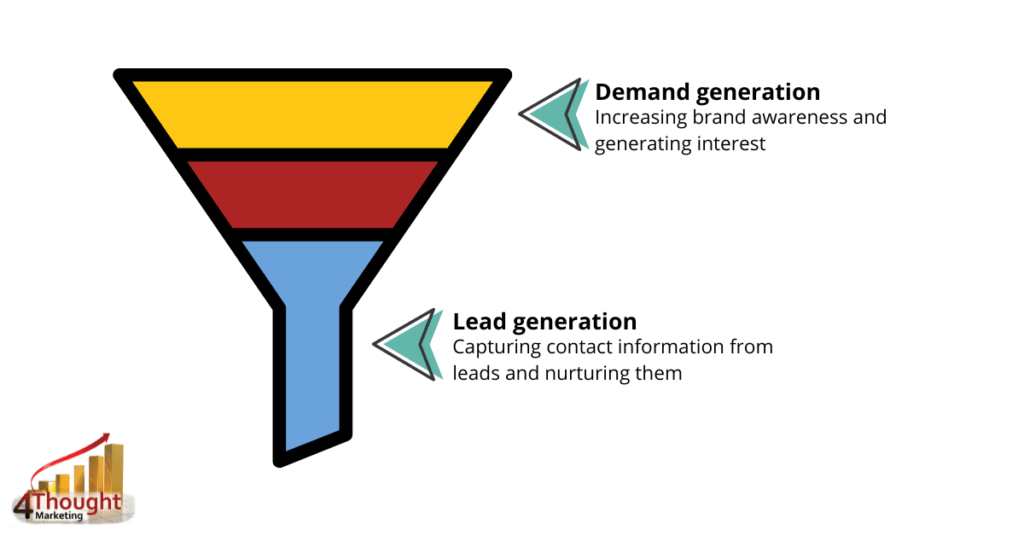
Demand generation is the process of increasing awareness and demand for your company’s service or product. The focus here is getting your brand name out there and drumming up interest in what your brand has to offer.

In other words, demand generation is bringing new visitors to your business or website. The goal is to establish your target audience, get them thinking or talking about you, and build trust with them through thoroughly planned content and interactions.

One common method of demand generation is creating ungated content, meaning customers don’t have to commit to anything to access the content. Examples of this can include:

  • Blog posts
  • Case studies
  • Interviews
  • Infographics
  • Press releases
  • Social media posts
  • Resource pages
  • Videos

This content aims to increase the brand’s or company’s profile and attract attention to it. You can build trust and connect with your target audience through engaging content. That will encourage them to come to you.

What is Lead Generation?

lead generation vs. demand generation

Lead generation requires a specific skill set, as it is about conveying interest to leads and guiding them through the funnel. It could be described as a way to funnel through eventual buyers of your service or product. Its purpose is to capture personal data.

Remember that lead generation strategies are used to obtain names, email addresses, and phone numbers, with the hope that some of these people will convert into qualified leads. Hence, gated content is the main priority here, meaning people must sign up and share their contact information to download or receive the content.

The most typical types of lead generation content include:

  • Email subscriptions
  • Ebooks
  • Research papers
  • Online courses
  • Product demos and free trials
  • PDF guides
  • Cheat sheets or checklists
  • Whitepapers
  • Viral contests

Where Do Lead Generation & Demand Generation Fit into the Sales Process?
lead generation vs. demand generation

Comparing lead generation vs. demand generation efforts is essential to tracking the impact of your B2B sales process. These strategies involve applying research, building credibility, and addressing consumer challenges through your content. Well-produced demand-generation content offers solutions and helps connect your target audience, resulting in more leads.

Demand generation marketing techniques let you reach a big audience with impactful messaging in different ways. The goal is to raise visibility for your digital presence, solidify your position as a thought leader, and keep your business at the forefront of your mind. Demand generation thus fits well into the research and prospecting part of the sales process.

Meanwhile, lead generation strategies enable better access to set up a first sales consultation or product demo for interested parties. It also keeps the sales pipeline filled with qualified leads you can move throughout the sales process. Identify where those leads are in the sales funnel and personalize the approach according to their interest level. That will help you close more deals and establish better long-term client relationships.

Running Both Strategies Together

lead generation vs. demand generation

What you need to bear in mind about lead generation and demand generation is that they are both essential to your B2B marketing strategy. They are made to work well together, along with lead generation, to support the work completed by demand generation.

Other organizations may focus on lead generation to acquire contacts and email addresses to hit sales targets. However, the ideal approach is to deploy both lead and demand generation simultaneously. This is because you cannot produce leads to your fullest potential or sustainably if there is no demand in the first place. People must know who you are and the products or services you provide.

Similarly, demand generation requires the further push of lead generation. Otherwise, all the hard work to get people interested in your brand could go to waste if you cannot convert them into leads.

Lead Generation and Demand Generation: Better Together

So, should you pursue lead generation or demand generation?

Realistically, you should pursue both. Without demand gen, you will have trouble getting leads into your funnel to convert a significant number into customers. On the other hand, you may end up attracting poor-fit customers who won’t help you grow your brand and business without quality lead-gen strategies.

With strong inbound and organic marketing processes to raise awareness of your site and excellent lead-generation practices to identify best-fit customers, you will be well on your way to huge growth.

How 4Thought Marketing Can Help

Determining what your prospects want and what they need to conquer their challenges will help your sales efforts. Deliver information that supports your solutions and demonstrates their effectiveness. Those ongoing lead and demand generation efforts drive high-quality engagements with qualified leads and continuously connect with new prospects. 

At 4Thought Marketing, we are well-versed in B2B sales and can guide you on the tools, strategies, and techniques essential to flourish in your B2B sales process. Get in touch with us today to get your marketing strategy on the path to success.

account based marketing

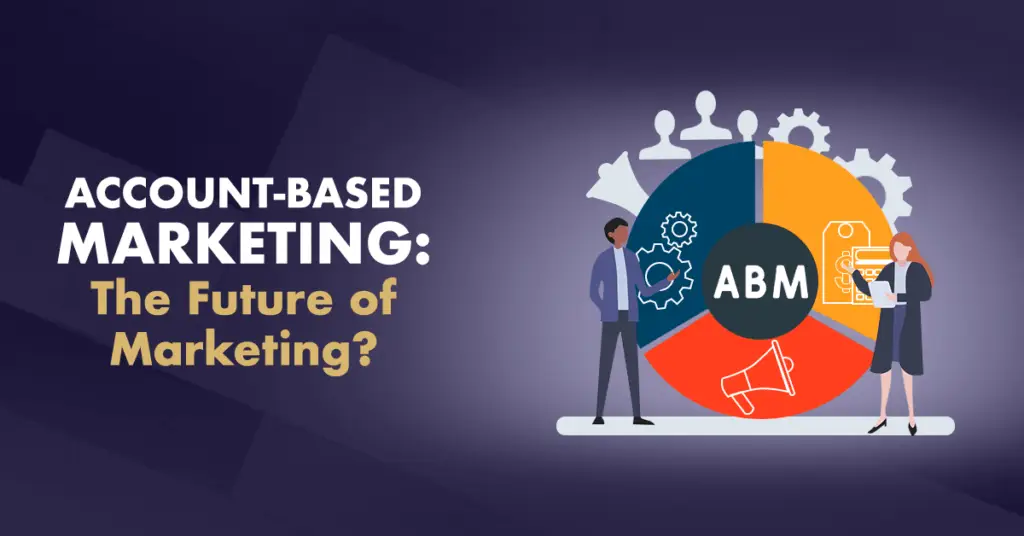
When most people think of marketing, what they’re really thinking of is conventional marketing: an approach that begins by generating as much attention as possible and narrowing down to potential leads based on that. This approach is the most common today. And it certainly works to a degree. But in more recent years, a different strategy has begun to make itself known: account-based marketing (ABM). Let’s look a little closer at both.

account based marketing

Conventional Marketing Funnel

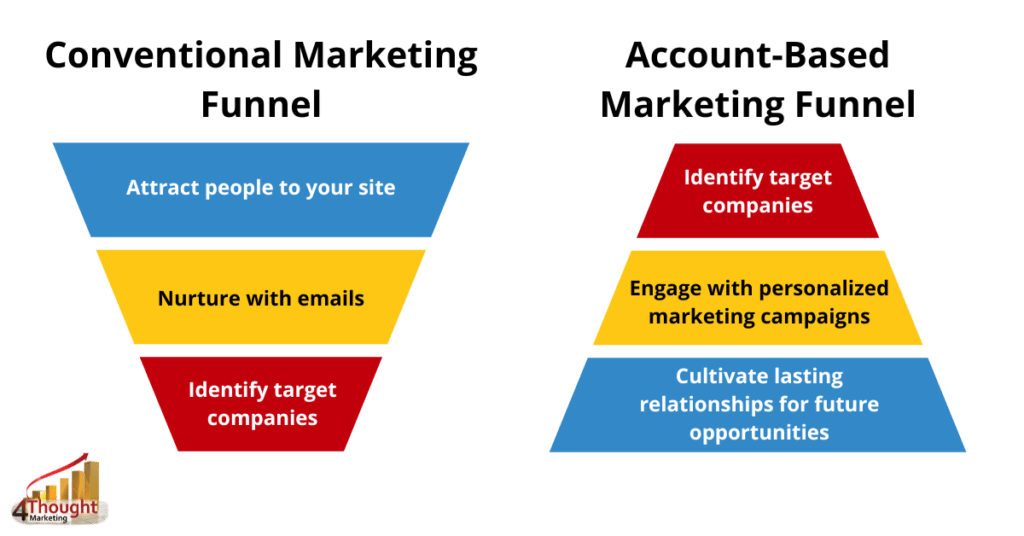
Conventional marketing starts by casting a wide net and trying to get your products and services in front of as many people as possible. From there, marketers narrow the audience down to potentially interested people. Nurturing begins through automated emails, personalized offers, and similar methods. Finally, sales joins the process downstream to turn these interested targets into conversions. Sales then reports back to marketing on which leads were good and which didn’t work out, and marketing can alter their future plans accordingly.

In practice, conventional marketing means spending a lot of time mass-producing content and showing it to everybody without knowing for sure if they’ll be interested. Sales isn’t involved until the nurture stage or later. And of course, because you’re starting with such a huge group of only potentially interested people, not every lead will be a success.

Account-Based Marketing Funnel

Account-based marketing takes the conventional marketing funnel and flips it on its head. Marketing and sales have a partnership from the beginning in ABM as both work together to identify and focus on their target audience. They grow the list of potential clients through careful research. Once they have a completed list, the nurturing and personalized marketing campaigns begin. Any leads that don’t work out are crossed off the list. Meanwhile, every target that responds with interest or converts remains a future opportunity.

In practice, account-based marketing involves sales from the very beginning so nurture begins early. This also allows marketing to produce targeted materials for a specific audience rather than generic advertisements. The process also produces far fewer leads to track and nurture. Since both sales and marketing can focus on a small group rather than trying to please a massive audience, they are more likely to win over leads and build long-term customer relationships.

ABM’s Advantages Over Conventional Marketing Methods

So why can ABM lead to more successful campaigns than conventional marketing? There are several key reasons. First: as stated above, both sales and marketing can target key accounts through ABM, resulting in more personalized (and thus more effective) marketing. Second: sales is involved from the very beginning, not just marketing, so everyone’s in the loop from the start.

Finally, and perhaps most importantly: ABM builds on demand that already exists. Conventional marketing focuses on generating demand. Account-based marketing focuses on locating demand and meeting it.

The Current State of Account-Based Marketing

For now, most companies stick to conventional marketing as the default method. Most businesses start out trying to “read the room”, so casting a wide net seems like the better option. Some may hire a consultant to narrow down the client base. But even with a consultant’s help, it’s very rare for a business to start with account-based marketing right off the bat.

But ABM is gaining some traction. Its proven methods and increased lead production certainly earn attention. As customer and company behavior alike continues to evolve, account-based marketing is expected to become the norm over the next decade.

Conclusion

Which is better: conventional marketing or account-based marketing? That’s arguably the wrong question. Both have their place. Sales and marketing teams should take the time to consider a variety of factors before drastically changing their advertising strategy. But if your company can spare the resources, account-based marketing holds great promise.

Interested in how you can identify targets and follow up with them easily? Get in touch with our team of marketing experts today to learn more.


marketing automation oracle eloqua

Oracle Eloqua is a market-leading marketing automation platform that helps companies generate leads that convert. Named a leader in the 2021 Gartner® Magic Quadrant™ for Marketing Automation Platforms, it enables your team to craft and send personalized emails, integrate seamlessly with other systems, track customer activity, and plan future campaigns—all within a robust but easy-to-understand visual interface. Eloqua integrates with leading customer relationship management systems, including Oracle Sales, Microsoft Dynamics, and Salesforce. Most importantly, Eloqua makes it easy to create and manage email campaigns that generate revenue. 

But Eloqua’s capabilities don’t stop there. Marketing automation experts know that sending too many emails or emails that don’t match customer interests runs the risk of being marked as spam and never seen by the customer. Fortunately, Eloqua users have an easy solution.

Avoid These 3 Common Email Campaign & Marketing Automation Pitfalls

Customers delete corporate marketing emails or mark them as spam for a variety of reasons, but three stand out as the worst offenders: 1) they receive way too many emails, 2) the emails come too often, and 3) the flood of emails don’t contain relevant information. Oracle Eloqua can help you address each of these problems.

The first two problems can be addressed with Eloqua’s email scheduling system. This allows you to space out the emails so the customer won’t feel overwhelmed. Follow-up or reminder emails can also be scheduled with enough time in between to avoid harassing the customer. This way, your contact doesn’t feel overwhelmed by the volume of emails they receive.

So now you know your customers won’t get a dozen identical emails from you every day. From here, you can address the third problem: lack of relevant information. With Eloqua’s activity tracking and segmentation functions, you can send each contact information relevant specifically to them and their interests. You can also avoid sending information they don’t want to receive.

Tips for Creating Effective Email Campaigns with Oracle Eloqua

With Eloqua’s built-in functions, running an email campaign from start to finish has never been easier. Here are some critical components of running effective campaigns to keep in mind:

  1. Customer segmentation: Segment your customers and prospects based on past interactions and user preferences. Form a clear picture of what your customer wants.
  2. Collect customer activity data: Observe how your customers respond to each marketing campaign and use the information to target communication based on interests.
  3. Create personalized, dynamic emails: Eloqua allows you to create dynamic content, so your communication includes timely and relevant data, not just a generic, general-purpose email. Your customers deserve emails tailored to their interests.
  4. Maintain professional standards in your email design: Emails should help customers instantly recognize your brand and appear uncluttered and professional.
  5. Tell a story with lead nurturing: Based on customer interest, tell a story through a series of customized emails that go to the right person at an appropriate time.
  6. Review generated data reports: Review data collected to create detailed, customizable reports highlighting the information you need to make informed decisions.
  7. Long-term lead management and quality assurance: With each campaign you run, Eloqua collects data to help you improve future campaigns. Better customer interactions can increase brand awareness, consumer engagement, and sales figures.

Oracle Eloqua Gives Email Marketers an Advantage

Eloqua’s extensive capabilities make email marketing easier than ever. Whether you’re trying to decrease customer unsubscribes, increase your profits, or both, Eloqua has you covered. You can be sure that your promotional emails will actually make it to your subscribers’ inboxes.

Want to see what else Eloqua can do? Get in touch with our team of marketing automation experts today to find out.


segmentation for marketing

It goes without saying that different people have different interests. But marketers who want to get as much promotional material out as possible, as quickly as possible, might not give this fact the consideration it deserves. Prioritizing audience segmentation for marketing is the foundation of a successful campaign.

Why is Segmentation for Marketing Such a Big Deal?

On the surface, creating a single mass marketing campaign designed to appeal to everyone sounds much easier and faster than segmentation. Just get the word out, right?  However, a broad advertisement can only do so much. Your customers want products and services tailored to them specifically—and to provide that, you need to know your audience.

Segmentation for marketing separates your potential audience into groups, or segments, based on shared characteristics. These characteristics can include:

  • Job title
  • Geographic location
  • Purchase history
  • Expressed preferences
  • Engagement with previous promotional material
  • Etc.

Organizing your audience this way lets you give potential customers what they want or need. With specialized ads tailored to each segment, you can more effectively market your products and services to interested audiences.

Modern Marketing without Segmentation, aka Spamming

Modern marketing technology allows companies to send millions of emails with just a click. But without proper segmentation, those emails go out to literally everybody on your organization’s contact list. And given the volume of advertising companies tend to do, that’s a LOT of emails every week, if not every day. Consumers have an unflattering nickname for this kind of marketing: spam messages.

Even unintentionally spamming your customers will impact how much they trust you. Aside from the fact that your messages will look suspicious (and maybe even be flagged by the recipient’s inbox), it also reflects a lack of care for your customers. You are doing the opposite of what the modern customer wants, which is to be empowered to get the information they want because they’ve told the company through their choices and action what they want to receive. Likewise, the customer wants to not receive other information as a result of poor segmentation.

Privacy Laws: The Result of Broken Customer Trust

The new wave of privacy laws is, in part, a result of broken customer trust. Corporations abused the data they collected, and consumers pushed back. Without a healthy respect for your customers’ privacy, reflected in part through segmentation and heavy personalization, you are destroying the trust people have in your company.

How 4Segments Can Help

Advanced marketing automation software shouldn’t have to work alone. For truly effective marketing, pair your system with a powerful segmentation tool that displays the data in a clear, visually distinct format. 4Segments fits the bill perfectly.

4Segments lets you visually create customer segments and build campaigns around them, ensuring you target only the right audience. Even better, this software is designed to pair not only with your marketing automation system but with our privacy compliance software, 4Comply. Maximize your marketing efforts without putting yourself at risk! Contact us to learn more.


oracle eloqua custom objects

Marketers know that Oracle Eloqua Custom Objects (COs) can do quite a bit when used correctly. As an Oracle Partner, we get a lot of questions about what you can do with data stored in COs. And we have good news! Eloqua’s Program Canvas, introduced in 2016, offers you many more options than the previous out-of-the-box functionality.

In the Eloqua Program Canvas, you can add Custom Object records to a program and choose from a list of decisions or actions to impose on the data. For instance, you can compare the value in a single field to create a decision tree. You could perform a few basic updates. You can even completely delete a record when it’s no longer needed. But why stop there?

Using Oracle Eloqua Custom Objects in the Program Canvas

Eloqua users are very creative. In our own observations of clients that take advantage of Eloqua systems, we’ve seen marketers:

  • Perform calculations on fields within or across records
  • Compare the value of two different fields within or across records
  • Update fields on linked Contact records from data in a CO record
  • Update fields in a CO record from linked Contact records
  • Look up data in a Custom Object and match it to Contact record data to determine which sales rep is best for a particular job
  • Append values from different fields within or across records
  • Perform a wide variety of data filters and manipulations, including but not limited to:

    • Find all records with a renewal before a certain date
    • Find all records created in the past (insert number here) weeks
    • Add a specific amount of time to a date field

And that’s not even a complete list! Our clients have pulled off some amazing feats with Oracle Eloqua Custom Objects.

Expand Oracle Eloqua’s Capabilities with Cloud Apps

As impressive as that list is, there’s likely plenty of other functions that you want that you didn’t see. That’s where Cloud Actions, Cloud Decisions, Cloud Apps, and Cloud Connectors come into play. Using Oracle Eloqua’s development platforms and API capabilities, sharp developers can create apps to expand the Program Canvas’s functionality even further and allow for even more creative choices.

Here at 4Thought Marketing, we have several favorite Oracle Eloqua cloud apps. And we’re proud to say we’ve made quite a few ourselves! (Check out our list of in-house created cloud apps here.) If you feel you have tried everything Oracle Eloqua offers in its current state but still can’t meet your business goals, get in touch with us. We haven’t yet found a CO problem that we can’t solve.

Contact us today to see which of our cloud apps is best suited to help you take full advantage of Oracle Eloqua Custom Objects.


customer nurturing

Businesses prioritize finding new leads and new business. The marketing department works overtime to attract interest, sales pushes to close the leads, and both celebrate their success at capturing new business. They then quickly move on to hunting for the next sale. This can certainly help the company’s profits. But what’s wrong with this picture? Both sales and marketing have forgotten a key part of long-term success: customer nurturing.

Outside of regular communications like subscription renewal offers, how often does your organization reach out to your customers? If this only happens rarely, you could be turning customers off with your inattentiveness. Dissatisfied customers tend to look elsewhere for what they want. Not only does this make it far less likely that you’ll keep them as a lifelong customer, but it could also mean that they’ll permanently switch to a competitor with effective customer nurturing in place.

Customer Retention is Cheaper – and More Profitable

The numbers speak for themselves:

  • Approximately 53% of marketing dollars are spent on customer acquisition, an impressively high number for a rather unimpressive return, according to Bain & Company.
  • According to the Harvard Business Review, acquiring a new customer can cost 5-25 times more than sustaining an existing one.
  • Research by Gartner shows that 80% of your future profits will come from just 20% of your existing customers.
  • Bain & Company highlights that increasing customer retention rates by 5% will increase profits by up to 95%.

In spite of the significantly better payoff of customer retention efforts, approximately 53% of marketing dollars are spent focusing solely on acquiring new customers, according to Bain & Company. While this is a lower number than before, it still misses the point. Neglecting current customers for new ones will not help your long-term profits.

But what form can effective customer nurturing campaigns take? Let’s look at a few examples.

4 Types of Customer Nurturing

customer nurturing

1.  On-boarding

On-boarding campaigns introduce the customer to your products, services, or company after they make their first purchase.

You may want to do this, for example, with someone who purchased a new software package. Here’s what this might look like:

  • A “welcome to the family” message
  • An overview of the purchased software
  • A list of the software’s more advanced features
  • An invitation to join the online support community

Your goal with an on-boarding campaign is to make the customer feel like they’re part of your company, product, and community. This engages, retains, and makes them happy.

customer nurturing

2.  Renewal Campaign

This type of campaign suits companies that sell products that last through a particular amount of time and must be renewed. These products could include:

  • Cloud software
  • Insurance policies
  • Maintenance contracts
  • Product warranties

The list goes on – if your company sells anything that requires renewal, this type of nurturing campaign fits in with your goals.

Effective renewal campaigns should generally begin three to six months before the actual renewal date. Encourage early renewals with reduced prices or other incentives. This allows you to show a vested interest in keeping the customer around, instead of appearing to care only about getting money from them.

customer nurturing

3. Product Education & Engagement

This type of campaign is similar to on-boarding. However, while on-boarding is geared toward familiarizing customers with the company and product/service, an education and engagement campaign is more targeted.

This is a series of emails that specifically educate on a certain subject. Examples can include:

  • A five-part email series on maintaining a newly purchased appliance
  • Tips and tricks to get the most out of your new software
  • Cosmetic/decorative tips to improve home renovations
  • Rarely used but helpful features of a recently purchased computer

Customers often appreciate tips, tricks, and updates on current events.

customer nurturing

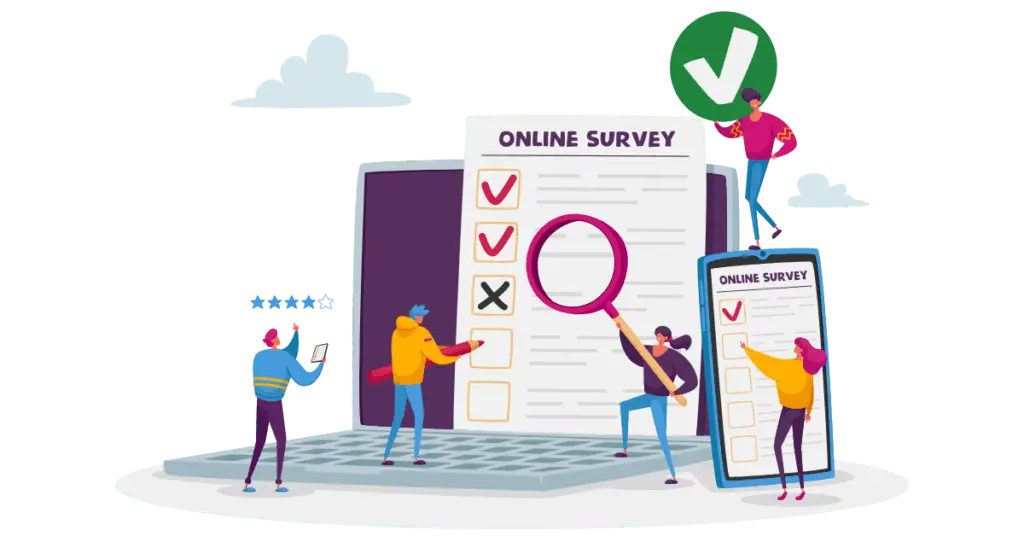
4. Customer Survey

Any survey is better than no survey. Even if most of the recipients simply delete the survey email, they will usually enjoy the thought that your company cares enough to send them a survey and that you value their opinion and state of mind regarding your products and services. In this case, “it’s the thought that counts”.

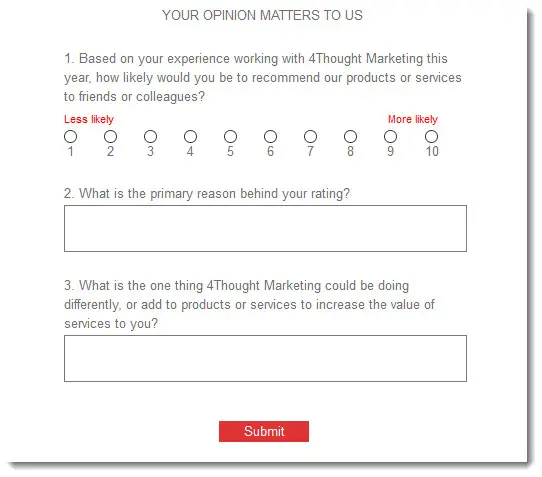
A Net Promoter Score survey can measure customer loyalty and identify potential areas of improvement for your business.

Net Promotor Score Survey

The Critical Role of Customer Nurturing

The numbers speak for themselves: customer retention and nurturing not only cost less, but also bring in more profits. Constantly prioritizing new leads and new sales costs more money and doesn’t have as high of a return rate.

By carefully nurturing your customers and keeping your brand integrated with their lives, you can turn them into loyal, life-long purchasers. After all, if they bought from you once, they’re more likely to buy from you again. Someone who just learned your company exists isn’t nearly as likely to spend money with you yet.

If you aren’t yet using nurture campaigns, now is a good time to start them. If you already use them as part of your marketing strategy, remember that they need to evolve with your market and now is probably a great time for a message and content review.

Ready to take your customer nurturing strategy to the next level? Get in touch with our team of experts and start improving your profit margin today.


eloqua upload wizard

Uploading data into marketing automation systems like Oracle Eloqua can quickly become complicated. As marketers know, there’s far more to the contact list upload process than just clicking a button. Some data might be in the wrong format and need to be converted. Other data might overwrite important information when uploaded and requires creating additional columns for processing. Any and all uploaded data must meet your pre-established standards.

Manually reviewing the data can catch most of these errors. Unfortunately, this is not always a practical solution. Manual review is a time-consuming and error-prone process and requires the attention of a pre-trained professional. Only they can correctly manage pre-validations and pre-processing requirements. If you’re required to import several different files, from different vendors, in different formats and the problem grows exponentially.

You need a solution that automates all of the manual pre-processing and allows people minimal training to successfully upload the data. Fortunately, we have a solution: the Eloqua Upload Wizard.

The Upload Wizard from 4Thought Marketing is my new best friend. It reduced the time required to process new leads from days to minutes and to get them into the hands of sales much faster.

Brinette Holdren, Sr. Marketing Specialist – Operations & Campaign Management, Catalent

What is the Eloqua Upload Wizard? 

The Eloqua Upload Wizard is a custom Eloqua cloud app that allows any trained user to upload contact lists to Eloqua.  Based on your unique requirements, it can be configured to enforce policies and validations before the data goes to the marketing automation system. We have also seen our customers successfully use the Eloqua Upload Wizard in several different ways, including:  

  • Reposting validated records to an internal system for tracking before uploading
  • Creating templates for future uploads 
  • Enforcing custom upload notifications and error reporting 
  • Automating uploads through the validation rules and processing via SFTP  
  • Allowing internal users to upload data to the marketing automation system without the need for a license for each resource
  • Allowing subcontractors or partners to upload data to the marketing automation system without providing access to the system and the data

Eloqua Upload Wizard Dashboard: Tracking your Uploads for Quantity & Quality 

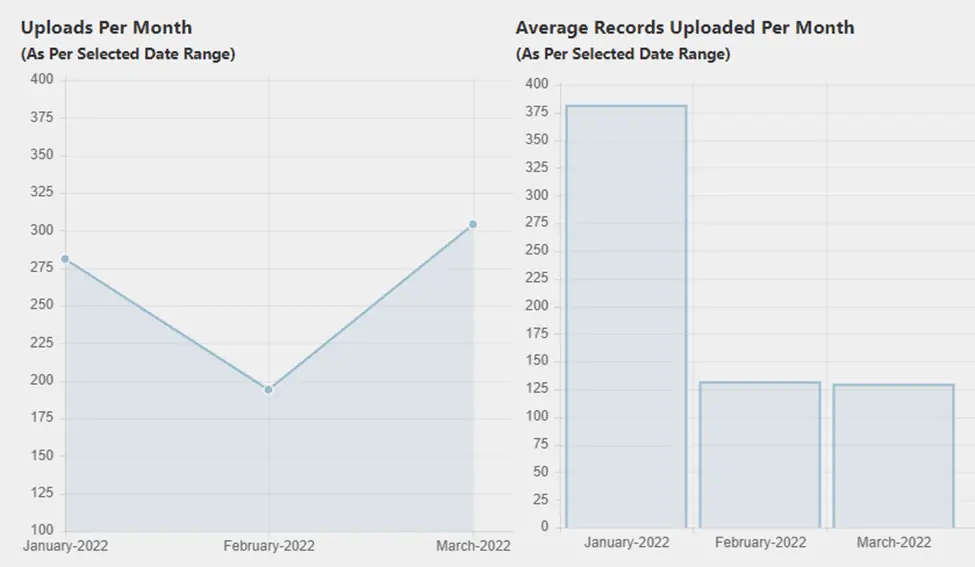
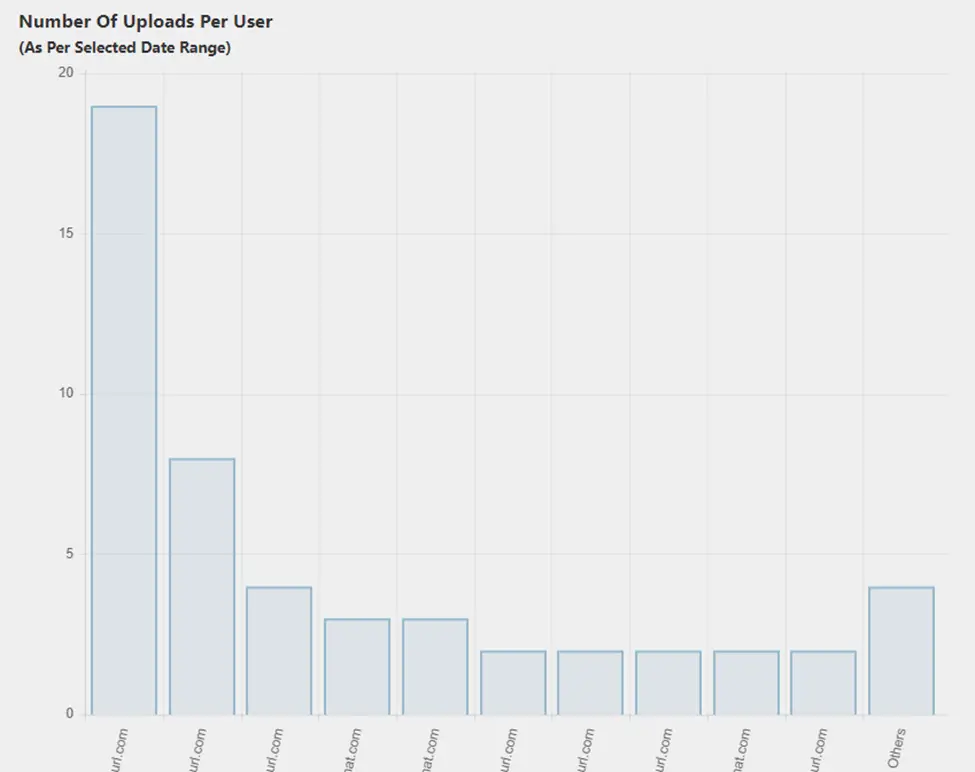
You’ll want to ensure that all the data you upload to your marketing automation system meets your internal quality standards. The Upload Wizard dashboard allows managers to track this and more, including:

  • The number of records processed in a given time period
  • How many uploads each user has performed
  • The number of records rejected, bounced, or updated
  • The number of newly added records
eloqua upload wizard

Enforcing Privacy Laws in Uploads 

Privacy-conscious companies can also configure the Eloqua Upload Wizard to enforce requirements based on the country and region of the records to be uploaded. For example, for records from the EU, the Upload Wizard can trigger additional validation to ensure the corresponding consent information is included in the upload. Any records that don’t meet these requirements would be marked as an error due to consent issues. This helps to protect your company from accidentally violating a relevant privacy law and potentially incurring a fine.

Save Yourself Some Time

With the Eloqua Upload Wizard, you and your team can enjoy a streamlined upload process, spending significantly less time on manual quality control. Interested in hearing more? Contact us today for more information on our suite of custom-built cloud apps.


eloqua nurture campaign

Every marketer knows the value of reaching the right people with the right message – at the right time. As a modern marketer, you also know the downside of sending too much information – or the wrong message at the wrong time, especially when your target audience has moved on to the next stage of their buying cycle.

Eloqua nurture campaigns gently nudge buyers by responding to interests and telling a compelling story about a product or service.  These campaigns are staples of marketing automation platforms,  offering robust solutions for building and managing nurture campaigns.  However, creating robust nurtures comes with complexity, especially when the buyer indicates they’re ready for the next step and they become a marketing qualified lead (MQL). When they reach this stage, you should remove them from the current nurture.  No one wants to continue receiving emails from marketing when they’re already chatting with sales.

Think about your current nurture campaigns: You’ve probably spent a lot of time and energy to make sure you have the right audience for each campaign. You might have a campaign for new contacts – people who are just finding out about your company. You may have several different campaigns, each targeting potential buyers based on the interest they have expressed in one product over another. Being savvy, you also provide a different message for people who are farther down the buying process, maybe they reached out to you via form submits or downloaded specific whitepapers.

Each of these nurture campaigns usually consists of 3 or 4, or maybe 5 different emails – all designed to keep the potential buyer engaged and help guide them on their buying process. There’s a lot at stake to do this well, so how do you make sure your nurture campaign members are kept up to date?

Option 1: Going Old School

Decision Steps for Each Stage in Your Campaign

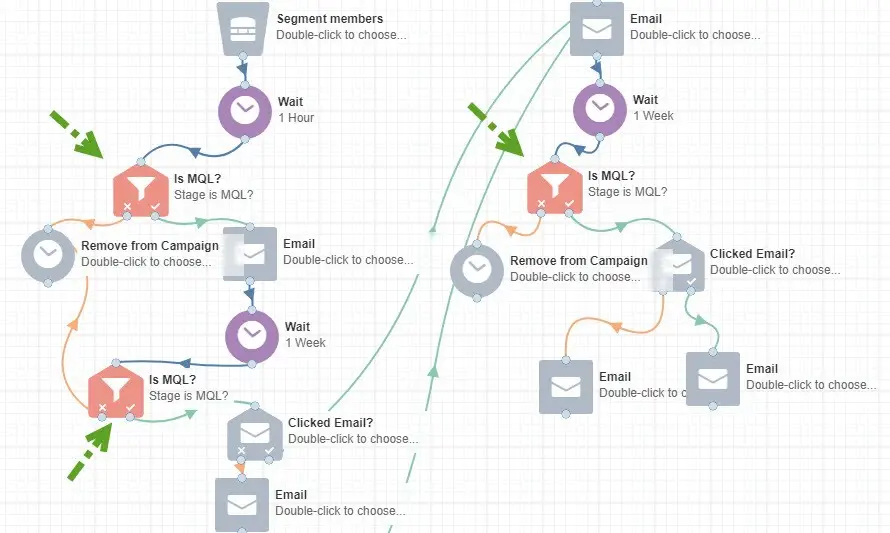
At each stage of a campaign, you’ll need to check to see if the person still meets the criteria for that campaign. Have they expressed interest in a different product? Have they reached MQL qualification, and are ready for a more direct message? Maybe they made a purchase, so now need customer information instead of prospect messages?

When building your campaigns in Oracle Eloqua, you could insert decision steps before each email to make sure that the right message is getting to the right person at the right time. This means that every single one of these decision boxes needs to be updated whenever you have new exclusion criteria.

eloqua nurture campaign

If you have 1 or 2 simple nurture campaigns, each consisting of just a few emails, then this approach may be your ideal route.  However, if you have a growing number of nurtures, each with many steps, this method isn’t sustainable.  There is a better solution that uses a cloud app.

Option 2: Remove Contacts Automatically

Use the the Campaign Contact Remover Cloud App

If your nurture program involves multiple campaigns, each consisting of several emails, then maintaining a multitude of decision steps is time-consuming and rife with a chance for error or omissions.

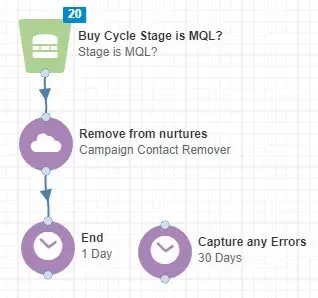
There’s a simpler way to manage and maintain all of the various criteria for one or more campaigns: our easy-to-use Campaign Contact Remover.

eloqua nurture campaign

With the Campaign Contact Remover app, you can manage all decisions in one program simply by creating a filter with the exclusion criteria. The app then determines which contacts should be removed from one or more of your campaigns.

It’s even easier to do it than to explain it– Get a 10-Day Free Trial and check it out for yourself.

So, there you have it! If your business is just getting into lead nurturing or if you don’t have various campaigns to maintain, then doing manual iterations to update your send lists may work great for you. On the other hand, if you’re moving toward nurturing program scalability and resource efficiency, then this is the right time to save yourself some time with the Campaign Contact Remover App.

Interested in seeing the Campaign Contact Remover app in action? Contact us for a demo.


4Thought Marketing Logo   April 9, 2026 | Page 1 of 1 | https://4thoughtmarketing.com/marketing-automation/page/15/