AI lead scoring, predictive lead scoring, rule-based lead scoring, B2B lead qualification, machine learning lead scoring, lead scoring model
Key Takeaways
  • AI lead scoring adapts over time; rule-based models do not.
  • Rule-based scoring works well when data volume is low.
  • Predictive lead scoring requires clean, consistent historical data first.
  • Both approaches can coexist inside a single lead scoring model.
  • MOPs teams must own data quality before adding AI to scoring.
  • Match your scoring approach to your pipeline maturity, not trends.

Your team spent three months building a lead scoring model. You mapped out every firmographic attribute, assigned weights to each behavioral trigger, and got sales to sign off on the thresholds. Six months later, sales are still saying the leads are not ready.

But the model has not changed. And that is exactly the problem. Rule-based lead scoring reflects what your team believed about buyer behavior at the time it was built. It does not learn, it does not adapt, and it cannot account for the patterns your data has quietly been revealing ever since.

Therefore, more B2B MOPs teams are evaluating AI lead scoring as a way to move from static assumptions to dynamic, data-driven qualification. This post breaks down what that shift actually involves, when it makes sense, and what your team needs to have in place before making the move.

What Rule-Based Lead Scoring Actually Does Well

Before dismissing rule-based scoring, it is worth being precise about what it is genuinely good at.

It gives you control and transparency

With rule-based models, every point assigned to a lead has a reason behind it. A VP-level title earns 20 points. Visiting the pricing page earns 15. Attending a webinar earns 10. Sales can see exactly why a lead hit a threshold, which makes handoff conversations easier and model adjustments faster.

Why it matters: Transparency builds trust between marketing and sales. When a rep asks ‘why is this lead a hot score?’, you can answer them in one sentence.

It works when data volume is limited

Machine learning models need volume to find meaningful patterns. If your organization closes fewer deals per year, a predictive model may not have enough signal to outperform a carefully designed rule set. Rule-based scoring is a pragmatic choice at lower pipeline volumes, and there is no shame in using the right tool for your actual situation.

The limitation: it calculates, it does not learn

The core constraint of rule-based scoring is that it is a snapshot. It reflects what you knew when you built it. As your ICP shifts, as new channels emerge, or as buyer behaviors change, the model drifts silently out of alignment. Most teams only notice this when sales start complaining, which is usually long after the decay began.

What AI Lead Scoring Actually Does

AI lead scoring, often called predictive lead scoring, uses machine learning to identify the combination of signals that most reliably predict conversion. Instead of you deciding that ‘VP + pricing page visit = 35 points,’ the model analyses your historical conversion data and surfaces the patterns that actually correlate with closed-won outcomes.

It finds patterns humans miss

A rule-based model might weight job title and page views heavily because those feel important. A machine learning model might discover that the sequence of pages visited matters more than the pages themselves, or that company growth rate combined with a specific content download is a stronger signal than anything you had mapped manually.

What this looks like in practice: A B2B software company running Marketo might integrate a predictive scoring tool that pulls in CRM data, intent data from a provider like Bombora or 6sense, and engagement history. The model identifies that accounts showing surging intent on a competitor’s category page, combined with a contact who has attended two webinars, convert at three times the average rate. No rule set would have surfaced that combination.

It adapts as your market changes

Because the model retrains on new data regularly, it adjusts as your pipeline evolves. If enterprise accounts start converting faster than mid-market this quarter, the model picks that up. You do not have to run a scoring audit to catch the drift.

The honest limitation: it is not plug-and-play

AI lead scoring is only as good as the data feeding it. If your CRM is full of duplicate records, if your MAP has inconsistent field values, or if your historical win/loss data is incomplete, the model will learn the wrong patterns with great efficiency. Garbage in, garbage out is not a cliche here. It is the most common reason AI scoring projects underdeliver.

How to Decide Which Approach Is Right for Your Team

Neither approach is universally superior. The right choice depends on where your program is today.

Use rule-based scoring if:

  • You have fewer than 500 closed-won opportunities in your CRM history
  • Your data quality is inconsistent or field mapping is incomplete
  • You are building a scoring model for the first time and need stakeholder alignment
  • Sales is not yet in the habit of acting on score thresholds

Start with a well-governed rule-based model, get sales bought in, and use that period to clean your data and build the historical record that a predictive model will later need.

Move toward AI lead scoring if:

  • You have a mature, well-mapped CRM with reliable closed-won and closed-lost history
  • Your current model has been live for at least 12 months and is showing signal decay
  • You have access to third-party intent data that is too complex to incorporate manually
  • Your pipeline volume gives a machine learning model enough data to find meaningful patterns

The lead scoring implementation roadmap is a useful starting point for structuring either approach, including the data preparation steps required by predictive models.

Consider a hybrid model

Many mature MOPs teams run both in parallel. Rule-based logic handles obvious disqualifiers (wrong geography, student email domains, competitor contacts) and sets a floor for manual review. The predictive layer then ranks qualified leads by likelihood to convert. This combination gives you the control of rules and the adaptability of AI without depending entirely on either.

4Thought Marketing’s lead scoring service covers both architectures, including how to structure the handoff between your scoring logic and your sales team’s workflow.

What MOPs Teams Need Before Adding AI to Scoring

If your team is seriously considering predictive lead scoring, work through this checklist before evaluating vendors.

Data completeness: Are your key firmographic fields (industry, company size, revenue, geography) populated for at least 70% of your database? Sparse data means the model has less to work with on the dimensions that matter most.

Win/loss integrity: Does your CRM reliably capture closed-won and closed-lost outcomes, with reasons? Predictive models train on this data. If your sales team marks deals as ‘closed-lost’ without logging a reason, or leaves opportunities in limbo, the training data is compromised.

Field consistency: Are picklist values standardized across your MAP and CRM? ‘Enterprise,’ ‘enterprise-level,’ and ‘ENT’ all mean the same thing to a human and completely different things to a model.

Integration readiness: Predictive scoring tools like Mad Kudu and Leadspace need clean data pipelines between your MAP, CRM, and any third-party intent sources. Your integration architecture matters before your model choice does.

4Thought Marketing’s AI practice works with MOPs teams on exactly this kind of infrastructure readiness, from data audits through to model deployment and sales enablement.

AI lead scoring is not a replacement for strategic thinking. It is a tool that amplifies the quality of your data, your historical record, and your alignment with sales. Rule-based models are not obsolete. They remain the right choice for teams that are earlier in their data maturity journey, and a valuable layer even for teams running predictive models. The question is not which approach is better in the abstract. The question is which approach your program is ready for today. If you are unsure where your team stands or want to map out a path from your current model to something more adaptive, contact 4Thought Marketing to book a consultation.


Frequently Asked Questions

What is the main difference between AI lead scoring and rule-based lead scoring?
Rule-based scoring assigns points to leads based on manually defined criteria set by your team. AI lead scoring uses machine learning to analyze historical conversion data and identify which combination of signals actually predicts a closed-won outcome. The key distinction is that AI models adapt over time, while rule-based models stay static until someone updates them manually.
How much data does my team need before AI lead scoring is worth implementing?
Most practitioners recommend a minimum of 500 to 1,000 closed-won opportunities in your CRM before a machine learning model has enough signal to outperform a well-tuned rule set. Below that threshold, a rule-based model with strong governance will typically deliver better results and be easier to explain to sales.
Can I run rule-based and AI lead scoring at the same time?
Yes, and many mature MOPs teams do exactly this. Rule-based logic handles disqualification and filters out obvious non-fits, while a predictive layer ranks remaining leads by conversion likelihood. The two approaches are complementary, not competing.
What data quality issues will break an AI lead scoring model?
The most common problems are incomplete firmographic fields, inconsistent picklist values across your MAP and CRM, and unreliable win/loss data in your CRM. If the model trains on noisy or inconsistent data, it will learn the wrong patterns. Data preparation is the most important step in any AI scoring implementation.
How do I get sales buy-in when transitioning from rule-based to AI scoring?
Start by showing sales the correlation between score and actual conversion rate in your current model, then show where the gaps are. Frame AI scoring as improving the accuracy of a signal they already use, not replacing their judgment. Run the two models in parallel during a pilot period and let the data make the case.

Eloqua custom data objects; Eloqua CDO setup; Oracle Eloqua custom objects; Eloqua data management
Key Takeaways
  • Eloqua custom data objects store repeatable, relational marketing data.
  • Use CDOs when contact fields cannot hold history cleanly.
  • Start schema design with the relationship model, not the field list.
  • Good governance prevents clutter, sync issues, and future rework.
  • Well built CDOs improve segmentation, personalization, and reporting.

Eloqua custom data objects are where a clean marketing data model either starts helping your team or starts creating hidden friction. When your instance needs to track recurring events such as purchases, renewals, event attendance, or product interest, a flat contact record is no longer enough. Many teams know they need more structure but do not know how to set it up cleanly. This guide explains when to use CDOs, how to approach setup, and which use cases justify them without turning your Eloqua instance into a storage closet with better branding.

Oracle’s custom objects documentation makes the core model clear: these records supplement standard contact and account data, and each object can hold many linked records for a single contact or account. That is exactly why Eloqua custom data objects are so useful when marketers need history, repeatability, and relationships instead of one overwritten field.

When to Use Eloqua Custom Data Objects

Use Them for Repeatable and Relational Data

The simplest rule is this: use standard fields for stable profile values, and use CDOs when one person or account can have many related records. According to Oracle’s official overview of custom objects, common examples include purchase history, preferences, browsing history, interviews, and event attendance. These are all patterns where rows work better than columns.

If you need a deeper conceptual walkthrough before getting technical, 4Thought Marketing’s The Ultimate Guide to Oracle Eloqua Custom Objects is a strong companion resource because it explains why custom objects matter before you get lost in field mapping and object maintenance.

Use Standard Fields for Stable Data

Oracle notes that contact and account records can each have up to 250 custom fields, while a single custom object can support far more specialized structure. That does not mean every new data point belongs in a CDO. It means Eloqua custom data objects should be reserved for data that is historical, repeatable, or better modeled as rows rather than single values. Good Eloqua data management starts with that distinction.

How to Approach Eloqua CDO Setup

Define the Relationship Before the Schema

A strong Eloqua CDO setup starts by defining the relationship in one sentence. For example: one contact can have many subscription records, or one account can have many product entitlement records. Oracle’s custom object reference confirms the logic: one contact or account can have multiple linked custom object records, while each custom object record links back to only one contact or account. Writing that relationship first keeps the object from becoming a miscellaneous bucket.

Build Only the Fields the Process Needs

In a practical Eloqua CDO setup, start with an identifier, key dates, status values, and only the business fields needed for segmentation, reporting, or automation. Oracle’s managing and editing custom objects guidance shows that admins can edit fields, mapping, dependencies, search behavior, and object configuration after creation. That flexibility is helpful, but it also makes it easy to overbuild. If a field does not drive a decision, report, sync, or campaign action, challenge whether it belongs there.

For a more advanced view of configuration and design patterns, 4Thought Marketing’s Advanced Data Manipulation with Oracle Eloqua Custom Objects is useful because it moves beyond the basics into how object data can support more sophisticated operational workflows.

Decide How Records Will Be Created and Maintained

The object design is only half the work. You also need to decide how records enter and change over time. In Eloqua, rows may be created through imports, forms, CRM synchronization, Program Canvas, or manual processes. That is where duplication, stale records, and inconsistent updates usually begin. Strong Eloqua data management means deciding early how duplicates will be handled, when a record should be updated instead of replaced, and which team owns data quality.

The Most Practical Use Cases

Purchase History, Subscriptions, and Event Activity

Eloqua custom data objects are ideal for use cases where history matters. Purchase records, renewal events, webinar attendance, product interest, or service milestones all fit naturally into a row-based model. Instead of storing only the latest value on the contact, you preserve the timeline. That gives marketing teams better segmentation logic, better personalization, and stronger reporting context.

Historical Versus Current State Models

A useful design pattern is to separate historical records from current state records. Unlock the Full Potential of Eloqua Custom Objects with Cloud Apps highlights how teams often need one layer that preserves the full history and another layer that supports current segmentation or downstream action. That approach prevents one overloaded object from trying to do everything badly.

Governance That Keeps Oracle Eloqua Custom Objects Usable

Name, Retain, and Review Records Intentionally

Oracle Eloqua custom objects become difficult to trust when old rows remain active forever, ownership is unclear, and object names stop reflecting their business purpose. Good governance means naming objects clearly, documenting their relationship model, defining who owns them, and creating retention rules before the record count explodes. Without that discipline, Eloqua custom data objects create reporting noise instead of useful history.

Know When Native Features Are Enough

Native CDO functionality can support a lot. Oracle documents that custom object data can power segmentation, campaigns, programs, personalization, lead scoring, and reporting. Still, not every advanced manipulation need can be handled elegantly with native steps alone. The right question is not whether a CDO can store the data. The right question is whether your process can govern, update, and activate that data cleanly at scale.

Conclusion

Eloqua custom data objects are most valuable when they are built around repeatable business events, clear relationships, and disciplined governance. They can improve segmentation, personalization, and reporting, but only when the structure, record flow, and cleanup rules are intentional. If your current design feels more confusing than useful, contact 4Thought Marketing for help building an Eloqua CDO setup that supports both immediate execution and long-term Eloqua data management.

Frequently Asked Questions

What are Eloqua custom data objects used for?
They are used to store repeatable or historical records that do not fit neatly on one contact or account profile. Oracle describes them as linked records that supplement standard contact and account data. See Oracle’s custom objects documentation for the official definition.
When should I use Eloqua custom data objects instead of contact fields?
Use them when one contact or account can have many related records or when you need to preserve history. Standard fields are better for single-value profile data.
What is included in a strong Eloqua CDO setup?
A strong setup defines the relationship model first, then adds only the fields required for automation, reporting, segmentation, or integration. It also includes rules for row creation, updates, retention, and ownership.
Are Oracle Eloqua custom objects enough for advanced manipulation?
They support many native use cases, but advanced calculations or synchronized updates may require additional tooling or more deliberate process design.

Marketo engagement programs, Marketo email program, Marketo nurture, Engagement Stream, Marketo program types, nurture automation
Quick Takeaways
  • Marketo engagement programs are built for nurture.
  • Use Marketo email programs for complex email sends with varied cadence.
  • Engagement Streams organize content by stage or persona.
  • Email programs cannot nest inside engagement program streams
  • The Engagement Score benchmarks nurture content performance.
  • Wrong program choice creates reporting gaps and operational debt.

Marketo gives you more than one way to send an email — and that flexibility is exactly where MOPs teams get tripped up.

Most organizations start with Email Programs because they are familiar and fast to configure. But as nurture strategies grow more complex, the cracks appear: leads receive content out of order, duplicate sends slip through, reporting becomes fragmented, and the team spends more time managing workarounds than building strategy. The tool that felt simple starts to feel like a liability.

The decision between Marketo engagement programs and Marketo email program is not just a technical one. It is a strategic one that shapes how scalable, measurable, and maintainable your entire nurture architecture becomes. This guide breaks down when to use each, what you sacrifice when you choose the wrong one, and how to make the call with confidence.

What Each Program Type Is Actually Designed to Do

Before comparing the two, it helps to be precise about their intended purpose. Marketo has four program types: Email, Engagement, Event, and Default. Each serves a distinct operational role, and none are interchangeable without trade-offs.

Marketo Engagement Programs : Built for Nurture at Scale

Marketo Engagement Programs is Marketo’s native nurture engine. It is designed to deliver a sequenced series of content to leads over time, automatically managing who gets what and when. Content lives inside Engagement Streams, which function like organized swim lanes — each stream can represent a buyer stage, a persona, a product line, or a geographic segment.

Why it matters for MOPs: The Engagement Program handles duplicate send prevention natively. As long as you reuse the same email asset rather than cloning it, Marketo will not send the same email to the same lead twice. For teams managing large, always-on nurture tracks, this removes an entire layer of manual QA.

The cadence system controls when casts go out, and transition rules allow leads to move between streams automatically based on behavior — a form fill, a lead score threshold, or a CRM status change. If your nurture strategy has any degree of branching logic, Engagement Programs are the architecture it requires.

Marketo Email Programs: Built for Precision One-Time Sends

Marketo Email Programs is purpose-built for a single email send or a structured A/B test. It comes with a built-in reporting dashboard, native A/B testing for subject lines, from addresses, send time, and whole-email variants, and a clean approval workflow. For campaigns like monthly newsletters, product announcements, event invitations, or prospect list sends, an Email Program gives you focused control and clear performance data.

For a deeper look at how the Email Program editor has evolved, see our guide to the new Adobe Marketo Engage Email Editor.

Why it matters for MOPs: The Email Program is optimized for speed and clarity on one-off sends. It is not designed to manage sequencing, stream transitions, or long-running content journeys. Trying to replicate nurture logic inside a series of Email Programs means building and maintaining exclusion lists manually, which scales poorly and introduces error risk.

The Strategic Decision: Four Questions to Ask First

Choosing between these two program types is a strategic question, not just a configuration one. These four questions cut through the noise.

1. Is this a one-time send or an ongoing journey?

If the answer is one-time, use an Email Program. If the answer is ongoing — or if you expect to add content over time and have leads enter at different points — use an Engagement Program. The Engagement Program’s content exhaustion tracking, which flags leads who have consumed all content in a stream, is a feature you cannot replicate in an Email Program without significant manual overhead.

2. Do you need behavioral branching or stream transitions?

If your nurture strategy requires leads to move between content tracks based on engagement, lead score, or lifecycle stage, only the Engagement Program supports this natively through transition rules and stream logic. Email Programs have no concept of streams or transitions. If you are building smart marketing automation workflows that respond to behavior, Engagement Programs are the right foundation.

3. How important is A/B testing to this campaign?

Here the answer favors the Email Program — with an important caveat. Email Programs support clean, structured A/B tests where a sample group receives the test and the remainder receives the winner. Inside Engagement Programs, you use Champion/Challenger testing instead, which introduces variations to an ongoing percentage of recipients over time. If a controlled, time-boxed A/B test is your primary objective, the Email Program wins. If you are running continuous testing inside a live nurture, Champion/Challenger inside an Engagement Program is the appropriate tool.

4. What does your reporting need to prove?

Engagement Programs produce an Engagement Score — a proprietary metric benchmarked against all Marketo customers, calculated 72 hours after each cast based on engaged and disengaged behavior across your last three casts. This gives MOPs teams a consistent, cross-program benchmark for nurture content quality. Email Programs produce send-level dashboards that are useful for individual campaign performance but do not aggregate into a nurture health score. If you are reporting on the effectiveness of a nurture program as a whole, the Engagement Program’s reporting architecture is more appropriate.

Common Mistakes That Create Operational Debt

Understanding the right tool matters less if teams fall into patterns that undermine either program type.

Nesting Email Programs inside Engagement Streams

This is one of the most common configuration errors new Marketo users make. Email Programs cannot be placed inside an Engagement Program stream. The correct approach is to use a Default Program with a non-scheduled batch Smart Campaign containing a Send Email flow step. If you are migrating from Eloqua and unfamiliar with how Marketo program types map to your existing architecture, the Eloqua to Marketo Glossary is a useful reference for getting your bearings.

Using Email Programs as a substitute for nurture

Some teams build long drip sequences entirely out of Email Programs, using date-based Smart Campaigns to approximate engagement program behavior. This works at small scale but breaks down as the database grows. Exclusion logic must be maintained manually, content reordering requires campaign rebuilds, and there is no native mechanism to track content exhaustion. The operational cost compounds over time.

Ignoring program type when evaluating platform fit

If your team is evaluating Marketo against other platforms, program architecture is one of the most important structural differences to understand. Our Eloqua vs. Marketo comparison covers this in detail. And if you want to go deeper on what Marketo’s personalization layer can do inside these programs, the Marketo Velocity Scripts guide is worth reading alongside this one.

Conclusion

The choice between Marketo engagement programs and Email Programs comes down to a single strategic distinction: are you sending a message, or building a journey? Email Programs give you precision and control for discrete sends. Engagement Programs give you the architecture to run intelligent, scalable nurture that responds to lead behavior over time.

But the wrong choice in either direction creates operational debt that compounds — whether that is manual exclusion logic, fragmented reporting, or a nurture program that cannot adapt without a full rebuild. If you are designing or auditing your Marketo program architecture and want to make sure the foundation is right, contact 4Thought Marketing. Our team works with MOPs organizations at every stage of Marketo maturity to build programs that scale.

Frequently Asked Questions (FAQs)

What is the main difference between a Marketo engagement program and an email program?
An Engagement Program is designed for ongoing, sequenced nurture that responds to lead behavior over time, using Streams, cadences, and transition rules. An Email Program is designed for single, one-time email sends with structured A/B testing and a dedicated send dashboard. They serve fundamentally different purposes and are not interchangeable.
Can you use an Email Program inside an Engagement Program stream?
No. Marketo does not allow Email Programs to be nested inside Engagement Program streams. The correct approach is to use a Default Program with a non-scheduled batch Smart Campaign containing a Send Email flow step.
When should a MOPs team choose an Engagement Program over an Email Program?
Choose an Engagement Program when your campaign involves multiple emails delivered over time, requires leads to move between content tracks based on behavior, needs duplicate send prevention across a large database, or requires an Engagement Score to benchmark nurture performance. Use an Email Program for one-time sends, newsletters, event invitations, and controlled A/B tests.
How does A/B testing work differently in each program type?
Email Programs support structured A/B tests where a sample receives the test variants and the remainder receives the winner, all within a defined time window. Engagement Programs use Champion/Challenger testing, which introduces content variations to an ongoing percentage of stream recipients over multiple casts.
What is the Engagement Score in Marketo and why does it matter?
The Engagement Score is a proprietary Marketo metric that measures how well your nurture content is performing. It is calculated 72 hours after each cast, based on engaged behavior (opens, clicks, program success) and disengaged behavior (unsubscribes), benchmarked against all Marketo customers with an average of 50. It gives MOPs teams a normalized way to assess nurture content quality across streams and over time.
What happens when a lead exhausts all content in an Engagement Program stream?
Marketo marks that lead as “Exhausted,” meaning they have received all active content in the stream. They will remain in the stream but will not receive additional emails until new content is added. Monitoring exhaustion rates is a useful signal for content strategy planning.

customer preferences, Email preference center, Zero-party data strategy, First-party preference data, Preference collection, Customer communication preferences, Email unsubscribe reduction, Customer-managed experience
Key Takeaways
  • Behavioral data shows what happened, not what customer preferences actually are.
  • Most unsubscribes are a customer preference failure, not a list problem.
  • Customers want control over topic, frequency, channel, and snooze.
  • Declared preference data is more accurate than any inferred signal.
  • Collecting customer preferences without the right infrastructure is just noise.

Here’s the uncomfortable truth most marketing teams won’t say out loud: the data you’re using to understand your customers is telling you what they did — not what they want.

Click-through rates. Purchase history. Time on page. These are the signals most B2B marketing teams rely on to infer customer preferences. And on the surface, that approach sounds reasonable. After all, behavior doesn’t lie, right? Except it does. Or at the very least, it misleads. A customer who opened your last three emails isn’t necessarily telling you they want more of the same. They may have opened out of habit, curiosity, or because your subject line was unusually good that week.

A contact who clicked a product page six months ago isn’t signaling that they want weekly follow-up emails on that topic today. And a prospect who went quiet after downloading your whitepaper almost certainly didn’t unsubscribe because they lost interest — they left because you kept sending the wrong things at the wrong time or frequency.

The gap between what your behavioral data suggests and what your customer preferences actually are is where email engagement goes to die. And most marketing teams are operating squarely in that gap.

Why Is the Guessing Problem Getting More Expensive?

Sending the wrong content to the wrong people at the wrong time has always been a problem. But recently, the cost of getting it wrong has compounded significantly.

On the engagement side, inboxes are more crowded than ever. Attention is scarcer. Customers disengage faster — and once they’re gone, re-engagement is an uphill battle that most nurture programs lose. Unsubscribe rates are rising across nearly every B2B vertical, and the primary driver isn’t list hygiene or deliverability. It’s a customer preferences mismatch — a relevance failure at the individual level.

On the compliance side, the regulatory environment has expanded dramatically. Data privacy laws now cover a significant majority of the world’s population, and the penalties for mishandling customer communication preferences — including sending communications to people who’ve signaled they don’t want them — have moved from theoretical to very real. A compliance failure isn’t just a legal expense anymore. It’s a brand event.

And here’s what makes this particularly frustrating: most of the customers who disengage didn’t want to leave permanently. They needed a break. They wanted fewer emails. They cared more about a different topic. They wanted to hear from you on their terms, not yours. But because you didn’t give them a structured way to express their customer preferences, the easiest option was the unsubscribe button — and they used it.

The guessing problem isn’t just inefficient. It’s actively destroying relationships you could have kept.

What Do Customers Actually Want to Control?

Before you can build a better customer preferences discovery system, it’s worth being specific about what “preferences” actually mean. Most marketing teams think of it narrowly — opt in or opt out, subscribed or unsubscribed. That binary thinking is exactly the problem. Customer preferences are multi-dimensional.

When you give customers a real opportunity to tell you what they want, they want to control:

Topics and content categories. Not every customer wants everything you produce. A CFO at a mid-market manufacturer doesn’t want your product release notes. A marketing director doesn’t need your supply chain updates. Customers want to select the content streams that are actually relevant to their role and their current priorities — and filter out the noise.

Frequency. This is arguably the single biggest driver of unsubscribes, and it’s almost entirely preventable. Some customers are happy hearing from you weekly. Others want a monthly digest at most. The problem isn’t that you’re emailing too much in absolute terms — it’s that you’re emailing too much for that specific customer. Frequency tolerance varies enormously, and the only way to know where any individual sits is to ask them.

Channel and format. Email is still the dominant channel for B2B communication, but it’s not the only one, and it’s not always the right one. Some customers prefer SMS alerts for time-sensitive updates. Others want long-form content delivered differently from short-form. Format matters too — HTML-rich emails don’t render well in every environment, and some customers actively prefer plain text.

Timing and snooze. This is the most underutilized customer preferences lever in B2B marketing. A customer who is heads-down in a product implementation, dealing with a budget cycle, or simply overloaded for a quarter doesn’t want to unsubscribe from your brand — they want to pause. The ability to “snooze” communications for 30, 60, or 90 days converts what would have been a permanent exit into a temporary break. Brands that offer this functionality retain a meaningful share of contacts who would otherwise be gone.

The pattern here is clear: customers don’t want less communication, they want better-fit communication. And they’re willing to tell you exactly what that looks like — if you give them the infrastructure to do it.

Why Behavioral Data Alone Will Always Fall Short

There’s a reason customer preferences discovery conversations keep circling back to analytics. Behavioral data is abundant, it’s already being collected, and it feels objective. It’s also deeply incomplete as a preference signal.

Behavioral data is retrospective. It tells you what a customer responded to under specific conditions that may no longer apply. The campaign that drove high open rates last quarter was shaped by timing, subject line, competitive context, and a dozen other variables that have since changed. Using last quarter’s behavior to predict this quarter’s customer preferences is like navigating with last year’s map.

Behavioral data is aggregated by default. When you look at segment-level engagement metrics, you’re looking at an average — and averages hide the individual. The segment that shows 30% open rates includes customers who opened every email and those who opened none. Treating them identically, based on the segment average, guarantees you’re wrong for most of them.

Most importantly, behavioral data is indirect. It measures response, not intent. A customer who didn’t open your last email didn’t necessarily signal disinterest — they may have been traveling, slammed with a deadline, or simply missed it in a crowded inbox. A customer who did open it may have done so by accident. Neither action tells you what the customer wants to receive next.

Surveys and focus groups get you closer to stated intent, but they’re expensive, slow, and don’t scale. By the time survey data feeds back into your campaign strategy, the preferences you captured are already drifting. The best data source that reliably tells you what a customer wants is the customer telling you directly — in a structured, actionable format that your systems can actually use.

Why Should You Prioritize Declared Preference Data?

Zero-party data — information that customers proactively and intentionally share with you — is the most accurate customer preferences signal available. It’s not inferred. It’s not averaged. It’s not retrospective. It’s a direct declaration of intent from the person who knows best what they want: the customer themselves.

When a customer tells you they want weekly product updates via email, no case studies, and they’d like to pause communications for the next 60 days — that’s not a data point you could have derived from any behavioral dataset. It’s a precise, actionable instruction. And the marketing team that acts on it correctly will retain that customer. The team that ignores it — or worse, never collects it — will lose them.

The shift from inferred to declared customer preferences isn’t just about data quality. It changes the relationship dynamic. Customers who are given genuine control over how a brand communicates with them feel a fundamentally different level of trust toward that brand. They’re less likely to disengage, more likely to engage with the communications they do receive, and more likely to view the brand as a partner rather than an intruder in their inbox.

This is the distinction the industry is increasingly calling the shift from Customer Experience Management to the Customer Managed Experience. Brands no longer impose their communication cadence on customers. Customers define it. The brands that enable this shift are building a structural advantage. The brands that don’t are managing a slow erosion.

What Is the Right Way to Ask for Preferences?

One of the most common objections to declared customer preferences collection is the cold-start problem: how do you collect meaningful preferences from a new contact without overwhelming them upfront?

The answer is progressive collection — gathering customer preferences incrementally across touchpoints rather than front-loading a lengthy preference form at first contact. When a new contact lands in your database, you know very little about them. Presenting them with a 20-field preference center at that moment creates friction and drives abandonment. But every subsequent interaction is an opportunity to learn one or two more things. A content download can prompt a single question about topic preferences. A webinar registration can surface a frequency preference. An account anniversary touchpoint can invite a full preference review.

Done well, progressive collection builds a rich, accurate customer preferences profile over time — with far less abandonment and far more completion than traditional front-loaded approaches. It also keeps preference data current, which matters because preferences change. The customer who wanted weekly updates six months ago may want monthly ones now. Progressive collection creates natural moments to refresh the data rather than letting it go stale.

The infrastructure requirement here is important: progressive collection only works if your systems can track what’s already been collected, prioritize what’s still missing, and suppress questions that have already been answered. Without that capability, you end up asking customers the same questions repeatedly — which is exactly the kind of experience that erodes trust.

Where Does Preference Discovery Actually Break Down?

Here’s where most preference management conversations stop short. Teams acknowledge that declared customer preferences data is superior. They agree that progressive collection is smarter than front-loaded forms. They understand that customers want more control. And then they go back to relying on behavioral inference — because their systems can’t operationalize anything better.

Preference discovery without the infrastructure to store, update, and act on customer preferences in real time is just noise. It’s the organizational equivalent of asking customers what they want and then ignoring the answer.

A centralized preference management system — one that maintains a live, unified record of each customer’s declared preferences and makes that data available across your marketing automation, CRM, and communication channels — is the missing piece in most B2B marketing stacks. Without it, preference data collected in one channel doesn’t inform another. Updates made today may not propagate to active campaigns for days. And the customer who carefully set their preferences last month receives a campaign that ignores every choice they made.

The brands getting this right aren’t just collecting better data. They’re building a communication infrastructure that gets smarter with every customer interaction — and more resistant to churn with every preference declared.

Stop Guessing. Start Asking.

The path forward isn’t complicated, but it does require a deliberate choice. You can continue optimizing around behavioral signals — refining subject lines, testing send times, adjusting cadence based on engagement quartiles — and continue watching unsubscribe rates climb and engagement rates drift. Or you can make the structural shift: build the infrastructure that lets customers tell you what they want, collect customer preferences progressively across every touchpoint, keep that data current, and let it drive every communication decision you make. That’s not just a better marketing strategy. It’s a better customer relationship.

The customers are ready to have this conversation. The question is whether your systems are ready to hear them. Ready to move from guessing to knowing? Explore the full framework in our Preference Management Framework, or see how a centralized preference management platform makes declared customer preferences collection operational at scale. Request a 4Preferences Demo

Frequently Asked Questions

What is the difference between behavioral data and declared preference data?
Behavioral data is inferred — it tracks what customers did, like opening an email or clicking a link. Declared preference data is explicit — it’s what customers directly tell you they want. Declared data is more accurate, more actionable, and doesn’t degrade with changing context.
Why do customers unsubscribe even when they like a brand?
Usually because the communication doesn’t match their preferences — wrong frequency, irrelevant topics, or the wrong channel. Most of those customers didn’t want to leave permanently. They wanted control. Without a structured way to express that, the unsubscribe button is the only option available to them.
What is progressive preference collection and why does it work better?
Progressive collection gathers preferences incrementally across multiple touchpoints instead of front-loading a lengthy form at first contact. It works because it reduces friction at the moment of lowest engagement and builds a richer, more current preference profile over time.
What is zero-party data in the context of customer preferences?
Zero-party data is information a customer proactively and intentionally shares with a brand. In preference management, it means a customer directly telling you their topic interests, preferred frequency, and channel choices — as opposed to you inferring those things from behavioral signals.
What does a snooze feature do in a preference center?
It lets customers temporarily pause communications for a set period — 30, 60, or 90 days — without unsubscribing. It converts what would be a permanent exit into a temporary break, retaining contacts who are simply overwhelmed or in a low-engagement phase.
Why does preference data fail to drive results in most marketing stacks?
Because the infrastructure isn’t built to support it. Preference data collected in one channel often doesn’t propagate to others in real time. Without a centralized system that keeps preferences current and makes them available across every campaign and touchpoint, the data sits idle and communications ignore it entirely.

New customer personalized onboarding, onboarding automation, customer journey personalization, AI in sales onboarding, buyer experience, onboarding software, personalized customer experience,
Key Takeaways
  • New customer personalized onboarding reduces early churn by up to 25%.
  • AI adapts onboarding flows based on real-time user behavior patterns.
  • Generic sequences confuse 60% of new buyers during implementation.
  • Automation maintains human touchpoints where they matter most.
  • Privacy-compliant personalization builds trust in first 90 days.

The moment a contract is signed, the real work begins. B2B buyers expect seamless transitions from prospect to active user, yet most organizations still deploy one-size-fits-all sequences that ignore buying committee dynamics, industry nuances, and individual user roles. Research shows that 23% of customer churn happens within the first 90 days, often because buyers never fully understood how to extract value from their purchase. Traditional frameworks were built for simpler times when a single decision-maker controlled adoption, and success metrics were less sophisticated.

Today’s buyers demand new customer personalized onboarding experiences that reflect the same intelligence encountered during the sales cycle. Organizations that fail to bridge this gap risk losing customers before they ever truly engage, turning what should be a growth engine into a revolving door.

Why Does Generic Onboarding Fall Short in Complex B2B Environments?

Generic sequences fail because B2B purchases involve multiple stakeholders with competing objectives, priorities, and varying technical proficiencies. A CFO evaluating ROI dashboards needs guidance different from that of an IT administrator configuring integrations or an end-user learning daily workflows. When everyone receives identical welcome emails and training modules, critical adoption signals get missed.

The gap becomes most visible during implementation. Procurement teams focus on contract compliance and vendor management, while operational users struggle to discover features. Marketing leaders want campaign integration, sales teams need CRM synchronization, and executives demand dashboards. A single linear path cannot address these divergent needs simultaneously.

Common Pain Points in Generic Onboarding:

  • Irrelevant content overwhelming specific user roles
  • Missed opportunities for role-based feature discovery
  • Delayed time-to-value due to information overload
  • Higher support ticket volumes from confused users
  • Premature churn before full product value realization

New Customer Personalized Onboarding vs. Generic Approaches:

Aspect Generic Onboarding New Customer Personalized Onboarding
Content Delivery One-size-fits-all sequence Role-based adaptive pathways
Timing Fixed schedule for all users Behavior-triggered milestones
Feature Introduction Comprehensive upfront dump Progressive disclosure by relevance
Support Model Reactive ticket response Proactive intervention based on signals
Success Metrics Completion rates only Time-to-value plus engagement depth

Consider the typical enterprise software deployment: stakeholders receive the same 47-slide deck, six recorded webinars, and a 200-page PDF manual. Completion rates hover around 12%, and support tickets spike in week three when users encounter scenarios not covered in generic materials. New customer personalized onboarding flips this model by delivering micro-learning moments triggered by actual user actions, answering questions before frustration builds.

How Does AI Enable True Personalization at Scale?

AI transforms onboarding from a static checklist into a dynamic conversation. Machine learning models identify patterns in successful customer journeys, then apply those insights to new accounts in real time. When a user repeatedly visits integration documentation but never completes setup, the system can trigger targeted assistance or escalate to customer success teams.

Automation powered by AI adapts based on firmographic data, technology stack information, and behavioral signals collected during pre-sales interactions. If a prospect attended three webinars about API capabilities, their new customer personalized onboarding emphasizes developer resources and technical documentation. If discovery calls revealed concerns about data governance, compliance checkpoints appear earlier in their journey.

Key AI Capabilities in Onboarding:

  • Behavioral pattern recognition across user cohorts
  • Predictive scoring for at-risk account identification
  • Natural language processing for support inquiry analysis
  • Dynamic content sequencing based on engagement signals
  • Automated milestone tracking and celebration triggers

Natural language processing enhances this approach by analyzing support inquiries, chat transcripts, and help center searches to identify knowledge gaps. Instead of waiting for quarterly surveys, systems detect confusion in real time and automatically adjust content delivery. A spike in questions about report customization triggers proactive tutorials for similar user cohorts.

Onboarding Success Indicators:

Metric Without AI Personalization With AI-Powered Personalization
Time to First Value 18-24 days 8-12 days
Feature Adoption Rate (90 days) 34% 67%
Support Tickets (First Month) 8.3 per account 3.1 per account
Early Churn (0-90 days) 23% 15-18%
NPS Score (60 days) 32 54

Predictive analytics also play a crucial role in optimization. By scoring engagement levels and comparing them against historical success patterns, AI identifies at-risk accounts before they disengage. Customer success teams receive prioritized alerts highlighting accounts that deviate from healthy adoption trajectories, enabling intervention while retention is still achievable.

The privacy dimension cannot be ignored. AI-driven personalization requires robust consent management and transparent data practices. Organizations must balance customization benefits against compliance requirements, ensuring that systems respect user preferences and regulatory obligations while still delivering relevant experiences.

What Are the Essential Components of Effective Personalized Onboarding?

Effective new customer personalized onboarding starts with comprehensive data integration. Customer relationship management systems, marketing automation platforms, and product analytics tools must share information to create unified user profiles. Without this foundation, personalization efforts fragment across disconnected touchpoints.

Role-based pathways form the structural backbone. Rather than forcing everyone through identical sequences, organizations create parallel tracks aligned with job functions, seniority levels, and stated objectives. An executive sponsor receives strategic success metrics and ROI tracking, while technical administrators get implementation guides and integration support.

Core Components of New Customer Personalized Onboarding:

  • Role-Based Pathways: Parallel tracks aligned with job functions and seniority levels
  • Progressive Disclosure: Incremental feature revelation based on demonstrated readiness
  • Behavioral Triggers: Content delivery activated by specific user actions
  • Human Touchpoints: Strategic personal outreach at critical milestones
  • Feedback Loops: Continuous optimization based on usage analytics and surveys

Progressive disclosure prevents information overload by revealing features incrementally as users demonstrate readiness. Instead of front-loading every capability during week one, new customer personalized onboarding introduces advanced functionality after core workflows achieve consistent usage. This scaffolding approach mirrors how people naturally learn complex systems.

Onboarding Timeline Example:

Week Executive Sponsor Technical Administrator End User
1 Strategic goals workshop plus ROI framework System configuration plus integration setup Basic navigation plus core workflows
2 Executive dashboard setup plus success metrics API documentation plus security protocols Feature discovery plus task completion
3 Business review preparation plus stakeholder alignment Advanced configurations plus troubleshooting Efficiency shortcuts plus collaboration tools
4 ROI milestone review plus expansion discussion Performance optimization plus monitoring Advanced features plus peer knowledge sharing

Human touchpoints remain critical even in automated environments. While AI handles routine communications and content delivery, strategic moments require personal outreach. Kick-off calls, milestone celebrations, and executive business reviews benefit from human relationship building that technology cannot fully replicate.

How Can Organizations Measure Onboarding Success?

Time-to-first-value represents the most critical early indicator. How quickly do new users accomplish meaningful tasks that validate their purchase decision? Organizations should track this metric by user role, identifying friction points that delay initial wins. Reducing time-to-first-value by even a few days can significantly impact long-term retention.

Feature adoption rates reveal whether users discover capabilities that drive sustained engagement. Tracking which features get activated during new customer personalized onboarding versus later helps optimize sequencing. If critical functionality consistently goes unused until month three, it probably belongs earlier in the journey.

Essential Onboarding Metrics:

  • Time-to-first-value by user role and account segment
  • Feature adoption rates during 30/60/90-day windows
  • Support ticket volume, type, and resolution time
  • User engagement scores across training materials
  • Net Promoter Score measured at key milestones
  • Revenue expansion correlation with completion rates

Support ticket volume and type provide direct feedback on effectiveness. A well-designed approach reduces preventable inquiries while surfacing legitimate product issues. Categorizing tickets by timing and topic highlights where proactive education could replace reactive support. Net Promoter Score measured at 30, 60, and 90 days shows sentiment evolution during the critical adoption window. Early scores indicate whether new customer personalized onboarding met expectations, while longitudinal tracking reveals whether initial momentum sustains or fades as the novelty period ends.

Revenue expansion metrics connect quality to business outcomes. Accounts with strong completion rates expand faster and churn less frequently. By correlating engagement with upsell velocity and renewal rates, organizations can quantify the financial impact of investments in personalized experiences.

Conclusion

The AI era demands that onboarding evolve from an administrative necessity to a strategic advantage. Organizations that deploy new customer personalized onboarding aligned with how modern B2B buying committees actually operate will capture market share from competitors still relying on generic sequences. Success requires integrating customer data across platforms, designing role-specific pathways that respect individual needs, and leveraging AI to deliver the right content at precisely the right moment. But technology alone cannot bridge the experience gap—human touchpoints must complement automation to build relationships that transcend transactional interactions.

As buyer expectations continue rising and competitive pressure intensifies, the quality of those first 90 days will increasingly determine whether customers become advocates or cautionary tales. Ready to transform your onboarding from checkbox exercise to competitive differentiator? 4Thought Marketing helps B2B organizations design and implement new customer personalized onboarding strategies that turn new customers into long-term partners.

Frequently Asked Questions (FAQs)

What is new customer personalized onboarding?
New customer personalized onboarding tailors the post-purchase experience to individual user roles, behaviors, and stated objectives rather than deploying generic sequences to all customers.
How does AI improve new customer personalized onboarding?
AI analyzes behavioral patterns, engagement data, and success metrics to dynamically adjust content delivery, predict at-risk accounts, and surface relevant resources in real time based on user actions.
What metrics indicate successful new customer personalized onboarding?
Key indicators include time-to-first-value, feature adoption rates, support ticket volume, NPS scores at 30/60/90 days, and correlation between completion and revenue expansion.
Can small teams implement new customer personalized onboarding?
Yes. Modern platforms enable small teams to deliver personalized experiences by leveraging AI to handle routine communications while focusing human effort on high-impact touchpoints.
How does new customer personalized onboarding affect retention?
Research shows that new customer personalized onboarding reduces early-stage churn by 15-25% by helping users extract value faster and building confidence during the critical first 90 days.
What role does privacy play in new customer personalized onboarding?
Privacy-compliant approaches require transparent consent management, respect for data preferences, and adherence to regulations while still delivering relevant experiences that build trust.

Marketing asset naming conventions, marketing assets, asset lists, naming conventions,
Key Takeaways
  • Marketing asset naming conventions provide quick asset discovery across platforms.
  • Structured naming enables accurate sorting for strategic reporting.
  • Consistent protocols trigger automation for common use cases.
  • Visual age indicators in names simplify archiving decisions.
  • Standardized frameworks prevent chaos as teams scale operations.

It’s 4 PM on a Friday, and you need to pull reporting on last quarter’s webinar campaigns. You open your marketing automation platform, search for the program, and find seventeen variations: “Webinar_Q3,” “Q3-Webinar-Final,” “2024_Webinar_Series,” and “WEBINAR Q3 (Updated).” Thirty minutes later, you’re still hunting. This scenario plays out daily in marketing operations teams that lack standardized marketing asset naming conventions. What seems like a minor administrative detail becomes a compounding drag on efficiency, reporting accuracy, and team productivity. The solution isn’t complex, but it requires intentional design and consistent enforcement across your entire marketing systems.

Why Do Marketing Asset Naming Conventions Matter?

Marketing asset naming conventions serve as the foundational infrastructure for operational efficiency. Without them, teams face four critical challenges that compound over time.

Quick Reference and Asset Discovery

When every team member names assets according to personal preference, finding what you need becomes archaeological work. A standardized convention acts as a universal language, reducing search time from minutes to seconds.

Impact of Poor Naming:

  • Adds unwanted extra time
  • Duplicate assets created because existing ones can’t be found
  • Delayed campaign launches waiting for asset location
  • Frustrated team members and decreased productivity

Reporting and Data Organization

Marketing operations leaders need clean data to demonstrate ROI and optimize strategy. Inconsistent naming breaks reporting logic and forces manual data manipulation.

Common Reporting Challenges:

  • Cannot aggregate performance by campaign type
  • Manual filtering required for date-range analysis
  • Inconsistent regional or business unit grouping
  • Executive dashboards showing incomplete data

Well-designed marketing asset naming conventions enable automatic grouping by campaign type, business unit, date range, or channel, making strategic reporting straightforward rather than painful.

Automation Triggers and Smart Lists

Platforms like Marketo allow you to build smart campaigns triggered by naming patterns. These automation shortcuts only work when naming follows a predictable structure.

Automation Use Cases:

  • Webinar programs automatically adding registrants to nurture streams
  • Contact request forms triggering immediate sales notifications
  • Regional campaigns routing to appropriate sales territories
  • Content type tags enabling dynamic personalization

Visual Age Indicators for Archiving

Including date stamps in asset names creates instant visual context. When you see “2021_ProductLaunch_Email,” you immediately know it’s three years old and likely due for archiving.

Archiving Benefits:

  • Instant visual scanning without opening assets
  • Quick identification of outdated content during audits
  • Streamlined instance maintenance across platforms
  • Reduced storage costs and improved system performance

What Makes a Great Naming Convention?

Effective marketing asset naming conventions share four core characteristics that balance human readability with system logic.

Characteristic What It Means Why It Matters
Consistency Same logic across all asset types Easier adoption and universal understanding
Hierarchy Information flows broad to specific Mirrors natural search and filter behavior
Scalability Accommodates future growth Prevents painful system migrations later
Readability Balances human and machine needs Works in dashboards and conversations

Consistency Across Asset Types

Your convention should apply universally, whether you’re naming programs, emails, landing pages, or workflows. The underlying logic should remain constant even if formats vary slightly by platform.

Consistency Checklist:

  • Date formats match across all platforms
  • Separator conventions (underscores, hyphens) are uniform
  • Asset type abbreviations follow a master list
  • Regional or business unit codes standardized

Logical Hierarchy and Order

Information should flow from broad to specific: date, campaign type, specific descriptor, and version.

Example Structure:

2024_Webinar_DataPrivacy_V2

This tells you:

  • When: 2024
  • What type: Webinar
  • Topic: Data Privacy
  • Version: Second iteration

Scalability for Growth

Build in fields you might need later—business unit, region, product category—even if you don’t populate them immediately.

Future-Proofing Elements:

  • Business unit codes (even for single-unit companies)
  • Regional identifiers (before international expansion)
  • Product line categories (before diversification)
  • Channel indicators (as Martech stack grows)

Human Readability Without Sacrificing Machine Logic

Strike a balance that works in both reporting dashboards and human conversation.

Too Cryptic Too Verbose Just Right
24Q3WbDG 2024_Third_Quarter_Webinar_Series_About_Data_Governance_Best_Practices 2024_Q3_Webinar_DataGovernance

How Do Platform-Specific Naming Conventions Work?

While universal principles apply everywhere, each platform has unique quirks that influence naming strategy.

Marketo Program and Marketing Asset Naming Conventions

Marketo’s program structure benefits from prefixes that indicate program type and channel.

Marketo Naming Formula:

[Type]_[Year]_[Quarter]_[Campaign]_[Descriptor]

Examples:

  • EM_2024_Q4_Newsletter_October
  • WB_2024_Q3_Webinar_DataPrivacy
  • NR_2024_Lead_Nurture_Trial_Users
Key Considerations:

  • Assets within programs need full context (appear in global searches)
  • Form names drive automation trigger logic
  • Nested folders allow slightly more concise program-level names
  • Smart campaign triggers rely on consistent naming patterns

HubSpot Workflow and Content Naming

HubSpot’s interface displays asset names prominently, making readability especially important for team collaboration.

HubSpot Best Practices:

  • Workflows: Use descriptive internal names (2024_Workflow_Lead_Scoring_Enterprise)
  • Landing pages: Balance SEO and internal organization (2024_LP_Product_Demo_Request)
  • Blog posts: SEO-optimized titles (auto-generate URLs)
  • Lists: Include purpose and update frequency (Active_Customers_Updated_Daily)
Critical Elements:

  • Multiple marketers often manage overlapping workflows
  • URLs auto-generate from content titles
  • Internal vs. public-facing naming requirements differ

Salesforce Campaign Naming

Salesforce campaigns appear in reports viewed by sales and executive teams, requiring immediate clarity for non-marketers.

Salesforce Naming Formula:

[Year]_[Quarter]_[Channel]_[Campaign_Name]

Examples:

  • 2024_Q3_Webinar_Data_Governance_Series
  • 2024_Q4_Trade_Show_DreamForce
  • 2024_Event_User_Conference_Boston
Sales Leadership Perspective:

  • Names must be self-explanatory without marketing translation
  • Standard fields (Campaign Type, Status) handle some categorization
  • Attribution tracking requires consistency with external platforms
  • Executive dashboards display campaign names directly

How Do You Audit and Fix Your Naming Conventions?

Implementing standardized marketing asset naming conventions requires a methodical approach, especially if you’re correcting years of inconsistency.

Step 1: Assess Your Current State

Begin with a comprehensive audit across all platforms.

Audit Checklist:

  • Export asset lists from each platform (programs, campaigns, workflows, forms, emails)
  • Review 50-100 examples per platform
  • Document naming patterns by team member or department
  • Identify assets impossible to categorize without opening
  • Flag naming that breaks reporting filters
  • List orphaned assets with no clear owner
Red Flags to Watch For:

  • Same campaign named differently across platforms
  • Date formats varying (2024-01, Jan-2024, 012024, 2024_January)
  • Inconsistent separators (underscores, hyphens, spaces, camelCase)
  • No version control indicators
  • Missing or inconsistent asset type identifiers

Step 2: Define Your New Standard

Create a comprehensive written guide that becomes your team’s single source of truth.

Marketing asset naming conventions, marketing assets, asset lists, naming conventions,
Documentation Requirements:
Element Details Example
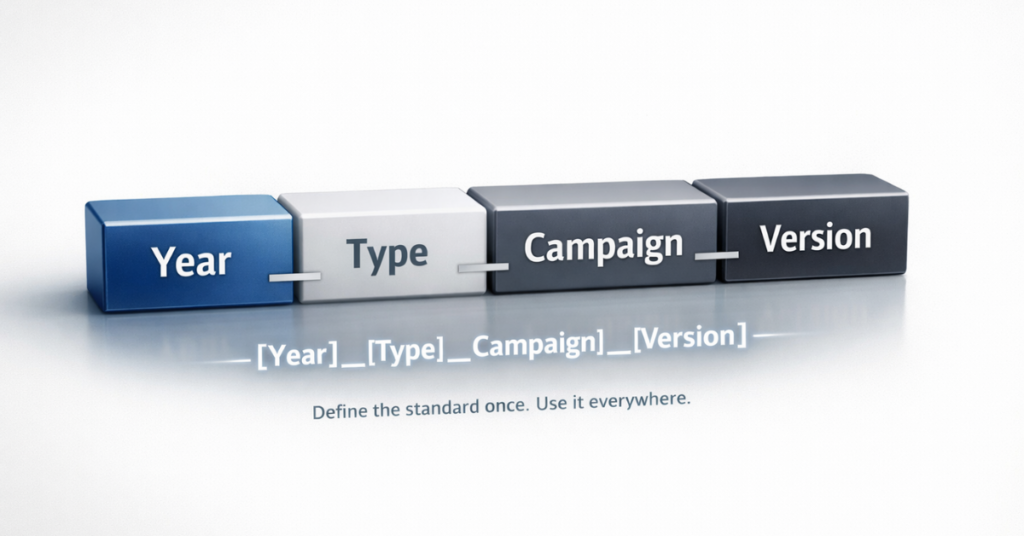
Naming Formula Exact structure with fields [Year]_[Type]_[Campaign]_[Version]
Required Fields Must-have components Year, Asset Type, Campaign Name
Optional Fields Context-dependent additions Region, Business Unit, Channel
Separators Consistent delimiters Underscores only
Date Format Standardized approach YYYY or YYYY_QX or YYYY_MM
Abbreviations Approved shorthand list EM=Email, WB=Webinar, NR=Nurture
Examples 10-15 across asset types Cover all common scenarios

Step 3: Prioritize and Rename Strategically

Don’t attempt to rename everything at once. Use a phased approach that delivers quick wins.

Prioritization Framework:

Phase 1 (Week 1-2): Active Campaigns

  • Anything launching in the next 60 days
  • Currently running programs
  • High-visibility executive reporting items

Phase 2 (Week 3-4): Recent Assets

  • Created in the last 6 months
  • Frequently referenced templates
  • Core automation workflows

Phase 3 (Month 2-3): Strategic Archive

  • Rename only what you’ll reuse
  • Archive outdated content
  • Delete duplicates and unused assets

Phase 4 (Ongoing): Maintenance

  • All new assets follow the convention
  • Weekly audits of recent additions
  • Quarterly reviews for edge cases

Step 4: Document and Train

Make compliance easy by embedding the convention into daily workflows.

Training Components:

  • Add naming guide to marketing operations documentation
  • Include in onboarding materials for new hires
  • Create platform-specific templates with pre-filled naming
  • Build quick-reference posters or Slack bots
  • Record video walkthroughs for each platform
Template Examples:

  • Marketo program templates with naming structure
  • HubSpot workflow naming generator
  • Salesforce campaign naming form
  • Email template naming checklist

Step 5: Enforce and Iterate

Assign ownership and build accountability into your processes.

Enforcement Mechanisms:

  • Designate a naming convention owner
  • Weekly audits of new assets (15-minute review)
  • Platform permission settings requiring approval
  • Naming validation in approval workflows
  • Quarterly team refreshers
Iteration Schedule:

  • Month 1-3: Weekly reviews and adjustments
  • Month 4-6: Bi-weekly reviews
  • Month 7-12: Monthly reviews
  • Year 2+: Quarterly reviews (unless major org changes)

Step 6: Leverage Automation

Where possible, remove human error by automating convention enforcement.

Automation Opportunities:

  • Platform naming templates with locked fields
  • Validation rules that prevent saving incorrect formats
  • Slack/Teams bots that generate compliant names
  • Form submissions that auto-create properly named assets
  • Scripts that flag non-compliant assets for review

Conclusion

Marketing asset naming conventions transform from administrative burden to competitive advantage when implemented thoughtfully. Teams that invest in standardized naming systems reclaim hours spent searching for assets, produce more accurate reporting with less manual effort, and build automation that scales as their operations grow. The upfront work of designing a convention and migrating existing assets pays dividends in efficiency, clarity, and operational maturity. If your current naming landscape feels overwhelming, or if you’re building a convention framework from scratch, 4Thought Marketing specializes in marketing operations optimization that creates sustainable systems for growing teams.

Frequently Asked Questions (FAQs)

What is the best format for marketing asset naming conventions?
The best format depends on your specific needs, but most effective conventions follow a hierarchical structure: date or year first, followed by asset type, campaign name, and version number, separated by consistent delimiters like underscores or hyphens.
How do naming conventions improve marketing reporting?
Standardized names allow you to filter and group assets automatically in reports. When all webinar programs start with “Webinar_,” you can pull aggregate performance data instantly rather than manually selecting each program variant.
Should I rename all existing marketing assets?
No. Focus on active and recently created assets first. Rename older assets only if you’ll actively use them in upcoming campaigns. Archive or delete outdated content rather than spending time renaming items you’ll never touch again.
What happens if team members don’t follow the naming convention?
Inconsistent adoption undermines the entire system. Designate a naming convention owner to audit new assets weekly, implement approval workflows where possible, and include convention training in onboarding for new team members to ensure consistent enforcement.
Can naming conventions work across multiple marketing platforms?
Yes. While each platform has specific considerations, your underlying logic should remain consistent. Use the same date formats, separator conventions, and hierarchical structure everywhere, adapting only for platform-specific constraints like character limits or special requirements.
How often should I update my naming convention framework?
Review your convention quarterly during the first year of implementation to catch edge cases and refine based on real usage. After the system stabilizes, annual reviews are typically sufficient unless you experience major organizational changes like mergers or new product launches.

revenue operations, RevOps, sales marketing customer success, pipeline, CRM, automation, alignment,
Key Takeaways
  • Revenue operations aligns sales, marketing, and customer success without restructuring teams.
  • Shared metrics and data access create accountability across all revenue functions.
  • Centralized CRM systems enable transparent collaboration and faster decision-making.
  • Quick wins include automated lead routing and unified pipeline dashboards.
  • Expert guidance accelerates adoption while minimizing disruption to existing workflows.

B2B companies struggle with fragmented data, disconnected workflows, and teams working toward separate goals. Marketing generates leads that sales questions. Sales closes deals that customer success struggles to retain. Each department tracks different metrics, uses different tools, and celebrates different wins. Revenue operations changes this dynamic by creating a unified approach where every team contributes to measurable growth throughout the customer lifecycle. This mindset shift requires no organizational restructuring—just aligned processes, shared data, and collaborative decision-making focused on revenue outcomes at every stage.

What Is a Revenue Operations Mindset?

A revenue operations mindset brings sales, marketing, and customer success together around a single objective: generating predictable, measurable growth. Rather than operating in silos with separate KPIs, teams share accountability for the complete customer journey from first touch to renewal.

This approach emphasizes transparency through integrated processes and accessible data. Teams coordinate lead management, pipeline health, customer onboarding, and retention activities using shared dashboards and common definitions. The CRM becomes the single source of truth, and automation platforms like Eloqua or Marketo tie every workflow directly to revenue impact.

Companies adopting this mindset see smoother handoffs between departments, faster responses to market changes, and more consistent growth—all without changing reporting structures or job titles.

Why Should B2B Companies Adopt Revenue Operations Now?

Today’s buyers expect seamless experiences across every interaction with your company. They research independently, engage multiple touchpoints, and switch vendors quickly when expectations aren’t met. Fragmented internal operations create disconnects that buyers notice and competitors exploit. According to Salesforce research, companies with aligned revenue teams achieve 36% higher customer retention and 38% higher sales win rates. Organizations that embrace revenue operations gain several competitive advantages:

  • Unified customer view: Every team accesses the same lead and customer data in real time, eliminating blind spots and duplicate efforts.
  • Faster decision-making: Shared metrics and transparent reporting enable teams to identify problems and adjust tactics quickly.
  • Improved conversion rates: Aligned processes reduce friction at handoff points between marketing, sales, and customer success.
  • Higher retention: Coordinated teams spot at-risk customers earlier and respond with targeted interventions.

How Can Teams Adopt Revenue Operations Without Reorganizing?

Shifting to revenue operations doesn’t require new departments or changed reporting lines. Start by making targeted adjustments to how teams communicate, share information, and measure success. These steps surface quick wins and build the foundation for full revenue operations maturity without disrupting existing structures.

  • Map your current revenue journey: Document how leads move from marketing to sales to customer success. Identify gaps in handoffs, data visibility, and process consistency.
  • Define shared goals and metrics: Align all teams around key indicators like pipeline value, conversion rates at each stage, and customer lifetime value. Ensure everyone uses the same definitions.
  • Centralize data access: Use your CRM as the hub for all customer and pipeline information. Integrate marketing automation platforms to eliminate manual data transfers and duplicate records.
  • Schedule cross-team reviews: Meet regularly to analyze results, surface blockers, and share insights. Monthly pipeline reviews involving all revenue teams keep everyone aligned.
  • Launch pilot initiatives: Start small with joint campaigns that require collaboration between at least two departments. Success builds momentum for broader adoption.
  • Invest in training: Document common workflows and provide guidance on automation tools. Partners like 4Thought Marketing can map processes and ensure teams use platforms optimally.

What Tools Enable Revenue Operations Alignment?

Technology integration powers revenue operations by connecting previously isolated systems. The foundation is a centralized CRM like Salesforce or Microsoft Dynamics that serves as the single source of truth for all lead and customer data. Marketing automation platforms—Oracle Eloqua, Adobe Marketo, or HubSpot—connect to the CRM to automate lead scoring, nurture campaigns, and handoffs. When properly integrated, these systems eliminate manual data entry and provide real-time visibility across departments. Best practices for integrated technology include:

  • Enforce consistent data standards: Synchronize field definitions and validation rules across all systems to reduce errors and improve reporting accuracy.
  • Build automated workflows: Capture, score, and route leads instantly between teams based on predefined criteria.
  • Create shared dashboards: Provide real-time metrics on pipeline health, campaign performance, and customer engagement accessible to all revenue teams.
  • Audit regularly: Review integrations and data quality monthly to catch issues before they compound.

How Do You Measure Revenue Operations Success?

Tracking the right metrics proves the value of revenue operations and identifies areas for continued improvement. Focus on indicators that reflect cross-functional collaboration and customer journey efficiency. Quick wins often emerge from automating lead routing, creating unified dashboards, or piloting campaigns where teams jointly own revenue targets. Gartner research shows that companies with mature revenue operations achieve 15% faster growth than competitors still working in silos.

  • Lead conversion rates: Monitor progression from marketing qualified leads (MQLs) to sales qualified leads (SQLs) to closed deals. Improvements indicate better alignment between teams. For proven conversion strategies, explore Seamless MQL to SQL: Convert More Leads Now.
  • Sales cycle length: Shorter cycles signal more efficient handoffs and better-qualified leads reaching sales teams.
  • Pipeline velocity: Measure how quickly opportunities move through each stage. Faster movement typically reflects coordinated effort and reduced friction.
  • Customer retention and expansion: Track renewal rates and upsell success as indicators of alignment between sales promises and customer success delivery.
  • Handoff speed and quality: Time how long leads sit between stages and measure the percentage requiring rework or reassignment.

What Common Mistakes Should Teams Avoid?

Many organizations slow their revenue operations progress by making preventable errors during adoption. Understanding these pitfalls helps teams maintain momentum.

revenue operations, RevOps, sales marketing customer success, pipeline, CRM, automation, alignment,

  • Unclear accountability: Without documented ownership for each process step, confusion stalls progress. Create clear responsibility maps showing which team handles what at every customer journey stage.
  • Isolated data: Maintaining separate databases or reports prevents the transparency revenue operations requires. Consolidate all revenue-impacting data into unified systems accessible to relevant teams.
  • Neglecting regular reviews: Teams drift back to old habits without scheduled check-ins. Establish recurring meetings where sales, marketing, and customer success review shared metrics and adjust workflows.
  • Insufficient training: New processes fail when users don’t understand the tools. Provide comprehensive guidance on platforms like Eloqua and Marketo to ensure adoption.
  • Forcing perfect alignment immediately: Attempting to fix everything at once overwhelms teams and invites resistance. Start with high-impact areas and expand gradually as early wins build confidence.

Conclusion

Adopting a revenue operations mindset transforms how B2B companies drive growth by uniting sales, marketing, and customer success around shared goals and transparent data. This shift requires no reorganization—just aligned processes, integrated technology, and collaborative decision-making focused on the complete customer journey. Companies that embrace these principles see faster conversions, shorter sales cycles, and stronger retention without the disruption of structural changes. 4Thought Marketing helps B2B organizations accelerate this transition by optimizing automation platforms, establishing unified metrics, and building collaborative cultures that deliver measurable results. Ready to align your revenue teams? Contact 4Thought Marketing to discover how we can support your journey.

Frequently Asked Questions

What is the difference between revenue operations and sales operations?
Sales operations focuses exclusively on sales team efficiency and performance, while revenue operations encompasses sales, marketing, and customer success as one coordinated function throughout the entire customer lifecycle.
How long does it take to adopt a revenue operations mindset?
Initial alignment and quick wins typically emerge within 90 days. Full maturity with optimized processes and sustained collaboration usually takes 6 to 12 months depending on organization size and complexity.
Do we need dedicated revenue operations staff to succeed?
Not necessarily. Many companies start with a cross-functional committee of existing leaders from sales, marketing, and customer success who meet regularly to drive alignment before hiring specialized roles.
Which metrics matter most when starting revenue operations?
Begin with MQL-to-SQL conversion rate, sales cycle length, and pipeline velocity. These indicators quickly reveal alignment gaps and improvement opportunities across departments.
Can small B2B companies benefit from revenue operations?
Absolutely. Companies of any size gain from better data sharing, aligned goals, and coordinated customer experiences. Smaller teams often find alignment easier due to fewer legacy processes and closer working relationships.
What role does technology play in revenue operations success?
Technology provides the infrastructure for data sharing and process automation, but success depends more on how teams use these tools collaboratively than on the specific platforms chosen.

marketing funnel evolution, marketing automation intelligence, buyer intent modeling, AI-driven personalization, customer segmentation strategy, signal-based marketing, buyer intent signals,
Key Takeaways
  • The marketing funnel was built to infer buyer intent, not to map behavior precisely.
  • Funnel breakdowns came from human cognitive limits, not from flaws in the model.
  • Two-dimensional segmentation reduced relevance as buyer signals grew more complex.
  • AI enables multidimensional intent inference at a resolution humans cannot manage.
  • Marketing funnel evolution depends on signal precision, not content volume.

The funnel has survived every major shift in marketing for a reason. Not because it perfectly represents how buyers behave, but because it helps organizations decide how to respond when buyer behavior is uncertain. The real problem was never the funnel itself. It was the narrow way we learned to think about it.

The idea behind the marketing funnel evolution was always sound. It was designed as a practical mental model, a way to simplify complexity so teams could make decisions at scale. It helped marketing and sales infer intent, estimate readiness, and determine what to communicate next. The funnel was never intended to be a literal representation of human decision-making. It was an abstraction built to enable action.

Where progress stalled was not in the concept itself, but in its resolution. For decades, marketing automation operated within a two-dimensional constraint. We reduced buyers to a market segment and a funnel stage because that was all humans could reasonably manage. The marketing funnel evolution did not stop evolving because it was complete. It stopped because our cognitive capacity forced it to.

Funnels were built for inference, not precision

At its core, the marketing funnel evolution exists to answer a single question. Given what we know about this buyer right now, what is the most relevant next message.

That is an inference problem. Funnels were designed to work statistically across populations, not deterministically at the individual level. Friction emerged when teams began treating stages as fixed process steps rather than probabilistic indicators.

Buyers did not become unpredictable. They were always complex. The failure came from applying a simplified model uniformly to individuals without accounting for context, intent, or nuance.

The true limitation was dimensional compression

Traditional marketing automation relied on two dominant dimensions: market segment and funnel stage. Five segments multiplied by five stages created a manageable framework. Within that boundary, the marketing funnel evolution functioned adequately.

Reality, however, was never that simple.

Two buyers could occupy the same segment and stage while having fundamentally different needs. Product ownership, competitive exposure, geography, engagement behavior, and maturity all influence intent. Most of these signals were flattened or ignored to preserve manageability.

That compression reduced relevance. Messaging became generalized. Performance declined. Not because the funnel failed, but because its resolution was frozen at a level humans could manually sustain.

Complexity without a model does not improve outcomes

As markets matured, many organizations responded by embracing complexity. More journeys. More touchpoints. More orchestration. Yet complexity alone does not improve decision-making.

Describing a complex environment does not help teams decide what matters most in the moment. The strength of the marketing funnel evolution was never completeness. It was focus. Removing that focus without replacing it with a higher resolution model only increases noise.

Marketing did not need fewer abstractions. It needed better ones.

How AI changes what marketing can handle

Marketing automation intelligence fundamentally changes the economics of buyer modeling. AI does not make buyers more complex. It makes complexity usable.

AI systems process far more dimensions than humans can manage. They continuously reassess signals and adjust assumptions in real time. Within the marketing funnel evolution, this enables segmentation to become adaptive rather than static. Funnel position becomes inferred rather than assigned.

Buyer intent modeling shifts from periodic evaluation to continuous interpretation. AI-driven personalization emerges not from producing more content, but from weighting signals correctly.

From static stages to multidimensional inference

In an AI-enabled environment, the marketing funnel evolution does not disappear. It evolves.

Buyers may exist in different inferred states simultaneously depending on context. An account may signal readiness for one product while remaining exploratory for another. Intent is interpreted dynamically rather than forced into predefined paths.

Customer segmentation strategy becomes fluid. Segments form based on multidimensional similarity rather than static attributes. Signal-based marketing replaces campaign assumptions with real-time interpretation driven by buyer intent signals.

The funnel retains its purpose while operating at a resolution no human team could maintain manually.

Precision matters more than volume

AI lowers the cost of content creation, but relevance does not scale automatically. Without discipline, organizations risk flooding channels with personalized noise that dilutes attention.

The most effective use of marketing automation intelligence is not speaking louder. It is listening more precisely. Signal quality matters more than message quantity. Precision compounds over time. Volume does not.

The marketing funnel evolution succeeds when AI is used to improve inference rather than accelerate output indiscriminately.

What this means for marketing and sales leadership

This evolution requires a mindset shift. Funnels do not need to be defended or discarded. They need to be refined.

Teams must move from static segmentation to adaptive interpretation. From campaign planning to intent-led decisioning. From assumed readiness to continuously inferred readiness.

When marketing and sales align around shared inference models, conversations become more relevant and handoffs more effective. The funnel becomes what it was always meant to be. A guide for understanding buyer intent and determining what matters most right now.

The funnel was never the enemy

Buyers were always complex. Funnels were never meant to capture that complexity perfectly. They were designed to make action possible in its presence.

The future of the marketing funnel evolution is expansion, not abandonment. AI removes the cognitive limits that once constrained marketing to two dimensions. What emerges is a higher resolution model that respects buyer reality while preserving clarity and focus.

The funnel was never the problem. Our two-dimensional thinking was.

Final Words

The marketing funnel did not lose relevance. It lost resolution. Buyers were always complex, but two-dimensional thinking limited how well intent could be understood and acted on. AI now makes higher precision possible by allowing signals, context, and behavior to be interpreted together rather than flattened into stages. Organizations that treat this shift as an intent modeling challenge, not a content production race, will align marketing and sales more effectively and compete on relevance rather than volume. At 4Thought Marketing, we work with teams navigating this exact transition, helping them rethink funnels, data, and automation through a precision first lens that turns buyer signals into meaningful action.

Frequently Asked Questions (FAQs)

1. What does marketing funnel evolution really mean today?
Marketing funnel evolution refers to shifting from static, stage-based models toward dynamic intent inference, where buyer signals, context, and behavior are continuously interpreted to guide more relevant decisions.
2. Is the marketing funnel still relevant in modern marketing automation?
Yes. The funnel remains relevant as an inference framework, not as a rigid process. Its value lies in helping teams understand probable buyer intent and decide what action makes sense next.
3. How does AI improve buyer intent modeling in the funnel?
AI improves buyer intent modeling by analyzing multiple signals simultaneously, adjusting assumptions in real time, and supporting more precise interpretations of readiness across different contexts.
4. What is the difference between traditional segmentation and multidimensional segmentation?
Traditional segmentation relies on a limited set of attributes such as segment and stage, while multidimensional segmentation incorporates behavior, product context, geography, and engagement patterns to improve relevance.
5. Why does signal-based marketing matter more than content volume?
Signal-based marketing prioritizes understanding intent over producing more content. As attention becomes scarcer, relevance driven by accurate signal interpretation delivers stronger outcomes than volume alone.

One to one marketing strategy, Personalized marketing, Marketing automation personalization, Customer data privacy in marketing, Privacy compliant personalization, Data-driven customer experience, Consent-based marketing, Global privacy regulations in marketing, Customer trust and transparency, Responsible data use in marketing, Customer journey personalization
Key Takeaways
  • One to one marketing strategy now demands compliance-first frameworks
  • Global privacy laws redefine data collection and usage practices
  • Consent-based workflows protect brands while preserving trust
  • Transparency and accountability separate market leaders from laggards

A one to one marketing strategy has always promised remarkable results: perfectly timed messages that respond to browsing behavior, purchase history, and what customers might want next. Marketing teams have built sophisticated tools to deliver the right message to the right person at the right time. Yet many now face a growing challenge. Campaigns get paused because consent is unclear. Legal teams raise red flags about how customer data is collected and stored. Customers ask uncomfortable questions about who has access to their information and why. The creative vision remains strong, but proving that every email, every offer, and every interaction follows the law becomes nearly impossible.

This is where modern one to one marketing strategy transforms the landscape. By integrating privacy compliance directly into the creation and management of campaigns, organizations can deliver personalized experiences that customers trust while meeting the stringent requirements of regulations such as GDPR and CCPA. The way forward combines precision with responsibility, transforming legal obligations into a foundation for stronger and more transparent customer relationships.

One to One Marketing Now Requires a Compliance Framework

What does privacy-first personalization actually mean?

Privacy-first personalization means that every marketing decision—from how you segment your audience to what message you send—must be traceable back to a legal reason for using that customer’s data. Think of it as having receipts for everything. When someone signs up for your newsletter, you record what they agreed to receive. If they only wanted product updates but not promotional offers, your system must respect that choice automatically. This approach also means collecting only the information you genuinely need. If you don’t need a customer’s birthday to deliver value, don’t ask for it. And when someone asks you to delete their data, you must be able to find and remove it from every system you use.

This framework does not limit creativity. It provides clear boundaries that protect both your customers and your organization. Leading brands now map exactly where customer data flows—from the moment someone fills out a form to how that information gets used in email campaigns, website personalization, and analytics tools. They identify risky activities and build automatic controls. For example, if someone withdraws consent, the system immediately stops using their data in active campaigns.

Key compliance pillars for personalization:

  • Explicit consent capture at every touchpoint where personal data is collected.
  • Real-time preference synchronization across platforms
  • Automated suppression when consent is withdrawn
  • Audit logs documenting consent activity

How do global privacy regulations reshape marketing workflows?

Privacy laws, such as GDPR in Europe and CCPA in California, have changed the rules for how businesses handle customer information. GDPR requires companies to demonstrate that they are following the rules, not just claim to be doing so. Before launching a campaign, marketers should be prepared to provide evidence of their legal right to contact those customers.

Under CCPA, customers can ask what information you have about them, how you use it, and demand that you stop selling it to others. Global privacy regulations in marketing mean you cannot assume someone wants to hear from you simply because they made a purchase once. You cannot hide unsubscribe buttons in tiny footer text. You cannot ignore customer requests to access or delete their data simply because responding takes time and effort.

Marketing teams must now maintain detailed records of who has consented to what, manage contracts with every vendor that handles customer data, and ensure those vendors also comply with privacy rules. This complexity necessitates new processes, technologies, and accountability measures. Organizations that treat privacy as only an IT department problem will struggle. Those that weave privacy into their marketing strategy will build lasting customer trust and transparency.

Regulatory impacts on daily workflows:

  • Consent must be freely given, specific, informed, and unambiguous
  • Pre-checked boxes and inactivity-based consent are prohibited
  • Data subject rights honored within statutory deadlines
  • Cross-border transfers require adequacy decisions or contractual clauses

Building Permission-Aware Campaigns

What is permission, and how does it apply to email campaigns?

Permission is the result of reviewing all relevant consent activity and calculating a simple ‘Yes’ or ‘No’ that your marketing automation system uses to either send or suppress an email to a specific contact in the campaign workflow.  It’s a final checkpoint before an email is sent to the contact. Think of it as a license verification—your marketing automation platform must confirm that a contact granted consent for this type of communication before the message can be sent. This system operates automatically in real-time, querying the current permission from your privacy compliance system. If someone has withdrawn consent for promotional emails but still wants transactional updates, it enforces what is allowed to be sent without manual intervention.

This mechanism transforms compliance from a manual audit exercise into an automated safeguard embedded directly within your marketing automation infrastructure. It prevents non-compliant sends before they happen, protecting both your brand reputation and customer trust. Leading organizations synchronize their preference centers with campaign execution platforms in real time, ensuring that every consent change—whether it happens on a website, through an email preference update, or via customer service—is reflected instantly across all touchpoints where personal data is collected.

Pre-send validation checklist:

  • Real-time consent status queries before every campaign send
  • Automated suppression when consent is withdrawn or expired
  • Channel-specific permission verification (email, SMS, push, paid media)
  • Audit logs documenting every permission check and send decision

How does compliance affect segmentation?

Compliance fundamentally reshapes how segmentation rules are built and executed. When someone withdraws consent for behavioral tracking, your system must immediately stop using their browsing data, purchase patterns, or predictive scores in active segmentation logic. This is not a batch process that runs overnight—it must happen in real time. If a customer opts out of promotional communications at 2 PM, any campaign scheduled to send at 3 PM must automatically exclude that contact. Consent-aware segmentation means every audience filter, every dynamic content rule, and every personalization trigger must query current permission status as part of its execution logic.

This operational discipline protects your brand by ensuring no message reaches someone who has clearly declined to receive it. It also future-proofs your marketing operations as regulations tighten and enforcement actions increase. Building compliance into segmentation means connecting preference data directly to your audience-building tools, implementing automated suppression workflows that activate within seconds of consent changes, and maintaining detailed audit trails that document how segmentation decisions respect customer choices.

Compliance-driven segmentation best practices:

  • Segmentation queries check consent status in real time, not from cached data
  • Behavioral data fields become unavailable when tracking consent is withdrawn
  • Automated workflows pause contacts who revoke permissions mid-journey
  • Regular compliance audits identify segments that may violate consent boundaries

Transforming Privacy Compliance into Customer Trust

Why is transparency the new currency in customer relationships?

Customers want to understand how their data gets used. Vague privacy policies and hidden tracking damage trust. Privacy compliant personalization requires clear communication at every stage of the customer journey personalization process. When someone visits your website, your consent banner should explain in plain language what information you collect, why you need it, and who else might see it. When a subscriber changes their preferences, your confirmation message should acknowledge the update and explain what will change. Transparency builds trust, and trust drives long-term engagement and loyalty.

One to one marketing strategy, Personalized marketing, Marketing automation personalization, Customer data privacy in marketing, Privacy compliant personalization, Data-driven customer experience, Consent-based marketing, Global privacy regulations in marketing, Customer trust and transparency, Responsible data use in marketing, Customer journey personalization

Organizations that embrace transparency stand out in crowded markets. They publish clear privacy disclosures written for real people, not lawyers. They offer easy-to-use tools that let customers control their own data. They proactively communicate when data practices change. This approach aligns with the principle of customer trust and transparency, turning a legal requirement into a brand strength. A data-driven customer experience built on transparency is not just compliant; it performs better, because customers willingly share information when they understand and trust how it will be used.

Transparency in action:

  • Plain-language privacy policies with real examples of data use
  • Proactive notifications when data practices change
  • Self-service tools letting customers view, update, or delete their data
  • Regular privacy updates in newsletters and customer communications

Conclusion

The transformation of one to one marketing strategy reflects how organizations now balance personalization with accountability. Marketing teams once struggled with campaigns halted by compliance gaps, legal scrutiny over data practices, and customer skepticism about transparency. Today, the solution lies in embedding privacy into the foundation of every workflow; from consent capture to segmentation to campaign execution. This approach does not diminish personalization. It strengthens it by building customer relationships on respect, clarity, and trust.

Organizations that master this balance deliver the data-driven customer experience modern consumers expect while meeting regulatory requirements that protect both parties. The result is marketing that performs better because it operates with integrity and earns customer confidence through every interaction.

For marketing leaders ready to transform these challenges into strategic advantages, partnering with experts who understand both the creative and compliance dimensions of modern personalization becomes essential. 4Thought Marketing has established itself in privacy-first marketing strategy, guiding organizations through the complexities of global regulations while preserving the power of personalized engagement.

Their purpose-built solution, 4Comply, provides the infrastructure and expertise needed to make consent management, DSAR workflows, and audit-ready documentation seamless and scalable. When you bring your privacy and personalization challenges to 4Thought Marketing, you gain more than technology—you gain a strategic partner committed to helping you build marketing operations that customers trust and regulators respect.

Frequently Asked Questions (FAQs)

What is a one to one marketing strategy in the context of privacy laws?
A one to one marketing strategy now means creating personalized customer experiences using data collected legally, with clear consent, and with processes that can prove compliance with regulations like GDPR and CCPA.
How does GDPR affect personalized marketing campaigns?
GDPR requires marketers to document legal justifications for using customer data, honor customer rights to access or delete their information within strict deadlines, and maintain audit trails proving compliance.
What are the risks of ignoring customer data privacy in marketing?
Ignoring privacy can result in substantial fines from regulators, legal action from customers, damage to your brand reputation, and loss of customer trust that undermines long-term business performance.
How can marketing teams prepare for data subject access requests?
Teams should map where customer data exists across all systems, use consistent customer identifiers that link records together, and build automated workflows that can retrieve and export complete information within regulatory deadlines.
Why is consent-based marketing important for brand reputation?
Consent-based marketing shows customers you respect their choices, builds trust in your brand, and protects you from compliance violations that can trigger public criticism and financial penalties.
What role does transparency play in customer journey personalization?
Transparency helps customers understand how you use their data, which increases their willingness to share information and strengthens their engagement and loyalty to your brand over time.

Marketo image to email template, Marketo email template builder, create email templates Marketo, AI email template generator, automated email template creation, Marketo email template workflow, Marketo Engage email designer, responsive email templates, email template automation, Marketo template builder,
Key Takeaways
  • AI converts design files into HTML templates instantly.
  • Eliminates coding dependencies and technical delays completely.
  • Brand Themes ensure automated design compliance globally.
  • Supports screenshots, mock-ups, and hand-drawn sketches.
  • Available free to all Marketo Engage customers.

Your marketing ops team shouldn’t be waiting on developers to build email templates. You shouldn’t be blocked from shipping campaigns because of someone else’s timeline. Marketo image to email template feature, powered by AI, gives you that control back. Upload a design image, and AI converts it into a fully responsive HTML template in seconds. You own the entire process. No developer requests. No revision cycles. No dependencies. Your team launches campaigns on your schedule. Your brand stays consistent. You move at the speed you need to move.

Adobe Marketo Engage has introduced the Marketo image to email template feature that fundamentally changes this equation through artificial intelligence. The Marketo image to email template capability leverages AI to convert any visual design into fully editable, brand-compliant, responsive HTML templates within seconds.

What Is Marketo’s Image to Template Feature and How Does It Work?

The Marketo image to email template functionality is an AI-powered solution that instantly transforms visual designs into production-ready templates. The system accepts any image file—such as PNG, JPEG, a screenshot, or a design mock-up—and automatically generates structured HTML with editable content blocks.

The Marketo image to email template workflow operates through five straightforward steps. Upload your design file directly into the interface. Select your Brand Theme containing pre-defined design guidelines. The AI processes your image and generates the HTML structure. Customize the generated template using the drag-and-drop editor. Test and deploy your campaign immediately without additional development cycles.

Adobe’s AI analyzes visual hierarchy, identifies functional elements like buttons and navigation, recognizes text blocks versus imagery, and applies appropriate HTML structures based on email best practices.

Why Do Marketing Teams Need Faster Email Template Production?

Traditional workflows create operational friction that impacts business outcomes. When template creation requires more than two days, marketing teams miss time-sensitive opportunities, and competitive windows close.

Technical dependencies represent the primary constraint. Marketing operations professionals often lack HTML coding expertise, which requires them to submit tickets to IT departments or engage external agencies. The Marketo image to email template approach eliminates these bottlenecks completely.

Product launches miss market timing when announcement emails lag behind availability. Event marketing suffers when registration campaigns deploy late. Customer lifecycle programs experience gaps when triggered emails require weeks to build rather than hours.

Agency retainers for routine template builds divert budget from strategic initiatives. Internal development resources spend time on repetitive tasks rather than platform optimization.

How Does This Technology Benefit Marketing Operations?

The Marketo image to email template technology transforms how teams work by removing technical barriers. Marketing automation managers gain complete autonomy over template production, enabling rapid response to business needs.

Templates that previously consumed days now generate in seconds through the Marketo image to email template system, fundamentally changing what becomes possible within campaign timelines. B2B marketers can respond to breaking news or competitive developments with same-day email campaigns.

Brand Themes function as centralized design systems within Marketo, ensuring every generated template automatically conforms to approved guidelines using the Marketo image to email template feature. This capability proves especially valuable for enterprise marketing teams managing multiple regions or business units.

Organizations redirect agency spending toward strategic creative development rather than routine template builds. Internal engineering resources focus on platform enhancements or integration projects instead of repetitive HTML production through email template automation.

Content specialists, campaign managers, and regional marketers who lack coding knowledge can produce professional templates independently using the Marketo image to email template capability. This distributed capability increases organizational agility while reducing bottlenecks.

What File Types and Design Tools Work with This Feature?

The system accepts diverse input formats. Standard image formats including JPEG and PNG files work seamlessly regardless of resolution. Screenshots captured from any application process without conversion requirements into the Marketo image to email template generator.

Design mockups from professional tools integrate directly into the Marketo image to email template workflow. Figma exports, Adobe XD artboards, Sketch files saved as images, and PowerPoint slides all serve as valid inputs.

The AI handles low-fidelity inputs effectively. Marketo’s product team demonstrated this through their “paper napkin test,” where a hand-drawn email layout sketched with pen on paper successfully generated a functional template complete with image blocks, text sections, and call-to-action buttons.

Marketing operations professionals should establish minimum standards around input quality. Designs with clear visual section boundaries, consistent element spacing, and distinct functional components produce more accurate initial templates.

How Can Marketing Teams Implement This Feature Successfully?

Successful implementation of the Marketo image to email template feature begins with Brand Theme configuration. Marketing automation managers should invest time creating comprehensive Brand Themes that capture complete design systems including color palettes, typography hierarchies, spacing standards, button styles, and header-footer templates.

Establishing internal standards for design files improves output quality when teams use the Marketo image to email template system. Teams benefit from documented guidelines covering minimum resolution requirements, visual section boundaries, element naming conventions, and annotations for interactive components.

Brief enablement sessions should cover how to prepare optimal design files, select appropriate Brand Themes, refine generated templates, implement quality control checkpoints, and execute testing protocols before deployment of any Marketo image to email template output.

Workflow documentation supports organizational adoption. Process maps showing step-by-step template creation procedures help teams maintain consistency as usage scales.

Generated templates should undergo standard email testing procedures including rendering verification across major email clients, responsive design validation on mobile devices, and link functionality confirmation before deployment.

Conclusion

The Marketo image to email template feature eliminates technical bottlenecks that have constrained email marketing operations for years. This innovation transforms workflow efficiency while maintaining brand consistency through systematic application of design standards. Enterprise marketing teams gain agility to respond to market opportunities in hours rather than weeks using the Marketo image to email template capability.

The future of email production has arrived through the Marketo image to email template solution, delivering measurable improvements in campaign velocity, operational costs, and competitive responsiveness. If you’re ready to transform your processes and eliminate production bottlenecks permanently, 4Thought Marketing specializes in helping organizations optimize their marketing automation platforms—contact us to discuss how we can accelerate your marketing operations.

Frequently Asked Questions (FAQs)

Is the Image to Template feature available to all Marketo customers?
Yes, the Marketo image to email template feature is included at no additional cost for all Marketo Engage and Journey Optimizer B2B Edition customers starting November 7, 2025.
Do I need coding skills to use this feature?
No technical expertise is required. The Marketo image to email template system handles HTML generation automatically, and the drag-and-drop editor allows non-technical marketers to customize templates easily.
How does the feature maintain brand consistency across templates?
Brand Themes serve as centralized design systems that automatically apply approved colors, typography, spacing, and style standards to every template generated through the Marketo image to email template process.
Can the AI recognize hand-drawn sketches or only professional design files?
The Marketo image to email template technology processes various input types including professional mockups, screenshots, and even hand-drawn sketches, as demonstrated by Marketo’s paper napkin test.
What happens if the generated template needs modifications?
All templates open in the Marketo Engage email designer where you can customize content blocks, swap images, modify text, add personalization tokens, and adjust layouts using drag-and-drop tools.
How long does it take to generate a template from an uploaded image?
The Marketo image to email template generation completes in seconds, dramatically reducing the days or weeks typically required through traditional development workflows.

growth driven marketing operations, marketing operations transformation, marketing operations strategy, operational efficiency, marketing automation consulting, B2B marketing operations, growth mindset, CMO alignment, process optimization, data-driven marketing, privacy-compliant automation, 4Comply, revenue growth, customer experience alignment
Key Takeaways
  • Marketing operations must drive strategic business impact.
  • Every initiative must tie to revenue or efficiency.
  • Aligned technology, process, and privacy sustain growth.
  • Alignment with CMO priorities turns operations into a growth engine.
  • 4Thought Marketing and 4Comply enable scalable, compliant transformation.

Organizations with truly mature growth driven marketing operations align people, platforms, and processes into one unified growth engine. Every process connects directly to revenue and efficiency outcomes. Their teams operate as strategic business enablers, not tactical executors.

Most marketing operations functions haven’t reached that state. They’re still managing tools and campaigns in isolation, which worked in simpler times. But rapid technological change, evolving privacy requirements, and relentless pressure for measurable impact have made that approach insufficient.

The gap exists because leaders haven’t yet embedded growth driven marketing operations principles into how their team works. Closing that gap requires rethinking what modern operations actually need to deliver: strategic business enablement where every decision traces back to business results.

How Can Marketing Operations Become a Strategic Growth Enabler?

By linking automation, analytics, and governance directly to business goals, operations leaders transform into growth enablers. They create measurable value for both customers and the enterprise.

A growth-driven mindset redefines automation as a lever for accelerating revenue and retention, rather than merely maintaining routine tasks. When professionals think strategically, marketing operations evolves from execution to leadership, guiding enterprise growth through data-driven marketing and continuous improvement.

How Should Technology, Process, and Outcomes Be Integrated?

Technology integration should always serve a measurable business purpose. Process optimization then ensures those tools deliver consistent, efficient outcomes.

Leaders evaluate every workflow to pinpoint automations that shorten acquisition cycles, integrations that deliver real-time insight to sales, and privacy-compliant automations that strengthen trust. 4Thought Marketing helps B2B marketing operations identify and prioritize high-impact connections, turning compliance and data governance into growth drivers.

What Is the Revenue-and-Efficiency Filter and Why Does It Matter?

The revenue-and-efficiency filter helps teams focus only on high-value work. Each initiative should either generate revenue or improve efficiency—if not, it is busywork.

This discipline ensures that all activities connect to core business results. Automation is approved only when it reduces manual errors or accelerates conversion; reports are only approved when they enable faster deal closure. 4Thought Marketing’s marketing automation consulting helps clients apply this framework and institutionalize accountability.

How Can Marketing Operations Enhance Experiences for Customers and Teams?

Unified systems and transparent collaboration improve both customer journeys and internal efficiency. When data flows freely, performance follows.

Shared dashboards, integrated CRMs, and consistent data standards enable marketing and sales to work together as one. This alignment enhances speed, accuracy, and personalization. With 4Comply, 4Thought Marketing helps organizations maintain privacy-compliant automation while improving collaboration across the entire go-to-market ecosystem.

Why Is Alignment with the CMO’s Vision Critical for 2026?

Alignment converts executive vision into operational reality. When marketing operations anticipates the CMO’s goals, every project drives measurable business outcomes.

This requires listening to strategic priorities, auditing systems for friction, and collaborating across sales, IT, and analytics for unified data. 4Thought Marketing’s consulting framework helps clients connect operational design with executive goals, ensuring every initiative supports enterprise growth.

What Questions Help Teams Deliver Strategic Value?

Strategic marketing operations begin with sharper questions. Teams must validate whether each project improves revenue, efficiency, or experience.

If the answer is unclear, the initiative needs re-evaluation. These diagnostic questions create a disciplined roadmap that connects actions to impact. 4Thought Marketing utilizes this model to help organizations transition from activity metrics to meaningful business performance indicators.

How Does 4Thought Marketing Enable Growth-Driven Mindsets?

4Thought Marketing provides the structure and expertise required to sustain growth driven marketing operations. With their product, 4Comply, they add trusted data governance and privacy assurance.

Together, they transform complexity into clarity. By linking CRM and automation systems through compliant, data-driven processes, B2B organizations accelerate sales cycles, strengthen trust, and achieve operational efficiency that scales responsibly.

Conclusion

Marketing operations in 2026 will determine how confidently organizations grow. The shift toward growth driven marketing operations places leaders at the center of strategic decision-making, which is responsible for driving revenue, enhancing efficiency, and delivering customer value.

Now is the time to align priorities, modernize systems, and embed measurable outcomes across every initiative. 4Thought Marketing and 4Comply can help you lead this transformation through expert consulting, technology alignment, and privacy-compliant automation. Partner with us to build marketing operations that power sustainable, data-driven growth.

Frequently Asked Questions (FAQs)

What defines a growth driven marketing operations approach?
It connects every marketing process to measurable outcomes, such as revenue growth, efficiency, and customer retention.
Why is marketing operations transformation urgent for 2026?
Technology, privacy, and performance pressures require agile, growth-focused systems to stay competitive.
How does 4Thought Marketing support B2B marketing operations teams?
By offering marketing automation consulting, data integration, and strategy alignment that improve results.
What role does 4Comply play in this transformation?
It ensures privacy-compliant automation and consent management, helping brands scale responsibly.
How can operations leaders align with the CMO’s vision?
By mapping automation and analytics initiatives directly to business priorities and measurable outcomes.
What advantages come from using the revenue-and-efficiency filter?
Sharper prioritization, reduced waste, and a stronger connection between marketing actions and growth results.

email deliverability crisis, sender reputation recovery, email bounce rate improvement, Mimecast blocklist resolution, ISP throttling, inbox placement rate, email authentication issues, bounce suppression strategies,
Key Takeaways
  • Sender reputation issues can disrupt deliverability at scale.
  • Blocklists from security providers often drive hard bounces.
  • Fixing mail loops and authentication stabilizes delivery.
  • Adjusting send patterns reduces ISP throttling risk.
  • Ongoing monitoring prevents future email deliverability crises.
A case study in diagnosing and solving sender reputation issues before they disrupt inbox placement.

What problem was the client experiencing?

The client was experiencing an email deliverability crisis that developed suddenly across their marketing automation environment. They observed a sharp rise in bounce activity, and the pattern looked inconsistent across recipients.

Although their system was well-managed and the data quality remained strong, they saw six-figure bounce volumes within a short period. Some emails reached the same contacts without issue, while others bounced immediately. The inconsistency suggested a deeper issue unrelated to list quality, requiring a closer look at sender reputation, authentication behavior, and sending patterns.

Why did the issue appear random to the client?

The issue appeared random because the underlying factors were tied to sender reputation, ISP throttling, and time-based filtering. These factors change throughout a send, which created mixed outcomes for identical contacts.

During peak hours, the client’s sending behavior increased the likelihood of throttling, causing early messages to be accepted and later ones to be rejected. On stable days, messages moved normally; on other days, small fluctuations in trust signals led to sudden failures. This combination of timing, throttling, and reputation decline explained the inconsistent bounce results.

What did we uncover when we examined the bounce data?

We uncovered that a large portion of failures came from security filters applying blocklist rules, especially Mimecast. These blocklist indicators aligned with a sender reputation decline rather than contact-level issues.

The rejection message showed that the sender address was blocked before inbox placement was attempted, which matched the early stages of Mimecast blocklist resolution scenarios. We also identified a mail loop configuration that generated repeated bounce events, increasing total failures. Additional analysis revealed mailbox saturation for some domains, along with authentication gaps involving SPF, DKIM, and DMARC. Together, these issues created the foundation of the email deliverability crisis.

What immediate steps were required to stabilize the situation?

The immediate steps included correcting the mail loop and enabling suppression to reduce unnecessary attempts to failing addresses. These actions reduced repetitive bounce creation and stabilized inbound reputation signals.

We also began the Mimecast blocklist resolution process to restore trust with security providers. The team temporarily paused emails to contacts with repeated failures to prevent further reputation loss. In addition, we implemented bounce suppression strategies so the system would stop reattempting messages that had no chance of success.

What long-term adjustments improved overall deliverability?

Long-term improvements focused on authentication alignment, sending behavior adjustments, and progressive list refinement. These changes were necessary to strengthen overall trust signals.

We corrected SPF, DKIM, and DMARC records to remove email authentication issues. Sending patterns were updated to avoid peak throttling periods and distribute volume more evenly across domains. We also introduced structured list hygiene practices and established ongoing monitoring of inbox placement rate, bounce categories, and sender score trends. These efforts ensured the issue would not repeat.

What results did these changes produce?

These changes produced a significant email bounce rate improvement of roughly 75 percent. The reduction was visible across all major ISPs.

Blocklist volumes dropped as delisting progressed, and sender reputation recovery became evident in Microsoft, Yahoo, and Gmail results. Chronic bouncers were removed from circulation, and inbox placement rate improved without needing new data sources or a platform change. The client’s sending environment stabilized and became predictable again.

What did this case teach us about deliverability?

This case showed that deliverability challenges are often tied to infrastructure and reputation rather than data quality. Clean lists can still experience failures when trust signals weaken.

It also demonstrated the value of monitoring bounce codes, authentication behavior, and how sending patterns influence ISP throttling. These elements can quietly shift over time and cause performance drops. Identifying the underlying cause allows teams to resolve the issue rather than reacting to surface-level symptoms.

What actions proved most effective in resolving the issue?

Immediate priorities:
• Analyze bounce codes by category
• Suppress contacts with repeated failures
• Fix mail loop and configuration errors
• Verify SPF, DKIM, and DMARC alignment

Week 2 priorities:
• Initiate blocklist resolution
• Implement automated suppression
• Adjust send timing
• Segment large sends

Ongoing priorities:
• Monitor sender score
• Track bounce rates by ISP
• Review authentication metrics
• Maintain suppression and hygiene processes

Why is this important for marketing teams?

This is important because email deliverability changes as ISP rules and sending patterns evolve. Even well-managed systems can run into issues when technical factors shift. The client did not need new data or a new platform. They needed clear analysis, structured action, and ongoing monitoring. With the right process, even a serious email deliverability crisis can be reversed and stabilized.

Conclusion

This case shows how technical factors, reputation changes, and sending behavior can create a widespread email deliverability crisis even when data quality is strong. Understanding bounce patterns, reviewing authentication, and monitoring trust signals allows teams to resolve the issue at its source instead of reacting to surface symptoms. With the right diagnostic approach and structured follow-through, organizations can stabilize performance before the problem affects larger parts of their marketing program. If teams need clarity on similar issues, 4Thought Marketing can help them identify the cause and restore predictable inbox placement.

Frequently Asked Questions (FAQs)

1. What caused the email deliverability crisis?
Blocked sender reputation, misconfigured mail loops, and authentication errors collectively caused widespread bounces.
2. How was the Mimecast blocklist issue resolved?
By initiating delisting, correcting DNS records, and improving sending patterns over time.
3. Why did some contacts bounce inconsistently?
ISPs throttled email volume during peak hours, causing intermittent delivery failures.
4. What immediate fixes made the biggest impact?
Stopping mail loops, enabling bounce suppression, and pausing sends to chronic bouncers.
5. How can similar deliverability issues be prevented?
Monitor bounce codes, maintain sender authentication, and review reputation metrics regularly.

4Thought Marketing Logo   April 1, 2026 | Page 1 of 1 | https://4thoughtmarketing.com/marketing/