eloqua rest vs bulk api, eloqua api, eloqua rest api, eloqua bulk api, eloqua api rate limits, eloqua best practices, eloqua api reference,
Quick Overview
  • Eloqua REST vs bulk API decisions depend on latency needs and data volume.
  • REST API 2.0 works best for real time updates and interactive workflows.
  • Bulk API handles large scale imports, exports, and scheduled synchronization efficiently.
  • Rate limits differ significantly between REST and Bulk in Eloqua’s architecture.
  • Most mature integrations combine both APIs for optimal performance and governance.

Choosing between Eloqua REST vs bulk API is not about personal preference. It is about matching your integration requirements to the technical reality of how Eloqua processes data. If your workflow demands immediate confirmation and precise control over individual records, the Eloqua REST API is typically the right choice. If your integration needs to move thousands of contacts, accounts, or custom data objects reliably and efficiently, the Eloqua Bulk API is usually the better fit. The clearest way to decide is to evaluate latency requirements, data volume, rate limits, and how your system handles failures and retries. Understanding the Eloqua REST vs bulk API comparison helps you make informed architectural decisions.

What is Eloqua REST API 2.0 optimized for?

Eloqua’s REST API 2.0 is a synchronous interface designed for operations that require immediate responses. When you send a request to create, update, or retrieve a record, Eloqua processes it and returns a result in the same transaction. This makes REST ideal for workflows where a user, form, or downstream application is waiting for confirmation before proceeding. When evaluating Eloqua REST vs bulk API for real time scenarios, REST consistently wins on immediacy.

Use Eloqua REST API 2.0 when you need:

  • Immediate feedback: Create or update a single contact, custom object record, or campaign element and confirm success instantly.
  • Fine grained control: Handle individual records with precision, such as updating a lead score or fetching a specific contact by email address.
  • Event driven actions: A form submission triggers a lookup in Eloqua, writes or updates a record, then returns a confirmation to the user interface.
  • Targeted queries: Retrieve filtered datasets using Eloqua’s search and filtering parameters, then act on specific results in real time.

REST also simplifies debugging because each failure is tied to a single request with a clear HTTP response code and error message. For teams building interactive applications, dashboards, or near instant sync workflows, REST feels natural because every operation is visible, traceable, and self contained.

Typical Eloqua REST API use cases:

  • A web application updates a contact profile and must confirm the change before displaying a success message.
  • A custom dashboard loads and calls the Eloqua API to fetch campaign performance metrics or contact activity.
  • A marketing automation trigger fires and needs to enrich one lead record before routing it to sales.

What is Eloqua Bulk API optimized for?

Eloqua’s Bulk API is built for moving large datasets efficiently and reliably. Unlike REST, Bulk operations are asynchronous. You submit a job, upload data in structured formats, allow Eloqua to process the batch, then retrieve results once processing completes. The goal is throughput, stability, and reduced overhead, not instant responses. The Eloqua REST vs bulk API decision becomes straightforward when volume enters the equation: Bulk handles scale far better than REST.

Use Eloqua Bulk API when you need:

  • High volume processing: Importing or exporting thousands or millions of contacts, accounts, or custom data objects.
  • Batch imports and exports: Scheduled synchronization between Eloqua and CRM systems, data warehouses, or external platforms.
  • Backfills and migrations: Historical data loads that would overwhelm REST API rate limits or timeout windows.
  • Stronger recovery patterns: Partial failure handling, structured error logs, retries, and resumable processing for mission critical data flows.

Bulk is more efficient because it reduces per record overhead. Instead of making hundreds or thousands of individual REST calls, you bundle records into a single job. This approach helps you stay within Eloqua’s rate limits and prevents integration collapse under high traffic or burst scenarios.

Typical Eloqua Bulk API use cases:

  • Nightly synchronization of contacts, accounts, and custom object data between Eloqua and Salesforce.
  • Exporting email engagement activity, form submissions, and campaign responses for compliance reporting and analytics.
  • Large scale data cleanup, standardization, or field mapping across years of historical records.

How do Eloqua API rate limits differ between REST and Bulk?

Understanding rate limits is essential when comparing Eloqua REST vs bulk API. Eloqua enforces different rate limits for REST API 2.0 and Bulk API, and these limits directly influence which API you should use for specific integration patterns.

Eloqua REST API rate limits:

Eloqua REST API 2.0 uses a concurrent request model. Each Eloqua instance has a limit on how many simultaneous API calls can be processed. The exact limit depends on your Eloqua subscription tier, but typical limits range from 10 to 20 concurrent requests. If your integration exceeds this threshold, Eloqua returns HTTP 429 errors, and your requests are throttled until capacity is available again.

This means high frequency REST operations can quickly hit limits, especially if multiple integrations or applications are calling the API simultaneously. For use cases involving hundreds or thousands of records, REST becomes inefficient and fragile. This is a key factor in the Eloqua REST vs bulk API evaluation.

Eloqua Bulk API rate limits:

Bulk API operates differently. Instead of counting concurrent requests, Eloqua limits the number of active Bulk jobs and the size of each job. You can typically run multiple Bulk import or export jobs in parallel, and each job can handle tens of thousands of records. Because Bulk bundles records into jobs, you reduce the total number of API calls and avoid the concurrent request bottleneck that affects REST.

For integrations that need to move large datasets predictably, Bulk API’s rate limit structure is far more forgiving and scalable. This makes the Eloqua REST vs bulk API decision clear when you are facing rate limit constraints.

What are the decision signals that matter most when choosing between Eloqua REST vs bulk API?

Four signals make the choice between Eloqua REST vs bulk API clear in most scenarios.

Latency requirement: If a user experience or downstream workflow needs confirmation immediately, choose Eloqua REST API. If waiting minutes or hours for batch processing is acceptable, choose Eloqua Bulk API. Latency is often the first filter in the Eloqua REST vs bulk API decision tree.

Record volume: If you are moving dozens or a few hundred records at a time, REST is often sufficient. If you are moving thousands or tens of thousands of records, Bulk becomes the safer and more efficient default. Volume thresholds clarify the Eloqua REST vs bulk API tradeoff quickly.

Eloqua API rate limits and platform constraints: REST usage can hit concurrent request limits quickly because each record often requires a separate call. Bulk reduces call count by bundling records into jobs. If you routinely see HTTP 429 throttling errors, Bulk is usually the fix. Rate limit behavior is a decisive factor in the Eloqua REST vs bulk API comparison.

Error recovery and observability: REST errors are immediate and localized to a single request. Bulk errors can be delayed and spread across a batch, but Eloqua Bulk API provides structured result files and sync logs that make auditing easier. If you need to prove what happened to every record for compliance or governance, Bulk often produces cleaner evidence trails. Error handling requirements influence the Eloqua REST vs bulk API strategy significantly

What are practical patterns Eloqua teams use in the real world?

eloqua rest vs bulk api, eloqua api, eloqua rest api, eloqua bulk api, eloqua api rate limits, eloqua best practices, eloqua api reference,

Most mature Eloqua integrations use both REST and Bulk APIs together. The Eloqua REST vs bulk API decision is not binary; it is about using each API where it performs best.

Pattern 1: REST for the edge, Bulk for the core – Use Eloqua REST API for interactive operations, real time triggers, and user facing workflows. Use Eloqua Bulk API for scheduled consolidation, nightly syncs, exports, and reconciliation jobs. This pattern reflects the core Eloqua REST vs bulk API principle: immediacy versus scale.

Pattern 2: REST first, then Bulk once volume grows – Teams often start with Eloqua REST API because it is straightforward to implement and test. When the integration scales and rate limits appear, they shift heavy data movement to Bulk while keeping REST for user facing paths and event driven actions. This evolutionary approach to the Eloqua REST vs bulk API question is common in growing organizations.

Pattern 3: Bulk with a REST verification layer – You can run Bulk jobs for large imports or updates, then use Eloqua REST API to spot check key records, validate outcomes, or confirm downstream dependencies before marking the job complete. This hybrid approach demonstrates that the Eloqua REST vs bulk API decision can be complementary rather than exclusive.

Why is this choice also a trust and governance decision?

API selection in Eloqua influences data quality, audit readiness, and customer trust. When REST is misused for large data loads, failures become silent retries, timeouts, and partial updates that are difficult to detect. When Bulk is misused for interactive screens or real time workflows, users experience delays, stale data, and confusing application states. The result is not just technical friction. It is operational uncertainty, and that uncertainty erodes trust with your stakeholders, compliance teams, and end users.

A useful test: if you cannot explain your Eloqua data flow in plain language, you do not fully control it. That is when monitoring, logging, and governance become non negotiable. The Eloqua REST vs bulk API choice carries governance implications that extend beyond technical performance.

Conclusion

Eloqua REST vs bulk API is a choice between immediacy and scale, and the right answer is often a strategic blend: Eloqua REST API 2.0 for interactive control, real time updates, and targeted queries, and Eloqua Bulk API for high volume imports, exports, and resilient batch processing. Making the right Eloqua REST vs bulk API decision for each workflow ensures your integration is both performant and maintainable. If you want a clear mapping of your Eloqua data flows, rate limits, failure modes, and audit readiness, 4Thought Marketing can help you run a practical integration and governance review that turns this into a repeatable standard.


Frequently Asked Questions (FAQs)

What is the main difference between Eloqua REST and Bulk API?
Eloqua REST API is synchronous and designed for immediate, single record operations, while Eloqua Bulk API is asynchronous and optimized for large scale batch processing with better throughput and recovery.
When should I use Eloqua REST API instead of Bulk API?
Use Eloqua REST API when you need real time feedback, are handling small record volumes, or require event driven workflows where downstream systems wait for confirmation.
What are Eloqua REST API rate limits?
Eloqua REST API 2.0 enforces concurrent request limits, typically ranging from 10 to 20 simultaneous requests depending on your subscription tier, and returns HTTP 429 errors when exceeded.
Can I use both Eloqua REST and Bulk API in the same integration?
Yes, most mature Eloqua integrations use both APIs together, leveraging REST for interactive workflows and Bulk for scheduled synchronization and high volume data movement.
How does Eloqua Bulk API handle errors differently than REST?
Eloqua Bulk API provides structured result files and sync logs that detail successes and failures across large batches, making it easier to audit outcomes and implement retries.
Where can I find Eloqua API reference documentation?
Oracle provides official Eloqua REST API 2.0 documentation and Eloqua Bulk API documentation through the Oracle Help Center and Eloqua Developer resources.

Customer's Email Preferences Guide
Key Takeaways
  • Ask subscribers directly about their email preferences.
  • Preference centers give subscribers control over communications.
  • Capture preferences incrementally during existing touchpoints.
  • Use intelligent defaults based on lookalike audiences.
  • Offer frequency alternatives before confirming unsubscribes.

Most marketing teams spend countless hours analyzing engagement metrics, testing send times, and debating the ideal email frequency. Research suggests customers will tolerate up to five emails per week before fatigue sets in. The challenge with this approach is that tolerance is not the goal, and averages rarely reflect individual needs. Understanding your customer’s email preferences should not rely on assumptions or industry benchmarks that treat every subscriber identically. Instead, focus on gathering insights that reveal each subscriber’s unique customer’s email preferences.

A customer interested in product updates may welcome daily emails, while another prefers monthly newsletters. The gap between what marketers assume and what subscribers actually want creates friction that drives unsubscribe rates higher. The most reliable method for discovering these preferences is refreshingly straightforward: ask your subscribers directly what they want, when they want it, and through which channels they prefer to receive it. By identifying and respecting individual customer’s email preferences, you can create a more engaging and personalized experience that reduces the likelihood of unsubscribes.

What Are Customer’s Email Preferences and Why Do They Matter?

Understanding customer’s email preferences allows marketers to tailor their messages effectively. This ensures that content resonates with the audience, leading to better engagement. When subscribers control their customer’s email preferences, several benefits emerge. Customer’s email preferences encompass the choices subscribers make about email frequency, content topics, communication channels, and format types. These preferences form the foundation of permission-based marketing that respects individual needs rather than applying blanket strategies across your entire database.

When subscribers control their own communication settings, several benefits emerge:

  • Engagement rates improve because recipients receive content aligned with their interests
  • Deliverability scores increase as fewer people mark messages as spam
  • Compliance with privacy regulations becomes more manageable when explicit consent is documented
  • Brand perception shifts from tolerated sender to valued resource
  • Customer lifetime value increases through sustained engagement

The cost of ignoring these preferences is measurable:

Problem Impact Solution
Too many emails 45% of unsubscribes Frequency controls
Irrelevant content 35% of unsubscribes Topic preferences
Wrong channel 12% of unsubscribes Channel selection
Poor timing 8% of unsubscribes Send time options

How Do You Create an Effective Email Preference Center?

An effective preference center balances granularity with simplicity. Start by identifying the core decisions subscribers need to make.

Essential Preference Center Components

Implementing an effective system for managing customer’s email preferences is essential for long-term success.

  • Centralized portal: Accessible through a persistent link in every email footer
  • Intuitive interface: Clear language rather than internal terminology
  • Dynamic navigation: Tree structure for sophisticated preference hierarchies
  • Real-time updates: Changes take effect immediately without confirmation emails
  • Mobile responsive: 42% of preference updates occur on smartphones

Content Category Structure

This centralized portal allows easy management of customer’s email preferences for every subscriber. Content categories should reflect how your organization produces content, not how it’s structured internally. Consider this framework:

Clear explanations of customer’s email preferences help demystify the process for subscribers.

Category Frequency Options Example Topics
Product Updates Real-time, Daily, Weekly Feature releases, bug fixes
Industry Insights Weekly, Bi-weekly, Monthly Trends, research, analysis
Training Resources As published, Weekly digest Tutorials, webinars, documentation
Event Invitations As scheduled, Monthly preview Conferences, workshops, demos
Promotional Content Weekly, Monthly, Quarterly Offers, discounts, campaigns

What Techniques Reduce Friction in Preference Collection?

By providing a well-structured view of customer’s email preferences, you empower subscribers to make informed choices. Several proven techniques make preference collection feel like value rather than work.

Incremental Capture Strategy

Instead of presenting a lengthy form upfront, spread data collection across multiple touchpoints:

  • During content downloads: Ask which topics interest them most
  • At account login: Request frequency preferences for 1-2 categories
  • After webinar attendance: Capture preferences for similar event types
  • Following purchases: Learn about post-sale communication preferences
  • Annual check-ins: Prompt comprehensive preference reviews

Intelligent Defaults Framework

Subscriber Persona Default Frequency Default Topics Adjustment Rate
Marketing Director Weekly Strategy, tools, case studies 35%
Marketing Operations Bi-weekly Technical guides, integrations 28%
Executive Leadership Monthly Industry trends, research 42%
Individual Contributor Weekly Tutorials, best practices 31%

Progressive Profiling Integration Points

  • Registration forms
  • Content gates
  • Webinar signups
  • Survey completions
  • Support interactions
  • Product trials

How Can You Rescue Subscribers During the Unsubscribe Process?

The unsubscribe moment represents a final opportunity to retain the relationship through preference adjustment.

Last-Chance Options to Present

Frequency Reduction:

  • Switch from daily to weekly emails
  • Move to monthly digest format
  • Receive quarterly summaries only

Temporary Pause:

  • Suspend emails for 30 days
  • Pause for 60 days
  • Take a 90-day break

Topic Refinement:

  • Unsubscribe from promotional content only
  • Keep educational resources and product updates
  • Receive event invitations exclusively

Rescue Strategy Performance

Intervention Recovery Rate Implementation Difficulty
Frequency options 22-28% Low
Pause subscription 15-20% Low
Topic selection 18-25% Medium
Channel switching 8-12% Medium
Combined approach 30-35% High

What Role Does Marketing Automation Play in Preference Management?

Marketing automation platforms like Eloqua and Marketo provide the infrastructure for sophisticated preference management when configured properly. These interactions can help refine customer’s email preferences over time and can lead to higher engagement rates.

Technical Implementation Requirements

Offering options based on customer’s email preferences can also help reduce frustration during the unsubscribe process.

  • Custom objects: Store granular preference data beyond standard contact fields
  • Processing steps: Evaluate preference settings before email sends
  • Segmentation logic: Build audiences based on explicit preferences
  • Dynamic content: Adapt messages based on stored preference selections
  • Cross-channel routing: Direct communications to preferred channels

Preference-Driven Workflow Examples

Workflow Type Preference Trigger Action
Content distribution Topic interest = Webinars Add to webinar invitation segment
Frequency management Preference = Monthly Suppress from weekly campaigns
Channel routing Email opt-out, SMS opt-in Send to SMS campaign instead
Re-engagement Last preference update > 12 months Trigger preference review email

This means respecting their customer’s email preferences and providing flexible solutions.

Conclusion

Discovering your customer’s email preferences transforms email marketing from a tolerance test into a valued service that subscribers actively manage and appreciate. The strategies outlined here create systems where preferences drive every communication decision, from frequency and timing to content selection and channel choice. Implementing centralized preference centers with incremental capture, intelligent defaults, and last-chance rescue options positions your email program for sustainable engagement that respects subscriber autonomy. Marketing automation platforms provide the technical foundation, but success ultimately depends on asking the right questions and honoring the answers. Contact 4Thought Marketing to implement preference management strategies that reduce unsubscribe rates while increasing engagement across your entire email program.

Frequently Asked Questions (FAQs)

How often should you prompt subscribers to update their preferences?
Include preference center links in every email footer, but actively prompt updates once or twice per year during natural touchpoints like product launches or content strategy changes.
What is the minimum number of preference options to offer?
At minimum, offer email frequency control and one unsubscribe option, though most effective centers include 3-5 content categories and multiple frequency choices.
Can preference data improve deliverability scores?
Yes, when subscribers control their communication preferences, engagement rates increase and spam complaints decrease, both of which improve sender reputation and inbox placement.
Should preference centers include channel options beyond email?
Modern preference centers should accommodate email, SMS, phone, and direct mail preferences to support omnichannel marketing strategies with documented consent.
How do you handle preferences for users who never visit the preference center?
Apply intelligent defaults based on similar personas, then use incremental capture during natural interactions to build their preference profile over time without requiring a dedicated visit.
What happens to preference data when subscribers change companies?
Implement data retention policies that archive preferences when email addresses bounce, but consider maintaining anonymized preference patterns to improve future intelligent defaults.

data privacy audit, marketing data privacy, customer data flow, consent management, marketing stack audit, data flow mapping, privacy compliance, vendor data governance, third-party data risk, consent logic, data retention policy, privacy by design,
Key Takeaways
  • Trust leaks when data flows are unclear across marketing tools and integrations.
  • If you cannot trace a form submission end to end, you cannot prove control or respect choices.
  • Unreviewed vendor policy changes can quietly create compliance and reputation gaps.
  • Consent is logic that needs regular testing, not a banner you set once.
  • A plain English data flow map makes audits faster and fixes easier to prioritize.

Around January 28, Data Protection Day reminds teams that privacy is not just a policy page. Customers judge you by what happens in the moments that matter: the landing page, the form, the email, the chat, the ad follow-up. Trust rarely collapses in one dramatic event. More often, it leaks through quiet, invisible handoffs inside the marketing stack.

A data privacy audit is not about perfection. It is about control. If you cannot explain your customer data flow in plain English, from first touch to deletion, you do not have control. You have assumptions. This diagnostic is designed to surface common trust leaks, help you prioritize fixes, and create a clear case for a strategy call or a formal marketing stack audit.

How Do You Know Your Marketing Stack Is Quietly Violating Trust?

Treat the checklist below as a quick health check. If you recognize two or more signs, your stack needs attention from a marketing data privacy perspective.

You Cannot Trace Where Customer Data Flows

In many organizations, the same identifier travels across a form tool, marketing automation, analytics, ad platforms, chat tools, and a data warehouse. Then it moves again through webhooks and integration services.

Quick test: Pick one high-value form. Trace three fields, such as email, phone, and country. List every system that receives each field, including intermediaries.

Why it matters: If you cannot trace it, you cannot explain it to customers. You also cannot respond confidently to access or deletion requests. This is where a data privacy audit begins: visibility into customer data flow.

Vendors Update Policies Without Review

Vendors change terms, sub-processors, and default settings. If nobody reviews updates, your stack drifts away from what you promised. Vendor data governance becomes a blind spot.

Quick test: List vendors that touch personal data. Assign an owner for each vendor. Record the last time policies and sub-processors were reviewed.

Why it matters: Your public statements and your actual data practices slowly diverge. That gap is where audits, complaints, and reputational damage begin.

You Rely on Third-Party Cookies Without a Backup Plan

Cookie deprecation is not only a targeting problem. It is also a trust problem. More users opt out, and platforms reduce cross-site tracking. If core measurement depends on identifiers, you do not control, results become unstable and third-party data risk increases.

Quick test: List use cases that depend on cross-site identifiers, such as retargeting and attribution. Identify what still works with consented, first-party data. Estimate what breaks when most users say no.

Why it matters: When tracking fails, teams often add more tags and more workarounds. That can increase risk and slow your site, further harming trust.

Consent Logic Is Not Reviewed Quarterly

Consent management is logic, not a banner. Logic breaks when pages change, tags are added, or vendors update. If you do not test regularly, tags can fire too early or preferences can fail to sync. Consent logic must be audited as part of any data privacy audit.

Quick test: Test first visit, returning visit, and form submission on desktop and mobile. Verify what loads before consent, after accept, and after reject. Confirm that opt-out signals are honored across tools.

Why it matters: A consent experience that is not tested becomes theater. It looks compliant, but it behaves unpredictably.

What Is the Plain English Data Flow Exercise?

You do not need a massive program to regain clarity. Start with one journey and build a map that anyone can read aloud. This is the foundation of effective data flow mapping.

Step 1: Choose One Journey

Pick a revenue-relevant journey such as demo request, webinar registration, or checkout. Keep scope tight.

Step 2: Write the Journey as a Customer Story

Example: a visitor arrives, views a page, makes a consent choice, submits a form, receives an email, and is routed to sales.

Step 3: Attach Tools to Each Step

Use simple labels like form tool, analytics, marketing automation, ad platform, customer support, and data warehouse.

Step 4: Note What Data Moves

List data categories rather than every field: contact identifiers, device identifiers, behavioral events, preference choices, transaction details.

Step 5: Mark the Control Points

Control points are where trust is enforced:

  • Consent capture and consent storage
  • Preference management and syncing
  • Tag firing rules
  • Data minimization on forms
  • Data retention policy and deletion rules
  • Vendor access and sub-processor checks

Your output should be a one-page map. If it is too complex to explain in plain English, simplify until it is. This exercise is central to any marketing stack audit focused on privacy compliance.

What Actions Stop the Leaks?

Once you can see the flow, you can fix the leaks. Start with actions that reduce risk and improve customer experience. These steps align with privacy by design principles and support Martech privacy goals.

Reduce Collection Where It Is Not Needed – Remove fields from forms unless they support a clear purpose. Explain why you ask. Use progressive profiling so the first interaction feels respectful.

Clean Up Tags and Enforce Consent Gating – Audit tags, remove what you do not use, and ensure nothing fires before a valid consent signal. Performance improvements alone can justify this work. This is a core component of any data privacy audit.

Create Vendor Ownership and a Review Cadence – Assign a named owner for each vendor that touches personal data. Review policies, sub-processors, and key settings on a consistent schedule, such as quarterly. Vendor data governance is non-negotiable for marketing data privacy.

Make Measurement Resilient Without Hidden Tracking – Shift core measurement toward consented analytics, aggregated reporting, and event-based analytics patterns that align with user choices. Build audiences through value exchange, not surprise.

Document the Decisions – A simple log of what changed, why it changed, and who approved it makes future reviews faster and reduces internal friction. Documentation is evidence of privacy compliance.

Conclusion

If you cannot explain your customer data flow in plain English, you do not control it. Data Protection Day is a good moment for an uncomfortable audit—not a panic, but a calm diagnostic that turns complexity into clarity. A marketing stack audit led by 4Thought Marketing can identify the highest-risk gaps, prioritize fixes, and protect both compliance and conversion. If you want help conducting a data privacy audit, a trust diagnostic followed by a focused strategy call can give you the visibility and control you need to stop the leaks and rebuild trust.

Frequently Asked Questions (FAQs)

What is a data privacy audit for marketing stacks?
It is a structured review of customer data flow, consent management, vendor configurations, and governance practices, with clear findings and prioritized recommendations.
How long does the first data flow map take?
A first pass for one journey can be completed in a working session if marketing ops and analytics are present, typically two to three hours.
What should be reviewed on a quarterly basis?
Consent logic behavior, tag firing rules, preference syncing, vendor policy updates, sub-processor lists, and evidence that changes were approved and documented
How can we reduce reliance on cookies without losing performance?
Strengthen consented first-party data capture, improve value exchange with customers, and upgrade measurement toward aggregated reporting and event-based analytics aligned with privacy compliance.
Who should be involved in a marketing stack audit?
Marketing operations, analytics, privacy or legal, and security. A small cross-functional group with clear owners is more effective than a large committee.
What is the clearest sign we need a data privacy audit now?
If you cannot trace where a form submission goes, or you cannot confirm what loads before consent is granted, you likely need an audit to reduce risk quickly.

Marketing asset naming conventions, marketing assets, asset lists, naming conventions,
Key Takeaways
  • Marketing asset naming conventions provide quick asset discovery across platforms.
  • Structured naming enables accurate sorting for strategic reporting.
  • Consistent protocols trigger automation for common use cases.
  • Visual age indicators in names simplify archiving decisions.
  • Standardized frameworks prevent chaos as teams scale operations.

It’s 4 PM on a Friday, and you need to pull reporting on last quarter’s webinar campaigns. You open your marketing automation platform, search for the program, and find seventeen variations: “Webinar_Q3,” “Q3-Webinar-Final,” “2024_Webinar_Series,” and “WEBINAR Q3 (Updated).” Thirty minutes later, you’re still hunting. This scenario plays out daily in marketing operations teams that lack standardized marketing asset naming conventions. What seems like a minor administrative detail becomes a compounding drag on efficiency, reporting accuracy, and team productivity. The solution isn’t complex, but it requires intentional design and consistent enforcement across your entire marketing systems.

Why Do Marketing Asset Naming Conventions Matter?

Marketing asset naming conventions serve as the foundational infrastructure for operational efficiency. Without them, teams face four critical challenges that compound over time.

Quick Reference and Asset Discovery

When every team member names assets according to personal preference, finding what you need becomes archaeological work. A standardized convention acts as a universal language, reducing search time from minutes to seconds.

Impact of Poor Naming:

  • Adds unwanted extra time
  • Duplicate assets created because existing ones can’t be found
  • Delayed campaign launches waiting for asset location
  • Frustrated team members and decreased productivity

Reporting and Data Organization

Marketing operations leaders need clean data to demonstrate ROI and optimize strategy. Inconsistent naming breaks reporting logic and forces manual data manipulation.

Common Reporting Challenges:

  • Cannot aggregate performance by campaign type
  • Manual filtering required for date-range analysis
  • Inconsistent regional or business unit grouping
  • Executive dashboards showing incomplete data

Well-designed marketing asset naming conventions enable automatic grouping by campaign type, business unit, date range, or channel, making strategic reporting straightforward rather than painful.

Automation Triggers and Smart Lists

Platforms like Marketo allow you to build smart campaigns triggered by naming patterns. These automation shortcuts only work when naming follows a predictable structure.

Automation Use Cases:

  • Webinar programs automatically adding registrants to nurture streams
  • Contact request forms triggering immediate sales notifications
  • Regional campaigns routing to appropriate sales territories
  • Content type tags enabling dynamic personalization

Visual Age Indicators for Archiving

Including date stamps in asset names creates instant visual context. When you see “2021_ProductLaunch_Email,” you immediately know it’s three years old and likely due for archiving.

Archiving Benefits:

  • Instant visual scanning without opening assets
  • Quick identification of outdated content during audits
  • Streamlined instance maintenance across platforms
  • Reduced storage costs and improved system performance

What Makes a Great Naming Convention?

Effective marketing asset naming conventions share four core characteristics that balance human readability with system logic.

Characteristic What It Means Why It Matters
Consistency Same logic across all asset types Easier adoption and universal understanding
Hierarchy Information flows broad to specific Mirrors natural search and filter behavior
Scalability Accommodates future growth Prevents painful system migrations later
Readability Balances human and machine needs Works in dashboards and conversations

Consistency Across Asset Types

Your convention should apply universally, whether you’re naming programs, emails, landing pages, or workflows. The underlying logic should remain constant even if formats vary slightly by platform.

Consistency Checklist:

  • Date formats match across all platforms
  • Separator conventions (underscores, hyphens) are uniform
  • Asset type abbreviations follow a master list
  • Regional or business unit codes standardized

Logical Hierarchy and Order

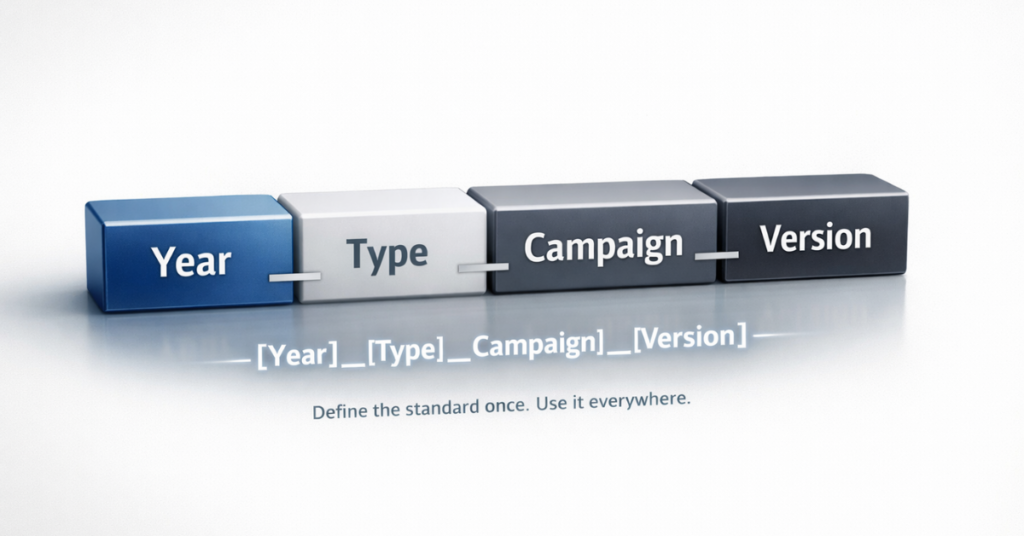
Information should flow from broad to specific: date, campaign type, specific descriptor, and version.

Example Structure:

2024_Webinar_DataPrivacy_V2

This tells you:

  • When: 2024
  • What type: Webinar
  • Topic: Data Privacy
  • Version: Second iteration

Scalability for Growth

Build in fields you might need later—business unit, region, product category—even if you don’t populate them immediately.

Future-Proofing Elements:

  • Business unit codes (even for single-unit companies)
  • Regional identifiers (before international expansion)
  • Product line categories (before diversification)
  • Channel indicators (as Martech stack grows)

Human Readability Without Sacrificing Machine Logic

Strike a balance that works in both reporting dashboards and human conversation.

Too Cryptic Too Verbose Just Right
24Q3WbDG 2024_Third_Quarter_Webinar_Series_About_Data_Governance_Best_Practices 2024_Q3_Webinar_DataGovernance

How Do Platform-Specific Naming Conventions Work?

While universal principles apply everywhere, each platform has unique quirks that influence naming strategy.

Marketo Program and Marketing Asset Naming Conventions

Marketo’s program structure benefits from prefixes that indicate program type and channel.

Marketo Naming Formula:

[Type]_[Year]_[Quarter]_[Campaign]_[Descriptor]

Examples:

  • EM_2024_Q4_Newsletter_October
  • WB_2024_Q3_Webinar_DataPrivacy
  • NR_2024_Lead_Nurture_Trial_Users
Key Considerations:

  • Assets within programs need full context (appear in global searches)
  • Form names drive automation trigger logic
  • Nested folders allow slightly more concise program-level names
  • Smart campaign triggers rely on consistent naming patterns

HubSpot Workflow and Content Naming

HubSpot’s interface displays asset names prominently, making readability especially important for team collaboration.

HubSpot Best Practices:

  • Workflows: Use descriptive internal names (2024_Workflow_Lead_Scoring_Enterprise)
  • Landing pages: Balance SEO and internal organization (2024_LP_Product_Demo_Request)
  • Blog posts: SEO-optimized titles (auto-generate URLs)
  • Lists: Include purpose and update frequency (Active_Customers_Updated_Daily)
Critical Elements:

  • Multiple marketers often manage overlapping workflows
  • URLs auto-generate from content titles
  • Internal vs. public-facing naming requirements differ

Salesforce Campaign Naming

Salesforce campaigns appear in reports viewed by sales and executive teams, requiring immediate clarity for non-marketers.

Salesforce Naming Formula:

[Year]_[Quarter]_[Channel]_[Campaign_Name]

Examples:

  • 2024_Q3_Webinar_Data_Governance_Series
  • 2024_Q4_Trade_Show_DreamForce
  • 2024_Event_User_Conference_Boston
Sales Leadership Perspective:

  • Names must be self-explanatory without marketing translation
  • Standard fields (Campaign Type, Status) handle some categorization
  • Attribution tracking requires consistency with external platforms
  • Executive dashboards display campaign names directly

How Do You Audit and Fix Your Naming Conventions?

Implementing standardized marketing asset naming conventions requires a methodical approach, especially if you’re correcting years of inconsistency.

Step 1: Assess Your Current State

Begin with a comprehensive audit across all platforms.

Audit Checklist:

  • Export asset lists from each platform (programs, campaigns, workflows, forms, emails)
  • Review 50-100 examples per platform
  • Document naming patterns by team member or department
  • Identify assets impossible to categorize without opening
  • Flag naming that breaks reporting filters
  • List orphaned assets with no clear owner
Red Flags to Watch For:

  • Same campaign named differently across platforms
  • Date formats varying (2024-01, Jan-2024, 012024, 2024_January)
  • Inconsistent separators (underscores, hyphens, spaces, camelCase)
  • No version control indicators
  • Missing or inconsistent asset type identifiers

Step 2: Define Your New Standard

Create a comprehensive written guide that becomes your team’s single source of truth.

Marketing asset naming conventions, marketing assets, asset lists, naming conventions,
Documentation Requirements:
Element Details Example
Naming Formula Exact structure with fields [Year]_[Type]_[Campaign]_[Version]
Required Fields Must-have components Year, Asset Type, Campaign Name
Optional Fields Context-dependent additions Region, Business Unit, Channel
Separators Consistent delimiters Underscores only
Date Format Standardized approach YYYY or YYYY_QX or YYYY_MM
Abbreviations Approved shorthand list EM=Email, WB=Webinar, NR=Nurture
Examples 10-15 across asset types Cover all common scenarios

Step 3: Prioritize and Rename Strategically

Don’t attempt to rename everything at once. Use a phased approach that delivers quick wins.

Prioritization Framework:

Phase 1 (Week 1-2): Active Campaigns

  • Anything launching in the next 60 days
  • Currently running programs
  • High-visibility executive reporting items

Phase 2 (Week 3-4): Recent Assets

  • Created in the last 6 months
  • Frequently referenced templates
  • Core automation workflows

Phase 3 (Month 2-3): Strategic Archive

  • Rename only what you’ll reuse
  • Archive outdated content
  • Delete duplicates and unused assets

Phase 4 (Ongoing): Maintenance

  • All new assets follow the convention
  • Weekly audits of recent additions
  • Quarterly reviews for edge cases

Step 4: Document and Train

Make compliance easy by embedding the convention into daily workflows.

Training Components:

  • Add naming guide to marketing operations documentation
  • Include in onboarding materials for new hires
  • Create platform-specific templates with pre-filled naming
  • Build quick-reference posters or Slack bots
  • Record video walkthroughs for each platform
Template Examples:

  • Marketo program templates with naming structure
  • HubSpot workflow naming generator
  • Salesforce campaign naming form
  • Email template naming checklist

Step 5: Enforce and Iterate

Assign ownership and build accountability into your processes.

Enforcement Mechanisms:

  • Designate a naming convention owner
  • Weekly audits of new assets (15-minute review)
  • Platform permission settings requiring approval
  • Naming validation in approval workflows
  • Quarterly team refreshers
Iteration Schedule:

  • Month 1-3: Weekly reviews and adjustments
  • Month 4-6: Bi-weekly reviews
  • Month 7-12: Monthly reviews
  • Year 2+: Quarterly reviews (unless major org changes)

Step 6: Leverage Automation

Where possible, remove human error by automating convention enforcement.

Automation Opportunities:

  • Platform naming templates with locked fields
  • Validation rules that prevent saving incorrect formats
  • Slack/Teams bots that generate compliant names
  • Form submissions that auto-create properly named assets
  • Scripts that flag non-compliant assets for review

Conclusion

Marketing asset naming conventions transform from administrative burden to competitive advantage when implemented thoughtfully. Teams that invest in standardized naming systems reclaim hours spent searching for assets, produce more accurate reporting with less manual effort, and build automation that scales as their operations grow. The upfront work of designing a convention and migrating existing assets pays dividends in efficiency, clarity, and operational maturity. If your current naming landscape feels overwhelming, or if you’re building a convention framework from scratch, 4Thought Marketing specializes in marketing operations optimization that creates sustainable systems for growing teams.

Frequently Asked Questions (FAQs)

What is the best format for marketing asset naming conventions?
The best format depends on your specific needs, but most effective conventions follow a hierarchical structure: date or year first, followed by asset type, campaign name, and version number, separated by consistent delimiters like underscores or hyphens.
How do naming conventions improve marketing reporting?
Standardized names allow you to filter and group assets automatically in reports. When all webinar programs start with “Webinar_,” you can pull aggregate performance data instantly rather than manually selecting each program variant.
Should I rename all existing marketing assets?
No. Focus on active and recently created assets first. Rename older assets only if you’ll actively use them in upcoming campaigns. Archive or delete outdated content rather than spending time renaming items you’ll never touch again.
What happens if team members don’t follow the naming convention?
Inconsistent adoption undermines the entire system. Designate a naming convention owner to audit new assets weekly, implement approval workflows where possible, and include convention training in onboarding for new team members to ensure consistent enforcement.
Can naming conventions work across multiple marketing platforms?
Yes. While each platform has specific considerations, your underlying logic should remain consistent. Use the same date formats, separator conventions, and hierarchical structure everywhere, adapting only for platform-specific constraints like character limits or special requirements.
How often should I update my naming convention framework?
Review your convention quarterly during the first year of implementation to catch edge cases and refine based on real usage. After the system stabilizes, annual reviews are typically sufficient unless you experience major organizational changes like mergers or new product launches.

Eloqua response rules, campaign response tracking, Eloqua CRM integration, Eloqua campaign responses, Eloqua program canvas, configure response rules, Eloqua response tracking, campaign member status, CRM campaign sync, response rule configuration, campaign response priority, CRM member status mapping, campaign response workflow, set up response rules, troubleshoot Eloqua responses, sync campaign responses,
Key Points at a Glance
  • Eloqua Response rules define what counts as a response in your CRM.
  • CRM response tracking requires a CRM campaign ID.
  • Priority order syncs only the highest value interaction.
  • Processing runs hourly at five minutes past the hour.
  • Program Canvas and Program Builder give the most sync control.

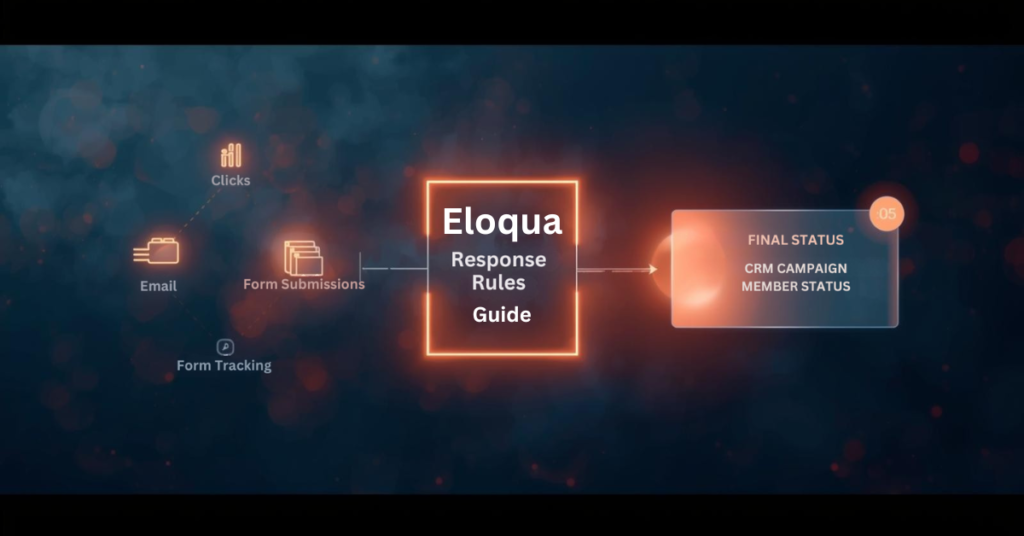
Campaign response tracking connects marketing activities to measurable outcomes in your CRM. When contacts engage with emails, forms, or events, those interactions need proper classification to inform sales teams and attribution models. Eloqua response rules serve as the configuration layer that defines which activities count as responses and how they map to CRM statuses. Without proper setup, valuable engagement data may never reach your CRM, or worse, the wrong status updates could trigger inappropriate workflows. Understanding how Eloqua response rules work ensures your campaign data flows accurately from Eloqua to your CRM, giving sales and marketing teams the insights they need to act on engagement signals.

What exactly are response rules in Eloqua?

Response rules define which campaign activities qualify as responses and determine the CRM status those responses should receive. When contacts interact with your campaigns through email opens, link clicks, form submissions, or event attendance, Eloqua response rules are used to evaluate those interactions against the criteria you have configured and sync qualified activities to your CRM system.

Think of response rules as the execution logic for decisions your sales and marketing teams have already made: which interactions represent engagement worth tracking in the CRM? This configuration connects marketing activity in Eloqua to campaign member records in Salesforce, Microsoft Dynamics, Oracle Sales Cloud, or other CRM platforms.

Response rules consist of three main components:

  • Activity type (what the contact did)
  • CRM member status (how that activity should be labeled in your CRM)
  • Priority order (which status wins when multiple activities occur)

Do I need a special campaign setup to use Eloqua response rules?

Yes. Every Eloqua campaign that tracks responses must include a CRM campaign ID, which links Eloqua contacts to your CRM campaign member records.

When configuring your campaign, place all assets you want tracked as responses on the campaign canvas or within simple campaigns. If you plan to track form submissions or external activities like webinar registrations, these assets must be included on the canvas and share the same campaign ID. Assets living outside the campaign structure or using different campaign IDs will not generate responses in accordance with your rules.

This setup requirement means planning your campaign architecture before launch. You cannot retroactively assign response tracking to activities that occurred without a proper campaign ID association.

Which campaign activities can count as responses?

Five primary activity types for Eloqua response rules:

  • Email sends
  • Email open
  • Email click-through
  • Form submission
  • External activities (webinar registration, webinar attendance, event check-in)

Most marketing operations teams exclude email sends from Eloqua response rules because a send represents a marketing action rather than contact engagement. Similarly, email opens can be unreliable due to limitations in tracking pixels and privacy features in modern email clients.

The most commonly tracked responses include:

  • Email clickthrough — demonstrates active interest
  • Form submission — indicates deeper engagement and data sharing
  • Webinar attendance — shows commitment through time investment
  • Event registration — signals intent to engage further

Your response rule configuration should reflect which activities matter most to your sales and marketing workflows.

How do I map activities to CRM campaign member statuses?

Each response rule maps a specific activity type to a CRM member status value. The status values must match exactly what your CRM expects for campaign members. For Salesforce and Oracle Sales Cloud, common statuses include “Responded,” “Registered,” “Attended,” “Clicked,” or custom values your team has created. For Microsoft Dynamics and other CRM systems, you define equivalent status codes that align with your CRM configuration.

You also designate a default response rule, typically assigned to your lowest priority activity. This default catches any qualifying activities that do not match higher-priority rules, ensuring that all meaningful engagement generates a response. The mapping process requires coordination between your Eloqua administrator and CRM administrator to ensure status values align across both systems. Mismatched status values will cause sync failures or unexpected behavior.

What happens when contacts perform multiple activities on the same campaign?

Priority order becomes critical when contacts engage multiple times. Eloqua sends only the highest-priority responses to your CRM, preventing status downgrades and reducing data noise.

Consider this scenario: A contact receives an email, clicks the link, submits a form, and later attends a webinar. If your priority order ranks webinar attendance first, form submission second, and email click through third, Eloqua will sync only “Attended” to your CRM. Even if the contact clicks the email again after attending the webinar, the CRM status remains “Attended” because Eloqua recognizes that a higher-priority activity has already occurred.

This priority logic ensures your CRM campaign member status reflects the most meaningful interaction, not every interaction. Without proper priority configuration, a contact who attends your webinar might show a status of “Clicked” if the click activity is processed after attendance, creating reporting confusion and potentially triggering incorrect automation. Set priority order based on business value and engagement depth, not chronological order.

How quickly do campaign responses sync to my CRM?

Eloqua does not sync responses to your CRM in real time. Instead, a backend process runs at 5 minutes past each hour to evaluate all campaign activities against your configured Eloqua response rules. This process creates campaign response records in an internal Eloqua table according to the rules and priorities you set. Those response records then become available for your CRM sync workflow to process.

If campaign responses are not appearing in your CRM immediately after a contact clicks or submits a form, timing is often the explanation. The contact may have completed the activity, but the backend evaluation process has not run yet to create the response record. Wait until at least 5 minutes past the hour before investigating further.

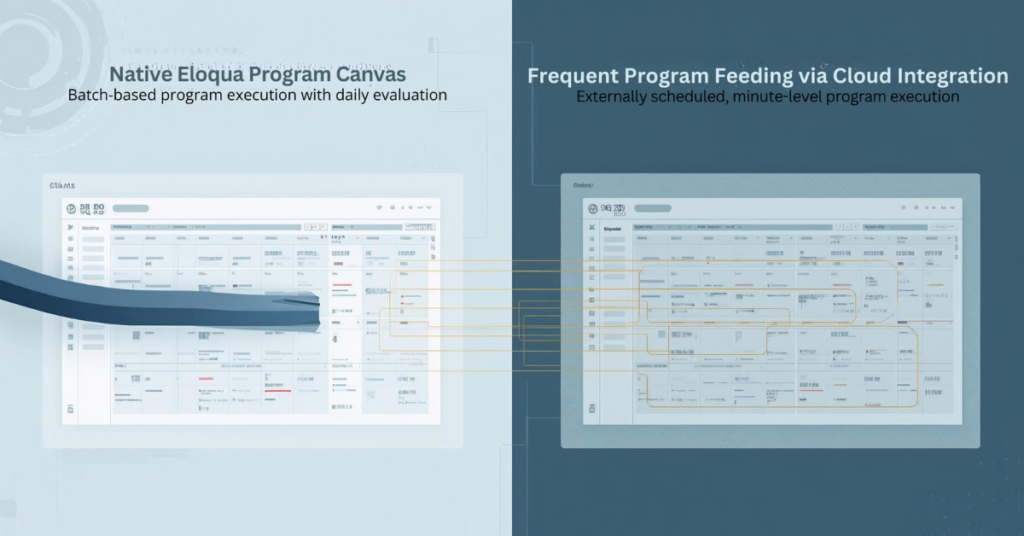
After the response record is created, your Program Canvas, Program Builder, or integration rule workflow must still process and send that record to your CRM, which introduces additional timing based on how frequently those workflows run.

What are the methods for sending Eloqua responses to my CRM?

Eloqua response rules, campaign response tracking, Eloqua CRM integration, Eloqua campaign responses, Eloqua program canvas, configure response rules, Eloqua response tracking, campaign member status, CRM campaign sync, response rule configuration, campaign response priority, CRM member status mapping, campaign response workflow, set up response rules, troubleshoot Eloqua responses, sync campaign responses,

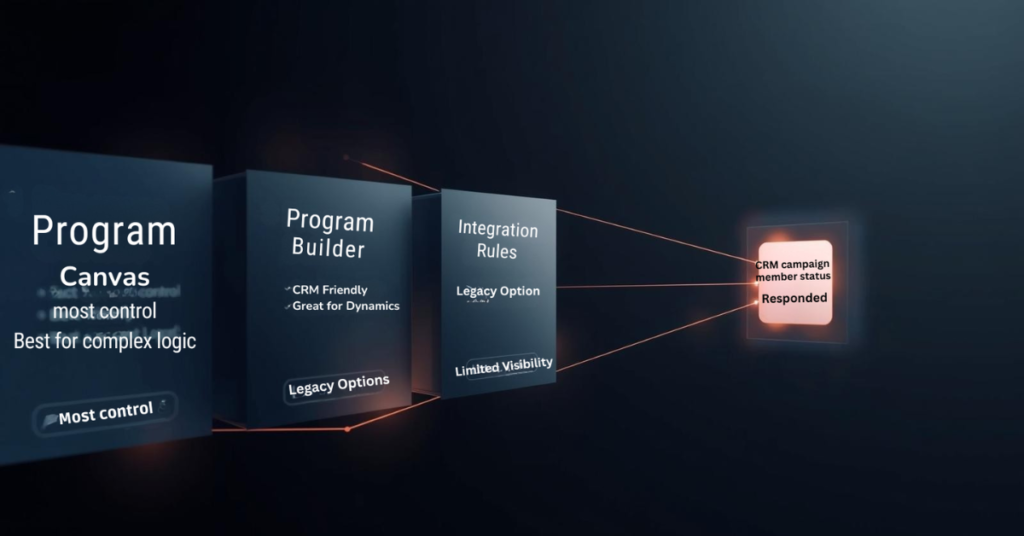
Eloqua offers three primary methods for delivering campaign responses to your CRM: Program Canvas, Program Builder, and Integration Rules.

Program Canvas (available for Salesforce and Oracle Sales Cloud customers using integration apps) provides the most visibility and control. A listener step can trigger automatically when a campaign response is created, feeding records directly into your CRM update workflow. This approach allows you to add filtering, data enrichment, or conditional logic before syncing.

Program Builder offers similar functionality through a different interface, particularly useful for Microsoft Dynamics and other CRM systems.

Integration Rules represent an older approach that still functions but provides less visibility into data flow and troubleshooting capabilities.

Most marketing operations teams prefer the Program Canvas or Program Builder approach because it surfaces the sync workflow visibly, making it easier to diagnose issues, add business logic, and maintain over time.

Can I sync campaign responses to multiple CRM systems simultaneously?

No. The response action feature and Program Builder both limit you to a single CRM system per Eloqua instance. There is no native capability to trigger multiple CRM integrations from one response action.

If your organization requires syncing campaign responses to multiple CRM systems, you will need a workaround. One approach involves creating custom objects for each campaign response, then building separate programs for each CRM that check which CRM ID fields contain values and route responses accordingly. This adds complexity and requires careful data architecture planning.

For most organizations, this limitation is not an issue, as marketing operations typically maintain a single primary CRM for campaign tracking and lead management.

What should I verify before launching campaigns with Eloqua response rules?

Configure Eloqua response rules before sending your first campaign. Once contacts begin engaging, the rules determine what syncs to your CRM, and retroactive changes can create data inconsistencies.

Verify these items during setup:

Match CRM expectations — Confirm that response rule status values exactly match the campaign member statuses your CRM expects. Even small differences in capitalization or spacing will cause sync failures.

Test priority order — Walk through realistic contact journeys where someone engages multiple times. Verify that the highest priority status reaches your CRM regardless of activity timing.

Confirm contact existence — Build your workflow to check that contacts exist in your CRM before attempting to send campaign responses. If a contact record has not been created yet, the response will have nowhere to attach, causing sync errors.

Validate campaign ID assignment — Double-check that all assets you want tracked share the same campaign ID and appear on the campaign canvas or within simple campaigns.

Taking time to configure Eloqua response rules properly prevents troubleshooting headaches later and ensures campaign engagement data flows to your CRM as intended.

Conclusion

Eloqua response rules form the foundation of how campaign engagement data flows from Eloqua to your CRM system. Understanding which activities count as responses, how priority order prevents status downgrades, and when the backend processing creates response records helps marketing operations teams build reliable workflows.

Proper configuration requires coordination between Eloqua administrators and CRM teams to ensure status values align, priority order reflects business value, and sync workflows check for contact existence before sending data. At 4Thought Marketing, we help organizations design and implement Eloqua response rule strategies that ensure accurate campaign tracking and seamless CRM integration. Ready to optimize your Eloqua response rules? Contact our team to discuss how we can help improve your marketing automation workflows.

Frequently Asked Questions (FAQs)

Can I change response rules after a campaign has already started?
Yes, but changes only affect activities that occur after the modification. Existing campaign responses remain unchanged, which can create inconsistencies in reporting.
Why are some campaign responses not appearing in my CRM?
Common causes include mismatched CRM status values, contacts not existing in your CRM yet, missing campaign IDs on assets, or sync workflows not running frequently enough.
Do email opens count as reliable response indicators?
Email opens have become less reliable due to privacy features in email clients that block tracking pixels or pre-load images, making click-throughs and form submissions more trustworthy engagement signals.
Can I use response rules with campaigns that do not have a CRM campaign ID?
No. Response rules require a CRM campaign ID to function because that ID links Eloqua activities to CRM campaign member records.
How often should I review my response rule configuration?
Review response rules quarterly or whenever you launch new campaign types, add CRM member statuses, or notice discrepancies between Eloqua activity and CRM data.
What is the difference between a response rule and a campaign response?
A response rule is the configuration that defines what activities count as responses. A campaign response is the actual record created when a contact performs an activity that matches a rule.

Implementing velocity scripts, Velocity script implementation, Marketo scripting best practices, Testing velocity scripts, Velocity script governance, Script performance optimization,
Key Takeaways
  • Real-world scenarios demonstrate practical applications of velocity scripts
  • Structured testing protocols prevent production errors
  • Governance frameworks ensure safe deployment and compliance
  • Performance monitoring prevents email rendering delays
  • Expert support accelerates capability building for complex requirements

You’ve heard about velocity scripts. You understand the potential. You know they can unlock personalization that standard Marketo tokens simply can’t deliver. But here’s where most teams get stuck: turning that theoretical understanding into actual working campaigns.

Implementing velocity scripts isn’t just a technical exercise—it’s a process that requires careful planning, structured testing, and honest assessment of what your team can handle versus where you need outside help. The gap between “this sounds great” and “this is working in production” trips up even experienced operations professionals.

The challenge isn’t just writing code that works. It’s writing code that works reliably across thousands of records with messy data, doesn’t break when someone updates a field name, and still renders emails fast enough to meet campaign deadlines. Implementing velocity scripts successfully means understanding these realities upfront.

This guide walks through real scenarios where velocity solved actual business problems, the implementation challenges teams encountered, and the Marketo scripting best practices that separate successful deployments from expensive failures. Whether you’re building capability in-house or bringing in specialists, these insights help you avoid the painful lessons others learned the hard way.

Real-World Implementation Scenarios

Talking about velocity scripts in abstract terms rarely helps. Let’s look at how real organizations used them to solve specific problems.

Scenario 1: Multi-Tier Product Recommendations

A B2B SaaS company was drowning in email versions. They offered three subscription tiers, and marketing wanted to recommend the right one based on company revenue, current plan, and renewal timing. The math was brutal: that’s potentially 15+ email variations to maintain.

Every time pricing changed or messaging shifted, someone had to update every single version. Testing took forever. Version control became a nightmare. Something had to give.

The solution? One email template with velocity logic evaluating all three factors simultaneously. The script checks revenue brackets first, then looks at subscription status, then factors in renewal proximity. Based on those conditions, it generates the appropriate recommendation with personalized reasoning.

The result: One template replaced 15 assets. Campaign deployment time dropped from days to hours. When offers change, one update handles everything.

Pro Tip: Don’t start with your most complex personalization challenge. Pick something straightforward that proves value quickly. Success builds confidence and internal support for tackling harder problems later.

Scenario 2: Geographic Event Invitations

A consulting firm ran into the classic regional event problem. They hosted quarterly networking events in six cities, but every invitation email was generic: “Join us in [city list].” Prospects had to figure out which location made sense for them.

Registration rates were mediocre. People don’t engage when you make them work to find relevant information.

Implementing velocity scripts changed the approach entirely. The team built logic that evaluated each prospect’s state against event locations, automatically assigned them to the nearest city, and populated that event’s specific details—date, venue, registration link—as the primary call-to-action.

Prospects far from any venue? The script defaulted them to the virtual event option with physical locations as alternatives.

The outcome: Registration rates jumped 34% compared to previous campaigns. The team managed one template instead of seven. Adding new cities just meant updating the script logic, not building entirely new assets.

Scenario 3: Cleaning Inconsistent Contact Data

Here’s a problem every operations team knows: phone numbers stored in wildly different formats. Some have parentheses and hyphens. Others are straight digit strings. Many include international prefixes. All of them need to display professionally in customer emails.

A manufacturing company faced exactly this situation. The data existed in their database, but showing it to customers looked sloppy and inconsistent—not the impression they wanted to make.

Pausing campaigns to manually clean thousands of records wasn’t realistic. The timeline didn’t allow it, and frankly, new records would just recreate the problem immediately.

Velocity script implementation solved it at render time. The script strips non-numeric characters, validates digit count, then reformats based on regional conventions. Ten-digit US numbers become (555) 123-4567. International numbers keep their country codes with proper spacing.

The payoff: Professional presentation without database cleanup projects. No debates about which format is “correct” because the script adapts display based on context.

Technical Implementation Challenges

Let’s be direct: implementing velocity scripts introduces complexity. Knowing what you’re getting into helps you prepare appropriately.

Developer Skill Requirements

Velocity scripting isn’t something most marketers pick up casually. It requires understanding syntax, conditional logic, loops, and variables—basically, programming fundamentals.

Small mistakes have big consequences. Miss a closing bracket? Your entire email content block goes blank. Reference a variable incorrectly? Recipients see error messages instead of personalized content. These aren’t theoretical risks—they happen in production if testing isn’t thorough.

Testing velocity scripts becomes exponentially more complex than testing standard emails. A script working perfectly with complete data profiles might crash spectacularly when it hits a null value or unexpected text format. You need to validate across dozens of scenarios, not just send yourself a few test emails.

Most teams handle this in either of three-ways: train existing staff (slow but builds capability), hire specialized talent (expensive but effective), or partner with agencies like 4Thought Marketing (immediate expertise without permanent headcount).

Email Rendering Performance

Complex scripts slow things down. That’s just reality.

Scripts with nested loops, multiple custom object queries, or heavy string manipulation add processing time to every email render. Batch programs that previously completed in 30 minutes might now take two hours.

For time-sensitive campaigns—flash sales, event registrations with limited capacity, breaking news—those delays can kill business outcomes. Script performance optimization isn’t optional; it’s essential for maintaining operational efficiency.

Important: Monitor send completion times closely after implementing velocity scripts. If performance degrades significantly, optimization becomes your top priority.

Performance improvements come from minimizing unnecessary loops, caching frequently-accessed values, breaking complex scripts into smaller blocks, and testing velocity scripts with realistic data volumes before production.

Data Quality Dependencies

Here’s an uncomfortable truth: velocity scripts amplify data quality problems instead of hiding them. Poor data hygiene becomes more visible, not less, when you’re trying to personalize content.

Null values break scripts unless you code explicit fallback handling. A script expecting company revenue data will crash on records missing that field—unless the developer anticipated this scenario and built around it.

Inconsistent formats—dates as text versus date fields, phone numbers structured differently, mixed-case entries—require additional complexity to handle gracefully. The messier your data, the more elaborate your scripts become.

Then there’s maintenance. Every time someone adds custom fields, renames existing fields, or changes data types, every velocity script touching those fields needs manual updates. Without clear documentation tracking dependencies, one seemingly minor database change can break multiple campaigns simultaneously.

Best Practices for Velocity Script Success

Marketo scripting best practices reduce implementation risk through structured approaches balancing capability with governance.

Establish a Centralized Script Library

Stop building scripts from scratch every single time. Maintain tested templates for common scenarios that teams can reuse and adapt.

Product recommendation templates with clear documentation on parameters and expected fields. Geographic personalization frameworks covering regional variations. Data formatting utilities for phone numbers, dates, addresses, text case. Custom object access patterns optimized for performance. Consent-checking logic meeting privacy compliance requirements.

Documented templates accelerate implementing velocity scripts, reduce errors, and ensure consistency. New team members onboard faster when they can reference working examples instead of learning through trial and error.

Version control matters as your library grows. Track which campaigns use which script versions so updates don’t accidentally break active programs.

Implement Mandatory Peer Review

Never let scripts go to production without a second set of eyes reviewing them. Fresh perspective catches mistake the original developer missed.

Effective peer review covers:

Syntax checking for common errors like mismatched brackets. Logic validation ensuring conditions cover all possible scenarios. Fallback verification confirming default output exists for null values. Performance assessment flagging potential rendering delays. Compliance review ensuring scripts respect consent and privacy rules.

This velocity script governance approach creates accountability, reduces production errors, and builds team knowledge as reviewers learn from examining others’ work.

Build Comprehensive Test Segments

Create Smart Lists representing edge cases scripts must handle gracefully. Testing velocity scripts only with clean, complete data misses real-world scenarios that break personalization.

Essential test segments include:

Records with null values in fields your scripts reference. International data with varied formats and languages. Minimal profiles containing only required fields. Maximum profiles with all possible fields populated. Edge cases like extremely long text or unusual characters. Recent opt-outs affecting what data can display.

Pro Tip: Maintain permanent test segments rather than rebuilding them for each campaign. Standardized test data accelerates validation and ensures consistent quality checks.

Send tests to yourself using each segment. Verify content renders correctly, fallback logic works as intended, and no blank sections or error messages appear.

Document Business Logic Clearly

Write plain-language explanations of what each script does and why, separate from the code itself. Future team members need to understand intent, not just syntax.

Effective documentation includes:

Business objective the script achieves. Fields accessed and expected data types. Logic flow in plain language. Fallback behavior for missing data. Known limitations or scenarios not handled. Update history tracking when and why changes occurred.

This supports knowledge transfer, reduces dependency on individual developers, and accelerates troubleshooting when scripts behave unexpectedly.

Create Fallback Content Always

Never let scripts produce blank output. Always define default content when data doesn’t meet expected conditions.

Generic fallback maintains professional presentation even when personalization fails. “Explore our product lineup” beats blank space when revenue data needed for recommendations is missing.

Monitor and Audit Regularly – Schedule quarterly reviews of active scripts identifying optimization opportunities, retiring unused logic, and ensuring alignment with current business rules.

Regular audits assess – Which scripts remain active versus deprecated. Script performance optimization opportunities based on rendering times. Accuracy of logic as requirements evolve. Data dependencies and potential breaking changes. Compliance with current privacy regulations. Consolidation opportunities for similar scripts.

Proactive monitoring prevents script proliferation where outdated logic persists in forgotten campaigns.

When to Get Expert Help

Not every situation demands external support for velocity script implementation, but certain scenarios benefit significantly from specialized expertise.

Implementing velocity scripts, Velocity script implementation, Marketo scripting best practices, Testing velocity scripts, Velocity script governance, Script performance optimization,

Limited Internal Technical Capacity

  • Operations staff lack scripting skills and bandwidth for development
  • Personalization needs clearly exceed native capabilities
  • Timeline doesn’t allow for lengthy learning curves

Complex Compliance Requirements

  • Privacy regulations demand sophisticated logic beyond general marketing knowledge
  • Industry-specific requirements create meaningful legal risk
  • Compliance mistakes carry serious consequences

Accelerated Timelines

  • Business objectives require immediate implementation
  • Competitive pressures demand faster execution
  • Can’t wait months for skill development

Multiple Failed Attempts

  • Team lacks architectural understanding of how velocity integrates
  • Trial-and-error approach wasting resources
  • Stakeholder confidence damaged by repeated failures

Scaling Challenges

  • Initial success creating demand across many campaigns
  • Team manages few scripts but lacks frameworks for broader adoption
  • Need structured governance to support growth

What Expert Partners Provide

Agencies like 4Thought Marketing bring experience across dozens of implementations, avoiding pitfalls internal teams discover through expensive mistakes.

Core Services:

  • Assessment – Separate genuine velocity needs from native feature capabilities
  • Architecture – Establish governance, testing protocols, documentation standards
  • Development – Production-ready logic with error handling and optimization
  • Testing – Comprehensive validation across edge cases
  • Training – Knowledge transfer on maintenance and troubleshooting
  • Support – Ongoing backup as programs evolve

Build vs. Buy Decision

Build Internally When:

  • Personalization requirements are extensive and ongoing
  • Budget justifies permanent technical headcount
  • Existing teams can add velocity skills through training
  • Self-sufficiency is strategic priority

Partner When:

  • Needs are sporadic or campaign-specific
  • Expertise only when needed costs less than permanent staff
  • Timeline pressures don’t allow learning delays
  • Compliance risk requires proven experience

Hybrid Works When:

  • Partners handle initial implementation and complex scenarios
  • Internal teams trained for maintenance over time
  • Balancing immediate capability with future self-sufficiency

Conclusion

Successfully implementing velocity scripts requires more than technical skills—it demands structured processes, velocity script governance, and honest assessment of capabilities.

The organizations seeing real success start focused. They prove value with straightforward use cases before expanding scope. They invest in Marketo scripting best practices like comprehensive testing and peer review instead of rushing production. They recognize when to build internally versus when expertise prevents expensive mistakes.

The challenges are real. Velocity requires developer skills, affects performance, and increases maintenance complexity. But teams addressing these challenges through structured approaches transform velocity from interesting concept to competitive differentiator. Whether building expertise or partnering with specialists like 4Thought Marketing, match your approach to your specific situation. Resources, skills, timelines, compliance needs, and strategic importance all influence the right path for velocity script implementation success.

Frequently Asked Questions (FAQs)

How long does implementing velocity scripts take?
Timeframes vary significantly. Simple formatting scripts might take days, while sophisticated multi-field logic can require weeks of development and testing velocity scripts, plus additional time for peer review.
What’s the biggest implementation mistake teams make?
Tackling complex scenarios first. Starting with simpler use cases builds confidence and understanding before addressing sophisticated logic or custom object integration.
Do we need a dedicated developer for velocity?
Not necessarily. Some operations professionals develop scripting skills through training. However, extensive personalization requirements often justify dedicated technical resources or agency partnerships.
How do we prevent scripts from breaking campaigns?
Follow Marketo scripting best practices: comprehensive testing across data scenarios, mandatory peer review, fallback content for null values, and clear documentation of field dependencies.
Can velocity scripts slow email sends?
Yes, complex scripts impact rendering performance. Focus on script performance optimization, monitor send times, and test with realistic data volumes before production.
Should we build velocity expertise internally or use an agency?
Consider personalization volume, available resources, and strategic priorities. Internal capability makes sense for extensive ongoing needs. Agency partnerships work well for sporadic requirements or accelerated timelines.

feed eloqua programs, eloqua program feeder, custom objects, cloud custom object feeder,
Key Takeaways
  • Native program feeders execute only once daily
  • Listener steps offer limited filtering flexibility
  • Cloud feeders schedule feeds every few minutes
  • Advanced filter criteria enable precise targeting
  • Frequent feeding accelerates lead response times

Eloqua Program Canvas delivers powerful automation for contact management and custom object processing. Marketing operations teams rely on program feeders to route contacts through workflows based on lead stage changes, form submissions, and database updates. But native Eloqua program feeders impose a significant constraint: they only evaluate and feed Eloqua programs once every 24 hours. This limitation creates delays when your automation demands real-time responsiveness, such as immediately routing MQLs to sales or triggering custom object updates within minutes of a status change. Cloud-based solutions now enable marketers to bypass these restrictions, feeding contacts and custom object records to programs multiple times per day with flexible scheduling and advanced filtering that native listeners cannot provide.

Why Are Eloqua Program Feeders Limited to Daily Execution?

Eloqua’s native program feeder architecture evaluates segments and shared filters on a 24-hour cycle to balance system performance across large contact databases. While listener steps offer real-time triggers for specific events like lead score changes or new contact creation, they support only a narrow set of data sources. If you need to feed Eloqua programs based on custom field changes, specific lead stage transitions, or complex filter criteria involving custom objects, native listeners fall short.

For example, a listener can monitor when a contact’s lead score increases, but it cannot trigger on a lead stage field changing from “Inquiry” to “MQL” unless you configure contact field tracking (limited to three tracked fields per instance). Similarly, segment-based program feeders provide robust filtering capabilities but refresh only once daily. This gap leaves marketing operations teams unable to respond immediately to critical pipeline events without workarounds.

The technical reason behind these limitations lies in database query load. Continuously evaluating complex filter criteria against millions of contact records in real time would strain system resources. Oracle designed the daily cycle to maintain platform stability, but this design choice creates friction for teams running time-sensitive automation workflows.

What Happens When You Need Real-Time Program Feeding?

Consider two common scenarios where daily program feeds create operational bottlenecks:

Use Case 1: Lead Stage Progression

Your demand generation team runs campaigns that move contacts from “Inquiry” to “MQL” status based on form submissions and engagement scoring. When a contact crosses the MQL threshold, you want them routed immediately to a Program Canvas that assigns account ownership, syncs to CRM, and triggers a sales alert. With a native segment feeder running once daily, newly qualified leads wait up to 24 hours before entering the program. This delay reduces speed-to-lead and impacts conversion rates.

Use Case 2: Custom Object Updates

You maintain a custom object that tracks product interest by account. When a custom object record updates to reflect a customer requesting a demo for a specific product line, you need that record processed immediately through a program that updates account scoring and notifies the relevant sales rep. Native custom object program feeders evaluate once daily, meaning demo requests sit unprocessed for hours.

In both scenarios, the inability to feed Eloqua programs on demand creates missed opportunities. Marketing automation should accelerate pipeline velocity, not introduce delays. Teams need the flexibility to schedule program feeds based on business requirements rather than platform constraints.

How Do Cloud Feeders Solve Eloqua’s Program Feeding Limitations?

Cloud-based feeder applications integrate with Eloqua Program Canvas as custom data sources, enabling marketers to feed contacts and custom object records to programs on flexible schedules. Unlike native segment feeders that run once daily, cloud feeders can execute every few minutes, providing near-real-time program feeding without the limitations of listener steps.

The Contact Cloud Feeder and Custom Object Cloud Feeder from 4Thought Marketing address this gap by offering:

  • Advanced filtering with segments or shared filters: Use the full power of Eloqua’s filtering logic, including complex criteria based on contact fields, custom object data, and activity history
  • Customizable execution frequency: Schedule program feeds to run every 5, 10, or 15 minutes instead of waiting 24 hours
  • On-demand triggering: Push contacts or custom object records into programs immediately when needed
  • No listener limitations: Bypass the restricted data sources available to native listener steps

Comparison: Native vs. Cloud Feeder Capabilities

Feature Native Segment Feeder Native Listener Step Cloud Feeder
Execution Frequency Once per 24 hours Real-time (specific triggers) Every few minutes (customizable)
Filter Flexibility Full segment/filter logic Limited to lead score, contact creation, field tracking (max 3 fields) Full segment/filter logic
Custom Object Support Limited to daily feeds Not supported Full support with flexible scheduling
Use Case Fit Batch processing, periodic updates Specific real-time triggers Time-sensitive workflows requiring custom filtering

Cloud feeders combine the filtering power of segments with the responsiveness teams need for modern marketing automation workflows.

feed eloqua programs, eloqua program feeder, custom objects, cloud custom object feeder,

How to Set Up Frequent Program Feeding with Cloud Apps

Configuring a cloud feeder to feed Eloqua programs follows a straightforward process within Program Canvas:

Step 1: Configure Your Filter Criteria Determine which contacts or custom object records should enter the program. Cloud feeders accept either an Eloqua segment or a shared filter as the source. If you need to feed contacts when their lead stage changes to “MQL,” create a segment that includes contacts where Lead Stage equals “MQL” and Date Modified is within the last hour. This ensures only recently updated records enter the program.

Step 2: Set Execution Frequency Instead of accepting the default 24-hour cycle, specify how often the cloud feeder should evaluate your filter criteria. For time-sensitive workflows, configure the feeder to run every 5 or 10 minutes. The execution frequency field supports minute-based intervals, enabling near-real-time program feeding without manual intervention.

Step 3: Connect to Your Program Canvas Add the cloud feeder as a data source in your contact or custom object program. The feeder appears in the Program Canvas alongside native segments and listeners. Once connected, activate the program. The cloud feeder begins evaluating your filter criteria according to the schedule you defined, automatically feeding matching records into subsequent program steps.

Step 4: Monitor and Optimize After activation, monitor program member counts and processing times. If records aren’t entering as expected, verify your filter criteria and execution frequency settings. Adjust the schedule based on volume—high-volume workflows may benefit from slightly longer intervals to balance throughput with system performance.

What Are the Benefits of Feeding Programs Every Few Minutes?

Frequent program feeding delivers measurable improvements across multiple dimensions of marketing operations performance:

Faster Response to Buyer Signals When a contact downloads a high-value asset or requests a demo, immediate program entry enables instant lead routing and sales notification. Instead of waiting hours for the next segment refresh, your team responds while the buyer’s interest peaks. This reduces time-to-contact from 24 hours to minutes.

Improved Lead Routing Speed Speed-to-lead directly impacts conversion rates. Studies consistently show that contacting leads within five minutes of their inquiry produces significantly higher connect and conversion rates than waiting an hour or longer. Frequent program feeding ensures qualified leads reach sales queues immediately after crossing qualification thresholds.

Enhanced Program Personalization Real-time custom object processing enables dynamic content personalization based on the latest account data. When a custom object record updates with new product interest information, feeding that record into a program within minutes allows you to trigger personalized follow-up campaigns while context remains fresh.

Real-Time Custom Object Processing For organizations leveraging custom objects to track complex account relationships or product configurations, frequent feeding transforms custom object programs from batch processors into responsive automation engines. Demo requests, renewal triggers, and support escalations can all flow through programs as they occur rather than accumulating for daily processing.

How to Choose Between Contact and Custom Object Cloud Feeders

Selecting the appropriate cloud feeder depends on your automation workflow and data model:

Use Contact Cloud Feeder When:

  • Your program processes individual contacts through nurture streams, lead routing, or data enrichment
  • Filter criteria focus on contact fields, lead scores, or email activity
  • You need to trigger programs based on lead stage changes, form submissions, or campaign responses
  • The program updates contact records or adds contacts to campaigns and shared lists
Use Custom Object Cloud Feeder When:

  • Your program processes custom object records representing opportunities, product interests, or account relationships
  • Filter criteria evaluate custom object fields or linked contact data
  • You need to trigger workflows when custom object records are created or updated
  • The program performs actions on custom object data, such as updating fields or deleting records
Can You Use Both Together?

Yes. Many sophisticated automation workflows combine both feeder types. For example, a custom object program might process product interest records and use the “Add Linked Contact to Program” action to push the associated contact into a separate contact program. This enables you to process custom object logic at high frequency while maintaining clean separation between object-level and contact-level automation.

When architecting multi-stage workflows, consider which data entity (contact or custom object) serves as the primary trigger, then design your program canvas and feeder configuration accordingly.

Conclusion

Native Eloqua program feeders limit automation responsiveness by restricting segment evaluation to once-daily cycles, while listener steps provide real-time triggers for only a narrow set of use cases. Cloud feeders eliminate these constraints, enabling marketing operations teams to feed Eloqua programs multiple times per day with full access to segment and shared filter criteria. This flexibility transforms program canvas from a batch processing tool into a dynamic automation engine capable of responding to pipeline events within minutes.

Whether routing MQLs immediately after qualification or processing custom object updates in near-real-time, frequent program feeding accelerates marketing operations and improves buyer experience. Explore how Contact Cloud Feeder and Custom Object Cloud Feeder can reduce your response times and enhance workflow precision.

Frequently Asked Questions (FAQs)

Can you feed Eloqua programs more than once per day?
Yes, cloud feeders enable program feeds to run every few minutes instead of the native 24-hour cycle, providing near-real-time automation.
How often can cloud feeders run?
Cloud feeders support execution frequencies as short as every 5 minutes, allowing you to balance responsiveness with system performance based on your workflow requirements.
What filtering options are available with cloud feeders?
Cloud feeders accept any Eloqua segment or shared filter, providing full access to contact fields, custom object data, activity history, and complex Boolean logic.
Do frequent program feeds impact Eloqua performance?
When configured appropriately, frequent feeds have minimal performance impact. Start with 10-15 minute intervals and adjust based on contact volume and program complexity.
Can I schedule feeds to run every 5 minutes?
Yes, cloud feeders support minute-based scheduling, enabling you to configure execution frequencies as short as every 5 minutes for time-critical workflows.
Is this compatible with all Eloqua program types?
Cloud feeders integrate with both contact programs and custom object programs in Eloqua Program Canvas, supporting the full range of program automation capabilities.

early warning reports, primary keywords: marketing analytics alerts, revenue performance monitoring, predictive marketing analytics, operational risk reporting, marketing performance alerts, data driven alerts, campaign performance monitoring, marketing operations reporting
Key Takeaways
  • Early warning reports detect issues before revenue impact
  • Effective alerts span your entire MarTech ecosystem
  • Operational risk reporting requires business-tied thresholds
  • Marketing analytics alerts trigger action, not observation
  • Proactive monitoring reduces firefighting and improves ROI

Marketing operations teams spend countless hours building dashboards to track performance. But dashboards only tell you what already happened. By the time a metric dip on your weekly report, the damage is done—leads have gone unrouted, campaigns have burned budget on broken tracking, and revenue opportunities have slipped through the cracks. The solution is not more reporting; it is creating early warning reports that detect anomalies and trigger intervention before small issues cascade into big problems.

These proactive systems monitor your marketing automation platforms, CRM, analytics tools, and advertising channels in real time, sending alerts when thresholds are breached or patterns deviate from expected behavior. When designed correctly, predictive marketing analytics transform your operations from reactive to resilient, protecting revenue and freeing your team to focus on strategic work instead of constant troubleshooting.

What Are Early Warning Reports in Marketing Operations?

Early warning reports are automated monitoring systems that detect performance issues, system failures, and data anomalies across your marketing technology stack before they cause revenue loss. Unlike traditional dashboards that display historical data, these reports use predefined thresholds and logic to generate marketing performance alerts when conditions indicate a problem.

The key difference lies in their purpose:

Traditional Dashboards Early Warning Reports
Display historical performance Detect real-time anomalies
Require manual review Send automatic notifications
Support periodic analysis Enable immediate intervention
Show what happened Prevent what could happen

These systems span your entire ecosystem—marketing automation platforms, CRM systems, customer data platforms, content management systems, advertising platforms, analytics tools, event platforms, and integration layers. The goal is not visualization, but intervention. When a form stops submitting leads, when tracking scripts fail, when lead routing breaks, or when campaign performance drops unexpectedly, these systems notify the right person immediately so they can fix the issue before it compounds.

Why Do Marketing Teams Need Proactive Alerting?

Marketing teams operate complex technology ecosystems where dozens of systems must work in concert to drive revenue. A single failure can silently disrupt lead flow for days before anyone notices.

The cost of delayed detection:

  • Hundreds of leads lost or misrouted before weekly reviews
  • Thousands in ad spend wasted on unmeasurable campaigns
  • Pipeline gaps that show up quarters later
  • Customer experience damage from broken journeys

Revenue performance monitoring addresses this by shifting from periodic reporting to continuous surveillance. Data driven alerts catch issues within minutes or hours, not days or weeks. This reduces risk, protects pipeline, and allows marketing operations teams to move from firefighting mode to strategic optimization. When you can detect performance issues before revenue loss, you gain time to investigate, resolve, and prevent recurrence.

What Systems Should Early Warning Reports Monitor?

Effective operational risk reporting covers every layer of your marketing and revenue technology stack. Here is where to focus your monitoring efforts:

Marketing Automation Platforms

  • Form submission rates and failures
  • Email deliverability and bounce rates
  • Workflow execution errors
  • Lead assignment logic breakdowns
  • Database health and capacity warnings

CRM Systems

  • Lead ingestion rates and sync delays
  • Pipeline velocity anomalies
  • Data quality degradation
  • Integration failures and API errors

Analytics and Advertising

  • Traffic drops and conversion rate changes
  • Goal completion failures
  • Attribution model discrepancies
  • Ad spend pacing and performance deviations
  • Conversion tracking failures

Integration and Data Layers

  • API response times and error rates
  • Data transformation failures
  • Queue backlogs and sync delays
  • Identity resolution errors in CDPs
  • Segment population changes in DMPs

Each system has failure modes that can disrupt revenue if left undetected. The key is monitoring not just individual platforms, but the connections between them where data handoffs occur.

How Do You Build Effective Marketing Analytics Alerts?

Building campaign performance monitoring that drives action requires three core components: thresholds, context, and routing.

1. Define Intelligent Thresholds

Start with historical data to establish baseline performance. Then set alert levels that indicate genuine problems, not normal variance:

  • Minor alert: 10-20% deviation from baseline
  • Major alert: 20-50% deviation requiring investigation
  • Critical alert: 50%+ deviation demanding immediate action

2. Provide Actionable Context

Every alert should answer:

  • What system or metric is affected?
  • By how much has it deviated?
  • Over what time period?
  • Compared to what baseline or threshold?
  • Where can I investigate further?

Poor alert: “Form submissions are down”
Good alert: “Contact form submissions dropped 65% in last 2 hours (12 vs 34 avg). Check form rendering and tracking: [dashboard link]”

3. Route to the Right People

Severity Level Notification Method Response Time
Minor Slack channel or email Next business day
Major Email + Slack mention Within 4 hours
Critical SMS + PagerDuty Immediate

Avoid alert fatigue by tuning sensitivity. Too many false positives train teams to ignore notifications, while too few alerts mean real problems go unnoticed. Test your alerting logic regularly and refine thresholds as your systems and business evolve.

What Are the Common Pitfalls to Avoid?

early warning reports, primary keywords: marketing analytics alerts, revenue performance monitoring, predictive marketing analytics, operational risk reporting, marketing performance alerts, data driven alerts, campaign performance monitoring, marketing operations reporting

Alert Fatigue from Poor Tuning

Setting thresholds too sensitive generates noise instead of insight. Suppress alerts during known maintenance windows and expected low-traffic periods.

Missing Response Procedures

An alert without documentation is useless. Include these in every notification:

  • What the alert means in business terms
  • Links to relevant dashboards and admin panels
  • Step-by-step troubleshooting guidance
  • Escalation contacts if initial fixes fail

Siloed Monitoring

If your CRM team only monitors the CRM and your MAP team only monitors the MAP, integration failures between systems will go undetected. Treat your entire ecosystem as an interconnected system.

Over-Reliance on Vendor Alerts

Many platforms offer basic notifications, but they are rarely sufficient for complex operations. Build custom monitoring that reflects your specific workflows, integrations, and business logic.

Set-and-Forget Mentality

Your technology stack evolves, campaigns change, and new failure modes emerge. Review and update your monitoring logic quarterly to ensure it remains effective.

Conclusion

Marketing operations can no longer afford to discover problems through weekly dashboard reviews. The complexity and speed of modern revenue technology ecosystems demand proactive monitoring that catches issues before they cascade into lost pipeline and wasted spend. By creating early warning reports that span your entire MarTech stack—from marketing automation and CRM to analytics, advertising, and integration layers—you shift from reactive troubleshooting to strategic resilience. Effective marketing analytics alerts are not about generating more data; they are about generating timely intervention. When you invest in operational risk reporting with intelligent thresholds, clear context, and smart routing, you protect revenue, empower your team, and transform marketing operations from a cost center into a competitive advantage. Ready to build proactive monitoring into your marketing operations? 4Thought Marketing helps B2B teams design and implement early warning systems that protect revenue and reduce operational risk.

Frequently Asked Questions (FAQs)

How to create early warning reports for marketing systems?
Start by identifying critical metrics across your MarTech stack, establish baseline performance ranges, then configure automated alerts that trigger when thresholds are breached or anomalies are detected.
What are early warning alerts for marketing systems?
These are automated notifications that detect performance issues, system failures, or data anomalies in real time, allowing teams to intervene before problems impact revenue.
How do proactive reporting for marketing teams differ from dashboards?
Dashboards display historical performance for analysis, while proactive reporting monitors systems continuously and sends alerts when immediate action is required to prevent issues.
What are the best practices for detecting performance issues before revenue loss?
Set intelligent thresholds based on historical data, monitor the entire ecosystem including integrations, route alerts to the right people, and include actionable context in every notification.
How does monitoring marketing systems in real time prevent campaign failures?
Real-time monitoring catches issues like broken tracking, form failures, or workflow errors within minutes, allowing teams to fix problems before they disrupt lead flow or waste ad spend.
What are early indicators of campaign failure in marketing operations?
Common indicators include sudden drops in form submissions, email deliverability declines, conversion tracking failures, API sync errors, lead routing breakdowns, and unexpected changes in traffic or engagement patterns.

campaign responses, Eloqua campaign responses, marketing automation campaigns, email campaign tracking, bulk campaign actions, campaign canvas Eloqua, marketing automation workflows, campaign member responses, lead nurturing automation, email response tracking,


Key Takeaways
  • Create multiple campaign responses simultaneously using bulk actions
  • Duplicate response settings across campaign steps instantly
  • Ensure consistency in tracking across marketing automation workflows
  • Save hours on repetitive campaign configuration tasks
  • Ideal for multi-step email campaigns and lead nurturing sequences

Setting up campaign responses in Eloqua typically means configuring each one manually—a process that works fine for simple, single-step campaigns. But when you’re managing complex email sequences with multiple touchpoints, this approach quickly becomes time-consuming and prone to inconsistencies across your marketing automation workflows.

The repetitive nature of configuring individual campaign responses creates bottlenecks, especially when your lead nurturing automation requires identical tracking across dozens of steps. You end up copying the same settings over and over, increasing the risk of configuration errors that can compromise your email campaign tracking.

There’s a faster way. By using bulk campaign actions in Eloqua’s campaign canvas, you can create multiple campaign responses at once—duplicating all settings across steps in seconds. This approach maintains consistency in your campaign member responses while cutting setup time dramatically, allowing you to focus on strategy rather than repetitive configuration work.

Why Campaign Response Management Matters

Before diving into the tutorial, it’s worth understanding why efficient campaign response setup matters for your marketing automation workflows. Every campaign response you configure creates a data point that feeds into your lead nurturing automation, scoring models, and reporting dashboards. When you’re running email campaign tracking across dozens of touchpoints, inconsistent response configuration can create gaps in your data—leading to inaccurate insights and missed opportunities.

Campaign member responses serve as the foundation for understanding how contacts interact with your campaigns. Whether someone opened an email, clicked a specific link, or completed a form, each action generates a response that your Eloqua campaign canvas uses to determine next steps. The challenge isn’t just creating these responses—it’s creating them consistently and efficiently across complex, multi-step campaigns.

The Manual Approach vs. Bulk Campaign Actions

Traditionally, marketers configure campaign responses one step at a time. You add an email send step, configure its responses (open, click, bounce), move to the next step, and repeat the process. For a simple three-email sequence, this means configuring responses at least three separate times. For a comprehensive lead nurturing automation with ten or more touchpoints, you’re looking at hours of repetitive work.

Bulk campaign actions change this dynamic entirely. Instead of configuring responses individually, you set them up once and duplicate those settings across all relevant steps simultaneously. This approach ensures every email in your sequence tracks the same response types with identical naming conventions—critical for clean reporting and accurate marketing automation campaigns.

Step-by-Step: Creating Multiple Campaign Responses

Step 1: Build Your Campaign Structure First

Start by adding all your email send steps to the campaign canvas before configuring any responses. This gives you a complete view of your workflow and helps you identify which steps need response tracking. For most email campaign tracking scenarios, you’ll want consistent responses across all send steps—opens, clicks, and bounces at minimum.

Step 2: Configure Your First Response Set

Select your first email send step and add all the campaign responses you need. Be thorough here because these become your template. Common responses include:

  • Email opened
  • Email clicked
  • Email bounced
  • Specific link clicks (if using multiple CTAs)
  • Unsubscribes

Give each response a clear, descriptive name that includes the email identifier. For example: “Email 1 – Opened” rather than just “Opened.” This naming convention becomes crucial when analyzing campaign member responses across multiple touchpoints in your reporting.

Step 3: Copy Your Configured Response Steps

Once your first set of responses is configured, select all those response steps in the campaign canvas (you can click and drag to select multiple elements, or use Ctrl+Click to select individual steps). Then copy them using Ctrl+C (Windows) or Cmd+C (Mac).

Step 4: Paste Responses to Remaining Steps

Navigate to your second email send step, select it, and paste using Ctrl+V (Windows) or Cmd+V (Mac). Eloqua duplicates all response configurations instantly—including response types, naming patterns, and any associated wait steps or decision logic.

Repeat this paste action for each remaining email send step in your campaign. What would have taken 30-45 minutes to configure manually now takes less than two minutes.

Step 5: Update Response Names for Context

After pasting, update the response names to reflect each specific email. Change “Email 1 – Opened” to “Email 2 – Opened,” “Email 3 – Opened,” and so on. This maintains consistency in response structure while providing clear context in your marketing automation workflows.

This naming strategy pays dividends when you’re analyzing campaign performance or troubleshooting issues. Instead of seeing generic “Opened” responses scattered across your reports, you’ll have clearly labeled campaign member responses that tell you exactly which email generated each interaction.

Step 6: Verify and Activate

Before activating your campaign, verify that each email step has its complete set of responses properly configured and named. Check that response logic flows correctly—opens should connect to click evaluation, clicks should trigger appropriate follow-up actions, and bounces should remove contacts from the sequence.

This verification step catches any paste errors or naming oversights before they affect your live marketing automation campaigns. Once confirmed, activate your campaign knowing that your email campaign tracking is consistent, accurate, and ready to deliver reliable data.

Best Practices for Scalable Response Management

As you implement this bulk campaign actions approach, keep these best practices in mind:

  • Standardize your response naming conventions across all campaigns. This makes cross-campaign reporting significantly easier and helps new team members understand your campaign canvas structure quickly. This approach aligns with campaign tracking best practices recommended by marketing automation experts.
  • Document your response templates so anyone on your team can replicate this approach. This technique integrates seamlessly into a broader for maximum efficiency. Create a quick reference guide showing your standard response set and naming patterns.
  • Review response data regularly to ensure your tracking captures the insights you need. If certain responses consistently show zero activity, consider whether they’re necessary or if your campaign design needs adjustment.
  • Combine response tracking with lead scoring to maximize the value of your campaign member responses. Each tracked interaction becomes an opportunity to refine lead quality assessments and prioritize sales follow-up.

Conclusion

Creating multiple campaign responses at once transforms your Eloqua workflow efficiency. What once required manual configuration for every single step now happens in seconds through bulk campaign actions, ensuring consistency across your email campaign tracking and lead nurturing automation.

Yet efficiency alone isn’t enough—your marketing automation workflows must scale as your campaigns grow more sophisticated. Campaign member responses need accurate tracking, and your team needs processes that reduce errors while maintaining the flexibility to adapt quickly.

That’s where strategic campaign management makes the difference. At 4Thought Marketing, we help B2B marketers optimize their Eloqua campaigns and build marketing automation workflows that scale. Whether you’re streamlining your campaign production process or developing a comprehensive marketing automation strategy, our campaign management services team specializes in turning complex workflows into competitive advantages.

Frequently Asked Questions (FAQs)

How do I create multiple campaign responses at once in Eloqua?
Configure all responses for your first campaign step, then copy those response steps and paste them to each subsequent step in your campaign canvas. This duplicates all settings instantly, eliminating manual configuration for each step.
What are campaign responses in marketing automation?
Campaign responses are tracking mechanisms that record contact interactions with specific campaign elements—such as email opens, clicks, form submissions, or page visits. They enable automated follow-up actions and provide data for lead scoring and reporting.
What is the difference between campaign response and email response in Eloqua?
Email responses track interactions at the asset level (opens and clicks on any email), while campaign responses track interactions within a specific campaign workflow. Campaign responses provide context about where contacts are in your nurture sequence and trigger subsequent campaign steps.
Why should I create multiple campaign responses instead of configuring them individually?
Bulk response creation ensures consistency across your workflow, reduces setup time by 60-70%, and minimizes configuration errors. When managing lead nurturing automation with ten or more touchpoints, this approach saves hours while maintaining data accuracy.
Can I automate campaign response tracking for all email sends in Eloqua?
Yes, by creating standardized response templates and using the copy-paste method across your campaign canvas, you can automate consistent tracking for every email send. Combine this with naming conventions that include email identifiers for cleaner reporting.
How do campaign responses support lead management and scoring?
Campaign responses feed directly into lead scoring models by providing behavioral data points. Each tracked interaction—opens, clicks, content downloads—can adjust lead scores automatically, helping sales teams prioritize follow-up based on engagement levels across your marketing automation campaigns.

privacy standards for marketers, website privacy standards, privacy regulations, data privacy compliance, GDPR compliance, privacy laws, consumer data protection, privacy best practices, digital marketing privacy,
Key Takeaways
  • Privacy standards require GDPR, CCPA, and global framework knowledge
  • Compliance builds customer trust and reduces legal exposure
  • Effective implementation combines transparency with automated consent management
  • Balance personalization with ethical data collection and minimal retention
  • Privacy compliance software streamlines workflows across jurisdictions

Marketing teams today operate within a complex web of regulations designed to protect consumer information. Modern privacy standards for marketers frameworks demand more than checkbox compliance—they require marketers to embed data protection principles into every campaign decision, from initial collection through final deletion.

Privacy standards for marketers have evolved from optional guidelines into mandatory operational requirements. Organizations now recognize compliance as a competitive differentiator rather than a legal burden. Customers actively seek brands that demonstrate transparent data practices, making privacy literacy essential for marketing professionals. As enforcement actions increase globally, understanding these standards becomes critical for sustainable growth.

The year 2026 brings heightened scrutiny from regulators and sophisticated expectations from consumers. This guide examines the essential privacy frameworks marketers must navigate, practical compliance strategies, and how privacy-first approaches strengthen both trust and performance.

What Privacy Standards for Marketers to follow in 2026?

Marketers must understand GDPR, CCPA, and emerging regional laws that govern data collection and usage. The General Data Protection Regulation remains the most comprehensive framework globally, establishing strict requirements for consent, data minimization, and individual rights. Organizations face penalties up to four percent of annual revenue for violations, making GDPR fluency non-negotiable for teams operating in or targeting European markets.

The California Consumer Privacy Act and its successor CCRA grant residents extensive control over personal information. These laws require businesses to disclose data collection practices, honor opt-out requests, and maintain detailed records of processing activities. Other states have enacted similar legislation, creating a patchwork of requirements that marketers must track and implement. Beyond North America and Europe, countries including Brazil, India, and Japan have established their own data protection frameworks with unique compliance obligations.

Understanding these laws means recognizing common principles that transcend individual frameworks. Legitimate purpose, minimal collection, transparent disclosure, and timely deletion form the foundation of most privacy legislation. Marketers should focus on building systems that honor these universal standards rather than creating separate processes for each jurisdiction. Data privacy for marketers requires ongoing education as laws continue to evolve and enforcement patterns shift.

How Do Privacy Standards Impact Marketing Campaign Design?

Privacy standards for marketers reshape how teams collect data, segment audiences, and measure performance. Traditional marketing relied on extensive data collection to fuel personalization engines and attribution models. Current regulations restrict what information can be gathered without explicit consent and how long it can be retained. This constraint forces marketers to become more strategic about which data points genuinely drive results versus those collected out of habit.

Campaign architecture must now incorporate consent checkpoints, preference management, and rights fulfillment workflows. Email programs require documented opt-in records and functional unsubscribe mechanisms. Web tracking needs cookie consent banners configured to respect visitor choices. Marketing automation platforms must integrate with consent management systems to ensure communications reach only permissible audiences. These technical requirements add complexity but also create opportunities to demonstrate respect for customer preferences.

The shift toward privacy-first design improves data quality and engagement metrics over time. When people voluntarily share information knowing exactly how it will be used, that data becomes more reliable for decision-making. Campaigns built on transparent relationships generate higher conversion rates than those relying on questionable data sources. Privacy in marketing automation workflows balance compliance requirements with campaign velocity by embedding governance into execution.

What Compliance Practices Should Marketing Teams Implement?

Marketing teams should implement data inventory management, regular privacy audits, and automated consent tracking. Start by mapping where customer information enters your systems, which platforms store it, and how long retention policies keep it accessible. This inventory forms the foundation for demonstrating accountability to regulators and responding efficiently to individual rights requests. Without clear visibility into data flows, compliance becomes reactive rather than proactive.

Regular audits identify gaps before they become violations. Review data collection forms quarterly to ensure they request only necessary information with appropriate consent language. Examine segmentation rules to confirm they respect stated preferences and current permissions. Test rights fulfillment processes to verify deletion requests properly remove records across all integrated systems. These systematic reviews catch configuration drift that accumulates as teams launch new campaigns and tools.

Automation reduces manual compliance burden while improving consistency. Consent management platforms synchronize permissions across email, advertising, and analytics systems in real time. Privacy compliance software orchestrates subject rights workflows, tracks regulatory deadlines, and maintains tamper-evident audit logs. 4Comply by 4Thought Marketing provides marketing teams with tools to operationalize privacy standards for marketers requires without sacrificing campaign agility or performance visibility.

How Can Marketers Balance Personalization With Privacy Requirements?

Marketers balance personalization with privacy by using purposeful data and transparent value exchanges. Instead of collecting extensive profiles speculatively, focus on information that directly enables better experiences. Behavioral signals like content engagement and purchase history often provide more actionable insights than demographic details. This approach aligns with data minimization principles while maintaining the ability to deliver relevant messaging.

Progressive profiling strategies collect information gradually as relationships develop. Initial forms request minimal details to reduce friction, with additional data gathered as trust builds and value becomes clearer. This method respects privacy standards for marketers requiring proportional data collection while supporting personalization objectives. Clearly communicate why specific information is requested and how it improves the customer experience.

Preference centers give individuals control over their data and communication settings. Well-designed preference management allows people to specify topics of interest, communication frequency, and channel choices without opting out entirely. This granular control improves engagement quality by ensuring contacts receive only relevant content. Changing privacy laws make customer-controlled experiences increasingly important for maintaining compliant contact strategies.

What Tools Help Marketers Maintain Compliance Across Jurisdictions?

privacy standards for marketers, website privacy standards, privacy regulations, data privacy compliance, GDPR compliance, privacy laws, consumer data protection, privacy best practices, digital marketing privacy,

Privacy management platforms centralize compliance workflows across multiple regulatory frameworks. These systems maintain unified consent records, automate rights request fulfillment, and generate documentation required for regulatory inquiries. By integrating with marketing automation platforms and CRMs, they ensure permissions flow consistently throughout the technology stack. This integration prevents the permission mismatches that create compliance gaps.

Data governance tools provide visibility into information flows and processing activities. They map system connections, track data transformations, and flag retention policy violations automatically. Marketing operations teams use these insights to optimize architectures for both performance and compliance. Regular monitoring detects configuration changes that could introduce privacy risks before they impact campaigns.

4Thought Marketing helps B2B organizations implement privacy-first marketing operations through strategic consulting and purpose-built technology. 4Comply addresses the specific needs of marketing teams managing consent, preferences, and subject rights across Eloqua, Marketo, Salesforce, and other enterprise platforms. The solution maintains detailed audit trails while computing permissible audiences for each campaign based on current permissions and applicable regulations. GDPR compliant data storage practices supported by appropriate tooling reduce both risk and operational overhead.

Conclusion

Privacy standards for marketers represent both obligation and opportunity in 2026. Organizations that view compliance as merely avoiding penalties miss the strategic advantage that privacy-first operations provide. Transparent data practices build customer trust, improve engagement quality, and differentiate brands in crowded markets. Implementing effective privacy programs requires ongoing commitment across legal, technical, and marketing functions. Regular audits, automated consent management, and clear governance policies form the operational foundation. 4Thought Marketing partners with B2B organizations to transform privacy compliance from reactive tasks into strategic capabilities. Our expertise in marketing operations combined with purpose-built privacy technology helps teams maintain campaign effectiveness while meeting complex regulatory requirements. Contact us to learn how we can support your privacy compliance journey.

Frequently Asked Questions (FAQs)

What is the primary difference between GDPR and CCPA for marketers?
GDPR requires explicit opt-in consent before processing personal data, while CCPA grants consumers the right to opt out of data sales. GDPR applies based on data subject location; CCPA applies based on business characteristics and California residency.
How often should marketing teams conduct privacy audits?
Quarterly reviews of data collection forms, consent mechanisms, and retention policies help identify compliance gaps. Annual comprehensive audits examining entire technology stacks and process documentation provide deeper assurance.
Can marketing automation still be effective under privacy regulations?
Yes, when designed with privacy principles embedded. Consent-based segmentation, preference-driven personalization, and transparent communication often improve engagement metrics compared to broad, impersonal campaigns.
What information must be included in a privacy policy for marketers?
Privacy policies must disclose what data is collected, legal basis for processing, purposes of use, retention periods, third-party sharing practices, and how individuals can exercise their rights under applicable laws.
How do marketers handle data subject access requests efficiently?
Automated workflows that integrate with all systems storing personal data enable efficient rights fulfillment. Privacy management platforms centralize intake, track deadlines, compile responses, and maintain audit documentation throughout the process.
What role does consent management play in modern marketing?
Consent management synchronizes individual permissions across all marketing channels and platforms in real time. It ensures campaigns reach only audiences who have granted appropriate permissions for specific communication types and purposes.

revenue operations, RevOps, sales marketing customer success, pipeline, CRM, automation, alignment,
Key Takeaways
  • Revenue operations aligns sales, marketing, and customer success without restructuring teams.
  • Shared metrics and data access create accountability across all revenue functions.
  • Centralized CRM systems enable transparent collaboration and faster decision-making.
  • Quick wins include automated lead routing and unified pipeline dashboards.
  • Expert guidance accelerates adoption while minimizing disruption to existing workflows.

B2B companies struggle with fragmented data, disconnected workflows, and teams working toward separate goals. Marketing generates leads that sales questions. Sales closes deals that customer success struggles to retain. Each department tracks different metrics, uses different tools, and celebrates different wins. Revenue operations changes this dynamic by creating a unified approach where every team contributes to measurable growth throughout the customer lifecycle. This mindset shift requires no organizational restructuring—just aligned processes, shared data, and collaborative decision-making focused on revenue outcomes at every stage.

What Is a Revenue Operations Mindset?

A revenue operations mindset brings sales, marketing, and customer success together around a single objective: generating predictable, measurable growth. Rather than operating in silos with separate KPIs, teams share accountability for the complete customer journey from first touch to renewal.

This approach emphasizes transparency through integrated processes and accessible data. Teams coordinate lead management, pipeline health, customer onboarding, and retention activities using shared dashboards and common definitions. The CRM becomes the single source of truth, and automation platforms like Eloqua or Marketo tie every workflow directly to revenue impact.

Companies adopting this mindset see smoother handoffs between departments, faster responses to market changes, and more consistent growth—all without changing reporting structures or job titles.

Why Should B2B Companies Adopt Revenue Operations Now?

Today’s buyers expect seamless experiences across every interaction with your company. They research independently, engage multiple touchpoints, and switch vendors quickly when expectations aren’t met. Fragmented internal operations create disconnects that buyers notice and competitors exploit. According to Salesforce research, companies with aligned revenue teams achieve 36% higher customer retention and 38% higher sales win rates. Organizations that embrace revenue operations gain several competitive advantages:

  • Unified customer view: Every team accesses the same lead and customer data in real time, eliminating blind spots and duplicate efforts.
  • Faster decision-making: Shared metrics and transparent reporting enable teams to identify problems and adjust tactics quickly.
  • Improved conversion rates: Aligned processes reduce friction at handoff points between marketing, sales, and customer success.
  • Higher retention: Coordinated teams spot at-risk customers earlier and respond with targeted interventions.

How Can Teams Adopt Revenue Operations Without Reorganizing?

Shifting to revenue operations doesn’t require new departments or changed reporting lines. Start by making targeted adjustments to how teams communicate, share information, and measure success. These steps surface quick wins and build the foundation for full revenue operations maturity without disrupting existing structures.

  • Map your current revenue journey: Document how leads move from marketing to sales to customer success. Identify gaps in handoffs, data visibility, and process consistency.
  • Define shared goals and metrics: Align all teams around key indicators like pipeline value, conversion rates at each stage, and customer lifetime value. Ensure everyone uses the same definitions.
  • Centralize data access: Use your CRM as the hub for all customer and pipeline information. Integrate marketing automation platforms to eliminate manual data transfers and duplicate records.
  • Schedule cross-team reviews: Meet regularly to analyze results, surface blockers, and share insights. Monthly pipeline reviews involving all revenue teams keep everyone aligned.
  • Launch pilot initiatives: Start small with joint campaigns that require collaboration between at least two departments. Success builds momentum for broader adoption.
  • Invest in training: Document common workflows and provide guidance on automation tools. Partners like 4Thought Marketing can map processes and ensure teams use platforms optimally.

What Tools Enable Revenue Operations Alignment?

Technology integration powers revenue operations by connecting previously isolated systems. The foundation is a centralized CRM like Salesforce or Microsoft Dynamics that serves as the single source of truth for all lead and customer data. Marketing automation platforms—Oracle Eloqua, Adobe Marketo, or HubSpot—connect to the CRM to automate lead scoring, nurture campaigns, and handoffs. When properly integrated, these systems eliminate manual data entry and provide real-time visibility across departments. Best practices for integrated technology include:

  • Enforce consistent data standards: Synchronize field definitions and validation rules across all systems to reduce errors and improve reporting accuracy.
  • Build automated workflows: Capture, score, and route leads instantly between teams based on predefined criteria.
  • Create shared dashboards: Provide real-time metrics on pipeline health, campaign performance, and customer engagement accessible to all revenue teams.
  • Audit regularly: Review integrations and data quality monthly to catch issues before they compound.

How Do You Measure Revenue Operations Success?

Tracking the right metrics proves the value of revenue operations and identifies areas for continued improvement. Focus on indicators that reflect cross-functional collaboration and customer journey efficiency. Quick wins often emerge from automating lead routing, creating unified dashboards, or piloting campaigns where teams jointly own revenue targets. Gartner research shows that companies with mature revenue operations achieve 15% faster growth than competitors still working in silos.

  • Lead conversion rates: Monitor progression from marketing qualified leads (MQLs) to sales qualified leads (SQLs) to closed deals. Improvements indicate better alignment between teams. For proven conversion strategies, explore Seamless MQL to SQL: Convert More Leads Now.
  • Sales cycle length: Shorter cycles signal more efficient handoffs and better-qualified leads reaching sales teams.
  • Pipeline velocity: Measure how quickly opportunities move through each stage. Faster movement typically reflects coordinated effort and reduced friction.
  • Customer retention and expansion: Track renewal rates and upsell success as indicators of alignment between sales promises and customer success delivery.
  • Handoff speed and quality: Time how long leads sit between stages and measure the percentage requiring rework or reassignment.

What Common Mistakes Should Teams Avoid?

Many organizations slow their revenue operations progress by making preventable errors during adoption. Understanding these pitfalls helps teams maintain momentum.

revenue operations, RevOps, sales marketing customer success, pipeline, CRM, automation, alignment,

  • Unclear accountability: Without documented ownership for each process step, confusion stalls progress. Create clear responsibility maps showing which team handles what at every customer journey stage.
  • Isolated data: Maintaining separate databases or reports prevents the transparency revenue operations requires. Consolidate all revenue-impacting data into unified systems accessible to relevant teams.
  • Neglecting regular reviews: Teams drift back to old habits without scheduled check-ins. Establish recurring meetings where sales, marketing, and customer success review shared metrics and adjust workflows.
  • Insufficient training: New processes fail when users don’t understand the tools. Provide comprehensive guidance on platforms like Eloqua and Marketo to ensure adoption.
  • Forcing perfect alignment immediately: Attempting to fix everything at once overwhelms teams and invites resistance. Start with high-impact areas and expand gradually as early wins build confidence.

Conclusion

Adopting a revenue operations mindset transforms how B2B companies drive growth by uniting sales, marketing, and customer success around shared goals and transparent data. This shift requires no reorganization—just aligned processes, integrated technology, and collaborative decision-making focused on the complete customer journey. Companies that embrace these principles see faster conversions, shorter sales cycles, and stronger retention without the disruption of structural changes. 4Thought Marketing helps B2B organizations accelerate this transition by optimizing automation platforms, establishing unified metrics, and building collaborative cultures that deliver measurable results. Ready to align your revenue teams? Contact 4Thought Marketing to discover how we can support your journey.

Frequently Asked Questions

What is the difference between revenue operations and sales operations?
Sales operations focuses exclusively on sales team efficiency and performance, while revenue operations encompasses sales, marketing, and customer success as one coordinated function throughout the entire customer lifecycle.
How long does it take to adopt a revenue operations mindset?
Initial alignment and quick wins typically emerge within 90 days. Full maturity with optimized processes and sustained collaboration usually takes 6 to 12 months depending on organization size and complexity.
Do we need dedicated revenue operations staff to succeed?
Not necessarily. Many companies start with a cross-functional committee of existing leaders from sales, marketing, and customer success who meet regularly to drive alignment before hiring specialized roles.
Which metrics matter most when starting revenue operations?
Begin with MQL-to-SQL conversion rate, sales cycle length, and pipeline velocity. These indicators quickly reveal alignment gaps and improvement opportunities across departments.
Can small B2B companies benefit from revenue operations?
Absolutely. Companies of any size gain from better data sharing, aligned goals, and coordinated customer experiences. Smaller teams often find alignment easier due to fewer legacy processes and closer working relationships.
What role does technology play in revenue operations success?
Technology provides the infrastructure for data sharing and process automation, but success depends more on how teams use these tools collaboratively than on the specific platforms chosen.

Marketo velocity scripts, velocity template language, email customization, custom object personalization, Marketo token alternatives, data formatting, custom object,
Key Takeaways
  • Velocity scripts enable advanced email personalization beyond standard tokens
  • Scripts use template language to process data at render time
  • Best for multi-field logic and accessing custom object data
  • Requires technical skills but delivers sophisticated customization
  • Ideal alternatives to standard tokens for complex B2B scenarios

Most marketing teams struggle with a familiar challenge: their database is perfectly segmented, but their emails still feel generic. You’ve built Smart Lists that identify exactly who should receive each campaign, yet personalizing what those recipients actually see remains frustratingly limited. Standard Marketo tokens insert basic information like first names or company names. Dynamic content blocks require pre-built segmentations with rigid rules. When your personalization needs get more sophisticated—combining multiple data points, formatting inconsistent information, or adapting content based on complex business logic—native features hit a wall.

Marketo velocity scripts bridge this gap. Using specialized template language, these scripts process lead data the moment an email renders, enabling customization that responds to nuanced combinations of attributes that standard features simply cannot handle. For marketing operations professionals managing complex B2B programs, Marketo velocity scripts transform personalization from basic to sophisticated without multiplying the number of email assets you need to maintain.

What Are Marketo Velocity Scripts?

Marketo velocity scripts use Apache Velocity Template Language (VTL)—a server-side scripting syntax designed for dynamic content generation. Unlike basic tokens that simply display field values, these scripts evaluate conditions, process data, and generate customized output based on logic you define.

How the Template Language Works in Marketo

Scripts execute during email rendering, which means they process data at the exact moment an email sends or a landing page load. This timing allows personalization based on the most current lead information in your database. The velocity template language Marketo uses works alongside standard tokens, pulling real-time data from contact records. You can combine fields, apply custom rules, and build content that reflects multiple data points simultaneously.

Here’s what makes this powerful: Instead of showing a generic product name, you can evaluate company size, industry, and engagement history together to recommend a specific product tier with messaging explaining exactly why it fits that prospect’s profile.

Important: Velocity executes at render time, not during campaign processing. This means scripts cannot update lead records, trigger workflows, or perform segmentation. Their power lies entirely in controlling what content each recipient sees.

What are the core Capabilities of Velocity Script?

Marketo velocity scripts deliver four key functions that native personalization cannot easily achieve:

Multi-Field Conditional Logic

Scripts evaluate multiple lead fields at once and apply complex business rules to determine content. Rather than creating dozens of dynamic content variations, you write logic once that adapts to any data combination. You can evaluate industry & company size & engagement score simultaneously, with unique responses for incomplete data profiles.

Data Formatting and Transformation

These scripts clean and standardize information the moment your email assembles. This data formatting capability solves persistent hygiene problems without database cleanup campaigns.

Common uses include:

  • Standardizing phone number formats across regions
  • Converting text case for professional presentation
  • Concatenating address fields with intelligent punctuation
  • Performing date calculations like days until renewal

Custom Object Personalization

For organizations using Marketo custom objects—purchase history, event registrations, support cases—velocity provides the only native way to reference this information in email customization. Scripts can loop through custom object records, identify patterns, and generate recommendations reflecting complex relationship data between leads and their associated records.

Dynamic Content Assembly

Beyond simple field swaps, scripts construct entire content blocks based on real-time data evaluation. You can create personalized narratives, build product grids, generate event recommendations, or assemble region-specific disclaimers—all within one template that adapts to each recipient.

When to Use Velocity Scripts vs. Native Personalization

Not every personalization challenge requires Marketo velocity scripts. Understanding when to use which approach saves time and reduces unnecessary complexity.

When Native Features Work Fine

Standard tokens and dynamic content blocks handle straightforward personalization effectively:

  • Inserting single field values like names or companies
  • Showing different images based on one segmentation
  • Simple if/then scenarios with clear binary choices
  • Personalization that rarely changes

For these situations, native Marketo features provide easier implementation and simpler maintenance.

When Velocity Becomes Necessary

Marketo velocity scripts become essential when requirements exceed native capabilities:

Complex Product Recommendations

You need to recommend product tiers based on company revenue, current subscription, renewal timing, and feature usage—evaluating four fields simultaneously to generate personalized suggestions that standard tokens cannot create.

Geographic and Regulatory Compliance

Global organizations must display different content based on country-specific regulations. Marketo velocity scripts can evaluate location and consent status to suppress or show information according to GDPR or CCPA requirements dynamically.

Pro Tip: Instead of maintaining separate email versions for each region, velocity scripts adapt content automatically based on lead data, significantly reducing compliance management burden.

Data Quality Issues

When databases contain inconsistent formatting—various phone number formats, mixed-case text, incomplete addresses—data formatting through velocity standardizes display without requiring database-wide cleanup. This ensures professional presentation in customer communications even when underlying data quality remains imperfect.

Custom Object Integration

Organizations tracking purchases, events, or support interactions through Marketo custom objects need custom object personalization to reference this data in emails. Native tokens cannot access custom objects, making velocity the only solution.

Multi-Attribute Nurture Campaigns

Complex nurture programs that adapt messaging based on engagement score, content consumption, and demographic attributes simultaneously require the conditional logic that Marketo velocity scripts provide.

Key Benefits of Using Velocity Scripts

Implementing Marketo velocity scripts expands what operations teams can achieve without creating maintenance nightmares.

Marketo velocity scripts, velocity template language, email customization, custom object personalization, Marketo token alternatives, data formatting, custom object,

Sophisticated Personalization Without Asset Proliferation

Velocity enables granular email customization that would otherwise require dozens of email variations. A single template with well-constructed scripts adapts to countless data combinations. You deliver personalized experiences without multiplying your asset management burden—matching product recommendations to company profiles, adapting offers to engagement levels, and customizing language to regional preferences within one campaign.

Improved Data Presentation Quality

Data formatting capabilities solve persistent hygiene problems at render time. Rather than pausing campaigns to clean databases, you use velocity to standardize phone numbers, format dates consistently, and construct complete addresses from partial field data. This approach ensures professional presentation even when underlying database quality remains imperfect, reducing embarrassing display errors that damage brand perception.

Reduced Campaign Management Complexity

Organizations using velocity as Marketo token alternatives significantly reduce email assets requiring maintenance. Instead of separate versions for each product line, region, or customer segment, you maintain fewer templates with embedded logic. This consolidation simplifies campaign management, reduces testing burden, and minimizes the risk of sending outdated versions because fewer assets exist to track.

Enhanced Privacy Controls

Velocity enables privacy-aware content delivery by evaluating consent status at render time. Scripts suppress personal data for recipients in specific regions, display only consented information, or include region-appropriate privacy language—all automatically based on lead field values. This dynamic approach to compliance reduces manual oversight and adapts immediately as lead consent status changes, supporting regulatory requirements through technical controls rather than process dependencies.

What Velocity Scripts Cannot Do

Understanding limitations clarifies appropriate use and prevents unrealistic expectations.

  • Cannot Update Lead Records – Scripts run at render time and cannot write data back to your database. They only control content display, not data manipulation.
  • Cannot Determine Email Recipients – Audience selection happens via Smart Lists before velocity executes. Scripts don’t influence who receives emails—only what those recipients see.
  • Cannot Trigger Workflows – Scripts only affect content display, not campaign logic. They cannot start campaigns, update program statuses, or trigger workflows.
  • Cannot Access External APIs – Velocity operates within Marketo’s closed rendering environment. Scripts cannot call external services or databases directly.
  • Cannot Execute During Batch Processing – All personalization logic must complete during individual email rendering. Scripts don’t run during campaign processing to calculate segments or update data.

Important: These boundaries mean velocity enhances personalization within already-segmented campaigns—it doesn’t replace segmentation capabilities or campaign automation logic.

Conclusion

Marketo velocity scripts have become essential tools for marketing operations professionals managing sophisticated B2B programs. By extending capabilities beyond native tokens and dynamic content, velocity template language enables email customization that directly impacts engagement and conversion.

When your personalization requirements involve multiple data points, data formatting challenges, or custom object personalization, velocity delivers results that standard features cannot achieve. The investment in learning this approach pays dividends through higher engagement rates, reduced operational overhead, and improved campaign scalability.

The key is knowing when velocity adds value versus when native features suffice. For straightforward personalization, stick with standard tokens and dynamic content. When scenarios demand sophisticated logic, data transformation, or custom object integration, Marketo velocity scripts become the right tool for the job.

Organizations implementing velocity successfully balance technical capability with proper governance, testing protocols, and documentation practices. When done well, these Marketo token alternatives transform from optional enhancement to competitive advantage in marketing technology capabilities. Ready to explore how velocity scripting could enhance your Marketo programs? The team at 4Thought Marketing specializes in helping B2B organizations implement advanced personalization strategies that deliver measurable results.

Frequently Asked Questions (FAQs)

What are Marketo velocity scripts?
Marketo velocity scripts are code blocks written in template language that enable advanced email personalization by processing lead data at render time to create dynamic content adapting to individual recipient attributes.
Do I need coding experience to use velocity in Marketo?
Yes, implementing scripts requires developer-level skills including syntax knowledge, conditional logic, and variables. Most marketing operations teams need technical training or developer partnership.
What’s the difference between velocity scripts and standard tokens?
Standard tokens insert single field values, while velocity scripts evaluate multiple fields simultaneously, perform calculations, and apply conditional logic—serving as powerful alternatives for complex scenarios.
Can velocity scripts segment my audience in Marketo?
No, scripts cannot perform segmentation or determine who receives emails. They only control what content recipients see after Smart Lists have already selected the audience.
How do velocity scripts help with data quality issues?
Velocity provides data formatting capabilities that standardize inconsistent values at render time—converting phone formats, proper-casing names, formatting dates—without requiring database cleanup campaigns.
When should I use velocity instead of dynamic content blocks?
Use Marketo velocity scripts when personalization requires evaluating multiple fields simultaneously, accessing custom object data, performing data transformations, or applying logic more complex than segmentation-based content swaps allow.

4Thought Marketing Logo   April 1, 2026 | Page 1 of 1 | https://4thoughtmarketing.com/articles/page/3