Balances marketing ambition with legal risk by design.
Centralized DSAR intake with “you are here” progress.
Consent captured once; permissions computed per law and policy.
Enforces least‑risk outreach automatically across channels.
Immutable log of consent, permissions, DSARs, and refusals.
Audit‑ready, regulator‑ready evidence available in a click.
Speeds compliant campaigns without blocking revenue goals.
Configurable for jurisdictions and evolving privacy policies.
At 4Thought Marketing, when we think about privacy compliance, we have two primary concerns. The first is ensuring that customers’ rights to proper data handling are always respected. The second is empowering companies to handle customer data in a legal manner without hindering their marketing efforts. Our privacy compliance software, 4Comply, was born out of these two concerns. We carefully designed this privacy software to help companies strike the proper balance between enthusiastic marketing and overly cautious data handling.
The 3 Pillars of 4Comply
Everyone has their own idea of the proper way to handle customer data privacy, in large part because everyone has different plans for using the data. Marketers are focused on lead generation, and so want to collect as much data as possible, keep it as long as possible, and squeeze every last drop of marketing potential out of it. They see customer data as a resource to harvest.
On the other hand, a company’s legal department is focused on keeping unhappy customers from suing. They work hard not only to be ready for any legal threats, but to lower the risks on their end as much as possible. Strict privacy laws like the GDPR inflict serious penalties for mishandling data, so from an attorney’s perspective, it’s better to be safe than sorry when dealing with customer information. If your legal department had their way, your company would collect as little data as possible, get rid of it the moment it’s no longer needed, and use it as cautiously as possible to avoid upsetting anyone.
Of course, both perspectives are flawed. Overly enthusiastic marketing can drive away customers. On the other hand, overly cautious marketing means attracting fewer customers in the first place. The proper balance falls somewhere between these two extremes. Our privacy software, 4Comply, is designed not only to help your company find the proper balance for your needs, but to keep careful track of your decisions and apply them to company-wide marketing choices. The three pillars of 4Comply are:
Citizen rights fulfillment
Consent/permissions distribution
Legal activities vault
Citizen Rights Fulfillment
Many privacy laws (most famously the GDPR) allow customers to request access to data a company holds on them. These requests are known as data subject access requests, or DSARs. Customers may ask simply to view their data, update any wrong or outdated information, transfer their information to a different company, or for their data to be purged entirely.
Refusing DSARs or failing to answer them in the required time frame can cost a company a small fortune in fines. 4Comply makes the process easier by storing all these requests centrally and displaying them in a single dashboard. A secondary dashboard provides a streamlined view of each process with a “you are here” indicator.
Consent & Permission Distribution
In marketing, consent refers to a customer explicitly stating that a company can communicate with them. For marketers, consent is a much stronger signal of interest and opens the door for a variety of marketing activities.
Permission is a 4Comply-specific term configured by the algorithm. When a user submits information to your company through what we refer to as a “consent input”, 4Comply analyzes the information provided. Our software algorithm considers relevant privacy laws, the user’s consent or lack thereof, and your company’s own privacy policy. The result of this calculation is permission—the practical extent to which you are allowed to contact the user for marketing purposes.
Legal Activities Vault
With laws like the GDPR ready to penalize any company that mishandles information, business leaders need a reliable way to keep a detailed record of legal activities that can’t get lost in the filing cabinet. Fortunately, 4Comply users are ready for an examination of their privacy-related legal activities.
The legal activities vault automatically records a detailed log of every legal action regarding consent activities, permissions activities, rights fulfillment, any (very rare) DSAR refusals, and forgotten customers. Both your company’s actions and the customer’s actions are recorded. No one can edit the stored information, not even 4Comply itself, so you can be confident that your records will never change. A detailed, unchangeable privacy software record is truly a lifesaver.
A Reliable Privacy Software
4Comply is a revolutionary privacy software designed not only to make your marketing experts’ job easier, but also to give your legal department peace of mind regarding how you handle customer data. It gives legal and marketing teams precise control over how laws and privacy policies are applied to customer actions. Companies in an increasingly privacy-conscious world need this balance desperately. Why wait? Give your company the boost it needs today! Contact us to get started with 4Comply.
Frequently Asked Questions (FAQs)
What is privacy software and how does it work?
Privacy software helps organizations govern personal data responsibly and legally. It centralizes consent and preferences, applies relevant privacy laws to each interaction, automates DSAR workflows, and preserves audit-ready evidence so teams can prove compliance.
Do I need privacy software to comply with GDPR, CCPA/CPRA, and other privacy laws?
Regulations don’t mandate a specific tool, but they require consistent, documented processes. Privacy software makes compliance repeatable at scale—standardizing notices, consent, DSAR handling, retention, and reporting—so you meet deadlines and reduce audit risk.
How is privacy software different from a consent management platform (CMP)?
A CMP focuses on banners and preference capture on web or apps. Privacy software goes further: it computes permissible outreach, orchestrates DSARs, enforces retention and deletion, tracks processing activities, and maintains a tamper-evident compliance record across systems.
How does privacy compliance software handle DSARs (data subject access requests)?
It centralizes intake, verifies identity, routes tasks to systems of record, tracks statutory timelines, and compiles a complete response package. It also logs every action to create an immutable trail that’s easy to present to regulators or auditors.
Can privacy software improve marketing performance without risking data privacy?
Yes. By computing permissions from consent, policy, and applicable privacy laws, privacy software guides marketers to contact only permissible audiences—protecting data privacy while maintaining campaign velocity and conversion quality.
What features should I look for in privacy compliance software?
Look for: consent and preference management, computed permissions, DSAR orchestration with deadline tracking, immutable audit logs, data retention and deletion workflows, integrations with CRM/MAP/CDP/CMP, and a rules engine that adapts to changing privacy laws.
Key Takeaways
Roadmap aligns teams, timelines, and ownership.
Usage-based rules beat vanity marketing signals.
PQL models reveal accounts already seeing value.
Decay and negatives keep scores honest.
Prove lift first, then scale confidently.
Measure KPIs; tune thresholds by segment.
Imagine your sales team knowing exactly when a prospect is ready to buy—backed by a clear set of lead scoring implementation roadmap steps that turn product usage into a signal you can trust. In a product-led world, your software is the loudest buying signal. Why does traditional lead scoring fail here? Because it still rewards form fills and job titles over the behaviors that prove value realization inside the product. The result: real prospects slip through while reps chase leads that look good on paper but haven’t experienced your core value.
The fix isn’t another tweak to demographic points—it’s a usage-driven scoring model that treats engagement milestones as your primary qualification signal. When marketing, sales, and product align on the same behavioral thresholds, you unlock faster sales cycles, higher conversion rates, and more predictable revenue that scales with adoption. This post maps the phased journey to that ideal state and answers the practical questions SaaS leaders face when shifting from legacy scoring to product-centric qualification.
What are the lead scoring implementation roadmap steps every SaaS team should follow?
Rolling out product-led lead scoring doesn’t have to be overwhelming. A roadmap gives structure to the process, ensuring teams don’t get lost in scattered data or conflicting priorities. Each phase builds on the previous one—moving from understanding your current state, to equipping your systems, to validating performance. By breaking the journey into manageable steps, SaaS teams can build confidence and reduce risk while still moving quickly toward measurable business impact.
Phase 1: Audit & Alignment
This is your discovery stage. Take inventory of what exists today: What scoring rules are already in place? Which product analytics events are available? Where are the gaps? Just as importantly, use this phase to align stakeholders—marketing, sales, and product—around shared activation and engagement milestones. This ensures everyone is scoring toward the same definition of readiness.
Phase 2: Instrumentation & Integration
Once the gaps are clear, focus on building the plumbing. Instrument missing product events in your analytics tool, and double-check the accuracy of existing tracking. Then, integrate those signals into your CRM or marketing automation system so they flow seamlessly into the scoring engine. This is where technical precision matters, because flawed data upstream will undermine the entire model downstream.
Phase 3: Calibration & Rollout
Here you bring the model to life. Configure scoring rules and establish decay schedules so scores stay dynamic. Set alerts and thresholds for high-value leads, ensuring sales teams are notified in real time. Start with a controlled pilot, tracking the lift in MQL to SQL conversions and gathering AE feedback. Once the pilot proves value, expand to a full rollout—scaling rules, refining thresholds, and continuously tuning performance.
How long does it take to implement a lead scoring model in practice?
Timeframes vary by company size and data maturity, but most SaaS teams can expect a 30–60 days path from audit to rollout:
Weeks 1–2: Audit signals, align stakeholders, and finalize roadmap.
Weeks 5–6: Run pilot scoring model, track results, and refine.
Keeping the timeline realistic builds trust across teams and sets expectations for iteration rather than perfection on day one.
What usage-based lead scoring rules and best practices should SaaS teams adopt?
Usage signals are more reliable than vanity metrics like email opens. Best practices include:
Assign higher points for recurring feature use over time, not one-off clicks.
Include negative scoring for inactivity or uninstall events.
Decay points over time to avoid inflated scores from old activity.
Calibrate weights with sales feedback to avoid false positives.
This ensures that lead scores reflect true product adoption and buying readiness.
How do you build a PQL model that actually works?
A product-qualified lead (PQL) model translates in-product actions into sales readiness. To build one:
Define activation milestones (e.g., first team invite, core feature use). These are the specific product behaviors that show users are getting value and moving closer to a purchase decision.
Assign point values that align with revenue likelihood. Weight the milestones so that stronger buying signals (like integrations or multiple teams invites) carry more influence than lighter actions.
Layer usage signals with firmographic or demographic data for context. This helps you understand not just what the user is doing, but who they are—ensuring your model is relevant to both SMB and enterprise prospects.
Continuously test and refine based on SQL conversion performance. Track how well your scoring predicts real opportunities, then adjust point values, thresholds, or decay rules to keep accuracy high.
The result is a scoring system that surfaces prospects who are already realizing value from your product.
Why is product-led lead scoring important for B2B enterprises?
In B2B enterprise SaaS, the buying process involves multiple stakeholders. Product-led lead scoring helps by:
Identifying champions who actively use the product.
Highlighting accounts where multiple users engage across departments.
Alerting sales teams when enterprise usage patterns suggest cross-sell or upsell opportunities.
For enterprises, product-led scoring bridges the gap between individual usage and account-level readiness.
How do usage signals vs profile signals impact PQL accuracy?
While profile signals (job title, company size) are helpful, usage signals are more predictive of revenue outcomes. The best models:
Use profile data to set context (e.g., SMB vs enterprise thresholds).
Prioritize usage signals such as repeat core feature use, integrations, or pricing page visits.
Combine the two for a balanced approach that avoids overreliance on either data type.
This hybrid approach ensures your PQL model balances precision with scale.
What does a product-qualified lead model look like for SaaS trial users?
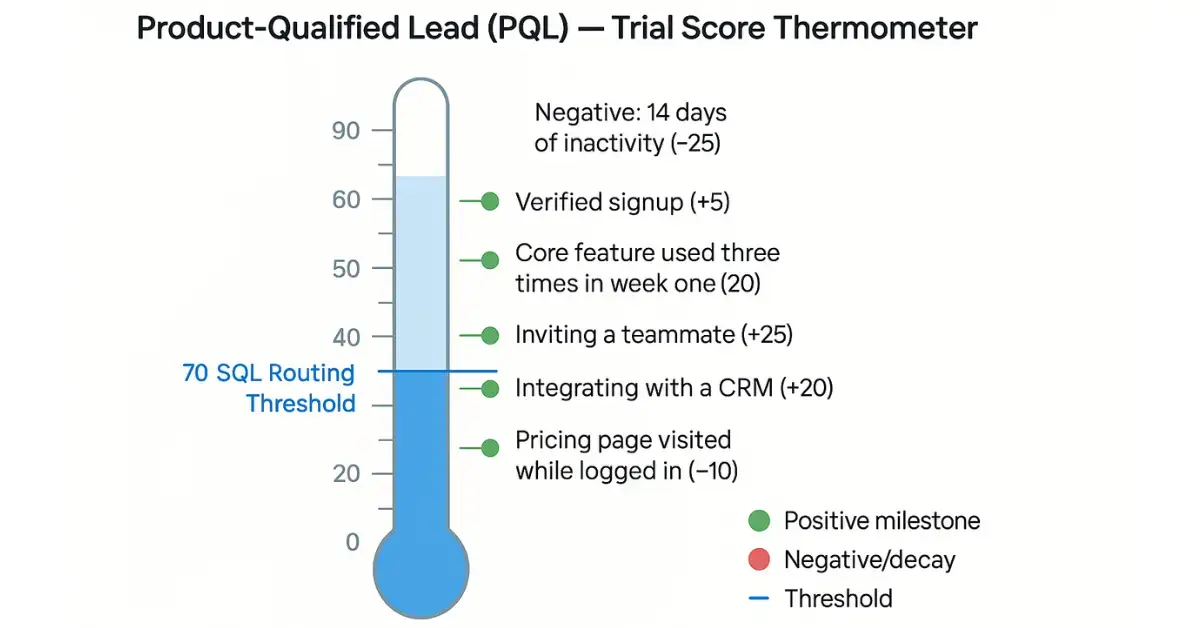
Trial users are one of the strongest PLG signals. A PQL model for trials might include:
Account creation with verified email (+5 points).
Core feature used three times in the first week (+20 points).
Inviting a teammate (+25 points).
Integrating with a CRM (+20 points).
Visiting pricing page while logged in (+10 points).
Negative: 14 days of inactivity (−25 points).
These scoring steps help identify which trial accounts are worth immediate sales engagement.
How do you measure success and avoid pitfalls in product-led lead scoring?
Success in product-led lead scoring isn’t just about putting a model in place—it’s about proving that the model reliably drives better business outcomes. To do this, focus on a mix of conversion, efficiency, and accuracy metrics:
Lift in MQL to SQL conversion rate. Track whether leads routed by the scoring model convert more often than those routed by traditional methods.
Time-to-first-sales-touch. Measure how much faster your sales team engages once high-value usage signals trigger alerts.
Win rate for PQLs vs MQLs. Compare how often product-qualified leads close compared to marketing-qualified leads.
Pipeline contribution. Assess how much of your pipeline is generated from PQLs and whether it is growing month over month.
Feedback loop accuracy. Collect AE and SDR feedback on routed leads to validate whether scores match ground truth.
At the same time, watch out for common pitfalls:
Overvaluing vanity metrics. Email opens and page visits rarely predict purchase on their own.
Ignoring score decay. Without decays, inactive users may appear hotter than they are.
One-size-fits-all thresholds. Different segments (SMB vs enterprise) often need different benchmarks.
Failing to validate with real outcomes. A model is only useful if its high scores consistently map to revenue.
By regularly reviewing these KPIs and correcting for pitfalls, you ensure that your scoring system remains accurate, scalable, and trusted by both marketing and sales.
Frequently Asked Questions (FAQs)
How do I apply lead scoring implementation roadmap steps in a US B2B SaaS context?
Start with a quick audit (signals, gaps, owners), then instrument priority events and connect them to CRM/MA for real-time scoring. Pilot with one US segment first to validate routing and SLAs before scaling.
How long does it take to implement a lead scoring model for most SaaS teams?
Most teams ship a first version in 30–60 days. Weeks 1–2 focus on audit/alignment, weeks 3–4 on instrumentation/integration, and weeks 5–6 on piloting and tuning with sales feedback.
What usage-based lead scoring rules best practices should we follow to avoid vanity metrics?
Prioritize repeated core-feature use over clicks, include negative points for inactivity, apply time-based decay, and set thresholds by segment. Pair alerts with talk-tracks so sales acts on real intent—not noise.
How to build PQL model that works for enterprises—and why product-led lead scoring for B2B enterprises matters?
Define activation milestones at user and account level (e.g., multi-seat activity, integrations, pricing-page visits). Weight events that signal consensus and expansion, then validate with AE feedback from complex deals.
Do usage signals vs profile signals for PQLs matter more for accuracy?
Usage signals are stronger predictors of revenue. Use profile data to set context (SMB vs enterprise), but route primarily on recency, frequency, and depth of product behavior to minimize false positives.
What does a product-qualified lead model for SaaS trial users include—and how do we act on it?
Examples: verified signup, repeat core-feature use, teammate invites, key integration, and logged-in pricing visits—offset by inactivity decay. Route trials that cross threshold to sales with usage context attached.
Conclusion
If your pipeline still relies on gut feel and static fields, you’re not alone—and you’re not stuck. A product‑led approach simply meets buyers where the real intent lives: inside your product. Start with small, confident moves, follow clear lead scoring implementation roadmap steps, and let data from real usage guide the next tweak.
Our take is simple: prove lift first, then scale. Ship a pilot, listen to sales, tighten decay, and promote the signals that actually predict revenue. When the model earns trust, everything downstream moves faster—routing, conversations, and deals. Want a hand getting there? 4Thought Marketing can help instrument events, configure a scoring blueprint, and run a 60‑day pilot that shows measurable impact before you roll it out broadly. Let’s turn product behavior into sales‑ready moments—without the guesswork.
Key Takeaways
Build audit‑ready privacy records with trusted privacy evidence software.
Capture a complete DSAR audit trail from intake to export.
Maintain tamper‑evident compliance logs and an immutable audit log.
Centralize consent management evidence in a secure legal activities vault.
Keep a unified consent and permissions log across systems.
Produce regulator‑ready documentation in minutes, not months.
Demonstrate credible privacy compliance proof without manual stitching.
Apply privacy by design and show data minimization proof throughout.
When privacy complaints or regulatory audits arrive, the challenge isn’t what you did—it’s proving it. Teams that adopt privacy evidence software avoid the scramble of siloed emails and screenshots by maintaining audit‑ready documentation from day one. With frameworks like GDPR, CPRA, and LGPD imposing significant penalties, organizations need a record that is complete, readable, and tamper‑evident—so the proof is as strong as the process.
Why does evidence readiness matter?
Regulators and plaintiff attorneys look for two things: substantive compliance (did you do the right thing?) and procedural compliance (can you prove it quickly and defensibly?). Evidence‑ready teams close investigations faster, reduce legal exposure, and avoid reputational damage. In short, reliable privacy compliance proof shortens audit cycles and builds trust.
Typical pain points without an evidence system:
Scattered artifacts (ticket logs, CRM notes, email chains) with no unified timeline
Unclear chain of custody—who acted, when, and under which policy
Difficulty proving erasure (you’re asked to prove a negative)
Missed deadlines due to manual stitching of proof instead of audit‑ready privacy records
What is 4Comply’s Legal Activities Vault—and how does it work?
4Comply automatically builds a time‑stamped DSAR audit trail for every action your team takes to fulfill data‑subject rights, manage consent, and honor permissions—alongside key subject interactions (for example, identity verification or viewing a response). The result is a single source of truth for privacy events in a secure legal activities vault.
Role‑based access controls protect sensitive cases while enabling auditor views
Granular redaction: Mask sensitive fields while preserving integrity and chain of custody records
Retention rules: Align evidence retention to policy with a clear evidence retention policy
Built on privacy by design, so safeguards are enforced across the lifecycle
Audit‑Ready Exports
Filter by individual, request, time window, or regulation and export a clean evidence packet. Standard audit export packets include a cover summary, chronological timeline, and references to underlying system events—delivering regulator‑ready documentation and, when needed, a DSAR export for outside counsel.
Auditor view in four steps: Open the legal activities vault → Filter to the subject/request → Preview the timeline → Export the evidence package.
Note: Regulations and deadlines vary by jurisdiction. This content is for general information only and not legal advice.
How should you document DSAR refusals (exceptions)?
Most DSARs must be fulfilled. In rare cases, refusing may be lawful—for example when identity cannot be verified, the request is manifestly unfounded or excessive, disclosure would infringe others’ rights/freedoms, or a statutory exemption applies. Use structured DSAR refusal documentation so every reviewer sees what was requested, what you did, and why the refusal was justified.
4Comply dedicates a section of the legal vault to legal activity exceptions, recording:
The exact request and requestor identity checks completed
A traceable summary of steps taken to fulfill the request
The specific refusal rationale, response communication, and escalation trail
This structure helps demonstrate good‑faith handling and defensible reasoning if your decision is later scrutinized.
How do you prove erasure with the “Erasure Evidence Vault”?
A “right to be forgotten” request seems simple—until you’re asked to prove deletion. Proving a negative is difficult, and you can’t expose your entire database to make your case.
4Comply’s Erasure Evidence Vault stores erasure evidence and the absolute minimum data necessary to demonstrate that an individual’s personal data was purged and is no longer used for marketing or processing:
Data minimization proof: Only minimal identifiers (for example, hashed/contact token and timestamps) required for right to be forgotten verification
Purpose limitation: Retained solely to evidence compliance with the erasure request
Role‑based access controls restrict visibility to legal/compliance; not available to marketing or analytics
Retention controls: Kept only as long as required to evidence compliance, then purged per policy
This balances “prove it” requirements with privacy by design—and provides additional privacy compliance proof without re‑creating risk.
What does an end‑to‑end DSAR & consent workflow look like?
Intake: Route requests from web forms, email, or service desk; auto‑classify by jurisdiction and set the SLA for DSAR
Verify: Identity checks with recorded artifacts and data‑subject rights tracking
Locate: Query connected systems (CRM, MA, data warehouse) and log sources searched
Prepare: Package data, apply redactions, record approvals, and lock the audit timeline
Deliver: Secure portal delivery with view/download confirmations and regulator‑ready documentation
Archive: Append the complete timeline to the legal activities vault with retention tag for ongoing compliance reporting
Which integrations support Marketing Ops & IT?
4Comply connects with the tools your teams already use to reduce swivel‑chair work and capture complete evidence:
Marketing automation:Adobe Marketo Engage, Oracle Eloqua—log consent and subscription changes; capture fulfillment proofs as consent management evidence
CRM & service desk: Salesforce, HubSpot, Zendesk—associate DSAR tickets with the DSAR audit trail and audit export packets
Identity & access: Okta/Azure AD—verify requestors and record verifier identity under role‑based access controls
Data platforms: S3/Data Lake/ETL—record sources queried and extracts generated for compliance reporting
How does this align with Governance, Risk & Compliance (GRC)?
Policies → Controls → Evidence: Map vault events to control IDs and attach policy references—supporting regulator‑ready documentation
Review workflows: Legal sign‑off steps logged as part of the chain of custody records
Reporting: Time‑to‑fulfill DSAR, percentage within SLA, refusal rate by rationale, evidence export cycle time—rolled into executive compliance reporting
What’s the 30‑60‑90 day implementation plan?
Days 1–30: Connect intake channels; configure jurisdictions and SLAs; set RBAC; pilot with DSAR‑Access—baseline audit‑ready privacy records
Days 31–60: Add consent change logging from MA platforms; enable templates for audit export packets; train service desk/legal teams
Days 61–90: Roll out erasure workflows; activate the Erasure Evidence Vault; finalize retention schedules and evidence retention policy
Which KPIs should you track?
DSAR cycle time (median, p90) and on‑time rate against your SLA for DSAR
Evidence completeness score (required artifacts present in the immutable audit log)
Refusal documentation completeness (rationale, notices, escalations) via DSAR refusal documentation
Erasure proof rate (erasure cases with vault entry and retention tag)
When does the vault really pay off?
Cross‑border audits: Produce jurisdiction‑specific regulator‑ready documentation fast
Vendor incident inquiries: Show which data was shared, under what basis, and when consents changed within your DSAR audit trail
Customer disputes: Demonstrate delivery, view/download confirmations, and timelines of actions taken preserved in tamper‑evident compliance logs
Why do teams choose 4Comply?
Zero manual stitching: Evidence is captured at the moment actions occur into audit‑ready privacy records
Consistent, readable output: One place to see the full story, from request to resolution, with a maintained audit timeline
Defense you can stand behind: Tamper‑evident compliance logs and role‑based access controls designed for scrutiny
What’s the next step?
Privacy compliance is serious business, and proof is everything. As privacy evidence software, 4Comply helps you follow the rules and present privacy compliance proof clearly, quickly, and credibly. Request an “evidence export” demo and we’ll walk you through a real DSAR case from intake to export.
FAQs
How do tamper‑evident records work in 4Comply?
4Comply maintains an append‑only, time‑stamped event log. Authorized users can view, filter, and export evidence, but the underlying record cannot be overwritten. Any administrative changes (for example, access and retention) are logged as events, preserving chain of custody records.
How quickly can we produce an auditor‑ready DSAR evidence packet?
Teams typically filter to a subject and export within minutes because artifacts (verification, collection, redaction, delivery confirmations) are captured in the legal activities vault. Standard audit export packets and regulator‑ready documentation reduce review cycles.
Does an Erasure Evidence Vault conflict with the “right to be forgotten”?
No. The vault keeps only the minimum data necessary to prove deletion and prevent re‑ingestion—retained solely for compliance proof, access‑restricted to legal/compliance via role‑based access controls, and purged per policy. This supports right to be forgotten verification and data minimization proof.
Which systems can we connect to build a complete trail?
Out of the box, 4Comply supports common marketing and GTM stacks (Adobe Marketo Engage, Oracle Eloqua), CRM/service desk (Salesforce, HubSpot, Zendesk), identity (Okta/Azure AD), and data platforms (S3/data lakes/ETL). These connections enrich consent management evidence, the consent and permissions log, and your DSAR audit trail.
How should we document DSAR refusals so they are defensible?
Record the request exactly as received, verification attempts, jurisdiction, applicable regulation, steps taken, and the specific refusal rationale (for example, identity not verified, manifestly unfounded/excessive, rights of others, statutory exemption). Attach notices sent to the requestor. Use the vault’s structured DSAR refusal documentation to standardize reviews.
Where do regional differences (GDPR/CPRA/LGPD) get handled?
Use jurisdiction templates to set deadlines, notice language, and data‑set scopes per region. The vault tags each case with location and regulation so reviewers can filter and produce regulator‑ready documentation quickly.
Key Takeaways
Translating Eloqua terms to Marketo equivalents.
Match list logic precisely: Smart Lists versus Segments.
Replicate outcomes, not user interfaces or labels.
Surface consent rules and processing step differences.
Pilot one journey; validate events end‑to‑end.
You speak ‘Eloqua.’ Your new team speaks ‘Marketo.’ This Eloqua to Marketo glossary translates the terms so you can ship campaigns without learning the hard way. Although both tools are mature, tiny terminology gaps derail builds. But when you lead with a glossary—not a feature battle—you cut onboarding time, prevent consent mistakes, and keep reporting intact. Use this Eloqua to Marketo guide for day‑one productivity.
What This Eloqua to Marketo Glossary Covers
Below is a concise translation table for Eloqua to Marketo shift with usage notes and common gotchas. Use it to map your mental model quickly and ship a first campaign safely.
Eloqua term
Marketo equivalent
Where to click (Marketo)
Usage tip
Gotcha
Campaign Canvas
Program + Smart Campaigns
Marketing Activities → Program → Smart Campaigns
Break a canvas flow into coordinated Smart Campaigns
Mirror entry criteria and wait steps exactly
Shared List
Static List
Marketing Activities → Program → New → Local Asset → List
Use for fixed membership (imports, QA cohorts)
Won’t update dynamically—don’t expect rules
Segment (Shared Filter)
Smart List
Program/Workspace → Smart List
Rule‑based audience that updates continuously
Filters run often; watch processing volume
Program (Eloqua)
Program (Marketo)
Marketing Activities → New → Program
Same name, different categories and tokens
Align naming, channel, period cost model
Form (Processing Steps)
Form + Flow Action via Smart Campaign
Design Studio → Forms; then Smart Campaign Flow
Keep fields on form; move logic into Flow
Beware double processing if both run
Lead Scoring Model
Score fields + Smart Campaign rules
Admin/Field Mgmt; Smart Lists/Flows
Express model as field updates via flows
Reconfirm MQL thresholds with sales
External Activities
Custom Activities
Admin → Database → Custom Activities
Track non‑native events consistently
Plan API volume and retention
Custom Objects
Custom Objects
Admin → Database → Custom Objects
Mirror multi‑row data like products
Map relationships before syncing
Email Editor/LP Editor
Email Editor/LP Editor
Design Studio
Similar concepts; token patterns differ
QA tokens and snippets per template
CRM Integration App
Native CRM Sync (SFDC/Dynamics)
Admin → CRM
Document field ownership and cadence
Sandbox first; watch sync errors
Why a Shared Vocabulary Speeds Marketo Onboarding
When you arrive in a Marketo shop with Eloqua habits, the fastest wins come from naming things the way your teammates do. A shared vocabulary for Eloqua to Marketo removes the constant mental translation during builds, speeds reviews and handoffs, and prevents subtle errors—like using a Static List where a Smart List was intended or expecting “processing steps” to live on the form. It also anchors consent handling and field governance, so attribution, suppression, and CRM sync behave predictably across campaigns.
Onboarding speed: People move faster when terms match their muscle memory.
Lower risk: Misnamed fields or mismatched triggers lead to over‑mailing, lost consent, or bad attribution.
Repeatability: Teams can port proven campaigns across regions with fewer regressions.
Governance: A glossary anchors naming conventions, tokens, and audit trails.
How to Onboard from Eloqua to Marketo in 90 Minutes
Skim the Eloqua to Marketo glossary. Highlight terms you use daily; confirm the Marketo equivalents.
Rename and tag. Adopt team naming for Programs, Lists, and Smart Campaigns.
Rebuild one audience. Convert an Eloqua Segment into a Smart List; compare counts.
Translate one journey. Break a known Canvas into Smart Campaigns inside a Program; mirror waits and entry rules.
Port scoring. Recreate your scoring model as explicit Flow updates; align thresholds with sales.
Harden forms/consent. Keep fields on the form; shift processing to Smart Campaign Flows; verify opt‑in storage.
QA telemetry. Validate events (form submit, click) into CRM. Check deliverability settings and API limits.
Compliance checkpoints: centralize consent logic, store proof, run regional suppression checks, and version assets.
Best Practices for Using This Glossary
This Eloqua to Marketo glossary is a working tool, not a one‑time read. Keep it open while you build and review so translations become muscle memory and small terminology gaps don’t become production issues for the Eloqua to Marketo transition.
Keep the glossary in split‑screen when building Programs and Smart Campaigns.
When translating an Eloqua term, confirm the Where to click path before cloning assets.
Use Smart Lists for dynamic, rule‑based audiences; reserve Static Lists for imports and QA cohorts.
Keep fields on the Form and route post‑submit actions in Smart Campaign Flows to avoid double processing.
Express scoring as Score field updates; align MQL thresholds with sales and document the rules.
Add team‑specific Usage tip/Gotcha notes to the table as you discover edge cases.
Conclusion: One Language, Faster Campaigns
This Eloqua to Marketo glossary isn’t a side note—it’s the most useful, day‑one resource for translating Eloqua experience into Marketo results. By standardizing language, you reduce rework, avoid consent mishaps, and keep attribution clean. The faster your team speaks the same terms, the sooner campaigns move from reviews to results.
Put it to work: Keep the Eloqua to Marketo glossary open while building Programs and Smart Campaigns, align a few shop‑specific terms with your admins, and translate one production‑adjacent journey end‑to‑end. Then, capture what you learn back into the table so the next campaign ships even faster.
If your business is planning—or even exploring—a shift from Eloqua to Marketo, this terminology exchange is the best starting point. And when you’re ready to accelerate, 4Thought Marketing can help you cruise through the transition, a piloted Marketo Program with QA and consent checkpoints, CRM/integration validation, and hands‑on training for your builders. Contact 4Thought Marketing to schedule your onboarding session and first pilot.
Frequently Asked Questions (FAQs)
What is the Marketo equivalent of Eloqua Campaign Canvas?
Use a Program containing coordinated Smart Campaigns. Mirror entry rules, wait steps, and flow actions; use Channel/Program Status for reporting and progression.
How do I convert an Eloqua Segment (Shared Filter) to Marketo?
Rebuild it as a Smart List. Replicate each filter/logic operator, test people count on a sample, and cache key lists for performance. Use Member of List for fixed cohorts. Use a Program containing coordinated Smart Campaigns. Mirror entry rules, wait steps, and flow actions; use Channel/Program Status for reporting and progression.
Where do Eloqua Form Processing Steps live in Marketo?
Keep fields on the Form and route actions in a Smart Campaign with the u003cemu003eFills Out Formu003c/emu003e trigger. In the Flow, update fields, set program status, send alerts, and add to lists. Avoid double processing.
How do I migrate Eloqua lead scoring into Marketo?
Create Score fields (e.g., Behavior Score, Demographic Score, Total Score) and implement rules via Smart Campaigns (batch + trigger). Reconfirm MQL thresholds with Sales and sync to CRM.
What replaces Eloqua Shared Lists in Marketo?
Static Lists (fixed membership) and Smart Lists (dynamic rules). Migrate Shared Lists to Static Lists; recreate Shared Filters as Smart Lists. Choose Static for imports/QA and Smart for audiences.
How do I rebuild an Eloqua nurture in Marketo?
Use an Engagement Program with Streams and Cadences. Place content as Emails or nested Programs; use transition rules and Smart Campaigns to move people between Streams.
How do I track Eloqua External Activities in Marketo?
Define Custom Activities (Admin → Database) with a primary attribute, then send events via API. Plan retention and naming so reporting is consistent.
Key Takeaways
Centralize policies, certifications, and system status.
Data transparency boosts credibility and customer trust.
Compliance hub speeds security reviews and sales cycles.
Govern updates: owners, cadence, monitoring, feedback.
Trust is no longer optional — it has become the cornerstone of every modern business relationship. Customers today are highly informed, cautious, and empowered. They know their data is valuable and will not entrust it to brands that cannot demonstrate accountability. And while companies often make promises of strong privacy and security practices, customers increasingly expect tangible proof. This is where a trust center bridges the gap. By centralizing policies, certifications, compliance documents, and transparency resources, a transparency hub helps organizations demonstrate credibility, integrity, and accountability. Beyond serving as a compliance tool, it reassures customers, accelerates business decisions, and strengthens brand credibility in a competitive, compliance‑driven marketplace.
What Is a Trust Center?
A trust center is an online hub dedicated to transparency. Instead of scattering privacy notices, compliance documents, and certifications across multiple pages, the transparency hub consolidates them in one easy‑to‑navigate location. Typically, this hub includes information about security certifications, privacy policies, compliance frameworks, and data handling practices. The goal is to provide customers, partners, and even regulators with a reliable single source of truth about how your organization safeguards data. By presenting information in an accessible and structured way, a transparency hub communicates accountability and demonstrates that your business treats data stewardship as a strategic priority, not an afterthought.
Why does a Trust Center Matters?
Customer trust is a form of currency. Organizations that lack transparency often face setbacks that go beyond reputational harm. Key risks include:
Lost deals: Procurement teams now require visibility into data protection measures before signing contracts. If this information is absent or scattered, deals can be delayed or lost altogether.
Compliance fines: Regulations such as GDPR, CCPA, and other global frameworks impose heavy penalties for non‑compliance. Without centralized information, companies risk missteps that result in costly fines.
Customer churn: Customers who sense weak governance or vague privacy practices are likely to abandon your brand in favor of competitors that demonstrate transparency and accountability.
A trust center mitigates these risks by making privacy, security, and compliance information easily available. In doing so, it improves customer confidence, accelerates partner reviews, and builds long‑term loyalty.
Types of Trust Centers
Not every organization needs the same type of trust center. Depending on your industry, regulatory environment, and business goals, different models may apply:
Security centers — Focused on data protection, these hubs showcase certifications, policies, vulnerability management practices, and incident response readiness. They are common in SaaS and technology companies where security is paramount.
Privacy centers — Designed to empower customers, these hubs outline data privacy rights, opt‑out mechanisms, and data request tools. They are especially important for businesses handling sensitive or regulated customer data.
Legal centers — These hubs clarify contractual obligations and terms of service. By translating complex legal jargon into accessible language, they demystify user rights and ensure transparency around compliance.
Homegrown centers — Fully customized hubs created to fit an organization’s unique brand identity and industry requirements. While resource‑intensive, they allow complete flexibility and differentiation.
Unified trust center — A comprehensive approach that integrates all the above. By combining privacy, security, legal, and compliance information into one portal, the unified transparency hub serves as a holistic source of truth.
The unified model is particularly powerful because it ensures that all stakeholders — customers, partners, and regulators — can access accurate and complete information in one place, without confusion or fragmentation.
Benefits of a Trust Center
While compliance may be the initial motivation for creating a transparency hub, the benefits extend much further:
Empowering customers — A well‑designed transparency hub allows customers to access and manage their data preferences, understand how their information is processed, and exercise their rights without friction. This empowerment reinforces your brand’s transparency and customer‑centric approach.
Boosting trust perception — When organizations openly display certifications, policies, and system statuses, customers perceive them as more reliable. This perception can translate into stronger relationships and improved retention.
Streamlining the sales cycle — Sales teams often spend time addressing security questionnaires and compliance concerns. A centralized hub reduces these delays, enabling prospects to self‑serve critical information and move through the evaluation process faster.
Reinforcing brand differentiation — Transparency itself can be a competitive advantage. In industries where competitors hide behind vague assurances, a robust trust center sets your organization apart as a leader in governance and accountability.
How to Build a Trust Center
Building a trust center requires more than uploading documents. It involves careful planning and cross‑functional collaboration. Five critical steps include:
Stakeholder alignment — Start by involving privacy, legal, security, compliance, marketing, and IT teams. Each group ensures the content is accurate, comprehensive, and aligned with business goals.
Information architecture — Organize your content thoughtfully. Group policies, certifications, and FAQs into clear categories. Prioritize intuitive navigation to help users find information quickly.
Design & UX — A transparency hub must be user‑friendly. Avoid legal jargon where possible, use plain language explanations, ensure mobile responsiveness, and follow accessibility standards for inclusive design.
Update protocols — A transparency hub is only credible if information remains current. Establish protocols to update content whenever certifications are renewed, policies change, or new compliance standards are introduced.
Monitoring & feedback — Track visitor behavior to understand what customers search for most. Solicit feedback to refine content, layout, and usability continuously.
Best Practices for Running a Trust Center
Even the most well‑built transparency hub can fail if it is not actively maintained. Consider these best practices:
Do: keep content updated, especially when policies or compliance statuses change.
Do: use plain, customer‑friendly language rather than dense legal text.
Do: assign ownership across teams so every area of content has a responsible maintainer.
Do: monitor visitor metrics to identify which sections are most useful.
Don’t: hide critical documents behind confusing menus or PDFs buried deep in the site.
Don’t: treat the transparency hub as a one‑time project. Continuous updates and oversight are required to maintain credibility.
Adopting these practices ensures your trust center remains credible, usable, and aligned with both customer expectations and regulatory requirements.
Conclusion
Trust centers are not just repositories of compliance paperwork — they are strategic assets that improve brand perception and accelerate business outcomes. And while regulations and customer expectations evolve faster than ever, many companies still operate with scattered or outdated transparency practices. Therefore, establishing a unified transparency hub is no longer optional; it is essential for maintaining credibility, winning customer trust, and reducing operational risk.
At 4Thought Marketing, our privacy and compliance experts can help your organization design, build, and optimize a transparency hub tailored to your industry. By working with us, you not only meet regulatory obligations but also turn transparency into a true competitive advantage.
Frequently Asked Questions (FAQs)
How does a trust center accelerate the sales cycle?
By centralizing certifications, policies, and compliance documents, prospects can self‑serve answers to common security and privacy questions. This reduces delays caused by lengthy questionnaires and back‑and‑forth inquiries.
What industries benefit most from a transparency hub?
Industries handling sensitive data — such as SaaS, fintech, healthcare, and e‑commerce — gain the most. However, any business seeking to improve transparency and customer confidence can benefit.
How often should a trust center be updated?
Updates should occur whenever certifications renew, regulations change, or new policies are introduced. As a best practice, assign ownership and review content at least quarterly.
Can a trust center help with global compliance requirements?
Yes. A transparency hub can showcase adherence to GDPR, CCPA, ISO, NIST, and other international standards. This helps organizations demonstrate compliance across multiple jurisdictions in one place.
What features make a trust center user‑friendly?
Clear navigation, plain language explanations, mobile‑responsive design, accessibility compliance, and a search function all make a trust center easier for customers and partners to use.
Is building a unified trust center worth the investment?
Yes. Though it requires upfront planning and resources, a unified trust center enhances brand credibility, reduces compliance risk, and improves customer trust — providing long‑term ROI.
Key Takeaways — Data Protection Program
Compliance is only the baseline.
Keep data inventories current.
Collect only what’s necessary.
Strong governance builds alignment.
Use automation with oversight.
Offer transparent data options.
Audit policies and vendors.
Track trust and incident metrics.
Achieving privacy compliance is a non-negotiable first step for any business. But it’s just the beginning. Businesses building trust with customers and partners must go beyond simple legal compliance. A more comprehensive data protection program provides extra layers of security and shows potential contacts that you take privacy very seriously. With customers listing trust as a critical factor in who they choose to do business with, showing everyone that you can be trusted will go a long way.
The Shift from Compliance to Privacy-Centric Business Practices
So, how do you shift from checking things off a legal list to a broader, more respectful approach to handling personal data? The fine details will vary depending on the exact nature of your business and the data you use. However, regardless of your industry, there are a few tasks you can prioritize to take your data protection program to the next level.
1. Maintain an Up-to-Date Data Inventory
Businesses that comply with data regulations typically maintain some form of data inventory to track how and where personal information is collected, stored, and used. However, data processes evolve, and so must your data inventory.
A well-managed data inventory helps businesses keep track of their data sources, usage, and flows. It should include all data types collected, where they are stored, who has access to them (including third-party vendors), and how they are shared. Updating your data inventory frequently allows you to reduce unnecessary duplication, streamline information flows, and simplify data management processes.
For simpler updates, automation can save your company a lot of time and help to identify potential risks. More detailed updates will likely require human involvement. But regardless of your preferred method, reviewing and updating your data inventory regularly is a must.
2. Prioritize Data Minimization
With the role data plays in modern marketing, it’s all too easy to focus on collecting more data than is necessary. Customers don’t appreciate that, and they demonstrate this by abandoning forms that feel invasive. Demanding too much data feels intrusive to consumers, and places them at a higher potential risk in the event of a data breach. Privacy-conscious businesses should instead practice data minimization and only collect what is necessary.
Simply defined, data minimization is the practice of collecting only what data you need for a particular task. (For example, a promotion for birthday bonuses will obviously require a customer’s birthdate, but not their shirt size.) This might sound restrictive until you realize that most companies only use about half the customer data they collect and retain. That unused data occupies valuable space in your records—space that could go toward data that actively contributes to marketing plans. Data minimization also helps build trust with customers who may be wary about handing over too much personal information.
3. Take Advantage of Automation
As your company grows, so does the complexity of complying with privacy regulations and responding to data subject requests. You could hire twice as many employees to handle every minute detail. Or you could automate the less important tasks.
Automated workflows can streamline the finer details of privacy audits, DSARs, and similar processes. The potential for improving response times is obvious. But automation doesn’t just make tasks go faster. Automation enables continuous monitoring and instant access to information at every step of the process. Not only does this let you keep up with how things are going, but it also significantly reduces your risk of errors.
4. Give Consumers Control Over Their Own Data
Today’s consumers are inundated with marketing messages from multiple brands across various platforms. The oversaturation of marketing content has led to what is known as “marketing fatigue,” causing many customers to disengage or block communications altogether.
To avoid alienating your audience, give consumers more control over how their data is used and how they receive communications. Implementing a customer-facing preference center can be a game-changer for building trust. Rather than presenting a simple “unsubscribe” option, a preference center allows users to select what kinds of messages they want to receive and how frequently they prefer to be contacted. This ensures that the communications they receive are relevant and welcomed, and builds trust with your customers.
5. Develop a Comprehensive Privacy Training Program
Privacy and data protection are not just the responsibility of the legal or IT department—they must be part of the company culture. Ongoing privacy training needs to include all your employees. But as important as formal training is, don’t stop there. Encourage a culture of privacy through informal channels like privacy-focused chat groups or newsletters. You can also consider attending a privacy conference as a company. Whatever you choose, ensure that your team is aware of and passionate about data protection.
Conclusion: Building Trust Through Data Protection
Maximizing your data protection program means going beyond compliance and embedding privacy into your organization’s DNA. By maintaining an up-to-date data inventory, embracing data minimization, automating busywork, giving consumers control over their data, and providing continuous privacy education, your business can become a leader in data protection.
Ready to improve your approach to data privacy? Contact us today to get started.
Frequently Asked Questions (FAQs)
What is a data protection program?
A data protection program is the framework an organization uses to manage, secure, and govern personal data in line with global regulations such as GDPR, CCPA, and LGPD.
How does a data protection program go beyond compliance?
Going beyond compliance means not only meeting laws but also building trust through transparency, data minimization, and customer‑first governance practices across regions.
Why is a data inventory important for privacy laws worldwide?
A data inventory ensures visibility of where personal data is stored, processed, and transferred—critical for meeting country‑specific regulations and cross‑border data transfer rules.
How does data minimization support global privacy compliance?
Minimizing collected data lowers the risk of breaches and helps align with strict data protection requirements in regions like the EU, Canada, and Asia‑Pacific.
What role does data governance play in multinational organizations?
Data governance establishes consistent policies across markets, ensuring compliance with regional standards while enabling scalable, transparent data practices.
How can businesses prepare for evolving data privacy regulations?
Organizations should adopt flexible governance models, conduct regular audits, and implement tools that adapt quickly to new regional laws and international compliance frameworks.
Key Takeaways
Integrate intelligence directly into automation decisions.
Start governed pilots tied to one measurable metric.
Use consented data and documented lineage from start.
Monitor models, bias, and enable human override paths.
Scale proven patterns into reusable playbooks and templates.
Marketing automation integration is how teams turn the Future of AI into everyday outcomes. And while automation keeps campaigns shipping on time, experiences still feel stitched together because decisions about who to engage, what to say, and when to say it often live outside the systems that deliver them.
But when marketing automation integration moves those decisions into the stack itself—at the segment, trigger, and content‑assembly layers—the Future of AI becomes practical: journeys feel personal without being creepy, measurable without being brittle, and respectful of consent by design. Therefore, the real opportunity isn’t adding another tool; it’s operationalizing intelligence where activation happens, with clear guardrails, so every send learns and the entire program compounds.
What this looks like in real life
Marketing automation integration means embedding machine learning, natural language, and decision logic inside the rules, triggers, and dynamic content that power journeys—grounded in the Future of AI capabilities that can evaluate context in real time. The goal isn’t another dashboard; it’s better decisions at the exact point of activation. This approach serves marketing operations leaders, demand gen teams, and lifecycle owners who want more than static rules. Success looks like faster learning cycles, lift in revenue metrics, and clear governance—every decision is logged, explainable, and aligned with consent.
Why this matters now (and what could go wrong)
The value shows up quickly:
Revenue and efficiency: smarter audience selection and timing reduce waste and raise conversion while shrinking manual build work.
Clarity: integrated decisioning improves visibility across cross‑channel orchestration and downstream marketing ROI.
Momentum: reusable templates let teams scale what works without new tech debt.
There are real trade‑offs: consent obligations, bias risk, and integration complexity with legacy tools. You’ll balance personalization against brand safety and legal requirements. That’s why privacy by design and clear escalation paths matter from day one.
How to roll it out—without breaking trust
Fix the target and the guardrails. Pick one business metric (e.g., qualified pipeline from nurtures) and write down constraints—purpose‑based processing, retention periods, fairness thresholds, and review cadence.
Harden the data layer. Map where profiles live (CRM, customer data platform) and how events arrive. Improve hygiene: dedupe keys, standardize fields, and record consent states. Capture both first‑party data and declared preferences from forms (your zero‑party data).
Select two pilot journeys. Choose high‑impact, low‑risk cases—onboarding nudges, churn prevention, or product‑qualified follow‑ups. Define “done”: a target uplift, minimum sample sizes, and stop rules.
Embed models where work happens. Use predictive analytics to rank leads, prescriptive analytics to pick next actions, and dynamic content to assemble copy and images per contact. Add conversational marketing on key pages with clear handoff to humans.
Instrument controls and visibility. Add model monitoring for drift, bias checks, and human‑in‑the‑loop overrides. Log inputs, outputs, and rationales for audits and internal QA. Keep a simple feature registry so decisions can be reproduced.
Automate testing and learning. Establish an experiment template with guardrails for sample sizing and exposure. Run lightweight A/B testing automation with traffic allocation that favors proven variants, then periodically reset to explore.
Standardize and scale. Turn proven patterns into playbooks: segmentation snippets, decision nodes, and creative templates. Document handoffs between MOPs and RevOps, and schedule quarterly model reviews.
Field‑tested habits that keep you on track
Do
Use purpose‑limited consent and verify it at activation (consent management).
Keep a small set of explainable features, then expand once value is proven.
Track “decisions shipped” and “time‑to‑learning” as capability KPIs.
Maintain fallback logic and a rapid escalation path to a human.
Align on a lightweight ethics rubric and schedule fairness reviews (bias mitigation).
Don’t
Don’t let tools dictate strategy; start with outcomes and constraints.
Don’t rely only on vanity metrics; report incremental lift and retention.
Don’t over‑personalize sensitive segments without brand and legal review.
Don’t skip documentation—lineage and approvals protect speed later.
Where to start (and how we can help)
Marketing automation integration and the Future of AI together make every touch more relevant and respectful. But durable gains come from tight governance, clean data, and steady experimentation—not from chasing features. Therefore, if you’re ready to build pilots that prove lift and keep you compliant, 4Thought Marketing can help you map use cases, embed decisioning in Eloqua or Marketo, and scale what works without slowing your team. Let’s pick your first two journeys and get measurable results in weeks.
Frequently Asked Question (FAQs)
Q1. Do we need a CDP to start?
Not strictly. A lean profile store with consent status is enough for pilots; a CDP helps once you scale audiences and channels.
Q2. Which use cases show quick wins?
Onboarding sequences, churn‑prevention nudges, and pricing‑page chat assistance typically prove lift fast with low risk.
Q3. How do we prevent biased outcomes?
Limit sensitive features, run fairness checks, and keep human overrides. Review model performance by cohort quarterly.
Q4. What changes in team skills?
You’ll need strong marketing ops, a data engineer for pipelines, and an analyst for testing. Data science can be in‑house or a partner.
Q5. How do we measure success?
Use lift‑based metrics (incremental conversions, retention) plus operating metrics like time‑to‑learning and percent of decisions covered by models.
Q6. How risky is channel expansion?
Safer once controls are in place. Start with email and web, then extend to ads and in‑app once consent checks and monitoring are stable.
Key Takeaways
Visual builder speeds production — no fragile HTML
Reusable modules keep layouts consistent and brand‑safe
Requires Adobe IMS access and admin enablement
Reporting includes New Marketo Email Designer alongside legacy
Roll out with training, QA, and phased pilot
If email production in Marketo feels like a tug‑of‑war between “go faster” and “don’t break brand,” the new Adobe Marketo Engage email editor finally gives you both. The New Marketo Email Designer adds a clean visual builder, reusable modules, and simple admin guardrails—so authors can build confidently and admins sleep at night. No finicky HTML, fewer last‑minute fixes, and a process your team can actually follow.
A smooth rollout still matters. Confirm IMS access, pick one program type to pilot, and ship with a lean set of branded, token‑ready templates. Layer in quick training and a short QA checklist—preview, links, deliverability—then make sure reporting captures new‑designer emails alongside older sends. With those basics, the new adobe Marketo engage email editor doesn’t just upgrade your emails; it upgrades how your team works.
What the New Adobe Marketo Engage Email Editor Delivers
Think of the New Adobe Marketo Engage Email Editor as a friendlier way to build on‑brand emails at speed. You get a modern drag‑and‑drop canvas, reusable modules, and template variables for colors, spacing, and typography—plus the ability to lock critical brand and legal sections. Once your instance is on Adobe IMS and access is enabled, authors can assemble polished layouts without touching HTML, while admins control the structure, tokens, and approvals.
The sweet spot: teams that want faster execution without design drift. Success looks like a slim library of approved Marketo Email templates and modules, a clear token plan for UTMs and consent language, trained authors, and measurable improvements in build time, QA defects, and engagement.
Why Should you Choose New Adobe Marketo Engage Email Editor?
You’re likely weighing the same concern as every marketing team: can we move faster without losing control? Here’s how the new editor helps—and what to watch for:
Speed with guardrails: Drag‑and‑drop modules reduce custom HTML and keep layouts consistent across teams.
Admin clarity: Access lives in Admin → New Email Designer; templates and variables are centrally managed.
Apples‑to‑apples measurement: Email and link performance reports include New Marketo Email Designer sends, so dashboards stay comparable during migration.
Quality safety net: Built‑in checks (e.g., SpamAssassin check) catch risky content before approvals and launches.
Prerequirement to plan for: You’ll need Adobe IMS migration and the right entitlements—coordinate with your Adobe team.
Compatibility notes: New‑designer templates don’t work in the legacy editor; a phased rollout avoids disruption.
People factor: Authors still need training and clear rules about what’s editable versus locked.
How to Implement? – A Safe, 7‑Step Rollout Plan
Start small, learn fast, and scale with confidence. Use this single, streamlined plan:
Enable and sandbox. Confirm IMS, turn on access in Admin → New Email Designer, and test in a sandbox or pilot workspace.
Design the building blocks. Ship a lean set of branded, token‑ready templates with core modules (hero, copy+image, CTA, dividers, footer). Expose variables for colors/fonts/spacing and lock legal/brand areas.
Pilot one program type. Pick newsletters or webinars; convert one proven email and track build time, QA defects, and engagement.
Bake in standards and governance. Document alt text, heading order, link styles, consent language via tokens, and who approves templates before authors use them.
Train authors. Cover drag‑and‑drop, inserting modules, allowed personalization tokens, and “do not edit” notes in locked blocks.
QA and deliverability. Use Preview/device views, validate links and UTMs, and run built‑in checks before approvals.
Measure and scale. Ensure reports include new‑designer emails; compare to legacy baselines, then expand to more program types.
Watch‑outs: Moving/deleting programs with new‑designer emails is supported but coordinate naming/folder governance. Editing raw HTML inside an email can break its link to the template—keep structural edits in the template.
Best Practices: Field‑Tested Do’s and Don’ts
Do
Keep templates few and flexible; document where tokens belong.
Lock brand and legal modules; let authors edit safe text/image areas.
Version templates and note changes to trace impact.
Build in accessibility from day one (contrast, alt text, headings).
Standardize UTMs via program tokens; test every CTA.
Don’t
Flip everything at once—pilot, measure, then scale.
Let authors tweak structural HTML—use modules instead.
Assume reporting is automatic—confirm new‑designer sends are tracked.
Conclusion
Your team needs to move faster and keep brand tight. The new editor makes both possible once you set a few guardrails and teach the basics. With reusable modules, admin controls, and quick checks in place, production gets lighter and quality goes up. If you want a head start, 4Thought Marketing can help you run a focused rollout: a 30‑minute discovery, a two‑template pilot with locked brand/legal modules, author training, and a practical QA checklist. Let’s schedule your discovery and publish cleaner, on‑brand emails faster this quarter.
Frequently Asked Questions (FAQs)
1) Do I need anything before I can use the new Adobe Marketo Engage Email editor?
Yes—your Marketo Engage subscription must be migrated to Adobe IMS, and admins must grant access to users in Admin → New Email Designer.
2) Can I use new templates in the old editor?
No. New‑designer templates aren’t compatible with the legacy editor; plan a phased rollout.
3) What changes for reporting?
Email and link performance reports include New Marketo Email Designer emails, enabling side‑by‑side analysis with legacy sends.
4) How do modules help governance?
Modules limit structural edits to safe areas, standardize brand elements, and reduce breakage; build and lock critical sections at the template level.
5) Any built‑in deliverability checks?
Marketo includes a SpamAssassin check to flag risky content before send.
Key Takeaways
Automate repeatables; leave judgment to people.
Prioritize high‑impact, low‑effort workflows with outcomes.
Build consent, QA, ownership, rollback before launch.
Schedule monthly QA and quarterly audits to sustain.
Marketing automation helps teams move faster and do more. As modern AI adds real‑time orchestration, programs can scale quickly. Yet velocity without intention erodes trust and creates noise. The goal is scale that still feels human—software handles the repeatable, while people keep judgment, creativity, and brand craft. This article defines marketing automation with Intention and shows practical steps—governed, measurable, and compliant—so programs grow without losing the human touch.
What We Mean by “Marketing Automation with Intention” — scope & success
Marketing automation with Intention is a lens for deciding where software should step in and where people should stay in charge. It replaces the default “can we automate this?” with “why would this improve the experience, and for whom?”
In practice it looks like a few, well‑named programs that do one job extremely well. Triggers are explicit, suppressions are visible, and consent is treated as a first‑class input. Data gets validated on the way in, exceptions have a clear home, and every flow has an owner who can explain the intent in a sentence.
A simple rule of thumb: if you turned it off tomorrow, would a customer—or a seller—feel the loss? If the answer is “not really,” it probably belongs on the backlog, not in production.
This approach fits most B2B teams (Marketo, Eloqua, and friends), but the principle travels: automate the boring, protect the brand, and let humans handle the moments that change minds.
Why “More Automation” Isn’t the Goal — value, risks, trade‑offs
Automation should buy back time for marketers to think, test, and talk to customers. When it’s intentional, it standardizes handoffs, removes wait states, and keeps data tidy so campaigns don’t wobble. A good example is a capture flow that validates fields, dedupes records, and assigns the right owner within minutes; the same system honors consent automatically and pauses nurture the moment an opportunity opens. The result isn’t more email—it’s fewer manual fixes and faster movement through the funnel.
The opposite happens when volume becomes the goal. Overlapping triggers fire at once, buyers receive two versions of the same message, and sales gets alerts at midnight. Behind the scenes, technical debt piles up: copied smart lists, mystery scoring rules, and brittle dependencies nobody wants to touch. Reporting drifts as teams optimize for sends and clicks instead of pipeline, cycle time, or retention.
Choosing intention means trading breadth for depth. You run fewer, well‑named programs with visible rules and suppression logic, clear ownership, and a standing review cadence. Governance isn’t red tape—it’s what keeps brand voice, consent, and data quality intact while the system scales. Do that, and automation feels like service: timely, relevant, and respectful of the buyer’s context. Anything else is just noise.
How to Roll It Out — seven moves that stick
Map the value chain. List key workflows from lead capture to reporting. Mark where time or quality is lost.
Complex deals: long‑cycle opportunities with many stakeholders and politics.
Habits of High‑Trust Automation — do/don’t with rationale
Do
Document triggers, suppressions, ownership, SLAs, and rollback steps.
Build small, composable modules; prefer one well‑named program per job.
Version your logic and content; ship incrementally behind QA checklists.
Keep a shared “intent log” describing the business goal for each flow.
Don’t
Don’t chain automations into fragile labyrinths.
Don’t measure activity (emails sent) instead of impact (pipeline, velocity).
Don’t bypass consent or source‑of‑truth rules to “hit the number.”
Don’t leave programs unowned—assign a DRI and backup.
Quality & governance tips
Pre‑flight QA: seed list, throttling, daylight savings checks, and link validation.
Data hygiene gates: enrichment thresholds and bounce‑back queues for fixes.
Compliance: store consent proofs, audit changes, and suppress by purpose.
Bring the Human Back to Scale
Automation can make your team look larger and more consistent. Still, scale without intention erodes trust and wastes attention. Start small with a governed, human‑in‑the‑loop plan that measures outcomes. If you’d like a pragmatic blueprint—prioritization, guardrails, and a pilot your executives can trust—4Thought Marketing can help design and implement it. When consent is central, our 4Comply experts ensure the right data and policies are in place. Let’s align automation with what matters most.
Frequently Asked Questions (FAQs)
1) How do I choose my first candidates for automation?
Run the impact–effort matrix on your current workflows and pick one or two high‑impact/low‑effort wins; document rules, suppressions, and KPIs before building.
2) Do I need AI to practice Marketing Automation with Intention?
No. Start with rules‑based logic and strong governance; add AI for orchestration or scoring once you can measure outcomes reliably.
3) What KPIs should I track?
rate, SLA adherence, and error‑queue resolution Pipeline influenced, sales cycle time, retention/expansion, and leading indicators like enrichment.
4) Where should humans stay in the loop?
ABM outreach, executive communications, crisis messaging, complex deals, and any edge case where tone, timing, or politics matter.
5) How do we prevent “automation sprawl”?
Create an intent log, assign DRIs, version logic, review monthly, and maintain a sunset list to retire low‑value programs.
6) What about compliance and consent?
Honor purpose‑based consent at every trigger, store proofs, audit changes, and route ambiguous cases to a human reviewer; tools like 4Comply help operationalize this.
Key Takeaways
Eloqua is central to scalable, compliant B2B operations.
Automation and templates cut errors and speed campaign launches.
Tight CRM integrations ensure accurate data and faster personalization.
Efficient production boosts conversion rates and campaign scalability.
Expert partners fortify privacy integrations and measurable results.
Eloqua campaign production is now a central factor for successful B2B marketing operations. Organizations face pressure to deliver more personalized, data-driven experiences across multiple channels while meeting strict privacy standards and integrating several complex technology platforms. The stakes for operational efficiency and campaign quality continue to rise as marketing leaders seek to boost conversion rates and reach scalable growth.
Why Campaign Production Matters Now
B2B marketing operations teams are responsible for aligning technology, strategy, and compliance. Eloqua is often the hub for this work, orchestrating everything from segmentation and asset creation to reporting and privacy controls. A well-designed Eloqua campaign process can:
Shorten the lead lifecycle and improve conversion rates
Reduce costly execution errors through automation and integration
Support data privacy and regulatory compliance with built-in governance
Enable marketing and sales teams to scale campaigns efficiently
What’s Eloqua Campaign Production for B2B Marketing Operations
Eloqua campaign production is a coordinated process that involves designing, building, and launching digital marketing campaigns inside Oracle Eloqua. For B2B organizations, this process manages the complete flow from initial concept through to deployment, ensuring that every campaign aligns with business objectives and audience needs.
Core Components
Asset creation, such as emails and landing pages
Audience segmentation and targeting strategies
Workflow setup, including triggers and decision paths
Integration with CRM systems for consistent lead management
Testing and quality assurance checkpoints
Challenges in Eloqua Campaign Production: Integration, Privacy, and Process Complexity
The first challenge comes from integration. Marketing operations often require Eloqua to connect with CRM systems, data warehousing platforms, and analytics tools. Disconnected systems can cause data mismatches or loss of real-time visibility, which leads to reporting delays and missed opportunities for personalization.
Privacy and compliance demands make process complexity worse. Regulations like GDPR and CCPA require strict management of data consent and audience segmentation. Handling these regulations without error means maintaining up-to-date processes and technology safeguards. For more on compliance tools that address these issues, see 4Comply.
The actual production process can also cause bottlenecks. Manual workflows, inconsistent asset templates, and unclear roles lead to delays and mistakes. Efficient campaign production relies on clear documentation and strong alignment across marketing, IT, and compliance teams. Many organizations also involve partners like 4Thought Marketing to close internal resource gaps and introduce proven best practices.
How to Streamline Eloqua Campaign Production Process
Reducing friction in campaign production depends on a few proven tactics. Marketing teams benefit from automation of repetitive steps such as email scheduling, audience segmentation, and lead scoring. Using campaign templates for emails, landing pages, and workflows helps maintain quality while speeding up launches. Standard process checklists also prevent errors that can slow down production cycles.
Key Strategies for Smoother Campaign Execution
Leverage shared assets and approved templates to cut production time
Keep detailed documentation for consistent asset builds
Foster strong communication between marketing, IT, and compliance teams
Technology Solutions and Tools Enabling Efficient Eloqua Campaign Production
Eloqua campaign production succeeds when technology reduces repetition, connects data, and enforces accuracy. Existing integration capabilities with platforms like Salesforce, Microsoft Dynamics, and popular webinar providers enable teams to share lead data, activities, and consent status automatically. Centralized data sync simplifies updates across marketing and sales, while reducing the chance of error from manual entry.
Automation Features and Add-ons in Action
Automation tools like Eloqua Program Builder and built-in campaign templates help eliminate repetitive tasks by triggering actions based on lead behavior, scores, or consent changes. Quality assurance features such as built-in testing and preview modes also help teams spot and fix errors before campaigns launch.
Consistent segmentation tools enable audience targeting based on real-time and historical data
Custom reporting dashboards identify bottlenecks and campaign metrics easily
4Thought Marketing offers apps and integration services designed for privacy compliance and data management
The Impact of Efficient Eloqua Campaign Production on Lead Conversion and Scalability
Efficiency in Eloqua campaign production has a direct effect on both lead conversion rates and long-term growth. When teams eliminate manual steps, enable automated routing, and use standardized templates, campaigns reach their audience faster and with fewer errors. This responsiveness helps nurture prospects at precisely the right stage and contributes to measurable increases in conversion.
Benefits for Scalability and Compliance
Reduced bottlenecks allow marketers to increase the number and complexity of campaigns without added strain on staff
Integrated data flows minimize rework and maintain the accuracy that sales and marketing depend on for reporting and follow-up
Automated privacy controls help ensure ongoing compliance as regulations evolve
Value of 4Thought Marketing
Modern Eloqua campaign production exposes teams to constant integration, privacy, and process demands. Expert consultants step in where in-house resources or platform expertise may be stretched, helping resolve issues that impact day-to-day operations.
Expertise That Enhances Campaign Success
Consulting partners like 4Thought Marketing combine technical knowledge in Oracle Eloqua and allied systems with industry-specific marketing operations expertise. This approach improves campaign execution in several core areas:
Custom integration with sales and marketing platforms, ensuring seamless data flow and up-to-date lead information
Building privacy frameworks that keep every campaign compliant with changing regulations
Standardizing workflows, templates, and documentation for more reliable campaign replication at scale
Future Trends in Eloqua Campaign Production
As Eloqua campaign production evolves, new trends continue to shape B2B marketing operations. Personalization at scale now relies on artificial intelligence, with features predicting engagement and segmenting audiences automatically. API advancements have begun to enable deeper integrations between Eloqua, CRM, and privacy tools, increasing efficiency and compliance. Privacy regulations remain a moving target, driving many organizations to adopt built-in data governance features and audit trails.
Emerging Practices and Technology Shifts
Low-code platforms simplify campaign automation and enable rapid iteration without coding skills
Cross-channel orchestration now spans email, paid ads, and web personalization in a single workflow
Analytics have shifted from manual reporting to real-time dashboards that track compliance and performance
Conclusion
Organizations that prioritize efficiency and process excellence in Eloqua campaign production consistently see better performance across B2B marketing operations. With highly structured workflows, close alignment between teams, and advanced integration tools, B2B organizations can minimize delays, keep data accurate, and maintain strict compliance standards. These are no longer options but requirements for staying competitive in markets that demand high-volume, personalized campaign delivery.
Frequently Asked Questions (FAQs)
1) What is “Eloqua campaign production,” in plain terms?
It’s the end-to-end work of planning, building, QA’ing, launching, and reporting on campaigns in Eloqua (assets, segments, canvases, and metrics).
2) How do we integrate Eloqua with our CRM (e.g., Salesforce) without data loss?
Use the Salesforce Integration app/guide, schedule frequent imports/exports, and map fields for leads/contacts/activities. Monitor error logs and run small pilots before scaling.
3) How do we keep data clean for segmentation and personalization?
Leverage Deduplication & Validation Rules plus the Contact Washing Machine app to normalize fields (case, country, phone), standardize values, and prevent dupes—then enrich where needed.
4) What’s the fastest way to stand up consistent campaigns?
Create campaign templates and shared assets for emails/LPs; lock naming, cadence, and compliance steps into the template notes; pair with a pre-flight checklist.
5) How should we approach lead scoring so Sales actually trusts it?
Agree on the MQ(L) definition with Sales, standardize fields, and start with a simple profile + engagement model; route scores to CRM and iterate with feedback.
6) How do we measure campaign performance and find bottlenecks?
Use Dashboards/Insight for campaign, email, and form reports (Campaign Analysis, Individual Campaign Performance, Closed-Loop ROI). Operational reports cover ~90 days; use Insight for longer lookbacks.
7) What are the first automations to implement for efficiency?
Set up data hygiene programs, lead routing, scoring updates, and consent sync on Program Canvas; reserve Campaign Canvas for audience messaging.
Most teams want Eloqua to send the right message to the right people without slowing campaigns. Complex rules feel powerful at first; launch delays, data gaps, and unclear results usually follow. The antidote is a clear set of Eloqua segmentation marketing strategies that keep targeting simple and governed. Quick wins come from a dependable first split, clean fields, and simple routing you can measure. Treat segmentation as an operational habit—ship early, document rules, and improve based on evidence. When foundations are lightweight and governed, the Eloqua campaign canvas becomes a place to learn fast, not a maze of brittle rules.
What Are Eloqua Segmentation Marketing Strategies?
Eloqua segmentation marketing strategies are the governed ways you group contacts—and, where useful, accounts—so every campaign targets a purposeful audience. The strategy documents who qualifies, which fields power the logic, how consent is honored, and where the audience is reused across canvases, forms, and programs. Think of it as the operating manual that keeps targeting consistent as teams and campaigns change.
Who it’s for. Marketing operations, demand gen, lifecycle, and field marketing teams that need repeatable, low‑overhead targeting. Sales ops and RevOps benefit too because clean audience definitions make pipeline attribution and capacity planning more predictable.
Success criteria.
Inclusion/exclusion rules are unambiguous, testable, and easy to explain.
Audiences are reusable across multiple campaigns without copy‑pasting logic.
Consent and preference handling are explicit in every audience.
Changes are versioned, reviewed, and measured for impact.
Core building blocks.
Use Segments to assemble the audience, Eloqua shared filters/lists to centralize logic, optional Custom Objects (COs) when relationships require them (e.g., purchased products), and the Eloqua campaign canvas to route audiences into distinct journeys. Keep names predictable (e.g., SF_Active_Prospects, SF_Customers_NA) so anyone can discover and reuse them.
Data sources and dependencies. Most strategies rely on CRM account/contact data, preference centers, and basic engagement signals. You can add enrichment later, but the strategy should run well even if enrichment is delayed. That’s the point of starting simple and prioritizing customer vs prospect segmentation first.
A small, stable set of audiences accelerates time‑to‑value and clarifies analytics. When the same Customer and Prospect definitions are reused across programs, you can compare offer performance, spot lift by segment, and prioritize spend without re‑engineering targeting each time. Deliverability usually improves because you avoid blasting long‑inactive contacts just to “make numbers.” Thoughtful Eloqua segmentation also provides a safer path into account‑based segmentation once data foundations are steady.
Business outcomes you can expect. Faster launch cycles, cleaner attribution, and tighter collaboration with sales. Analysts get clearer denominators for open/click/MQL rates, and ops leaders can plan capacity around a known set of audiences instead of bespoke lists.
Example. A team running quarterly webinars moved from 14 ad‑hoc lists to four shared audiences: Customer, Prospect, High‑Intent (recent clicks/visits), and Dormant. Setup time dropped by half, they cut sends to Dormant by 60%, and CTR for High‑Intent improved by 22% because messaging was tuned to their stage. These are the kinds of gains well‑structured Eloqua segmentation marketing strategies can unlock.
How to Implement Eloqua Segmentation on the Campaign Canvas
Baseline split. Create durable audiences—Customer and Prospect—and apply them across Eloqua nurture programs, re‑engagement, and upsell tracks. Agree on the single source of truth for the Customer flag (e.g., CRM account status or invoice data synced nightly). This is the foundation of customer vs prospect segmentation.
Hygiene first. Standardize Email, Country/Region, Company/Account, Lifecycle/Status, and Permission. Deduplicate obvious collisions. Add basic validation to forms and import processes to keep these fields intact going forward.
Eloqua shared filters & lists. Centralize logic such as “Active Prospects,” “Customers in North America,” or “Opt‑in with recent click.” Document each filter’s purpose, owner, and dependencies; reuse them rather than cloning logic inside segments.
Quarterly refresh. Upload a Customer Companies list, map to contacts, and set a clear flag (for example, Is_Customer = true). Diff the new list against last quarter’s and review exceptions so drift doesn’t creep in.
Digital body language. Layer opens, clicks, form fills, and site visits to promote or pause contacts. Treat engagement as a modulator, not the entire definition—e.g., “Prospect AND recent click within 30 days,” not a dozen overlapping timers.
Eloqua campaign canvas routes. Send segments into distinct canvases or tracks; keep decision rules minimal and named consistently (e.g., D_Check_Permission, D_Recent_Click_30d). Fewer, clearer decisions are easier to test and less likely to break.
Iteration loop. Add field comparisons only when a use case repeats (two or more campaigns need it). Retire rules that add noise. Run A/Bs at the segment level (e.g., High‑Intent vs Prospect) to see where lift originates.
Governance. Version filters, document owners, and maintain a deprecation plan. Add lightweight change control: propose → review → implement → measure. Verify consent handling in every audience, especially where regional rules apply.
Best Practices for Eloqua Shared Filters and Nurture Programs
Reliable Eloqua segmentation marketing strategies come from repeatable rules, not sprawling edge cases. Keep criteria few, names clear, and ownership obvious. Paragraphs first; use bullets to support—not replace—explanations.
Do
Use clear prefixes (e.g., SF_ for Eloqua shared filters) and versioning (v1, v1.1).
Compare performance by audience quarterly; prioritize segments that show lift.
Document field sources and sync paths from CRM and enrichment tools.
Add suppression filters (e.g., recent opt‑out, bounces, complaint thresholds) and reuse them everywhere.
Pilot new rules on a subset before enshrining them in shared logic on the Eloqua campaign canvas.
Don’t
Resurrect long‑inactive contacts into core sends without testing re‑engagement first.
Add account‑based segmentation layers before Customer vs Prospect is dependable.
Stack timers and score thresholds until no one can explain inclusion.
Treat enrichment as a silver bullet; require evidence of lift before adding fields to core logic or Eloqua nurture programs.
Get Clean Segmentation Rolling
Ambitious targeting stalls without foundations. Momentum grows when your Customer vs Prospect split is reliable, shared filters centralize logic, and every change is justified by measured lift. If you want a quick, governed rollout, 4Thought Marketing can audit your setup, design reusable filters, align consent handling, and build repeatable canvases—so campaigns launch clean and scale smoothly. We’ll help you codify the rules, publish the documentation, and set up a simple dashboard so results guide the next iteration.
Common Pitfalls & Anti‑Patterns
Reliable segmentation comes from repeatable rules, not sprawling edge cases. Watch for these traps and address them early:
Over‑segmentation. Many tiny audiences fragment learning and slow launches. Consolidate around a few durable segments and compare performance there.
Messy or undefined fields. If a field powers inclusion, give it an owner, a definition, and validation. Otherwise, expect drift and disputes.
One‑off logic. Edge cases hard‑coded in a single segment erode consistency. Move them into Eloqua shared filters or drop them entirely if they don’t show lift.
Dormant reactivation in core sends. Protect deliverability. Re‑engage with dedicated tracks; don’t fold dormant contacts into standard promotions.
Premature ABM layers. Start ABM (i.e., account‑based segmentation) after the basics are stable and account mapping is trustworthy.
When to Introduce Advanced Tools in Eloqua
Custom Objects (COs). Use when you must model many‑to‑one or time‑series relationships (e.g., products owned, recent transactions) that drive targeting or suppression. Keep COs scoped; over‑modeling invites complexity.
Account Mapping & ABM. Add after customer vs prospect segmentation is dependable and CRM account alignment is trustworthy; pilot named‑account tiers first with simple criteria (industry, size, region) and measure lift—an incremental path into account‑based segmentation.
Data Enrichment. Introduce when match rates are proven and fields will be reused across filters. Start with a small field set directly tied to a decision (e.g., industry or employee range) that improves Eloqua segmentation quality.
Scoring & Qualification Changes. Evolve once engagement signals are flowing; validate that scoring shifts improve conversion, not just opens/clicks. Treat scores as modulators, not the entire audience definition within Eloqua nurture programs.
Frequently Asked Questions (FAQs)
How many starting segments make sense?
Begin with two to four durable audiences—Customer, Prospect, High‑Intent, Dormant—then expand only when a repeatable need appears.
Which fields are mandatory on day one?
Email, Country/Region, Company/Account, Lifecycle/Status, and Permission/Opt‑in. Additional fields can phase in as they become reliable.
When should account‑based segmentation start?
After Customer vs Prospect is stable and account mapping is trustworthy. Pilot named‑account tiers and measure lift before scaling.
What’s the simplest way to refresh customers quarterly?
Export a company list from your CRM, match to contacts, set a customer flag, and review exceptions. Update the master Shared Filter that downstream segments depend on.
How do we avoid over‑segmentation?
Set a rule that every new audience must be reused across at least two campaigns and demonstrate measurable lift within a quarter.
Key Takeaways
Privacy governs lawful use; security defends systems and data.
Unify programs with zero trust across identities and data.
Design controls in early: security by design, privacy by design.
Minimize data collected; limit purpose, retention, and sharing.
Prove governance with maps, consent logs, and audits.
Data Privacy vs Data Security: Looking to the Future
Data fuels every product release, campaign, and customer interaction, and leaders are expected to move faster with sharper insights. At the same time, stakeholders expect provable stewardship of personal information. That’s why data privacy & data security isn’t a semantic debate—it’s the foundation of trustworthy operations in an AI-driven world, where AI data privacy and security concerns now shape product decisions, procurement, and reputation.
Yet the reality is messy: sprawling datasets, shadow AI usage, and overlapping regulations make it easy to over-collect, under-govern, and misconfigure controls. Security tools alone don’t guarantee lawful, ethical use; privacy policies alone don’t stop breaches. The practical path forward is a governance-first operating model that unites zero trust architecture, security by design, and privacy by design, reinforced by data minimization and a living data governance framework. Do this well, and you reduce risk and friction, accelerate approvals, and earn durable digital trust—without slowing the business.
What: Defining the Line & the Link
Data privacy manages lawful, transparent, and purpose-bound use of personal data—consent, notices, rights, retention. Data security prevents unauthorized access, alteration, or loss through controls like encryption, IAM, logging, and incident response. In practice, they’re interdependent: without strong security, privacy commitments fail; without privacy governance, secure systems may still misuse data.
Why Now: AI Raises the Stakes
AI workloads expand data collection and sharing, increasing exposure.
Model inputs/outputs can leak sensitive information without tight controls.
Regulators expect demonstrable accountability, not policies on paper. The upshot: operate privacy and security as one program anchored in AI data privacy and security guardrails, not parallel checklists.
How: Build One Operating Model (Governance First)
Security by design Embed controls in architecture and pipelines: encryption at rest/in transit, key management, secrets hygiene, hardened baselines, least privilege, continuous monitoring.
Privacy by design Specify purposes up front, capture and honor consent, document data flows, set retention defaults, and ensure purpose limitation in analytics and product features.
Zero trust architecture Assume breach. Verify every identity and device, segment networks, enforce MFA and conditional access, and apply just-in-time, least-privilege permissions for data stores and AI services.
Data minimization Collect only what’s necessary; prefer pseudonymization or aggregation; reduce identifiers in training sets; de-scope where feasible to lower risk and cost.
Incident readiness Link privacy and security playbooks: detection, containment, communication, and post-incident remedies that consider both breach obligations and individual impact.
Data governance framework Define owners, RACI, approval checkpoints, model/data lineage, and audit trails. Make evidence generation (logs, DPIA/PIA summaries, access reviews) part of the workflow—not an afterthought.
Best Practices: Make It Real in 90 Days
Days 0–30
Inventory personal data and high-risk flows; tag purposes and retention.
Close obvious IAM gaps; enforce MFA; baseline logging.
Stand up a governance board that approves AI use of personal data.
Days 31–60
Roll out security by design patterns to top-risk systems.
Implement privacy by design defaults in forms, SDKs, and analytics.
Begin zero trust architecture segmentation for crown-jewel data stores.
Days 61–90
Operationalize data minimization in ETL/ELT and model training.
Test joint incident response with privacy/security scenarios.
Publish data governance framework artifacts: data maps, access reviews, evidence packs.
Program KPIs
Systems with least-privilege access and MFA
Records aligned to stated purpose and retention
Mean time to detect/contain incidents
High-risk features approved via governance checks
Conclusion
Data powers products and relationships, and teams are judged by how well they turn it into value while respecting people. Yet the landscape keeps shifting—threats evolve, rules multiply, and shortcuts creep into workflows. So the path forward is discipline plus empathy: purpose defined up front, lean collection, clear ownership, and evidence that controls actually work. It’s tempting to treat safeguards as paperwork or a late-stage gate, which invites surprises and erodes trust. A better approach makes proof routine—logs, reviews, drills—and bakes accountability into everyday decisions.
Do this consistently, and you’ll move faster with fewer crises, protect the people behind the data, and remain worthy of the confidence you ask from customers. Need a practical blueprint to align data privacy vs data security with AI-ready controls? We can help you operationalize zero trust, design-time safeguards, minimization, and governance across teams and tech. Let’s talk.
April 3, 2026 | Page 1 of 1 | https://4thoughtmarketing.com/articles/page/9