eloqua engage
Key Takeaways
  • Strong data foundations determine segmentation accuracy and ROI.
  • Capacity constraints—not tools—often limit marketing operations impact.
  • Prioritize quick wins that reduce friction across handoffs and systems.
  • Embed governance and measurement to scale repeatable, reliable execution.
  • Use AI selectively to speed analysis and workflows, not add noise.

Eloqua Engage is reshaping how modern marketing teams connect with prospects and customers by simplifying personalization and streamlining campaign execution. Many organizations recognize the need for efficient engagement, but they often struggle with fragmented tools, limited resources, and inconsistent messaging. By leveraging Eloqua Engage as a unified platform, marketers can overcome these hurdles, drive more relevant interactions, and accelerate business outcomes without sacrificing compliance or scalability.

What Does Eloqua Engage Offer?

Eloqua Engage is a sales tool that makes it easy for B2B sales teams to send personalized emails to prospects and customers using templates created by their marketing team. Sales managers can leverage reporting capabilities to see how their reps are using the tool and what results they are getting. The marketing team can also use reporting to make improvements to increase conversions.

The benefits of utilizing Eloqua Engage include:

  • Increased sales productivity: Engage helps sales reps save time by providing a library of pre-built email templates that they can customize to fit their needs. This eliminates the need to start from scratch with every email.
  • Improved email personalization: Engage allows sales reps to effortlessly personalize their emails with dynamic content, such as the recipient’s name, company, and job title. This can help to improve the open and click-through rates of emails.
  • Better brand consistency: Engage templates ensure that emails sent by sales reps are consistent with the company’s brand and marketing messaging without burdening sales with creating or managing templates.
  • Enhanced tracking and reporting: Engage provides detailed monitoring and reporting capabilities for both sales and marketing. Sales managers can see how their reps use the tool and what results they are getting. Marketing can view clicks, run tests, and make improvements to improve the sales process and increase sales performance.

Using Eloqua Engage Effectively

To get the most out of Eloqua Engage, your team should consider the following:

  • Build a library of email templates: During campaign planning, your sales and marketing teams should discuss messaging that will support campaigns, then build email templates to streamline the processing for sales to send follow-up emails.
  • Provide sales with Engage training: As part of the campaign launch, provide training to sales on how to use the tool, how it can save them time, and how it provides key metrics to sales leadership about their usage and results.
  • Leverage reporting for continuous improvement: Oracle Eloqua offers detailed tracking and reporting capabilities for Engage activities and peformance. Review metrics with underperforming sales team members on how to use Engage more effectively. In addition, highlight positive results and ask high-performing reps to share their best practices.

Eloqua Engage: An Essential Tool for Eloqua Users

To summarize, Eloqua Engage is a powerful sales tool that can help B2B sales teams increase productivity, improve email personalization, and achieve better results. Marketing can support sales efforts by making it easier for sales to send brand-consistent emails quickly, and sales leadership can review usage and performance metrics to drive higher results. If your team relies on Eloqua to create and run marketing campaigns, Eloqua Engage is a must-have.

Ready to get the most out of your Eloqua instance? Contact our team today for expert Eloqua help.


Frequently Asked Questions (FAQs)

What is Eloqua Engage used for?
Eloqua Engage helps marketing and sales teams create, personalize, and send approved emails that align with brand standards, making customer communication faster and more consistent.
How does Eloqua Engage improve personalization?
It provides pre-approved templates and dynamic content tools, enabling users to tailor messages to different audiences while maintaining compliance and avoiding errors.
Can Eloqua Engage integrate with CRM systems?
Yes, Eloqua Engage integrates seamlessly with CRMs like Salesforce and Microsoft Dynamics, ensuring that sales reps can send targeted emails directly from their CRM environment.
What are the benefits of using Eloqua Engage for sales teams?
Sales teams gain access to marketing-approved emails, reducing the time spent writing from scratch while ensuring consistency, compliance, and better engagement with prospects.
Is Eloqua Engage suitable for global campaigns?
Absolutely. Eloqua Engage supports multi-language templates and global compliance requirements, making it ideal for organizations running campaigns across multiple regions.
How does Eloqua Engage support compliance?
It enforces the use of approved templates, tracks usage, and ensures that all emails adhere to brand, legal, and privacy standards, reducing regulatory risks.

eloqua cloud apps

If you’re an Eloqua user, you know just what it’s capable of. Eloqua makes marketing easy for busy professionals. Whether you want to improve your social media promotions, email campaigns, or something else entirely, Eloqua has you covered.

But avid users of Eloqua also know that from time to time, you need an add-on for particular tasks. That’s where 4Thought Marketing’s suite of Eloqua Cloud Apps comes in. Our Cloud Apps are designed to expand Eloqua’s existing functionality and streamline your marketing tasks more than ever. And what better time to treat yourself (or your marketing team) to new Eloqua Cloud Apps than the holiday season? Here are a few of our favorites that our clients particularly like.

Contact Garbage Indicator

Customers don’t always provide valid contact information when signing up for services. To avoid being contacted, they may input an incorrect email address or phone number, or even a fake name. Some may genuinely make a typo or enter the correct information in the wrong field, confusing the system. Whatever the case, the result is “dirty data” that just takes up space in your Eloqua instance and requires a lot of time to manually sort from the usable information.

The Contact Garbage Indicator Cloud App can save your team a lot of time filtering out unusable data. This app examines every contact added to Eloqua and singles out any that appear illegitimate. A member of your team can then review the filtered data to ensure there are no false positives. After this review, the app deletes all the unusable data in its store and continues monitoring incoming information. This Cloud App is both a massive timesaver and an excellent way to streamline the data review process!

Contact Deleter

Maybe dirty data has previously made it through your review and into your Eloqua instance. Maybe some of your customers’ consent has expired, or they’ve abandoned the email address they previously gave you. Whatever the case, it’s time to delete their contact records in Eloqua.

The Contact Deleter Cloud App does exactly what its name implies—it deletes Eloqua contacts routed into it. (The contacts are saved temporarily in an archive to prevent accidentally deleting valid records.) Using this app regularly allows you to purge any bad data that’s gotten in. More importantly, it ensures that your sales team won’t waste time reaching out to contacts who are no longer interested. It also prevents you from paying for additional Eloqua contacts you aren’t using. This app is a must-have for Eloqua users who deal with a lot of incoming data!

Contact Cloud Feeder

By default, the Eloqua program canvas checks once per day for any new contacts. This typically works just fine. But for businesses that receive dozens of leads per day, or companies where a quick follow-up with customers is essential, more frequent checks would help a lot.

Fortunately, you can turn to the Contact Cloud Feeder Cloud App. This app allows your team to have the Eloqua program canvas check for new contacts multiple times per day. (One client of ours has it set to check every five minutes!) You can also specify segments or shared filters to assign new contacts to the right canvas. If you need to process as many new leads as possible, as quickly as possible, the Contact Cloud Feeder Cloud App is an excellent tool.

eloqua cloud apps

Upload Wizard

Eloqua’s default list upload feature can accept data that conforms to a variety of data standards, and in a variety of file formats. This can make data standardization tricky. Without a built-in way to ensure that all imported data follows your company’s standards, your team has to spend valuable time manually editing the data themselves before importing.

With the Upload Wizard Cloud App, none of that manual work is necessary. The Upload Wizard is designed to handle massive amounts of data at once and to quickly identify and fix errors in uploaded data. Your team can configure the app to ensure that all imported data matches your company data standards. Best of all, the app requires no specific Eloqua training to use! New hires can take advantage of this Cloud App just like a more experienced employee.

Anonymous Campaign Attribution

Consumers spend a significant amount of time researching products and services long before making a purchase. As a result, most of your online traffic—social media views, website visits, and the like—is completely anonymous. Eloqua tracks this traffic as visitors but stores no data beyond that. These visitors only become known contacts when they submit a form on your website. Of course, this makes it difficult to know exactly how they found you and what drew them in.

The Anonymous Campaign Attribution Cloud App eliminates this guesswork. The Cloud App connects visitors’ campaign responses to form submissions, giving you a more complete picture of the contact’s campaign engagement. This helps you more effectively measure your ROI and campaign effectiveness. In addition, it also tells you at a glance what campaigns aren’t yielding results and where to course-correct.

Happy Holidays!

Oracle Eloqua is already a powerful marketing automation platform on its own. But your marketing team might have a wishlist of Eloqua Cloud Apps that could make their jobs easier and your campaigns even more effective. Expand Eloqua’s functionality with our suite of Cloud Apps! Contact us today to learn more.


In Eloqua, custom objects (hereafter COs) are excellent ways to store additional information about a contact. But sometimes, an integration, upload, or process adds COs without connecting them to Eloqua contact records. Even if a contact record already exists, Eloqua’s default behavior is to map contact records and COs by email address.  If you need to map COs with other contact fields, those records are not mapped and remain orphaned. This is obviously a problem.

This is where the Eloqua CO to Contact Mapper Cloud App comes in. This cloud action is designed to quickly and easily map a custom object to a contact record based on other fields besides email addresses. It expands Eloqua functionality to ensure COs are mapped to their respective contact records. Connecting data to the right person and segmenting accordingly has never been easier.

For more information on the CO to Contact Mapper Cloud App, get in touch with the 4Thought Marketing team today.

co to contact mapper cloud app


Eloqua users already know how extensive its capabilities truly are. But what if it could do even more? What if your team could use Eloqua for more effective marketing campaigns and long-term plans? That’s all possible when you pair Eloqua with another tool from Oracle: Oracle Unity CDP. Today, we’re looking at a few important advantages this pair-up offers.

1. Advanced Segmentation for Refined Targeting

One of the biggest challenges marketers face is fragmented customer data. This was the case for a leading financial institution struggling with siloed information. Combining the capabilities of both Oracle Unity CDP and Eloqua, they unified their customer data, allowing for advanced segmentation. This integration enabled them to create precise segments and apply AI-driven insights to determine the next best actions.

The results were impressive: a 24x faster performance in building segments and a 4x increase in generating next best actions, leading to more personalized and effective marketing campaigns.

2. 360-Degree Customer View

Understanding your customer’s journey across various touchpoints is crucial. To understand this further, let’s look at another real-world example. A major telecommunications company solved its fragmented data issue by integrating 23 data sources into Oracle Unity. This holistic view enabled them to run evergreen campaigns and deliver personalized experiences in real time.

Once again, the results speak for themselves. The company saw a 20% lift in performance for new opportunities and reduced segment creation time from weeks to the same day.

3. Improved Lead Scoring & Nurturing

For other companies, identifying high-value leads and nurturing them effectively is a challenge. One particular international company discovered this the hard way. By integrating their customer data into Oracle Unity and applying AI models, they significantly improved their lead scoring. This allowed them to deliver high-quality leads to Eloqua, where personalized campaigns could be executed.

The impact was substantial, with a 230% increase in lead submissions and a 5% increase in order uptake.

4. Consistent Omnichannel Experience

Customers deserve a seamless, headache-free experience across all channels. Oracle itself faced challenges in this area, spending excessive time on manual processes. By utilizing its own tool to centralize customer data and integrate it with various other tools, including Eloqua, Oracle automated 70% of its marketing transactions.

This resulted in faster campaign execution, a reduction in lead time from weeks to days, and a 33% increase in opportunity size.

5. Reducing Churn & Increasing Cross-Sell/Upsell Opportunities

Oracle Unity also allows users to take a proactive approach to opportunities. For example, a prestigious car brand aimed to enhance its upsell and cross-sell efforts, particularly in the context of new car services and warranty renewals. By integrating its customer data into Oracle Unity and applying predictive models, it could foresee customer needs and engage them proactively.

This led to a 29% increase in revenue and a 39% callback rate from customers, not to mention the amount of time saved by this approach.

Why Choose Oracle Unity CDP?

Oracle Unity stands out for several reasons:

  • Safety, security, and scalability: Built on Oracle Cloud Infrastructure, Oracle Unity CDP ensures your data is secure and scalable.
  • Comprehensive data integration: Oracle Unity connects both front and back-office data, offering a complete view of your customer.
  • Industry-specific data models: Ready-to-use models offer quick implementation and faster realization of benefits.
  • Native AI/ML capabilities: Built-in intelligence helps to predict customer needs and optimize engagement.
  • Flexible mastering of profiles: Oracle Unity can master various data points, such as products or business-specific needs.
  • Seamless journey orchestration: Oracle Unity enables the creation of personalized and real-time customer journeys across all touchpoints.

Conclusion

Oracle Unity CDP and Eloqua offer a powerful combination for marketers looking to enhance their strategies. By unifying customer data, applying advanced AI insights, and enabling seamless integration across channels, these tools help create personalized and effective marketing campaigns. Whether it’s improving lead scoring, delivering consistent omnichannel experiences, or reducing churn, Oracle Unity and Eloqua can elevate your marketing efforts to new heights.

For more information on how Oracle Unity and Eloqua can transform your marketing strategy, contact the 4Thought Marketing team today.


Eloqua campaigns

Oracle Eloqua is a potent marketing automation tool. By adopting a few simple strategies, you can streamline its use, making campaign and program building and future troubleshooting much easier. This ensures you fully leverage Eloqua’s capabilities while keeping your Eloqua campaigns straightforward and manageable.

Here are a few changes to make to simplify your future Eloqua campaigns and programs:

Number Every Step in the Flow

When you have a logical process that needs to follow steps 1 through N, why not make it so that anyone who will access the asset can easily follow the path? By numbering each step, you can directly specify a specific step when showing the campaign or program to someone else. Alternatively, you can check which was the exit step of a specific record you’re trying to troubleshoot. We recommend adding a number in an increment of tens or hundreds, so that the first step is either 10 or 100, and keep going from it to 20 or 200. That way, if you ever need to add a new step to the flow, you have room to add it and not break the numeration/sequence: you can add step 15 between 10 and 20 without it feeling out of place.

Include an Error Step

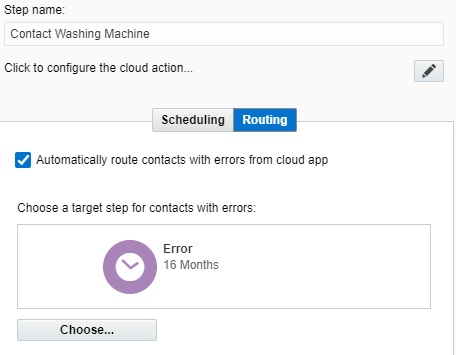
If you use apps in your Eloqua campaigns or programs, it’s a great idea to add, and route contacts to, an error step. Most Eloqua apps can be configured to do exactly that, as in this example:

This will help you a lot when troubleshooting potential issues in your process. Better yet, this allows you to process failed records differently or keep them in the flow for a manual check.

Keep Your Formatting & Labeling Consistent

Something as simple as routing all “no” decisions to the left will help you make your flow easier to follow. As part of this, adding a meaningful name to the step (along with its numeric value as explained in point 1) will make the flow feel more natural. Some steps (like wait steps) might seem self-explanatory already, but they may be serving a different purpose. For instance, wait steps can be used as placeholders while you wait for a field to be populated, or can even be used as an error step (as in point 2). Adding the intended purpose to each step’s name prevents you from forgetting why you inserted a wait step at a particular spot.

We all want to tap into Oracle Eloqua’s full potential, because it can greatly improve your marketing campaigns and bring in more leads. But it’s easy to get tangled in its complexity. If you are not certain how to get the most out of Oracle Eloqua, that’s where 4Thought Marketing can help. Get in touch with our team of marketing automation experts today to learn how to make Eloqua work for you.

Eloqua campaigns

february webinar replay

Watch an on-demand replay of our February 2023 webinar, “Solve Unique Business Requirements with Eloqua Cloud Apps”, here.


4Thought Marketing Logo   March 28, 2026 | Page 1 of 1 | https://4thoughtmarketing.com/articles/tag/eloqua-add-ons/