Businesses naturally want to generate leads. And if a customer is already on your website, an online form is one of the best ways to capture them as a lead. Directing the customer to the form is easy enough. But unfortunately, getting the form in front of your contact doesn’t guarantee that they’ll actually fill it out and submit it.
No “magic button” to guarantee form completion exists. However, Oracle Eloqua users have a powerful form design editor at their disposal to make the whole process easier to complete. Today, we’re looking at design principles and how to decrease form abandonment.
Lead Generation from Online Forms
Obviously, online forms exist to generate leads for your business. But a quality lead is more than just a name and email address. A college student working part-time is not a worthwhile lead for a jet engine manufacturer, for example. Gathering valuable leads means collecting enough information to make it obvious whether this lead is worth pursuing.
Here we run into a problem. Marketing experts will tell you, correctly, that gathering as much information as possible on a lead provides a much-needed boost to nurturing and customized marketing. But collecting that information can be a challenge. Forms that get too long and complicated, or that ask for data not readily available, can add friction and lead to the dreaded form abandonment.
What Causes Form Abandonment?
Simply having a form on your website is not a guarantee of lead generation. Customers may start filling out your form but stop halfway through and never finish. Marketing experts tend to agree that form abandonment usually results from one of these issues:
Long, complicated forms with too many questions
Forms that load slowly and force users to wait
Requests for information that is not readily available (i.e., information the customer may have to leave the computer to find)
Confusing layout or instructions
Questions with an unclear purpose (i.e., the customer doesn’t know how you will use their data and if they agree)
Hindered accessibility from poor form design
Lack of privacy controls
Fortunately, these problems are easily treatable with Eloqua’s form design system.
User-Friendly Online Form Design Strategies
Changing how you develop online forms can make a significant difference in your lead generation numbers. As you revamp your form templates in Eloqua, keep these principles in mind:
Optimize your form for the correct device. Poorly formatted forms can lead customers to decide this isn’t worth it.
Test your form ahead of time, repeatedly. Catch any glitches, errors, or loading problems long before a customer ever sees your form.
Short and sweet. The longer a form is, the more likely the potential lead will lose patience. Only request information that is strictly necessary.
Limit your form to a single column. This makes the form appear simpler, shorter, and cleaner. This also optimizes your form for mobile devices.
Give your form and fields clear titles. Customers want to know they’re on the right form, and what information you’re asking them to provide.
Avoid drop-down menus. Consider radio buttons instead, where all possible answers are visible at once so the customer can more easily decide.
Start with the easiest information to find. Keep “harder” but necessary questions, like information the customer will have to leave the computer to find, at the bottom. Since the form is mostly complete by now, this makes them more likely to return and finish.
Be upfront about your privacy approach. Clearly explain how the requested information will be used. Additionally, provide a link to your full privacy statement for details. This should feed into your marketing consent solution like 4Comply.
Provide an unmistakable CTA. The form won’t do you any good if it’s not submitted!
Thank the customer. Always say thank you when someone trusts you with their information.
Collect More Quality Leads with Well-Designed Forms
As consumers become increasingly aware of their data privacy rights and the options available to them, businesses need to adjust accordingly. Personalized marketing materials still work wonders, but how can your company collect enough data for personalization without violating privacy laws? What’s the balance between respecting user privacy and effectively using data?
The Evolution of Preference Management
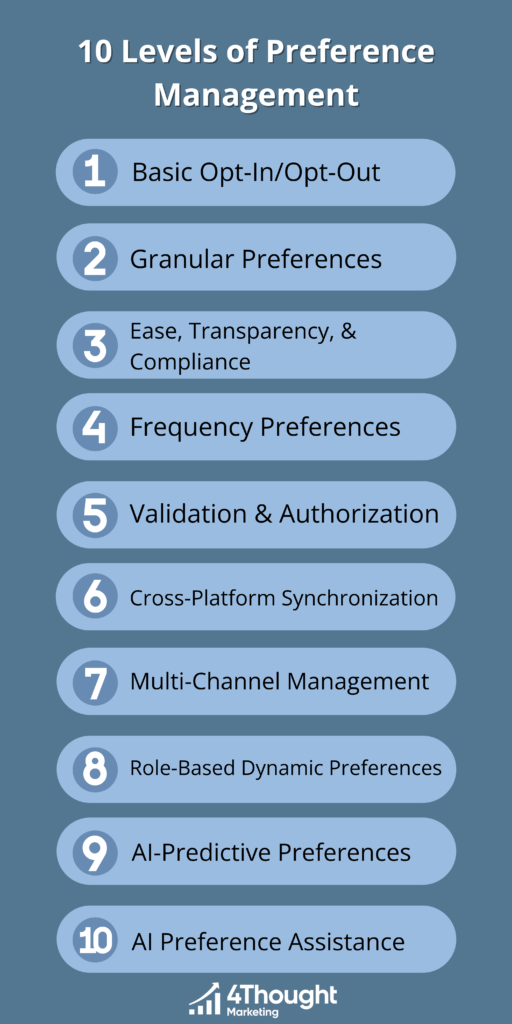
In short, the answer lies in a practice called preference management. This allows customers to control exactly what data they provide to your company and how they allow your company to use the collected data. There are multiple ways to approach this. Today, we’ll be looking at ten levels of preference management, each building on the previous one.
Level 1: Basic Opt-In/Opt-Out
At the most fundamental level, preference management begins with the ability for customers to opt in or opt out of communications. While this may seem elementary, providing a balanced choice like this goes a long way. A well-designed preference center not only offers an opt-out option but also encourages customers to opt back in by explaining exactly how and when their data will be used. This keeps contacts informed and ensures they feel in control of their choices.
Level 2: Granular Preferences
Granular preferences allow customers who have opted in to specify the types of communications they wish to receive. This can be segmented by product lines, content types, business units, or any number of other relevant categories. This choice assures customers that the communications they’ll receive will be both relevant and not overwhelming.
Level 3: Ease, Transparency, & Compliance
This level of preference management has three distinct levels of its own.
First, ease of use. Preference centers should be intuitive and straightforward. Too many options will overwhelm users and make them more likely to opt out of everything. Keep your dashboards scannable and simple.
Second, transparency. Being honest about your data collection and usage is crucial at this stage. Don’t ask for more data than you need. Explain how and when you’ll use the data you ask for, and stick to it. Make your privacy policy easily available for customers to review.
Third, legalcompliance. It’s essential to prove that you’re honoring your customers’ requests. A customer’s preference submission is already connected to their email address. To be truly compliant, you must gather additional identifying data such as date, time, and form location, that show when and how the request was made. Returning only the most recent opt in or out state, if it’s a checked or unchecked box, is insufficient evidence if your compliance is ever challenged. You must provide a history of changes.
Level 4: Frequency Preferences
Some visitors who ask to unsubscribe might not want to completely stop communications—they may just want a break. Providing an ability to control how often they receive things -frequency preferences, makes this easy for both them and you.
Depending on your company’s exact marketing approach, frequency preference management can take different forms, such as:
You may give visitors the option to pause all communications for a period.
Alternatively, you may want to give them to control, for each preference they opt into a frequency option. For example they may want to get newsletters only quarterly, but product support information immediately.
Finally, you may want to consider “fatigue analysis”, which slows down communications to customers who aren’t actively engaging with your messages anymore. Communications will pick back up when their participation does. This keeps messaging frequency at the customers’ comfort level without costing you a contact.
Level 5: Validation & Authorization
This level is fairly straightforward: making sure the customer is who they say they are. This can be accomplished with something as simple as an identity verification email. This adds an extra layer of security to the preference management process, ensuring that no one else can sign up a customer for unwanted communications or change their set preferences.
Level 6: Cross-Platform Synchronization
In large organizations, recorded customer preferences may be scattered across various systems and departments. This obviously makes managing these preferences harder for internal marketing and privacy professionals that must deal with making multiple systems legally compliant. It also makes submitting those preferences in the first place harder, as customers have to navigate multiple menus and webpages. Consolidating them into a single, unified view through cross-platform synchronization makes things far easier for the customer and for you. Some jurisdictions even legally mandate this.
Level 7: Multi-Channel Management
Email marketing may be the most lucrative form of online advertising, but it’s far from the only one. SMS, push notifications, and other communication channels are still effective ways to reach your audience. And different demographics will prefer different channels. For example, one age group may prefer SMS messages over email, while another group wants email communication and nothing else. This is another layer of choice that your preference center needs to offer.
Level 8: Role-Based Dynamic Preferences
Prospects, customers, and company partners will have different areas of focus when it comes to receiving communication from you. Offering a universal preference center can make those areas of focus harder to track. Consider creating one preference center for prospects, one for current customers, one for company partners, and others as required so you can offer each group a relevant set of choices. (You’ll also need to remember the validation step of level 5 as you do this.) This makes things easier for the users and, by extension, increases their engagement.
Level 9: AI-Predictive Preferences
This level uses artificial intelligence to predict and then pre-set customer preference settings based on historical data, behavior, and other inputs. Many companies do this with an algorithm today, but enabling an AI to set these is typically far more capable when preferences are many and complex.
While AI-predictive preferences should not replace customer-set preferences, they can provide a valuable starting point, especially for new customers or prospects.
Level 10: AI Preference Assistance
The most advanced level of consent management involves AI-powered systems that interact directly with customers to understand their preferences. Imagine typing into a preference page:
“Every two months, send me an update with hyperlinks for all content on everything happening regarding home appliances from this company only. However, I’d like product announcements to be sent to me immediately.”
“I’ve turned on the three preferences below that pertain to home appliances with a frequency of every two months, and also the preferences for product announcements to come as soon as available.”
These systems look and behave like your typical chatbot, except they are intentionally focused and pre-prompted to understand all the content a company creates and the concept of preferences. This futuristic approach can simplify the preference management process, making it more even intuitive and user-friendly.
Implementing Effective Preference Management
While understanding these levels is crucial, implementing them effectively requires strategic planning and execution. As you begin:
Assess your current state: Identify which level your organization currently operates at. Are you still at basic opt-in/opt-out, or have you moved towards AI-predictive preferences?
Prioritize ease and transparency: Regardless of the level, ensure your preference center is easy to navigate and transparent about what each option means. Use clear language and, where possible, visual aids.
Take advantage of technology: Use technology to automate and streamline preference management. This includes using AI for predictive preferences and cross-platform synchronization to consolidate data from different systems.
Focus on compliance: Stay up-to-date with legal requirements and ensure your preference management practices comply with relevant laws. This not only protects your organization from legal risks but also builds trust with your customers.
Customize and personalize: Tailor your preference management to different user groups. Use role-based dynamic preferences to provide relevant options to prospects, customers, and partners.
Stay flexible and adaptive: As new technologies and customer expectations evolve, be prepared to adapt your preference management strategies. Regularly review and update your practices to stay ahead of the curve.
Conclusion
Effective preference management is a dynamic and evolving process that requires a thoughtful approach and the right blend of technology and strategy. By understanding the different levels of preference management and implementing best practices, marketers can offer personalized experiences while maintaining compliance and building customer trust. The journey from basic opt-in/opt-out to AI-driven preference assistance is not just a technological upgrade. Rather, it is a strategic evolution that can significantly enhance customer engagement and satisfaction.
Eloqua users already know how extensive its capabilities truly are. But what if it could do even more? What if your team could use Eloqua for more effective marketing campaigns and long-term plans? That’s all possible when you pair Eloqua with another tool from Oracle: Oracle Unity CDP. Today, we’re looking at a few important advantages this pair-up offers.
1. Advanced Segmentation for Refined Targeting
One of the biggest challenges marketers face is fragmented customer data. This was the case for a leading financial institution struggling with siloed information. Combining the capabilities of both Oracle Unity CDP and Eloqua, they unified their customer data, allowing for advanced segmentation. This integration enabled them to create precise segments and apply AI-driven insights to determine the next best actions.
The results were impressive: a 24x faster performance in building segments and a 4x increase in generating next best actions, leading to more personalized and effective marketing campaigns.
2. 360-Degree Customer View
Understanding your customer’s journey across various touchpoints is crucial. To understand this further, let’s look at another real-world example. A major telecommunications company solved its fragmented data issue by integrating 23 data sources into Oracle Unity. This holistic view enabled them to run evergreen campaigns and deliver personalized experiences in real time.
Once again, the results speak for themselves. The company saw a 20% lift in performance for new opportunities and reduced segment creation time from weeks to the same day.
3. Improved Lead Scoring & Nurturing
For other companies, identifying high-value leads and nurturing them effectively is a challenge. One particular international company discovered this the hard way. By integrating their customer data into Oracle Unity and applying AI models, they significantly improved their lead scoring. This allowed them to deliver high-quality leads to Eloqua, where personalized campaigns could be executed.
The impact was substantial, with a 230% increase in lead submissions and a 5% increase in order uptake.
4. Consistent Omnichannel Experience
Customers deserve a seamless, headache-free experience across all channels. Oracle itself faced challenges in this area, spending excessive time on manual processes. By utilizing its own tool to centralize customer data and integrate it with various other tools, including Eloqua, Oracle automated 70% of its marketing transactions.
This resulted in faster campaign execution, a reduction in lead time from weeks to days, and a 33% increase in opportunity size.
Oracle Unity also allows users to take a proactive approach to opportunities. For example, a prestigious car brand aimed to enhance its upsell and cross-sell efforts, particularly in the context of new car services and warranty renewals. By integrating its customer data into Oracle Unity and applying predictive models, it could foresee customer needs and engage them proactively.
This led to a 29% increase in revenue and a 39% callback rate from customers, not to mention the amount of time saved by this approach.
Why Choose Oracle Unity CDP?
Oracle Unity stands out for several reasons:
Safety, security, and scalability: Built on Oracle Cloud Infrastructure, Oracle Unity CDP ensures your data is secure and scalable.
Comprehensive data integration: Oracle Unity connects both front and back-office data, offering a complete view of your customer.
Industry-specific data models: Ready-to-use models offer quick implementation and faster realization of benefits.
Native AI/ML capabilities: Built-in intelligence helps to predict customer needs and optimize engagement.
Flexible mastering of profiles: Oracle Unity can master various data points, such as products or business-specific needs.
Seamless journey orchestration: Oracle Unity enables the creation of personalized and real-time customer journeys across all touchpoints.
Conclusion
Oracle Unity CDP and Eloqua offer a powerful combination for marketers looking to enhance their strategies. By unifying customer data, applying advanced AI insights, and enabling seamless integration across channels, these tools help create personalized and effective marketing campaigns. Whether it’s improving lead scoring, delivering consistent omnichannel experiences, or reducing churn, Oracle Unity and Eloqua can elevate your marketing efforts to new heights.
Getting Practical with AI in Marketing – Eloqua Office Hours June 2024
June 27, 2024
David Gutelius from Motiva AI shares practical approaches to incorporating AI in your Marketing efforts. Eloqua Office Hours is 4Thought Marketing’s monthly gathering for Eloqua users to share insider hacks, and clever tips, and address all your pressing questions. Expand your knowledge and connect with like-minded professionals.
Email marketing still ranks among the most effective forms of marketing. With a remarkable ROI of $36 for every $1 spent, it has more than proven its worth. But part of that success comes from a specific aspect of email marketing: personalization.
Emails structured around a customer’s specific interests boast a significantly improved open rate and ROI compared to generic emails. And for marketers to take full advantage of this, they can turn to dynamic content.
What is Dynamic Content?
Dynamic content refers to digital content that changes and adapts based on various factors, such as user behavior, preferences, and real-time interactions. Unlike static content, which remains the same for all users, dynamic content provides a tailored experience for each individual. This goes hand-in-hand with segmentation. A few common examples include:
Content based on preferences: Personalizing emails with content relevant to a contact’s preferences avoids clutter and irrelevant information, providing a better user experience. For instance, an email can have different sections dynamically inserted based on the recipient’s indicated interests, such as different images or text tailored to their preferences.
Geographic relevance: Companies operating in multiple regions can use dynamic content to connect customers with local representatives. This is also a good way to promote live events near the recipient.
Industry-specific engagement: Emails can be tailored with images and content relevant to the recipient’s industry. For example, a furniture resale company might use dynamic images linked to specific types of furniture that interest the recipient, making the communication more relevant and avoiding unnecessary information.
Outcomes of Using Dynamic Content
Marketers who take advantage of dynamic content and personalization can see improvement very quickly. A few of the most prominent changes could include:
Enhanced user experience: Tailoring interactions to individual preferences and behaviors makes communications feel personal and directly relevant.
Increased engagement: Personalized content is more engaging, leading to higher interaction rates.
Higher conversion rates: Relevant information and tailored calls-to-action make it easier for recipients to connect with resources and make decisions.
Customer retention and loyalty: Personalized campaigns foster deeper connections with recipients, encouraging repeat business.
Data-driven decision making: Dynamic content provides real-time feedback and analytics, helping marketers make strategic decisions and align strategies with audience preferences.
Optimized marketing efforts: Continuous improvement through data-driven insights ensures that each campaign is more targeted and effective, maximizing marketing ROI.
Implementing Dynamic Content: A Checklist
To successfully implement dynamic content, consider the following checklist:
Default criteria rule: Ensure there is a generic default version of the email for recipients who do not meet any specific criteria.
Content style and fonts: Consistent styling and fonts are crucial to avoid rendering issues.
Data accuracy: Keep dynamic content updated and relevant to customer needs.
Live testing: Test dynamic content live to ensure all criteria are functioning correctly and to mitigate any issues before launching campaigns.
Dynamic Content: A Game-Changer
Dynamic content transforms a generic email into a highly personalized message that the recipient will appreciate. In turn, this improves user experience, boosts engagement, and ultimately achieves higher conversion rates. The near-instantaneous feedback from contacts also tells you what to change in future campaigns. For any marketer taking advantage of email marketing, dynamic content is a must.
Marketing is a marathon. With technology, laws, and customer preferences constantly evolving, anyone who can’t stay ahead of the curve gets left behind. Marketing automation tools like Eloqua and Marketo significantly boost these efforts. However, as any marketer knows, having the right tools is just the first step.
Without experts on your team, your tools may not be used to their full potential. You may even under-utilize tools due to a lack of experience. Hiring an expert will mitigate the issue, but that comes with the added requirements of recruiting and onboarding a new employee. Meanwhile, you may still not have all the expertise you need.
What can you do? You can do what many organizations today are doing: partnering with a Marketing Agency with the expertise you need instead of hiring a new, permanent team member. Here are just a few reasons to consider this choice.
1. Access to Multi-Faceted Expertise
A partner organization brings a depth of experience and expertise that a new hire might not possess. While an individual may have strong skills in certain areas, a partner can provide a team of specialists with a wide range of knowledge. This collective expertise allows for a more comprehensive approach to problem-solving and implementation. You’ll also enjoy more up-to-date solutions, ensuring you always stay ahead of the curve.
2. Rapid Execution & Efficiency
The ability to mobilize a team swiftly can make all the difference. A partner organization can allocate multiple resources to your project, accelerating the completion of tasks. This agility allows your marketing department to overcome hurdles more efficiently than relying on a single new hire. The coordinated efforts of a partner team can lead to faster implementation of strategies and quicker realization of marketing goals.
3. Enhanced Peace of Mind
Hiring a new employee always comes with a degree of uncertainty. Even the most qualified candidates need time to adjust to a new work environment and may not deliver immediate results. On the other hand, a reputable partner organization with a proven track record and established processes ensures high-quality and timely work. This reliability provides peace of mind, allowing you to focus on strategic initiatives rather than day-to-day operational concerns.
4. Informal Training Opportunities
One significant benefit of partnering with a marketing automation expert is the informal training your team will receive. As your staff interacts with seasoned professionals, they learn through hands-on experience rather than training modules. This on-the-job training helps your team become more proficient in using your systems and enhances their overall marketing skills, leading to a more knowledgeable and capable department.
5. Broader Perspective & Innovative Ideas
A partner organization brings a wealth of experience from working with a diverse range of clients across various industries. This broad perspective allows them to offer innovative solutions and creative strategies you might not have considered. Whether optimizing subscription lists, crafting compelling subject lines, or implementing advanced segmentation techniques, a partner’s extensive campaign experience can provide fresh ideas and valuable insights.
The Added Value of a Technology-Savvy Partner
Partnering with a technology-savvy organization offers numerous advantages beyond just filling a temporary gap in your team. For companies new to marketing automation, having an experienced partner can ensure that the system is set up correctly and operates smoothly. This support lets your team focus on strategic tasks while the partner handles technical complexities.
Moreover, working with a partner provides ongoing opportunities for your team to learn and grow. By observing and collaborating with experienced professionals, your staff can gain confidence and competence in using Eloqua, leading to faster and more effective campaign execution.
A Long-Term Solution
Partnering with another organization doesn’t have to be a short-term decision. As many companies have found, maintaining a partnership for the long haul not only addresses their immediate needs but offers significant future benefits. A partner’s ongoing support and expertise can become integral to your marketing strategy, ensuring continuous improvement and innovation. As your organization grows and evolves, a trusted partner can help you navigate new challenges and capitalize on emerging opportunities.
Ready to partner with our expert team to bring your game to the next level? Contact us today to get started.
Modern marketers use a variety of tools and platforms to run campaigns. But none of these tools works in isolation. One critical part of your marketing system is integration, ensuring that all your tools work well together. Seamless data flow helps create genuinely effective marketing campaigns.
However, integrating these platforms requires careful attention to your data. Poor data management can cause an integration to fail and make your job much more difficult. Today, we’ll be looking at a few reasons why integrations fail, and what you can do to avoid them.
Why Do Integrations Fail?
The primary reason for integration failures is unhealthy data. When marketers create new forms or import records without considering the data requirements of all integrated systems, they risk feeding incorrect data into these systems. This oversight can result in significant issues, including:
Incorrectly classified data: CRM systems may reject entries because they don’t meet predefined criteria. For example, an entry labeled “PC maker” might not be a valid industry category, or “not interested” might not be a recognized job level.
Segmentation issues: Incorrect (or incorrectly classified) data can cause segmentation to fail. If the CRM passes incorrect options, it can lead to inaccurate targeting and campaign execution.
Closed-loop reporting failures: Discrepancies in campaign names, company names, or other critical fields can disrupt reporting, making it difficult to track the effectiveness of marketing efforts.
These errors can result in lost records, impacting sales and marketing activities. Even in well-designed systems, a lack of monitoring can mean that potential problems go unnoticed for far too long.
Ensuring Integration Success
1. Robust Error Tracking
A successful integration begins with a well-defined error-tracking system. This system should:
Record every error that occurs, maintaining logs for several months
Automatically notify the appropriate personnel when an error is detected
2. Structured Import Processes
Establishing clear processes for data imports is crucial. This involves:
Defining stringent protocols for importing data
Ensuring these protocols are consistently followed
3. Thoughtful Form Creation
Form creation should be a deliberate process that prioritizes data integrity across all systems. Key steps include:
Developing a process for form creation that considers the requirements of all integrated systems
Testing forms to ensure that data flows correctly through the CRM and other systems, validating all common options, especially new ones
4. Assigning a Data Steward
When issues arise, having a designated data steward can make a significant difference. This person’s responsibilities could include:
Identifying and resolving integration errors
Investigating the root cause of these errors, whether from forms or imports
Communicating with the responsible personnel to prevent future issues
Implementing a “data washing machine” to convert incorrect entries into valid, generic options
Training & Clear Processes
Many integration issues stem from turnover with the accompanying loss of domain experience and the introduction of new team members. By implementing clear, documented processes, you can mitigate these risks. Ensure that new personnel understand how to:
Create forms that align with data integrity standards
Perform imports that adhere to established protocols
Maintain the health of your integration data
Stay Proactive
Every marketer wishes that integrations went smoothly every single time. However, the reality is that your marketing platforms and tools simply work with the data that they’re given. It’s up to you to make sure that the data they have is accurate and compatible with all systems involved. Proactive data management goes a long way toward keeping your integrations smooth and your future marketing campaigns streamlined.
AI has certainly made its mark. Many companies jumped on board early, eager to take advantage of AI-powered tools’ extra capabilities. Marketers, in particular, were intrigued by this shiny new toy. And with good reason—AI-powered marketing efforts offer increased efficiency, help eliminate busywork, and can improve customer relations.
But this shiny new toy comes with inherent risks still being uncovered. Companies that choose to take advantage of AI need to understand the impact it can truly have, both now and as the technology continues to evolve. One excellent way to start is an AI audit.
What are AI Audits?
An AI audit assesses how AI is used in your organization and the impact it has. The audit also ensures that your AI tools comply with ethical standards and legal requirements for privacy, security, and transparency.
This audit also covers every area where your company uses AI. This goes beyond your website chatbot. AI may be more visible now, but marketers have been using it in some fashion in marketing automation for years. No matter how insignificant, every AI tool needs to be a part of this audit.
Why AI Audits Matter
An AI audit gives you a clear picture of who uses AI in your company, how they use it, and how often. It also helps identify potential problems. AI audits specifically look for:
Not only will an AI audit will help you catch problems early on, but it will also demonstrate your company’s commitment to ethics and transparency.
Best Practices for Effective AI Audits
AI audits function much like any other type of audit in your company. As you prepare, keep these best practices in mind:
Define clear objectives: Before starting an AI audit, define what you aim to achieve. Whether it’s compliance verification, performance assessment, or risk identification, clear objectives will guide the audit process and ensure it focuses on your concerns.
Involve cross-functional teams: AI audits should involve collaboration between various departments, including IT, legal, compliance, and marketing.
Use standardized tools and frameworks: Tools such as AI impact assessments and algorithmic audits can provide a structured approach and make things simpler.
Conduct continuous audits: AI systems evolve, and so should the auditing processes. Regular audits allow for continuous oversight and the ability to address new challenges as they arise.
Focus on transparency and documentation: Maintaining transparency through comprehensive documentation of AI systems and audit processes is vital. This transparency not only supports regulatory compliance but also builds trust with consumers.
Engage external experts: Sometimes, the complexity of AI systems can benefit from external expertise. Third-party auditors with specialized knowledge in AI can provide an unbiased view and help uncover issues that internal teams might overlook.
AI Audits in Your Company
At the end of the day, AI is simply another tool at marketers’ disposal. This new tool has to follow the same rules and adhere to the same standards as any other system. By prioritizing AI audits, you demonstrate your commitment to keeping marketing ethical and legally compliant even as technology evolves.
How else can you incorporate AI into your marketing strategies? Do your existing AI systems need a checkup? Contact our team today to discuss all your marketing needs.
Eloqua Office Hours May 2024
Recorded May 30, 2024
Boost your Eloqua skills through real-world examples. Today we’ll explore the complexities of data privacy, consent, and email preferences. Balancing Privacy, Consent, Complexity, and Choice
Sales and marketing play different roles in the customer journey. But they truly shine when both can work together. To do this, many companies implement a “nurturing while selling” strategy, which allows sales reps to manage some marketing campaigns while working on opportunities. But how might this work in your organization? Let’s explore nurturing while selling further.
Nurturing While Selling: The Basics
To understand nurturing while selling, you must first grasp the concept of the customer journey: the process of a customer moving from initial interest to eventual purchase. While most companies focus on marketing at the beginning and sales at the end, the middle portion often remains neglected. This is where nurturing while selling comes into play.
Nurturing while selling involves supporting your sales reps with marketing automation and other tools while they engage in the selling process. This approach can include sending targeted emails and offering resources to help your sales reps close deals.
The Role of Marketing Automation in Nurturing While Selling
One of the most common challenges in sales is keeping leads warm. Fortunately, marketing automation provides a much-needed solution. Sales reps can take advantage of automated marketing communications to stay in touch with potential customers and gently nudge them toward a purchase. Your team will be able to automate targeted email campaigns, provide tailored communications, track customer interactions, and provide valuable insights into consumer behavior. Best of all, this automated approach to nurturing while selling allows sales reps to focus on their core tasks without worrying about accidentally ghosting leads.
Navigating the Sales Process
In the early stages of sales, qualification is crucial. Sales reps rely on customer needs and behavior data to narrow down a potential client base for their products or services. Marketing automation can help here too. Page tagging can track customer behavior and provide insights into product interest. Meanwhile, automated email campaigns keep customers engaged with relevant information and promotions.
As leads enter the evaluation stage of the customer journey, opportunity management becomes the focus. At this stage, customers compare products and services and decide what to purchase. Providing content that helps customers make informed choices without overwhelming them with broad, early-stage content is essential. Social proof and testimonials are particularly effective here.
Implementing Control for Sales Reps
Sales reps who typically handle larger, more complex deals might object to marketing’s involvement in their sales process. You can mitigate this problem by giving your sales reps control over when and how marketing automation comes into the picture. Not only does this provide them with valuable tools, but it also ensures they feel empowered in their role.
You may choose to give control to your sales reps through:
On/off control: This basic option allows sales reps to stop or start nurturing campaigns.
Pause capability: This option adds a pause function to the on/off control, allowing reps to pause nurturing when actively engaging with leads and resume it when needed.
Campaign selection: This allows sales reps to choose from a list of nurturing campaigns based on their needs. This approach is powerful but requires more involvement and expertise from the reps.
You may also want to consider automatic nurturing. This campaign kicks in if a set period of time passes with no sales activity, ensuring leads don’t go cold from lack of communication. Whatever your final choice, the key is to give your sales reps control over the process without overwhelming them with options.
Nurturing While Selling: Final Thoughts
Nurturing while selling can be a game-changer for organizations looking to improve their sales and marketing alignment. Keeping everyone on the same page ensures a smooth customer journey and potentially higher conversion rates. But taking the first step can be tricky. Changes can feel overwhelming when your sales and marketing teams have their preferred systems and approaches established. That’s where we can help. Contact to help your sales and marketing teams work together and focus on nurturing while selling.
An Eloqua marketing campaign checklist helps prevent underperforming marketing campaigns from frustrating the teams that developed them and the companies that see little to no return on their investment. Unfortunately, there is no “silver bullet” that makes a marketing campaign a massive success every time. However, there are a few steps you can take to give yourself a better chance. For Eloqua users, one of the most essential steps is to create a marketing campaign checklist to follow during development.
Using an Eloqua marketing campaign checklist is essential for ensuring that your campaigns are successful and yield positive results. This Eloqua marketing campaign checklist helps you track all important aspects of your campaign.
Setting the Stage
You have an event next week, and not nearly as many people have registered as you’d hoped. What do you do?
While you might be tempted to send out another email blast to drum up interest, this can backfire. Your prospects and customers may be annoyed to receive another marketing email and might complain or even unsubscribe. Unfortunately, by now, this marketing campaign is likely a lost cause.
Implementing an Eloqua marketing campaign checklist can greatly enhance your marketing strategy, ensuring every element is in place before launching.
A comprehensive Eloqua marketing campaign checklist ensures that no detail is overlooked, allowing for a smoother execution of your marketing efforts.
The best thing to do to avoid a repeat is to understand what went wrong and how to fix your mistakes in the future. Let’s look at this step by step.
Step 1: Clarify Your Initial Campaign Goal
What, exactly, do you want to accomplish with this campaign?
To answer this question, remember the SMART framework. Your goal with any marketing campaign should be:
Specific: “Get more people to attend the webinar” is a vague, unhelpful goal. “Increase webinar registrations by 25%” gives you something concrete to aim for.
Measurable: This ties back in with having a specific goal. With numbers in mind, you’ll know if you hit your target and how significantly you missed or exceeded the goal.
Attainable: As nice as it would be, very few marketing campaigns result in 100% conversion. Be realistic about what you can accomplish without setting the bar too low or too high.
Relevant: What are the current market conditions? If a recession is looming, conversion rates might be lower.
Time-based: Set a definite timeframe for your goal. This lets you analyze your results and move on to better campaigns sooner.
These all sound basic, but many marketers are tempted to skip these steps. If you’re unsure how to set ambitious but realistic goals, consider using results from past campaigns to guide your planning.
Step 2: Assess Your Campaign Resources
The resources available for your campaign significantly impact your ability to reach your goals. For our purposes, we’ll consider three kinds of resources: data, tools, and skills.
Data quality and quantity: Generally speaking, aim for a list of 400-1000 contacts as the minimum threshold to run a test. If you have a smaller contact list, consider moving to a highly personalized account-based marketing approach.
Tools: What marketing automation, email marketing, and related tools do you have available to run your campaign? If your available tools are limited, it may be more difficult to run a demanding campaign.
Your experience level: If you are about to run a campaign to drive attendance at an event and you’ve never done that before, you may need to adjust your expectations. Likewise, if you are proficient in marketing automation but have weaker copywriting skills, this skill mix will affect the kinds of campaigns you can run. Consider partnering with another person who has the marketing skills you lack. Or seek help from an outside agency.
Step 3: Identify Barriers to Campaign Success
With an Eloqua marketing campaign checklist, you can easily track your resources and identify areas for improvement based on past campaigns.
After identifying your available resources, it’s time to look more closely at potential barriers. Risks are inevitable, and identifying potential obstacles upfront can help you identify, understand, and manage them to achieve your goals. For example:
Alignment with sales: If you don’t take the time to align with the sales team, they may perceive your campaign as a waste of time. We take a look at how to avoid 6 Common Sales & Marketing Alignment Mistakes.
Market sophistication: If the market is already saturated, your campaign may struggle. However, if your copy and messaging help distinguish your solution from your competition, customers may be more interested in your offerings.
Step 4: Perform a Sanity Check
The next step is to evaluate your initial goal in light of the barriers and resources you have identified. Go back to the SMART framework for a bit. Does the campaign goal still make sense? Is it achievable? If not, adjust the scope or timeline accordingly. Don’t forget to check back with your stakeholders and get their input.
Using an Eloqua marketing campaign checklist helps in identifying barriers early, allowing teams to pivot their strategies accordingly.
The importance of aligning your sales strategy with your Eloqua marketing campaign checklist cannot be overstated, as it enhances overall effectiveness.
Step 5: Remove Duplicates and Errors from Your Marketing Data
Bad data hurts marketing results in two ways. First, low-quality data means fewer appropriate prospects will see your message. Second, you will find it difficult to measure your results accurately and determine ROI.
To improve your marketing data, use the following techniques:
Clean your data: For Eloqua users, we recommend using the Contact Washing Machine. It’s a free tool included with Eloqua that helps ensure data coming into your system is as clean as possible
Assess the age of your marketing data: The accuracy of business contact data gradually declines over time as people move to new roles. If you are targeting businesses, keep in mind that the average employee tenure is 4-5 years, according to the Bureau of Labor Statistics.
Manually review: Yes, we suggest you manually review your campaign data set. Pick a few dozen contacts from your list and review them manually.
You might also consider using the Friendly CSV tool to clean your email list. It can help you remove “LLC” and similar data from company names and make other simple changes.
Your Eloqua marketing campaign checklist should include a verification step to ensure all data is accurate and up-to-date.
Step 6: Evaluate Need to Enrich Your Data
Does your marketing data only contain a name and email address? Two data points per contact are not much to build a campaign. Here are some options to consider:
Use a third-party data provider for lead enrichment: For B2B leads, you might find better data using solutions like BuiltWith.com for technology insights.
Build your own data enrichment tools: Besides paid services, you can also build solutions using the data you already have. For example, if you collect job title on every form, create a program to evaluate and segment your data by job function and level using data lookups and lookup tables. You can also use Eloqua Cloud Apps from 4Thought Marketing to populate job level and job role.
Adjust your campaign goal to get more insights: Instead of a direct sales call to action, make a content offer to your prospects. For example, you might offer a webinar aimed at an executive audience (e.g., “What CFOs Need to Know About Presenting to The Board”). Based on who responds to the offer, you will have a higher degree of confidence about which of your contacts fits an executive profile. The registration data will also help enrich your contact data.
Step 7: Check Privacy & Compliance Requirements
Businesses must consider how to address privacy and compliance regulations. Depending on where you do business, you may be subject to GDPR or other privacy laws. Any campaign should ensure compliance with the relevant privacy and data regulations.
Depending on the data you’ve collected, it might be tricky to determine where each contact lives and what laws apply. Check the IP address they used to subscribe or engage with your content for a rough idea of their location.
Step 8: Verify Your Campaign Tracking
Without tracking, you cannot tell if your marketing campaign succeeded. Ideally, you will want to track multiple metrics to identify relevant changes. In an email marketing campaign, you could track open rates, clicks, and replies. In a direct response style campaign, you may focus on the number of orders.
To verify your campaign tracking is correctly configured, send out messages to an internal company email list. We recommend sending it to at least two different email accounts.
Step 9: Start with a Small Marketing Test
Some marketing campaigns – such as running an annual event – do not lend themselves to smaller tests. For online marketing campaigns, we recommend you use the 10% rule. If you plan to engage 1,000 prospects, first send a test campaign to 100 contacts. In this test campaign, verify all the technology works properly and gauge market response to a degree. You might even want to start with a smaller campaign experiment.
Step 10: SLO – Subject Line Optimization
In an email campaign, you should test at least two subject lines. You may find that one variation yields significantly improved open rates. Likewise, you should consider testing multiple variations for a webinar landing page. And don’t forget using subject line testing tools like SubjectLine.com.
Step 11: STO – Send Time Optimization
Obviously, people check their email at different times. And with the sheer number of emails most people receive now, your targeted messages can get buried under so many others that the recipient may never see them. But there’s a way around this. A certain add-on tool for Eloqua can determine when your customers are most likely to engage with your messages and schedule the emails to arrive at the best time possible.
Whether you program your STO tool yourself or purchase it from Eloqua, take advantage of this opportunity! Don’t let your messages get buried.
Always refer back to your Eloqua marketing campaign checklist during the campaign launch to monitor performance and track progress.
Step 12: Adjust Your Content
Good subject lines get email opens. Good email content gets clicks and purchases. If you find your contacts are opening your emails but not taking any further steps, your email content may need an update.
This is also important to consider if your marketing team uses AI for content creation. Obviously AI-generated content looks and feels unnatural, and will be a turn-off to customers. Anything AI-generated in your marketing campaigns should be subject to the same level of editing and scrutiny as anything else. Use an AI detection tool as well – if the tool picks up on AI influence, you still have work to do.
Step 13: Launch Your Campaign
After you’ve carefully considered the items above, you should be ready to launch your marketing campaign! After completion, refer back to the first few steps of the checklist. Ask yourself how you performed against your goals – what went smoothly and where did you encounter problems. The insights you gain from this analysis will help you to plan your next campaign more effectively.
Step 14: Keep Improving Your Checklist
A checklist shouldn’t remain static. After each campaign, examine what went well and how to improve future campaigns. Make a point of asking how to update your checklist to drive better results based on your most recent experience.
Conclusion
An Eloqua marketing campaign checklist helps improve performance. While your checklist will be unique, it likely shares some common elements, including goal setting, resource analysis, risk assessment, and sanity checks. Ensure that your Eloqua marketing campaign checklist is thorough and effective to achieve the best results.
Ready to take your marketing campaigns to the next level? Get in touch with our team today and start using an Eloqua marketing campaign checklist to its full potential.
By updating your Eloqua marketing campaign checklist with each campaign, you ensure continuous improvement and a better chance of success.
In conclusion, an Eloqua marketing campaign checklist is vital for ongoing success in your marketing efforts, helping you adapt and refine your approach.
Integrations enable sales and marketing systems to work together seamlessly. And most of the time, they do just that. But nothing is static. Laws may change, requiring you to update your marketing automation system. Your platform might expand to hold a bigger list of contacts. Your data cleaning efforts might miss something in one platform, allowing the mistake to pass to the other platform and frustrate your marketing efforts. Whatever the case, letting an integration problem go unchecked can lead to significant problems later on as the issue snowballs.
This is why regularly auditing your software integrations is so important. Today, we’ll be looking at what you can expect during a systems integration audit and why it should be a priority.
Why Do You Need Regular Integration Audits?
Among other benefits, frequent integration audits help with:
Ensuring functionality: Regular audits help identify and fix any problems that may arise from software updates, system modifications, or external factors.
Maintaining compliance: As regulations evolve, audits are critical to ensuring that integrations comply with current legal standards.
Minimizing risk exposure: Regular audits will help identify vulnerabilities before they become a threat.
Adapting to growth and changes: As a business grows and its marketing strategies evolve, audits ensure that integrations remain aligned with the company’s objectives and market dynamics.
It’s easy to assume your integrations are working fine. We tend to think of our software systems as “set it and forget it” setups. But failing to conduct audits regularly can result in formidable issues, including but not limited to:
Poor system performance
Lower lead flow or incorrect qualifications
Outdated legal compliance standards
Outdated information from failed cross-platform communication
Missed opportunities for improvement
Any of the above could hinder your marketing efforts now or in the near future. Don’t let that happen. Running regular integration audits could make a huge difference.
What to Expect During an Integration Audit
Before officially kicking off an integration audit, decide exactly who is responsible for handling it. Placing an expert at the helm allows them to focus exclusively on the process, ensure thorough checks, keep things efficient, and monitor system performance at all times. You could also consider bringing in a qualified third party for independent review.
Following that, an integration audit involves several key steps:
Planning and information gathering: This initial phase involves understanding the scope of the proposed audit, defining objectives, and collecting necessary information.
Compliance and substantive testing: Auditors assess the integrations for compliance with legal standards and run tests to be sure.
Performance evaluation and gap identification: Auditors see if both integrated platforms are performing as expected and note any gaps in functionality.
Data integrity and user needs assessment: Data transfer is a big part of integration. Auditors take the time to improve the transfer process between platforms and prioritize secure handling of data.
The Strategic Value of Regular Audits
We all want our marketing system integrations to work flawlessly. And when they work properly, your sales and marketing efforts can flourish. But if errors start creeping in over time, it can restrict the flow of leads or reduce data quality, impactive your revenue. Periodic integration audits are a great way to ensure your systems are working correctly.