eloqua cloud apps

If you’re an Eloqua user, you know just what it’s capable of. Eloqua makes marketing easy for busy professionals. Whether you want to improve your social media promotions, email campaigns, or something else entirely, Eloqua has you covered.

But avid users of Eloqua also know that from time to time, you need an add-on for particular tasks. That’s where 4Thought Marketing’s suite of Eloqua Cloud Apps comes in. Our Cloud Apps are designed to expand Eloqua’s existing functionality and streamline your marketing tasks more than ever. And what better time to treat yourself (or your marketing team) to new Eloqua Cloud Apps than the holiday season? Here are a few of our favorites that our clients particularly like.

Contact Garbage Indicator

Customers don’t always provide valid contact information when signing up for services. To avoid being contacted, they may input an incorrect email address or phone number, or even a fake name. Some may genuinely make a typo or enter the correct information in the wrong field, confusing the system. Whatever the case, the result is “dirty data” that just takes up space in your Eloqua instance and requires a lot of time to manually sort from the usable information.

The Contact Garbage Indicator Cloud App can save your team a lot of time filtering out unusable data. This app examines every contact added to Eloqua and singles out any that appear illegitimate. A member of your team can then review the filtered data to ensure there are no false positives. After this review, the app deletes all the unusable data in its store and continues monitoring incoming information. This Cloud App is both a massive timesaver and an excellent way to streamline the data review process!

Contact Deleter

Maybe dirty data has previously made it through your review and into your Eloqua instance. Maybe some of your customers’ consent has expired, or they’ve abandoned the email address they previously gave you. Whatever the case, it’s time to delete their contact records in Eloqua.

The Contact Deleter Cloud App does exactly what its name implies—it deletes Eloqua contacts routed into it. (The contacts are saved temporarily in an archive to prevent accidentally deleting valid records.) Using this app regularly allows you to purge any bad data that’s gotten in. More importantly, it ensures that your sales team won’t waste time reaching out to contacts who are no longer interested. It also prevents you from paying for additional Eloqua contacts you aren’t using. This app is a must-have for Eloqua users who deal with a lot of incoming data!

Contact Cloud Feeder

By default, the Eloqua program canvas checks once per day for any new contacts. This typically works just fine. But for businesses that receive dozens of leads per day, or companies where a quick follow-up with customers is essential, more frequent checks would help a lot.

Fortunately, you can turn to the Contact Cloud Feeder Cloud App. This app allows your team to have the Eloqua program canvas check for new contacts multiple times per day. (One client of ours has it set to check every five minutes!) You can also specify segments or shared filters to assign new contacts to the right canvas. If you need to process as many new leads as possible, as quickly as possible, the Contact Cloud Feeder Cloud App is an excellent tool.

eloqua cloud apps

Upload Wizard

Eloqua’s default list upload feature can accept data that conforms to a variety of data standards, and in a variety of file formats. This can make data standardization tricky. Without a built-in way to ensure that all imported data follows your company’s standards, your team has to spend valuable time manually editing the data themselves before importing.

With the Upload Wizard Cloud App, none of that manual work is necessary. The Upload Wizard is designed to handle massive amounts of data at once and to quickly identify and fix errors in uploaded data. Your team can configure the app to ensure that all imported data matches your company data standards. Best of all, the app requires no specific Eloqua training to use! New hires can take advantage of this Cloud App just like a more experienced employee.

Anonymous Campaign Attribution

Consumers spend a significant amount of time researching products and services long before making a purchase. As a result, most of your online traffic—social media views, website visits, and the like—is completely anonymous. Eloqua tracks this traffic as visitors but stores no data beyond that. These visitors only become known contacts when they submit a form on your website. Of course, this makes it difficult to know exactly how they found you and what drew them in.

The Anonymous Campaign Attribution Cloud App eliminates this guesswork. The Cloud App connects visitors’ campaign responses to form submissions, giving you a more complete picture of the contact’s campaign engagement. This helps you more effectively measure your ROI and campaign effectiveness. In addition, it also tells you at a glance what campaigns aren’t yielding results and where to course-correct.

Happy Holidays!

Oracle Eloqua is already a powerful marketing automation platform on its own. But your marketing team might have a wishlist of Eloqua Cloud Apps that could make their jobs easier and your campaigns even more effective. Expand Eloqua’s functionality with our suite of Cloud Apps! Contact us today to learn more.


In Eloqua, custom objects (hereafter COs) are excellent ways to store additional information about a contact. But sometimes, an integration, upload, or process adds COs without connecting them to Eloqua contact records. Even if a contact record already exists, Eloqua’s default behavior is to map contact records and COs by email address.  If you need to map COs with other contact fields, those records are not mapped and remain orphaned. This is obviously a problem.

This is where the Eloqua CO to Contact Mapper Cloud App comes in. This cloud action is designed to quickly and easily map a custom object to a contact record based on other fields besides email addresses. It expands Eloqua functionality to ensure COs are mapped to their respective contact records. Connecting data to the right person and segmenting accordingly has never been easier.

For more information on the CO to Contact Mapper Cloud App, get in touch with the 4Thought Marketing team today.

co to contact mapper cloud app


Eloqua campaigns

Oracle Eloqua is a potent marketing automation tool. By adopting a few simple strategies, you can streamline its use, making campaign and program building and future troubleshooting much easier. This ensures you fully leverage Eloqua’s capabilities while keeping your Eloqua campaigns straightforward and manageable.

Here are a few changes to make to simplify your future Eloqua campaigns and programs:

Number Every Step in the Flow

When you have a logical process that needs to follow steps 1 through N, why not make it so that anyone who will access the asset can easily follow the path? By numbering each step, you can directly specify a specific step when showing the campaign or program to someone else. Alternatively, you can check which was the exit step of a specific record you’re trying to troubleshoot. We recommend adding a number in an increment of tens or hundreds, so that the first step is either 10 or 100, and keep going from it to 20 or 200. That way, if you ever need to add a new step to the flow, you have room to add it and not break the numeration/sequence: you can add step 15 between 10 and 20 without it feeling out of place.

Include an Error Step

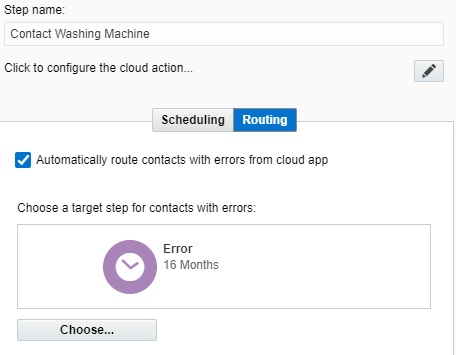
If you use apps in your Eloqua campaigns or programs, it’s a great idea to add, and route contacts to, an error step. Most Eloqua apps can be configured to do exactly that, as in this example:

This will help you a lot when troubleshooting potential issues in your process. Better yet, this allows you to process failed records differently or keep them in the flow for a manual check.

Keep Your Formatting & Labeling Consistent

Something as simple as routing all “no” decisions to the left will help you make your flow easier to follow. As part of this, adding a meaningful name to the step (along with its numeric value as explained in point 1) will make the flow feel more natural. Some steps (like wait steps) might seem self-explanatory already, but they may be serving a different purpose. For instance, wait steps can be used as placeholders while you wait for a field to be populated, or can even be used as an error step (as in point 2). Adding the intended purpose to each step’s name prevents you from forgetting why you inserted a wait step at a particular spot.

We all want to tap into Oracle Eloqua’s full potential, because it can greatly improve your marketing campaigns and bring in more leads. But it’s easy to get tangled in its complexity. If you are not certain how to get the most out of Oracle Eloqua, that’s where 4Thought Marketing can help. Get in touch with our team of marketing automation experts today to learn how to make Eloqua work for you.

Eloqua campaigns

dirty data sophos

Modern business demands a lot from professionals. Systems like Eloqua work wonders to lighten the load, but sometimes they need a little help—especially where dirty data is involved. We work to provide the additional boost Eloqua needs to keep our customers in business. Here’s how 4Thought’s suite of Eloqua apps improved lead generation for Sophos.

About Sophos

Sophos provides comprehensive cybersecurity solutions for almost 400,000 businesses in more than 150 countries. Based out of the UK, the company has four other locations around the world. Their customer list includes such diverse clients as the Diocese of Brooklyn, the Washakie County School District, Del Monte, People’s Independent Bank, and many more. Sophos also offers a family version of their cybersecurity software for individual subscribers. But whether Sophos is marketing their products and services to fortune 500 companies or a local family, they rely on lead generation as much as any other company. And unfortunately, customers aren’t making their job easy.

Problem #1: Dirty Data

Sophos uses multiple free trials offers to generate new customer leads from anyone willing to fill out a short customer-facing form. There was certainly no shortage of interested parties submitting these forms. According to a 2017 survey, most B2B companies report that 66% or 2 out of 3 free trial users end up converting once their trial expires. Quality leads through free trials were and continue to be a valuable asset, to companies as a whole and to Sophos in particular.

However, much of the information submitted in these forms were unusable. People might provide an invalid email address or even list their name as “Mickey Mouse”. Far too much of the data coming from these forms fell into this category of “dirty data”. And if it wasn’t caught in time, the unusable information made its way to the sales team, who then had to spend additional time sorting genuine contacts from tire kickers.

Receiving fake data is surprisingly common, especially in the privacy and security fields. “People are exceptionally apprehensive about giving their personal details because they are in the security space,” said Corey Lysohirka, Senior Marketing Operations Manager at Sophos. “In our industry, people are less likely to provide us with their personal information.” While expected, the influx of unusable information was certainly a problem.

The Sophos team did their best to isolate dirty data once it entered their system. Their Eloqua setup included nearly 400 rules to locate bad information but lacked a straightforward and automated method to delete it.

Problem #2: Poor Lead Flow

Like many companies, Sophos works hard to promote its products and services at public events like trade shows and webinars. These marketing events can result in many new contacts and potential leads. However, contacts from events require near-immediate follow-ups to prevent the conversation from going stale. Sophos’ lead processing system segmented the contact data in Eloqua and marked them to be processed as leads, but that’s where it stopped. Eloqua’s Program Canvas only allows contacts to enter workflows at midnight each night. This caused lengthy delays in getting sales-ready leads into the sales team’s hands and caused the leads to go cold. Sophos needed a solution.

dirty data sophos

The Solution: Data Filtering & Lead Acceleration Apps from 4Thought Marketing

Corey first noticed 4Thought Marketing while examining the Eloqua cloud app catalog. Impressed with the range of apps and capabilities he saw, he requested that Sophos get in touch with them. From there it was a simple process to find the right apps to solve the problem.

4Thought has developed a suite of apps that extend Eloqua’s functionality and further streamline the marketing process. The first app considered was the Contact Garbage Indicator. This app screens every contact entering Eloqua and singles out potential bad data. This bad data is then held for manual review to prevent false positives. Once the data has been reviewed, the Contact Garbage Indicator empties its data storage and continues to filter incoming contacts.

The Contact Garbage Indicator works in tandem with another app from 4Thought Marketing, the Contact Deleter App. This app does exactly what its name implies—it purges bad contacts routed into it. The Sophos team is especially fond of this one. The team simply has to drop the object into the canvas and then, as Corey puts it, “You just route every garbage contact record that you want to be deleted out of Eloqua to that object and the app simply deletes the garbage record.”

But while both of these apps root out bad data that has already made its way into the system, legitimate customer contacts still need attention as potential leads. Sophos uses the Contact Cloud Feeder app to accelerate lead flow in Campaign Canvas. Instead of having to wait for overnight processes to transfer lead data between programs, the team set up the app to check for newly added contacts every 5 minutes. The app then begins processing, getting leads into the hands of sales reps faster. The process is fully automatic and fits right into their current Eloqua setup. No need to refresh segments, and no need to wait overnight for programs to refresh!

Results: Improved Quality & Processing Speed

With their new setup, Sophos’ data intake has never been better. The Contact Cloud Feeder App kicks off the cycle of processing incoming contacts as leads. The Contact Garbage Indicator then examines each lead for possible dirty data and filters it out. Finally, the Contact Deleter removes the bad data from the system entirely. With all the administrative work done automatically, Sophos is free to focus on generating and nurturing new leads without worrying about bad contacts.

The Sophos team is also exploring live email validation. When someone fills out a customer-facing form, the website will quickly verify that the domain for the provided email address actually exists, otherwise, it will not allow the form to submit. In the long term, Sophos plans to use this validation system to further filter bad data.

Write Your Own Success Story

Sophos has managed to drastically improve its data quality and lead flow with 4Thought Marketing’s suite of Eloqua apps. Dirty data is not a problem unique to them, however. Virtually any company could find itself dealing with bad contacts. Why not give our apps a try and streamline your marketing team’s workday? Contact us today for more information.


eloqua upload wizard

The Eloqua Upload Wizard from 4Thought Marketing is a game-changing tool for companies seeking to enhance their lead generation efforts. By streamlining the process of importing data, it can drastically reduce the time required to process new leads. This was especially true for Catalent, a global healthcare company who needed to improve the process for importing leads from their content syndication partners.

Challenge

Like many businesses, Catalent collected lead data from customers who opted in to communications. The challenge arose when the data arrived from their partners, each in different formats and each using different data standards. This forced the Catalent team to continually repeat a lengthy manual process to apply data standards and prepare the data for import into Oracle Eloqua. Even then, Eloqua’s default list upload feature would often accept data that did not conform to their standards, further complicating the issue. The company soon turned to 4Thought Marketing for help.

Solution: The Eloqua Upload Wizard

4Thought’s team had the solution: the Eloqua Upload Wizard cloud app. The Eloqua Upload Wizard is designed to address data management challenges with its ability to handle large volumes of data with ease. The tool can also identify and address errors in uploaded data to improve the system over time.

 The Upload Wizard was designed with these benefits in mind:

  1. Enhanced efficiency: The Upload Wizard allows organizations to manage large volumes of data more efficiently, reducing the time required to process and analyze data lists.
  2. User friendliness: Uploading data does not require specific Eloqua training to use. Any user can upload files with simple training, distributing the work to multiple employees.
  3. Customization: With extensive customization options, the Upload Wizard can adapt to the specific needs of each customer.
  4. Error management: The tool helps in addressing errors and improving the system over time, minimizing troubleshooting efforts and making the resolution process easier.
  5. Easy implementation: The process of developing requirements for the Upload Wizard is relatively straightforward, especially for organizations with a well-defined standard operating procedure (SOP).
  6. Scalability: As data volumes continue to grow, the Upload Wizard is designed to scale with the needs of an organization, ensuring that it remains a valuable tool in the face of increasing data management challenges.
eloqua upload wizard

Results: More Efficient Lead Generation for Catalent

With the Eloqua Upload Wizard, what used to take Catalent’s marketing team up to 30 days can now be accomplished in just a few hours. This allows them to act on leads more quickly, get them to sales sooner, and close deals faster to gain a competitive edge in their industry.

One team member described her positive experience with the Upload Wizard, saying, “Due to having the Upload Wizard, we’re able to tackle data uploads with ease and in record time.” She also highlighted the app’s troubleshooting capabilities. “As I receive notifications of errors in the file, I can update a table or picklist with the correct value. Now the troubleshooting has minimized tremendously, and the resolution is much easier.”

For more details on the Upload Wizard solution, watch our recorded webinar where we talked with several members of the Catalent team.

Make your workday easier! Contact our team today to learn more about the Eloqua Upload Wizard.


eloqua custom objects

Eloqua custom objects (abbreviated as CO) provide a simple and flexible way to store additional data, such as purchase history or areas of interest, for segmentation and personalization. To maximize how the data can be used, Eloqua users may want to copy or move data between a contact or account record and a linked CO record, or between CO records. That’s where 4Thought Marketing Cloud Apps come into play. We’ve built a variety of apps that expand Eloqua’s functionality and give your team tools to enhance your data manipulation options, streamline integration, and supercharge your marketing campaigns. Let’s look at a couple of examples of how our apps can help. 

Storing Current Status in an Eloqua Custom Object

Often an outside system, like a purchasing or CRM system, sends transactional data to Eloqua—for instance, a record of a product renewal transaction. Eloqua will store this information for future use in nurturing, segmentation, or reporting campaigns. However, you might also like to see and filter on the most recent status of a product renewal. In this case, transactional data will be difficult to use, since there will be multiple transactions for the same product—and you only need the most recent status.

In this case, you might want to build two CO tables, one for the ongoing transactions and one for the current status. Incoming data would feed the transaction table. But how do you populate the current status table?

4Thought Marketing has built an app for that purpose—the CO-to-CO Updater. In this example, you would be able to take data from the transaction record and populate data in the second CO table to record only the current status. If you use COs frequently, the CO-to-CO Updater app has a long list of potential uses.

Handling Multiple Products of Interest

In a related process, let’s say that you have an integration process that feeds your contact record with current product interest. This particular contact has shown interest in several of your different product lines. Since your integration is feeding your Eloqua Contact record, how would you create a series of CO records that show the breadth of interest from this individual?

The 4Thought Marketing cloud app Contact to CO Updater is just the solution to this problem. By using this app, you would be able to create CO records linked to the contacts, one for each product of interest. In this way, you can segment this contact based on multiple product interests or lack thereof. For example, you could build an upsell campaign for everyone showing interest in Product X, but not in Product Z. Or you could build a campaign for everyone showing interest in both Product A and Product B. The applications are endless.

eloqua custom objects

Sending Recent Products of Interest to your CRM

Finally, let’s say that you have an integration that feeds your CRM system from Eloqua with the most recent product interest. You also have a custom object that stores multiple product interests accumulated over time. If you want to send the most recent data, you would either need to build a new integration for the most recent CO record, or you could just move the data from the CO record into the contact record, and continue with your integration. This can easily be accomplished with our CO to Contact Updater app.

Expanding Eloqua’s Capabilities with Cloud Apps

We have run across dozens of real business use cases that require data manipulation that is not easily accomplished with Eloqua’s out-of-the-box functionality. But we believe in getting the most value out of Eloqua. Our cloud apps are designed to build on Eloqua’s existing capabilities to make your job easier and more streamlined than ever.

Our clients have used Eloqua Cloud Apps and custom objects to demonstrably improve their revenue and customer engagement. For instance:

In addition to the cloud apps discussed above, 4Thought Marketing offers apps like the CO Form Submitter, the CO Deleter, and more to take your custom object development to a new level. And if our existing suite of apps doesn’t quite meet your needs, don’t worry—we can build a custom cloud app for your Eloqua instance.

Contact us for more information and a price list of all our apps.


4Thought Marketing Logo   March 11, 2026 | Page 1 of 1 | https://4thoughtmarketing.com/articles/tag/eloqua-cloud-apps/