With an average ROI of $36 for every dollar spent, email marketing remains one of the most lucrative campaign strategies. It’s every marketer’s dream to maintain an impressive ROI. But what happens when your existing strategies are falling short? In that case, it’s time to consider how to optimize email campaigns for your audience.
Are Optimized Email Campaigns Really That Important?
Simply defined, an optimized email marketing strategy empowers your team to create high-quality campaigns that not only land in recipients’ inboxes but also drive engagement and align with your business objectives. A poorly optimized email strategy hurts your campaigns. Customers won’t be as engaged, and your ROI will plummet.
Your email campaign may need a rework if you’re experiencing:
Elevated levels of customer complaints or spam reports
Drops in click-through rates or opens with no clear reason
Increased bounce or unsubscribe rates
Characteristics of an Optimized Email Campaign
On the other hand, an optimized email campaign includes the following characteristics:
Effective list building: A healthy email program starts with your subscriber list and great segmentation. Everyone in your campaign should be genuinely interested in your offerings and ready to engage with your emails.
Regular list maintenance: Inactive or invalid email addresses result in failed deliveries. Review your email database regularly and get rid of the unusable contact info.
High deliverability: Your emails should reliably reach recipients’ inboxes rather than getting lost in spam folders.
Smooth workflow: From ideation to design, production, and testing, the email creation process should flow seamlessly to minimize disruptions.
Engaging campaigns: Whether it’s making a purchase or signing up for an event, your emails should drive recipients to a desired action. Keep your messages compelling, straightforward, and intriguing.
Always improving: Experiment, learn, and refine your strategies accordingly. Keeping up with technological changes and customer preferences ensures you don’t get left behind.
Watching for red flags: Keep an eye on your email metrics: click-throughs, bounces, spam reports, unsubscribes, etc. Addressing the problems quickly will help prevent them from snowballing.
Giving Your Email Marketing Strategy a Checkup
If you’re not sure how optimized your existing email marketing strategy is, it’s time for an audit. Use this checklist to determine what needs to change:
Consistent engagement and deliverability: Are your emails being opened and clicked on? Are they reaching inboxes at all?
Sender reputation score: Do email providers trust your company enough to display your messages?
Authentication records: Are your SPF, DKIM, and DMARC records correctly configured?
Integration and automation: Are your automated processes in the background running smoothly?
Content functionality: Does your email properly load? Are the copy, images, and links all readily visible? Do the links lead to the right pages?
Cross-client compatibility: Your contacts will use a variety of different email clients. Do your messages render correctly for each of them?
Re-engagement effectiveness: Do your re-engagement campaigns get results?
Regular audits will help you identify areas that need improvement. More importantly, these audits will allow you and your team to proactively address any problems in their early stages.
Optimize Email Campaigns & Improve Your ROI
Maintaining a healthy email marketing program is crucial for maximizing the impact and ROI of your email marketing efforts. Regularly assessing key metrics, addressing issues promptly, and adopting best practices all go a long way toward keeping your email marketing strategy in the best shape possible.
Ensuring that new users are well-trained is crucial for fully utilizing any platform, such as Oracle Eloqua. New users require a strong foundational understanding of the tool and specialized training tailored to the company’s standards and processes. When personalized, on-demand training is made accessible, companies can rapidly onboard users. A global technology company found this out when their team couldn’t keep up with training demands.
The Challenge: Generic Training Materials
Like many large organizations, our client leverages Eloqua to the fullest with highly optimized processes and procedures. Their marketing teams use Oracle Eloqua to manage customer communications, automate campaigns, and analyze performance. Every Eloqua user, newcomer, or long-time employee can access training materials when needed.
However, these training materials didn’t always provide the instruction users required. A collection of documents stored in a SharePoint folder covered the basics but contained limited information about Eloqua’s advanced features or company-specific use cases. Most of the team was granted self-service access to Eloqua, but mistakes were easy to make without proper training. This led to confusion among the team members and disruption across multiple campaigns.
The company faced a pressing question: How could they ensure that new Eloqua users received the necessary training without distracting seasoned users from their own tasks?
The Solution: A Custom-Built, On-Demand Training Program
Recognizing the need, the client collaborated with a specialized team from 4Thought Marketing to develop a training program tailored to their needs. The goal was to provide users with a basic understanding of Eloqua and create a comprehensive, step-by-step program to ensure users were fully prepared before gaining access to the production environment.
Script Development & Customization
The development process began with creating detailed scripts for training videos. These scripts were not just reiterations of Eloqua’s existing training materials but were heavily customized to reflect the client’s specific use cases, making the training more immediately practical for users.
The customization process was highly collaborative. The 4Thought team worked closely with the client and key stakeholders to refine the scripts. In real-time sessions, they discussed what should be included and omitted, ensuring that every part of the training was necessary and valuable. This approach made the training more effective and helped engage users by showing them exactly what they needed to know.
A Structured, Automated Training Path
Once the scripts were finalized, the team moved on to the production phase. They created a series of pre-recorded video modules, each focusing on a different aspect of Eloqua. Users had to pass a quiz at the end of each module to unlock the next one. This not only ensured that they retained the information they had learned, but it also prevented anyone from skipping ahead. This method assured the client that users were acquiring the necessary skills as they progressed through the training.
Additionally, the training program was built using their Eloqua instance. When they completed a module, users automatically received an email with a link to the next module. This seamless integration meant the training program required minimal manual intervention, allowing the team to focus on other critical tasks.
The Sandbox Environment: Safe Practice, Real Results
An integral part of the training program was the client’s use of a sandbox environment, which mirrored their Eloqua instance but completely isolated from their live customer data. Users had access to this sandbox from the beginning of training. Here, they could apply what they had learned, experiment, and make mistakes without the risk of affecting actual campaigns. Only after they completed the entire training program and demonstrated their proficiency through the final quiz did they receive access to the production environment.
The Outcome: A Stronger, More Capable Team
The training program’s results were impressive. Since its implementation, many users have successfully completed the training, demonstrating a marked improvement in their Eloqua skills. The program’s structured approach ensured that users only gained access to the live environment once they were truly ready, reducing the risk of errors that had previously caused disruptions.
While it’s difficult to quantify the exact impact on the client’s operations, the improvement in user competence is clear. The training program empowered users to work more effectively and protected the integrity of their marketing efforts. By preventing untrained users from accessing critical systems, the company minimized the risk of costly mistakes and ensured that their campaigns ran smoothly.
Building Your Own Customized Eloqua Training Course
For marketers working with complex tools like Oracle Eloqua, this story highlights the importance of investing in a structured training program that goes beyond the basics. Our client expanded their team’s knowledge, trained a larger team to use the system, and improved performance through a customized training course focused on the client’s standards and processes.
If you’re ready to set your team on the path to success with an Eloqua training course built specifically for you, contact 4Thought Marketing today.
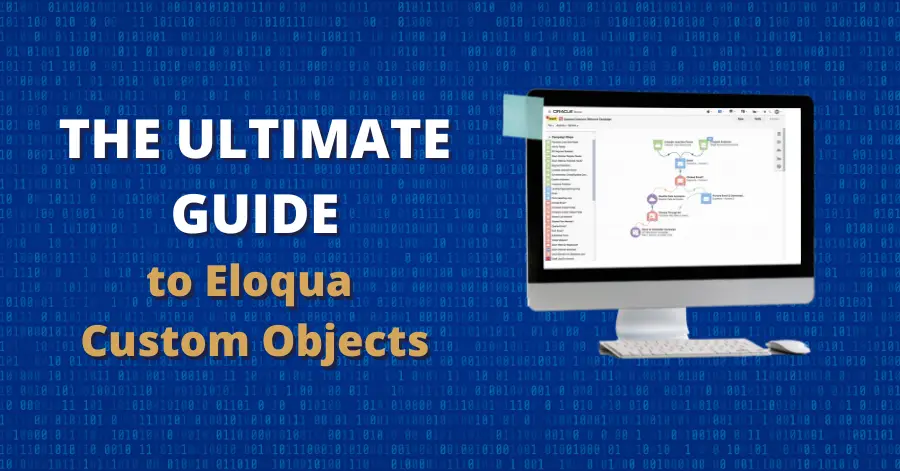
Oracle Eloqua offers numerous tools to help businesses leverage their customer data and execute personalized marketing campaigns. Among these tools, custom objects (often abbreviated COs) stand out as a particularly powerful feature. Eloqua custom objects allow you to store important data points to use in more precise segmentation and customer targeting.
In this guide, we’ll explore what custom objects are, why they are crucial, and how you can maximize their potential to drive your marketing efforts.
What are Oracle Eloqua Custom Objects?
Custom objects are data tables that allow you to store information outside the standard contact and account fields. While Eloqua provides a robust set of default fields for contacts and accounts, these fields might not cover all your business needs, especially as your organization grows. Custom objects step in to fill this gap. You can add or remove columns in custom objects as needed, making connecting a single customer ID with multiple departments or product purchases easy.
Custom objects can store various types of data, including purchase history, areas of interest, transactional information, and more. They enable marketers to link multiple records to a single contact or account, providing a more comprehensive view of customer interactions and preferences. This flexibility makes COs a valuable segmentation, personalization, and campaign management tool.
What Can Eloqua Custom Objects Do?
Eloqua custom objects offer a variety of practical uses, some of which aren’t obvious at first glance. Just a few examples include:
Tracking Products or Services of Interest
Custom objects allow you to track customer interests, such as products or services they have shown interest in. You can store information like the original lead source, the most recent product of interest, and other relevant data. This helps you understand your customers’ preferences and tailor your marketing efforts accordingly.
Managing Leads
Custom objects are particularly useful for managing leads, especially when you need to associate multiple leads with a single contact or route different types of leads to various sales teams. By using COs, you can maintain clear connections between leads and contacts without overwhelming your team with unnecessary data.
Leveraging Purchase History
Storing purchase history in custom objects allows you to capture a complete record of products or services purchased, along with a timeline of customer activity. This information can be linked to a contact or account record, providing valuable insights for upselling, cross-selling, and personalized marketing campaigns.
Handling Shared Email Addresses
In some cases, multiple contacts might share a single email address, which can create issues since Eloqua uses email addresses as unique identifiers. Custom objects can solve this problem by associating multiple contacts with the same email address while maintaining distinct records for each contact.
Creating Subscription Centers
Custom objects can be used to manage subscription preferences, allowing contacts to update their communication preferences, preferred language, and products of interest. This data can be connected to the appropriate contact record and displayed accurately on the user’s preference center page.
Deleting Eloqua Custom Objects
As powerful as custom objects are, managing them effectively is crucial to avoid performance issues and data clutter. Over time, your Eloqua instance may accumulate a large number of custom object records that are no longer needed. Regularly cleaning up this old CO data should be a regular part of your routine to keep Eloqua running smoothly and streamline data management. Tools like the Mass CO Deleter Cloud App will let you automatically delete outdated or unnecessary custom object records.
Why Use Eloqua Custom Objects over Contact & Account Fields?
When setting up your Eloqua instance, it might seem logical to store all customer data directly on contact or account records. However, this approach can lead to several challenges as your data needs expand. Custom objects offer several significant advantages, most notably:
Custom objects can hold significantly more data than contact and account fields. Eloqua’s default setup provides 62 contact fields and 18 account fields, with the option to create up to 250 custom fields each for contacts and accounts. Custom objects, on the other hand, can contain up to 1,024 fields each, with no limit on the number of custom objects you can create. The only restriction is the total number of records, capped at 25 million across all COs.
Custom objects let you easily associate a single contact or account with multiple data records. For example, a customer might purchase several products from your company, each with its own set of details. Storing this information directly in account fields can quickly exhaust the available custom fields. Custom objects allow you to link multiple records to a single contact or account, enabling you to efficiently manage and reference this data within your campaigns.
Custom objects can store both historical and dynamic data. Contact and account fields are ideal for storing relatively static information, such as contact details or business information. However, they are less suited for storing data that changes frequently or needs to be retained over time, such as campaign interactions or purchase history. Custom objects enable you to store this changing data, which can be invaluable for lead scoring, segmentation, and creating more targeted campaigns.
Custom objects easily scale as your data management needs grow. Custom objects offer a scalable solution that can adapt to your changing requirements. By setting up a custom object structure that aligns with your CRM’s data architecture, you can ensure that your data remains organized and accessible, even as your Eloqua instance becomes more complex.
Expanding Eloqua’s Functionality with Custom Objects
To fully leverage the power of custom objects, you might need to move data between different records or even between custom objects themselves. This is where cloud apps can be incredibly beneficial. These apps can help you manipulate data in ways that Eloqua’s out-of-the-box functionality does not easily allow.
Account CO to Contact CO Updater: Easily update all Contact COs associated with an account with data from the appropriate Account CO or static values.
CO Cloud Feeder: Eloqua currently only allows standard, out-of-the-box filters on the program canvas. However, the CO Cloud Feeder app adds this ability to the program canvas.
CO Count: Search for matching CO records and store count in the contact field using the campaign or program canvas.
CO Date Calculator: Add or subtract days, weeks, months, or years in a date field and store the results in a custom object (CO) field in a CO program.
CO Deleter with Archive: As the number of Eloqua custom objects (CO) increases, the more challenging it can be to maintain accuracy and peak performance. The CO Deleter with Archive allows you to delete large or small quantities of COs quickly and easily. (A version of this app for the campaign canvas can be found here.)
CO Form Submitter: Automate form submission on the program canvas for contacts or custom objects.
CO to CO Updater: Move data from one custom object to another on the program canvas smoothly.
CO to Contact Mapper: Map custom object records to contacts based on a designated contact field.
CO to Contact Updater: Update a contact record from a custom object on the campaign or program canvas.
CO to Contact Updater (CO based): Enhance your Eloqua program canvas functionality to modify contacts from linked CO records easily.
Contact CO Deleter: Remove mapped custom object records from a contact in a contact program or campaign canvas.
Contact to CO Updater: Create or modify a custom object from a contact on the campaign canvas or program canvas.
Embed CO Records in Email Table: The Embed CO Records in Email Table Cloud App enables you to embed multiple rows of data from Eloqua custom objects (COs) into an email using HTML.
Mass CO Deleter: The Mass CO Deleter Cloud App can be configured to remove all mapped CO records, all unmapped CO records, or both. You can also specify which custom objects to exclude from this process.
Unlinked CO Mapper: The Unlinked CO Mapper matches orphaned Eloqua custom objects records with matching contact records to create a complete customer profile for your marketing campaigns.
Update All Contacts COs: The Update All Contacts COs Cloud App makes it easy to keep custom object (CO) data consistent across all mapped records with just a few clicks.
Unlocking the Full Potential of Oracle Eloqua with Custom Objects
Custom objects are a versatile and powerful feature in Oracle Eloqua that can significantly enhance your marketing automation capabilities. Whether you’re tracking purchase history, managing leads, or simply organizing data more efficiently, custom objects provide the flexibility and scalability you need to grow your business.
Ready to unlock the full potential of Eloqua custom objects? Contact our team today for expert assistance.
Maintaining customer engagement is essential for your company’s long-term success. By consistently providing compelling, relevant, and timely information, you are more likely to elicit a response from your customers. However, your current offer, while interesting, may not address their current priorities.
When customers show signs of disengagement, offering them the option to control the type and frequency of content provides the best chance of retaining their interest in the long run. One possible option is adding a snooze feature to your email preference center, allowing customers to slow or pause communication instead of unsubscribing completely.
The Problem: Inactive Users
Our client was focused primarily on contact information gathered from live or one-time events. Their database contained tens of thousands of names. However, when those contacts stopped opening emails or clicking links, retaining all this inactive information became a problem. Time and money went into marketing emails that never got any engagement. By then, any form of engagement—even asking to pause communications—would turn an inactive contact into an active contact again. Our client was determined to do just that.
The Re-Engagement Campaign: A Fresh Approach
The initiative began with a clear objective: reach out to the tens of thousands of inactive users in the client’s database and determine if these users still wished to receive communications. More importantly, they wanted to give these contacts more options than continuing as is or opting out. So, they decided to add a snooze option to their email preference center.
Crafting the User Experience
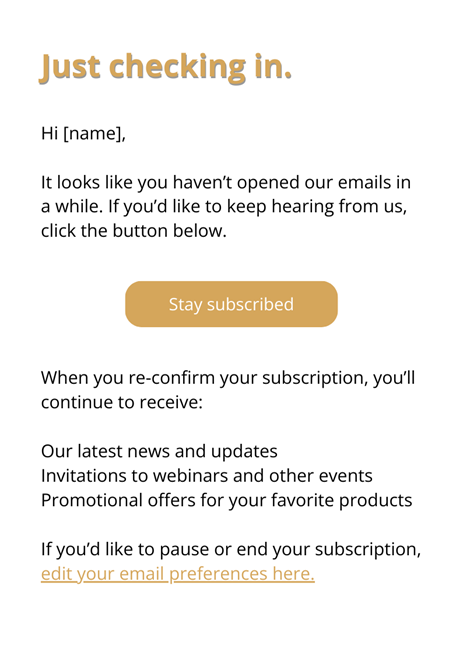
The process began with designing an email to the inactive contact. The copy clearly showed the reason for this email and that they wanted to serve the customer according to their wishes.
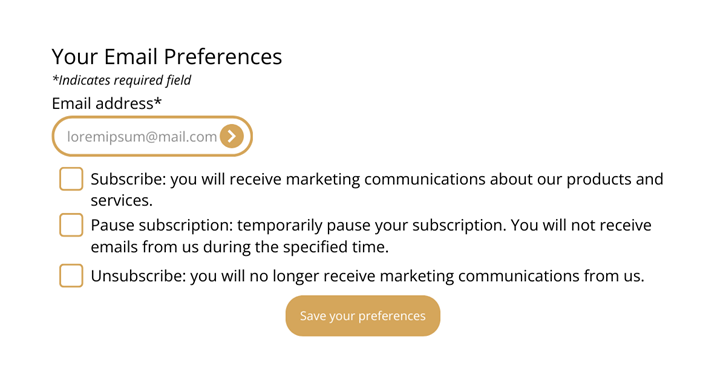
The email allowed customers to re-subscribe immediately or navigate to a redesigned email preferences page, where they could choose between three options.
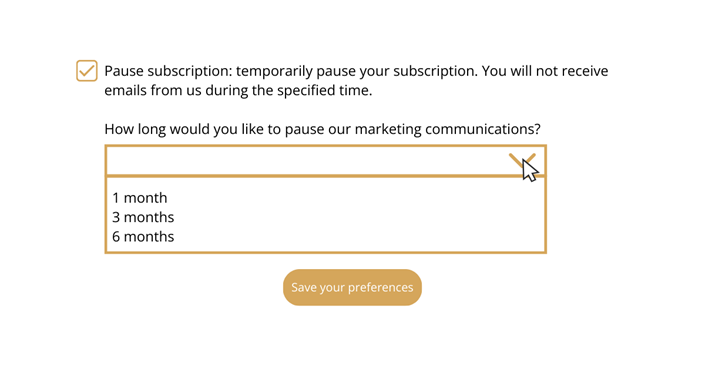
Upon receiving the email, users found their email address pre-populated in the form. They could simply click a button to save their preferences. If they chose to adjust their subscription, they had two main options: pause their subscription or unsubscribe.
Subscription Pause: Offering Flexibility
The pause option introduced a layer of flexibility that aimed to reduce permanent unsubscribes.
Users could pause their subscriptions for one, three, or six months. This feature was designed for those overwhelmed by emails or those taking a temporary break, such as a vacation. By providing this choice, they aimed to retain subscribers who might otherwise opt out permanently.
Our Client’s Results
Our client’s initial focus was re-engaging inactive users and managing event follow-ups. The snooze option allowed customers to select their own preferences. This strategy proved successful, as any interaction from previously inactive users was considered a win.
Adding a snooze option to your email preference is a simple option that added a valuable dimension to our client’s re-engagement campaign. By offering users the flexibility to pause their subscriptions rather than unsubscribe, they were able to retain a portion of the audience that might have otherwise been lost.
Do your inactive contacts need a break? Contact us today to implement a snooze option in your campaigns.
The Spam and Open Relay Blocking System (SORBS), one of the oldest domain name system-based blackhole lists (DNSBLs), closed shop on June 5, 2024, after more than two decades online. The blocklist was acquired by Proofpoint Inc., in 2011 but continued operations as a free, standalone service until it was retired.
SORBS’ sudden closure with no real explanation other than the statement, “Please note that this service has been decommissioned and will no longer contain reputation data,” has ignited more than a few conversations about the future of free and open-source software and what the future may hold for the currently decommissioned SORBS. On a more practical level for email marketers, it’s a good reminder to monitor and improve your email deliverability.
Widely regarded as a pioneer in the anti-spam industry, SORBS was praised by mail administrators for its ease of integration into mail server workflows as well as the ability to choose and reference blacklists at varying levels of strictness. It was SORBS’ transparent operating practices that won it the most praise.
Conversely, it faced criticism for being highly sensitive, overblocking IP ranges, and having issues accessing its databases. According to email anti-abuse expert Mickey Chandler, SORBS wasn’t particularly relevant in the email marketing industry and was mainly the domain of “hobbyist email administrators” in the years leading up to its closure.
Will it be reinstated? The community hopes that SORBS will be taken over by legitimate sources instead of spammers who have expressed interest in acquiring the blocklist for years.
What Does This Mean for Email Marketing?
The closure of SORBS shouldn’t have an impact on most marketers. However, those who relied on SORBS for spam filtering will need to explore alternative blocklists. Spamhaus, SpamCop, Barracuda, and the Composite Blocking List (CBL) are a few that are already in existence while newer players like Data443, with Cyren, have been quick to jump onto the bandwagon.
The closure of SORBS is characteristic of the shift from open-source software to enterprise technology that leverages AI to recognize abnormal behavior patterns.
How Should Marketers Ensure Email Deliverability?
The answer is simple. It is to continue implementing the best practices for, and optimizing email campaigns. Some of them include:
Monitoring your IP: Monitoring your IP reputation remains a crucial step to avoid blacklisting. It is vital that your sender score is checked, and emails comply with any applicable regulatory requirements and privacy laws.
Analyze spam scores: Conduct email preview tests to assess your spam scores and take corrective actions where necessary.
Implement authentication protocols: Configure your domain with your own SPF (Sender Policy Framework), DKIM (DomainKeys Identified Mail), and DMARC (Domain-based Message Authentication, Reporting, and Conformance to maintain control over your sender reputation. A fixed, static IP address can also help build reputation.
Consistent sending volumes are key: Spam filters monitor inconsistent behaviors, such as sudden spikes in email sending. Keeping your outgoing emails at consistent levels will help you avoid triggering these filters.
Maintain clean email lists: Old, outdated email addresses on your emailing lists can wreck your deliverability, resulting in higher bounce rates and raising red flags with spam filters.
High-quality content: What you send your subscribers matters. Creating high value content is a key factor in driving engagement and reaching your campaign goals.
Avoid Spam Filters by Maintaining Email Marketing Hygiene
Email marketing is an effective marketing strategy that offers robust ROIs. Integrated email marketing strategies can help maximize the impact of your email marketing campaign. Checking your sender reputation, analyzing your spam scores, effectively segmenting your subscriber list, adopting best practices, and addressing issues immediately are all ways you can keep your deliverability metrics on track.
Need some help? Contact our team today to get expert help optimizing your email campaigns to build trust and ensure they reach their intended users.
Businesses naturally want to generate leads. And if a customer is already on your website, an online form is one of the best ways to capture them as a lead. Directing the customer to the form is easy enough. But unfortunately, getting the form in front of your contact doesn’t guarantee that they’ll actually fill it out and submit it.
No “magic button” to guarantee form completion exists. However, Oracle Eloqua users have a powerful form design editor at their disposal to make the whole process easier to complete. Today, we’re looking at design principles and how to decrease form abandonment.
Lead Generation from Online Forms
Obviously, online forms exist to generate leads for your business. But a quality lead is more than just a name and email address. A college student working part-time is not a worthwhile lead for a jet engine manufacturer, for example. Gathering valuable leads means collecting enough information to make it obvious whether this lead is worth pursuing.
Here we run into a problem. Marketing experts will tell you, correctly, that gathering as much information as possible on a lead provides a much-needed boost to nurturing and customized marketing. But collecting that information can be a challenge. Forms that get too long and complicated, or that ask for data not readily available, can add friction and lead to the dreaded form abandonment.
What Causes Form Abandonment?
Simply having a form on your website is not a guarantee of lead generation. Customers may start filling out your form but stop halfway through and never finish. Marketing experts tend to agree that form abandonment usually results from one of these issues:
Long, complicated forms with too many questions
Forms that load slowly and force users to wait
Requests for information that is not readily available (i.e., information the customer may have to leave the computer to find)
Confusing layout or instructions
Questions with an unclear purpose (i.e., the customer doesn’t know how you will use their data and if they agree)
Hindered accessibility from poor form design
Lack of privacy controls
Fortunately, these problems are easily treatable with Eloqua’s form design system.
User-Friendly Online Form Design Strategies
Changing how you develop online forms can make a significant difference in your lead generation numbers. As you revamp your form templates in Eloqua, keep these principles in mind:
Optimize your form for the correct device. Poorly formatted forms can lead customers to decide this isn’t worth it.
Test your form ahead of time, repeatedly. Catch any glitches, errors, or loading problems long before a customer ever sees your form.
Short and sweet. The longer a form is, the more likely the potential lead will lose patience. Only request information that is strictly necessary.
Limit your form to a single column. This makes the form appear simpler, shorter, and cleaner. This also optimizes your form for mobile devices.
Give your form and fields clear titles. Customers want to know they’re on the right form, and what information you’re asking them to provide.
Avoid drop-down menus. Consider radio buttons instead, where all possible answers are visible at once so the customer can more easily decide.
Start with the easiest information to find. Keep “harder” but necessary questions, like information the customer will have to leave the computer to find, at the bottom. Since the form is mostly complete by now, this makes them more likely to return and finish.
Be upfront about your privacy approach. Clearly explain how the requested information will be used. Additionally, provide a link to your full privacy statement for details. This should feed into your marketing consent solution like 4Comply.
Provide an unmistakable CTA. The form won’t do you any good if it’s not submitted!
Thank the customer. Always say thank you when someone trusts you with their information.
Collect More Quality Leads with Well-Designed Forms
Eloqua users already know how extensive its capabilities truly are. But what if it could do even more? What if your team could use Eloqua for more effective marketing campaigns and long-term plans? That’s all possible when you pair Eloqua with another tool from Oracle: Oracle Unity CDP. Today, we’re looking at a few important advantages this pair-up offers.
1. Advanced Segmentation for Refined Targeting
One of the biggest challenges marketers face is fragmented customer data. This was the case for a leading financial institution struggling with siloed information. Combining the capabilities of both Oracle Unity CDP and Eloqua, they unified their customer data, allowing for advanced segmentation. This integration enabled them to create precise segments and apply AI-driven insights to determine the next best actions.
The results were impressive: a 24x faster performance in building segments and a 4x increase in generating next best actions, leading to more personalized and effective marketing campaigns.
2. 360-Degree Customer View
Understanding your customer’s journey across various touchpoints is crucial. To understand this further, let’s look at another real-world example. A major telecommunications company solved its fragmented data issue by integrating 23 data sources into Oracle Unity. This holistic view enabled them to run evergreen campaigns and deliver personalized experiences in real time.
Once again, the results speak for themselves. The company saw a 20% lift in performance for new opportunities and reduced segment creation time from weeks to the same day.
3. Improved Lead Scoring & Nurturing
For other companies, identifying high-value leads and nurturing them effectively is a challenge. One particular international company discovered this the hard way. By integrating their customer data into Oracle Unity and applying AI models, they significantly improved their lead scoring. This allowed them to deliver high-quality leads to Eloqua, where personalized campaigns could be executed.
The impact was substantial, with a 230% increase in lead submissions and a 5% increase in order uptake.
4. Consistent Omnichannel Experience
Customers deserve a seamless, headache-free experience across all channels. Oracle itself faced challenges in this area, spending excessive time on manual processes. By utilizing its own tool to centralize customer data and integrate it with various other tools, including Eloqua, Oracle automated 70% of its marketing transactions.
This resulted in faster campaign execution, a reduction in lead time from weeks to days, and a 33% increase in opportunity size.
Oracle Unity also allows users to take a proactive approach to opportunities. For example, a prestigious car brand aimed to enhance its upsell and cross-sell efforts, particularly in the context of new car services and warranty renewals. By integrating its customer data into Oracle Unity and applying predictive models, it could foresee customer needs and engage them proactively.
This led to a 29% increase in revenue and a 39% callback rate from customers, not to mention the amount of time saved by this approach.
Why Choose Oracle Unity CDP?
Oracle Unity stands out for several reasons:
Safety, security, and scalability: Built on Oracle Cloud Infrastructure, Oracle Unity CDP ensures your data is secure and scalable.
Comprehensive data integration: Oracle Unity connects both front and back-office data, offering a complete view of your customer.
Industry-specific data models: Ready-to-use models offer quick implementation and faster realization of benefits.
Native AI/ML capabilities: Built-in intelligence helps to predict customer needs and optimize engagement.
Flexible mastering of profiles: Oracle Unity can master various data points, such as products or business-specific needs.
Seamless journey orchestration: Oracle Unity enables the creation of personalized and real-time customer journeys across all touchpoints.
Conclusion
Oracle Unity CDP and Eloqua offer a powerful combination for marketers looking to enhance their strategies. By unifying customer data, applying advanced AI insights, and enabling seamless integration across channels, these tools help create personalized and effective marketing campaigns. Whether it’s improving lead scoring, delivering consistent omnichannel experiences, or reducing churn, Oracle Unity and Eloqua can elevate your marketing efforts to new heights.
An Eloqua marketing campaign checklist helps prevent underperforming marketing campaigns from frustrating the teams that developed them and the companies that see little to no return on their investment. Unfortunately, there is no “silver bullet” that makes a marketing campaign a massive success every time. However, there are a few steps you can take to give yourself a better chance. For Eloqua users, one of the most essential steps is to create a marketing campaign checklist to follow during development.
Using an Eloqua marketing campaign checklist is essential for ensuring that your campaigns are successful and yield positive results. This Eloqua marketing campaign checklist helps you track all important aspects of your campaign.
Setting the Stage
You have an event next week, and not nearly as many people have registered as you’d hoped. What do you do?
While you might be tempted to send out another email blast to drum up interest, this can backfire. Your prospects and customers may be annoyed to receive another marketing email and might complain or even unsubscribe. Unfortunately, by now, this marketing campaign is likely a lost cause.
Implementing an Eloqua marketing campaign checklist can greatly enhance your marketing strategy, ensuring every element is in place before launching.
A comprehensive Eloqua marketing campaign checklist ensures that no detail is overlooked, allowing for a smoother execution of your marketing efforts.
The best thing to do to avoid a repeat is to understand what went wrong and how to fix your mistakes in the future. Let’s look at this step by step.
Step 1: Clarify Your Initial Campaign Goal
What, exactly, do you want to accomplish with this campaign?
To answer this question, remember the SMART framework. Your goal with any marketing campaign should be:
Specific: “Get more people to attend the webinar” is a vague, unhelpful goal. “Increase webinar registrations by 25%” gives you something concrete to aim for.
Measurable: This ties back in with having a specific goal. With numbers in mind, you’ll know if you hit your target and how significantly you missed or exceeded the goal.
Attainable: As nice as it would be, very few marketing campaigns result in 100% conversion. Be realistic about what you can accomplish without setting the bar too low or too high.
Relevant: What are the current market conditions? If a recession is looming, conversion rates might be lower.
Time-based: Set a definite timeframe for your goal. This lets you analyze your results and move on to better campaigns sooner.
These all sound basic, but many marketers are tempted to skip these steps. If you’re unsure how to set ambitious but realistic goals, consider using results from past campaigns to guide your planning.
Step 2: Assess Your Campaign Resources
The resources available for your campaign significantly impact your ability to reach your goals. For our purposes, we’ll consider three kinds of resources: data, tools, and skills.
Data quality and quantity: Generally speaking, aim for a list of 400-1000 contacts as the minimum threshold to run a test. If you have a smaller contact list, consider moving to a highly personalized account-based marketing approach.
Tools: What marketing automation, email marketing, and related tools do you have available to run your campaign? If your available tools are limited, it may be more difficult to run a demanding campaign.
Your experience level: If you are about to run a campaign to drive attendance at an event and you’ve never done that before, you may need to adjust your expectations. Likewise, if you are proficient in marketing automation but have weaker copywriting skills, this skill mix will affect the kinds of campaigns you can run. Consider partnering with another person who has the marketing skills you lack. Or seek help from an outside agency.
Step 3: Identify Barriers to Campaign Success
With an Eloqua marketing campaign checklist, you can easily track your resources and identify areas for improvement based on past campaigns.
After identifying your available resources, it’s time to look more closely at potential barriers. Risks are inevitable, and identifying potential obstacles upfront can help you identify, understand, and manage them to achieve your goals. For example:
Alignment with sales: If you don’t take the time to align with the sales team, they may perceive your campaign as a waste of time. We take a look at how to avoid 6 Common Sales & Marketing Alignment Mistakes.
Market sophistication: If the market is already saturated, your campaign may struggle. However, if your copy and messaging help distinguish your solution from your competition, customers may be more interested in your offerings.
Step 4: Perform a Sanity Check
The next step is to evaluate your initial goal in light of the barriers and resources you have identified. Go back to the SMART framework for a bit. Does the campaign goal still make sense? Is it achievable? If not, adjust the scope or timeline accordingly. Don’t forget to check back with your stakeholders and get their input.
Using an Eloqua marketing campaign checklist helps in identifying barriers early, allowing teams to pivot their strategies accordingly.
The importance of aligning your sales strategy with your Eloqua marketing campaign checklist cannot be overstated, as it enhances overall effectiveness.
Step 5: Remove Duplicates and Errors from Your Marketing Data
Bad data hurts marketing results in two ways. First, low-quality data means fewer appropriate prospects will see your message. Second, you will find it difficult to measure your results accurately and determine ROI.
To improve your marketing data, use the following techniques:
Clean your data: For Eloqua users, we recommend using the Contact Washing Machine. It’s a free tool included with Eloqua that helps ensure data coming into your system is as clean as possible
Assess the age of your marketing data: The accuracy of business contact data gradually declines over time as people move to new roles. If you are targeting businesses, keep in mind that the average employee tenure is 4-5 years, according to the Bureau of Labor Statistics.
Manually review: Yes, we suggest you manually review your campaign data set. Pick a few dozen contacts from your list and review them manually.
You might also consider using the Friendly CSV tool to clean your email list. It can help you remove “LLC” and similar data from company names and make other simple changes.
Your Eloqua marketing campaign checklist should include a verification step to ensure all data is accurate and up-to-date.
Step 6: Evaluate Need to Enrich Your Data
Does your marketing data only contain a name and email address? Two data points per contact are not much to build a campaign. Here are some options to consider:
Use a third-party data provider for lead enrichment: For B2B leads, you might find better data using solutions like BuiltWith.com for technology insights.
Build your own data enrichment tools: Besides paid services, you can also build solutions using the data you already have. For example, if you collect job title on every form, create a program to evaluate and segment your data by job function and level using data lookups and lookup tables. You can also use Eloqua Cloud Apps from 4Thought Marketing to populate job level and job role.
Adjust your campaign goal to get more insights: Instead of a direct sales call to action, make a content offer to your prospects. For example, you might offer a webinar aimed at an executive audience (e.g., “What CFOs Need to Know About Presenting to The Board”). Based on who responds to the offer, you will have a higher degree of confidence about which of your contacts fits an executive profile. The registration data will also help enrich your contact data.
Step 7: Check Privacy & Compliance Requirements
Businesses must consider how to address privacy and compliance regulations. Depending on where you do business, you may be subject to GDPR or other privacy laws. Any campaign should ensure compliance with the relevant privacy and data regulations.
Depending on the data you’ve collected, it might be tricky to determine where each contact lives and what laws apply. Check the IP address they used to subscribe or engage with your content for a rough idea of their location.
Step 8: Verify Your Campaign Tracking
Without tracking, you cannot tell if your marketing campaign succeeded. Ideally, you will want to track multiple metrics to identify relevant changes. In an email marketing campaign, you could track open rates, clicks, and replies. In a direct response style campaign, you may focus on the number of orders.
To verify your campaign tracking is correctly configured, send out messages to an internal company email list. We recommend sending it to at least two different email accounts.
Step 9: Start with a Small Marketing Test
Some marketing campaigns – such as running an annual event – do not lend themselves to smaller tests. For online marketing campaigns, we recommend you use the 10% rule. If you plan to engage 1,000 prospects, first send a test campaign to 100 contacts. In this test campaign, verify all the technology works properly and gauge market response to a degree. You might even want to start with a smaller campaign experiment.
Step 10: SLO – Subject Line Optimization
In an email campaign, you should test at least two subject lines. You may find that one variation yields significantly improved open rates. Likewise, you should consider testing multiple variations for a webinar landing page. And don’t forget using subject line testing tools like SubjectLine.com.
Step 11: STO – Send Time Optimization
Obviously, people check their email at different times. And with the sheer number of emails most people receive now, your targeted messages can get buried under so many others that the recipient may never see them. But there’s a way around this. A certain add-on tool for Eloqua can determine when your customers are most likely to engage with your messages and schedule the emails to arrive at the best time possible.
Whether you program your STO tool yourself or purchase it from Eloqua, take advantage of this opportunity! Don’t let your messages get buried.
Always refer back to your Eloqua marketing campaign checklist during the campaign launch to monitor performance and track progress.
Step 12: Adjust Your Content
Good subject lines get email opens. Good email content gets clicks and purchases. If you find your contacts are opening your emails but not taking any further steps, your email content may need an update.
This is also important to consider if your marketing team uses AI for content creation. Obviously AI-generated content looks and feels unnatural, and will be a turn-off to customers. Anything AI-generated in your marketing campaigns should be subject to the same level of editing and scrutiny as anything else. Use an AI detection tool as well – if the tool picks up on AI influence, you still have work to do.
Step 13: Launch Your Campaign
After you’ve carefully considered the items above, you should be ready to launch your marketing campaign! After completion, refer back to the first few steps of the checklist. Ask yourself how you performed against your goals – what went smoothly and where did you encounter problems. The insights you gain from this analysis will help you to plan your next campaign more effectively.
Step 14: Keep Improving Your Checklist
A checklist shouldn’t remain static. After each campaign, examine what went well and how to improve future campaigns. Make a point of asking how to update your checklist to drive better results based on your most recent experience.
Conclusion
An Eloqua marketing campaign checklist helps improve performance. While your checklist will be unique, it likely shares some common elements, including goal setting, resource analysis, risk assessment, and sanity checks. Ensure that your Eloqua marketing campaign checklist is thorough and effective to achieve the best results.
Ready to take your marketing campaigns to the next level? Get in touch with our team today and start using an Eloqua marketing campaign checklist to its full potential.
By updating your Eloqua marketing campaign checklist with each campaign, you ensure continuous improvement and a better chance of success.
In conclusion, an Eloqua marketing campaign checklist is vital for ongoing success in your marketing efforts, helping you adapt and refine your approach.
Marketing is a critical part of any company’s operations—but customers today are increasingly receiving too much. Marketing emails lose effectiveness when a customer regards them as merely spam. The last thing any marketer wants is for their messages to be ignored or, worse, blocked. How can we, as marketers, retain our audience’s interest without overdoing it?
Part of the answer lies in giving customers control over what they receive and when. And for Eloqua users, one straightforward way to do both is the snooze program that pauses Eloqua campaigns. Watch as Queena Quý discusses this function and how to implement it here.
Should your marketing team continue nurturing while your sales team works on opportunities? Listen as 4Thought Marketing CEO Mark LeVell discusses the pros, cons, and options that empower sales to influence marketing nurture behavior.
If you’d like expert help with both nurturing and selling, get in touch with us today and take your marketing game to the next level.
In marketing automation, Oracle Eloqua is a leader for marketers aiming to streamline their workflows and elevate efficiency. Among its suite of tools, two features stand out for automating marketing tasks: Program Builder and Program Canvas. Both are designed to automate workflows and eliminate repetitive manual tasks, yet they cater to different needs and offer unique advantages.
Understanding Program Builder
Program Builder is a legacy automated workflow module crucial in managing and optimizing various marketing tasks. Whether for lead scoring, nurturing, data modification, or other marketing functions, Program Builder has been the go-to for marketers. It operates based on a set run mode that adjusts its processing capacity according to the size of your database. For instance:
For a small database size (classified as <50K contacts):
Priority mode: 25/cycle, 300/hr
Standard mode: 2500/cycle, 10,000/hr
Bulk mode: 10,000/cycle, 5000/hr
For a medium database size (classified as >50K and <1M contacts):
Priority mode: 100/cycle, 1200/hr
Standard mode: 12,500/cycle, 50,000/hr
Bulk mode: 50,000/cycle, 25,000/hr
For a large database size (classified as >1M contacts):
Priority mode: 250/cycle, 3,000/hr
Standard mode: 25,000/cycle, 100,000/hr
Bulk mode: 100,000/cycle, 50,000/hr
The Evolution to Program Canvas
While Program Builder has served many well, the advent of Program Canvas marks a significant leap forward in marketing automation within Oracle Eloqua. Program Canvas offers a modern, easy-to-use, drag-and-drop interface that transforms data in real-time, enhancing CRM integration, data cleansing, and security label management, among other functions. Its ability to integrate apps from the Oracle Marketing App Cloud further extends its capabilities, making it a powerful tool for automating complex marketing workflows.
Transitioning to Efficiency: Program Canvas vs. Program Builder
The transition from Program Builder to Program Canvas is not just a change of tools—it’s a strategic upgrade. For instance, a lead data standardization process that might take hours in Program Builder can be accomplished in minutes with Program Canvas, thanks to its rapid execution and the unique “Listener” step. This step continuously monitors database records based on specific criteria and updates them in real-time, a useful feature for tracking and updating lead scores instantly. Program Canvas also introduces advanced capabilities not available in Program Builder, such as using cloud apps and an advanced drag-and-drop UI.
The key differences between Program Canvas and Program Builder are:
Program Canvas
Program Builder
Processes records very fast
Standard mode: 15 minutes to process records between steps Priority mode: 5 minutes to process records
Uses a listener for field tracking; monitors database records based on specific criteria and updates them in real time; makes lead scoring very fast
Uses feeders from external programs or campaigns
Can’t use deduplication or match rules
Can use deduplication or match rule
Cannot send emails
Can send emails from each program step
Cannot create a program for companies
Can create a program for your company’s record type
Advanced but easy-to-use drag-and-drop UI
Uses the old UI from E9 to add steps and design rule
Can add a lead scoring model as a listener and update the score
Not available
Can create a contact security label program
Not available
Why Make the Switch?
The distinction between Program Canvas and Program Builder lies in their efficiency and capability to handle complex tasks swiftly. Program Canvas’s advanced UI, real-time data processing, and integration with cloud apps make it the superior choice for marketers looking to optimize their Eloqua automation processes.
However, transitioning to a new tool can be daunting, which is where we come in. Our expertise in leveraging Program Canvas to its fullest potential can help you seamlessly transition, ensuring your marketing automation system is maintained and significantly improved. From setting up sophisticated lead scoring models to automating CRM integration and beyond, our services are designed to help you unlock the full potential of Program Canvas.
We’ve also developed additional tools for Program Canvas to expand its functionality further. With default settings, Eloqua’s feeder options make it tricky to set up precise filtering criteria for particular records or last-minute edits. To fill these gaps, we created the Contact Cloud Feeder and CO Cloud Feeder cloud apps. Both apps can be configured to run every few minutes instead of only once daily. They also offer increased flexibility and more options for your filters, building upon Eloqua’s default options. With our cloud apps in your toolbox, Program Canvas will open to you even more.
Embracing the Future of Marketing Automation
The shift from Program Builder to Program Canvas is more than an upgrade; it’s a strategic move towards more efficient and effective marketing automation. With Program Canvas, marketers are equipped with a tool that speeds up processes and opens up new possibilities for data management and marketing strategies.
If you want to elevate your marketing automation and harness the full power of Oracle Eloqua, consider migrating to Program Canvas. Our team is here to assist you through every transition step, ensuring your marketing efforts are automated and optimized for the best possible outcomes. Embrace the future of marketing automation today with Program Canvas.
Any marketer knows that personalizing emails goes a long way toward conversion. Customers appreciate content tailored to their needs and interests. And for Eloqua users, there’s a straightforward way to approach email personalization: dynamic content. See what exactly dynamic content is and what it can do in this excerpt from our March 2024 Eloqua Office Hours session.