Eloqua campaigns

Oracle Eloqua is a potent marketing automation tool. By adopting a few simple strategies, you can streamline its use, making campaign and program building and future troubleshooting much easier. This ensures you fully leverage Eloqua’s capabilities while keeping your Eloqua campaigns straightforward and manageable.

Here are a few changes to make to simplify your future Eloqua campaigns and programs:

Number Every Step in the Flow

When you have a logical process that needs to follow steps 1 through N, why not make it so that anyone who will access the asset can easily follow the path? By numbering each step, you can directly specify a specific step when showing the campaign or program to someone else. Alternatively, you can check which was the exit step of a specific record you’re trying to troubleshoot. We recommend adding a number in an increment of tens or hundreds, so that the first step is either 10 or 100, and keep going from it to 20 or 200. That way, if you ever need to add a new step to the flow, you have room to add it and not break the numeration/sequence: you can add step 15 between 10 and 20 without it feeling out of place.

Include an Error Step

If you use apps in your Eloqua campaigns or programs, it’s a great idea to add, and route contacts to, an error step. Most Eloqua apps can be configured to do exactly that, as in this example:
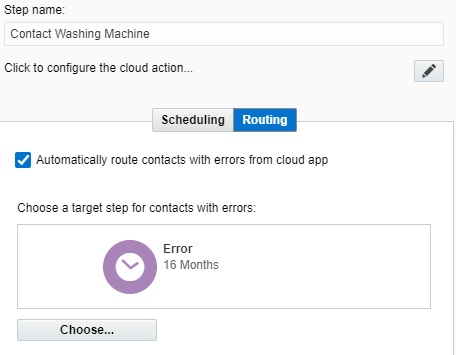
This will help you a lot when troubleshooting potential issues in your process. Better yet, this allows you to process failed records differently or keep them in the flow for a manual check.

Keep Your Formatting & Labeling Consistent

Something as simple as routing all “no” decisions to the left will help you make your flow easier to follow. As part of this, adding a meaningful name to the step (along with its numeric value as explained in point 1) will make the flow feel more natural. Some steps (like wait steps) might seem self-explanatory already, but they may be serving a different purpose. For instance, wait steps can be used as placeholders while you wait for a field to be populated, or can even be used as an error step (as in point 2). Adding the intended purpose to each step’s name prevents you from forgetting why you inserted a wait step at a particular spot.

We all want to tap into Oracle Eloqua’s full potential, because it can greatly improve your marketing campaigns and bring in more leads. But it’s easy to get tangled in its complexity. If you are not certain how to get the most out of Oracle Eloqua, that’s where 4Thought Marketing can help. Get in touch with our team of marketing automation experts today to learn how to make Eloqua work for you.


Eloqua campaigns

up-to-data data dictionary

Eloqua users know how important it is to maintain an up-to-date data dictionary. But as the marketing operations field becomes more complex, this maintenance demands a lot of time and attention. This raises a question: what is the best way to maintain an up-to-date data dictionary without letting it completely monopolize your time?

Here’s what eight marketing operations professionals have to say.

1. Leverage Collaborative, Cloud-Based Tools

In my journey as a Fractional Chief Marketing Officer, having worked extensively with start-ups and established companies to steer their digital transformation and brand strategy, keeping an up-to-date data dictionary has been pivotal.

One of the practices I’ve championed involves leveraging collaborative, cloud-based tools to maintain a live, accessible data dictionary. This practice ensures that any changes or additions to the data model are instantly available to all stakeholders, fostering a culture of transparency and continuous improvement. For example, while guiding a SaaS company through a rebranding process, we utilized a shared Google Sheet for our data dictionary, which allowed various teams, from product development to marketing, to have real-time access to the latest data definitions, maintaining alignment and efficiency across departments.

Additionally, fostering a culture of documentation within teams has been key. Encouraging every team member to contribute to and review the data dictionary regularly not only keeps the document comprehensive and current but also engenders a sense of ownership and accountability. In one instance, by implementing a weekly review session of our data dictionary as part of our project management cycle, we were able to catch discrepancies early and adjust our marketing strategies in a timely manner.

This iterative process ensured that our data practices remained robust, relevant, and closely aligned with our evolving business goals, significantly impacting our overall marketing effectiveness and strategic decision-making.

2. Schedule Regular Data Ecosystem Audits

Cole Greer, Vice President, Easyfish Marketing

In my leadership role at Easyfish Marketing, ensuring our data dictionary remains up-to-date has been a cornerstone of our ability to deliver precise and effective digital marketing strategies for our clients. From this experience, one impactful practice we’ve embraced is regular, scheduled audits of our data ecosystem. These audits involve cross-functional teams that compare the current operating environment against our data dictionary, identifying any emerging data points, shifts in consumer behavior, or technological advancements that necessitate updates. For instance, when we noticed a trend in increased mobile leads for a client in the home services industry, we quickly adjusted our data dictionary to include new metrics specific to mobile engagement and conversion rates, ensuring our strategies remained targeted and relevant.

Moreover, promoting a culture of continuous feedback among our teams has been instrumental in keeping our data dictionary agile. We encourage all team members, from data analysts to marketing strategists, to contribute insights and observations from their day-to-day operations that may signal the need for updates to our data dictionary. This democratized approach led to the identification of a new customer segment, previously grouped under a broad category, for one of our retail clients. By refining our data dictionary to include this new customer segment, along with tailored engagement metrics, we were able to create highly specialized marketing campaigns that significantly improved customer acquisition rates for that segment.

Through these practices, we’ve ensured that our data management processes stay dynamic, fostering an environment of continuous improvement and adaptation to the ever-evolving digital marketing landscape.

3. Implement a Data Schema Approval Process

Jugnu Nagar, SEO Specialist, GREAT Guest Posts

I play a hybrid role in the company and have control of most marketing and development activities that impact reporting. I implemented a process where any change to the data schema requires an approval process with pertinent information. I maintain a dedicated reporting database where I keep definitions updated. The approval process (SP approval workflow) serves as a backup.

4. Assign a Dedicated Data Dictionary Manager

Finn Wheatley, Executive Consultant of Data & Technology, Xtrium

One way to ensure your data dictionary stays up-to-date is to assign a dedicated team or person to manage it. Creating a straightforward process and schedule for updating the dictionary can also be beneficial. It’s important to involve stakeholders from various departments to ensure all relevant information is included. Utilizing technology tools can also streamline the process and reduce errors. It’s essential to regularly review and refine the data dictionary to ensure it remains an effective resource for your organization.

5. Utilize Social Media for Marketing Terms

Saneem Ahearn, VP of Marketing, Colorescience

I keep my verbiage up to date by using social media, as well as coworkers. Every once in a while, a marketing video pops up in my social media feed, and with that, new terms also come out. When this happens and I don’t understand the term, I look it up to find the meaning. As for coworkers, I do not shy away from asking them to explain if there is terminology that I have not heard before. We both know that I don’t know everything about marketing, especially since it is ever-changing. With that comes new terms and new learning opportunities!

6. Establish a Recurrent Review Routine

Having a data dictionary that is up-to-date requires garden-like tending; it must be cultivated on an ongoing basis for best results. In my career, I’ve come to realize that consistency and teamwork are paramount. Let me share how I deal with this assignment.

To begin with, I established a recurrent review routine. I mean, the same way you water your plants regularly, I check our data dictionary every quarter to see if there are any changes in terms of structure that we have made to our data or new points that we have introduced. This practice prevents the dictionary from becoming obsolete and enables it to remain a useful source of information for the team.

Collaboration is another cornerstone. I engage stakeholders drawn from different departments in the review process. In this way, I draw on the richness of knowledge and outlook, making certain the data dictionary is full-fledged and correct. It is like having a group of gardeners, each with their own specialization, to take care of the plants.

I also use change management principles. Every time a new data source is added, or when there is any major change, I immediately update the dictionary. This preemptive measure avoids backlog and guarantees that the dictionary is always current.

Last but not least, I have noticed that the availability of a data dictionary and its user-friendliness prompts the team to use it more actively, contributing in this way to its accuracy. The definitions and examples I provide are clear and straightforward, thus allowing anyone in the organization to comprehend easily how they can apply it.

By adhering to these guidelines, I can be sure that the data dictionary is a dynamic document—one which lives and breathes alongside our requirements. It is a core element of our data-driven strategy, allowing us to retain transparency, uniformity, and precision in regard to the decisions we make based on said information.

7. Participate in Educational Webinars

Lucas Ochoa, Founder & CEO, Automat

What I find effective in keeping my data dictionary updated is to participate in webinars and lunch-and-learn sessions. Many organizations offer free webinars discussing the latest developments in Data Science and AI. I really like these because signing up for a webinar commits me to setting aside time for learning and development. This is very useful for making sure I dedicate time to stay informed.

For instance, if you use cloud database systems like Google BigQuery or AWS RDS in your regular work, attending a webinar by Google or AWS could be beneficial. These webinars often focus on how to use these tools most effectively. I recently joined one—an excellent BigQuery webinar—that was about improving your SQL code to cut costs and reduce the time queries take.

8. Follow Data Science Channels on YouTube

precious abacan third party cookies phase out

Precious Abacan, Marketing Director, Softlist

I simply follow data science channels on YouTube. Two Minute Papers is one such channel that does exactly what its name suggests. It uploads two new videos each week, aiming to summarize the key points of a recent research paper, many of which are about AI. Their AI and Deep Learning playlist has a huge number of videos. Following this channel is an excellent way to stay updated on the latest AI research. I’m particularly fond of their ‘OpenAI Plays Hide and Seek’ video, but there are so many great ones, it’s tough to pick a favorite.

Two other channels I really enjoy are StatQuest with Josh Starmer and 3Blue1Brown. What I appreciate about these channels is how they make statistics and machine learning concepts easy to understand and visually engaging, even for those without a lot of background knowledge. While they’re well-known for their beginner courses, they also cover more advanced topics in machine learning.

If your team needs a little more help creating an up-to-date data dictionary and keeping it current, we can provide. Get in touch with us today to up your Eloqua game.


Eloqua Office Hours March 2024

March 21, 2024

Boost your Eloqua skills through real-world examples.  This month, we’re exploring how marketing can empower sales to influence the customer journey and leverage dynamic content to drive personalization.

We will discuss

  • Marketing-sales synergy: enabling sales-personalized nurture paths
  • Utilizing dynamic content to enhance personalization
  • List

    eloqua job titles

    Between user-provided data and data enrichment, Eloqua users generally have very little trouble populating Job Title fields. But related fields, such as Job Function or Job Level, present a bit of a challenge. Out-of-the-box values may not meet your company’s needs. And if you’re only able to choose one Job Function value per user, how do you know which is the correct one?

    Fortunately, there’s a relatively simple solution. Check out this excerpt from our January 2024 Eloqua Office Hours session for a quick demo.

    Ready to take your Eloqua game to the next level? Get in touch with our team today.


    eloqua email templates

    Templates offer a streamlined approach to producing emails and landing pages, saving valuable time while ensuring brand consistency across communications. By leveraging predefined layouts and designs, marketers can quickly create on-brand assets, focusing on content without worrying about formatting or design standards. This efficiency accelerates the production process and upholds a professional and cohesive brand image in every interaction, making templates essential for effective and efficient marketing campaigns.

    When creating landing pages and emails, Eloqua users can use the HTML or Design Editor to create and modify templates. This article will focus on how templates can be locked or unlocked, providing even more control over the look and feel.

    Eloqua Email Template Types

    Eloqua includes two primary types of templates: locked or unlocked. Unlocked templates give users total control over the finished email by giving them a complete look and feel. All users have to do is update the content. Meanwhile, locked templates offer a more controlled environment that restricts access to the backstage code, preventing changes that may impact how pages and emails are rendered within browsers or email clients.

    Both template types have pros and cons, so your choice will depend on your requirements and team skills.

    Locked Eloqua Email Template

    When using locked email templates, the administrator or template designer selects in advance the parts of the email that will be editable or removable by the user. Then, when the template is used, the asset creator gets a simplified experience. There are three ways to designate template sections editable:

    • Right-click sections of the template in the preview window to designate them as editable.
    • Add two properties to the code in the HTML pane. You can specify which components can be removed or edited by adding the attributes elq-edit=”true” and elq-delete=”true.” Only the HTML source editor offers this option.
    • Move to protected content in settings. From here, you can decide whether users can alter the layout, default style, or email design.
    Eloqua email templates

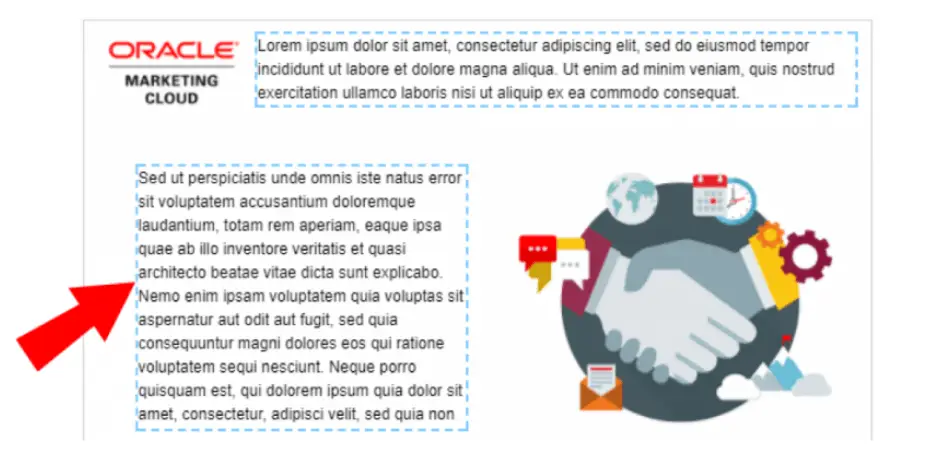
    Highlighted sections with dotted lines can be edited when users create a new Oracle Eloqua Email asset.

    Advantages of Using a Locked Eloqua Email Template

    Locked Eloqua email templates offer several potentially helpful advantages, including:

    • Locked templates let you expressly designate which parts of the cannot be changed. Administrators and designers can then ensure that certain elements, including layouts, logos, or legal disclaimers, cannot be edited.
    • Organizations can ensure that only authorized individuals alter the templates to render correctly on all clients by restricting access to the CSS.
    • Locked templates offer a simple user interface. Users can only point and click on editable areas, immediately informing them of what can be modified and how.
    • Eloqua users cannot access the HTML and CSS backstages of the email designer in a Locked template. Not only does this allow users to make edits without needing to understand coding, but it also prevents accidental edits to the code.

    Potential Difficulties With a Locked Eloqua Email Template

    Of course, a locked email template may not be the best choice for every campaign. A few potential challenges to consider include:

    • The more complex or intricate the email design becomes, the harder the template will be to edit.
    • Because locked templates don’t allow as much editing flexibility, administrators must anticipate as many use cases as possible and create templates for each one.
    • Users can only access more sophisticated features, such as dynamic content or signatures, if those features are already included in the template. Even then, users cannot swap the component out for another of its kind.
    • To develop locked templates, many users choose to use the source editor. Using tags that Eloqua does not officially support can lead to issues, such as using Eloqua Engage secure templates.
    • There is no way to quickly fix an email asset because there is no access to the underlying code. The only solution is troubleshooting the template and then completely rebuilding the asset.
    • You’ll probably need to make frequent modifications over time because ISPs alter how email clients display messages, which is annoying if you need to send an email out immediately.

    Unlocked Email Templates

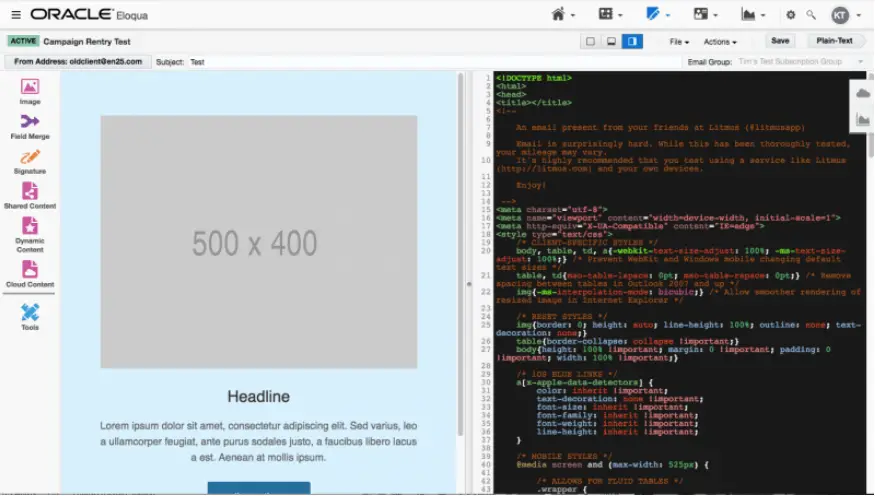
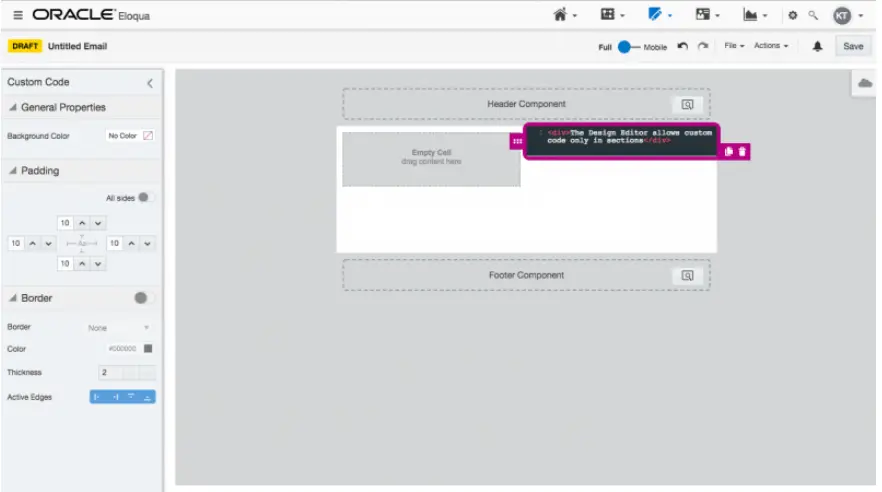
    Only the Source Editor, which offers complete access to the underlying code, offers truly unlocked templates. Despite allowing users to apply custom code to editable parts, the new Design Editor does not let you view or modify the overall code.

    eloqua email templates
    eloqua email templates

    Advantages of Using an Unlocked Eloqua Email Template

    More advanced Eloqua users will find many advantages to using an unlocked Eloqua email template. For example:

    • Users with the necessary skills have total control over the email asset since they have access to the underlying code. As a result, the user can design more intricate layouts than those that could be achieved when utilizing locked templates or the Design Editor. The responding behavior of the asset is likewise subject to more user control.
    • All email technologies offered by Eloqua, including dynamic content, shared content, signature layouts, and others, are entirely accessible to users.
    • Unlocked templates can be deployed more quickly and efficiently than Locked templates since they are less complex.
    • When a developer has access to all the underlying code, any flaws can be rapidly identified and fixed.

    Potential Difficulties with an Unlocked Eloqua Email Template

    Of course, an unlocked email template isn’t for everyone. A few potential hurdles to keep in mind include:

    • Eloqua administrators need to put more business practices in place because users now have total authority over the email, ensuring that outgoing emails adhere to brand standards.
    • It can be intimidating initially because the user interface incorporates all of the Oracle Eloqua email components. Because it is less straightforward, new users must learn what each function accomplishes.
    • Even minor HTML or CSS code modifications can significantly change the final email’s layout. Coding for Outlook and Gmail can be particularly challenging. Some people may make tiny modifications without comprehending the potential consequences because the underlying code is accessible.

    Choosing the Right Email Template

    Your choice of using locked or unlocked Eloqua email template will depend on several factors: the nature of your campaigns, the amount of required customization, the skill levels of your Eloqua users, and the amount of time you have. Consider your needs at the start of each marketing campaign. Choosing the right templates will make your final campaign smoother.

    Want some extra help getting your email design program off the ground? Contact us today to schedule expert Eloqua training.


    Eloqua Office Hours January 2024

    January 25, 2024

    Boost your Eloqua skills through real-world examples. This month we’re tackling challenges in segmentation and data management. Join us to learn about mapping data to multi-select picklists and improving data quality during Eloqua list uploads.

    We discuss:

    • Improving segmentation by mapping multiple values from a Title field to a multi-select picklist
    • Optimizing Eloqua list uploads while applying standards and improving data quality

    Download the Presentation


    data steward

    Adobe Marketo, Oracle Eloqua, and other marketing users are accustomed to handling and manipulating large amounts of vital data. But in the day-to-day process of working in a marketing automation system, CDP, or CRM, it can be easy to forget that this data and integrations need regular check-ups. Rather than distributing this responsibility to several marketing team members, appointing a single expert to perform this task may be better. This, simply put, is the role of a data steward.

    What Does a Data Steward Do?

    A data steward plays an important role in data management and governance, as they help the organization leverage its data assets and processes to full capacity and avoid risks and costs associated with poor data quality and broken processes. They ensure the quality and fitness of your marketing data, such as contacts, accounts, and campaigns. They may also be responsible for ensuring the security and privacy of the data that an organization collects, uses, and shares. Their job duties include:

    • Defining and documenting data elements, standards, policies, and rules
    • Identifying and resolving data quality issues and conflicts
    • Monitoring and enforcing data governance practices and compliance
    • Educating and collaborating with data users and stakeholders
    • Advocating for and promoting data-driven decision-making and innovation

    Data stewards also handle time-consuming but critical parts of data management, including but not limited to:

    • Data cleansing: removing or correcting inaccurate, incomplete, or duplicate data
    • Data normalization: standardizing the format or naming of data fields
    • Data enrichment: adding or updating relevant data attributes
    • Data integration: connecting and synchronizing data from different sources
    • Data analysis: measuring and reporting on data performance and insights
    data steward

    Improving Your Campaigns with a Data Steward

    Given how important data is to every step of your marketing campaigns, it’s hard to overstate how important of a role the data steward plays. Ensuring your data is in expert hands will dramatically improve how that data is processed and used . The data steward’s contributions will help alleviate many of your marketing concerns, most notably:

    • Deliverability: ensuring your emails reach the intended recipients
    • Segmentation: reaching the correct, personalized audiences
    • Reporting: generating accurate and meaningful metrics and dashboards
    • Compliance: adhering to data privacy and security regulations
    • Satisfaction: meeting or exceeding customer expectations and needs

    Is Your Marketing Data in Good Hands?

    As a marketing professional, you understand the importance of accurate, easily accessible data. But you also know that you don’t have the time to manage your marketing campaigns and handle the massive amount of information that needs to be secured, quality-checked, or funneled to the appropriate places. An Eloqua data steward can handle all of that. All you have to do is find an expert—and we can help with that. Contact us today to learn more.


    custom objects

    Custom objects are a simple yet powerful part of Eloqua that can enhance the ways that you’re able to connect with your customers. While they may seem daunting if you have never worked with them, custom objects (often abbreviated as COs) can become your best friend as your marketing automation needs increase.

    Why Use COs Instead of Contact or Account Fields?

    When getting started with Eloqua, it can be tempting to want to store all customer data on the contact and account records. But this can cause problems as your business needs change over time. As your company grows, you’ll need to store more customer data and be able to reference it quickly. Today, we’re looking at four advantages that COs offer over contact or account fields.

    1. Eloqua Custom Objects Can Hold a LOT of Data

    Out of the box, Eloqua provides 62 contact fields and 18 account fields, and you can create up to 250 custom fields each for contact and account. This sounds like a lot, and it is. But you’d be surprised how quickly the custom fields fill up as you begin adding the data points that your company needs.

    COs, on the other hand, can have up to 1,024 fields each. There is also no limit on how many COs you can create in your Eloqua instance. The only limitation is on the number of records across all your COs, which Oracle caps at 25 million.

    2. COs Can Accommodate Data That Has a Many-to-One Relationship

    You will often need to capture multiple records for a single entity, such as when a single customer purchases multiple products from your company. Using account fields to capture this information could work. However, if each product has a large number of data points associated with it that also need to be referenced in Eloqua, that quickly eats into the 250-field limit.

    COs provide an elegant alternative because they can hold multiple custom object records linked to a single account or contact. You can use filter criteria to select the correct CO record for a particular campaign. Custom apps or add-ons, such as our Many-to-One Email app, can also help augment the capabilities of a many-to-one CO relationship.

    custom objects

    3. Custom Objects Can Store Historical Data

    Contact and account fields are ideal for storing relatively permanent data such as contact or business information. However, they are less well-suited to storing information that changes frequently. For example, when tracking campaign attribution, you can easily set up your system to overwrite the Last SFDC Campaign ID field, but what if you want to be able to see more than just the last touch campaign interaction?

    COs enable you to store historical data, which is extremely useful for things like campaign interactions, event information, or form submission data. You can then draw on the historical data for lead scoring, segmentation, and more when you go to build a new campaign.

    4. They Can Scale With Your Business Needs

    As Eloqua instances grow, they increase in complexity. Having a data architecture plan in place ahead of time can save you numerous headaches down the road. COs are a great tool to keep your data organized. You can even set up a CO structure that mimics the data table structure of your CRM so that integrations are tightly aligned.

    The Value of Eloqua Custom Objects

    The beauty of COs is in their capacity and their flexibility. While it can be tempting to want to store all data on the contact and account records, especially if you are less familiar with custom objects, COs are often the better option. Incorporating COs into your Eloqua data structure now can save you lots of headaches down the road as your Eloqua instance continues to grow.

    But for those less familiar with custom objects and everything they can do, we’ve got you covered. Our team is ready to provide the training and support you need to get the most out of your Eloqua data. Contact us today to learn more.


    eloqua integration

    Eloqua offers businesses powerful tools to streamline their marketing efforts, generate leads, and nurture customer relationships. To maximize its effectiveness, Eloqua is often integrated with customer relationship management (CRM) systems such as Salesforce, Microsoft Dynamics, or Oracle Sales Cloud.

    But what advantages does Eloqua integration offer? Integrating your Eloqua instance with CRM systems can help align marketing and sales teams, improve data accuracy, and enhance customer engagement, among many others. This article will explore the benefits of integrating Eloqua with CRM.

    1. Improved Data Accuracy & Consistency

    Eloqua CRM integration ensures that marketing and sales teams access the same customer data. This eliminates data silos and discrepancies, reducing the chances of duplicate records and errors. This also allows teams to make informed decisions based on accurate and up-to-date information.

    2. Lead Management and Nurturing

    Eloqua excels in lead generation and nurturing. When integrated with CRM, leads captured by Eloqua can be seamlessly transferred to the CRM system. This enables sales teams to prioritize and engage with leads effectively. Additionally, Eloqua can automate lead nurturing campaigns based on CRM data, ensuring that leads receive timely and relevant content.

    3. Enhanced Lead Scoring

    CRM integration allows for more robust lead-scoring models. Eloqua can leverage CRM data such as lead demographics, engagement history, and purchase behavior to assign scores to leads. This helps sales teams focus on high-quality leads, increasing conversion rates and revenue.

    4. Closed-Loop Reporting

    Integration enables closed-loop reporting, which tracks the entire customer journey from initial touchpoints to conversion. Marketing teams can measure the impact of their campaigns on revenue, while sales teams can understand which leads originated from specific marketing efforts. This visibility helps refine marketing strategies and allocate resources effectively.

    5. Personalized Customer Experiences

    Eloqua can utilize CRM data to create highly personalized marketing campaigns. Marketers can deliver tailored content and offers by understanding customer preferences, behaviors, and purchase history, increasing engagement and conversion rates.

    eloqua integration

    6. Streamlined Workflows

    Integration automates various marketing and sales processes. For example, when a lead reaches a certain score in Eloqua, it can trigger a notification in the CRM system for a sales representative to follow up. This automation saves time, reduces manual tasks, and ensures timely lead responses.

    7. Lead Attribution

    Eloqua integration with a CRM provides insights into which marketing channels and campaigns are driving the most valuable leads and conversions. This attribution data helps allocate marketing budgets effectively and optimize strategies.

    Integrating Eloqua with CRM Systems

    Any business seeking to align sales and marketing efforts should start with CRM integration. It facilitates seamless data flow and ensures both teams work with real-time, accurate data. This alignment is crucial for effectively nurturing leads through the funnel and tracking and analyzing customer interactions at every touchpoint. Additionally, the integration can provide valuable insights to inform and refine marketing strategies, making your lead-generation efforts more effective.

    Are you ready to start your initial Eloqua integration or optimize your existing integration but aren’t sure how? Contact our team of experts today and start getting the most value out of your Oracle Eloqua investment.


    Eloqua Webhook App – Eloqua Office Hours

    Recorded September 28, 2023, 11:00 – 11:30 AM Pacific

    This month, Nathan Nemirovski, Principal PM, Eloqua CRM integrations, joins us to preview the new Eloqua Webhook App.

    In this session, we discuss:

    • Eloqua Webhook app use cases
    • Pushing contact data to 3rd parties from campaigns or programs
    • Configuring and testing webhooks
    • Signing up for controlled availability

    eloqua custom objects

    Eloqua custom objects (abbreviated as CO) provide a simple and flexible way to store additional data, such as purchase history or areas of interest, for segmentation and personalization. To maximize how the data can be used, Eloqua users may want to copy or move data between a contact or account record and a linked CO record, or between CO records. That’s where 4Thought Marketing Cloud Apps come into play. We’ve built a variety of apps that expand Eloqua’s functionality and give your team tools to enhance your data manipulation options, streamline integration, and supercharge your marketing campaigns. Let’s look at a couple of examples of how our apps can help. 

    Storing Current Status in an Eloqua Custom Object

    Often an outside system, like a purchasing or CRM system, sends transactional data to Eloqua—for instance, a record of a product renewal transaction. Eloqua will store this information for future use in nurturing, segmentation, or reporting campaigns. However, you might also like to see and filter on the most recent status of a product renewal. In this case, transactional data will be difficult to use, since there will be multiple transactions for the same product—and you only need the most recent status.

    In this case, you might want to build two CO tables, one for the ongoing transactions and one for the current status. Incoming data would feed the transaction table. But how do you populate the current status table?

    4Thought Marketing has built an app for that purpose—the CO-to-CO Updater. In this example, you would be able to take data from the transaction record and populate data in the second CO table to record only the current status. If you use COs frequently, the CO-to-CO Updater app has a long list of potential uses.

    Handling Multiple Products of Interest

    In a related process, let’s say that you have an integration process that feeds your contact record with current product interest. This particular contact has shown interest in several of your different product lines. Since your integration is feeding your Eloqua Contact record, how would you create a series of CO records that show the breadth of interest from this individual?

    The 4Thought Marketing cloud app Contact to CO Updater is just the solution to this problem. By using this app, you would be able to create CO records linked to the contacts, one for each product of interest. In this way, you can segment this contact based on multiple product interests or lack thereof. For example, you could build an upsell campaign for everyone showing interest in Product X, but not in Product Z. Or you could build a campaign for everyone showing interest in both Product A and Product B. The applications are endless.

    eloqua custom objects

    Sending Recent Products of Interest to your CRM

    Finally, let’s say that you have an integration that feeds your CRM system from Eloqua with the most recent product interest. You also have a custom object that stores multiple product interests accumulated over time. If you want to send the most recent data, you would either need to build a new integration for the most recent CO record, or you could just move the data from the CO record into the contact record, and continue with your integration. This can easily be accomplished with our CO to Contact Updater app.

    Expanding Eloqua’s Capabilities with Cloud Apps

    We have run across dozens of real business use cases that require data manipulation that is not easily accomplished with Eloqua’s out-of-the-box functionality. But we believe in getting the most value out of Eloqua. Our cloud apps are designed to build on Eloqua’s existing capabilities to make your job easier and more streamlined than ever.

    Our clients have used Eloqua Cloud Apps and custom objects to demonstrably improve their revenue and customer engagement. For instance:

    In addition to the cloud apps discussed above, 4Thought Marketing offers apps like the CO Form Submitter, the CO Deleter, and more to take your custom object development to a new level. And if our existing suite of apps doesn’t quite meet your needs, don’t worry—we can build a custom cloud app for your Eloqua instance.

    Contact us for more information and a price list of all our apps.


    eloqua training

    Is your marketing team eager to onboard self-service Eloqua users? Great news! Onboarding a new Eloqua user is a valuable investment that pays off by empowering your team. You can efficiently and effectively bring each new team member up to speed with excellent training options, even in a fast-paced environment. Streamline your process without sacrificing quality with these top-notch Oracle Eloqua training options.

    Solution 1: Oracle University—Virtual or In-Person Live Training

    Oracle itself provides extensive training options through its Oracle University program. Oracle University offers in-person and virtual private events, creating a safe and collaborative environment for your team to learn, question, and explore.

    Better yet, when you contact Oracle to schedule a training event for your team, you get to help develop the lesson plan. Your private event will focus on your organization’s specific pain points and practices. This also helps provide your team with a sense of familiarity and alignment, ensuring that everyone is on the same page.

    Customized training offered by Oracle University provides a targeted and efficient approach to address your organization’s particular needs and information gaps. By participating in private events, your team can learn, question, and explore in a safe and collaborative environment.

    Solution 2: Oracle University—Free & Paid Options

    For professionals looking for a ready-made training program, Oracle University provides additional options for Eloqua training, including:

    • The Learning Explorer Program: This free Oracle Eloqua training system offers entry-level online courses.
    • Oracle Cloud Learning Subscriptions: Eloqua’s cloud is always updating and changing. These paid courses allow your team to keep up with every update and fill in information gaps.
    • Oracle Training & Certification: These specialized courses focus on specific job roles or Eloqua functions, giving your team members the chance to develop their particular skills and earn certifications. This option also offers the chance to speak with Oracle product experts for valuable insights and interactive learning.
    eloqua training

    Solution 3: Developing Your Own Eloqua Training Program

    If you have access to a learning management system that aligns with your business requirements, you can also consider designing your own Eloqua training program. This may be a good option for a large company with the time and resources to devote to a fully customized, in-house training system.

    If you’re interested in implementing this kind of training program or seeking assistance from an agency, here are some tips to guide you through the process:

    • Determine access levels: Clearly define the level of access you want to grant to self-serve users and identify the specific assets they should be able to interact with. Decide where to draw the line between user control and restricted areas.
    • Develop training content: Creating the training materials, especially the videos, will require a significant investment of resources. However, by dedicating time to develop comprehensive training videos tailored to your company’s specific needs, you can save valuable hours in the long run.
    • Build quizzes: While making training materials available is important, incorporating quizzes adds an extra layer of assurance that trainees are comprehending the content. Quizzes encourage active learning and help ensure trainees are not simply going through the motions. They provide a structured learning experience, reinforcing knowledge from previous videos and validating the trainee’s understanding.
    • Tailor the training sequence: Based on the areas of Eloqua you want users to learn, determine the number and sequence of training materials. Start with basic concepts and gradually progress to more complex topics.
    • Provide incentives to finish training: Restricting access to the Eloqua system until the training program is completed serves as motivation for trainees to engage with the materials. It reinforces the importance of training and ensures that individuals who gain access to the powerful system are equipped to use it effectively.
    • Build campaign materials: Set up the campaign materials within Eloqua, including emails, landing pages, and quizzes. Custom JavaScript coding is often required for landing page validation and form data collection.
    • Consider incorporating existing training materials: Regarding the use of existing Eloqua training videos, it is certainly an option worth considering. If you lack the time or resources to create custom videos, incorporating the general Eloqua training videos can supplement your training course. However, custom videos offer the advantage of covering client-specific information, such as naming conventions and folder structures, that may not be addressed in the general training videos.
    • Thorough testing: Prioritize extensive testing of the training program with both experienced individuals who understand the desired flow and newcomers who provide fresh perspectives. Gather feedback to identify any areas that require improvement or clarification.
    • Continuous improvement: Once the training program is live and users start utilizing it, gather feedback from trainees to enhance the training further. Identify weak points and refine the program based on user input, aiming to make it as useful as possible for self-serve users.

    Remember that these tips can be tailored to your organization’s specific requirements and preferences. The key is to ensure that your self-serve users receive effective training to empower them without causing any additional issues.

    eloqua training

    Solution 4: Customized Eloqua Training with 4Thought Marketing

    At 4Thought Marketing, we have created custom training solutions for many clients that focus on emphasizing the client’s particular branding and pain points. Our approach involves implementing a self-paced and structured training format that ensures users actively engage with the training materials. We take the time to help trainees retain what they’ve learned, rather than simply rushing through a set of tests to get Eloqua access before they’re ready.

    Here are the key components of our custom-built training program:

    • Emails: Similar to a customer communication campaign in Eloqua, the program utilizes a series of triggered emails based on specific criteria. These emails guide users through a sequence of training materials, structured in a logical order that facilitates building upon previous modules.
    • Custom training videos: To effectively convey concepts, we develop tailored training videos specifically designed for each client. These videos cover both the general usage of Eloqua and client-specific standards and practices, including naming conventions and asset utilization within Eloqua.
    • Quizzes: To ensure effective learning and knowledge retention, the training program includes quizzes. These quizzes serve as checkpoints to confirm that participants have absorbed and understood the training content before progressing to the next stage of the program.

    At 4Thought Marketing, we believe that getting the most value out of your Oracle Eloqua instance is a critical step to long-term business success. We’d love to help you get started training your team to use this software better than ever. Contact us today to plan your training event.


    4Thought Marketing Logo   March 30, 2026 | Page 1 of 1 | https://4thoughtmarketing.com/eloqua/page/3/