Eloqua Campaign Responses, Campaign Response Rules, CRM Integration, Marketing Automation, Lead Tracking, Customer Engagement, CRM Member Status, Eloqua Bulk API

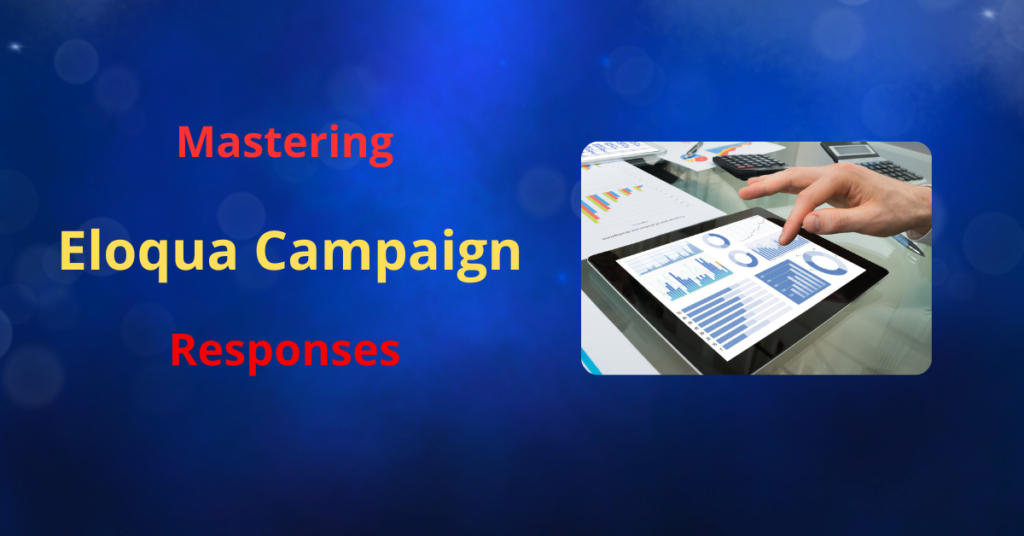
Imagine having a direct line of sight into your customer’s journey, knowing which actions trigger their interest and drive them closer to a purchase. That’s the power of Eloqua campaign responses rules. It’s not just about tracking clicks and opens; it’s about building a narrative of engagement that translates customer interactions into actionable CRM data. Think of it as turning the scattered puzzle pieces of campaign activity into a clear, compelling picture of your customer’s intent, empowering your sales and marketing teams to connect on a deeper, more effective level.

Understanding Campaign Response Fundamentals

Before diving into the mechanics, it’s crucial to grasp the fundamental building blocks of Eloqua Campaign Responses. These components are designed to work harmoniously, creating a continuous flow of information that connects your marketing efforts directly to your CRM. First, we have Campaign Activities, also known as Response Activities. These are the specific actions your contacts take when interacting with your campaigns.

Think of them as the footprints they leave behind. These activities fall into two main categories: Internal Activities, which are actions that occur directly within Eloqua, such as opening emails, clicking links, or submitting forms; and External Activities, which are actions taken outside of Eloqua, like registering for or attending a webinar, but can still be tracked and integrated into your campaign data.

These activities are the raw data that Eloqua transforms into actionable insights.

Campaign Response Rules

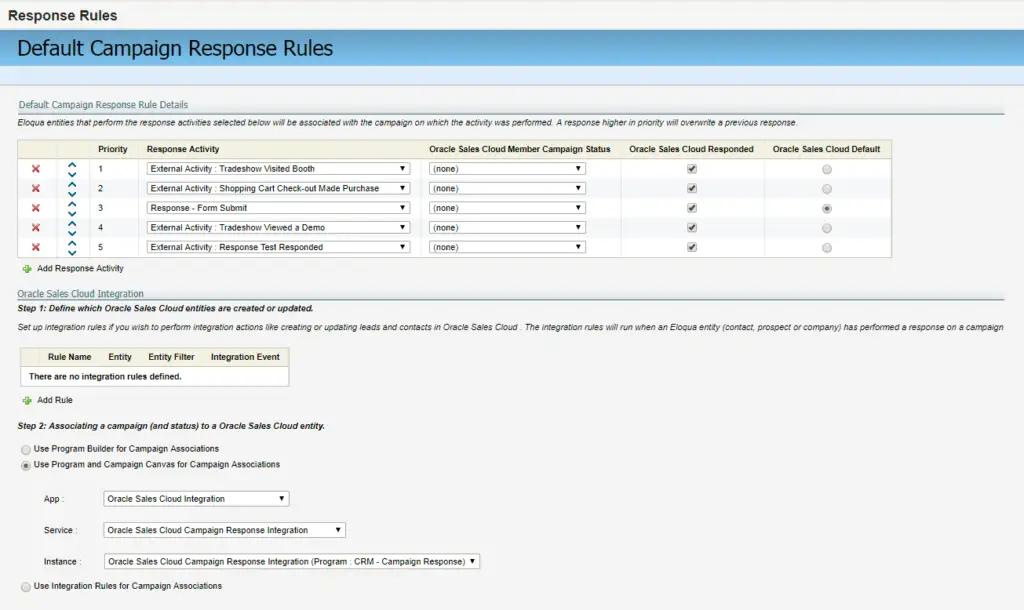
These are the defined parameters that dictate which activities are considered significant responses. They are prioritized to ensure that the most relevant interaction is recorded.

This prioritization is very important because if a customer attends a webinar and clicks an email, depending on your prioritization, the webinar attendance could be designated as more important to record than the email click.
Eloqua Campaign Responses, Campaign Response Rules, CRM Integration, Marketing Automation, Lead Tracking, Customer Engagement, CRM Member Status, Eloqua Bulk API

Campaign Responses (Campaign Member Status)

This represents the final, highest-priority activity transmitted to the CRM, providing a concise overview of the contact’s engagement. Examples of campaign responses are “registered,” “attended,” and “responded.”

The Mechanics of Campaign Responses in Eloqua

The Eloqua email campaign serves as the cornerstone of this process. The CRM campaign ID acts as a linkage point, ensuring accurate tracking and recording of campaign activity within the CRM system.

  • Campaign Setup: When setting up a campaign within Eloqua, it’s crucial to include all relevant assets, such as email assets and associated forms, on the campaign canvas. Linking the Eloqua campaign to the corresponding CRM campaign ID ensures data integrity.
  • Activity Tracking: Once the campaign is activated, Eloqua diligently tracks response activities, including email clicks and form submissions. Furthermore, external activities, such as webinar registration and attendance, can be incorporated as campaign responses, providing a holistic view of customer engagement.
  • Response Rule Configuration: Response rules are pivotal in defining what constitutes a campaign response. This involves setting parameters for activities like email sends, clicks, and form submissions, and mapping these activities to CRM member statuses. For instance, activities can be designated as ‘Attended’, ‘Registered’, or ‘Responded’, depending on the specific action taken by the contact.

  • Prioritization: Prioritizing these response rules is equally vital. When multiple response activities occur, Eloqua sends the highest priority activity to the CRM. This ensures that the most significant interaction is accurately recorded, providing valuable insights for sales and marketing teams.

Processing and Delivering Campaign Responses

The process of converting campaign activities into campaign responses occurs in the background of Eloqua. Every five minutes, Eloqua processes these activities and updates the campaign response table. Understanding this timing is crucial for troubleshooting issues related to delayed CRM updates.

Eloqua offers multiple methods for transmitting campaign responses to a CRM system, each with its own advantages:

  • Program Builder: This method is recommended for non-Salesforce CRM systems, such as Microsoft Dynamics. It allows for more customized workflows, ensuring accurate reflection of campaign responses in the CRM.
  • Program or Campaign Canvas: This method is particularly effective for Salesforce and Oracle Sales Cloud. It utilizes listener steps to automatically trigger CRM updates once campaign responses are generated.

  • Integration Rules: This method offers another avenue for transferring campaign response data, providing flexibility for specific integration requirements.

It’s important to note that only one of these methods can be selected at a time, so careful consideration should be given to choosing the most appropriate approach for your organization’s needs.

Practical Application and Best Practices

To ensure a seamless flow of campaign responses from Eloqua to your CRM, consider the following best practices:

Accurate Campaign Setup

Ensure that your campaign is set up with the correct CRM campaign ID to maintain data integrity.

Precise Response Rule Definition

Define and prioritize response rules accurately to capture the most relevant customer interactions.

Appropriate Integration Method Selection

Utilize the most suitable method (Program Builder, Program Canvas, or Integration Rules) to send responses to your CRM.

Understanding the Eloqua Bulk API

For those needing to pull or manipulate the data, understanding the Eloqua Bulk API is important. This allows for better automation of reports, and data manipulation.

By adhering to these best practices, you can ensure that all relevant interactions are captured and reflected in your CRM, providing valuable insights for your sales and marketing teams.

Conclusion:

Wouldn’t it be incredible to really see how your customers move through your campaigns, to know exactly which actions nudge them closer to a sale? That’s the promise of Eloqua’s campaign responses, turning every click and interaction into a story you can use. You’ve got the tool, and the potential is huge, but let’s be honest, getting all the pieces to fit—the strategic setup, the backend stuff, and making it play nice with your CRM—it can feel like a mountain to climb.

To truly get the most out of Eloqua, to make those smarter decisions and see those marketing wins, having someone who’s been there, done that, makes all the difference. Eloqua, in the right hands, can seriously boost your engagement and conversions. So, instead of letting the technical bits hold you back, why not have a chat? Let’s see how we can make Eloqua work its magic for you.


Effective lead nurturing is a critical component of successful B2B marketing strategies. Distributing content without a targeted framework often leads to inefficient resource allocation and suboptimal lead conversion. This article will delve into the powerful integration of Marketo Nurture Stream Programs and Lead Scoring, demonstrating how these steps can be leveraged to establish meaningful relationships with leads and drive measurable revenue growth. We will examine the mechanics of these tools and illustrate their capacity to automate converting potential clients into valuable, sales-ready prospects.

The Magic of Marketo Nurture Streams:

Marketo Nurture Stream Programs facilitate a refined, gradual engagement approach akin to the meticulous preparation of a custom blend. Rather than employing indiscriminate email campaigns, these programs deliver highly personalized content tailored to each lead’s specific stage within the buyer’s journey. This strategy prioritizes relationship cultivation over unsolicited mass communication. The operational framework of these programs can be summarized as follows:

  • Strategic Stream Segmentation: Marketo Nurture Streams are structured into distinct pathways, such as ‘Top of Funnel,’ ‘Middle of Funnel,’ and ‘Bottom of Funnel,’ to accommodate varied lead progression.
  • Dynamic Content Delivery: Each stream is configured with a unique cadence, targeted content, and transition rules, ensuring timely and relevant communication.
  • Scalable Personalization: Leveraging tokens, snippets, and intelligent segmentation, Marketo enables the efficient deployment of personalized marketing initiatives, achieving a high degree of individualization at scale.

Through these steps, marketers can effectively guide leads through the sales pipeline, enhancing engagement and fostering a more productive sales environment.

Marketo Nurture & Lead Scoring: Your Intent Decoder

A key aspect of successful lead management is recognizing when a lead moves from the nurturing phase to being sales-ready. Without a robust scoring mechanism, marketers operate without precise indicators of buyer intent, resulting in inefficient resource allocation. Lead scoring provides a quantitative methodology to assess and prioritize leads based on predefined criteria, facilitating a more targeted sales engagement strategy. The key elements of this scoring process are outlined below:

Demographic Qualification

This assesses the alignment of a lead with the ideal customer profile, considering factors such as job title, company size, and geographical location. This ensures that sales efforts are focused on prospects that match strategic business objectives.

Behavioral Engagement Analysis

This measures the level of interaction a lead has with marketing assets, including website visits, form submissions, and email engagement. This provides insights into the lead’s active interest and readiness to engage further.

Threshold-Driven Sales Enablement

Upon reaching a predefined scoring threshold, automated alerts are triggered to notify the sales team, and leads are seamlessly transitioned through the nurture streams. This facilitates a streamlined handoff process, ensuring timely and effective sales engagement.

By implementing a structured lead scoring framework, organizations can optimize their sales pipeline, enhancing the efficiency of their sales teams and maximizing conversion rates.

The Power Couple: Marketo Nurture + Lead Scoring

The true efficacy of Marketo‘s capabilities is realized through the integrated application of Marketo nurture programs and lead scoring. This synergy creates a robust revenue generation system, optimizing the lead-to-customer conversion process. By systematically nurturing leads and accurately identifying sales-ready prospects, organizations can prioritize quality interactions over mere volume, significantly enhancing the efficiency of their sales pipeline.

Strategic Implementation Recommendation

  • Rigorous A/B Testing: Conduct comprehensive A/B testing to determine optimal content and messaging strategies, ensuring data-driven decision-making.”
  • Periodic Scoring Model Refinement: “Implement quarterly reviews of the lead scoring model to adapt to evolving buyer behaviors and market dynamics, maintaining relevance and accuracy.
  • Cross-Functional Alignment: Foster seamless alignment between sales and marketing teams, establishing shared objectives and metrics to ensure cohesive lead management and revenue generation efforts.
  • Automated Lifecycle Management: Utilize intelligent transition rules to automate lead progression through the lifecycle, optimizing resource allocation and enhancing operational efficiency.

By adhering to these strategic recommendations, organizations can maximize the return on their marketing automation investments and achieve sustainable revenue growth.

Conclusion:

Achieving meaningful growth starts with connecting your marketing efforts to real buyer intent. Marketo Nurture Stream Programs and Lead Scoring offer a powerful framework to identify, prioritize, and engage the right leads at the right time. When used effectively, these tools move your strategy beyond guesswork and vanity metrics, enabling consistent, relevant communication that builds trust and accelerates pipeline. This article explores how to shift from reactive marketing to a data-driven approach that drives measurable impact and long-term success.

Contact us…


Your company has chosen a specialized application that does not offer built-in integration with your marketing automation platform.  So, what are your options?  You could use an integration platform with connectors for your business software and marketing automation system.  However, these solutions can be costly and require expertise to install and configure.  Another option that might be ideal for your situation is a custom API integration.  It’s not just about connecting systems; it’s about crafting a seamless experience and a streamlined workflow for your team.

Understanding the Digital Bridge: APIs and Custom API Integration

When we talk about APIs, we talk about the language that allows different software systems to communicate. In a custom API integration, we’re creating a tailored dialogue, a specific set of instructions that enable your systems to exchange data and functionality in a way that perfectly suits your needs. This is more than just connecting; this is orchestration. Think of it this way: to achieve a robust custom API integration, you are building a dedicated data highway optimized for your specific traffic. Here are some technical aspects of custom API integration that you should know:

  • RESTful APIs and JSON data formats are commonly used in custom API integration for flexibility and efficiency.
  • Security is paramount in custom API integration
  • Effective integration demands precise data mapping to prevent errors.

The Strategic Advantage:

For marketers, custom API integration is not a luxury; it’s a necessity. It’s about more than just syncing data; it’s about creating an intelligent, responsive marketing ecosystem. Without robust integrations, your marketing efforts are disjointed and ineffective, like a symphony without a conductor. Consider these benefits:

  • Achieve unparalleled data accuracy, ensuring every customer interaction is informed by reliable information.
  • Automate complex workflows, allowing your team to focus on strategic initiatives.
  • Deliver personalized customer experiences, leading to increased engagement and conversions.
  • Scale your marketing efforts, adapting to the evolving needs of your business.
  • Maximize your ROI, optimizing every marketing campaign for peak performance.

Real-World Applications

While out-of-the-box solutions are our starting point, we excel in crafting bespoke integrations when necessary. Our approach begins with a thorough exploration of existing integration possibilities. We prioritize leveraging native integrations or simple workarounds to minimize complexity and time investment. However, when custom solutions are imperative, our expertise shines.

We recently developed a tailored Eloqua cloud app for a financial services client, bridging the gap with their customer data platform. This integration enabled seamless segmentation data transfer, creating dynamic objects within Eloqua and significantly enhancing their targeted marketing efforts. Similarly, for a media and communications company, we created an app to streamline contact marketability checks, ensuring compliance and optimizing outreach.

Our most extensive project involved a bi-directional integration for a large enterprise client, linking Eloqua with their CRM system during a platform migration. This complex undertaking, requiring custom APIs and an Identity Server, facilitated real-time data exchange, effectively replicating a native integration. This project presented unique challenges, demanding meticulous development and testing to ensure seamless operation.

These projects exemplify our commitment to delivering precise, effective custom API integrations. Whether it’s a cloud app or a comprehensive server-based solution, our process ensures a seamless, tailored experience, driving efficiency and ROI for our clients. We understand that custom API integration is not just about connecting systems; it’s about optimizing them for peak performance.

Eloqua’s and Marketo’s Custom API Integration

Eloqua and Marketo are powerful platforms with robust APIs. A well-designed custom API integration allows your business-critical software to communicate with these platforms. When you are considering integration, think of it as optimizing the performance of already powerful platforms.

Partnering for Success: 4thought Marketing’s Custom API Integration Expertise

At 4thought Marketing, we specialize in crafting bespoke custom API integration solutions. We understand the nuances of API development and the complexities of integrating diverse systems. Our team works closely with you to design and implement custom API integration strategies that drive tangible results. We are experts in custom API integration. Ready to transform your marketing ecosystem with custom API integration? Contact us for a consultation today. Let’s explore how we can help you unlock the full potential of your marketing efforts.


Oracle Guided Campaigns, Eloqua Add-ons

Modern marketing thrives on personalization. Yet crafting email campaigns that resonate with individual prospects while maintaining brand consistency can feel overwhelming. You might have strong ideas for positioning your brand, but aligning teams, creating approved materials, and delivering a seamless email experience can be challenging. This is where Oracle’s solution comes in, helping you streamline every stage of your campaign while preserving a high level of quality in all communications.

Oracle Guided Campaigns offer a structured approach that relieves the burden of crafting brand-approved emails on tight deadlines or with limited resources. If you work in B2B marketing or technology, you’ve probably seen how quickly campaigns can grow complex—especially when you need to target multiple accounts with highly personalized messaging. These guided campaigns, powered by Oracle Eloqua, simplify that workflow and ensure you can quickly launch messages that stay on brand. Whether you’re dealing with dozens or thousands of contacts, the platform’s step-by-step process cuts down manual labor, enforces your branding guidelines, and keeps your outreach relevant.

What is Oracle Guided Campaigns?

Oracle Guided Campaigns are a structured framework that walks you through the process of designing and executing effective email outreach. They’re built to serve fast-paced marketing environments by laying out step-by-step instructions for tailoring messages. The goal is to help you easily create campaigns that are both brand-approved and highly specific to each segment of your audience.

By guiding you through each stage, these campaigns simplify how you blend personalization with consistent branding. Instead of starting every email from scratch, you can adopt ready-made templates that protect your brand voice. This approach also ensures you keep customers engaged with relevant content and meet your organizational standards for quality, style, and message consistency.

A key piece of Oracle Guided Campaigns relies on Oracle Eloqua. Eloqua provides the rules, segmentation tools, and integrations needed to manage data flows and personalize emails at scale. You can seamlessly pull in critical information like purchase history or previous interactions, thanks to Oracle’s ecosystem of advanced features. The result is a ready-to-launch email stream that captures attention and drives conversions across multiple accounts.

We’ll now take a closer look at the key benefits that make Oracle Guided Campaigns a powerful choice for your marketing efforts.

Key Benefits of Oracle Guided Campaigns

Oracle Guided Campaigns do more than just provide a convenient template for your outreach. They significantly reduce the manual tasks that often bog down campaign creation. Rather than building complex workflows from the ground up, you can rely on automation to schedule sends, track responses, and pull in customer details—letting you focus on strategy and creativity instead of repetitive processes.

When it comes to ensuring brand consistency, these guided campaigns excel by offering pre-approved templates and messaging. You’re free to personalize content while still following design and language standards, so your emails reflect the same professional image every time. This consistency fosters stronger brand loyalty, boosts trust, and makes it easier for potential clients to recognize your company in their inbox.

Personalization takes another leap forward with Oracle’s AI-driven audience targeting and account-based scoring capabilities. By layering audience intelligence features such as Oracle Unity, you can identify which prospects are most likely to engage with particular messages. This type of precision has already helped companies in technology markets deliver highly relevant emails at exactly the right time, while Eloqua marketers have cut through the clutter in crowded inboxes with content shaped by real data and insights.

Features That Make Oracle Guided Campaigns Stand Out

One of the biggest strengths of Oracle Guided Campaigns lies in its prebuilt workflows and audience targeting tools. Marketers can select from a variety of templates, such as basic single-email messages or more complex, multi-step nurture layouts. These workflows help you map out timing, frequency, and content flow with minimal guesswork. By combining them with Oracle Eloqua’s data segmentation and automation, you can unify your outreach strategy in one convenient interface.

Long-term engagement is made possible through the multi-step nurture feature. Instead of sending a single touchpoint and hoping for results, you can build a structured series of messages that respond to how leads interact with your emails. Technology companies often leverage multi-step campaigns to onboard prospects or upsell existing customers on related services. Each piece of content gets delivered exactly when it’s most likely to resonate.

Actionable analytics are another area where these guided campaigns shine. Real-time reporting lets you see how each email is performing, giving you clear indicators of whether your audience targeting and content strategy are hitting the mark. Detailed dashboards highlight open rates, click-throughs, and conversions across target accounts. If a particular message isn’t gaining traction, you can adjust on the fly, ensuring your communications stay agile and finely tuned to audience needs.

Next, we’ll discuss the best ways to implement these powerful campaigns so you can get the most value from each feature.

How to Implement Oracle Guided Campaigns for Maximum Impact

Oracle Guided Campaigns, Eloqua Add-ons

One of the first steps is to connect Oracle Guided Campaigns with Oracle Eloqua and any other tools you rely on. Whether you’re running CRM integrations or leveraging AI-driven insights, a seamless connection means data flows smoothly and personalization happens in real time. This can make a major difference in industries where high-value leads require multiple touches, or in technology sectors, where you might have large product catalogs and complex buyer journeys.

When setting up new campaigns, take time to define your audience segments clearly. Identify which attributes—such as industry, purchasing intent, or past engagement—will guide how you tailor content. Planning your content upfront also saves time, as Oracle’s templated system makes it easy to reuse artwork, copy blocks, or personalized tokens across different segments. By keeping this process organized, you can stay focused on fine-tuning the messaging rather than piecing everything together at the last minute.

Training is another key factor. Even though Oracle Guided Campaigns streamline many tasks, your team still needs to feel confident in using them. Workshops or hands-on sessions can help them quickly master the platform’s interface, from configuring multi-step nurtures to adjusting brand-approved templates. You’ll find that even a small investment in ongoing education leads to higher-quality campaigns that go out the door faster.

We’ve covered the nuts and bolts of standing up Oracle Guided Campaigns. Next, let’s recap the transformative value they bring and show you how you can take action to elevate your marketing approach.

Unlock the Potential of Oracle Guided Campaigns Today

Oracle Guided Campaigns can fundamentally change how your organization approaches email outreach. By bringing together personalization, brand consistency, and time-saving automation, you’ll be able to create communications that truly resonate with each person on your list. B2B marketing agencies have seen success generating targeted leads ready for deeper engagement, while technology companies often leverage the system for onboarding, upselling, and maintaining continuous conversations with key accounts. With more control and insight, your marketing efforts become not just more efficient, but more impactful. If you’re ready to see tangible results, now’s the time to act. We encourage you to explore Oracle Guided Campaigns by visiting the official website or scheduling a demo. You’ll see firsthand how you can streamline your marketing ecosystem and deliver meaningful interactions that keep your brand top of mind.


March 27, 2025

Improve Quality and Boost Productivity with AI

You will learn:

  • Optimized Alt-Text: The Key to Better Email & Search Previews
  • How to streamline Eloqua campaign reporting with AI

Custom GPTs mentioned during this Office Hours:

Alt Text Checker Prompt

You are an accessibility and SEO expert specializing in HTML content. Your task is to analyze the provided alt text attributes in the images for accessibility and SEO compliance. Follow these best practices:

Choose alt text language as per the content language used in a document, PDF, or the HTML content language
Descriptive Language & Context Relevance:
Use concise, accurate language that clearly describes the image’s content and purpose, including any links present.

Standards & Compliance:
Ensure alt text adheres to ADA compliance and WCAG 2.0 guidelines. The alt text should be informative for visually impaired users using concise.

With Apple Intelligence introducing AI Summaries and Gmail’s Automatic Extraction, your alt text prompt should be adjusted to:

Optimize for machine readability (AI Summaries & SEO)
Ensure clarity in all-image emails
Enhance AI-generated preview text accuracy

Character Count Limit:
Keep alt text within 90 characters.

Decorative Images:
If an image is decorative, confirm the alt attribute is either empty or managed appropriately.


Output Requirements:
Alt Text Improvement Table:
Columns: Section/Element, Original Alt Text, Analysis, Suggested Alt Text
Provide an analysis of the current alt text along with a suggested improvement.
Heatmap Table:
Columns: Section/Element, Alt Text, Analysis
Use heatmap indicators (🟢, 🟡, 🔴) with a short explanation.
Glossary:
Include definitions and examples for terms used in the analysis.
1. Alt Text Improvement Table
Section	Element	Original Alt Text	Analysis	Suggested Alt text
Header 	Banner 	Banner Image	Too vague; lacks details about the image’s purpose and associated link	Promotional banner featuring seasonal discounts with a “Shop Now” link.
 See the example below for the format

Note: For decorative images, an empty alt attribute is recommended.
2. Heatmap Table in a formatted way as alt text improvement
See the example below for the format
Section	Element	Alt Text	Analysis
Header 	Banner 	Banner Image	🔴 Vague alt text; lacks sufficient detail.

Main Section	Image	Main Section	🟡 Lacks context; could better describe content and link.
3. Glossary
Term	Definition/Example
Alt Text: Text alternative for images to convey content for users who can’t see them. Example: "Promotional banner featuring seasonal discounts with a 'Shop Now' link."
Banner Image	A prominent image used on webpages (often at the top) that typically includes key messaging or links.
ADA Compliance: Adhering to the Americans with Disabilities Act guidelines to ensure digital content is accessible to all users, including those with disabilities.
WCAG 2.0: Web Content Accessibility Guidelines version 2.0; a set of recommendations for making web content accessible.
Descriptive Language: Use of detailed, specific language to clearly describe an image’s content. Example: "Welcome banner displaying company mission with a link to the About page."
Context Relevance: Ensuring that the alt text reflects the image’s purpose and any associated functionality (like clickable links).
Decorative Image: An image used solely for visual enhancement with no essential informational value; such images should have an empty alt attribute to avoid distraction.

Campaign Analysis Prompt

R - Role
You are an advanced AI specializing in data cleansing, campaign data analysis, and visualization.
Your task is to extract, cleanse, and aggregate campaign data for a specified month, ensuring numerical accuracy and presenting key insights using charts.
if the user asks, provide details about other metrics 
________________________________________
I - Input
You will be provided with an Excel, Spreadsheet, or CSV file.
The file includes fields such as:
•	Date (Campaign execution date)
•	Campaign Name (Unique identifier for each campaign)
•	Total Sends (Summed across campaigns)
•	Total Delivered (Summed across campaigns)
•	Engagement Metrics: 
o	Unique Open Rate
o	Unique Clickthrough Rate
o	Unsubscribe Rate
o	Hard Bounce Rate
•	The user will specify a target month (e.g., January 2025).
________________________________________
S - Steps
1. Load:
•	Ensure the file uploaded has the required fields.
•	Handle missing or inconsistent values: 
	Check for nulls, blanks, or incorrect data types.
	Standardize date formats for accurate filtering.
•	Convert relevant columns to appropriate data types (e.g., Date as datetime, numerical fields as float).
2. Filter Data for the Specified Month:
•	Extract only campaigns executed within the given month.
•	Ensure the date range is accurate and inclusive of all days in the month.
3. Aggregate Data Correctly:
•	Count: 
•	Number of campaigns executed in the selected month.
•	Sum: 
•	Total Sends
•	Total Delivered
•	Calculate Averages for Engagement Metrics (expressed as percentages): 
•	Unique Open Rate
•	Unique Clickthrough Rate
•	Unsubscribe Rate
•	Hard Bounce Rate
4. Generate a Structured Cleaned Dataset:
•	Ensure the output file is structured with only relevant, processed data.
•	Format all engagement metrics as percentages with two decimal places for consistency.
5. Create Data Visualizations:
•	Bar Chart: Number of campaigns per day or week within the month.
•	Line Chart: Trend of engagement metrics over the month.
•	Pie Chart: Breakdown of delivery outcomes (e.g., Delivered vs. Bounced).
6. Provide a Downloadable Output:
•	Save the cleaned dataset in CSV or Excel format.
•	Include visual reports as PNGs or embedded within the Excel file.
7. Summarize Findings:
•	Total records before and after filtering.
•	Confirmation of data aggregation accuracy.
•	Summary of key insights from visualizations.
________________________________________
E - Expected Output
•	✅ Filtered Dataset: Containing only campaigns for the specified month.
•	✅ Aggregated Summary: 
•	Total Sends (Summed)
•	Total Delivered (Summed)
•	Unique Open Rate (Averaged, %)upto 2 decimals
•	Clickthrough Rate (Averaged, %)upto 2 decimals
•	Unsubscribe Rate (Averaged, %)upto 2 decimals
•	Hard Bounce Rate (Averaged, %)upto 2 decimals
•	✅ Visual Reports: 
•	Bar, Line, and Pie charts showcasing key metrics.
•	✅ Downloadable File: 
•	Cleaned dataset in CSV or Excel format with all percentages formatted correctly.
________________________________________
N - Nuances
Edge Cases to Consider:
•	Incomplete or Missing Data: 
•	Does not consider campaign name contains "Zoom"
•	Handle null values in key columns (e.g., Total Sends, Total Delivered).
•	Incorrect Date Formats: 
•	Ensure consistent date format (e.g., MM-DD- YYYY) to avoid filtering errors.
•	Ignore campaigns containing onboarding 
•	Zero or Negative Values: 
•	Address cases where Total Sends or Total Delivered are zero or negative, which could lead to division by zero errors in percentage calculations.
•	Optimization Tips:
•	Use efficient filtering and aggregation methods for faster processing, especially for large datasets.
•	Leverage vectorized operations for calculations (e.g., using NumPy or Pandas in Python).
•	Standardize percentage calculations for calculating average for campaign metrices to two decimal places for consistency.
Enhancements:
•	Year-over-Year Comparison: 
o	Include comparison for the same month in previous years to identify trends.
•	Interactive Dashboards: 
o	Provide dynamic visualizations for deeper data exploration and insights.
•	Scheduled Automation: 
o	Automate the data processing and report generation on a scheduled basis.
Scalability Considerations:
•	Ensure the solution is capable of processing large datasets efficiently.
•	Implement error handling for: 
o	File upload issues (e.g., incorrect file type).
o	Data processing steps (e.g., type conversion errors).
•	Design the framework to be easily adaptable for future data fields or engagement metrics.
Please Avoid providing engagement metrices in decimals; show average percentage of each from the beginning

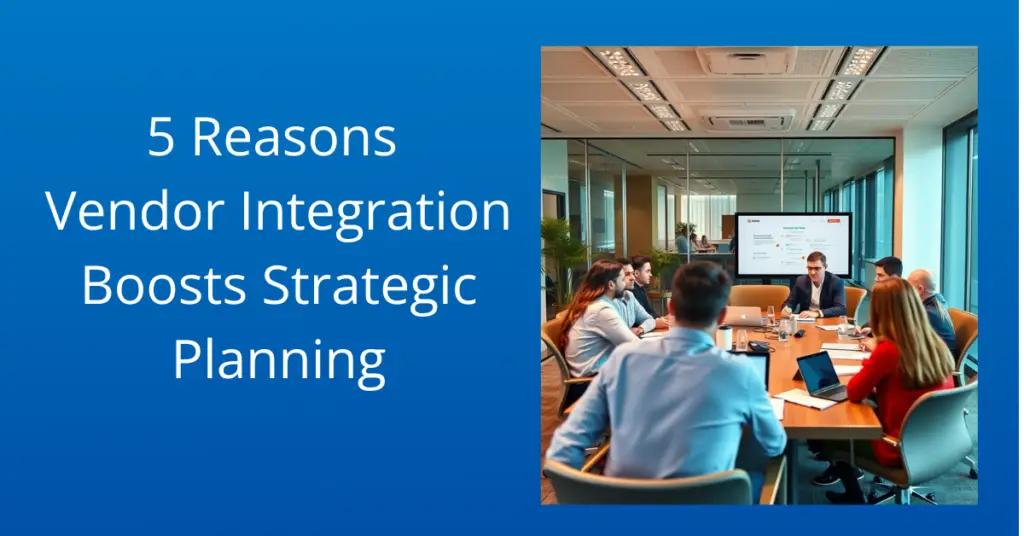
5 Reasons Vendor Integration Boosts Strategic Planning

What comes to mind when you think of company strategizing? Probably internal meetings. Connecting your in-house teams and getting everyone on the same page is essential. But if your company works with third-party vendors, you could miss out on a vital part of company strategizing. Involving vendors in your strategy sessions, particularly as vendor inclusion, does more than bring them up to speed too. It can enhance your risk management, streamline later communications, and generally improve your company’s functionality.

When we work together, we can tap into their specialized knowledge, access the latest technologies, and make our supply chains run smoother through effective vendor inclusion. In this article, we’ll explore practical strategies for creating and maintaining these valuable partnerships. We’ll show you how to build strong vendor relationships that not only benefit both sides but also drive long-term growth and give your business a real competitive edge. Let’s explore how these collaborations can pave the way for a more sustainable and successful future.

Fostering Collaborative Innovation

Your in-house teams are great at their jobs. But if you’re working with third parties, you already know that third parties can bring significant value with their different perspectives and skills.

Vendors, with their specialized knowledge and sector-specific insights, are often well-placed to drive innovation. By involving vendors in strategic planning, companies can tap into a wealth of expertise that can fuel product development, service improvement, and effective problem-solving. The vendors may add valuable insights for multiple projects and use their various skill sets in multiple projects from the very beginning making it more efficient and resourceful.

Enhancing Supply Chain Optimization

Global supply chains require a detailed approach to anticipate and manage disruptions. Vendors are pivotal in this equation. Their inclusion in strategic planning allows you to take a more preventive position and anticipate upcoming issues. This in turn reduces inefficiencies and cuts costs through better-informed decisions and faster response times. Vendors act like a window into the real-world market for your product and services. While delivering to various partners, vendors provide strategic insights that add to the deliverable quality of your product.

We may consider an example of the last pandemic. Businesses with stronger vendor relationships have the opportunity to expand on the various supply chains thereby avoiding the drastic losses during the worldwide lockdown. Vendors supported through pre-supply, authorized route movements, etc. thus aiding the business from going into huge losses and overcome the challanges.

Streamlining Risk Management

The business environment is fraught with risks – from market fluctuations to regulatory changes and technological advancements. Vendors can be allies in identifying and mitigating these risks. Early involvement of vendors in strategic planning allows you to establish a risk management system ahead of time, ensuring it’s in place when you need it. It also keeps your vendors prepared for upcoming risks as the rest of your company. Vendors who specialize in privacy compliance, for instance, can provide expertise on data protection laws, ensuring that companies maintain regulatory compliance while avoiding costly penalties.

Building Stronger Relationships

Viewing vendors as strategic partners rather than mere suppliers transforms the dynamic; fostering stronger relationships. You may even come to see some vendors as part of your team. This leads to improved communication and collaboration, not to mention improved services. Cultivating a relationship of trust and mutual respect also gives you an advantage in the business landscape.

A critical aspect of strategic vendor partnerships is the emphasis on shared risk and reward. In successful collaborations, both parties are invested in the outcomes of their joint efforts. This alignment fosters a sense of accountability and encourages proactive communication, enabling partners to navigate challenges more effectively. As businesses navigate the complexities of today’s market, the ability to rely on strategic vendor relationships can provide a significant competitive advantage, helping organizations adapt to changing conditions and achieve their strategic goals.

Ensuring Market Adaptability

The marketplace is constantly changing, influenced by shifting customer tastes and the overall economy. Our vendors are in a unique position to see these changes happening firsthand. Their insights can be incredibly valuable, helping us adapt quickly and effectively. In today’s fast-paced world, this kind of agility is essential for staying relevant and competitive. By working closely with our vendors, we can stay ahead of the curve, always understanding what our customers need and being ready to deliver it.

Achieving Cost Efficiency

Cost management is a constant concern for businesses. Including vendors in strategizing can uncover cost-saving opportunities without compromising on quality or performance. Vendors can offer alternative materials, processes, or technologies that are more cost-effective and keep your bookkeepers happy.

By collaborating with vendors who possess specialized knowledge and capabilities, businesses can streamline their supply chains, reduce costs, and improve product quality. This efficiency translates into faster time-to-market for new offerings, allowing companies to stay ahead of competitors and meet evolving customer demands.

Customization & Specialization Opportunities

Every company wants to stand out. Whether that’s through customization, special deals, unique product offerings, or something else, everyone needs an edge. This is another area where vendors can help.  Vendors can offer insights and capabilities that enable companies to tailor their products and services more closely to customer needs, keeping you competitive.

Leveraging Technology & Trends

With technological advancements occurring at a remarkable pace, staying ahead of trends is crucial. Vendors, especially in the tech sector, often get a front-row seat to these new trends. Including them in strategic planning can provide early access to emerging technologies, keeping your company ahead of the curve.

Advancing Sustainability

Consumers appreciate a company that practices sustainability. Vendors can play a crucial role in helping companies meet these objectives, offering expertise in eco-friendly materials, processes, and supply chain practices. This collaborative approach not only addresses environmental and social challenges but also aligns with the growing consumer demand for responsible business practices.

Aligning Long-Term Strategic Goals

Finally, incorporating vendors into strategic planning ensures that their development and capabilities align with the long-term goals of the company. This alignment is crucial for sustaining growth, innovation, and competitive advantage over time.

Furthermore, strategic vendor partnerships foster innovation by encouraging knowledge-sharing and collaboration. When companies partner with vendors who are at the forefront of technological advancements, they can gain access to cutting-edge tools and solutions that enhance their capabilities. This collaborative environment cultivates a spirit of experimentation, where both parties can explore new ideas and push the boundaries of what’s possible. As businesses strive for differentiation in crowded markets, leveraging the innovative potential of vendor partnerships becomes increasingly critical for sustained growth and success.

Final Thoughts

Integrating vendors into departmental strategic planning is more than just a wise decision. It’s a necessity in today’s complex and interconnected business environment. Everyone working with your company should be involved in planning. Don’t exclude third-party vendors!

As businesses continue to navigate the complexities of the digital era, the importance of strategic vendor partnerships will only grow. By forging strong alliances with vendors, companies can enhance their competitive positioning, respond to market changes with agility, and ultimately achieve sustainable growth. In this interconnected world, collaboration is key, and organizations that prioritize strategic vendor partnerships will be well-equipped to thrive in the face of evolving challenges and opportunities. Ready to take your marketing game to the next level? Give our team a call today.


February 27, 2025, 11:00 AM Pacific

Introducing 4Preferences: The Future of Preference Management

Join us for an exclusive live preview webinar to/ showcase how 4Preferences makes it easier than ever to manage customer preferences, enhance personalization, and improve engagement and compliance—all seamlessly integrated with Eloqua.

Why attend?

  • Get an early look at 4Preferences’ improves segmentation and personalization
  • Learn how it simplifies preference management for marketing teams
  • See how it works with Eloqua, Marketo, 4Comply, and your CRM
  • Find out how you can join our early access program

AI can help in creating accessible emails.

Email remains one of the most powerful communication, marketing, and engagement tools. Be it introducing your product, services, subscribed newsletters, etc.; almost everything is deliverable through emails. But are you sure that your emails are received and impact your client or the potential customers? Not all emails are accessible to everyone, particularly for users with disabilities. Ensuring email accessibility is not just a compliance requirement but also an ethical and business-driven decision that enhances customer experience and broadens your audience reach. Thanks to AI, achieving email accessibility is now easier than ever.

Why Email Accessibility Matters

Accessible emails ensure that all recipients, including those with visual, auditory, motor, or cognitive impairments, can read and interact with the content effectively. Readers who rely on screen readers, keyboard navigation, or cognitive-friendly layouts must be able to access your email. Moreover, several legal regulations, such as ADA and WCAG, enforce accessibility to emails so that businesses may avoid legal risks while fostering a very positive brand reputation.

By prioritizing accessibility of emails, businesses and organizations can create a more inclusive and effective communication experience for all users. An accessible email would have:

  • Better user experience for a diverse audience—Millions worldwide have visual, auditory, cognitive, and motor impairments. Designing accessible emails helps everyone access information without barriers.
  • Legal compliance with standards like WCAG and ADA—Many regions have digital accessibility laws, such as the Americans with Disabilities Act (ADA), the Web Content Accessibility Guidelines (WCAG) for global standards, and Section 508 honored by U.S. Government agencies. Failure to comply with these regulations can lead to legal issues and fines.
  • Better engagement rates—Well-structured, readable emails encourage recipients to engage. More people, including those with disabilities, can access and act on your emails, which enhances the chances of perception of your product. Accessibility features also enhance responsiveness on mobile devices, thus increasing lead generation and business.

Best Practices for Creating Accessible Emails

Some mandatory and innovative techniques are the best practices to increase a wider audience, including readers with disabilities. For example, start with a clear and descriptive subject line to communicate the context immediately and effectively. Make sure the descriptions, alt texts, and HTML formats are correct and interpretable for the readers using screen readers. Ensure color contrast; conveying a message just by using a specific color may not work if your reader suffers from color blindness. Ensure that these practices represent your inclusive and supportive culture to the readers.

Let us see some examples that may help in making your emails more accessible:

1. Use Semantic HTML for Proper Structure

Screen readers rely on proper HTML tagging to interpret content. They cannot understand simple English or complicated color combinations to convey your message to the audience thus, use HTML tagging like:

  • <h1> – <h6> for headings
  • <p> for paragraphs
  • <ul> and <li> for lists

Using such tags would specify the screen reader to interpret the message appropriately for your readers. Thus conveying your message more effectively. One may avoid using tables for the layout as it tends to confuse the screen readers thus creating loopholes in your message.

Creating Accessible Emails for visually impaired readers using AI

2. Ensure High Color Contrast

Another aspect one must consider is the higher color contrast of the text against the background to provide better readability for readers with visual impairments. Low contrast makes it difficult for visually impaired users to read emails. As referred in WCAG guidelines, make sure the emails maintain a contrast ratio of 4.5:1 for normal text i.e., foreground text is 4.5 times brighter than the background. Also, the large texts on your emails or the images may follow a similar ratio of 3:1 to coincide with the guidelines. You may use tools like WebAIM Contrast Checker to test your colors.

3. Use Readable Fonts and Text Sizing

Some fonts with cursive styles and irregular font sizing may not be comprehensible for screen readers. Overly decorative fonts tend to confuse the screen readers and our audience with visual impairments. Sans-serif fonts such as Arial, Verdana, or Roboto are much clearer and more readable for screen readers as they lack decorative elements. While writing your emails, make sure to:

  • Choose any sans-serif fonts like Arial, Verdana, or Roboto.
  • Maintain a minimum font size of 14px for body text.
  • Left-align text for better readability.

Following few simple steps and being cautious of the decorative elements on your email would ensure higher readability. Thus support in increasing lead generation.

4. Add Descriptive Alt Text to Images – Image Accessibility

The whole purpose of using an alt text is to provide textual description of an image that is embedded in a document or a webpage. As much as an alt text is crucial for your email accessibility it is also beneficial for the SEO functionality of your webpage. Readers with visual impairment or the ones imposing on screen readers to read and understand an email require descriptive alt texts to understand the embedded image without any difficulty. Unlike normal readers, screen readers cannot see the image. Thus, it is mandatory to provide a good descriptive alt text to the embedded image so that it is decipherable and is conveying the message that you require to your readers. Let us see an example to understand it.

A promotional email informing of a sale using an image if contains alt text “Sale Banner” is not much explanatory. Whereas using the alt text “25% off all Winter Collection – use code Winter25 at checkout” let’s the screen reader describe it thoroughly thus conveying your message even if your email receiver is not able to visualize the email.

5. Test with Screen Readers

Before sending your emails, make sure to test them with screen readers. Check if your email is readable, if it has the correct fonts, and if it is described with correct alt texts. You may use tools like NVDA for Windows, Voice Over for Mac/iOS, or JAWS to check email accessibility for screen reader users. You may also focus on optimizing links and buttons for better accessibility. Using descriptive texts and proper sizing of the buttons to ensure easy tapping if the reader is reading your email on mobile.

Ensure, the email is accessible through keyboard keys itself. For further navigation, tab and enter keys may help the readers to cruise through your email. Avoid requiring mouse clicks or pop-ups to fill in forms or access discount codes, etc.\

How AI Revolutionizes Creating Accessible Emails

AI-driven tools have revolutionized email accessibility, making it easier to design, optimize, and test emails. Creating accessible emails is not just a choice but mandatory if you are looking to expand your business and gain more traffic for your websites. How can artificial intelligence help you create emails that are accessible for your visually impaired readers? AI can write your emails, verify the content and images embedded in it, and look for predictive personalization for the readers.

Let’s see how AI can help in creating accessible emails:

Visually Impaired reader using screen reader through bluetooth to access emails

  • AI-Powered Content Creation

AI can write your emails. It can generate an engaging, descriptive, and concise email templates and messages that one may modify or use accordingly to draft emails for your readers. Google Gemini, Chat GPT, Claude.ai, are some of the widely used AI to draft multiple type of content. Although one must remember to input correct AI prompts, and include human intervention to avoid AI-made mistakes.

  • AI-powered Content Optimization

AI tools like Grammarly and Hemingway Editor enhance readability by suggesting simpler language and better structuring. It can also generate clear and concise subject lines for better comprehension. These tools aid in creating grammatically correct, precise, and appropriate content modifications for your email generation.

  • AI-Driven Email Builders

Platforms like Mailchimp, HubSpot, and Moosend use AI to generate accessible email templates, ensuring correct HTML structure, mobile responsiveness, and optimized color contrast. AI users may simply utilize these platforms that helps in creating a proper HTML structure for screen readers to interpret the email content correctly.

  • AI for Automated Alt Text Generation & Color Contrast Testing

AI can generate alternative texts for the embedded images in your emails. AI-based image recognition tools like Microsoft’s Seeing AI and Google Cloud Vision can automatically generate alt text descriptions for images. Thus, screen readers can easily identify and read the image description aloud to visually impaired readers or readers using assistance. AI-powered design tools such as Stark and Adobe Sensei help ensure proper color contrast, making email text more readable for visually impaired users.

  • Accessibility Testing Through AI

You may employ AI to test your emails for readability and accessibility. AI-driven email accessibility checkers like axe Accessibility and WAVE by WebAIM analyze emails to identify WCAG compliance issues and suggest improvements. While you may use multiple screen readers to check if they can access your email, using the AI such as WAVE would allow you to save time and increase efficiency in case of assuring legal presumptions of inclusivity in your emails.

Final Thoughts

Crafting emails everyone can read and enjoy is no longer a lofty goal—it’s a must-have for reaching a broader audience and boosting engagement. Using AI to create accessible emails is smart, ethical, and, fortunately, easier on pockets. Imagine effortlessly creating emails that are not only visually appealing but also perfectly structured for screen readers. It is optimized for mobile devices and designed with appropriate color contrast. That’s the power of AI-driven email tools. They take the complexity out of accessibility by automating important tasks like optimizing content for readability, generating descriptive alt text for images, performing accessibility checks, and even personalizing the email experience for individual users.


January 25, 2025

Email Optimization Strategies!

Join Us This Month for a Live Session on Email Optimization Strategies!
Discover actionable insights to improve your email marketing performance and keep your audience engaged. This session will help you:

  • Prevent over-communication with “stoplights” to reduce email fatigue.
  • Avoid spam filters by managing soft bounces more effectively and maintaining sender reputation.
  • Get your questions answered during our open Q&A with industry experts.

user acceptance testing

User acceptance testing (abbreviated UAT) is critical in the software development lifecycle. It often determines whether a system meets the real-world needs of its intended users. As a marketer, understanding UAT and your role is essential to ensuring that new tools and systems align with your business processes and deliver value to your team. This article provides a comprehensive overview of UAT, its importance, and how to participate effectively.

What Is User Acceptance Testing?

User acceptance testing is the final validation step before software is released. It’s where end-users—people like you—test the system in real-world scenarios to confirm it aligns with business requirements. Unlike technical testing, UAT ensures the software serves your needs and integrates seamlessly into your workflows.

Think of UAT as a trial run. You’re not just confirming the software is functional—you’re ensuring it’s usable and beneficial in your day-to-day operations.

The Journey to User Acceptance Testing: What Happens Before?

UAT doesn’t happen in isolation. It’s the culmination of several key development stages:

Needs Analysis

This phase captures the business’s requirements. Through interviews, surveys, and observations, project managers compile a detailed blueprint of what the software should achieve. This document sets the foundation for the entire development process.

Design

Based on the needs analysis, the design phase creates wireframes, prototypes, and system workflows. These visual representations guide development and ensure the software’s interface and functionality align with user expectations.

Development

Developers turn designs into functioning software by following specified requirements. They adopt a systematic approach, incorporating regular testing and revisions.

Initial Testing

Finally, the software undergoes rigorous testing by the development team and quality assurance team. Developer testing ensures the system meets design specifications. Next, quality assurance focuses on stability, usability, and security. These tests clear the way for you, the end-user, to validate the software.

Why User Acceptance Testing Matters

UAT is your opportunity to ensure the software meets your expectations and works as intended in your specific business environment. Here’s why it’s crucial:

  • Alignment with workflows: UAT verifies that the software supports your business processes effectively.
  • Cost savings: Catching issues before launch prevents expensive post-release fixes.
  • User confidence: A successful UAT builds trust and reduces resistance to adopting new systems.

By participating in UAT, you directly influence the final product, ensuring it’s not just functional but truly effective for your needs.

Preparing for UAT

To get the most out of UAT, preparation is key. Before you begin:

  • Understand your requirements: Familiarize yourself with the project’s design document, which outlines the system’s intended functionality. Note any features labeled “out of scope” to avoid unnecessary concerns.
  • Review the test plan: This document identifies the areas and features you’ll need to test, ensuring nothing is overlooked.
  • Know your support resources: Determine the level of support available from your project team or software provider. For example, 4Thought Marketing offers limited UAT support hours, so use this resource wisely.

Conducting User Acceptance Testing: A Step-by-Step Guide

UAT doesn’t require technical expertise. Here’s how you can approach it confidently:

Test Real-World Scenarios

Work with test cases that mimic your actual use of the software. Enter real-world data and simulate daily tasks to see how the system performs.

Document Your Experience

Take notes about your experience with the software. If something doesn’t work as expected or feels unintuitive, document it. Screenshots and step-by-step descriptions are especially helpful for addressing issues.

user acceptance testing

Provide Clear Feedback

Your observations are critical. In your notes, highlight what did or didn’t work, and why. Note anything that feels unintentional. If the system behaves differently than you anticipated, note whether it’s a functionality issue or simply a difference in expectations.

Overcoming UAT Challenges

UAT often comes with its share of obstacles. Here’s how to tackle them:

  • Time constraints: Focus on testing the most critical features first. Less important fixes can come later.
  • Complexity: Let the developers know if the software feels too overwhelming to use effectively.
  • Lack of training: If you feel underprepared, ask for additional guidance. What you consider a bug may be a feature you don’t fully understand.
  • Misaligned expectations: Sometimes, the software works as designed but not as expected. In such cases, schedule a discussion with the project team to clarify or refine functionality.

Tips for Successful UAT

  • Be thorough: Test all relevant features, not just the ones you use most often. Comprehensive testing now prevents surprises later.
  • Ask questions: Don’t hesitate to seek clarification if you’re unsure about a feature or its purpose.
  • Leverage your expertise: You know your business processes best. Your insights are invaluable in identifying gaps or improvements.

Wrapping Up: UAT as Your Opportunity to Shape Success

User acceptance testing is more than a procedural step—it’s your chance to ensure the software works for you. Your active involvement ensures the final product fits your company’s needs.


December 19, 2024

Suggestions for  New Enhancements and Addons

A special holiday edition of Office Hours took place! Attendees brought their Eloqua wish lists and shared ideas for new enhancements and add-ons. Suggestions included:

  • Annotations
  • TTOI Improvements to the Redwood Experience
  • Copy Account Data to Account CO or Contact CO
  • Automatic contact de-duper and merge
  • Get email alerts if a segment contains contacts
  • Send internal email
  • Improvements to SMS features
  • live code editor

eloqua cloud apps

If you’re an Eloqua user, you know just what it’s capable of. Eloqua makes marketing easy for busy professionals. Whether you want to improve your social media promotions, email campaigns, or something else entirely, Eloqua has you covered.

But avid users of Eloqua also know that from time to time, you need an add-on for particular tasks. That’s where 4Thought Marketing’s suite of Eloqua Cloud Apps comes in. Our Cloud Apps are designed to expand Eloqua’s existing functionality and streamline your marketing tasks more than ever. And what better time to treat yourself (or your marketing team) to new Eloqua Cloud Apps than the holiday season? Here are a few of our favorites that our clients particularly like.

Contact Garbage Indicator

Customers don’t always provide valid contact information when signing up for services. To avoid being contacted, they may input an incorrect email address or phone number, or even a fake name. Some may genuinely make a typo or enter the correct information in the wrong field, confusing the system. Whatever the case, the result is “dirty data” that just takes up space in your Eloqua instance and requires a lot of time to manually sort from the usable information.

The Contact Garbage Indicator Cloud App can save your team a lot of time filtering out unusable data. This app examines every contact added to Eloqua and singles out any that appear illegitimate. A member of your team can then review the filtered data to ensure there are no false positives. After this review, the app deletes all the unusable data in its store and continues monitoring incoming information. This Cloud App is both a massive timesaver and an excellent way to streamline the data review process!

Contact Deleter

Maybe dirty data has previously made it through your review and into your Eloqua instance. Maybe some of your customers’ consent has expired, or they’ve abandoned the email address they previously gave you. Whatever the case, it’s time to delete their contact records in Eloqua.

The Contact Deleter Cloud App does exactly what its name implies—it deletes Eloqua contacts routed into it. (The contacts are saved temporarily in an archive to prevent accidentally deleting valid records.) Using this app regularly allows you to purge any bad data that’s gotten in. More importantly, it ensures that your sales team won’t waste time reaching out to contacts who are no longer interested. It also prevents you from paying for additional Eloqua contacts you aren’t using. This app is a must-have for Eloqua users who deal with a lot of incoming data!

Contact Cloud Feeder

By default, the Eloqua program canvas checks once per day for any new contacts. This typically works just fine. But for businesses that receive dozens of leads per day, or companies where a quick follow-up with customers is essential, more frequent checks would help a lot.

Fortunately, you can turn to the Contact Cloud Feeder Cloud App. This app allows your team to have the Eloqua program canvas check for new contacts multiple times per day. (One client of ours has it set to check every five minutes!) You can also specify segments or shared filters to assign new contacts to the right canvas. If you need to process as many new leads as possible, as quickly as possible, the Contact Cloud Feeder Cloud App is an excellent tool.

eloqua cloud apps

Upload Wizard

Eloqua’s default list upload feature can accept data that conforms to a variety of data standards, and in a variety of file formats. This can make data standardization tricky. Without a built-in way to ensure that all imported data follows your company’s standards, your team has to spend valuable time manually editing the data themselves before importing.

With the Upload Wizard Cloud App, none of that manual work is necessary. The Upload Wizard is designed to handle massive amounts of data at once and to quickly identify and fix errors in uploaded data. Your team can configure the app to ensure that all imported data matches your company data standards. Best of all, the app requires no specific Eloqua training to use! New hires can take advantage of this Cloud App just like a more experienced employee.

Anonymous Campaign Attribution

Consumers spend a significant amount of time researching products and services long before making a purchase. As a result, most of your online traffic—social media views, website visits, and the like—is completely anonymous. Eloqua tracks this traffic as visitors but stores no data beyond that. These visitors only become known contacts when they submit a form on your website. Of course, this makes it difficult to know exactly how they found you and what drew them in.

The Anonymous Campaign Attribution Cloud App eliminates this guesswork. The Cloud App connects visitors’ campaign responses to form submissions, giving you a more complete picture of the contact’s campaign engagement. This helps you more effectively measure your ROI and campaign effectiveness. In addition, it also tells you at a glance what campaigns aren’t yielding results and where to course-correct.

Happy Holidays!

Oracle Eloqua is already a powerful marketing automation platform on its own. But your marketing team might have a wishlist of Eloqua Cloud Apps that could make their jobs easier and your campaigns even more effective. Expand Eloqua’s functionality with our suite of Cloud Apps! Contact us today to learn more.


4Thought Marketing Logo   April 8, 2026 | Page 1 of 1 | https://4thoughtmarketing.com/marketing-automation/page/7/