A unified brand presence isn’t a luxury in B2B—it’s a survival trait. Buyers don’t just evaluate products; they evaluate coherence. When your voice shifts across platforms or visuals feel disconnected, your audience starts to question your reliability. Social media, for all its immediacy and reach, often fractures brand presentation because of its pace and platform diversity. Still, the companies that win here aren’t the loudest—they’re the ones that show up with consistency and control. Here’s how to make sure your B2B brand holds together, even as you spread across more screens.
Lead With Brand, Not Tactics
Before you post anything, revisit the foundation. What are you trying to evoke every time your brand shows up? Many B2B companies jump to campaigns without fully committing to the slower, foundational work of brand presence. It shows. The difference between a scattered identity and a memorable one often comes down to how deeply a company understandswhy brand building matters in B2B. Brand isn’t the decoration around your message—it is the message. And the stakes aren’t just aesthetic. A well-formed brand identity builds trust, shortens sales cycles, and survives platform fatigue.
Lock in Your Messaging Framework
Social media may be reactive and real-time, but your voice shouldn’t shift with every post. Without guardrails, your team will default to gut feel—producing fragmented messages that confuse your audience. You need something more durable. Defininghow a messaging framework drives consistency across teams gives every social post a shared spine. Frameworks aren’t scripts. They’re boundaries—helping marketers stay on-tone while still being creative. And in B2B, where sales cycles can stretch over months and touchpoints multiply, consistency beats cleverness every time.
Define Voice and Tone—and Write It Down
You can’t scale what isn’t written. Ask 10 team members to describe your brand’s voice, and if you get 10 different answers, you’ve got a problem. The fastest way to fragment your brand is to leave tone to chance. Create documented voice guidelines for social media so teams stop guessing. Clarity around tone doesn’t kill creativity—it directs it. Guidelines give writers permission to be bold without going off-brand. And when every caption, reply, or video script sounds like it came from the same brain, your audience starts to lean in.
Centralize the Workflow Without Killing Flexibility
Disjointed strategy leads to disjointed execution. Many B2B companies let each platform run in its own lane, managed by siloed teams or external contractors. The result? Clashing tones, mismatched visuals, and inconsistent messaging. You don’t need rigid control—you need ahub and spoke model for social alignment that makes collaboration efficient. Centralizing strategy doesn’t mean micromanaging posts. It means every execution maps back to one source of truth, freeing teams to move fast without sacrificing cohesion.
Translate, Don’t Copy-Paste Across Platforms
Your audience shows up differently on each platform—and so should you. But adaptation doesn’t mean reinvention. The best brands know how to reshape their core message without losing fidelity. Learn the rhythm of each channel, then show up with content that feels native to the space. This starts by maintaining brand identity across teams and channels while adjusting format and tone. Your LinkedIn audience doesn’t expect the same delivery as your Instagram followers—but they should still recognize it as you. Consistency doesn’t mean sameness. It means coherence.
Make the Voice Unmistakable, Even When the Logo’s Not There
What’s left when you strip away logos, colors, and typefaces? The words. Your copy is the connective tissue of your brand identity. Every sentence you publish is either adding to your reputation—or eroding it. In crowded B2B feeds, companies with a strong, recognizable voice cut through the noise. That voice doesn’t happen by accident. It’s built deliberately, using steps to identify brand voice and tone that move your message from generic to distinctive. Done right, you could remove the branding altogether and still be recognized by how you speak.
Seamless Brand Support
Bringing consistency to your social visuals doesn’t require a full design team—just the right set of capabilities. One option is using Adobe Express, a suite of intuitive features that help you execute fast on-brand content creation across formats.
Social media rewards speed—but branding rewards clarity. B2B audiences are under no obligation to remember you. It’s your job to make that job easier. That starts with a clear identity, documented messaging, and the right infrastructure to keep everything aligned. From visual systems to voice consistency, your brand should feel familiar no matter where it’s seen. Because in the end, it’s not the platforms that matter—it’s the impression you leave behind.
Ready to make your marketing stack work harder—and smarter? Explore how 4Thought Marketing helps B2B teams streamline automation and drive conversion without breaking their brand.
Key Takeaways
Follow proven email deliverability best practices consistently.
Strengthen inbox placement using authentication and clean lists.
Segment and target engaged audiences to protect reputation.
Optimize content and frequency to avoid spam filters.
Monitor engagement metrics and refine your email strategy.
Marketers who rely on email as their core engagement channel understand one truth: if messages don’t reach the inbox, nothing else matters. Applying strong email deliverability best practices is not just a technical checkbox—it’s the difference between visibility and invisibility in today’s crowded inboxes.
And while recent updates from providers such as Google and Yahoo highlight the urgency for authentication and clean mailing lists, the fundamentals remain constant. Deliverability depends on trust—built through consistent sender reputation, relevant content, and engagement hygiene. Therefore, future-ready marketers must focus less on one-time fixes and more on ongoing email deliverability discipline.
What Defines Email Deliverability? Why It Still Matters?
Deliverability is more than just “getting through.” It’s about ensuring your email actually lands where it should: the inbox. Each major ESP (Email Service Provider) scores senders using factors like authentication, engagement, and complaint rates.
Marketers who understand these mechanics realize that email marketing deliverability affects every downstream metric—open rate, click-through rate, and ultimately conversion. Strong deliverability protects domain reputation, while poor deliverability drains ROI.
Your challenge isn’t to outsmart the filters but to align with them. Following email deliverability tips such as list cleanliness, authentication alignment, and smart frequency control keeps your reputation solid long after any single update rolls out.
How Do Authentication Methods Build Trust?
Before any subject line or segmentation strategy matters, your technical foundation must be sound. Email authentication methods like SPF, DKIM, and DMARC validate your identity as a legitimate sender.
SPF (Sender Policy Framework) verifies which servers are allowed to send emails on your behalf.
DKIM (DomainKeys Identified Mail) attaches a digital signature confirming that your message wasn’t altered in transit.
DMARC (Domain-based Message Authentication, Reporting & Conformance) connects SPF and DKIM results to set a clear policy—telling receivers how to handle suspicious mail.
When configured correctly, this DKIM SPF DMARC setup signals authenticity and drastically reduces the risk of spoofing or phishing associations. Think of it as the “passport” your emails carry across inbox borders. Once this groundwork is solid, you can focus confidently on engagement tactics and content design.
How Can Clean Lists and Smart Targeting Improve Inbox Placement?
Even the most technically perfect sender can fail if their list hygiene is weak. A clean email list isn’t just a legal safeguard—it’s a deliverability booster. Regularly removing invalid, unengaged, or outdated contacts minimizes bounce rates and keeps complaint ratios below industry thresholds.
Best Practices for List Hygiene
Use clean email list best practices such as double opt-ins or periodic re-confirmation campaigns.
Segment based on engagement recency (e.g., last 30–90 days).
Implement a “sunset policy” to reduce frequency or suppress unresponsive subscribers.
This targeting logic ensures your emails reach the most receptive audiences and directly improves inbox placement strategies. ESPs reward senders whose contacts consistently open, click, and interact with content.
What Content and Frequency Patterns Influence Deliverability?
Great deliverability depends on balance. The impact of content on deliverability is often underestimated—especially when marketers chase creativity over clarity.
Avoid spam-trigger phrases (“Act now!”, “100% guaranteed”) and limit exclamation points or symbols. Instead, write concise subject lines that reflect the email’s true value. Pair that with modern email marketing strategies—like AI-assisted personalization that respects data quality—and you’ll strike the right tone between engagement and trust.
Frequency also matters. Sending too often can fatigue your list, while sending too rarely can signal inactivity. Monitor audience responses to determine the optimal frequency of emails and deliverability sweet spot—usually between one and three touches per week depending on lifecycle stage and content relevance.
How Do Engagement Metrics Shape Your Sender Reputation?
Your reputation isn’t built overnight; it’s earned email by email. ISPs and ESPs measure how recipients interact with your messages. High engagement (opens, clicks, replies, forwards) boosts reputation, while low engagement or spam complaints weaken it.
Key engagement metrics for email that influence deliverability include:
Open rate: Indicates initial interest and subject-line strength.
Click rate: Reflects content relevance and CTA clarity.
Bounce rate: Should stay below 2% for healthy lists.
Spam complaint rate: Ideally under 0.1%—anything higher triggers filters.
Regularly reviewing these numbers through tools to test email deliverability (such as Validity, Litmus, or GlockApps) helps catch dips early. Your sender reputation is essentially your marketing credit score—protect it with the same care you’d give your brand equity.
How to Troubleshoot Common Email Deliverability Issues?
Even with strong hygiene, issues can arise. Some common email deliverability issues include:
Sudden spikes in complaint rates (often from aggressive frequency).
Incorrect DNS entries for SPF or DKIM.
Unsubscribes not syncing properly across systems.
Content mismatches between subject and body.
When troubleshooting, start by isolating the variable—technical (authentication), operational (list or frequency), or creative (content). Fix the root cause, then retest using inbox placement tools. Maintain an email deliverability checklist that ensures every campaign passes technical, operational, and content standards before launch.
Conclusion
Deliverability is never “done.” It’s an evolving discipline that bridges technology, strategy, and empathy for your audience. The brands that master email deliverability best practices treat them as an ongoing rhythm—authenticating consistently, cleaning lists diligently, and crafting relevant content that earns engagement.
As privacy rules expand and inbox algorithms evolve, these foundational habits will remain your best defense and your greatest opportunity. If your team wants to strengthen deliverability frameworks, streamline authentication, or align campaign hygiene with marketing automation platforms, 4Thought Marketing can help build a roadmap that keeps every message where it belongs—the inbox.
Frequently Asked Questions (FAQ)s
1. Why is email deliverability more important than open rates?
Because deliverability determines whether your message even reaches the inbox. Without it, open rates are meaningless.
2. How often should I clean my email list?
Ideally every quarter, or after any large campaign that causes a spike in bounces or unsubscribes.
3. Which authentication method is most critical?
All three—SPF, DKIM, and DMARC—work together. Omitting one leaves gaps in your email’s credibility.
4. How can content affect my sender reputation?
Over-hyped or misleading copy increases complaints. Balanced, relevant, and transparent content builds trust.
5. What tools can I use to test deliverability?
Platforms like Validity, Litmus, and GlockApps provide inbox placement, bounce, and spam-rate analysis.
6. Does sending fewer emails guarantee better deliverability?
Not necessarily—what matters is consistent engagement. A smaller, active list beats a large, inactive one every time.
Key Takeaways
Learn why duplicate leads damage campaigns, reporting, and compliance.
Understand root causes across data entry, sync timing, and system gaps.
Discover prevention tactics using governance, smart forms, and CRM setup.
Explore advanced detection and resolution with automation and review.
See how Dynamics 365 and Salesforce integrations handle duplicates differently.
Seamless data flow between Adobe Marketo and Dynamics 365 or Salesforce represents the ideal state: accurate reporting, optimized spend, consistent customer journeys, and strong compliance. That ideal often collapses when duplicate records creep into integrations, quietly multiplying costs, distorting insights, and eroding trust. Resolving Lead Duplicate Issues means uncovering the causes, assessing the risks, and applying proven strategies that keep data consistently clean across platforms. This article unpacks exactly that!
What business damage do duplicate leads actually cause?
Duplicate leads undermine almost every marketing and sales function. They fragment the customer view, leaving sales teams blind to full engagement histories. Marketing spend is wasted when prospects receive multiple communications, while reporting metrics become inflated and unreliable. Worse, duplicate email sends damage brand trust and may even result in compliance violations if opt-outs are missed. In short, duplicate leads don’t just clutter your database—they harm revenue, relationships, and reputation.
Where do lead duplication causes originate?
The sources of duplication are varied:
Inconsistent data entry: “John Smith” in marketing versus “J. Smith” in sales.
Multiple lead sources: Web forms, trade shows, purchased lists, and social channels all structure data differently.
Timing and sync delays: Leads created in CRM before Marketo syncs can result in new records instead of updates.
Weak matching rules: Relying only on email addresses misses alternate emails and typos.
System limitations: Default deduplication tools may not fit every business process.
By understanding these lead duplication causes, teams can design controls that stop issues before they cascade.
How can Dynamics 365 Marketo integration prevent duplicate leads in CRM?
Dynamics 365 Marketo integration provides opportunities to enforce governance if configured correctly. Establish naming conventions, standardized field mappings, and validation rules for all capture points. Enable Dynamics 365 duplicate detection and configure Marketo to recognize multiple match fields such as email + company + last name. Using the lead qualification mapping feature, users can connect new submissions to existing Contacts or Accounts, preventing redundant records. With these steps, Dynamics 365 duplicate detection and Marketo de-duplication work together to maintain clean, consistent data.
How does Salesforce Marketo integration handle duplicate leads differently?
Salesforce Marketo integration offers a different set of tools. Administrators can set up Salesforce duplicate management using Matching Rules and Duplicate Rules. For example, a rule might block new leads with the same email and company name, or alert users when potential duplicates appear. Configuring lead conversion properly ensures existing Contacts are updated instead of creating new ones. These controls rely on aligning Salesforce duplicate management policies with Marketo’s dedupe logic to ensure both systems agree on a single source of truth.
Which deduplication tactics are most effective across platforms?
Effective strategies combine prevention and detection:
Governance standards: Define required fields and validation rules.
Smart form design: Use progressive profiling and hidden attribution fields.
Lead routing rules: Assign records based on qualification and scoring models.
Advanced detection: Apply fuzzy logic, multi-field analysis, and behavioral recognition.
Automated workflows: Merge duplicates by recency, completeness, or lead score.
These strategies ensure duplicates are caught early, routed correctly, and resolved without losing history.
How do advanced detection techniques strengthen duplicate management?
Modern duplicate detection goes beyond simple email checks. Fuzzy logic matching identifies “Robert” versus “Bob,” or formatting differences in phone numbers. Multi-field analysis scores similarities across domains, job titles, or industries. Behavioral recognition looks at recurring engagement patterns, such as identical form submissions or browsing behaviors. When applied together, these techniques deliver higher accuracy and allow automated deduplication workflows to operate with confidence.
What are the best practices for resolving duplicates once they are found?
Resolution requires clear rules:
Priority-based merging: Favor the most recent activity, highest score, or most complete profile.
Data consolidation logic: Merge custom fields and activity histories without losing attribution.
Audit trails: Maintain logs of merges to preserve compliance transparency.
Manual review dashboards: Flag complex cases for human oversight, with SLAs and approval workflows.
By blending automation with controlled manual intervention, organizations ensure accurate data without sacrificing speed or compliance.
Why does the Dynamics 365 Person-model create unique challenges?
In Adobe Marketo, every individual is a Person record, whether they appear in Dynamics 365 as a Lead or Contact. When D365 qualifies a lead, it creates Contact, Account, and Opportunity records—sometimes generating duplicates if not linked properly. Meanwhile, Marketo continues linking to the original Person, creating misalignment. Without governance, this breaks customer journeys and distorts reporting. Using the D365 qualification feature to map leads to existing Contacts or Accounts avoids duplication and keeps Marketo associations intact.
How should Salesforce and Dynamics 365 strategies differ?
While both CRMs integrate with Marketo, each has unique nuances. Salesforce depends heavily on Matching and Duplicate Rules, while Dynamics 365 relies on lead qualification mapping. Organizations using both should document their rules separately, ensuring teams understand the differences. Training, governance standards, and cross-system audits are essential for long-term success in preventing duplicate leads in CRM.
What governance and measurement practices sustain clean data long-term?
Governance ensures the process does not break after initial setup. Define RACI responsibilities across Marketing Ops, Sales Ops, and IT. Set SLAs for reviewing duplicate queues—such as resolving high-value duplicates within 24 hours. Train staff on correct merge procedures. Measure success with KPIs like duplication rate, auto-merge rate, and unsubscribe integrity. Dashboards should track progress so leadership sees the ongoing impact of de-duplication strategies.
Conclusion
Duplicate leads are not just a technical annoyance—they are a barrier to revenue growth, customer experience, and compliance. And while they arise from multiple causes, organizations using Marketo with Salesforce or Dynamics 365 have clear paths to prevention, detection, and resolution. By combining governance, configuration, and advanced workflows, businesses can turn fragmented databases into unified customer views. If you’re ready to tackle duplicates and strengthen your CRM–Marketo integration, connect with 4Thought Marketing today to explore solutions tailored to your systems.
Frequently Asked Question (FAQs)
1. What is the best approach to Resolving Lead Duplicate Issues in Dynamics 365 Marketo integration?
The best approach involves strong data governance, field mapping, and duplicate detection rules within Dynamics 365 Marketo integration. Aligning CRM and Marketo de-duplication ensures accuracy and consistency.
2. How can Salesforce Marketo integration help prevent duplicate leads in CRM?
Salesforce Marketo integration allows you to set duplicate rules, use advanced matching, and apply Salesforce duplicate management policies. These steps prevent duplicate leads in CRM and keep records clean.
3. What are the most common lead duplication causes across CRM and marketing systems?
Lead duplication causes often include inconsistent data entry, sync timing gaps, and poor matching criteria. Using Dynamics 365 duplicate detection and Marketo de-duplication reduces these risks significantly.
4. Which de-duplication strategies are most effective for automated deduplication workflows?
Effective de-duplication strategies include fuzzy logic matching, multi-field analysis, and automated deduplication workflows. These approaches reduce manual effort while improving lead routing accuracy and CRM integrity.
5. How does merging duplicate records in CRM impact customer engagement?
Merging duplicate records in CRM ensures a unified view of the customer journey, prevents double outreach, and maintains accurate reporting. This directly addresses the impact of duplicate leads on sales performance.
6. Why are lead routing best practices and data privacy important when managing duplicates?
Lead routing best practices ensure leads reach the right teams quickly, while respecting data privacy and duplicate records. Together, these prevent compliance risks and improve customer experiences.
Key Takeaways
Classic processes relied on manual coordination
AI marketing operations processes automate repetitive work
Human oversight ensures ethical AI-driven decisions
Transformation requires strategy, tools, and culture shifts
Future blends human creativity with AI efficiency
Modern marketing leaders envision operations that are fast, data-driven, and seamlessly scalable. In this ideal state, AI marketing operations processes power campaign execution, automate routine tasks, and provide predictive insights that help teams focus on strategy and creativity.
But most organizations still depend on classic marketing operations processes—manual coordination, siloed reporting, and rigid workflows—that limit speed and flexibility. Therefore, the real opportunity lies in transforming these traditional steps into adaptive, AI-enabled processes that combine efficiency with governance. The contrast between the old and the new highlights not just a technological shift, but a leadership challenge to design marketing operations that truly align with future growth.
How Did Classic Marketing Operations Processes Work?
Classic marketing operations processes were designed in an era when manual effort drove every campaign. These processes emphasized:
Manual data entry and reporting from multiple systems
Human-driven segmentation and targeting using spreadsheets and CRM exports
Rigid workflows where campaigns moved step by step without flexibility
While effective for ensuring structure, these traditional processes were often slow, error-prone, and limited in scalability. The emphasis was on control, but this frequently came at the cost of agility and speed.
What Defines AI Marketing Operations Processes?
AI marketing operations processes leverage automation, machine learning, and intelligent orchestration. They fundamentally reshape workflows by:
Analyzing customer data at scale to uncover patterns humans would miss
Generating predictive recommendations for campaign timing, content, and channels
Orchestrating multichannel engagement in real time with minimal human intervention
Instead of relying on teams to manually connect steps, AI enables marketing systems to self-adjust, optimize continuously, and deliver personalized journeys for each customer segment.
Where Do Classic Processes Still Hold Value?
Despite the surge of AI marketing automation processes, classic methods are not obsolete. Certain areas still benefit from human-led structure:
Compliance reviews and approvals where accountability is non-negotiable
Strategic planning for brand direction and messaging consistency
Relationship-driven campaigns where nuance outweighs automation
Change management practices to align teams on new tools and methods
In these areas, classic processes provide a framework for governance and organizational discipline, ensuring AI-driven activities remain accountable.
What Are the Benefits of AI in Marketing Operations?
Organizations adopting AI in marketing operations are realizing measurable advantages:
Skill gaps in teams unfamiliar with AI-driven platforms
Cultural resistance to replacing familiar manual workflows
Compliance and ethical concerns around algorithmic decisions
Integration complexities with legacy systems and CRMs
Overcoming these challenges requires thoughtful planning, upskilling programs, and cross-functional governance to ensure AI adoption is both effective and ethical.
How Is AI Transforming Marketing Process Optimization?
Classic marketing process steps, such as campaign planning, execution, measurement, and refinement, are now being reimagined with AI:
Campaign planning: AI models predict which segments respond best
Execution: Automation tools deploy across multiple channels simultaneously
Refinement: Machine learning continuously adjusts campaigns without manual intervention
This cycle accelerates marketing performance while embedding adaptability into the core of operations.
What Does the Future of Marketing Operations Look Like?
The future will likely blend AI-driven efficiency with human creativity. Marketing operations leaders should expect:
Hybrid models combining AI-driven automation with human oversight
Expanded ethical frameworks to govern AI’s role in personalization
Smarter orchestration tools that unify processes across platforms
Deeper collaboration between marketing, IT, and compliance teams
Continuous innovation in marketing process automation and optimization
Ultimately, AI will not replace classic processes entirely. Instead, it will refine, accelerate, and expand what marketing teams can achieve.
Conclusion
Marketing operations are moving from manual, linear systems to dynamic, AI-driven processes that optimize campaigns in real time. Yet, the fundamentals of governance, strategy, and accountability remain essential. The leaders who succeed will be those who integrate AI with the discipline of classic operations, balancing efficiency with creativity. If your organization is looking to explore the benefits of AI in marketing processes, while staying aligned with best practices, consider partnering with 4Thought Marketing to design the roadmap that positions your team for long-term success.
Frequently Asked Questions (FAQs)
What are classic marketing operations processes?
Classic processes focus on manual planning, campaign execution, and reporting. They emphasize control, but often at the expense of agility and scalability.
How do AI marketing operations processes differ?
AI processes automate repetitive work, analyze data at scale, and deliver predictive insights. They optimize workflows and support real-time personalization across multiple channels.
What are the benefits of AI in marketing operations?
AI improves speed, scalability, personalization, and insights. It frees up teams to focus on strategy while delivering better outcomes through process automation.
What challenges exist in adopting AI marketing operations processes?
Challenges include data quality, skill gaps, cultural resistance, compliance concerns, and integration with legacy systems. Addressing these requires planning and governance.
Will AI completely replace classic marketing processes?
No. Classic processes remain valuable in governance, compliance, and strategic planning. AI enhances, but does not eliminate, the need for human-led oversight.
How should leaders prepare for the future of marketing operations?
Leaders should embrace hybrid workflows, invest in training, establish ethical frameworks, and collaborate across functions to ensure AI delivers sustainable value.
Key Takeaways
Strong data foundations determine segmentation accuracy and ROI.
Prioritize quick wins that reduce friction across handoffs and systems.
Embed governance and measurement to scale repeatable, reliable execution.
Use AI selectively to speed analysis and workflows, not add noise.
Eloqua Engage is reshaping how modern marketing teams connect with prospects and customers by simplifying personalization and streamlining campaign execution. Many organizations recognize the need for efficient engagement, but they often struggle with fragmented tools, limited resources, and inconsistent messaging. By leveraging Eloqua Engage as a unified platform, marketers can overcome these hurdles, drive more relevant interactions, and accelerate business outcomes without sacrificing compliance or scalability.
What Does Eloqua Engage Offer?
Eloqua Engage is a sales tool that makes it easy for B2B sales teams to send personalized emails to prospects and customers using templates created by their marketing team. Sales managers can leverage reporting capabilities to see how their reps are using the tool and what results they are getting. The marketing team can also use reporting to make improvements to increase conversions.
Increased sales productivity: Engage helps sales reps save time by providing a library of pre-built email templates that they can customize to fit their needs. This eliminates the need to start from scratch with every email.
Improved email personalization: Engage allows sales reps to effortlessly personalize their emails with dynamic content, such as the recipient’s name, company, and job title. This can help to improve the open and click-through rates of emails.
Better brand consistency: Engage templates ensure that emails sent by sales reps are consistent with the company’s brand and marketing messaging without burdening sales with creating or managing templates.
Enhanced tracking and reporting: Engage provides detailed monitoring and reporting capabilities for both sales and marketing. Sales managers can see how their reps use the tool and what results they are getting. Marketing can view clicks, run tests, and make improvements to improve the sales process and increase sales performance.
Using Eloqua Engage Effectively
To get the most out of Eloqua Engage, your team should consider the following:
Build a library of email templates: During campaign planning, your sales and marketing teams should discuss messaging that will support campaigns, then build email templates to streamline the processing for sales to send follow-up emails.
Provide sales with Engage training: As part of the campaign launch, provide training to sales on how to use the tool, how it can save them time, and how it provides key metrics to sales leadership about their usage and results.
Leverage reporting for continuous improvement: Oracle Eloqua offers detailed tracking and reporting capabilities for Engage activities and peformance. Review metrics with underperforming sales team members on how to use Engage more effectively. In addition, highlight positive results and ask high-performing reps to share their best practices.
Eloqua Engage: An Essential Tool for Eloqua Users
To summarize, Eloqua Engage is a powerful sales tool that can help B2B sales teams increase productivity, improve email personalization, and achieve better results. Marketing can support sales efforts by making it easier for sales to send brand-consistent emails quickly, and sales leadership can review usage and performance metrics to drive higher results. If your team relies on Eloqua to create and run marketing campaigns, Eloqua Engage is a must-have.
Eloqua Engage helps marketing and sales teams create, personalize, and send approved emails that align with brand standards, making customer communication faster and more consistent.
How does Eloqua Engage improve personalization?
It provides pre-approved templates and dynamic content tools, enabling users to tailor messages to different audiences while maintaining compliance and avoiding errors.
Can Eloqua Engage integrate with CRM systems?
Yes, Eloqua Engage integrates seamlessly with CRMs like Salesforce and Microsoft Dynamics, ensuring that sales reps can send targeted emails directly from their CRM environment.
What are the benefits of using Eloqua Engage for sales teams?
Sales teams gain access to marketing-approved emails, reducing the time spent writing from scratch while ensuring consistency, compliance, and better engagement with prospects.
Is Eloqua Engage suitable for global campaigns?
Absolutely. Eloqua Engage supports multi-language templates and global compliance requirements, making it ideal for organizations running campaigns across multiple regions.
How does Eloqua Engage support compliance?
It enforces the use of approved templates, tracks usage, and ensures that all emails adhere to brand, legal, and privacy standards, reducing regulatory risks.
Key Takeaways
Roadmap aligns teams, timelines, and ownership.
Usage-based rules beat vanity marketing signals.
PQL models reveal accounts already seeing value.
Decay and negatives keep scores honest.
Prove lift first, then scale confidently.
Measure KPIs; tune thresholds by segment.
Imagine your sales team knowing exactly when a prospect is ready to buy—backed by a clear set of lead scoring implementation roadmap steps that turn product usage into a signal you can trust. In a product-led world, your software is the loudest buying signal. Why does traditional lead scoring fail here? Because it still rewards form fills and job titles over the behaviors that prove value realization inside the product. The result: real prospects slip through while reps chase leads that look good on paper but haven’t experienced your core value.
The fix isn’t another tweak to demographic points—it’s a usage-driven scoring model that treats engagement milestones as your primary qualification signal. When marketing, sales, and product align on the same behavioral thresholds, you unlock faster sales cycles, higher conversion rates, and more predictable revenue that scales with adoption. This post maps the phased journey to that ideal state and answers the practical questions SaaS leaders face when shifting from legacy scoring to product-centric qualification.
What are the lead scoring implementation roadmap steps every SaaS team should follow?
Rolling out product-led lead scoring doesn’t have to be overwhelming. A roadmap gives structure to the process, ensuring teams don’t get lost in scattered data or conflicting priorities. Each phase builds on the previous one—moving from understanding your current state, to equipping your systems, to validating performance. By breaking the journey into manageable steps, SaaS teams can build confidence and reduce risk while still moving quickly toward measurable business impact.
Phase 1: Audit & Alignment
This is your discovery stage. Take inventory of what exists today: What scoring rules are already in place? Which product analytics events are available? Where are the gaps? Just as importantly, use this phase to align stakeholders—marketing, sales, and product—around shared activation and engagement milestones. This ensures everyone is scoring toward the same definition of readiness.
Phase 2: Instrumentation & Integration
Once the gaps are clear, focus on building the plumbing. Instrument missing product events in your analytics tool, and double-check the accuracy of existing tracking. Then, integrate those signals into your CRM or marketing automation system so they flow seamlessly into the scoring engine. This is where technical precision matters, because flawed data upstream will undermine the entire model downstream.
Phase 3: Calibration & Rollout
Here you bring the model to life. Configure scoring rules and establish decay schedules so scores stay dynamic. Set alerts and thresholds for high-value leads, ensuring sales teams are notified in real time. Start with a controlled pilot, tracking the lift in MQL to SQL conversions and gathering AE feedback. Once the pilot proves value, expand to a full rollout—scaling rules, refining thresholds, and continuously tuning performance.
How long does it take to implement a lead scoring model in practice?
Timeframes vary by company size and data maturity, but most SaaS teams can expect a 30–60 days path from audit to rollout:
Weeks 1–2: Audit signals, align stakeholders, and finalize roadmap.
Weeks 5–6: Run pilot scoring model, track results, and refine.
Keeping the timeline realistic builds trust across teams and sets expectations for iteration rather than perfection on day one.
What usage-based lead scoring rules and best practices should SaaS teams adopt?
Usage signals are more reliable than vanity metrics like email opens. Best practices include:
Assign higher points for recurring feature use over time, not one-off clicks.
Include negative scoring for inactivity or uninstall events.
Decay points over time to avoid inflated scores from old activity.
Calibrate weights with sales feedback to avoid false positives.
This ensures that lead scores reflect true product adoption and buying readiness.
How do you build a PQL model that actually works?
A product-qualified lead (PQL) model translates in-product actions into sales readiness. To build one:
Define activation milestones (e.g., first team invite, core feature use). These are the specific product behaviors that show users are getting value and moving closer to a purchase decision.
Assign point values that align with revenue likelihood. Weight the milestones so that stronger buying signals (like integrations or multiple teams invites) carry more influence than lighter actions.
Layer usage signals with firmographic or demographic data for context. This helps you understand not just what the user is doing, but who they are—ensuring your model is relevant to both SMB and enterprise prospects.
Continuously test and refine based on SQL conversion performance. Track how well your scoring predicts real opportunities, then adjust point values, thresholds, or decay rules to keep accuracy high.
The result is a scoring system that surfaces prospects who are already realizing value from your product.
Why is product-led lead scoring important for B2B enterprises?
In B2B enterprise SaaS, the buying process involves multiple stakeholders. Product-led lead scoring helps by:
Identifying champions who actively use the product.
Highlighting accounts where multiple users engage across departments.
Alerting sales teams when enterprise usage patterns suggest cross-sell or upsell opportunities.
For enterprises, product-led scoring bridges the gap between individual usage and account-level readiness.
How do usage signals vs profile signals impact PQL accuracy?
While profile signals (job title, company size) are helpful, usage signals are more predictive of revenue outcomes. The best models:
Use profile data to set context (e.g., SMB vs enterprise thresholds).
Prioritize usage signals such as repeat core feature use, integrations, or pricing page visits.
Combine the two for a balanced approach that avoids overreliance on either data type.
This hybrid approach ensures your PQL model balances precision with scale.
What does a product-qualified lead model look like for SaaS trial users?
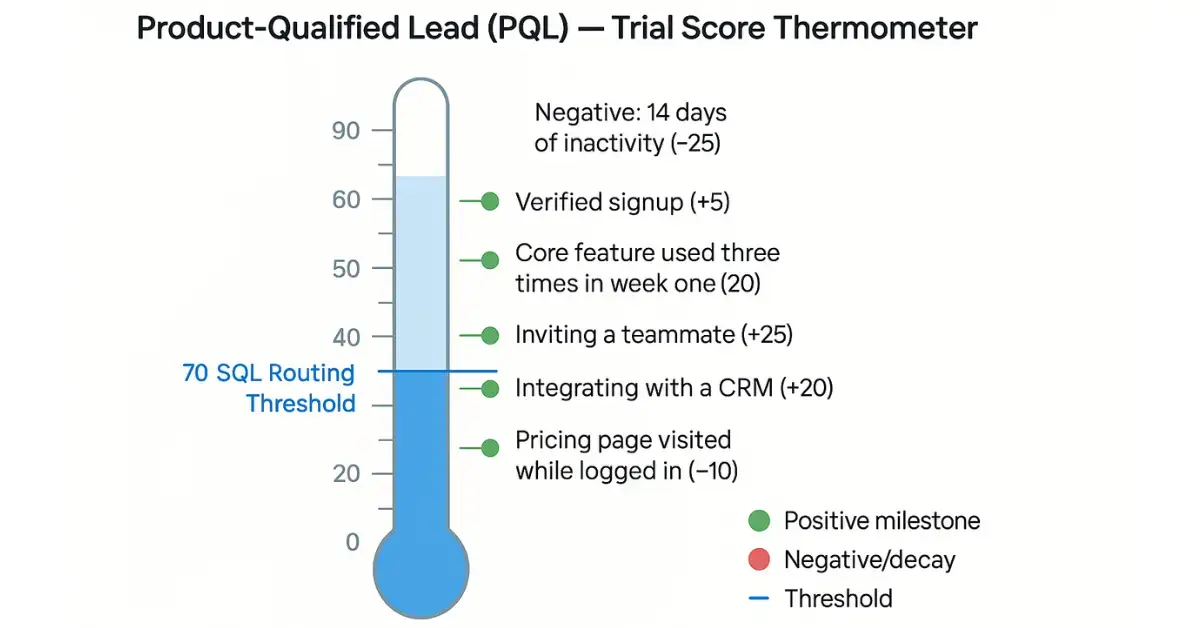
Trial users are one of the strongest PLG signals. A PQL model for trials might include:
Account creation with verified email (+5 points).
Core feature used three times in the first week (+20 points).
Inviting a teammate (+25 points).
Integrating with a CRM (+20 points).
Visiting pricing page while logged in (+10 points).
Negative: 14 days of inactivity (−25 points).
These scoring steps help identify which trial accounts are worth immediate sales engagement.
How do you measure success and avoid pitfalls in product-led lead scoring?
Success in product-led lead scoring isn’t just about putting a model in place—it’s about proving that the model reliably drives better business outcomes. To do this, focus on a mix of conversion, efficiency, and accuracy metrics:
Lift in MQL to SQL conversion rate. Track whether leads routed by the scoring model convert more often than those routed by traditional methods.
Time-to-first-sales-touch. Measure how much faster your sales team engages once high-value usage signals trigger alerts.
Win rate for PQLs vs MQLs. Compare how often product-qualified leads close compared to marketing-qualified leads.
Pipeline contribution. Assess how much of your pipeline is generated from PQLs and whether it is growing month over month.
Feedback loop accuracy. Collect AE and SDR feedback on routed leads to validate whether scores match ground truth.
At the same time, watch out for common pitfalls:
Overvaluing vanity metrics. Email opens and page visits rarely predict purchase on their own.
Ignoring score decay. Without decays, inactive users may appear hotter than they are.
One-size-fits-all thresholds. Different segments (SMB vs enterprise) often need different benchmarks.
Failing to validate with real outcomes. A model is only useful if its high scores consistently map to revenue.
By regularly reviewing these KPIs and correcting for pitfalls, you ensure that your scoring system remains accurate, scalable, and trusted by both marketing and sales.
Frequently Asked Questions (FAQs)
How do I apply lead scoring implementation roadmap steps in a US B2B SaaS context?
Start with a quick audit (signals, gaps, owners), then instrument priority events and connect them to CRM/MA for real-time scoring. Pilot with one US segment first to validate routing and SLAs before scaling.
How long does it take to implement a lead scoring model for most SaaS teams?
Most teams ship a first version in 30–60 days. Weeks 1–2 focus on audit/alignment, weeks 3–4 on instrumentation/integration, and weeks 5–6 on piloting and tuning with sales feedback.
What usage-based lead scoring rules best practices should we follow to avoid vanity metrics?
Prioritize repeated core-feature use over clicks, include negative points for inactivity, apply time-based decay, and set thresholds by segment. Pair alerts with talk-tracks so sales acts on real intent—not noise.
How to build PQL model that works for enterprises—and why product-led lead scoring for B2B enterprises matters?
Define activation milestones at user and account level (e.g., multi-seat activity, integrations, pricing-page visits). Weight events that signal consensus and expansion, then validate with AE feedback from complex deals.
Do usage signals vs profile signals for PQLs matter more for accuracy?
Usage signals are stronger predictors of revenue. Use profile data to set context (SMB vs enterprise), but route primarily on recency, frequency, and depth of product behavior to minimize false positives.
What does a product-qualified lead model for SaaS trial users include—and how do we act on it?
Examples: verified signup, repeat core-feature use, teammate invites, key integration, and logged-in pricing visits—offset by inactivity decay. Route trials that cross threshold to sales with usage context attached.
Conclusion
If your pipeline still relies on gut feel and static fields, you’re not alone—and you’re not stuck. A product‑led approach simply meets buyers where the real intent lives: inside your product. Start with small, confident moves, follow clear lead scoring implementation roadmap steps, and let data from real usage guide the next tweak.
Our take is simple: prove lift first, then scale. Ship a pilot, listen to sales, tighten decay, and promote the signals that actually predict revenue. When the model earns trust, everything downstream moves faster—routing, conversations, and deals. Want a hand getting there? 4Thought Marketing can help instrument events, configure a scoring blueprint, and run a 60‑day pilot that shows measurable impact before you roll it out broadly. Let’s turn product behavior into sales‑ready moments—without the guesswork.
Key Takeaways
Translating Eloqua terms to Marketo equivalents.
Match list logic precisely: Smart Lists versus Segments.
Replicate outcomes, not user interfaces or labels.
Surface consent rules and processing step differences.
Pilot one journey; validate events end‑to‑end.
You speak ‘Eloqua.’ Your new team speaks ‘Marketo.’ This Eloqua to Marketo glossary translates the terms so you can ship campaigns without learning the hard way. Although both tools are mature, tiny terminology gaps derail builds. But when you lead with a glossary—not a feature battle—you cut onboarding time, prevent consent mistakes, and keep reporting intact. Use this Eloqua to Marketo guide for day‑one productivity.
What This Eloqua to Marketo Glossary Covers
Below is a concise translation table for Eloqua to Marketo shift with usage notes and common gotchas. Use it to map your mental model quickly and ship a first campaign safely.
Eloqua term
Marketo equivalent
Where to click (Marketo)
Usage tip
Gotcha
Campaign Canvas
Program + Smart Campaigns
Marketing Activities → Program → Smart Campaigns
Break a canvas flow into coordinated Smart Campaigns
Mirror entry criteria and wait steps exactly
Shared List
Static List
Marketing Activities → Program → New → Local Asset → List
Use for fixed membership (imports, QA cohorts)
Won’t update dynamically—don’t expect rules
Segment (Shared Filter)
Smart List
Program/Workspace → Smart List
Rule‑based audience that updates continuously
Filters run often; watch processing volume
Program (Eloqua)
Program (Marketo)
Marketing Activities → New → Program
Same name, different categories and tokens
Align naming, channel, period cost model
Form (Processing Steps)
Form + Flow Action via Smart Campaign
Design Studio → Forms; then Smart Campaign Flow
Keep fields on form; move logic into Flow
Beware double processing if both run
Lead Scoring Model
Score fields + Smart Campaign rules
Admin/Field Mgmt; Smart Lists/Flows
Express model as field updates via flows
Reconfirm MQL thresholds with sales
External Activities
Custom Activities
Admin → Database → Custom Activities
Track non‑native events consistently
Plan API volume and retention
Custom Objects
Custom Objects
Admin → Database → Custom Objects
Mirror multi‑row data like products
Map relationships before syncing
Email Editor/LP Editor
Email Editor/LP Editor
Design Studio
Similar concepts; token patterns differ
QA tokens and snippets per template
CRM Integration App
Native CRM Sync (SFDC/Dynamics)
Admin → CRM
Document field ownership and cadence
Sandbox first; watch sync errors
Why a Shared Vocabulary Speeds Marketo Onboarding
When you arrive in a Marketo shop with Eloqua habits, the fastest wins come from naming things the way your teammates do. A shared vocabulary for Eloqua to Marketo removes the constant mental translation during builds, speeds reviews and handoffs, and prevents subtle errors—like using a Static List where a Smart List was intended or expecting “processing steps” to live on the form. It also anchors consent handling and field governance, so attribution, suppression, and CRM sync behave predictably across campaigns.
Onboarding speed: People move faster when terms match their muscle memory.
Lower risk: Misnamed fields or mismatched triggers lead to over‑mailing, lost consent, or bad attribution.
Repeatability: Teams can port proven campaigns across regions with fewer regressions.
Governance: A glossary anchors naming conventions, tokens, and audit trails.
How to Onboard from Eloqua to Marketo in 90 Minutes
Skim the Eloqua to Marketo glossary. Highlight terms you use daily; confirm the Marketo equivalents.
Rename and tag. Adopt team naming for Programs, Lists, and Smart Campaigns.
Rebuild one audience. Convert an Eloqua Segment into a Smart List; compare counts.
Translate one journey. Break a known Canvas into Smart Campaigns inside a Program; mirror waits and entry rules.
Port scoring. Recreate your scoring model as explicit Flow updates; align thresholds with sales.
Harden forms/consent. Keep fields on the form; shift processing to Smart Campaign Flows; verify opt‑in storage.
QA telemetry. Validate events (form submit, click) into CRM. Check deliverability settings and API limits.
Compliance checkpoints: centralize consent logic, store proof, run regional suppression checks, and version assets.
Best Practices for Using This Glossary
This Eloqua to Marketo glossary is a working tool, not a one‑time read. Keep it open while you build and review so translations become muscle memory and small terminology gaps don’t become production issues for the Eloqua to Marketo transition.
Keep the glossary in split‑screen when building Programs and Smart Campaigns.
When translating an Eloqua term, confirm the Where to click path before cloning assets.
Use Smart Lists for dynamic, rule‑based audiences; reserve Static Lists for imports and QA cohorts.
Keep fields on the Form and route post‑submit actions in Smart Campaign Flows to avoid double processing.
Express scoring as Score field updates; align MQL thresholds with sales and document the rules.
Add team‑specific Usage tip/Gotcha notes to the table as you discover edge cases.
Conclusion: One Language, Faster Campaigns
This Eloqua to Marketo glossary isn’t a side note—it’s the most useful, day‑one resource for translating Eloqua experience into Marketo results. By standardizing language, you reduce rework, avoid consent mishaps, and keep attribution clean. The faster your team speaks the same terms, the sooner campaigns move from reviews to results.
Put it to work: Keep the Eloqua to Marketo glossary open while building Programs and Smart Campaigns, align a few shop‑specific terms with your admins, and translate one production‑adjacent journey end‑to‑end. Then, capture what you learn back into the table so the next campaign ships even faster.
If your business is planning—or even exploring—a shift from Eloqua to Marketo, this terminology exchange is the best starting point. And when you’re ready to accelerate, 4Thought Marketing can help you cruise through the transition, a piloted Marketo Program with QA and consent checkpoints, CRM/integration validation, and hands‑on training for your builders. Contact 4Thought Marketing to schedule your onboarding session and first pilot.
Frequently Asked Questions (FAQs)
What is the Marketo equivalent of Eloqua Campaign Canvas?
Use a Program containing coordinated Smart Campaigns. Mirror entry rules, wait steps, and flow actions; use Channel/Program Status for reporting and progression.
How do I convert an Eloqua Segment (Shared Filter) to Marketo?
Rebuild it as a Smart List. Replicate each filter/logic operator, test people count on a sample, and cache key lists for performance. Use Member of List for fixed cohorts. Use a Program containing coordinated Smart Campaigns. Mirror entry rules, wait steps, and flow actions; use Channel/Program Status for reporting and progression.
Where do Eloqua Form Processing Steps live in Marketo?
Keep fields on the Form and route actions in a Smart Campaign with the u003cemu003eFills Out Formu003c/emu003e trigger. In the Flow, update fields, set program status, send alerts, and add to lists. Avoid double processing.
How do I migrate Eloqua lead scoring into Marketo?
Create Score fields (e.g., Behavior Score, Demographic Score, Total Score) and implement rules via Smart Campaigns (batch + trigger). Reconfirm MQL thresholds with Sales and sync to CRM.
What replaces Eloqua Shared Lists in Marketo?
Static Lists (fixed membership) and Smart Lists (dynamic rules). Migrate Shared Lists to Static Lists; recreate Shared Filters as Smart Lists. Choose Static for imports/QA and Smart for audiences.
How do I rebuild an Eloqua nurture in Marketo?
Use an Engagement Program with Streams and Cadences. Place content as Emails or nested Programs; use transition rules and Smart Campaigns to move people between Streams.
How do I track Eloqua External Activities in Marketo?
Define Custom Activities (Admin → Database) with a primary attribute, then send events via API. Plan retention and naming so reporting is consistent.
Key Takeaways
Visual builder speeds production — no fragile HTML
Reusable modules keep layouts consistent and brand‑safe
Requires Adobe IMS access and admin enablement
Reporting includes New Marketo Email Designer alongside legacy
Roll out with training, QA, and phased pilot
If email production in Marketo feels like a tug‑of‑war between “go faster” and “don’t break brand,” the new Adobe Marketo Engage email editor finally gives you both. The New Marketo Email Designer adds a clean visual builder, reusable modules, and simple admin guardrails—so authors can build confidently and admins sleep at night. No finicky HTML, fewer last‑minute fixes, and a process your team can actually follow.
A smooth rollout still matters. Confirm IMS access, pick one program type to pilot, and ship with a lean set of branded, token‑ready templates. Layer in quick training and a short QA checklist—preview, links, deliverability—then make sure reporting captures new‑designer emails alongside older sends. With those basics, the new adobe Marketo engage email editor doesn’t just upgrade your emails; it upgrades how your team works.
What the New Adobe Marketo Engage Email Editor Delivers
Think of the New Adobe Marketo Engage Email Editor as a friendlier way to build on‑brand emails at speed. You get a modern drag‑and‑drop canvas, reusable modules, and template variables for colors, spacing, and typography—plus the ability to lock critical brand and legal sections. Once your instance is on Adobe IMS and access is enabled, authors can assemble polished layouts without touching HTML, while admins control the structure, tokens, and approvals.
The sweet spot: teams that want faster execution without design drift. Success looks like a slim library of approved Marketo Email templates and modules, a clear token plan for UTMs and consent language, trained authors, and measurable improvements in build time, QA defects, and engagement.
Why Should you Choose New Adobe Marketo Engage Email Editor?
You’re likely weighing the same concern as every marketing team: can we move faster without losing control? Here’s how the new editor helps—and what to watch for:
Speed with guardrails: Drag‑and‑drop modules reduce custom HTML and keep layouts consistent across teams.
Admin clarity: Access lives in Admin → New Email Designer; templates and variables are centrally managed.
Apples‑to‑apples measurement: Email and link performance reports include New Marketo Email Designer sends, so dashboards stay comparable during migration.
Quality safety net: Built‑in checks (e.g., SpamAssassin check) catch risky content before approvals and launches.
Prerequirement to plan for: You’ll need Adobe IMS migration and the right entitlements—coordinate with your Adobe team.
Compatibility notes: New‑designer templates don’t work in the legacy editor; a phased rollout avoids disruption.
People factor: Authors still need training and clear rules about what’s editable versus locked.
How to Implement? – A Safe, 7‑Step Rollout Plan
Start small, learn fast, and scale with confidence. Use this single, streamlined plan:
Enable and sandbox. Confirm IMS, turn on access in Admin → New Email Designer, and test in a sandbox or pilot workspace.
Design the building blocks. Ship a lean set of branded, token‑ready templates with core modules (hero, copy+image, CTA, dividers, footer). Expose variables for colors/fonts/spacing and lock legal/brand areas.
Pilot one program type. Pick newsletters or webinars; convert one proven email and track build time, QA defects, and engagement.
Bake in standards and governance. Document alt text, heading order, link styles, consent language via tokens, and who approves templates before authors use them.
Train authors. Cover drag‑and‑drop, inserting modules, allowed personalization tokens, and “do not edit” notes in locked blocks.
QA and deliverability. Use Preview/device views, validate links and UTMs, and run built‑in checks before approvals.
Measure and scale. Ensure reports include new‑designer emails; compare to legacy baselines, then expand to more program types.
Watch‑outs: Moving/deleting programs with new‑designer emails is supported but coordinate naming/folder governance. Editing raw HTML inside an email can break its link to the template—keep structural edits in the template.
Best Practices: Field‑Tested Do’s and Don’ts
Do
Keep templates few and flexible; document where tokens belong.
Lock brand and legal modules; let authors edit safe text/image areas.
Version templates and note changes to trace impact.
Build in accessibility from day one (contrast, alt text, headings).
Standardize UTMs via program tokens; test every CTA.
Don’t
Flip everything at once—pilot, measure, then scale.
Let authors tweak structural HTML—use modules instead.
Assume reporting is automatic—confirm new‑designer sends are tracked.
Conclusion
Your team needs to move faster and keep brand tight. The new editor makes both possible once you set a few guardrails and teach the basics. With reusable modules, admin controls, and quick checks in place, production gets lighter and quality goes up. If you want a head start, 4Thought Marketing can help you run a focused rollout: a 30‑minute discovery, a two‑template pilot with locked brand/legal modules, author training, and a practical QA checklist. Let’s schedule your discovery and publish cleaner, on‑brand emails faster this quarter.
Frequently Asked Questions (FAQs)
1) Do I need anything before I can use the new Adobe Marketo Engage Email editor?
Yes—your Marketo Engage subscription must be migrated to Adobe IMS, and admins must grant access to users in Admin → New Email Designer.
2) Can I use new templates in the old editor?
No. New‑designer templates aren’t compatible with the legacy editor; plan a phased rollout.
3) What changes for reporting?
Email and link performance reports include New Marketo Email Designer emails, enabling side‑by‑side analysis with legacy sends.
4) How do modules help governance?
Modules limit structural edits to safe areas, standardize brand elements, and reduce breakage; build and lock critical sections at the template level.
5) Any built‑in deliverability checks?
Marketo includes a SpamAssassin check to flag risky content before send.
Modern B2B teams want faster launch cycles and tighter CRM alignment, and many look to Marketo Engage for standardized programs, ABM, and reliable analytics continuity. But switching from Eloqua is rarely a lift-and-shift—field models diverge, program channels map imperfectly, and consent or deliverability can slip if the move is rushed. That’s why this guide outlines an Eloqua to Marketo migration you can run step by step—discovery, mapping, pilot, cutover, and stabilization—using clear quality gates to preserve attribution, opt-ins, and campaign velocity.
What is an Eloqua to Marketo migration?
An Eloqua to Marketo migration is a structured replatforming of audiences, assets, automations, and reporting from Eloqua into Marketo Engage. The objective is continuity: transfer account and contact data, custom objects. Maintain consent, attribution, scoring, and funnel health while modernizing your stack. A strong plan defines scope, sequencing, owners, and quality gates to keep risk low.
Why switch from Eloqua to Marketo?
Teams switch when they want tighter CRM alignment, richer ABM, or simpler program architecture. If you are evaluating a switch from Eloqua to Marketo, consider Marketo vs Eloqua on four dimensions: data model, channels, governance, and ecosystem. Your findings should feed the business case and the plan that sets expectations for time, cost, and ROI.
Planning your migration strategy
Start with a current-state assessment. Audit data structures, custom fields, segments, integrations, and automation workflows in Eloqua. Align stakeholders across marketing, sales, IT, and compliance to confirm scope and success criteria. Set clear goals for Marketo adoption, including campaign velocity, lead management precision, and reporting clarity. Identify resource gaps and training needs early so your Marketo implementation for former Eloqua users starts smoothly. In practice, some objects aren’t apples to apples between the platforms—like program membership, shared lists, or custom objects—so using a partner familiar with both systems reduces surprises and speeds translation.
Pre-migration checklist
Complete a data inventory: people, accounts, custom objects, lists, and activity histories.
Map Eloqua fields to Marketo fields; normalize picklists and naming conventions.
Review dependencies: lead scoring, segments, and shared lists that may need reconfiguration.
Prioritize data cleansing: remove duplicates, outdated records, and non-compliant profiles.
Document scope, timelines, owners, and risks; publish a communication plan.
How does the Eloqua to Marketo transition process work?
Think in phases. This blueprint converts complexity into predictable sprints:
Design and mapping – Create your Eloqua to Marketo data migration schema: field-by-field mappings, picklist normalization, program channel mapping, and success step conversions. Document how lead statuses, program membership, and campaign types translate.
Build and configure – Stand up workspaces or partitions, branding domain, SPF, DKIM, DMARC, CRM sync rules, and Sandboxes. This is where Marketo implementation for former Eloqua users shines—align engagement programs and smart campaigns to your existing buyer journey.
Migration and QA – Execute the data migration for a pilot cohort. Validate consent states, unsubscribe flags, channel tags, and UTMs. Rebuild email and page templates only where needed; refactor nurtures into engagement programs. Extend testing to forms, routing, and alerts.
Cutover – Freeze changes in Eloqua, enable program syncs, and switch DNS for branded tracking links. Run parallel sends for one cycle to confirm deliverability and attribution. Announce migration completion to stakeholders with clear rollback criteria.
Stabilize and optimize – Monitor volumes, spam complaints, bounces, and campaign performance. Update the plan with lessons learned. Schedule a 30-day retrospective focused on analytics parity and team workflows.
Data Quality, Privacy, and Compliance
Validate field formats and required attributes during mapping. Confirm opt-in status and regional preferences so consent translates accurately. Document lawful bases and retention rules to align with GDPR and CCPA. Use secure transfer protocols and limit access during migration to reduce risk. Treat the Eloqua to Marketo data migration as a governance exercise as much as a technical one.
Training and Adoption
Transitioning means new workflows and reporting. Create a role-based training plan that covers program setup, segmentation, engagement programs, and reporting in Marketo. Provide hands-on workshops and quick-reference guides. Encourage knowledge transfer through internal champions and office hours so former Eloqua users become confident in Marketo.
Best practices for a Resilient Plan
Preserve consent first: ensure lawful basis, opt-in timestamps, and regional preferences migrate cleanly during the move.
Refactor, do not clone: engagement programs replace many Eloqua campaign patterns—use this as a modernization moment.
Design for operations scale: standardize program templates, channel tags, and reporting so the implementation accelerates onboarding.
Prove parity fast: track a golden cohort from first touch to pipeline to verify KPIs survived the switch.
Communicate clearly: publish a week-by-week update during the migration to maintain confidence.
Common Pitfalls and How to Avoid Them
Poor data mapping leads to data loss or misclassification; verify mappings with samples.
Lack of sandbox or phased testing allows errors to propagate; pilot first, then scale.
Insufficient communication creates rework; run weekly check-ins and publish decisions.
Ignoring privacy requirements risks violations; validate consent data at every step.
Inadequate training slows adoption; schedule role-based sessions and follow-ups.
Post-migration Stabilization and Optimization
Conduct a full audit of automations, triggers, segments, and reports. Manually test forms, emails, and landing pages in their new context. Monitor CRM sync health and tracking links. Leverage new Marketo capabilities such as engagement programs and dynamic content. Define new benchmarks for opens, clicks, MQLs, and pipeline so you can measure lift after optimization.
Update your Marketo migration plan with lessons learned and a 30-day retrospective; codify improvements into templates, SLAs, and QA checklists. Ready to move? Book a 45-minute migration assessment with 4Thought Marketing. We’ll validate scope, propose a pragmatic Marketo migration plan, and outline an implementation that protects deliverability and reporting from day one.
Frequently Asked Questions (FAQs)
What is the best way to migrate from Eloqua to Marketo?
Use a phased approach anchored by a documented plan: discovery, mapping, pilot, cutover, and stabilization. This reduces risk for global teams in the US, EU, India, and APAC.
How long does this migration take?
Most mid-market replatforms take 8–12 weeks, depending on asset volume and integrations. A disciplined plan shortens timelines and protects deliverability.
What data and assets migrate from Eloqua to Marketo?
People, accounts, custom objects, program membership, templates, and consent. Prioritize accuracy, then selectively rebuild nurtures and preference centers to fit Marketo patterns.
Do I need a dual-run cutover when moving to Marketo?
For complex stacks, yes—parallel sends confirm inbox placement and reporting before you fully switch.
How should I compare the two platforms?
Score requirements for CRM sync, engagement programs, ABM, and governance. “Marketo vs Eloqua” findings should guide whether to switch from Eloqua to Marketo now or later.
Key Takeaways
Score the journey: sequence, synergy, stickiness.
Add team signals and integrations to see intent.
Keep it explainable—show what moved the score.
Set thresholds → trigger plays you’ll actually run.
Start small, measure lift, and tune monthly.
Your portfolio spans multiple products, and revenue depends on how customers stitch them into daily workflows. A multi-product PLG score turns scattered signals into a PLG scoring model operators can act on. Teams often track an account health score and run Eloqua and Marketo lead scoring, yet expansion is driven by cross-product usage and collaboration—the patterns that convert activity into timed, targeted actions.
What is the multi-product PLG score?
A composite built from how customers move across products and work as a team. Core inputs:
Adoption sequences (what starts the journey, what consistently follows)
Feature synergy (pairs/clusters used in the same window)
Stickiness across tools (repeat multi-product use vs one-offs)
Point rules on single features flatten behavior and miss timing. A PLG scoring model that incorporates the cross-product pattern and collaboration becomes an early, defensible indicator for upsell, cross-sell, and save plays. Explainability is essential so sales and success can see which events moved the number.
How to build the score (fast path)
Instrument the event dictionary (feature used, integration added, workspace created) with reliable user/team/product IDs.
Select 4–6 inputs from the signals above; set light initial weights and test on a sample cohort.
Define thresholds and actions: tiers (nurture, assisted, high-touch) with specific outreach, offers, and handoff rules.
Enable real-time triggers for material score changes; log the reason each trigger fired.
Explain & improve: show local drivers to field teams; use feedback to tune inputs and thresholds.
What are Best practices & governance?
Cadence: monthly drift check, quarterly retrain with change log.
Overrides: allow exceptions with guardrails and approvals; maintain an audit trail.
Documentation: model card, training snapshots, validation results.
Feedback loops: capture false positives/negatives from sales and success and fold into the next retrain.
Is marketing automation suitable? It depends.
Marketing automation can absolutely accept product events and power scoring-driven programs—but suitability depends on latency, volume, identity complexity, and model type.
Use MA alone when you have a small set of high-value events, near-real-time to daily latency, rules-based logic, and person-level updates that roll up cleanly.
Supplement MA (warehouse/CDP + scoring service) when you need sequence-aware or graph-aware scoring across multiple products, robust account-level rollups, heavier event volumes, or sub-minute reactions. Compute externally; write the score back for orchestration.
Can I push in-app product usage to Marketo/Eloqua for scoring?
Yes. Define a compact event dictionary, stream to your CDP or warehouse, normalize IDs, and sync scoring fields into the systems of action. Smart Campaigns/Program Canvas can react immediately. Teams typically map usage into Marketo lead scoring for behavioral adjustments and Eloqua lead scoring for structured engagement inputs, qualify into lifecycle stages, and alert sales. Start with a handful of high-value events and a closed-loop report to verify lift.
Future-ready extensions
Market-aware adjustments for pricing or competitor moves
Cold-start aids (transfer learning) for new products
Coverage expansion to include partner usage and marketplace add-ons
Conclusion & next steps
Growth depends on seeing the whole pattern—how products and people come together, in what order, and with what staying power. A multi-product PLG score embedded in a PLG scoring model gives you an actionable signal instead of a noisy dashboard. Put it to work by auditing events, defining a lean schema, wiring thresholds to concrete plays, and enabling real-time triggers with explanations so every move is timely and defensible. Keep the account health score current for executive roll-ups, and align lifecycle programs with Eloqua and Marketo scoring so marketing automation and field execution move in lockstep.
If you want a fast start, 4Thought Marketing can lead a focused sprint to map your product graph, finalize inputs and thresholds, pilot on a controlled segment, and return a model card plus playbooks ready to deploy.
Frequently Asked Question (FAQs)
What is a multi-product PLG score?
A multi-product PLG score combines signals from how customers move across products and collaborate as a team. Core inputs include adoption sequences, feature synergy, stickiness across tools, integration depth, and collaboration intensity.
Why use a PLG scoring model?
A PLG scoring model turns cross-product behavior and collaboration into a single, defensible signal for prioritization. It supports tier thresholds and playbooks while keeping explanations visible to sales and customer success.
How does an account health score relate to a PLG scoring model?
An account health score provides an executive-friendly roll-up of retention and expansion risk, while a PLG scoring model focuses operationally on cross-product behavior and collaboration to trigger specific actions.
Can I push in-app product usage to Marketo/Eloqua for scoring?
Yes. Define a compact event dictionary, stream events to your CDP or warehouse, normalize IDs, and sync fields into systems of action. Teams commonly map product usage into Marketo lead scoring for behavioral adjustments and Eloqua lead scoring for structured engagement inputs.
Is marketing automation suitable for PLG scoring?
It depends on latency, volume, identity complexity, and model type. Marketing automation can ingest key product events and support rules-based scoring; when you need sequence-aware or graph-aware scoring at account level and lower latency, compute externally and write the score back for orchestration.
Imagine designing a great email marketing campaign, only to have most of your recipients lose interest because of the microscopic text size on their screens. Or generating demand from a social media campaign but losing out on conversions because of unnavigable landing pages that do not adjust to a device’s screen size. Utilizing responsive design can significantly enhance user experience.
Campaign strategies need to include optimizing emails, landing pages, and websites for various screen sizes and keeping visitors engaged. Responsive design provides the solution for a seamless experience across devices.
What is Responsive Design?
In today’s digital landscape, implementing responsive design is crucial for improving accessibility and ensuring that users have a positive interaction with your content, regardless of the device they are using.
Responsive design is the process of designing emails, landing pages, and websites that adapt to the end user’s screen as well as its orientation. It uses fluid layouts, flexible grids, responsive images, and CSS media queries to ensure that your emails and website landing pages render correctly on the end user’s device display. It even delivers a seamless viewing experience if a user switches the orientation of their device from portrait to landscape mode.
Why is Responsive Design Important?
Emails, landing pages, and websites are a critical part of a potential customer’s journey to conversion. The longer they spend with your content, the more likely they are to turn into strong leads and convert.
Viewing content on desktops is easy because of the large screen size. However, when users access their emails on their mobile devices, things can get a little tricky. Text, images, and buttons are much smaller, and thus harder to navigate and click.
Apart from the device itself, email clients (the programs that emails are viewed on) also display emails differently. So, an email that is formatted for Gmail will not look the same on Outlook, for example.
Similarly, landing pages need to render quickly and efficiently regardless of the device used to access them to provide a consistent user experience.
Lower Bounce Rates
Research shows that even a 0.1s improvement in loading speed can increase conversions by 10%. Mobile users are even more impatient. According to Google, as page load time goes from one second to 10 seconds, the probability of a mobile site visitor bouncing increases by 123%. Without fixing this, you can lose out on conversions even when potential customers make it to your landing page.
Better User Experience
Forbes reports that 88% of users are less likely to visit a website after they’ve had a bad experience. Since your landing page is often their first interaction beyond email and digital marketing, it’s vital that your landing page delivers. Google recommends having fewer than 50 individual pieces of content on your mobile page for an optimal user experience.
Higher Credibility
Stanford research shows that well-designed websites with great user experiences build credibility with potential clients. Responsive design helps your website’s landing pages look clean and professional to build the trust necessary to generate leads.
Improved SEO Rankings
Google uses mobile-first indexing for its SEO rankings. Optimizing landing pages for mobile gives them a better chance of ranking higher.
Future-Proof Pages
New devices flood the market every day. Responsive design means your landing page and website adapt to the latest technology without revisiting the design.
What are Responsive Design Best Practices
Responsive emails and landing pages must be carefully planned to suit the needs of your target audience and their devices. A few elements to consider include:
Mobile-First Design
You want your content to look great whether it is viewed on a 6.5-inch screen or a 20-inch one. Similarly, it needs to account for screens with different resolutions. The size of the screen will determine the breakpoints your page needs for a clear flow. Design breakpoints for different standard screen sizes, like mobile, laptops, and desktops.
Designing emails and landing pages for the smallest screens first allows you to structure and prioritize content so that vital information appears first. It also helps design a mobile-friendly navigation system right from the start.
Responsive Images, Logos, & Fonts
Use responsive images to optimize load times and enhance user experience. Use SVG images for icons or logos. Their small file size also helps optimize page loading speed and performance while still looking good on screens of all sizes.
Font sizes for mobiles may look too large on desktops or vice versa. Choose a font size that is user-friendly for both.
Touch-Friendly Buttons
The ability to click that all-important CTA button easily is an important aspect of emails and landing pages. Interactive elements like buttons and links need to be clearly highlighted with enough space around them to prevent them from being tapped accidentally as users scroll on their smartphones. Another option is to turn all links into click-friendly buttons.
Similarly, typing is difficult on mobile devices. To make landing pages even more phone-friendly, keep your forms short and offer dropdowns as much as possible.
Test Across Devices
Test your responsive design across multiple devices and screen resolutions to ensure it is working as intended. You should also check it against different email clients and browsers and tweak it as necessary.
How to Optimize Your Engagement Rates
Great user experiences can boost your engagement rates and drive conversions. Make the most of your marketing efforts with well-designed emails and landing pages! Contact the experts at 4Thought Marketing today to get started.
A thriving email contact list is the foundation of effective campaigns, and when your data is accurate and complete, it fuels lead generation, engagement, and higher conversions. Every marketer dreams of steady email list growth and a responsive audience that reads and acts on messages.
Yet, when that growth slows, the temptation to buy from list vendors grows stronger, promising instant access to new contacts. A purchased email list may seem like the fastest route to grow your email database, but it comes with hidden risks that can damage your reputation, deliverability, and compliance. Building your own list through ethical, opt-in strategies is the only approach that safeguards trust, keeps you aligned with regulations, and sets you up for long-term marketing success.
Email Contact List Compliance and Privacy Laws
Email lists can be purchased or rented from third-party vendors. Some may even claim to sell “opt-in” lists—meaning the contacts agreed to receive emails from a specific source at some point. The catch? They never agreed to receive emails from you. This creates serious GDPR compliance issues and can violate privacy laws and email marketing regulations.
By incorporating zero-party data collection into your outreach strategy, you not only protect customer privacy but also build ethical, transparent relationships. Every contact in your database has actively chosen to connect with you, ensuring your outreach remains compliant.
Platforms like Eloqua email marketing offer robust compliance features to support consent-based campaigns, but these work best when your list is permission-based from the start.
Improving Email Deliverability With an Organic Email Contact List
A purchased email list is often riddled with outdated or invalid addresses, leading to high bounce rates that hurt your email deliverability.
Instead, collect addresses via opt-in methods like post-purchase surveys, newsletter sign-ups, or dedicated landing pages. These contacts are more likely to engage with your content, improving your sender reputation and ensuring your messages actually reach inboxes.
For example, Marketo email marketing users can leverage advanced segmentation to boost deliverability rates—provided the database is clean and organically grown.
Avoiding the Spam Folder Through Clean Email Contact Lists
Using purchased addresses can trigger spam traps, sending your campaigns straight to the spam folder. Spam folder prevention is becoming more challenging as providers like Google and Yahoo tighten email sender regulations—requiring spam complaint rates below 0.1%. With an owned list, you can run targeted re-engagement campaigns, reminding inactive subscribers of the value you deliver. This keeps your audience active and your spam rates low.
Keeping Your ESP Happy With High-Quality Contact Lists
Email service providers (ESPs) expect high-quality lists. Poorly sourced lists can harm deliverability for all customers sharing the same IP. That’s why most ESPs prohibit the use of purchased lists.
By maintaining a clean, permission-based database, you safeguard your relationship with your ESP and ensure reliable campaign performance.
Focusing on Quality Over Quantity in Email Marketing
A smaller but high-quality list often outperforms a massive database filled with unqualified or disengaged contacts. Purchased addresses may not reflect your target audience, leading to poor email engagement and wasted effort.
Subscribers who opt in are genuinely interested in your brand and more likely to provide valuable zero-party data you can use for personalization. This means better segmentation, more relevant messaging, and higher conversion rates—without the risk and unpredictability of purchased lists.
Conclusion
An organic email contact list gives you accuracy, relevance, and the trust of an audience that has chosen to hear from you. That means better email engagement, stronger email deliverability, and compliance with privacy laws like GDPR. Buying contacts might seem like a shortcut, but it undermines these benefits, leaving you with high bounce rates, spam complaints, and wasted resources. When you invest in building your list ethically, you protect your sender reputation, get better results from platforms like Eloqua email marketing and Marketo email marketing, and create lasting connections that turn subscribers into loyal customers. Contact Us…
March 30, 2026 | Page 1 of 1 | https://4thoughtmarketing.com/marketing/page/2/