It’s not uncommon for routine data cleaning to remove contacts from your Eloqua database, breaking the mapping to custom objects (CO). But don’t worry, if they come back through purchases or form submissions, you can use the Unlinked CO Mapper Cloud App to restore all of that valuable segmentation and personalization data you might have lost. With this tool, you can easily re-map those unlinked custom object records and get your data back on track.
Click here to learn more about the Unlinked CO Mapper Cloud App and request a free trial.
Generating leads is a crucial part of any business, yet many companies fall short in this area. “Where are we going wrong?” In this blog post, we’ll explore some common lead generation mistakes and offer solutions to help you improve your results.
1. Talking About the Wrong Topics
It may seem obvious, but in order for people to convert on your website, your content must address their needs and pain points. Think about how often your product-related content is doing this. When people search on Google, they’re looking to solve a problem or meet a need. They have questions, and to convert leads, your product information should answer those questions. By addressing the right topics, you’ll create an opportunity to build trust with your prospects and guide them through the buying process, ultimately leading to conversions.
When customers find you online, they expect your sales pitch. But you can disarm them by showing neutrality. Instead of producing a lead about “Why this product is right for you,” try “Is this product the right fit for you?” One shows bias, the other doesn’t. Remember, you won’t always be the best option, and that’s okay. Your sales team has ideal-fit customers, and they don’t want to waste time selling to those who don’t fit the mold.
4. You Have No Clear Next Steps
What do you want the lead to do next? Should they read a related article? Contact you? Use the ROI calculator? Choose a single action and create calls-to-action (CTAs) for those landing pages, articles, etc., and add them to the end of the articles.
5. You’re Not Promoting Your Product
Without traffic being driven to your product page, leads won’t happen. Interview your existing customers to find out their online habits. What social media platforms do they use? Which industry journals or newsletters are they subscribed to? By understanding your prospects’ online habits, you can learn where they live – digitally. Then, share your product information page on those platforms. If it’s social media, find groups your prospects are part of and participate in discussion threads, sharing your content. If it’s an industry newsletter or journal, look into sponsored content options.
Preventing Lead Generation Mistakes
By avoiding common lead-generation mistakes and implementing these solutions, you’ll be well on your way to generating more leads for your business. Remember, it takes time and effort, but with persistence and the right approach, you’ll see results. Contact 4Thought Marketing today to learn more about effective lead generation.
Marketing emails unfortunately come with a negative reputation. Consumers often complain about receiving too many, too often. But with the immense advertising potential (not to mention ROI) that email marketing tends to bring, it’s not a method most companies can afford to ignore or significantly scale back. So, how do you get your contacts to actually be happy to receive a marketing email from you?
One way is to give the consumers control over the emails they receive. This is best accomplished with an email preference center, a webpage that allows email subscribers to control their preferences and experience with your organization. This allows consumers to pick the topics they are interested in without unsubscribing entirely.
In today’s article, we’ll look at the four essential parts of building a preference center and how you can give your customers a positive experience.
Step 1: Planning
Before construction begins, you need to know exactly how you’ll use it, its scope, and the data required to build it. You’ll also need to develop an easily readable form design that streamlines the process. And of course, you must comply with data privacy laws as you manage your customers’ preferences.
We recommend getting expert input for this stage, including:
Consulting with your data privacy officer and legal team
Research preference center ideas and best practices by observing companies you admire, Your call, and even your competitors
Consulting with a customer behavior analyst to see what content and frequency options will be most popular
Having team members look over your proposed design to ensure it’s easy to understand
Step 2: Consent
This step comes straight from the privacy compliance consultation earlier. Collecting customer consent to continue marketing to them is important for an email preference center.
You’ll want to ensure that your preference center:
Uses an opt-in consent system rather than pre-selected opt-in to make customizing preferences easier for the user
Requires that the user confirm they have read and accepted the terms of use and your privacy policy before submitting the completed form
Explains openly and honestly how your business collects and uses all customer data, including any information you are legally required to disclose
Step 3: Design & Implementation
Now, the designing and implementation phase begins. The designing stage is easy. Your preference center should obviously have the same branding as your business (or, if necessary, any brands you work with). The entire page should be easily scannable and understandable. Users should be able to access the page from mobile devices as easily as from computers. And of course, you’ll want to use colors and layout schemes that make the whole page aesthetically pleasing.
The details of implementation can get tricky, however, especially when it comes to data collection. As you structure your page, keep these general rules in mind:
Use your best judgment to decide what data is required for your business and content offerings.
Make sure the data you request is age-appropriate.
Allow customers to choose their preferred form of communication (i.e., text messaging over emails) and ensure your system can support their choice.
Once your data collection rules are in place, you can move on to more detailed page construction. Remember: the aim of this page is to convince your contacts to agree to as many personalized emails as possible. Highlight the advantages of more personalized marketing communications to them to encourage them to share more information and sign up for more frequent contact. Allow your contacts to specify how often they want to receive messages from you. Give them the freedom to decide how they want to hear from you: via a text message, through an email, or something else if your system supports it. (We also suggest including thumbnail previews of your communications so your customers can recognize messages from you.) Finally, you’ll want to ensure that your preference center displays in your contact’s language (if they have the option to choose one), and that the page can identify and filter out fake email addresses.
Once the user has filled out the form and clicked submit, send them a welcome email outlining their preferences and explaining how they can update this information whenever they want. They’ll be happy to have control over their choices. And you’ll be happy to have a potential long-term lead.
Step 4: Unsubscribing
Of course, customers will want to unsubscribe periodically. In this case, the best thing you can do is make unsubscribing as simple as possible.
In each email, include a link to update their communication preferences. When someone clicks unsubscribe, send them to your preference center and prompt them to adjust the type of information they want to receive. For those who want to unsubscribe entirely, make the process simple. You can also offer a “snooze” button that allows subscribers to pause communications for a specified period of time. Just make sure to follow up with a “Welcome back” email when the time comes and get confirmation that they want to hear from you again.
Conclusion
Effective customer communication starts by giving your contacts a degree of control. Customers will feel much happier with a business that listens to and respects their preferences, whether about frequency of contact or the types of messages they want to receive. And of course, data plays a big role in all of this. Your marketing team will be happy with the more detailed marketing materials they can create, and your contacts will benefit from a personalized content experience.
Marketing and advertising can take advantage of countless media in the modern world. And with consumers using technology for almost everything, there’s never been a better time to provide them with customized marketing materials designed to cater to their interests. While there are several ways to do this, one popular choice for most companies is to send an email.
But any marketer knows that there’s more involved than just typing a couple of lines of text and clicking send. Effective marketing emails need engaging content, eye-catching colors, an aesthetically pleasing design, and more to bring in business. And don’t forget about customizing the email’s content to match the customer’s interests! Marketing automation tools can help you create successful emails, but they won’t do all the work for you.
Your End Goal: Generating Conversions
As you begin designing and writing your campaign emails, keep your end goal in mind: generating conversions. This goal should influence each step of the process. What is your email offering the customer? Does it meet their needs? Will they be satisfied with the offer? Your customers’ thought process should be at the forefront of your campaign plans.
With this goal in mind, let’s take a look at how to design emails for effective marketing.
The 6 Types of Marketing Emails
Businesses focused on e-commerce should focus on six key types of marketing emails to retain or boost customer engagement. These emails include:
Welcome emails shortly after subscription
Promotional or announcement emails about a new product or upcoming event
Receipt emails sent to confirm an order
Re-engagement emails to revive interest in inactive customers
Newsletter emails to keep customers engaged and updated
Cart abandonment emails to remind customers about an unfinished online transaction
Each email demands its own layout and design. Since the type of email determines the design you’ll be creating, knowing what type of email you’re creating is a critical first step.
How to Design Emails: Aesthetics
There are a few key elements to keep in mind as you design your email layout. First of all, consider how this email is likely to be viewed. Do your customers tend to open emails on their phones or laptops? Your final design should be mobile-friendly and still look good on a larger screen.
Second, branding. Is your logo and/or company name prominently displayed? Can the customer tell at a glance which company is contacting them?
Third, colors. Too many colors can create an email so bright it’s painful to look at, and may even slow loading time. Overly busy patterns can cause similar problems. On the other hand, not enough colors can make your email look stale and boring. Find a balance of colors that will catch the eye without overwhelming your reader. And most importantly, keep your colors consistent with your brand! Using hot pink in an email when your logo is dark blue isn’t a great idea.
Finally, consider white space. It shouldn’t take up your entire email. Instead, use white space strategically to distinguish between different sections of your message. This will help the email flow. You can also use white space to highlight important sections, such as your CTA button.
Making a Great First Impression
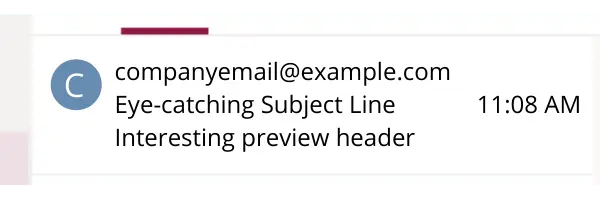
Before a customer clicks your email, two all-important lines of text appear in their inbox: the subject line and the preview header. Both play an important role in customer engagement.
The subject line is the first part of an email the recipient will see. It has to be intriguing! A subject line that’s too long will make a customer lose interest and, worse yet, may even be cut off since most email inboxes restrict subject lines to 60 characters. Some mobile devices even cap the limit at 30 characters! Keep it short and sweet without sacrificing the all-important intrigue.
Next is the preview header. This is a line or two of text below the subject line that adds a bit more detail about the email’s contents. This should be close to your subject line length, with a standard upper limit of 40-50characters. Put the most important ideas first, just in case your preview header is cut off. But don’t give it all away here! Make the customer interested enough to click the email rather than get all the info they need from the preview.
Additionally, make sure to add something for the preview header, even if it’s short. If you leave the space blank, your client’s inbox will display the first line or two of your email body instead. It’s far better (and cleaner-looking) to add a short, snappy preview header.
Personalizing the Message
Timely, relevant, and personalized emails can significantly increase the likelihood that a customer will respond. Addressing the recipient by name is already a great start, but don’t stop there. Further data segmentation enables you to create emails designed to make customers happy and more likely to buy. To use an example, segmentation should prevent you from sending an email promoting a new brand of cat food to someone who owns a dog and has no use for cat food.
Eloqua users will be happy to know that Eloqua’s custom objects system allows you to segment and personalize emails like a pro! Learn more about how to use custom objects in email design here.
What to Write?
It’s finally time to draft your email. But what does it take to create the perfect email copy?
There are a few principles to keep in mind as you write your email body. First and foremost, keep it simple. Invite your readers to click on landing page links for more details instead of trying to fit all those details into your email. Short, to-the-point email copy will leave a much bigger impression on your readers than trying to write an entire essay.
Second, remember to humanize your content. This goes beyond personalization measures like inserting the reader’s first name. If your email sounds like a robot wrote it, people will get bored and click off. Make the email feel like it was written specifically for them.
Third, consider whether your email works better as active or passive content. (A quick refresher: active content invites the reader to do something, such as make a purchase or register for an event. Passive content, such as a white paper or infographic, simply presents information without asking the user for action in return.) The vast majority of marketing emails should consist of active content.
Technical Considerations
Now that you have your email drafted, it’s time to start designing. But there’s more to keep in mind at this stage than just graphic design principles. A well-designed email that doesn’t function correctly is a failed email. As you design your message, prioritize these technical considerations:
Links: Double and triple check that each link works and sends you to the correct webpage or asset
Fallback fonts: Sometimes your branded font may not load properly in a client’s inbox. When this happens, the inbox will load your email in a default font instead. Choosing a fallback font lets you control how the default font looks without compromising your email design.
Email dimensions: It’s generally advised to stick to 600 px for desktop emails and 320 px for mobile. Remember to check your final email in both desktop and mobile inboxes to ensure the design changes to fit your screen.
File size: There’s no ideal file size for your finished email or its assets. However, remember that the bigger your email is, the longer it will take to load, especially on mobile. Experiment to find a good balance between eye-catching visuals and shorter loading times.
On rare occasions, an image in your email may fail to load properly. The recipient will see a blank white space when this happens. However, if you add alt text to your image, this white space will display the alt text if the image fails to load. Adding alt text that flows well with the rest of your message and describes the missing image makes the email feel more complete even if something goes wrong.
The All-Important CTA Button
Your email might have multiple CTA links, but only one should take the spotlight and be the primary focus of your email. This one links to the action you really want to encourage: making a purchase, downloading a document, registering for an event, etc. Your primary CTA should be separate from the rest of the message, ideally in a colorful button surrounded by white space to make it stand out. Keep the copy short and sweet—“Shop now” will work far better than “Browse these amazing deals and more in our online store”.
Overall, your CTA button should clearly explain what you want the customer to do, stand out in your email, and be compelling enough to motivate the customer to click.
Don’t Forget the Footer
Once the rest of your email is done, start thinking about the potentially most boring part that few customers pay attention to in the footer. Don’t overlook this even if you suspect your customers will. Not only can you use the footer to build additional connections, but it can also play a key role in your legal compliance.
A well-crafted email footer should contain several things:
Reinforcement of your branding to make it absolutely clear who sent the email
Contact and/or subscription information required by law (for instance, the address or contact info of your company, preference management options, and possibly terms and conditions)
Additional links (for example, links to contact your company or visit your social media pages)
Privacy policy or a link to view it to show your commitment to privacy compliance
The email footer is your last chance to include vital content. Make sure to take full advantage of this.
Taking the Email for a Test Drive
Now it’s time to test the email!
There are three major things you should test for at this stage. First, see if everything loads correctly. When you open the email in your own inbox, are all the images showing up? Is the text formatting still good? Do all the links still work?
Second, perform a quick spam test. Sometimes you can accidentally trigger someone’s spam filter, get routed to their junk folder, and pass under their radar completely. See if your own inbox flags your email as spam. There are plenty of free and commercial spam checkers available online. Make any changes you need to pass the test.
Finally, it’s time to send the email out. This is where the third, more long-term focused testing stage comes in: A/B testing. You might have multiple subject lines or email layouts for a particular campaign and aren’t sure which one is the better choice. Send out both! Monitor your results to see which option performs better, and use this information when designing future campaigns.
Email Campaigns Take Time
When it comes to marketing email campaigns, quantity no longer determines the winner. In fact, sending out emails en masse can get you flagged as spam by some inboxes. Quality rules now. A professional marketing email designed to provide the customer with exactly what they want will be far more successful than past mass email campaigns.
Ready to start designing better marketing emails? Get in touch with us today to learn more about how we can help.
Listen to Alexis Buitrago, Sr. Analyst at Catalent, and Linda David, Sr. Consultant at 4Thought Marketing, discuss how Catalent simplified lead delivery and made the process much faster using the Eloqua Upload Wizard.
Data is the lifeblood of the marketing industry. Marketers instinctively want to leverage data for personalization. For Eloqua users, that might include storing data in Custom Data Object (CO) records to keep everything organized.
Unfortunately, all the data-filled Custom Objects in the world don’t do a lot of good unless you know how to convert their contents into something useful for your customers. And without an efficient conversion method, is collecting and maintaining that much data really worth it?
At 4Thought Marketing, we want to empower you to use data to create hyper-personalized emails. That’s why we developed a powerful tool to help you utilize your data in customized marketing messages: the Embed CO Records in Email Table Cloud App for Oracle Eloqua.
Embed CO Records in Email Table Cloud App Overview
With this app, Eloqua users can take advantage of all the information stored in a Custom Objects. When you specify a particular contact, the app will search all Custom Objects mapped to that contact and select the most relevant ones based on user-specified filters. The app will search the data itself as well—it can filter text, numbers, and even dates to select exactly what data makes sense for your purposes. This data then allows you to build personalized emails tailored to specific users. This can lead to more positive responses to the emails and, hopefully, an improvement in your email marketing strategy.
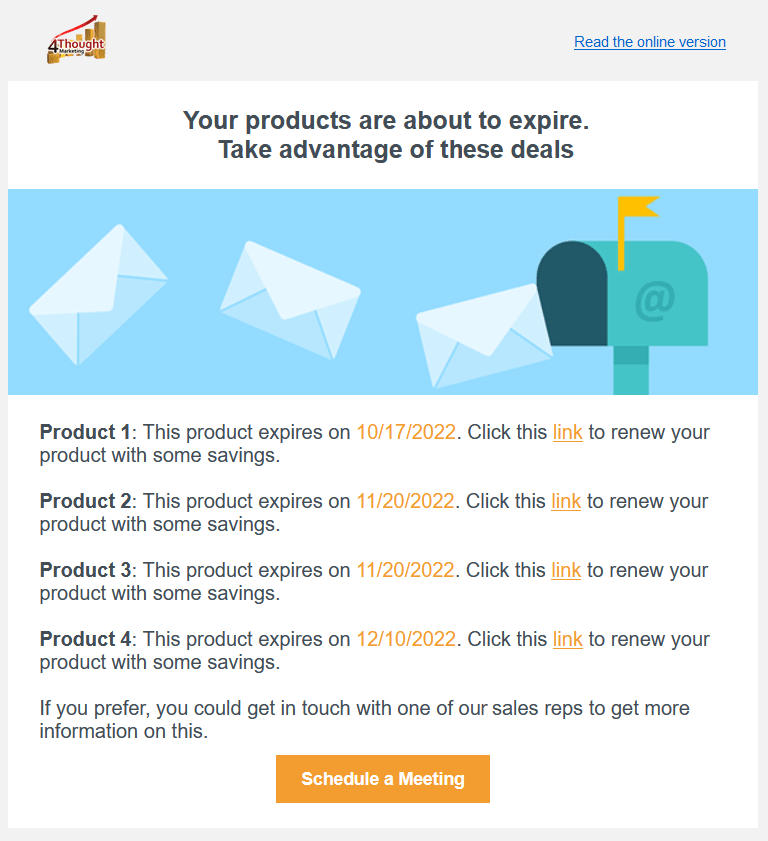
Let’s look at an example. Imagine having a Custom Object that stores which of your products or services a Contact has purchased. Maybe one of their subscriptions is about to expire, or one of their products is due for replacement. With the Embed CO Records App, you can search specifically for products or services with an expiration date attached so you can alert your customer with plenty of time. Even better, you can use this to offer specific discounts if they renew soon. The resulting email might look like this:
Customers will appreciate the personal touch. And of course, few people will turn down a discount!
And that’s not all this app can do. With the Embed CO Records in Email Table Cloud App, you can get as simple or as complicated as you want. Set multiple filters for different scenarios on different emails. Get information out of as many custom object records fields as you prefer. Edit colors, font sizes, and the email’s HTML attributes. This app will allow its users to get the most out of information that might otherwise be sitting in your system collecting dust.
Conclusion
Ready to upgrade your marketing email creation? Use the Embed CO Records in Email Table app and start giving your contacts more personalized information presented in any format you wish. Contact 4Thought Marketing today for more information.
During times of economic downturn, inflation, and recession, businesses of varying sizes often face challenging decisions. Sometimes this can include budget cuts and unfortunately, the marketing budget is often one of the first to take a hit. But this is a mistake. It is important to understand that, during these times more than ever, efficient digital marketing can be a business’s best tool.
Marketing automation is a great place to start. It’s a tool that can help to boost sales, grow the existing customer base and cut costs. Let’s take a look at this tool in more detail and how you can get started with using it.
What is Marketing Automation & Why is It Important?
In simple terms, marketing automation is the process whereby marketing activities are automated using software. It can be a game-changer for businesses as it makes it easier and faster to reach customers with personalized messages.
In addition, marketing automation handles some of the routine and labor-intensive marketing tasks without the need for human action. By automating email marketing, data entry, social media management and other repetitive tasks, businesses can save time and money. In addition to reducing labor, it can help existing sales and marketing teams work more closely together by automating tasks such as lead assignment, follow-up, and nurturing.
Automation can also be a useful tool to help track customer interactions, behaviors, and preferences. This information can be used to adjust marketing strategies to meet customer needs. This allows businesses to remain agile, which is particularly important in a tough economic climate.
In a recession, marketing automation can be a powerful tool to help businesses maintain and even grow their customer base. By automating marketing tasks, businesses can free up time and resources to focus on surviving the downturn.
Getting Started with Marketing Automation
There are several effective strategies for leveraging marketing automation. Some of the most popular include:
Automate email marketing: automated emails are a cost-effective way to keep in touch with your customers and continue promoting your products or services.
Social media: pre-scheduling and automating social media posts allow you to continue connecting with your customers and promoting content.
Targeted content & offers: If you’ve already segmented your customers based on activity and interests, use your collected data to deliver the right message at the right time. This is great for adding effective and ongoing customer touchpoints.
Conclusion
In conclusion, marketing automation can help businesses to be more efficient, which is particularly important during times of economic uncertainty and recession. It is a tool which can be easily implemented which can help to reduce operating costs and free up employees to focus on other areas.
Account-based marketing (also called ABM) and lead-based marketing are two popular strategies for businesses. Choosing the right model is important to ensure that organizations’ revenue processes are efficient. Let’s take a look at the two methods and which one is more appropriate for your business.
Definition of Lead-Based Marketing
Lead-based marketing tends to focus on volume and lead scoring. This is the process of ranking leads based on their engagement behavior. Values are assigned to leads based on certain criteria, including various elements such as industry, job title, age group, interests, and so on. Their engagement behavior is also determined by their level of interaction with your website and other online activities.
Definition of Account-Based Marketing
Account-based marketing, on the other hand, is focused marketing that requires a targeted accounts list. The end product is usually a highly targeted, bespoke campaign resulting in a much higher return on investment.
What is Account Scoring?
One very important part of effective account-based marketing is account scoring. Account scoring is the process of sorting potential customers in order from most to least valuable to help organizations understand which accounts they should prioritize. The “value” of each account depends on a variety of attributes, including:
How interested or engaged they are with your offering
How close the potential customer is to your ideal customer
Using strategies to zone in on areas of higher value means that organizations can work on campaigns targeted to capture the attention of these accounts and convert them into customers.
Account scoring can be done simply by tracking accounts in Excel and manually weighing the different criteria. Alternatively, more advanced artificial intelligence methods can group data to profile potential customers.
ABM: The Better Choice?
All this leaves us with the question: is account-based marketing a better choice than lead-based marketing? Lead-based marketing focuses on loosely targeted messages to a broad category of a target audience. These methods often result in a high volume of leads. However, they might not be the right leads. Meanwhile, ABM allows you to focus and convert high-quality prospects through a more purposeful outreach to build sustainable and long-lasting relationships. The right choice, therefore, depends on what your organization is trying to achieve. However, high-quality leads should be considered more useful than a high volume of low-quality leads.
Conclusion
To summarize, each strategy has pros and cons and is appropriate depending on an organization’s needs. However, ABM is often preferable as quality wins over quantity. We usually find that ABM-driven accounts are bigger, better, and faster.
If you are unsure of which method is right for you, the team at 4Thought Marketing is here to help. Get in touch with us today to learn more about account-based vs. lead-based marketing.
A well-designed marketing email template can make or break a campaign. A detailed template provides a solid foundation and ensures each element required for the email has been captured. When designing an email for clients, communication is key – and one of the best ways for the client to communicate their needs is to use a template you provide.
Key Requirements for a Marketing Email Template
During the email design process, your company has three main goals:
Your client understands what information you need to build their email.
You understand your client’s requirements.
Your client can easily communicate their requirements to you.
These requirements can be achieved by providing a detailed email briefing template for the client to complete. The better the template, the better your submission will be, so getting this part right is crucial.
We’d like to focus on three important parts of the email template design process:
Creating a preview of the finished product
Making it easy to read your template
Regularly reviewing and updating your email template
A Preview of the Finished Marketing Email
A preview of the email can clarify the requirements. For example, the client can clearly see that only 15 characters fit in a title text box, not 30. This will again help alleviate the back-and-forth between your team and the client.
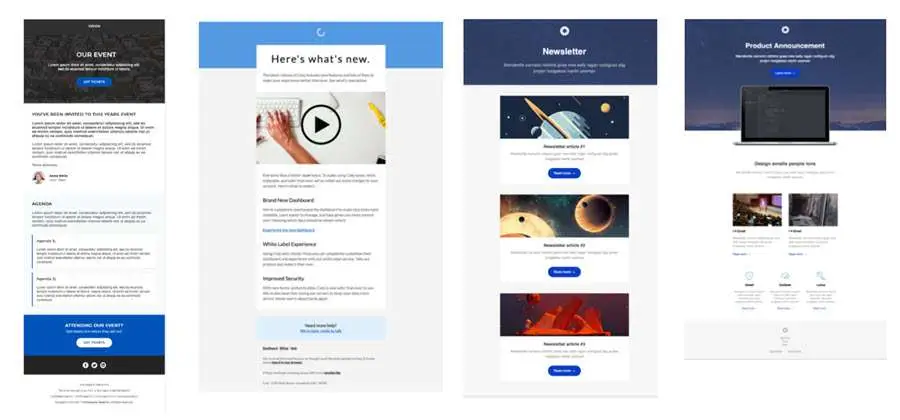
Providing visual examples of the final product can also be a great way to help the client visualize the email and what the final design will look like. This is important to ensure everyone is on the same page. This might include an example of a newsletter email, product announcement email, event email, or whatever your email offering includes. Your previews might look something like this:
Make Your Email Template Easy to Understand
Keep it simple but as detailed as possible. Providing clear textboxes and visual cues to guide the client on what is required can help you get the information you need. Having a clear and simple template will avoid confusion and reduce back-and-forth threads with clients who need further clarification.
Review & Update Your Email Template Regularly
It’s important to regularly review the template. Ask yourself, your team, and your client what’s working, what’s not working, and what are the communication challenges. This will help your template to evolve and continuously improve.
In Conclusion
Investing in marketing email templates not only saves time but also improves the quality of your campaigns. Some of the most effective templates include examples of final emails, text boxes, and cues to guide the client and ensure it is clear what information is required from them.
If you’re still unsure of where to start, we’re here to help. We work on templates day in and day out at 4Thought Marketing, so we know a thing or two about getting the information you need from them. Get in touch with us today to find out more.
2021 was the year the world worked remotely. What started as a temporary measure during the pandemic has largely become something likely to remain with us semi-permanently. As revealed by Owl Labs’ ���State of Remote Work 2021” report, as many as 70% of the US workforce have worked remotely, with most still doing so.
Not only does this suggest a shift in the way workplaces must let employees get their work done, but it also means that Eloqua tactics and B2B marketing for remote workers must evolve too. In this article, we’ll break down the steps that marketers should consider to adjust to the new work-at-home paradigm.
Shift to a Casual Tone
For many, the new norm is having kids and pets occasionally on-screen, showing up in T-shirts even for external meetings, and otherwise approaching business from a much more casual perspective. This shift has expanded across most aspects of business, including communication styles. Your content will now resonate better if it echoes the new normal. For example:
Attire: Stock photos of people in suits and conference rooms may show you are disconnected from the current state. Even if this doesn’t happen consciously, it may not resonate well. Offices are so two years ago!
Cats in emails: Except for Petco, pets were unacceptable in 2019. But maybe they can be worked in, in 2022 and beyond.
Less formal grammar and tone: Consider how your support/salespeople and your customers are going to interact. Are they going to meet in T-shirts in Zoom rooms with funky backdrops? If so, an overly formal marketing tone may feel “separate” and “different” from the new way the corporation works. An updated content tone should stay consistent with the rest of the business and workforce.
Re-Evaluate Location Calculations
Legacy code/flows in your MA system may use IP addresses to fill in city, state, etc. Usually, this system works under the assumption that the IP address is associated with the company headquarters. However, in 2022, it’s more likely that the address is connected to someone’s home. You’ll need to keep this in mind and change your marketing automation setup as necessary to accommodate it.
Re-Evaluate Send Times
Many workers now juggle kids and work simultaneously. When scheduling emails, you should consider the times that kids may be impacting opens. Previous send-times such as 3:00 pm that might have been considered “open and at the desk” now may have different results.
Set Aside Technologies that Associate Team Members with Companies by IP Address
Many MA and Leadgen systems feature the ability to identify a user’s employer company by looking at their IP address. However, for remote workers, this now reports incorrectly. You should consider updating your MA algorithms and deprecate any systems whose core functionality is based on this.
Reconsider Territory Mappings
A lot of companies use contact locations to determine which rep to assign. With more than 20% of people moving during the pandemic, and most of them having moved away from their company headquarters this is an important consideration. Company headquarters should supersede contact location and how international headquarters vs. local-country headquarters should impact.
Why This Matters: Remote Work is Here to Stay
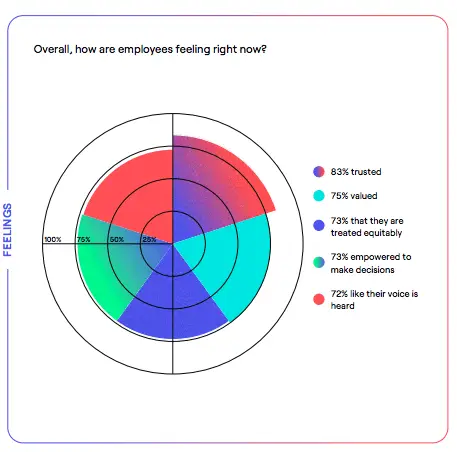
Employees feel differently working from home. Owl Labs’ research supports this notion (refer to the chart below), with key stats such as 73% of participants “feeling empowered to make decisions”. This can have many benefits to businesses and provide fantastic opportunities for both employees and organizations through increased creativity, productivity, and staff retention. Updating your B2B marketing for remote workers not only allows you to keep up with new challenges, but also demonstrates to your client base that you’re willing to meet them where they are.
As marketers, it is important to leverage every opportunity to increase lead flow and stay ahead of the competition. There isn’t a LOT needed to adjust to the new work-from-home environment, but there are definitely things to consider and change! And of course, if you need help, 4Thought Marketing specializes in keeping your marketing for remote workers current, personalized, and relevant. Get in touch with us today to learn more.
Eloqua’s often-overlooked page tagging feature is a powerful tool you should definitely be using. But why is this feature so important? Besides obvious benefits like webpage categorization, well-done page tagging can improve the sales process, from customer segmentation to lead scoring. Let’s take a closer look at several top benefits of page tagging.
1. More Accurate Lead Scoring
Page tagging allows you to categorize each webpage based on its place and value in the sales process. For example, you can observe when customers move from lower-value to higher-value pages and thus progress a prospect through the sales funnel. These patterns will help you plan the ideal customer journey and revise your website as needed to make it happen.
2. Easier Categorization
Along with information such as the funnel stage, consider adding general categories to each web page’s tags. Category tags might include:
Case studies
eBooks
Nurture
Upsell
This tells you at a glance what categories on your website get the most attention, and which play the more important roles in the customer journey.
Finally, with product/solution tags, you can easily identify cross-selling opportunities and build your segmentation strategy around them. For example, a customer buying a new phone might want a case, screen protector, or other accessories. A well-constructed page tagging system will show you what products they might be interested in for your segmentation strategy.
Get Started Creating Page Tags
Eloqua’s page tagging capabilities can significantly contribute to your marketing and sales efforts. With their potential to increase the quality of your lead scoring, website design, and future marketing strategies, they are well worth your time.
Ready to start adding page tags to your website, but not quite sure where to begin? Get in touch with us for professional help.
Among its many features, Eloqua offers one function that often goes overlooked: page tagging. In a previous article, we explored how page tagging can enhance customer segmentation and contribute to more effective marketing campaigns. Today, we’ll delve deeper into various practical methods for creating page tags in Eloqua and how they can significantly impact your marketing strategy.
Eloqua provides four distinct methods to create and manage page tags, each designed to cater to different needs and scenarios:
Manual
File upload
Auto-tagging
Meta-tagging
Additionally, before starting any page tagging, remember to track your web pages in Eloqua. Untracked pages will not appear as tag options, and for this to work, every page on your site needs at least one tag.
Understanding the strengths and weaknesses of each method will help you choose the best approach for your specific situation.
Manual Page Tags
For users just starting with page tagging, the manual method is a straightforward option. Within Eloqua, you can create a tag and assign it to individual pages or entire folders with only a few clicks. After saving your work, you’re all set! Though manual tagging is user-friendly, it can be a time-consuming task, especially for larger websites with many pages. It’s important to weigh the benefits of control and specificity against the time investment required. Consider how often you’ll need to update tags and if this method will scale with your needs.
Anyone new to page tagging will likely start with the manual method. Within Eloqua, you can create a tag and assign it to individual pages or to whole folders of web pages with just a few clicks. Save your work, and you’re done! While manual tagging is the easiest solution, it is the most tedious and may not be your best option.
File Upload for Page Tags
The file upload method necessitates some preparation. To begin, create a spreadsheet featuring two columns: one for the page URLs you wish to tag and another for the corresponding tags. You can apply multiple tags by separating them with commas. Once your spreadsheet is ready, upload it to Eloqua using the Upload Wizard. During this process, you’ll determine how you want the new tags to interact with any existing tags—whether to replace them or append them. After uploading, Eloqua will automatically assign your new tags, and you’ll receive a confirmation email once the process is complete. This method is particularly beneficial for users managing numerous pages at once, as it saves substantial time compared to manual tagging.
The file upload method requires some preparation ahead of time. Create a spreadsheet with two columns: one for each page URL you want to tag, and one for the tags you wish to apply. You can apply multiple tags using this method by separating them with commas. Next, upload your spreadsheet to Eloqua using the Upload Wizard, and determine how you want these new tags handled (for instance, whether they should replace any existing tags or simply be added). Eloqua will then assign your new tags, and you’ll receive a confirmation email.
Auto Page Tags
For dynamic websites that frequently add or remove URLs, relying on manual tagging or file uploads can be impractical. This is where Eloqua’s automated system shines.
To maximize the effectiveness of this approach, ensure that your spreadsheet is meticulously organized. Inaccuracies or inconsistencies can lead to failed uploads or misassigned tags, so double-check your entries before proceeding.
The auto-tagging method allows you to assign a set of tags to a specific URL, which can then be applied to any related URLs added subsequently. For instance, if a group of tags is assigned to example.com/products/toys, those tags will automatically apply to example.com/products/toys/board-games and example.com/products/toys/rc-vehicles. This method streamlines tag management as your website evolves, making it easier to maintain accurate tracking without constant manual updates.
Setting up auto-tagging rules requires careful planning. Be sure to consider the hierarchy of your URLs and their structure, as this will affect how broadly tags are applied. Additionally, it’s wise to regularly review the effectiveness of your auto-tagging rules to ensure they continue to meet your marketing goals.
To set this up, create an auto-tagging rule within Eloqua and double-check the generated preview for any issues. You can also manually create exclusions at this stage if needed. From there, save your work. Eloqua will automatically run the rule and tag new pages every time your sitemap updates.
Using Meta Tags
After creating your meta-tagging rule within Eloqua, configure the system’s crawling preferences. This will dictate how often Eloqua scans your website to generate new tags. Regular updates can ensure that your tagging remains reflective of your current content and marketing strategies, helping maintain effective customer segmentation.
Lastly, almost every website includes meta tags that enhance SEO and search visibility. These tags can also be utilized to generate and assign page tags. This approach is particularly useful for tagging pages that may not fit neatly into a parent-child structure, which can be a limitation of the default auto-tagging system. If your website has a well-defined taxonomy, meta-tagging may be the most effective method for creating Eloqua page tags.
Finally, virtually every website includes meta tags to help improve SEO and search results. These tags can also be used to generate and assign page tags. This method works best when you want to automatically tag pages that don’t necessarily follow a parent-child structure and thus don’t fall under the default auto-tagging system. If you have a well-constructed taxonomy for your website, this may be the best solution to create Eloqua page tags.
Within Eloqua, you can create a meta-tagging rule and configure the system to crawl your website as you wish. Double-check the generated preview and save your work. From there, your job is done. Eloqua will crawl your website once a day (or as often as you specify) and generate new page tags according to your specifications.
Conclusion
With Eloqua’s user-friendly interface and extensive capabilities, mastering page tagging is not only straightforward but can also yield remarkable results for your marketing efforts. Allocate time to explore everything Eloqua has to offer, as you may be pleasantly surprised by the positive impact on your campaigns!
If you’re ready to implement page tags but feel uncertain about the initial steps, don’t hesitate to email us for prompt, expert assistance. Our team is here to help you make the most of Eloqua’s powerful features, ensuring you achieve your marketing objectives effectively.
Ready to assign page tags, but not quite sure how to get started? Email us for quick, expert help.
April 9, 2026 | Page 1 of 1 | https://4thoughtmarketing.com/articles/page/29