eloqua cloud app

Anyone who has ever used Eloqua knows what a powerful tool it is. Combined with the custom cloud apps developed by 4Thought Marketing, the system improves even more. And while the vast majority of the time, systems run smoothly and without errors, nothing is truly perfect and error-free. Problems can occur with any system, the user may make a mistake in data entry, or some combination of both may happen. But this doesn’t have to spell the end of your marketing automation setup. Here’s what you can do.

Eloqua Cloud App Error Routing

Our apps communicate with Eloqua through their APIs in order to process information. However, sometimes communication issues might occur. For instance, in May 2021 Eloqua reported issues with the Bulk API, which is used by other apps to update and move records to other steps in the canvas. This resulted in records stuck on the campaign canvas in the error status. Despite recent improvements in the error retry mechanisms within Eloqua, sometimes a record needs a small nudge to get it back on track.

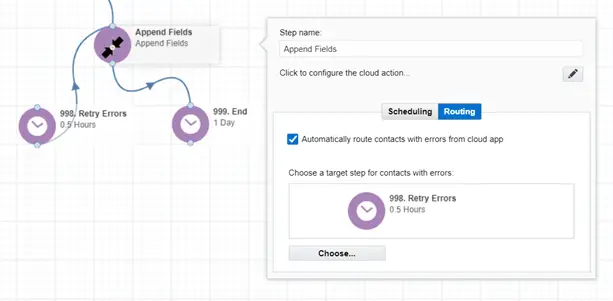
Fortunately, Eloqua has built in the ability to route records to a previous step which can then retry process. In the example below, we’re going to configure the error routing.

  • Create a wait step to receive problem records (998. Error).
  • Click on the Cloud App step to configure.
  • Click on “Automatically route contacts with error from the cloud app”.
  • Select the wait step you created earlier.
  • Set the delay. This can be as short as .01 hours.
  • Then connect the Error step back to the previous cloud app.
eloqua cloud app error routing

Keeping Eloqua Error-Free

Today’s marketing automation systems are very complex and mostly error-free. However, systems occasionally encounter errors it cannot address. Often these errors are quickly resolved by retrying the record. Use the Error Routing feature of Eloqua to automatically route records with errors and retry processing.

Interested in further training on everything Eloqua can do? Get in touch with 4Thought Marketing to schedule a workshop.


The CO Date Calculator Cloud App from 4Thought Marketing lets you perform date calculations within custom object programs. Users can add or subtract days, weeks, months, or even years from any date value and store the results in a CO record. For example, maybe you want to pre-schedule a campaign after a specified number of days or weeks and then create a segment triggered from the calculated date. The Date Calculator App can provide!

To use this app, open an existing CO program or create a new one. Search for the date calculator action and drag and drop it into the program canvas. Configure the app, select the source date field, and input the date calculation and destination field you need. Finally, save your work. That’s it! The altered date is stored in Eloqua for as long as you need it.

Please contact us if you would like to learn more about the CO Date Calculator Cloud Appd. Or take it for a spin with a 10-day free trial.


eloqua training

Oracle Eloqua’s extensive marketing automation capabilities allow companies to construct, manage, and measure the results of a marketing campaign. In the hands of an expert, Eloqua is a powerful tool. However, its capabilities are extensive and require advanced training for even the savviest of marketers to get the most out of the tool.

International law firm McDermott Will & Emery had an innovative marketing team, but needed expert training to deepen their Eloqua skillsets. The team leader, Kelly Hernandez, began searching for personalized lessons. That’s when she discovered 4Thought Marketing. “We were looking for an Eloqua training workshop that would help us advance our skills and execute complex campaigns,” she said. “Working with a Sr. Marketing Operations Consultant at 4Thought, we developed a plan for four 90-minute classes for a remote training workshop.” Each session would focus on Eloqua functions and their practical applications in marketing programs.

The first session focused on the Campaign Canvas, one of Eloqua’s most powerful features. As that first session progressed and the marketing team began asking questions, the plans for the remaining classes changed. “Our team was very interested in learning more about reporting capabilities and progressive profiling after the first session,” said Kelly. The remaining classes focused on these topics, as well as a more hands-on tutorial of Eloqua’s other functions.

The curriculum even incorporated actual emails from McDermott’s current outreach programs as examples. The last training session, or “final exam”, consisted of working on an actual future marketing project the team had been planning. They worked step-by-step, leveraging what they had learned. They got hands-on, practical experience setting up the project in Eloqua, preparing it for launch, and tracking the results afterward.

Overall, the McDermott marketing team was very satisfied with the training 4Thought Marketing provided. “We now have a deeper knowledge and skill set that will allow us to continue to innovate on our marketing automation plan,” said Kelly. As a result of the training, the team is better prepared to leverage the full range of Eloqua’s capabilities, and can now get far more business value out of their Eloqua system.

Is your marketing team in need of personalized Eloqua training? Get in touch with us today and we’ll make it happen.


managing custom objects in eloqua

Out of the box, Eloqua can handle a staggering amount of information. Your marketing team can store data on both individuals and accounts, and Eloqua’s easy-to-navigate interface allows for easy segmentation. But as any marketer knows, your data needs constantly change. Not all the information you’ve gathered belongs in the contact or account tables. So, what do you do? Eloqua has a built-in solution: custom objects.

What are Custom Objects?

By default, Eloqua stores information like company locations, parent companies or brands, individual names, addresses, job titles, phone numbers, and more. All of these are essential for proper segmentation, but more thorough segmentation may require additional data. For example, segmenting by purchase history—providing general marketing to a potential customer and more personalized marketing to a customer who has purchased from you—goes a long way toward increased revenue. But how do you add purchase history data to Eloqua? That’s where custom objects come in.

Simply put, a custom object is a free-form table you can build to do exactly what you need it to do. You can add, remove, or modify columns as you need to hold all your data. Custom objects allow you to expand Eloqua’s capabilities to hold more data than you otherwise could, while making them available for segmentation.

Marketing Segmentation Using Custom Objects

Let’s continue the example of segmentation based on purchase history. Your custom object might store information like the purchase’s description, cost, size (if applicable), the date of purchase, and any warranty that was also purchased. Two customers might buy the exact same product, but maybe only one purchases an extended warranty. Storing this data in a custom object allows for even more segmentation—and by extension, more detailed marketing. The customer who opted for a warranty might receive promotions for related products, along with relevant warranty information and general marketing. Meanwhile, the customer who did not initially purchase a warranty receives similar advertising with continued promotion of the warranty thrown in.

Info Management: Many-to-One

Custom objects are especially useful if multiple individuals provide the same data. For instance, let’s imagine a husband, wife, and their kids sign up for a cruise with a single shared email address. Eloqua’s default system would only allow you to store one name with that email address. With a custom object, you can store each family member’s data separately while still using the same email address and keeping their details separate.

From the family’s perspective, this means they can each plan their own activities on the cruise and each receive an email with their own agenda. This certainly makes planning easier for them. And for you, it allows you to treat a single email address the same way you would normally treat multiple contacts for marketing purposes.

Eloqua-Compatible Apps for Custom Objects

Eloqua’s custom objects unfortunately cannot move data from a contact record into a CO table on their own. Fortunately, there’s an app for that. The 4Thought team has developed multiple apps to expand Eloqua’s functionality, especially as it relates to custom objects. Whether you need to transfer data from a contact record to a CO, delete COs you no longer need, or do something else entirely, one of our apps can help you out.

How Will You Use Custom Objects?

Eloqua boasts a long list of useful functions for marketers. Even when its default functions aren’t quite enough, constructing a solution using  custom objects is a simple process. Mastering everything Eloqua has to offer can provide a much-needed boost to your marketing team. Want to take advantage of Eloqua’s full range of abilities? Get in touch with us for a demo and get on the path to greater success.


migrating from netsuite bronto to eloqua 5 considerations bronto end of life

Oracle NetSuite recently announced that Bronto, a reliable and widely used email automation software, will no longer be supported after May 31, 2022. For companies and marketing agencies that relied on NetSuite Bronto for promotional campaigns, this means it’s time to find a new solution as soon as possible.

Keep Your Email Marketing Campaigns Going

Marketing is a constantly evolving field. And with Bronto going the way of the dinosaurs, it’s time for companies that relied on it to find a more up-to-date solution. We’d like to invite you to take a closer look at Oracle Eloqua, one of the most comprehensive marketing automation systems available. But don’t take too long to decide! NetSuite Bronto won’t be around much longer, and the time to find an alternative system is now.

As you consider migrating from NetSuite Bronto to Oracle Eloqua, here are several important factors to consider.

1. Campaign Flows & System Capabilities

Email marketing plans range from single email blasts to multi-step campaigns. Eloqua can support both, but the transition does bear considering. Moving from a simpler program focused on single emails requires updating your strategy to Eloqua’s campaign-based system. Once the transition is complete, you’ll have access to far more capabilities than you ever did in your original system.

But maybe your current tool already supports multi-step email campaigns. If this is the case, take care to transfer your workflow rules and process to Eloqua correctly. Not everything can be exactly replicated after the move. See what can be replicated and update the rest accordingly.

2. Moving Data from Netsuite Bronto to Eloqua

Chances are, your current email marketing system contains far more data than you actually need. Take the opportunity to clean up your data and remove unusable or expired information. You can also standardize your information by state, country, etc. to easily replicate your database in Eloqua.

Duplicate data is more complicated. Sometimes more than one lead will use the same contact information, like a husband and wife sharing an email address or home phone number. Some email marketing software allows for situations like this, but Eloqua does not. Before you migrate duplicate data, either remove the duplicate or note the reason to retain it. You’ll then have to construct a custom object in Eloqua to store the duplicate information.

3. Asset Migration

Your old software has all of your assets—emails, landing pages, forms, etc.—that you constructed within the system. Eloqua allows you to keep these assets in their original HTML format or to transfer them straight into the built-in editor, depending on your preference. But Eloqua has more to offer here than a simple drag-and-drop transfer system. During your asset migration process, you can take advantage of Eloqua’s systems to clean up your collected forms. Eloqua allows you to:

  • Merge identical or nearly-identical assets into a single file
  • Standardize your templates and/or designs for easy future use
  • Recreate forms and/or emails in the Eloqua designer
  • Easily create new forms and/or emails with the same design and branding as the originals

While Eloqua is designed to make asset migration as simple as possible, migrating activity records like email clicks or website visits requires a little more care. You absolutely need this information for segmentation purposes. However, Eloqua cannot perform a one-to-one transfer of activity history. Instead, you will need to transfer the data and save it as an external asset or a different element within Eloqua. You can also choose to simply archive the data until you need it. Either way, the transfer process requires a little more thought.

4. Running Two Email Systems at Once

Migration can take two months or more to do properly. But since no company wants put their marketing campaigns on hold for two months, the best strategy is to run both systems in parallel. Your original email marketing software will continue to manage campaigns for the moment while you work on duplicating those campaigns and their assets in Eloqua. This gives you plenty of time to ensure that Eloqua can pick up where your previous system left off. Once the transfer is complete, you’ll enjoy a seamless transition with no interruption to your marketing plans.

5. Give Yourself Room for Testing & Troubleshooting

Finally, remember that no migration is perfect, and despite the best planning possible, things can and do go wrong. Maybe you have way more unused emails than you remember and have to clean up your collection before transferring. Maybe you can’t fully replicate your design in Eloqua and have to make a few changes. Maybe your computer will hiccup and interrupt some of the data transfer. Any number of things could happen. Be ready to deal with problems quickly when they do happen, and more importantly, give yourself enough time to handle them.

Marketing experts advise setting aside between 4-6 weeks and 2 months, if not more, to complete your migration. Plan for a longer process if you anticipate trouble. You owe it to your company to perform a successful migration for successful future campaigns.

Get Help from Eloqua Migration Experts

At 4Thought Marketing, we are experts at helping companies migrate to Oracle Eloqua. Give us a call today for more information on Eloqua and how to successfully migrate from Netsuite Bronto.


eloqua content blocks

Who doesn’t love a time-saving trick that can make our everyday work easier? With our calendars filled with endless meetings and projects to take care of, one of our top priorities should be to find resources that will help us be more productive throughout our workday. Nobody really enjoys sacrificing extra time to finish a last-minute task, after all. Anything that can lighten up our schedule is certainly very welcome. And that’s exactly what the new content block feature in the Eloqua Design Editor does.

As part of the release 20B that rolled out in May 2020, Eloqua content blocks are here to stay. We love them at 4Thought Marketing, and our clients love them. Why? Simply put, they save both of us a lot of time.

What are Content Blocks Anyway?

To quote the Oracle Eloqua Help Center, “Content blocks are groups of layout containers and cells that can be re-used when building responsive emails or landing pages. They can be a combination of different cell types such as text, images, dynamic content, shared content, and more. By breaking down your most commonly used components and re-assembling them to meet the unique needs of each new email and landing page, you can more quickly create brand-compliant content with ease.”

Our clients take advantage of content blocks in various ways, from quick fixes to overall layout and formatting consistency. We found this to be especially helpful when organizations have teams across different regions all working together on a particular project. With a simple drag and drop, anyone can create eye-catching email and landing page designs that are compatible with all email clients and render beautifully across different mobile devices. Reusable Eloqua content blocks provide a seamless, no-code approach that will ultimately help you create and edit templates much faster than before.

Ready to get started? Here’s a quick walkthrough of the content block system that’s helped so many marketers.

Creating Content Blocks in Eloqua Design Editor

Content blocks are managed from Eloqua’s Design Editor, which is why they are automatically responsive. When you select the content blocks section highlighted in this picture, you have the ability to search or manage your block library.

eloqua content blocks, eloqua, eloqua marketing

To create custom and reusable content blocks from an existing content section, select the layout that you would like to save as a content block and click on the block icon that appears on the right-hand side. It will prompt you to name your block before saving. You will now be able to find your block in the block library.

In our example below, we have a two-column set up with an image and a text block:

eloqua content blocks, eloqua, eloqua marketing

Once you have created and saved your custom content block, a simple drag and drop from the library will add it to the email canvas.

eloqua content blocks, eloqua, eloqua marketing

Editing a Content Block

After the content block has been saved and is visible from the block library, you may edit it as needed. Go to the block’s options menu and click “Edit”, as shown here:

eloqua content blocks, eloqua, eloqua marketing

In the “Edit Block” screen, you can adjust and tailor your block to your design needs.  Your new workshop will look like this:

eloqua content blocks, eloqua, eloqua marketing

Save Yourself Some Time with Eloqua Content Blocks!

When used efficiently, content blocks provide a hassle-free way to quickly build emails while increasing quality control and adhering to your company’s branding guidelines. If you haven’t tried creating your own custom blocks in our Eloqua marketing software yet, we strongly suggest you give them a try. You won’t look back! The increase in efficiency and design will be more than worth the effort.

Still have questions? Get in touch with our team for pointers on properly using Eloqua content blocks in the Design Editor.


checklist for expanding

Checklist for Expanding Oracle Eloqua to New Business Units

For many large organizations, they implement Oracle Eloqua phases. Or they may acquire a company and eventually need to move them into Eloqua. When it’s time to onboard a new business unit, a plan is essential to ensure everyone is on the same page. It’s also an opportunity to address the organization’s unique challenges and address potential issues early in the project.

One way to ensure a successful deployment is following a checklist to confirm you ask and answer all the relevant questions.  In this article, we’ll explore many of the planning steps and discuss the various tasks involved.  An Eloqua SmartStart from a qualified partner also covers many but not all of these steps.

Key Considerations

Depending on your Oracle Eloqua license, you may have the option of using an existing or creating a new Oracle Eloqua instance. There are many factors when making this decision, but the key is minimizing disruption to existing users and setting the new business unit up for success. The following are a series of questions that will uncover the best approach for your unique business case.

Contacts

• Are there overlapping contacts within the two business units?
• Does the new business unit share a large number of contacts with existing business units

Yes, share contacts – Having them use the existing instance will allow for better email frequency monitoring to prevent email fatigue. And your total contact count (which Oracle Eloqua uses to determine the cost) will not increase substantially. The contact count is performed across all Eloqua instances and counts the total number of contact records, regardless of duplication across all instances.

No, contacts do not overlap – Does access to contact records need to be restricted using Contact Level Security? If yes, and this is not already set up in the existing instance, consider this an additional piece to configure.

Subscription Management

  • How is subscription management configured in the existing instance, and would it be different for the new business unit?

Same subscription management – use existing

Different – To use the existing instance, you may need to make modifications that allow each business unit to manage their subscriptions separately, i.e., create unique preference management pages. Contacts previously globally unsubscribed may need to be re-subscribed and preferences updated on the email group level, especially if contacts are shared mainly with the new business unit.

Integrations

  • Are there additional integrations required by the new business unit, or can they leverage existing integrations?
  • Do they use the same CRM system, and if so, are the lead creation processes similar?

Yes — You eliminate the need to set up a new integration by using the existing instance.
No — evaluate how the existing CRM integration would need to be modified. If integrations require substantial changes, there may be no benefit to using the current instance. The level of effort to configure the integration may be the same as setting up a new instance and different integration.

Another consideration if using a different CRM system and overlapping contacts is how to implement Account Linkage.

Whether or not there are non-CRM integrations shouldn’t impact the decision, as new integrations, whether it’s a webinar platform or SFTP import, need to be set up in the existing in a new instance. There may even be existing non-CRM integrations that can be leveraged by the new business unit in the current instance.

Third-Party App

Are there any third-party apps in the existing instance that require licensing for a new instance? If so, consider the additional costs.

Campaign Responses

  • Does the new business unit define campaign responses the same way as the existing business units?

Yes – The same Instance

No – New instance. Response Rules in Eloqua apply for ALL activities in the instance, and you cannot modify them for each business unit. You may need to evaluate how campaign responses are currently sent to the CRM system and change the process if the new business unit has different definitions.

Branding

  • Does the new business unit have specific branding requirements? For example, will they require separate subdomains to host landing pages, branding & deliverability, and out-of-the-box subscription management?

Yes – consider creating a new instance for a separately branded send, image, and apps domain.
No – existing instance

Additional Considerations
IP Warming

If leaning towards setting up a new instance, remember you must first warm up the new dedicated IPs before sending large volumes of emails, a process that can and should take up to 4 weeks.

Reporting

  • Are the reporting requirements similar, or are they very different?

Many standard dashboards query the entire database, such as Campaign Analysis Overview. Some campaign dashboards display metrics based on a custom campaign field, such as Business Unit, to allow more granular reporting for each business unit. Most Insight reports are also configurable for specific asset metrics.

Asset Templates

  • Are there asset templates (email/form/landing page/campaign) in the existing instance that can be leveraged by the new business unit?

Yes – save time recreating asset templates by using the existing inst
No – Similar level of effort is required to create new templates in the existing instance or new instance.

Data Quality and Processes

  • Are your data standards such as country to region, job title to a job role, or level the same?

Yes – reduce effort by using existing lookup tables and automation without rebuilding them.

Conclusion

When adding new business units to your Oracle Eloqua CX Marketing platform, carefully consider your options when choosing to use an existing or creating a new Eloqua instance. Following a checklist can help ensure you ask and answer all the relevant questions during the decision-making process. While there are many factors, the choice is mainly dependent on how similar, or different the customer data and sales processes are between the respective business units

Get the Help you Need

Need help choosing the best path forward? 4Thought Marketing has deep experience helping companies consider their options carefully when adding a new business unit. Contact us to discuss your requirements with one of our specialists.

About 4Thought Marketing

4Thought Marketing is a software development and privacy compliance company founded in 2008. We help customers align business and legal objectives, translating them into strategies that produce results. Our services include Marketing Automation and Privacy Compliance Software Implementation, Integration, Customization, Consulting, and Service.


Shared Email Addresses Many to One

Shared Email Addresses and Eloqua – Top 5 Considerations

Most Eloqua users probably are aware that each Contact record in Eloqua has a unique email address.  Oracle Eloqua doesn’t allow different individuals to share a common email address or receive their own unique email – at least not with ‘out of the box’ functionality.

Your customers aren’t bound by these rules. There are cases where multiple people may share an email address such as household members, or a single person may wear enough hats to require more than one record in Eloqua.

Sharing Email Addresses

Some examples:

  • Cruise Ships. A family may book their reservation using a single email address, but you need to send itineraries and special event information to each individual in the household
  • Education. Parents of multiple children need information about each of their kids’ school activities
  • Auto dealerships. A vehicle owner needs to be kept informed about services for multiple vehicles
  • Corporations. A large company with multiple business units needs to email business unit-specific information to a shared lead

In these cases, it often is necessary to use Custom Objects (COs or Custom Data Objects) to store the information about each individual.

Check out this video for more Many-to-One Email Address use cases.

Five things you need to do if you want to market to customers with a shared email addresses in Oracle Eloqua

#1: Consider All Your Data Sources

How you load the data matters.  If you use Oracle Eloqua CO to store individual data (for example product preference, job title, or area of interest) you will need to find a way to create and/or update the CO when you get new information. Data in Oracle Eloqua comes primarily from three places: Form Submissions, List Uploads, and CRM integration.  Each input source has its own set of concerns to consider.  For example, if you are doing a list upload, do you want to create a new CO each time?  What is the unique ID for the CO and can the list upload determine if one already exists? 

If the source of the data is a form submission or CRM integration, you’ll want to answer the same questions.

#2: Pay attention When Integrating with Your CRM

In the same way you need to determine if a CO should be created or updated, you’ll need to understand what records will be created or updated in the CRM. Just like a standard CRM integration, you need to look at the business rules for creating and updating Leads and Contacts in the CRM, and retrieving that data back into Eloqua.  Many-to-One scenarios make these decisions a little more complex because you also have to understand which fields go to the Contact, and which go to the Lead CO.  


For example, First Name and Last Name belong at the Eloqua Contact.  But what about Lead Score – that is probably linked to the Lead, as is Lead Status.  And then you have other fields such as preferences or whether the individual is a customer.  You need to look at the business use of these fields to determine if they are at the Lead or Contact level.

These are just a few of the many situations where your CRM integration will need to be examined even more closely than before.

#3: Revisit How You Manage Subscriptions, Preferences and Opt Outs

When two or more people share an email address and one globally unsubscribes, all individuals linked to that email address will automatically be unsubscribed. 

One way to get around this is to use Preference Management. This way each individual can identify which emails they would like to receive, and which they don’t.  This introduces a new layer of complexity when segmenting data for campaigns.

#4: Revisit Lead Scoring

How you score and how you store these scores needs to be addressed  Just as you’ll want to manage email preferences on an individual basis, you may want to score each individual separately from others who share the same email address.

#5: Be Deliberate with Segmentation and Personalization Merges

When you have multiple COs for a single email address, and want to use data from the CO for field merge purposes – e.g. start the email with “Hi [fname]”, you’ll need a mechanism to perform the following functions:

  • Find all Contacts who meet your campaign segmentation criteria
  • Find the correct CO record from which to pull the data to be used on the field merge
  • Move the data from the CO to the Contact

You’ll then want to cycle through the COs in case there are multiple CO records that meet your campaign criteria.

The Many-to-One Email cloud app from 4Thought Marketing meets all of the segmentation and field merger criteria described here, and more. 

One More Thing…

Finally, you’ll want to take a careful look at your other data flow processes to identify those that would be impacted by sharing email addresses. 

Going down the household email path requires expertise – but it can be done. 

4Thought Marketing has successfully implemented Many-to-One email processes for B2B and B2C clients.  We take a holistic approach to your problem. We’ll  help you clearly define your needs and then determine if Many-to-One is right for you.  Just like you, we don’t want to make your life more complicated than it already is…but if you have complex business needs, we’re there to help simplify where possible.

For more information call us at 1-888-356-7824, or contact us  and we’ll get in touch shortly.


choosing an eloqua marketing agency

Imagine this.

You are a marketing operations professional who, along with your colleagues, manages your marketing technology systems’ day-to-day operations. Your responsibilities run from consulting with internal customers on new projects to building out campaigns, measuring performance, and scheduling campaign review meetings.

While your product marketing and creative teams develop the ideas, you make them real with email campaigns, landing pages, lead scoring models, and CRM integrations- to mention just a few things you do every day.  

While your colleagues are at the helm, steering your company down the correct course, you’re ensuring the marketing engine runs at peak performance and delivering leads to sales.

By the end of the day, you’re tired, overworked, and definitely in need of another espresso shot. Are you and your marketing operations teammates tapped out, trying to keep up with increasing demand? Are you spending too much time on tactical execution and not enough on defining your marketing operations strategy?  How do you achieve your marketing goals while not overworking yourself or overburdening your team?

Your first instinct might be to discuss options for hiring another marketing operations expert like yourself. You’ve been down this path before.  Even in the best of times, it takes time to develop a job description, get approval to hire, recruit, interview, extend offers, and onboard a new employee.

Or you could consider engaging a marketing agency that specializes in Eloqua and Marketing operations.   In this article, we’ll explore a list of questions you should consider when choosing an Eloqua marketing agency for either the short- or the long-term.

Checklist for picking an Eloqua marketing agency

To borrow an axiom, make your requirements list and check it twice. Follow along with this checklist when reviewing potential Eloqua marketing agencies to make sure they hit all the marks.  But remember, your company is unique, and what might work for others may not satisfy your needs.  So take the time to consider your requirements carefully.

Skills Inventory and Requirements

Determining where you have gaps with your current resources is probably the most critical step in hiring an Eloqua agency.  There are two distinct steps in this process:

  1. Determining the skills you need and then documenting why you need them
  2. Match the required skills to agencies with expertise in those areas

Start with a list of general needs for your team. It’s essential to articulate the “why” column fully.  No one has unlimited resources, so having the “why” clearly identified will help drive decision-making.  Below is an example of a skills needs analysis.

Skills Areas

Skill Area Description Level Required Why?
Strategic Guidance Customer Journey Mapping, Buyer Personas, MA Plans, Goal alignment, Funnel Definition,   MUCH more. None – we’ve got this covered Have primary and multiple backup resources
Eloqua –Technical Capabilities Adv Lead Scoring, Nurturing, Admin, Custom Objects, Contact Level Security, Basic Integrations Low – not likely to need help Primary  and backup resource
Project Management Wrangle team members, budgets, metrics, reporting. Medium—need all the time One resource only
Email Creation    
  Email Design The ability to layout appealing emails, landing pages and create beautiful graphics for them.  High—a big gap that must fill UX designer promoted, no current expertise
  Responsive Design Creation of Emails/Landing pages that visually lays out as designed for Laptops, Phones, Pads, all at once. None – we’ve got this covered Primary and backup resource
  Campaign Execution Someone to create campaigns does import Low – not likely to need help Primary  and backup resource
Special Skills      
Software Development Custom development using APIs, Javascript, creating Cloud Apps, developing advanced Integrations Medium—need all the time One resource, no backup
Legal and Privacy Compliance Knowing how to implement GDPR, CASL, CCPA, + other pertinent laws High—a big gap that must fill No current expertise
       

Remember, nobody is equally good at everything.  Which is is also true of am Eloqua agencies.  The more an agency is aligned with your platform and specializes in the skills you need, the better off you’ll be.

Skill Definitions

But what do each of the above-listed skills mean, broken out at a deeper level? Let’s go through them one by one!

Strategic Guidance:

Having a well-defined campaign strategy and mapping it to your operational objectives is imperative.  You may find yourself needing help building a cohesive strategy or taking your current approach and using it to guide your marketing technology purchases and implementation.

Interfacing with the CMO and aligning marketing operations with your marketing strategy requires a unique skill set.  Choose a marketing agency with competencies that range from strategic consulting at an executive level down to tactical integration to connect your systems and data to achieve your strategic goals.

Examples of the areas and projects a Strategic Specialist would lead.

Eloqua Technical Capabilities

Deep Eloqua abilities are a must as this software is the backbone of your marketing automation. Your preferred marketing agency must be able to use Eloqua effectively to execute your marketing campaigns and deliver marketing-qualified leads to sales.

Project management

Almost everyone can manage a project. But, if many projects are going on at once or if the project has complex requirements, putting someone with exceptional Project Management (PM) skills leading the work can dramatically improve on-time performance.

PM is a unique skill best handled by someone who is first very personable, backed by a strong PM skillset. It requires excellent leadership, communication, negotiating, and critical thinking abilities.

Email Design

Design is a deep-rooted aspect of every marketing campaign. If your emails or graphics look sloppy, have not aged well, or are low-quality, it reflects poorly on your company and makes for a less-effective campaign.

If you are already partnered with a digital agency or have internal resources that can design emails, graphics, and landing pages for you, that is fantastic. But if not, you should look for this skill in your next marketing agency.

Responsive Design

It’s not uncommon for someone to scan an email on a mobile device and then make a note to review later on their desktop or laptop.  If an email arrives on mobile that is difficult to read, you’re just a simple swipe away from dropping into the trash.  Responsive design ensures your message is easily read on any device.

Campaign Execution

Consistently and reliably cranking out large numbers of campaigns is a skill in and of itself.  If getting quantities of work out the door is a critical part of your need, specifically put this proven ability on your checklist.  Verify that each of your agency options does this for other companies routinely.  You don’t want to be the one they learn on!

Software Development

As with all automation processes, there is always a technical side that requires understanding, configuration, and programming. Experience with the Eloqua API and building cloud apps is a must. While Oracle Eloqua is a fantastic platform, you should think outside the box to meet new requirements.  Some ideas may result in needing to extend Eloqua with custom add-ons.  An agency that can help you achieve your objectives with custom apps tells you they are serious about marketing operations and satisfying your requirements.

Increasingly, marketing operations work very closely with the privacy office to satisfy current and emerging privacy compliance regulations.  You need to ensure your campaign and lead capture processes work within the law, or there could be severe financial consequences.  In today’s experience-driven economy, you need an agency with experience working with Legal teams and ensuring you are privacy compliant.

Agency Characteristics

Local and Remote Options

The recent shift to remote workers isn’t likely to go away.  However, sometimes may want an agency located nearby or in the same time-zone for face-to-face meetings. Being situated in similar (or the same) time zones puts the icing on the cake (i.e., it makes everything better).

If local access isn’t your top priority, be sure your marketing agency excels at working remotely with you.

Schedule Compatibility

Different companies keep different schedules. 

  • Is your company a hard-driving 24×7, “email me at any hour” type of organization? 
    Or does your management focus more on work-life balance? 
  • Do you have offices around the globe that need Eloqua help during a variety of work-hours?
  • Do you often have last-minute campaigns that need over-night processing?

Know in advance what you need from a schedule perspective.  Build your expectations into the Statement of Work (SOW) so that you KNOW you’ll get.  Be careful, though; it’s tempting to ask for the moon when you don’t need it.  Only ask for the schedule that you regularly and routinely will need.

Agency Size

Look for a marketing automation agency with an adequately sized team for your needs. If you get several high-priority rush jobs simultaneously, can they respond quickly without sacrificing quality? Opting for 2-3 person shops is appealing, and maybe that’s what you need.  But they may not have the capacity when multiple or larger projects hit at the same time.

What’s going to happen when their responsive email developer goes on vacation?  How will they handle it if the person with project management skills leaves the company?   

One of the reasons you’re hiring an agency instead of a single person is that THEY will deal with personnel issues.  Verify they have the essential skills you need double-covered (at a minimum) so that they won’t let you down when life happens.

Industry Expertise

Look for an agency with experience working with clients of your size, and hopefully, within your industry. The best Eloqua marketing agencies are well-equipped to handle any size company’s needs, whether yours is a small B2C or large B2B business.

Engagement model

A marketing automation agency’s engagement model is just as critical as their skills.  It sets the tone for how you and the agency will communicate and do business together. A clearly defined engagement model establishes milestones and checkpoints to ensure that everyone is ready to move forward.

Project experience alignment

What types of projects does your company need? How many of these projects has your chosen agency done recently? Can they provide references, samples, or testimonials that showcase their past projects and experience?

Sometimes the agency we want to pick is not the one we should choose. If their project experience does not match what you are looking for, it is best to go with the agency with a track record for completing projects similar to yours.

Security

Ask to see the agency’s security policies upfront before starting any project or signing a contract. Your agency should publish in-depth, detailed security policies online that you can review before even beginning to talk to a salesperson.  Nothing is worse than getting a few weeks into vendor business discussions to find out later that they cannot meet your security requirements. 

Suppose your company’s security checklist is too large to send early in the selection process. In that case, you can use the 30 Areas of Security that 4Thought Marketing covers as a checklist starting point for your pre-purchase security review.

Executive connection

Are they willing to establish an Executive connection early on in your communications?  Good agencies make sure that:

  • Executives on both sides have had a one-on-one conversation long before the project starts
  • Direct phone numbers and emails exchanged
  • Executive cadence calls scheduled so that opportunities for high-level discussions are built-in to the process. 

These calls may sometimes be VERY quick. “No problems here.” “Yea, we’re all good here; see you next month.”

But when problems arise, having this pre-existing relationship can help get a project over hurdles that otherwise can be VERY challenging.

Conclusion

Picking the best Eloqua marketing agency for your organization can be challenging.  Your company’s requirements are unique, and you’re best served by someone with the experience, depth, and available resources to satisfy your needs.  We invite you to learn more about 4Thought Marketing. We’d be excited to see if we are a good match for each other and would be happy to share our extensive history of successful partnerships to back it up.

Contact Us if you would like to learn more about how 4Thought Marketing can help you reach your goals using Oracle Eloqua as the foundation for your marketing operations activities.


email related contact cloud app

Email Related Contact Cloud App

The Email Related Contact Cloud App solves an age-old challenge every Eloqua marketer has heard from Sales at least once, especially after launching a new email campaign.

“Next time, could you please include me when you send an email to my accounts? It will help me prepare to answer any follow-up questions I might receive.” 

Score One for Marketing! This is precisely the behavior you want: an email that results in an account calling to their salesperson, and moving them one step further down the funnel.  However, Oracle Eloqua does not offer a solution.  At 4Thought Marketing, we hear this request all the time, and so we created an Eloqua Cloud App that provides a quick, convenient solution to send a carbon copy email.

Introducing the Email Related Contact Cloud App

The Email Related Contact Cloud App is an Action that works on either the campaign or contact program canvas.  It retrieves the account owner or other related contact’s email address and sends it to the related contact feeder running on the same canvas.  When your campaign runs, the Salesperson will also receive a copy of the email*. Other uses include subscribing related contacts to a group or adding them to a shared list. 

Watch a 2-minute demo

Want to see even more, watch our 2-minute demo:

Using the Email Related Contact Cloud App on the campaign canvas

Let’s take a look at an example using the campaign canvas.  Here are the steps:

  • Select your Segment
  • Add both the Export Related Contacts and Import Related Contacts actions to your campaign canvas, as shown below:

Next, configure the Email Related Contact app:

  • Select the field containing the related contact’s email address
  • Select the Feeder Step for import related contacts

Now when you activate this campaign, the account owner will also receive one copy of the email for each included account.*

Subscribing Related Contacts using contact program

Another use case is subscribing account owners to Eloqua Groups used for newsletters or similar communication. You can automate this using a contact program:

  • Select your segment
  • Add the Export Related Contacts and Import Related Contact actions to your canvas, as shown below:

Next, configure the Related Contacts to Campaign Cloud App:

  • Select the field containing the related contact’s email address
  • Select the Feeder Step for import related contacts

These are just two examples of how the Email Related Contact Cloud App works.

Contact Us if you would like to learn more or purchase the Email Related Contact Cloud App. 

Need help with your campaigns, experiencing staffing, or bandwidth issues?  Let our campaign services team help you.


building a delete contact program in oracle eloqua

Building a Delete Contact Program for Oracle Eloqua

Let’s face it; there are contacts in your Eloqua system that don’t belong there.  They take up valuable real estate, living in the dark alleys between “reachable” and “engaged” contacts.  They may think they are living rent-free, but they are not.  Even after building the “contact washing machine to rule them all,” these pesky goblins somehow find their way into your system.  Still, others are long-time residents, who like cockroaches, seem to be indestructible.  Even with routine contact maintenance and manual deletion, some just refuse to leave.  And for a few of you, despite your best efforts, management wants to keep contacts around, forever, “just in case.” 

Deleting contacts is also time-consuming.  If your system is small, it may be an easy task performed monthly.  However, if your Eloqua system holds hundreds of thousands or millions of contacts, you need some type of automation to help.

The good news is that there are simple solutions to help keep your database clean and tidy without breaking a sweat.

Deleting Contacts with Oracle Eloqua

Eloqua offers two built-in methods for deleting contacts: 1) searching and removing them one-by-one, or 2) importing a list of contacts for deletion.  There is also a clever Eloqua hack using deduplication rules to trick Eloqua into exposing delete contact functionality that you can build yourself. And here at 4Thought Marketing, we offer a Contact Deleter with Archive Cloud App that you simply drop into your program or campaign canvas.  Plus, it can also archive data before deletion, something not possible to automate with Eloqua alone.

But contacts aren’t the only thing you’ll have to delete. Any Custom Object records mapped to a deleted contact may still be there, taking up space and making your database confusing. Fortunately, 4Thought has another app for that. Use our Contact CO Deleter Cloud App to clean out these unused Custom Objects with just a few clicks.

Note: be mindful of what happens if contacts return.  Oracle details what contact data Oracle Eloqua retains and restores when deleting contacts.

The Usual Suspects

At the top of our list of least-wanted contacts are those from known spam domains.  These temporary, or in some cases, semi-permanent addresses are often easy to spot.  Many of these are also temporary or throw-away email domains.   While there are legitimate reasons for using this type of address, too often, bad actors exploit these systems, and they should be part of your spam domain list. 

Test Data

Virtually everyone performs testing in their live production systems, either to validate that all your hard work in sandbox environments works correctly or to monitor if systems continue to function through routine checks.  And it’s not always ideal to use real company email accounts for testing.  Here, a temporary email address service may be the correct choice.  In our experience, we prefer using email accounts that expire within a specific time, enabling testing but get removed after they expire.

Hard Bouncebacks

Removing hard bouncebacks should be a simple choice for most organizations.  Until they return through new form submission or data integration, Eloqua excludes hard bounceback contacts from communication.  Keeping them around isn’t a good idea.  While you could remove them immediately, some of our clients established short waiting periods for external metrics gathering and archiving.  You should carefully consider if you should delete immediately or briefly pause.

Because It’s the Law

New privacy regulations are the law, and keeping personal information around when it’s unlawful can get expensive fast.  In certain jurisdictions, if you don’t have consent, or cannot demonstrate you’ve got permission to process data, or keep a record longer than permitted by law, you could be in violation.  Also, for many, people’s rights include having their personal information removed from your systems.  If you have not already done so, or you are unhappy with your current privacy solution, 4Thought Marketing offers 4Comply, a complete full privacy compliance solution for Oracle Eloqua.

Other Considerations

Don’t forget to update your integrations, so your CRM or other systems doesn’t re-create deleted contacts.  If you have one, consult your Eloqua data dictionary on integration fields and rules.

Conclusion

Keeping unreachable, unresponsive, or test accounts in your Oracle Eloqua system is problematic, could cost you money, may impact reporting, and may cause privacy issues.  While Eloqua includes some tools to help, they are not ideal for every customer.  4Thought Marketing makes it easier with the Contact Deleter with Archive Cloud App that marketers can drop into the program or campaign canvas.  It also provides peace of mind with the option to archive contacts before removal.

Contact Us if you would like to learn more about the Contact Deleter with Archive Cloud App.  We can also help install, configure, and build your delete contact programs.


4Thought Marketing Logo   February 13, 2026 | Page 1 of 1 | https://4thoughtmarketing.com/marketing-automation/page/16/