eloqua training

Ensuring that new users are well-trained is crucial for fully utilizing any platform, such as Oracle Eloqua. New users require a strong foundational understanding of the tool and specialized training tailored to the company’s standards and processes. When personalized, on-demand training is made accessible, companies can rapidly onboard users. A global technology company found this out when their team couldn’t keep up with training demands.

The Challenge: Generic Training Materials

Like many large organizations, our client leverages Eloqua to the fullest with highly optimized processes and procedures. Their marketing teams use Oracle Eloqua to manage customer communications, automate campaigns, and analyze performance. Every Eloqua user, newcomer, or long-time employee can access training materials when needed.

However, these training materials didn’t always provide the instruction users required. A collection of documents stored in a SharePoint folder covered the basics but contained limited information about Eloqua’s advanced features or company-specific use cases. Most of the team was granted self-service access to Eloqua, but mistakes were easy to make without proper training. This led to confusion among the team members and disruption across multiple campaigns.

The company faced a pressing question: How could they ensure that new Eloqua users received the necessary training without distracting seasoned users from their own tasks?

The Solution: A Custom-Built, On-Demand Training Program

Recognizing the need, the client collaborated with a specialized team from 4Thought Marketing to develop a training program tailored to their needs. The goal was to provide users with a basic understanding of Eloqua and create a comprehensive, step-by-step program to ensure users were fully prepared before gaining access to the production environment.

Script Development & Customization

The development process began with creating detailed scripts for training videos. These scripts were not just reiterations of Eloqua’s existing training materials but were heavily customized to reflect the client’s specific use cases, making the training more immediately practical for users.

The customization process was highly collaborative. The 4Thought team worked closely with the client and key stakeholders to refine the scripts. In real-time sessions, they discussed what should be included and omitted, ensuring that every part of the training was necessary and valuable. This approach made the training more effective and helped engage users by showing them exactly what they needed to know.

A Structured, Automated Training Path

Once the scripts were finalized, the team moved on to the production phase. They created a series of pre-recorded video modules, each focusing on a different aspect of Eloqua. Users had to pass a quiz at the end of each module to unlock the next one. This not only ensured that they retained the information they had learned, but it also prevented anyone from skipping ahead. This method assured the client that users were acquiring the necessary skills as they progressed through the training.

Additionally, the training program was built using their Eloqua instance. When they completed a module, users automatically received an email with a link to the next module. This seamless integration meant the training program required minimal manual intervention, allowing the team to focus on other critical tasks.

eloqua training

The Sandbox Environment: Safe Practice, Real Results

An integral part of the training program was the client’s use of a sandbox environment, which mirrored their Eloqua instance but completely isolated from their live customer data. Users had access to this sandbox from the beginning of training. Here, they could apply what they had learned, experiment, and make mistakes without the risk of affecting actual campaigns. Only after they completed the entire training program and demonstrated their proficiency through the final quiz did they receive access to the production environment.

The Outcome: A Stronger, More Capable Team

The training program’s results were impressive. Since its implementation, many users have successfully completed the training, demonstrating a marked improvement in their Eloqua skills. The program’s structured approach ensured that users only gained access to the live environment once they were truly ready, reducing the risk of errors that had previously caused disruptions.

While it’s difficult to quantify the exact impact on the client’s operations, the improvement in user competence is clear. The training program empowered users to work more effectively and protected the integrity of their marketing efforts. By preventing untrained users from accessing critical systems, the company minimized the risk of costly mistakes and ensured that their campaigns ran smoothly.

Building Your Own Customized Eloqua Training Course

For marketers working with complex tools like Oracle Eloqua, this story highlights the importance of investing in a structured training program that goes beyond the basics. Our client expanded their team’s knowledge, trained a larger team to use the system, and improved performance through a customized training course focused on the client’s standards and processes.

If you’re ready to set your team on the path to success with an Eloqua training course built specifically for you, contact 4Thought Marketing today.



Digital marketing relies on data—data provided by customers, collected by programs, or deduced from past customer purchases or behavior. However, the accuracy and quality of this data are paramount. Inaccurate or outdated data can lead to ineffective campaigns, poor customer experiences, and wasted resources.

Real-time data validation offers a solution to these challenges by ensuring that the information you collect is accurate and reliable from the moment it enters your system. Today, we’re exploring the concept of real-time data validation, its benefits, and practical implementation strategies in Eloqua.

The Importance of Data Quality

High-quality data is essential for effective marketing. It enables personalized communication, accurate targeting, and insightful analytics. Conversely, poor data quality can lead to:

  • Inaccurate targeting: Sending messages to the wrong audience.
  • Reduced engagement: Irrelevant content leading to low open and click rates.
  • Wasted resources: Time and money spent on ineffective campaigns.
  • Damage to brand reputation: Frustrated customers receiving incorrect or irrelevant information.

What is Real-Time Data Validation?

Real-time data validation is the process of verifying the accuracy and quality of data at the point of entry. This involves checking data against predefined rules and external databases to ensure it meets specific criteria before being stored or used. In Eloqua, real-time validation can be applied to various data points, such as email addresses, phone numbers, and postal addresses, ensuring they are accurate and deliverable.

Benefits of Real-Time Data Validation

  • Improved data accuracy: Ensures that only correct and valid data enters your system.
  • Enhanced user experience: Reduces the likelihood of sending incorrect or irrelevant messages to your audience.
  • Increased campaign effectiveness: Higher data quality leads to better targeting and more effective campaigns.
  • Cost savings: Reduces the need for costly data cleansing and correction processes.
  • Compliance and deliverability: Ensures compliance with data protection regulations and improves email deliverability rates.

With this in mind, let’s look at several key steps to implementing real-time data validation in Eloqua.

1. Identify Key Data Points for Validation

Start by identifying which data points are critical for your marketing efforts. Common fields for validation include:

  • Email addresses: Verify format and deliverability.
  • Phone numbers: Ensure correct format and check against carrier databases.
  • Postal addresses: Validate against postal databases for accuracy.

2. Choose the Right Validation Services

Select third-party validation services that integrate seamlessly with Eloqua. Some popular providers include Sureshot.io, FreshAddress, NeverBounce, and BriteVerify. These services offer APIs that can be integrated into your Eloqua forms and workflows to validate data in real-time.

real-time data validation

3. Integrate Validation into Forms

Incorporate real-time validation into your web forms using JavaScript. This ensures that data is validated as users enter it. For example:

  • Email validation: Check if the email follows the correct format and if the domain exists.
  • Phone validation: Verify the number’s format and whether it is a valid mobile or landline number.
  • Address validation: Confirm the address against postal databases.

4. Set Up Validation in Campaigns & Programs

Beyond forms, integrate validation into your Eloqua campaigns and programs. Use validation steps in your workflows to check and clean data before it is used in campaigns. For instance:

  • List uploads: Validate data when importing lists to ensure accuracy.
  • CRM integrations: Validate data flowing from CRM systems into Eloqua.
  • Ongoing data quality checks: Regularly validate data within Eloqua to maintain quality.

Practical Example: Real-Time Email & Phone Validation

Let’s explore a practical example of implementing real-time email and phone validation in an Eloqua form:

  1. Create the form: Develop a form in Eloqua for data capture.
  2. Integrate JavaScript: Use JavaScript to call third-party validation APIs. When a user enters their email or phone number, the script sends the data to the validation service.
  3. Display validation results: If the data is invalid, display an error message prompting the user to correct their input. For example:
    1. If the email is invalid, show: “Please enter a valid email address.”

    1. If the phone number is invalid, show: “Please enter a valid phone number.”

Monitoring & Optimizing Data Validation

Once implemented, it’s essential to monitor the performance of your validation processes:

  • Track error rates: Monitor how often users enter invalid data and adjust your forms or user instructions accordingly.
  • Analyze data quality: Regularly review the quality of your data to ensure validation processes are effective.
  • Optimize validation rules: Refine your validation criteria based on observed trends and user feedback.

Prioritizing Real-Time Data Validation

Real-time data validation is a powerful tool for enhancing data quality in Eloqua. By ensuring that only accurate and reliable data enters your system, you can improve campaign effectiveness, enhance user experiences, and save on costs associated with data cleansing. Implementing validation requires thoughtful integration and ongoing monitoring, but the benefits far outweigh the efforts. By adopting real-time data validation, you can maintain a high standard of data quality and drive more successful marketing outcomes.

If you have any questions about implementing real-time data validation in Eloqua or need help setting up your own validation system, contact 4Thought Marketing today.


systems integration

Integrations enable sales and marketing systems to work together seamlessly. And most of the time, they do just that. But nothing is static. Laws may change, requiring you to update your marketing automation system. Your platform might expand to hold a bigger list of contacts. Your data cleaning efforts might miss something in one platform, allowing the mistake to pass to the other platform and frustrate your marketing efforts. Whatever the case, letting an integration problem go unchecked can lead to significant problems later on as the issue snowballs.

This is why regularly auditing your software integrations is so important. Today, we’ll be looking at what you can expect during a systems integration audit and why it should be a priority.

Why Do You Need Regular Integration Audits?

Among other benefits, frequent integration audits help with:

  • Ensuring functionality: Regular audits help identify and fix any problems that may arise from software updates, system modifications, or external factors.
  • Maintaining compliance: As regulations evolve, audits are critical to ensuring that integrations comply with current legal standards.
  • Minimizing risk exposure: Regular audits will help identify vulnerabilities before they become a threat.
  • Adapting to growth and changes: As a business grows and its marketing strategies evolve, audits ensure that integrations remain aligned with the company’s objectives and market dynamics.

It’s easy to assume your integrations are working fine. We tend to think of our software systems as “set it and forget it” setups. But failing to conduct audits regularly can result in formidable issues, including but not limited to:

  • Poor system performance
  • Lower lead flow or incorrect qualifications
  • Outdated legal compliance standards
  • Outdated information from failed cross-platform communication
  • Missed opportunities for improvement

Any of the above could hinder your marketing efforts now or in the near future. Don’t let that happen. Running regular integration audits could make a huge difference.

What to Expect During an Integration Audit

Before officially kicking off an integration audit, decide exactly who is responsible for handling it. Placing an expert at the helm allows them to focus exclusively on the process, ensure thorough checks, keep things efficient, and monitor system performance at all times. You could also consider bringing in a qualified third party for independent review.

Following that, an integration audit involves several key steps:

  • Planning and information gathering: This initial phase involves understanding the scope of the proposed audit, defining objectives, and collecting necessary information.
  • Compliance and substantive testing: Auditors assess the integrations for compliance with legal standards and run tests to be sure.
  • Performance evaluation and gap identification: Auditors see if both integrated platforms are performing as expected and note any gaps in functionality.
  • Data integrity and user needs assessment: Data transfer is a big part of integration. Auditors take the time to improve the transfer process between platforms and prioritize secure handling of data.

The Strategic Value of Regular Audits

We all want our marketing system integrations to work flawlessly. And when they work properly, your sales and marketing efforts can flourish. But if errors start creeping in over time, it can restrict the flow of leads or reduce data quality, impactive your revenue. Periodic integration audits are a great way to ensure your systems are working correctly.

For expert help testing your integrations right away, contact the experts at 4Thought Marketing.

systems integration

marketo drift integration

The ideal sales experience is an in-person interaction between the vendor and prospective customer.  And if you can create a similar experience online, you should see improved results over static copy on your website.  But it’s not possible for every customer to visit you in person.  This is why websites increasingly leverage chatbots to simulate in-person conversation to increase engagement.

The 4Thought Marketing team has helped multiple companies improve their marketing strategies and technology.  Recently, we were able to do something particularly interesting with a client: getting the most value out of their AI-chat tool, Drift.

What is Drift?

Drift is an AI-powered buyer engagement platform that automatically listens, understands, and learns from buyers to create the most personalized experiences possible. Its ultimate goal is to streamline the buyer’s journey from start to finish.

When a user visits a website with Drift active, a pop-up on the bottom right corner of the screen invites them to chat. Drift then uses this chat to collect data through the chat like a standard form submission. Drift also captures other critical information such as activity data and customer interests.

Marketo Drift Integration

Our client had already been using Marketo as their primary marketing automation platform, and used Drift for capturing general customer data. We helped them leverage the two programs working together. Our team provided the necessary help to integrate Drift and Marketo to make users’ website experiences as smooth and pleasant as possible.

This is where Drift truly shines. First, Marketo kicks off a specialized nurture campaign for the user.

marketo drift integration

Next, when the client clicks on the email and goes to a personalized landing page, Drift leverages its screen takeover, guiding the user to schedule a meeting right away.

marketo drift integration

Because Drift and Marketo are integrated, scheduling a meeting requires fewer steps, and is as simple as selecting a date and time from a provided list. This is all designed to fast-track the sales process and make scheduling a sales meeting as easy as possible for the potential client.

The results are undeniable. Customers clearly appreciate the smoothness of the entire process. Since implementing the Drift screen takeover and nurture email campaigns, our client has enjoyed a significantly higher conversion rate and increased revenue.

Leveraging AI Chatbots for Improved Marketing

The potential for AI in marketing is hard to overstate. If you’re interested in upgrading your existing marketing automation setup with an AI chatbot like Drift, get in touch with us today. We’ll help you make the customer experience all the more streamlined and straightforward.


program canvas

In marketing automation, Oracle Eloqua is a leader for marketers aiming to streamline their workflows and elevate efficiency. Among its suite of tools, two features stand out for automating marketing tasks: Program Builder and Program Canvas. Both are designed to automate workflows and eliminate repetitive manual tasks, yet they cater to different needs and offer unique advantages.

Understanding Program Builder

Program Builder is a legacy automated workflow module crucial in managing and optimizing various marketing tasks. Whether for lead scoring, nurturing, data modification, or other marketing functions, Program Builder has been the go-to for marketers. It operates based on a set run mode that adjusts its processing capacity according to the size of your database. For instance:

For a small database size (classified as <50K contacts):

  • Priority mode: 25/cycle, 300/hr
  • Standard mode: 2500/cycle, 10,000/hr
  • Bulk mode: 10,000/cycle, 5000/hr

For a medium database size (classified as >50K and <1M contacts):

  • Priority mode: 100/cycle, 1200/hr
  • Standard mode: 12,500/cycle, 50,000/hr
  • Bulk mode: 50,000/cycle, 25,000/hr

For a large database size (classified as >1M contacts):

  • Priority mode: 250/cycle, 3,000/hr
  • Standard mode: 25,000/cycle, 100,000/hr
  • Bulk mode: 100,000/cycle, 50,000/hr

The Evolution to Program Canvas

While Program Builder has served many well, the advent of Program Canvas marks a significant leap forward in marketing automation within Oracle Eloqua. Program Canvas offers a modern, easy-to-use, drag-and-drop interface that transforms data in real-time, enhancing CRM integration, data cleansing, and security label management, among other functions. Its ability to integrate apps from the Oracle Marketing App Cloud further extends its capabilities, making it a powerful tool for automating complex marketing workflows.

Transitioning to Efficiency: Program Canvas vs. Program Builder

The transition from Program Builder to Program Canvas is not just a change of tools—it’s a strategic upgrade. For instance, a lead data standardization process that might take hours in Program Builder can be accomplished in minutes with Program Canvas, thanks to its rapid execution and the unique “Listener” step. This step continuously monitors database records based on specific criteria and updates them in real-time, a useful feature for tracking and updating lead scores instantly. Program Canvas also introduces advanced capabilities not available in Program Builder, such as using cloud apps and an advanced drag-and-drop UI.

The key differences between Program Canvas and Program Builder are:

Program Canvas Program Builder
Processes records very fast Standard mode: 15 minutes to process records between steps Priority mode: 5 minutes to process records
Uses a listener for field tracking; monitors database records based on specific criteria and updates them in real time; makes lead scoring very fast Uses feeders from external programs or campaigns
Can’t use deduplication or match rules Can use deduplication or match rule
Cannot send emails Can send emails from each program step
Cannot create a program for companies Can create a program for your company’s record type
Advanced but easy-to-use drag-and-drop UI Uses the old UI from E9 to add steps and design rule
Can add a lead scoring model as a listener and update the score Not available
Can create a contact security label program Not available
program canvas

Why Make the Switch?

The distinction between Program Canvas and Program Builder lies in their efficiency and capability to handle complex tasks swiftly. Program Canvas’s advanced UI, real-time data processing, and integration with cloud apps make it the superior choice for marketers looking to optimize their Eloqua automation processes.

However, transitioning to a new tool can be daunting, which is where we come in. Our expertise in leveraging Program Canvas to its fullest potential can help you seamlessly transition, ensuring your marketing automation system is maintained and significantly improved. From setting up sophisticated lead scoring models to automating CRM integration and beyond, our services are designed to help you unlock the full potential of Program Canvas.

We’ve also developed additional tools for Program Canvas to expand its functionality further. With default settings, Eloqua’s feeder options make it tricky to set up precise filtering criteria for particular records or last-minute edits. To fill these gaps, we created the Contact Cloud Feeder and CO Cloud Feeder cloud apps. Both apps can be configured to run every few minutes instead of only once daily. They also offer increased flexibility and more options for your filters, building upon Eloqua’s default options. With our cloud apps in your toolbox, Program Canvas will open to you even more.

Embracing the Future of Marketing Automation

The shift from Program Builder to Program Canvas is more than an upgrade; it’s a strategic move towards more efficient and effective marketing automation. With Program Canvas, marketers are equipped with a tool that speeds up processes and opens up new possibilities for data management and marketing strategies.

If you want to elevate your marketing automation and harness the full power of Oracle Eloqua, consider migrating to Program Canvas. Our team is here to assist you through every transition step, ensuring your marketing efforts are automated and optimized for the best possible outcomes. Embrace the future of marketing automation today with Program Canvas.


email effectiveness email efficacy

Your email marketing strategy has been running for years and providing a steady source of leads and revenue. But maybe in recent months, things have changed. You might have noticed fewer people click on your CTAs or take advantage of promoted sales. Or registrations for upcoming events have dropped off. In short: your email performance is lagging, and you’re feeling the effects.

How can you pinpoint the problem and get your email marketing strategy back to optimal performance? 4Thought Marketing is pleased to announce our newest service offering: an email efficacy evaluation.

Why Get an Email Efficacy Evaluation?

Despite the rapid growth of new communication channels, email marketing still works! 4.26 billion people worldwide currently use email, which is expected to reach 4.73 billion by 2026. Meanwhile, HubSpot mentions an impressive ROI of $36 for every $1 spent on email marketing. To take advantage of these impressive numbers, your email marketing strategy and execution must be at the top of its game. That’s where we can help.

Our email efficacy evaluation service will examine your strategy and deeply dive into improving performance. Our expert team will review emails collected from your current or past marketing campaigns and provide professional input on how to improve. We can work with any marketing automation platform you use—Eloqua, Salesforce, Marketo, or something else. Your marketing team will get the direction they need to get back on track!

What an Email Efficacy Evaluation Looks Like

As the client, you’ll be in the driver’s seat. We’ll start by discussing the specific email marketing characteristics you’d like to focus on for improvement. These characteristics include, but are not limited to:

  • Subject line: Does it grab the reader’s attention? Does it provide a glimpse of what’s in the email without giving too much away?
  • Email layout and design: Does your email follow your brand guidelines and tell a story? Will readers on mobile devices be able to click on links?
  • CTAs: Is your CTA copy clear and concise? Is the button prominently displayed and easy to click?
  • Email content: How engaging is your email body? Is the message personalized to each customer?
  • Email deliverability: Is your email likely to get routed to the spam folder? Do you schedule the email to arrive at the optimal time for customer response?
  • Analytics: What’s the optimal send time for your messages? How often do your readers unsubscribe, and why?
  • Email settings: Does the email load quickly and correctly? Is the message formatted cleanly so no content is lost or obscured on desktop or mobile devices?
  • Compliance: Is your email marketing strategy compliant with applicable privacy laws?

Next, you’ll select specific emails from your marketing campaigns for us to analyze. Send as many as you want! We need a representative sample.

Once we’ve received your emails, we’ll review each email based on your chosen criteria. We’ll provide performance scores in each category and comments on how you can improve future emails.

Make Your Emails as Effective as Possible

Even as other marketing channels increase in popularity, email marketing remains a reliable source of revenue, customer growth, and retention. Don’t ignore small declines in performance. We can help your email marketing campaigns perform better than ever.

Ready to get started? Contact our team today to schedule your email efficacy evaluation.

email effectiveness email efficacy

eloqua training

Is your marketing team eager to onboard self-service Eloqua users? Great news! Onboarding a new Eloqua user is a valuable investment that pays off by empowering your team. You can efficiently and effectively bring each new team member up to speed with excellent training options, even in a fast-paced environment. Streamline your process without sacrificing quality with these top-notch Oracle Eloqua training options.

Solution 1: Oracle University—Virtual or In-Person Live Training

Oracle itself provides extensive training options through its Oracle University program. Oracle University offers in-person and virtual private events, creating a safe and collaborative environment for your team to learn, question, and explore.

Better yet, when you contact Oracle to schedule a training event for your team, you get to help develop the lesson plan. Your private event will focus on your organization’s specific pain points and practices. This also helps provide your team with a sense of familiarity and alignment, ensuring that everyone is on the same page.

Customized training offered by Oracle University provides a targeted and efficient approach to address your organization’s particular needs and information gaps. By participating in private events, your team can learn, question, and explore in a safe and collaborative environment.

Solution 2: Oracle University—Free & Paid Options

For professionals looking for a ready-made training program, Oracle University provides additional options for Eloqua training, including:

  • The Learning Explorer Program: This free Oracle Eloqua training system offers entry-level online courses.
  • Oracle Cloud Learning Subscriptions: Eloqua’s cloud is always updating and changing. These paid courses allow your team to keep up with every update and fill in information gaps.
  • Oracle Training & Certification: These specialized courses focus on specific job roles or Eloqua functions, giving your team members the chance to develop their particular skills and earn certifications. This option also offers the chance to speak with Oracle product experts for valuable insights and interactive learning.
eloqua training

Solution 3: Developing Your Own Eloqua Training Program

If you have access to a learning management system that aligns with your business requirements, you can also consider designing your own Eloqua training program. This may be a good option for a large company with the time and resources to devote to a fully customized, in-house training system.

If you’re interested in implementing this kind of training program or seeking assistance from an agency, here are some tips to guide you through the process:

  • Determine access levels: Clearly define the level of access you want to grant to self-serve users and identify the specific assets they should be able to interact with. Decide where to draw the line between user control and restricted areas.
  • Develop training content: Creating the training materials, especially the videos, will require a significant investment of resources. However, by dedicating time to develop comprehensive training videos tailored to your company’s specific needs, you can save valuable hours in the long run.
  • Build quizzes: While making training materials available is important, incorporating quizzes adds an extra layer of assurance that trainees are comprehending the content. Quizzes encourage active learning and help ensure trainees are not simply going through the motions. They provide a structured learning experience, reinforcing knowledge from previous videos and validating the trainee’s understanding.
  • Tailor the training sequence: Based on the areas of Eloqua you want users to learn, determine the number and sequence of training materials. Start with basic concepts and gradually progress to more complex topics.
  • Provide incentives to finish training: Restricting access to the Eloqua system until the training program is completed serves as motivation for trainees to engage with the materials. It reinforces the importance of training and ensures that individuals who gain access to the powerful system are equipped to use it effectively.
  • Build campaign materials: Set up the campaign materials within Eloqua, including emails, landing pages, and quizzes. Custom JavaScript coding is often required for landing page validation and form data collection.
  • Consider incorporating existing training materials: Regarding the use of existing Eloqua training videos, it is certainly an option worth considering. If you lack the time or resources to create custom videos, incorporating the general Eloqua training videos can supplement your training course. However, custom videos offer the advantage of covering client-specific information, such as naming conventions and folder structures, that may not be addressed in the general training videos.
  • Thorough testing: Prioritize extensive testing of the training program with both experienced individuals who understand the desired flow and newcomers who provide fresh perspectives. Gather feedback to identify any areas that require improvement or clarification.
  • Continuous improvement: Once the training program is live and users start utilizing it, gather feedback from trainees to enhance the training further. Identify weak points and refine the program based on user input, aiming to make it as useful as possible for self-serve users.

Remember that these tips can be tailored to your organization’s specific requirements and preferences. The key is to ensure that your self-serve users receive effective training to empower them without causing any additional issues.

eloqua training

Solution 4: Customized Eloqua Training with 4Thought Marketing

At 4Thought Marketing, we have created custom training solutions for many clients that focus on emphasizing the client’s particular branding and pain points. Our approach involves implementing a self-paced and structured training format that ensures users actively engage with the training materials. We take the time to help trainees retain what they’ve learned, rather than simply rushing through a set of tests to get Eloqua access before they’re ready.

Here are the key components of our custom-built training program:

  • Emails: Similar to a customer communication campaign in Eloqua, the program utilizes a series of triggered emails based on specific criteria. These emails guide users through a sequence of training materials, structured in a logical order that facilitates building upon previous modules.
  • Custom training videos: To effectively convey concepts, we develop tailored training videos specifically designed for each client. These videos cover both the general usage of Eloqua and client-specific standards and practices, including naming conventions and asset utilization within Eloqua.
  • Quizzes: To ensure effective learning and knowledge retention, the training program includes quizzes. These quizzes serve as checkpoints to confirm that participants have absorbed and understood the training content before progressing to the next stage of the program.

At 4Thought Marketing, we believe that getting the most value out of your Oracle Eloqua instance is a critical step to long-term business success. We’d love to help you get started training your team to use this software better than ever. Contact us today to plan your training event.


marketing email template

A well-designed marketing email template can make or break a campaign. A detailed template provides a solid foundation and ensures each element required for the email has been captured. When designing an email for clients, communication is key – and one of the best ways for the client to communicate their needs is to use a template you provide.

Key Requirements for a Marketing Email Template

During the email design process, your company has three main goals:

  • Your client understands what information you need to build their email.
  • You understand your client’s requirements.
  • Your client can easily communicate their requirements to you.

These requirements can be achieved by providing a detailed email briefing template for the client to complete. The better the template, the better your submission will be, so getting this part right is crucial.

We’d like to focus on three important parts of the email template design process:

  • Creating a preview of the finished product
  • Making it easy to read your template
  • Regularly reviewing and updating your email template

A Preview of the Finished Marketing Email

A preview of the email can clarify the requirements. For example, the client can clearly see that only 15 characters fit in a title text box, not 30. This will again help alleviate the back-and-forth between your team and the client.

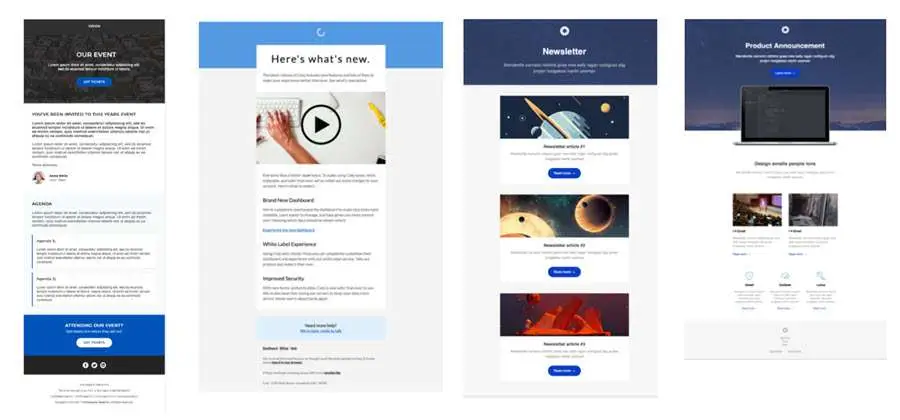
Providing visual examples of the final product can also be a great way to help the client visualize the email and what the final design will look like. This is important to ensure everyone is on the same page. This might include an example of a newsletter email, product announcement email, event email, or whatever your email offering includes. Your previews might look something like this:

marketing email template

Make Your Email Template Easy to Understand

Keep it simple but as detailed as possible. Providing clear textboxes and visual cues to guide the client on what is required can help you get the information you need. Having a clear and simple template will avoid confusion and reduce back-and-forth threads with clients who need further clarification.

Review & Update Your Email Template Regularly

It’s important to regularly review the template. Ask yourself, your team, and your client what’s working, what’s not working, and what are the communication challenges. This will help your template to evolve and continuously improve.

In Conclusion

Investing in marketing email templates not only saves time but also improves the quality of your campaigns. Some of the most effective templates include examples of final emails, text boxes, and cues to guide the client and ensure it is clear what information is required from them.

If you’re still unsure of where to start, we’re here to help. We work on templates day in and day out at 4Thought Marketing, so we know a thing or two about getting the information you need from them. Get in touch with us today to find out more.


page tag

We frequently work with customers to improve their marketing strategy and online presence. A significant part of this involves guiding marketers to explore Eloqua’s “hidden” features that they may not be leveraged to their full capabilities, or might not even be aware of.

You likely have a customer segmentation system based on past purchases or provided information, but what if you could start even earlier, or continue observing their journey? What if you could see which pages each customer viewed and where they are in the sales funnel? With Eloqua, you can do both of these and more with an often-overlooked function: creating page tags.

Today, we’ll look a little closer at why page tagging with Eloqua is so important and how it can drive engagement and conversions.

Utilizing page tags effectively can greatly enhance your understanding of customer behavior and improve your marketing efforts.

How Webpage Tagging Beats the Competition

In a nutshell: page tagging provides valuable information for customer segmentation based on website activity. You may already have customer information, but page tagging provides a more up-to-date picture of customer interests. This leads to better segmentation, more accurate targeting, more effective nurturing, and a higher chance of generating a lead or conversion.

Getting Started with Page Tags

Page tags let you see where visitors frequent your website, creating a profile you can use to send them relevant, targeted offers. For tags to work, every page on your website—even blog posts!—needs tags.

Let’s explore tags in terms of a physical store. A customer who spends 30 minutes in your store might spend 20 minutes browsing auto parts, and 10 minutes in the grocery department. To get them to shop with you a second time, you can offer them coupons based on their past browsing activity: for instance, a discount code for auto services or a buy-one-get-one grocery offer. Both are relevant, but neither is so specific that your customer feels spied on.

With a few variations between industries and business size, tag categories might include:

  • Target audience
  • Products
  • Services
  • Industry/vertical
  • Problem/solution
  • Marketing funnel stage

As you create page tags, try to use easy-to-understand naming conventions. The goal of page tagging is to make segmentation easier. Self-explanatory tags such as “department=automotive” or “stage=conversion” will work far better than cryptic tags such as “stage=3” or “audience=25”, for example.

Once you know which categories are relevant to your business, it’s time to start page tagging.

Level 1 Page Tags

This is the most basic page tagging, dependent only on a few categories. You’ve analyzed your website and identified the categories that apply to your business. You determine which individual pages fall into each category and tag them accordingly. All your products, regardless of price or popularity, receive the “product” webpage tag. All your services receive the “service” webpage tag and related tags.

Now, this does allow you to collect some information on visitors to your site. But stopping here means you’ll miss out on so much more potential that comes from more in-depth page tagging. Let’s move on to Level 2.

Level 2 Page Tags

In this stage, you’ll add additional category tags to your pages to narrow things down a little further. Instead of giving a product page only the “product” webpage tag and calling it a day, you’ll consider what other categories may be applicable. Your end goal should be to assign every webpage at least 2 tags, using a combination of your chosen categories, and to give each page a clear purpose (i.e., to track interest in a product or convey pricing).

You likely will have to rewrite some of your web pages at this stage. That’s alright—just keep the new content consistent with the tags.

Level 3 Page Tags

As we saw in Level 2, different web pages can and will have different purposes. What might not immediately be obvious is that they can also have different audiences. When focusing on webpage tagging, keep both the page’s purpose and its audience in mind. This will tell you what tags you need.

For example, your analysis of webpage purposes and audiences might look something like this:

Page Audience Page Purpose Eloqua Webpage Tags (Vertical, Product, Funnel Stage)
Financial Services Convey Financial Service Expertise Vertical=Finserv
Late-Stage prospects & Customers Describe ProdX Warranty Product=ProdX Stage=Conversion if not customer.  Stage=Service if customer.
Prospects Compare ProdY to Competition Product=ProdY Stage=Conversion
Fin Serve Prospects Compare ProdX to competitors Product=ProdX Stage=Conversion, Vertical=FInserv
All Prospects/Customers Pricing Stage=Conversion

After the Page Tagging is Done

Microsoft Teams

Page tagging is just the first step. Now that you have your data collection system in place, it’s time to turn the tags into data fields in Eloqua that your team can use for segmentation as well as triggering nurtures, newsletters, and other key components of marketing.

Data fields like “Funnel Stage”, “Vertical”, “Product_of_Interest”, etc., can be directly populated from your webpage tags. This makes it easy to sort new contacts as you track the pages they visit. From there, you can automatically include them in targeted nurture campaigns, knowing that they’re likely to be quite interested.

Conclusion

Creating webpage tags is easily accomplished with proper planning. A particularly expansive website might take weeks to properly tag. But it’s absolutely worth your time. Improving your segmentation improves your marketing efforts, which ultimately can improve your profit margin. Interested in page tagging with Eloqua but not sure where to start? Contact us for more


We’re All Feeling the Impact of Recent Events

With recent events dominating the news, keeping yourself and those close to you safe and well must be your highest priority.

While many companies are working very hard to keep everything “business as usual,” company leaders are already planning for the future.  They face difficult choices, and the longer they wait, the more likely they are to take more decisive steps.  Without regard as to whether this approach is right or wrong, it’s happening, at many organizations, right now.  In our article below, we examine the challenge of finding the correct balance of in-house or marketing agencies.

Balancing In-House Marketing Teams vs. Agencies in 2022

As part of your planning cycle, marketing organizations are continually examining and re-examining how to balance the mix of in-house marketing teams vs. agencies. According to a 2019 Gartner Marketing Operational Survey, companies shifted more work to in-house marketing teams from outside agencies in 2018.

Key drivers include the ability to better respond to emerging marketing and business opportunities, delivering higher value, and changing from tactical execution to a more strategic role in directing implementing their marketing strategy.

Moving in-house also reduces their dependency on outside agencies.  However, not everything is shifting in-house. Companies are generally looking first to centralize control and management, and then choosing the best mix of both in-house teams and partners for their marketing operations plan.

And moving work in-house presents a range of challenges.

Balancing In-House vs. Agency Hiring

  • Hiring the right talent takes time. Even if qualified applicants are available, it can take two to three months to hire someone and several months for them to become productive within your organization.
  • Lean teams. Most marketing teams staff for typical workloads, with a small buffer for the occasional urgent or unplanned projects.
  • Increasing workloads. With constantly shifting priorities and a rapidly changing business climate, in-house teams struggle to keep up with demand.
  • Skills gaps reduce agility. You have a fully staffed team, but lack expertise in specific areas that impact your ability to respond quickly to shifting priorities.
  • Focus on execution reduces the time to think strategically. Often the first area to suffer is your marketing strategy.  Getting the work done is crucial, but so is ensuring your skills and technology align with company objectives and strategy.
  • External events. The weather, health crises, and civil disruption may throw normal operations into disarray, limiting your ability to sustain normal marketing operations.

When companies are short-handed, or lack skills, partners can quickly fill the void with highly qualified people, ensuring that projects stay on schedule.  They can also help with routine day-to-day activities. With short notice, they can dedicate one or several people to your company. These are experienced people who work with you and your organization to fill the current gap.

Working with a partner organization also gives you access to new ideas and insights at every level, from creative to technology. From tactical tasks like subscription lists or optimizing subject lines to upgrading and adding new applications to your Martech stack, a partner working with many clients brings a wealth of experience!

At the same time, partners give new users at your company opportunities for hands-on experience (and interaction with more experienced users) and can help them to become much more proficient, and much more profitable, much more quickly.

And if recent events have taught us anything, you can never be fully prepared for every contingency.  Partners can help when external forces impact your business.

How Partners Provide Value to Marketing Operations Teams

  • Multi-faceted expertise: Partners will know critical areas that a new or even experienced employee may not have. And they can easily tap into expertise from other partner employees as necessary.
  • Get a lot of work done quickly: Emerging opportunities or urgent projects can outstrip available resources. A partner can frequently bring many people to bear on a problem, solving it quickly and efficiently.
  • Outsource tactical production work: Move some of your day-to-day campaign services work, to keep up with the workload, or free up time for more strategic planning by your team.
  • Skills training for your team: Leverage your partners for both formal and informal training for your organization – the kind of training after exposure to multiple successful projects across many clients.
  • A broad perspective on what is possible: A partner with many clients brings you a much broader experience base across all aspects of marketing operations. You can then tap into this experience and add it to your organization.

Getting the Most from Your Agency

While partners can quickly fill gaps and respond when demand is high, challenges remain. However, working with partners has never been easier with these simple solutions.

Partners do not spend much time in your office

When working with any partner or consultant, they usually don’t spend a lot of their time in your office. For many companies, face to face conversations is crucial for continued success. However, there are simple solutions to stay connected:

  • Use video conferencing for weekly, even daily check-in! With today’s internet speeds and cameras now in every computer, tablet, and phone, adding video to your conversations is easy.
  • Schedule periodic face to face meetings. Consider budgeting for the partner to regularly visit your office every 3-6 months (or more!).
  • Setup quarterly one-on-one meetings. Just as you would with an employee, find 30 minutes once a quarter to give some feedback. Don’t only provide feedback to the company. Provide input to the specific person working with you. It’s incredible what even a little feedback can do!
  • Maintain an executive-to-executive connection. Create and maintain a relationship between a partner executive and one of your key stakeholders. It bridges the connection between companies at higher levels and provides more ROI, and a “bigger picture” to supplement day to day interactions.

Naturally, there are many more management methods you can use, but those listed here can help you to enhance a partner relationship greatly.  The next challenge is cost.

Tough Times: Executives Use Different Calculations when Cutting Expenses

Budget cuts don’t always seem to make sense for a variety of political and financial reasons,

For example, you may look at someone’s salary of $100k and be required to cut them while simultaneously receiving permission to spend an additional $100k on an agency?  It would seem like a wash, right?

However, execs, CFOs, and Human Resources departments have a unique way of calculating.  An employee’s salary often has an “overhead factor” attached to it that goes above and beyond what the company pays for health care and taxes.

That overhead may include a portion of your building & office expenses, HR dept expenses, managerial expenses, projected possible termination expenses, etc., meaning that the core salary of 100k, can quickly jump to 2x, 3x, and even 4x what the person takes home.

Now compare your $100k agency with your $400k employee, and one can start to understand the rationale behind these decisions.

Also, an agency’s hours are quickly accelerated or slowed.  Have another $100k to spend next month?  Many agencies would say, “Let’s go!” However, hiring and training somebody to be fully productive by next month may be unrealistic.  Often companies project 60 days to hire and 60 days more before full productivity.

And the reverse is also true.  Need to your agency to be “turned off” quickly, and to tell them “Sorry, please cut $100k next month”, with the right contract, it is usually substantially easier than letting someone go.  This financial flexibility often appeals to executives.

Expense (or Perceived Expenses)

It may seem as if “partners don’t come cheap.” And in the current environment, where hiring is difficult, partners are also “in demand.”

One of the best ways to mitigate the costs of working with a partner is to plan thoroughly and negotiate for quantity discounts.

Some partners can steeply discount their services if:

  • You only need basic “operations” services like segmentation, email sends and landing page creation
  • You buy a significant number of hours, for a long enough time.

Of course, both of those items often come into play.  So don’t forget to ask, “Do you offer quantity discounts for a certain number of hours or certain types of services?” Even if a company doesn’t have a formal policy in this area (and 4Thought Marketing does), they may be open to something informal better suit both the Eloqua Partner and yourself.

A partner can help you through periods when you’re short-handed, and they can even become a longer-term adviser that you can rely upon through the ups and downs of regular business cycles. They can provide a kind of consistency that you may not be able to find in a volatile hiring market.

Contact us if you’re experiencing marketing operations staffing, skills, production capacity issues, or completing high-quality projects on time. We’re experts helping Oracle Eloqua and Oracle Marketing Cloud customers optimize their marketing operations.  Learn more about available services.


Data privacy and compliance regulations are here to stay

We all fondly remember the mad dash to deploy a solution for the General Data Protection Regulation (GDPR).  But wait, there’s more.  Soon, most countries will enforce their compliance regulations making it even more important to have a solid foundation in place that can scale with your needs. Companies need to stay informed and start planning to add or update their privacy compliance solutions everywhere they do business.

Implementing a privacy compliance solution is more than just installing software and setting a few parameters.  To build your privacy compliance solution correctly, it will involve coordination and cooperation across multiple teams, some of which may not work with each other regularly.  The team will likely include representatives from Legal, Security, Marketing, and Public Relations.  And each will have its perspective on privacy and compliance, and the requirements for achieving compliance.

Unfortunately, compliance is not a single, global standard.  Most regulations offer flexibility in many areas, and businesses can choose if they will strictly adhere to all rules, or if they will relax where permitted.  In most cases, your existing company policies and culture will guide your choices. An effective compliance solution will require everyone on the team to be actively involved in decision-making.

Balancing Privacy Compliance without Sacrificing Customer Experience

For many, compliance can feel like another government oversteps, an unnecessary burden that introduces new obstacles and increases costs with little benefit.  On the other hand, consumers are fed up with the amount of data collected about them, bought and sold without their input or permission, and used to target and influence their opinions and behavior.

However, according to Forrester, we’re now living in the age of the customer. Only companies that cede control to their customers and adapt to this new reality will grow, while those who do not will suffer. Companies are moving to empower their customers, allowing them to manage their preferences, and to specify how frequently and only through their preferred communication channels.

Savvy companies understand that when you embrace customers and give them control, only then can you accurately you can target and engage these motivated customers.

Learn More


4Thought Marketing Logo   March 30, 2026 | Page 1 of 1 | https://4thoughtmarketing.com/all-services/