Optimizing Marketo, B2B marketing, Marketing automation, Lead scoring, Data hygiene, CRM integration, Personalization, Campaign orchestration, Privacy compliance, Marketing analytics, Marketo strategies,

Optimizing Marketo is essential for B2B marketing teams as the platform remains a cornerstone of modern campaigns, yet rapid shifts in technology, privacy regulations, and buyer expectations demand constant evolution. In 2025, true optimization goes beyond simple automations or basic integrations—marketers need scalable, data-driven processes that are easy to maintain and deliver measurable business impact.

What to Expect for Optimizing Marketo

This guide introduces ten actionable strategies to optimize your Marketo instance in 2025, focusing on key areas such as audience segmentation, data quality, CRM integration, personalization, campaign orchestration, privacy compliance, AI-driven insights, efficient execution, analytics, and ongoing system health. Each strategy incorporates proven best practices and expert tips tailored for B2B success, aiming to provide practical steps you can implement immediately. For further exploration of current marketing automation trends, be sure to visit our Blog.

Here are the ten strategies and their key features and primary benefits:

  • Automating Segmentation: Employs Dynamic Smart Lists for faster, more relevant audience targeting.
  • Enhancing Data Quality: Leverages Automated Data Hygiene to ensure cleaner, deduplicated records.
  • Integrating With Salesforce: Establishes Stable Data Sync for a unified view of leads and reporting.
  • Advanced Personalization: Utilizes Velocity Scripting within Advanced Tokens for deeper personalization at scale.
  • Multi-Touch Campaigns: Implements Engagement Programs for improved nurture and conversion rates.
  • Consent and Compliance: Features Automated Consent Capture for reduced risk and easier audits.
  • AI-Driven Lead Scoring: Integrates Behavioral and Demographic AI Signals for higher conversion and sales efficiency.
  • Campaign Templates: Offers Reusable Program Blueprints for faster launches and fewer errors.
  • Custom Dashboards: Provides Tailored Analytics for actionable data and better decisions.
  • Regular Health Audits: Involves Systematic Process Review for proactive identification of issues.
1. Automating Segmentation with Dynamic Smart Lists

Dynamic smart lists transform how you segment audiences in Marketo by automatically updating membership based on real-time data. These lists use filters and rules that adapt whenever a lead’s information changes, ensuring your groups remain accurate without manual updates. This approach streamlines audience creation for B2B teams and allows for fast, precise targeting as your database evolves.

How Dynamic Smart Lists Support Scalable Personalization

Instead of static lists, dynamic smart lists let you deliver highly personalized email and nurture campaigns at scale. You can use profile, behavior, and engagement criteria to build advanced segments, such as:

  • Industry or job function
  • Recent engagement (webinars, content downloads)
  • Geographic region or account ownership

For large organizations, combining smart lists with program templates accelerates campaign launches and minimizes segmentation errors. Advanced segmentation also supports compliance initiatives, allowing you to isolate and manage sensitive or regulated audiences with precision. To further analyze and visualize your segmentation data, consider exploring 4Segments. By aligning smart list logic with business rules, you can improve response rates and better measure campaign performance.

2. Enhancing Data Quality Through Automated Data Hygiene

Clean, reliable data forms the backbone of every effective Marketo strategy. In 2025, automated data hygiene makes ongoing maintenance simple and scalable—ensuring you engage only the right contacts with the most up-to-date information.

Key Tactics for Automated Data Hygiene

  • Automation Workflows: Set up recurring data cleansing campaigns that catch duplicates, purge incomplete records, and standardize data fields using Marketo’s flow steps and Zapier integrations.
  • Deduplication Tools: Integrate services like RingLead to automate detection and merger of duplicate records across both Marketo and your CRM.
  • Field Normalization: Use smart campaigns to auto-correct variations in key fields, such as job titles or country codes, improving segmentation and reporting accuracy.
  • Data Enrichment: Connect Marketo to platforms like Clearbit for enriched, validated contact and company data, reducing manual research and boosting personalization.

For advanced solutions tailored to your data management needs, visit our Data Services page.

3. Integrating Marketo Seamlessly with Salesforce CRM
Critical Sync Foundations for Stable Data Flow

To achieve seamless integration between Marketo and Salesforce CRM, marketing operations teams in 2025 should focus on stable, two-way syncs and uninterrupted lead data flow. Start by precisely mapping fields and record types—aligning lead, contact, and account objects—to ensure information moves accurately and consistently between platforms. A clear, standardized data model reduces sync errors and accelerates troubleshooting.

Optimizing Lead Lifecycle Management

Best practice is to implement automated triggers for lead status changes, assignment, and nurture tracks. This approach moves leads efficiently through lifecycle stages and keeps sales teams updated in real time. Teams can extend automation with activity-based rules—such as Salesforce tasks for campaign responses or closed-loop feedback on opportunity status—to better coordinate marketing and sales efforts.

Unified Reporting and Error Prevention

Consistent integration enables unified reporting dashboards, giving full visibility into lead sources, campaign impact, and revenue contribution. It also helps identify and resolve duplicate, orphaned, or mismatched records. For more on connecting your platforms, see our 4Bridge Integration Connector.

4. Leveraging Advanced Tokens for Hyper-Personalization
Personalize at Scale Using Marketo Advanced Tokens

Marketo’s advanced tokens, especially when enhanced through velocity scripting, unlock true hyper-personalization across emails and landing pages. Standard tokens pull basic data like a lead’s name or company, but advanced tokens allow conditional logic, custom content blocks, and calculations that adapt each communication based on behavior, demographics, or lifecycle stage. This means a single campaign can deliver hundreds of unique experiences automatically.

With velocity scripts, you can show custom product offers, adjust messaging for industry or job title, or even integrate external data sources within your content. Example use cases include:

  • Setting fallback values for missing fields
  • Tailoring webinar follow-up messages by attendee type
  • Injecting regional compliance footers based on location
  • Displaying purchase history or account status dynamically

B2B teams gain higher engagement rates and improved conversion by delivering content that feels truly relevant. Plan variable logic, write velocity code, and keep tokens organized for long-term reuse—removing guesswork and supporting sustainable personalization at scale.

5. Orchestrating Multi-Touch Campaigns with Engagement Programs
Building Multi-Touch Journeys with Marketo Engagement Programs

Managing complex B2B buying journeys requires more than a single email or touchpoint. Marketo Engagement Programs give you the control to deliver coordinated, multi-step communications across several channels—ensuring that leads receive the right content at the right time based on their behavior and stage.

To maximize nurture outcomes in 2025, use the following steps to set up multi-touch programs that adapt as prospects interact with your marketing:

  • Map the buyer journey and identify key touchpoints (email, retargeting, SMS, webinars).
  • Structure Marketo Engagement Programs with nested streams, each targeting a specific stage or persona.
  • Set transition rules to move leads between streams automatically, based on actions like content downloads or event attendance.
  • Integrate third-party tools like ON24 for webinars or AdRoll for retargeting to expand channel reach.
  • Monitor engagement with Marketo’s analytics to refresh content and rebalance touchpoints regularly.

The result is a consistent experience that delivers higher conversion and nurtures prospects until they are sales-ready. Discover more about optimizing campaign orchestration with our Campaign Production services.

Optimizing Marketo, B2B marketing, Marketing automation, Lead scoring, Data hygiene, CRM integration, Personalization, Campaign orchestration, Privacy compliance, Marketing analytics, Marketo strategies,
6. Managing Consent and Compliance for Global Privacy Laws

Privacy requirements continue to evolve in 2025, making automated consent management a priority for Marketo users. B2B teams face greater accountability for tracking consent status, honoring global opt-in laws, and delivering proof of compliance on demand.

How to Automate Consent Collection and Normalization

  1. Centralize Consent Fields: Standardize consent and communication preference fields in your Marketo instance to ensure reporting consistency across regions and legal bases.
  2. Automate Capture: Use form integrations or webhooks to immediately store and timestamp consent interactions. This includes all capture points—web forms, landing pages, and preference centers.
  3. Normalize Disparate Data: Deploy smart campaigns to convert diverse opt-in types and values (yes/no, true/false, checkboxes) into common formats for reliable segmentation and global marketing logic.
  4. Create an Audit Trail: Maintain a log of consent activities tied to each contact by storing reasons, methods, and time of consent, making it easy to demonstrate compliance during audits.

Consent solutions like 4Comply can supplement Marketo’s capabilities for complex enterprise requirements to simplify compliance, reduce risk, and keep your entire database in line with local and international privacy laws.

7. Implementing AI-Driven Lead Scoring Models
Why AI-Driven Lead Scoring Sets New Standards

Manual lead scoring often misses valuable buying signals, resulting in missed opportunities or wasted sales effort. Using AI and machine learning in Marketo transforms lead scoring by continually analyzing both behavioral and demographic patterns—such as web activity, content downloads, job role, and company size—to calculate a conversion likelihood score in real time.

AI-powered models evaluate thousands of data points, finding patterns humans cannot reliably track. As a result, B2B teams quickly identify the most sales-ready leads while routing lower-priority contacts to ongoing nurture tracks. This reduces response time, increases pipeline quality, and supports higher marketing-to-sales conversion rates.

  • Integrate AI scoring tools like Leadspace or Lattice Engines for advanced modeling within Marketo.
  • Leverage in-platform AI features to weigh actions and attributes based on recent campaign engagement.
  • Test and recalibrate models quarterly to ensure relevance as buyer behaviors change.

Consulting partners such as 4Thought Marketing support AI model optimization by aligning scoring logic with B2B sales cycles and integrating external enrichment data. This structured approach boosts accuracy and makes marketing programs more accountable to revenue results. To learn more about Marketo lead scoring and nurturing, see our article on Marketo Nurture & Lead Scoring: Pipeline Growth.

8. Streamlining Campaign Execution with Marketo Program Templates

Efficiently launching campaigns starts with building and standardizing program templates in Marketo. Templates provide a repeatable framework that ensures every campaign includes the right assets, settings, and workflows—reducing time to launch and minimizing setup errors across teams. In 2025, B2B marketing teams rely on templates to support consistent branding, compliance, and scale their output without adding manual work.

  • Define campaign types—like webinars, email blasts, and nurtures—with dedicated templates for each use case.
  • Include pre-built assets: emails, landing pages, forms, and tracking tokens to speed setup and enforce branding guidelines.
  • Embed standard operational flows such as lead assignment, follow-up rules, and reporting triggers for uniformity.
  • Document template usage and version control so teams can easily update or retire assets as requirements change.

Scalable templates help new team members launch campaigns with confidence and allow teams to experiment with less risk. Leading consultancies work with B2B organizations to design, audit, and maintain robust Marketo program templates that reflect evolving best practices. This approach keeps execution agile as campaign volume grows or business needs shift. Keep your team up to date and efficient with our focused Training offerings.

9. Improving Reporting Accuracy with Custom Analytics Dashboards
Track KPIs and Uncover Insights with Custom Dashboards

Relying on standard reports in Marketo often limits visibility into the metrics that matter most for B2B teams. Custom analytics dashboards allow you to define, display, and drill into KPIs tailored to your campaigns, lead lifecycle, and revenue impact. With these dashboards, teams can quickly see which assets perform, where leads drop out, and how individual campaigns contribute to pipeline.

To get actionable insights, focus on:

  • Choosing Metrics That Drive Action: Track conversion rates, campaign responses, and sales-qualified leads, not just email opens or clicks.
  • Building Role-Based Views: Create separate dashboards for marketers, sales, and executives to show what each group needs at a glance.
  • Integrating Data Sources: Connect tools like Tableau or Power BI to merge Marketo data with Salesforce and web analytics for a unified reporting environment.

This approach eliminates manual data pulls, reduces reporting errors, and enables faster decision-making based on facts, not guesses. Explore more about optimizing reporting with our Reporting & Analytics offerings.

10. Ensuring Continuous Improvement Through Regular Health Audits

Proactive Marketo optimization relies on scheduled health audits that examine every layer of your system—processes, assets, integrations, and compliance. Regular reviews uncover problems like outdated triggers, broken links, redundant fields, or assets that impact deliverability and reporting accuracy before these issues disrupt campaigns.

What a Marketo Health Audit Should Cover

  • Asset Reviews: Check landing pages, emails, smart campaigns, and forms for outdated branding, compliance language, or non-working links.
  • Process Validation: Confirm workflows, scoring models, and nurture routes reflect current business needs and best practices.
  • Integration Health: Ensure active CRM, data enrichment, and consent system integrations—like Salesforce or Clearbit—maintain clean data flows without sync errors.
  • Compliance Checks: Audit consent fields, subscription centers, and storage logs to verify regulatory alignment across global privacy requirements.

By documenting findings and acting on recommendations, teams resolve technical debt, stay compliant, and maximize platform value. a checkup on your MarTech stack, check out our Health Checks & Analysis services.

How 4Thought Marketing Drives Marketo Optimization Success

Many B2B teams succeed with Marketo when they use outside support for technical setup, strategy, and ongoing management. 4Thought Marketing helps organizations address the real-world issues that slow down marketing operations and impact results. Their consultants guide clients from planning to execution, making advanced features—like data hygiene, dynamic segmentation, and privacy automation—easier to use in day-to-day campaigns.

Expert Consulting Across Marketo’s Core Challenges

  • Integration Services: 4Thought Marketing designs and maintains reliable connections between Marketo, Salesforce CRM, and other key platforms, enabling unified data and stable reporting.
  • Data Management: With custom workflows and cloud apps, B2B teams automate deduplication, normalization, and enrichment, which reduces errors and boosts campaign readiness. Learn more about these capabilities with our Cloud Apps.
  • Privacy Solutions: The privacy compliance app, 4Comply, streamlines consent collection and audit trails for global regulations, helping organizations avoid manual tracking or legal uncertainty.
  • Strategy and Training: Teams gain in-depth training, template creation, and scalable execution frameworks for predictable performance and faster launches.

By focusing on automation, accuracy, and privacy, 4Thought Marketing helps clients implement each optimization strategy efficiently. This approach enables B2B teams to focus their resources on insights and growth, rather than technical issues.

Moving From Strategy to Action

Each strategy offers a direct, actionable way to improve process, efficiency, and results with Marketo. Teams often see the greatest benefit by combining these approaches, creating a system where automation, compliance, and analytics support each other. Expert partners like 4Thought Marketing make this shift easier by providing hands-on consulting, integration support, and solutions built specifically for B2B operations.

Whether tackling legacy integrations, building new campaign workflows, or updating privacy frameworks, working with dedicated specialists helps keep your Marketo instance aligned with today’s best practices and ready for what’s next. Consistent attention to these ten strategies helps teams maintain a high-performing Marketo environment, adapt rapidly in a changing landscape, and drive measurable, long-term success in their marketing operations.

Conclusion: Elevate Your 2025 Marketo Strategy

The strategies listed above address the core challenges and opportunities for B2B marketing teams relying on Marketo in 2025. By automating segmentation with dynamic smart lists, you ensure campaigns reach the right audiences as your database evolves. Automated data hygiene keeps your contacts reliable, supporting accurate targeting and better reporting. Seamless Salesforce CRM integration maintains a unified view of leads and pipeline while preventing costly sync issues. Advanced tokens bring personalization to every message, raising engagement at scale. Multi-touch campaign orchestration guides prospects along long B2B journeys, adapting to how and where they interact.

Privacy compliance now shapes every marketing operation. By managing consent proactively, teams limit risk and respond confidently to shifting regulations. AI-driven lead scoring allows for smarter sales prioritization, using real-time data to surface your best opportunities. Reusable program templates cut launch times and errors, helping teams respond quickly to new needs and opportunities. Custom dashboards transform raw data into immediate insights, guiding both strategy and day-to-day decisions. Regular health audits, often overlooked, are critical for uncovering technical debt and preventing issues before campaigns suffer.

custom email templates, email template design, responsive email templates, modular email templates, accessible email templates, brand-safe email templates, email design best practices, marketing automation templates, Eloqua email templates, Marketo email templates, email template workflow

Racing toward a send date shouldn’t feel like threading needles in a wind tunnel, yet that’s exactly what happens when teams rely on one-size-fits-all builders: logos drift, headings shrink, Outlook chokes, and someone remembers the GDPR checkbox at the eleventh hour. A library of custom email templates solves those pain points in advance by baking brand rules, accessibility checkpoints, and performance tweaks directly into the code.

Each module follows a proven email template design framework—semantic headings, fluid images, alt-text placeholders—so marketers can rearrange blocks without risking a single pixel. Because every file ships as a fully responsive email template, layouts flex gracefully from watch-screen previews to widescreen desktops, keeping call-to-action buttons thumb-friendly and color contrast intact.

The result is a faster, calmer production cycle where creativity stays focused on the message, not the markup, and every send lands looking exactly the way your brand intended.

Why “Custom” Still Matters in a Drag-and-Drop World

Drag-and-drop builders promise convenience until your guidelines drift beyond stock fonts or rigid grids. Logos wobble, headings lose weight, and color contrast fails accessibility checks. Those tiny deviations fracture brand perception, swell QA loops, and raise legal concerns. Templates coded to exact specifications lock branding and compliance in place. Designers can refresh imagery without touching the skeleton, marketers move faster, and every send carries the unmistakable 4Thought polish from subject line to footer—because the underlying email template design never wavers.

Laying the Foundation: Core Template Elements

Modular Layouts

Hero, body, testimonial, footer—each block works like LEGO bricks. Teams reorder or remove sections without shattering the grid, spinning up fresh responsive email templates in minutes.

Accessibility by Design

Contrast ratios are baked in, semantic headings guide screen readers, and every image ships with an alt-text placeholder. By embedding accessibility inside every custom email template, compliance stays automatic rather than optional.

Responsive Rules

Fluid tables, max-width images, and well-tested media queries adapt gracefully from tiny phones to stubborn desktop clients—even Outlook’s Word-based renderer. Screens shrink, content flexes, message stays intact.

Personalization Tokens

Dynamic fields such as {{FirstName}} or region-specific CTAs sit exactly where Eloqua or Marketo expects them, so personalization feels seamless rather than bolted on.

Version Control

A shared repository or DAM maintains one source of truth. Contributors branch, review, and merge changes without spawning template-v9-final-FINAL.html.

Workflow: From Brief to Send in Five Steps

Creative Kick off

Designers, copywriters, and marketing ops gather brand guidelines, campaign goals, and subscriber personas, producing a brief everyone actually references. Early alignment keeps later rounds short.

HTML / CSS Build

Developers translate wireframes into lean, commented code. Outlook quirks are handled upfront, and reusable classes keep file size slim. Each block follows consistent email template design standards, ensuring every output is a responsive email template by default.

Client-Side QA

Templates pass through Litmus and real-device testing to catch rendering surprises. Accessibility scanners verify contrast, heading order, and alt-text coverage before anyone hits “Send.”

ESP Integration

The pixel-perfect template lands in Eloqua or Marketo. Tokens map to data fields, dynamic rules align, and a live test fires to the seed list so stakeholders see exactly what subscribers will receive.

Governance & Updates

Templates live on after launch. Release notes log every tweak, quarterly audits retest dark-mode behavior, and dashboards flag under-performing blocks for refinement rather than retirement. Continuous care keeps your library of custom email templates evergreen.

Case Snapshot: How One Global Fintech Cut Production Time 60 %

A fast-growing fintech juggled ten regional newsletters with inconsistent branding. After adopting a suite of modular, responsive email templates, build time dropped from two days to three hours, QA loops halved, and click-to-open rates climbed 18 %. Support tickets about “broken emails” virtually disappeared, freeing designers to focus on creativity instead of troubleshooting.

Common Pitfalls & Pro Tips

  • Fixed-width images break layouts on narrow phones; fluid images preserve proportion without sacrificing clarity.
  • Dark-mode blind spots can wash out vibrant banners; a simple @media (prefers-color-scheme: dark) rule keeps colors crisp.
  • Neglecting a plain-text version hurts deliverability; generating it directly from your HTML ensures every subscriber gets a readable message—even in text-only environments.

How 4Thought Marketing Can Help

Thousands of custom email templates delivered across SaaS, fintech, and higher-ed have sharpened our process. We start with a template audit to uncover fragmentation, then craft a modular library rooted in best-practice email template design and tested as fully responsive email templates. Maintenance packages keep every block current with device trends and evolving regulations, so your brand always shows its best side.

Conclusion

Consistency elevates perception, speed unlocks opportunity, and quiet confidence replaces launch-day stress when every send relies on a proven template system. Imagine the momentum that follows a friction-free workflow; a complimentary template review with 4Thought Marketing reveals the first steps your next campaign will appreciate.


MOPS request surge management, marketing operations, MOPS, marketing intake system, marketing request prioritization, marketing ops roadmap, marketing ticketing workflow, SLA for marketing operations, marketing backlog control, marketing operations best practices,

A recent survey of several hundred professionals confirmed what anyone in marketing operations already suspects: when deadlines loom and requests spiral out of control, most teams reach first for a formal intake system, many for stricter prioritization, and a vocal minority for an upfront roadmap. No matter which levers you prefer, the lesson is clear. MOPS request surge management is now a core survival skill. Demand for automation, data fixes, and campaign support grows faster than head count, so the question isn’t if the flood will hit—only whether your team can steer it toward genuine business value.

What Request Surge Really Looks Like

Surge is less about sheer volume than volatility. One morning you’re cloning a nurture for a new region; the next you’re rescuing a broken webinar integration. A senior leader’s “quick idea” lands in your inbox, and suddenly the sprint board is unrecognizable. This whiplash saps campaign velocity, erodes stakeholder trust, and nudges talented operators toward burnout. Worse, unmanaged tasks can transform marketing operations from strategic partner to frantic production line. Solid MOPS request surge management stops that slide by inserting purpose-built gates between urgency and execution.

Three Pillars of Control

Intake and Visibility

Every piece of work must pass through one doorway—a form, portal, or queue that captures who’s asking, why it matters, and when it’s truly due. Beyond gathering details, the portal turns hidden effort into transparent workload. Once stakeholders see the queue, last-minute “P0” labels lose their sting, and marketing operations gains breathing room.

Prioritization and the Confidence to Decline

Intake without triage merely organizes chaos. Whether you favor RICE, ICE, or a custom tiering model, tie each request to measurable impact and required effort. When low-value tasks surface, a data-driven score lets you explain why they’ll wait. That clarity converts emotional debates into constructive trade-offs and is the heart of effective MOPS request surge management.

Roadmap and Education

A living roadmap turns abstract priorities into a concrete story that anyone can follow. Publishing what the team will—and won’t—tackle this quarter shrinks off-road asks and positions marketing operations as a guide, not an order-taker. Pair the roadmap with short “show-and-tell” sessions that demystify tech constraints, and colleagues start filtering their own ideas long before they reach the intake form.

Handling Executive “Drive-By” Requests

When an urgent idea arrives from senior leadership, resist the reflex to drop everything. Log the request like any other, run it through your scoring model, and present the trade-offs in plain language. If the new work truly outweighs current priorities, decision-makers will see the cost and adjust. Keeping the conversation inside the intake-and-priority framework protects your credibility and ensures strategy, not hierarchy, guides the queue—another essential win for MOPS request surge management.

A Ninety-Day Path to Calm

Spend the first two weeks auditing past tickets to uncover common themes and cycle times. Use those findings to shape a lightweight intake form and draft service-level targets. Over the next month, soft-launch the form with a friendly stakeholder group, publish an initial roadmap, and hold a live priority review. In the final month, refine your scoring rubric, track turnaround times, and gather feedback for iteration. By day ninety, marketing operations should see shorter queues, clearer expectations, and more hours devoted to high-impact work.

Measuring Success

Progress becomes obvious when average cycle times shrink, service-level agreements hold steady, and stakeholder surveys trend upward. Equally telling is the share of completed work that map to your published roadmap. As that percentage climbs, you’ll know MOPS request surge management is steering effort toward the initiatives that matter most.

Conclusion

Marketing Operations exists to accelerate growth and safeguard the systems that enable it. Endless requests may threaten to drown that mission, yet the very volume of demand also signals how indispensable the function has become. Put a purposeful intake gate in front of the torrent, score each request against real business value, and illuminate a roadmap that everyone can see. The flood won’t stop, but it will flow where you choose—turning chaos into earned influence, one prioritized ticket at a time. When the request surge hits and your internal team is maxed out, one of the smartest strategies is to bring backup.

Partnering with a MOPS agency like 4Thought Marketing—and banking a block of hours in advance—can give you the flexibility to handle unexpected spikes without overloading your team. It’s like surge protection for your marketing ops: you’re not committing to full-time help, but you’ve got experts who already know your systems and can step in quickly when demand rises.


marketing automation, B2B enterprises, lead nurturing, lead scoring

Consider maintaining the smooth operation of all those important customer interactions, particularly when you’re concentrating on other important aspects of your business-to-business (B2B) enterprise. Marketing automation can help with repetitive tasks, lead nurturing, and identifying what is effective. It is not a complex technological solution. Exploring the world of automation could be a game-changer if your team is overburdened with manual labor and you’re searching for a more intelligent approach to handle lead scoring and establish connections with potential customers.

Why Marketing Automation?

For companies operating within the B2B enterprises sector, the implementation of marketing automation transcends mere time savings. It unlocks the potential for truly scalable workflows, consistently elevates the quality of generated leads, and fosters stronger, more productive relationships between marketing and sales teams. Furthermore, in an era characterized by increasingly stringent privacy regulations and an expanding digital ecosystem, the necessity for dependable and fully integrated automation tools has never been more pronounced.

Benefits of Marketing Automation for B2B Orgs

Marketing automation empowers B2B enterprises to streamline workflows, nurture leads effectively, and gain valuable insights into campaign performance. By automating repetitive tasks like email marketing and lead scoring, teams can focus on strategic initiatives, ultimately driving higher efficiency and a stronger return on investment.

Streamlined Efficiency and Time Savings

Marketing automation platforms excel at taking over repetitive yet crucial tasks, such as automated email sequences, sophisticated lead scoring methodologies, and comprehensive campaign tracking. This automation frees up valuable time for marketing professionals, allowing them to concentrate on higher-level strategic initiatives that drive business growth.

Enhanced Scalability for Growing Businesses

As B2B enterprises experience growth, the volume of leads and customer interactions naturally increases. Marketing automation systems, including robust platforms like Oracle Eloqua and Adobe Marketo, are designed to handle these large volumes of campaigns and customer touchpoints efficiently. This scalability ensures that marketing efforts can seamlessly keep pace with the expanding demands of sales and the increasingly complex journeys of their customers.

marketing automation, B2B enterprises, lead nurturing, lead scoring

Improved Lead Management and Nurturing

At the heart of effective B2B marketing lies the ability to manage and nurture leads effectively. Marketing automation platforms empower businesses to segment their audiences with precision and engage potential customers with personalized content that resonates with their specific needs and pain points. Features like lead scoring and detailed tracking provide sales teams with clear, actionable insights into the most promising contacts, optimizing their efforts.

Higher Marketing ROI

By enabling more precise targeting and deeper personalization, marketing automation often translates into significant improvements in marketing return on investment (ROI) for B2B enterprises. Automation minimizes wasted resources by ensuring that campaigns reach only the most relevant audience segments, thereby maximizing their impact. Moreover, the availability of detailed campaign performance analytics allows for continuous refinement and optimization of marketing efforts.

Stronger Sales and Marketing Synchronization

Achieving true alignment between sales and marketing teams is crucial for sustained success. Marketing automation facilitates this alignment by providing both teams with access to the same critical data and streamlined workflows. Shared dashboards and unified platforms ensure timely follow-up on leads and consistent messaging throughout the customer journey.

Align Your Strategy with Goals

For marketing automation to truly deliver value within B2B enterprises, it must be intrinsically linked to overarching business objectives. Rather than simply automating tasks for the sake of efficiency, every automation workflow should be strategically designed to contribute to key outcomes such as revenue growth, accelerated sales pipelines, or improved customer retention rates. A foundational step in this process is to meticulously map the entire customer journey, from the initial point of contact through the sales process to long-term engagement. This comprehensive view allows for the identification of critical moments where automation can streamline transitions, personalize follow-ups, or deliver timely, relevant content based on specific buyer actions.

Steps to Align Automation with Business Goals:

  • Define clear and measurable business objectives.
  • Translate these objectives into specific marketing goals (e.g., lead volume, lead quality, conversion rates, customer lifetime value).
  • Identify the various stages of the buyer’s journey and the key interactions that influence outcomes.
  • Configure your marketing automation platform to trigger customized campaigns, alerts, or lead scoring rules at each relevant stage.
  • Establish key performance indicators (KPIs) for tracking progress and measuring the impact of automation efforts.

Consistent measurement is paramount, ensuring that automation activities are directly linked to tangible business results. Utilizing dashboards and reporting tools within your chosen platform allows for continuous monitoring of campaign effectiveness.

marketing automation, B2B enterprises, lead nurturing, lead scoring

Integrating Leading Marketing Automation Platforms

The seamless integration of marketing automation platforms with other critical business systems is a pivotal step for B2B enterprises. This integration streamlines the flow of vital data, including lead information and campaign performance metrics, between marketing and sales systems, ensuring comprehensive visibility and accurate reporting. Selecting the appropriate platform and adhering to integration best practices can significantly impact overall marketing effectiveness.

Best Practices for Integration:

  • Confirm the compatibility of your marketing automation platform (e.g., Oracle Eloqua, Adobe Marketo) with your CRM and other essential business systems.
  • Clearly map the flow of lead, account, and campaign data between integrated systems to prevent data silos, duplication, or loss.
  • Automate routine processes such as lead assignment and lead scoring to maintain campaign momentum and reduce manual intervention.
  • Establish robust access control mechanisms to protect data privacy and maintain system integrity.

Data Management and Lead Nurturing Excellence

Effective data management serves as the bedrock of any successful B2B marketing automation program. When data is accurate, up-to-date, and well-organized, marketing campaigns can deliver the right messages to the right audiences at the right time, leading to improved conversion rates and stronger business outcomes. Conversely, poor data quality or unclear lead segmentation can result in missed opportunities and wasted marketing spend.

Essential Steps for Managing Data and Leads:

  • Establish a centralized system for all contact and account records from various channels and implement regular data cleansing routines to eliminate errors and outdated information.
  • Segment your database based on relevant criteria such as industry, company size, behavior, or stage in the buyer’s journey to enable highly targeted messaging.
  • Implement lead scoring methodologies based on engagement levels, demographic fit, and interactions with key marketing assets to prioritize and qualify leads effectively.
  • Automate lead nurturing processes through email drip campaigns, trigger-based messaging, and personalized content flows that adapt to prospect behavior.

Ensuring Privacy Compliance and Data Security in Automation

Before automating any marketing processes, B2B enterprises must prioritize privacy compliance and data security. Failure to adhere to stringent privacy regulations can expose organizations to significant legal risks and erode customer trust. Key regulations, such as GDPR and CCPA, establish clear guidelines for how businesses collect, process, and store personal data within automated marketing systems.

Understanding Key Regulations: GDPR and CCPA:

  • The General Data Protection Regulation (GDPR) governs the handling of personal data for individuals within the European Union.
  • The California Consumer Privacy Act (CCPA) applies to the personal data of California residents.

Both regulations mandate obtaining explicit consent, providing transparency about data usage, granting individuals rights to access and control their data, and implementing robust data protection measures.

marketing automation, B2B enterprises, lead nurturing, lead scoring

Solutions for Privacy Compliance and Data Security:

  • Conduct regular audits of all marketing automation systems to identify and address any compliance gaps.
  • Implement comprehensive consent management processes to track user preferences and withdrawal rights.
  • Segment and encrypt customer data within marketing automation platforms to enhance security.
  • Restrict data access based on specific user roles and business needs.

Optimizing Automated Campaigns for Maximum ROI

Achieving maximum return on investment (ROI) from automated marketing campaigns is an ongoing process that requires continuous improvement. B2B enterprises must actively test and refine every element of their automated workflows, making data-driven adjustments to optimize performance and drive sustainable growth.

Test and Refine Campaign Elements:

  • Implement A/B testing on critical elements such as email subject lines, content variations, and calls to action to identify which approaches resonate most effectively with your audience.
  • Experiment with different send times, channel sequencing, and content frequency to determine optimal combinations for engagement and conversion.
  • Closely monitor key engagement metrics, including open rates, click-through rates, and form completion rates, and make necessary adjustments to targeting or messaging based on performance data.

Measure What Matters:

  • Track conversions throughout the entire buyer journey, not just initial interactions.
  • Attribute pipeline growth and revenue to specific marketing automation campaigns using built-in analytics tools.
  • Establish clear benchmarks for success, such as cost per lead, engagement rate, and the progression of sales-qualified leads.

Selecting the Right Marketing Automation Tools for Your Enterprise

Choosing the most suitable marketing automation tool for a B2B enterprise demands a thorough evaluation of specific business needs, available resources, and long-term strategic goals. Rather than simply opting for the most popular solution, organizations should carefully outline their unique requirements and compare the core features, usability, integration capabilities, and overall cost of various platforms.

Factors to Evaluate When Selecting a Tool:

  • Assess the depth and breadth of features offered, including segmentation, lead scoring, dynamic content, multichannel automation, analytics, and data management.
  • Verify the availability of native connectors for your CRM, ERP, and other essential data warehouses, as well as the platform’s compatibility with your existing technology stack.
  • Consider the platform’s user interface, workflow builders, and role-based access features to ensure ease of use across different team members.
  • Evaluate the platform’s ability to handle increasing data volumes and complexity as your business scales.
  • Carefully compare subscription tiers, licensing models, add-on costs, support packages, and contract terms.

How 4Thought Marketing Drives B2B Marketing Automation Success

Many B2B enterprises, after implementing and measuring their automated campaigns, recognize that achieving consistent and reliable marketing automation success often requires specialized expertise and ongoing operational support. Consulting partners like 4Thought Marketing offer deep strategic insight and hands-on execution capabilities, empowering clients to effectively leverage complex platforms while maintaining compliance and agility.

Comprehensive Consulting for Strategy and Operations: 4Thought Marketing collaborates directly with B2B teams to thoroughly assess existing processes, identify inefficiencies within current campaigns, and develop tailored automation strategies that are fully aligned with overarching business objectives. Experienced consultants provide expert guidance throughout the technology selection process, develop comprehensive integration roadmaps, and ensure precise platform configuration for leading tools such as Eloqua and Marketo. This ensures that enterprise systems function as a unified, results-oriented solution, even when internal resources are limited.

System Integration and Customization: Addressing the often complex integration challenges posed by disparate marketing and CRM systems requires practical and effective solutions. 4Thought Marketing specializes in developing custom cloud applications and scripts designed to seamlessly bridge these gaps, automate critical data flows, and ensure synchronized reporting across all relevant platforms. The implementation of visual segmentation tools and automated data hygiene routines further enhances data accuracy, leading to more responsive and relevant marketing campaigns.

Privacy Compliance and Specialized Tools: In an environment of constantly evolving privacy regulations, dedicated support in this critical area is essential. 4Thought Marketing offers expert guidance and specialized software solutions, such as their 4Comply platform, to effectively manage user consent, automate compliance-related requests, and ensure that all data handling practices adhere to the latest regulatory standards. By embedding privacy controls directly into marketing automation workflows, B2B enterprises can significantly reduce their risk exposure and maintain the trust of their customers.

Experts Suggest:

marketing automation, B2B enterprises, lead nurturing, lead scoring

  • Begin with clearly defined objectives, ensuring that every automated workflow or campaign is directly linked to a specific, measurable business goal. Document your key performance indicators (KPIs) from the outset and review them regularly.
  • Prioritize the quality of your data and the seamless integration of your processes. Regularly audit your data and workflows to identify and eliminate silos and errors. Ensure that every technology within your marketing stack—including marketing automation, CRM, and consent management platforms—contributes reliable information to your campaigns.
  • Invest in comprehensive skills development and training programs for your marketing and sales teams to ensure they can effectively utilize your marketing automation platforms. Engage trusted consultants for complex platform migrations, advanced integrations, or intricate privacy configurations.
  • Integrate compliance considerations into every aspect of your marketing processes. Document your privacy policies thoroughly, automate consent management procedures, and rigorously test compliance features, particularly after software updates or regulatory changes.
  • Adopt a pilot, measure, and optimize approach to campaign management. Pre-test new campaigns on smaller segments before full-scale deployment, utilize A/B and multivariate testing methodologies, and rely on analytics dashboards to inform your decisions and drive continuous improvement.

Practical Next Steps for B2B Teams:

  • Conduct a thorough audit of your current marketing automation stack, documenting the features you are currently utilizing, identifying any integration gaps, and mapping the data sources for each platform.
  • Map out your primary customer journeys and pinpoint specific areas where marketing automation could enhance timing, personalization, or lead qualification processes.
  • Select a single marketing automation workflow (e.g., lead nurturing, lead scoring, or data cleansing) to optimize or redesign using the existing features of your platform. Ensure this project has a defined timeline and a clear focus on achieving measurable results.
  • Schedule a comprehensive privacy review, working closely with your IT and legal teams to update user permissions and compliance rules as necessary.
  • Establish quarterly targets for system improvements, such as reducing manual workload or increasing the number of qualified leads generated, and regularly review the outcomes with both your marketing and sales teams.

Conclusion:

In conclusion, for B2B enterprises, the path to achieving significant business growth lies in understanding and effectively leveraging marketing automation. While the desire for streamlined operations and improved lead quality is clear, the challenge often lies in navigating the complexities of implementation and optimization. However, by focusing on strategic alignment, data excellence, and continuous improvement in lead nurturing and lead scoring processes, tangible results become achievable. For those seeking a more direct and expert-guided approach to realizing these benefits, partnering with experienced consultants can significantly accelerate success and ensure that marketing automation investments translate into measurable and sustainable growth.


MQL to SQL, Marketing Qualified Lead (MQL), Sales Qualified Lead (SQL), Lead Handoff, Lead Qualification, Sales Alerts, Service Level Agreement (SLA), Sales and Marketing Alignment, Lead Management, Lead Conversion, Marketing Automation, CRM, Sales Process, Marketing Efficiency, Revenue Generation,

Ever feel like your best marketing leads vanish into thin air after reaching a certain point? You’re not alone. The transition from a Marketing Qualified Lead (MQL)—someone showing genuine interest—to a Sales Qualified Lead (SQL)—a prospect ready for serious sales engagement—is critical. Get it right, and your conversion rates soar. Get it wrong, and you’re leaving money on the table. This guide provides the essential framework to master the MQL to SQL handoff, ensuring your valuable MQLs are nurtured effectively and become your next successful SQLs. Let’s bridge that gap and fuel your sales pipeline. Understanding the conversion process for marketing leads to sales lead is essential for maximizing your marketing strategy.

The Power of a Streamlined MQL to SQL Process

To enhance your strategy, it’s crucial to recognize the significance of transitioning efficiently. By improving your transition methods, you increase the likelihood of turning interested leads into loyal customers.

Think of your marketing efforts as casting a wide net, attracting individuals who show interest in your offerings. The MQL is someone who raises their hand or meets the established lead scoring criteria, indicating they want to learn more. The SQL is the prospect Sales confirms is a good fit and ready for direct sales interaction. A well-defined process for moving leads from MQL to SQL is vital because it:

  • Maximizes Conversion Rates: Ensures that promising MQLs don’t get lost or mishandled before reaching the sales team.
  • Improves Sales Productivity: Equips your sales team with leads with a higher propensity to close, allowing them to focus their efforts effectively.
  • Enhances Marketing ROI: Justifies your marketing spend by ensuring that generated leads are effectively converted into revenue.
  • Fosters Collaboration: Breaks down silos between marketing and sales, creating a unified approach to revenue generation.
  • Shortens the Sales Cycle: Moves qualified prospects through the pipeline more efficiently.

Key Guidelines for Optimizing Your Transition

To effectively manage the journey from Marketing Qualified Lead (MQL) to Sales Qualified Lead (SQL), consider these crucial guidelines:

Implement Real-Time Sales Alerts for MQLs

When an MQL signals strong buying intent (e.g., requests a demo, downloads a pricing guide, engages with key product pages), immediate notification is key. Set up your CRM and marketing automation platform to trigger instant alerts to the appropriate salesperson. This ensures swift follow-up while the lead’s interest is high. Defining clear MQL criteria is the first step in making these alerts effective. By clearly defining what constitutes a Marketing Qualified Lead (MQL) and setting up timely alerts, you ensure no potential Sales Qualified Lead (SQL) is missed.

Automate CRM Task Creation for SQL Follow-up

Simply alerting sales isn’t enough. If accepted, automatically generate specific tasks within your CRM for each new SQL. These tasks should include relevant MQL engagement data, the triggering event, and suggested next steps for the salesperson. Standardized tasks ensure consistency and accountability in the follow-up process for every potential Sales Qualified Lead (SQL). Efficiently managing the transition from a Marketing Qualified Lead (MQL) involves creating actionable tasks that lead to effective engagement and measurement by the sales organization for Sales Qualified Leads (SQL). By focusing on the MQL to SQL conversion, businesses can streamline their sales processes and improve overall revenue generation.

Establish and Enforce Follow-Up Time SLAs for SQLs

Speed is critical in accepting an MQL as a Sales Qualified Lead (SQL). Define strict Service Level Agreements (SLAs) that dictate the maximum time a salesperson has to contact a newly transitioned MQL. These timelines should be based on your industry benchmarks, the accepted review cycle negotiated between the marketing and sales teams, and the urgency implied by the lead’s actions as an MQL. Consistent adherence to these SLAs significantly impacts conversion rates.

A key aspect of optimizing the MQL to SQL process is ensuring timely follow-up, which is crucial for turning a Marketing Qualified Lead (MQL) into a successful Sales Qualified Lead (SQL).

Develop a Clear and Shared Definition of MQL and SQL (Service Level Agreement – SLA)

The foundation of a smooth MQL to SQL process is a mutual understanding between marketing and sales on what constitutes each lead stage. Your SLA should detail the specific criteria a lead must meet to be classified as an MQL and the additional review and action required for it to become an SQL. This shared definition ensures that marketing is sending over truly sales-ready leads.  It should also specify the time before an unactioned MQL is reassigned to a new salesperson.   This ensures sales understands the context, Marketing’s expectation on action, and engagement history of each SQL.

A well-defined Service Level Agreement (SLA) ensures clarity on what constitutes a Marketing Qualified Lead (MQL) and a Sales Qualified Lead (SQL), and the responsibilities for the sales team, leading to a more efficient lead management process.

The importance of transitioning from MQL to SQL cannot be overstated. Effective strategies lead to better engagement and customer retention.

Implement Regular Reviews and Optimization of the MQL to SQL Process

The lead management landscape is dynamic. Regularly analyze your MQL to SQL conversion rates, time between MQL to SQL, re-assignment by salesperson, sales cycle length, and feedback from marketing and sales teams. Identify bottlenecks and areas for improvement in your process. These reviews should be collaborative, with both teams contributing to optimize the flow of leads from MQL to SQL.

Continuous improvement of your MQL to SQL process, based on performance data, is essential for maximizing the conversion of Marketing Qualified Leads (MQLs) into valuable Sales Qualified Leads (SQLs).

Conclusion

Effectively navigating the journey from Marketing Qualified Lead (MQL) to Sales Qualified Lead (SQL) is no longer a luxury—it’s necessary to drive revenue growth. By implementing these guidelines and fostering a collaborative environment between your marketing and sales teams, you can ensure that more of your promising MQLs are accepted as valuable SQLs and converted to loyal customers. Ready to optimize your lead handoff and see a real impact on your bottom line? 4Thought Marketing can help you implement these strategies and fine-tune your MQL to SQL process for maximum efficiency.

Maximizing the efficiency of your MQL to SQL process can significantly impact your overall marketing success.


April 24, 2025

Improve Eloqua Canvas Flexibility with Cloud Apps

Discover smarter, faster ways to manage marketing operations with cloud apps to supercharge your Eloqua canvases.

Watch the replay to learn how to:

  • Copy data between custom objects
  • Retain change history for frequently updated fields
  • Preserve a record of program entry and exits
  • Include sales reps in customer email campaigns

Marketo email editor, Generative AI marketing, AI-powered email content, Marketing automation, Email personalization at scale, Marketo AI capabilities, Email marketing optimization, AI content generation, Dynamic email content, Smart content marketing, B2B email automation, AI subject line optimization, Marketo workflow enhancement, Brand voice consistency, Multilingual content AI

Marketo email editor has undergone a remarkable transformation, integrating cutting-edge generative AI marketing capabilities that are changing how professionals approach email campaigns. This powerful combination of the Marketo’s email editor with gen AI marketing technology addresses the growing demand for personalized, engaging content delivered at scale—a challenge many marketing teams struggle to meet with traditional approaches.

The Evolution of Email Marketing Through AI Integration

The latest version of the email editor represents a significant advancement in how marketing teams conceptualize and execute email campaigns. Marketo has positioned its email editor as a comprehensive solution for content creation challenges by incorporating generative AI marketing tools directly into the workflow. This evolution of the email editor doesn’t just streamline processes—it fundamentally transforms what’s possible within email marketing automation.

Marketers who have traditionally spent hours crafting email copy can now leverage the Marketo’s email editor’s gen AI marketing capabilities to produce initial drafts in minutes, freeing up valuable time for strategy and creative refinement. This shift in approach demonstrates how gen AI marketing is becoming essential rather than optional in competitive business environments.

Key Features of the AI-Enhanced Marketo Email Editor

The revamped Marketo email editor includes several generative AI marketing features that deliver immediate value to marketing professionals:

Intelligent Content Generation

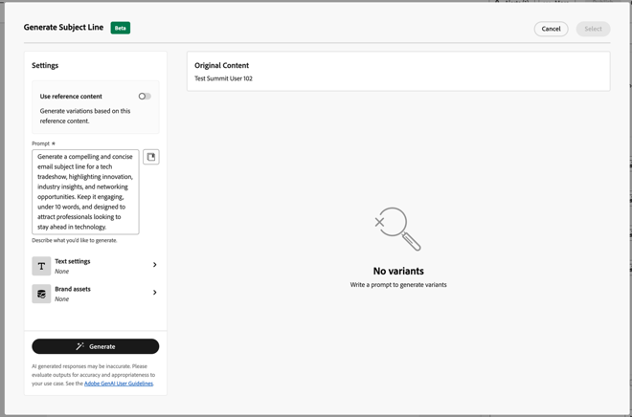
The editor now offers sophisticated content generation capabilities powered by generative AI marketing algorithms. Users can input campaign parameters and target audience characteristics, and the Marketo email editor will produce tailored email copy, subject lines, and call-to-action text that aligns with marketing objectives.

Marketo email editor, Generative AI marketing, AI-powered email content, Marketing automation, Email personalization at scale, Marketo AI capabilities, Email marketing optimization, AI content generation, Dynamic email content, Smart content marketing, B2B email automation, AI subject line optimization, Marketo workflow enhancement, Brand voice consistency, Multilingual content AI

A B2B technology provider recently implemented these gen AI marketing tools within their email editor workflow and reported reducing initial draft creation time by 65% while seeing improved engagement metrics—clear evidence of how gen AI marketing enhances rather than diminishes content quality.

Adaptive Content Recommendations

Beyond static content creation, the Marketo email editor employs gen AI marketing technology to analyze recipient data and past engagement patterns. This allows the editor to suggest content modifications likely to resonate with specific segments of your audience, enabling truly dynamic content creation that evolves with your audience’s preferences.

Financial service marketers using the email editor have found that these gen-AI marketing recommendations consistently outperform traditionally created content in both open rates and click-through performance, demonstrating the data-driven advantage that generative AI marketing brings to email campaigns.

Automated Testing Optimization

The email editor now includes generative AI marketing features that recommend specific elements to test and generate variations based on historical performance data. This gen AI marketing capability within the Marketo email editor takes the guesswork out of A/B testing, providing test options and predictive insights about which variations might perform best with certain audience segments.

Marketo email editor, Generative AI marketing, AI-powered email content, Marketing automation, Email personalization at scale, Marketo AI capabilities, Email marketing optimization, AI content generation, Dynamic email content, Smart content marketing, B2B email automation, AI subject line optimization, Marketo workflow enhancement, Brand voice consistency, Multilingual content AI

Healthcare companies utilizing the editor’s generative AI marketing testing capabilities have reported 30% improvements in campaign performance metrics after implementing AI-suggested variations—tangible results that highlight the value of integrating gen AI marketing into the email creation process.

Visual Content Creation

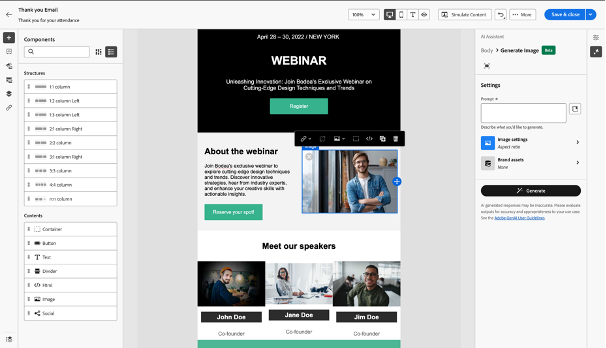
The email editor now incorporates visual generative AI marketing tools that allow users to create and modify images without leaving the platform. This integration within the Marketo editor eliminates workflow disruptions and ensures visual elements align perfectly with AI-generated text content, creating a cohesive message that reinforces brand positioning.

Marketo email editor, Generative AI marketing, AI-powered email content, Marketing automation, Email personalization at scale, Marketo AI capabilities, Email marketing optimization, AI content generation, Dynamic email content, Smart content marketing, B2B email automation, AI subject line optimization, Marketo workflow enhancement, Brand voice consistency, Multilingual content AI

Retail marketers have particularly embraced this aspect of the Marketo email editor, using its generative AI marketing capabilities to produce customized promotional imagery that previously would have required dedicated design resources, demonstrating how Marketo is evolving into a comprehensive content creation center.

Brand Voice Consistency

Maintaining consistent messaging across multiple campaigns and team members has traditionally been challenging. The Marketo’s email editor now includes generative AI marketing tools that help ensure all content aligns with established brand guidelines. By analyzing previously approved content, the editor can suggest edits that bring new copy in line with your organization’s voice and tone.

Global enterprises with distributed marketing teams have found the Marketo’s email editor’s generative AI marketing features invaluable for maintaining consistent messaging despite having dozens of content creators contributing to campaigns across different regions and product lines.

Multilingual Content Support

For organizations operating in multiple markets, the Marketo’s email editor’s generative AI marketing capabilities extend to multilingual content creation. These features go beyond simple translation to account for cultural nuances and regional preferences, allowing the Marketo email editor to serve as a global marketing tool.

Human-AI Collaboration: The Optimized Workflow

Organizations achieving the greatest success with the Marketo email editor understand that its generative AI marketing capabilities are designed to enhance rather than replace human creativity. The most effective implementation of the email editor involves a collaborative approach where:

Marketo email editor, Generative AI marketing, AI-powered email content, Marketing automation, Email personalization at scale, Marketo AI capabilities, Email marketing optimization, AI content generation, Dynamic email content, Smart content marketing, B2B email automation, AI subject line optimization, Marketo workflow enhancement, Brand voice consistency, Multilingual content AI

  1. Marketing teams define campaign objectives and audience insights
  2. The email editor uses generative AI marketing technology to produce initial content options
  3. Human marketers refine these suggestions, applying their understanding of brand and customer relationships
  4. The gen AI marketing features within the email editor learn from these refinements, becoming more aligned with organizational voice over time

This collaborative workflow preserves the essential human elements of marketing while eliminating much of the production work that traditionally consumed marketers’ time, demonstrating how the Marketo’s email editor and gen AI marketing technologies complement each other perfectly.

Implementation Best Practices

Organizations seeing the greatest benefits from the Marketo email editor’s gen AI marketing capabilities typically follow several best practices:

  1. Start with clear campaign objectives to provide direction for the Marketo’s email editor’s gen AI marketing algorithms
  2. Feed the email editor examples of your best-performing content to help its gen AI marketing system understand what works for your audience
  3. Begin with smaller campaigns to familiarize teams with the new email editor workflow before scaling
  4. Maintain human oversight of the email editor’s gen AI marketing outputs to ensure quality and brand alignment
  5. Use performance data to continually improve how you leverage the Marketo’s email editor’s gen AI marketing features

The Future of AI-Powered Marketing Content

The current capabilities of the Marketo email editor represent just the beginning of gen AI marketing’s potential impact on content creation. As these systems evolve, we can expect the email editor to incorporate even more sophisticated personalization, predictive optimization, and cross-channel coordination powered by advancing gen AI marketing technology.

Conclusion

The Marketo’s email editor has transformed email marketing automation through its integration of powerful generative AI marketing capabilities. Marketing teams across industries have embraced these tools to create more personalized, engaging content while significantly reducing production time and resources. Since, maintaining the human strategic element remains crucial for creating truly meaningful customer connections that drive business results. Thus, the most successful approach treats the Marketo editor and its gen AI marketing features as collaborative tools rather than replacements for human creativity—combining the efficiency of artificial intelligence with the strategic insight that only experienced marketers can provide.

As the Marketo’s email editor and gen AI marketing technologies continue to evolve together, organizations that establish effective human-AI collaborative workflows today will be well-positioned to leverage even more powerful capabilities in the future, creating competitive advantage through both content quality and operational efficiency.


sfdc integration

A significant shift is underway for those leveraging the power of Oracle Eloqua and Salesforce (SFDC). With Oracle’s announcement that support for the Eloqua Salesforce native integration has ended, the focus now turns to the essential transition to the new SFDC Integration App. This Eloqua migration is not just an upgrade; it’s necessary to ensure continued seamless data flow and access to the latest features. Given the upcoming permanent removal of the Eloqua Salesforce native integration in November 2025, proactive planning is paramount. This blog will guide you through the key considerations and steps for a successful SFDC integration app migration.

The End of the Native Integration Era is Approaching

It’s now official: Oracle will permanently retire the Eloqua Salesforce native integration 2025 with the Eloqua 25D release in November 2025. Following the initial end of support on February 1, 2021, this definitive timeline underscores the urgency for all users still relying on the native connection to initiate their Eloqua migration immediately. Delaying this transition risks disrupting critical data synchronization between your Eloqua and SFDC environments.

Why is Oracle Making this Change? Embracing the Future of SFDC Integration

The move towards the new SFDC Integration App is driven by its significant advancements over the now unsupported native integration. As detailed in Oracle’s product notice, the new app offers a multitude of benefits:

  • Uses the Program Canvas, a much faster way to process information.
  • The interface is similar to the Campaign Canvas, making it easier to set up and maintain.
  • Offers more frequent inbound updates from Salesforce to Eloqua.
  • Organizations with complex structures can now seamlessly integrate with multiple SFDC environments.
  • Improved filtering to prevent sending test data. Maintain data integrity and accuracy by preventing the transfer of non-production data.
  • Only the new Salesforce Integration App will see new enhancements and improvements. Future-proof your integration and benefit from ongoing innovation and support from Oracle. Continuing with the native SFDC integration beyond November 2025 means missing out on these crucial advancements.

It’s Never Too Late to Start Planning Your Eloqua Migration

While your existing native SFDC integration continued to function after February 1, 2021, it’s crucial to reiterate that Oracle no longer provides support or updates for it. The impending November 2025 Eloqua integration deadline amplifies the need for immediate action. The ability to run both the native and new SFDC Integration App concurrently offers a significant advantage, making the Eloqua migration and testing phases more manageable. However, failing to migrate to the new app means you will not be able to leverage new features and performance enhancements. Therefore, even if an immediate move isn’t planned, initiating your planning and preparation now is essential.

SFDC Integration App Considerations for a Smooth Transition

As you prepare for your Eloqua migration to the new app, be mindful of these key considerations:

  • Data Export Frequency: The standard feeder for exporting data from Eloqua to SFDC operates on a daily cycle. For requirements demanding more frequent exports, explore adding processing steps to individual forms or within programs and campaigns. Alternatively, consider the 4Thought Marketing Contact Cloud Feeder App, which offers feed frequencies as low as every 5 minutes.

  • Limitations of Program Canvas: The Program Canvas, the foundation of the new app’s processing, does not currently support the use of Match or Deduplication rules. Plan alternative strategies to manage data quality and avoid duplicates.
  • SOQL for Data Imports: Importing data into Eloqua from SFDC necessitates the use of Salesforce Object Query Language (SOQL) for defining filter criteria. Ensure your team has the necessary expertise or resources for crafting SOQL queries.
  • Sandbox Environment Setup: Installing the app in your Eloqua Sandbox environment requires a separate and complete installation and configuration process for your production environment.
  • Form Submit Marketing Activity Timing: The “Form Submit” marketing activity became available with the May 2020 (20B) release. Ensure your marketing automation workflows align with this availability.

Migration Planning to a Successful Eloqua SFDC Integration

Begin by thoroughly reviewing the official documentation, training courses, FAQs, and community discussions related to the SFDC Integration App.

Carefully Document Your Current Integration

Meticulously examine your inbound auto-syncs, outbound processing rules, and document all steps and processing logic within your current Program Builder programs. Remember to include Campaign integration, Campaign Responses, and Opportunity processing workflows. Utilize this opportunity to re-evaluate your existing integration and confirm its efficiency in supporting your current business processes. If your current setup has been running for over 12 months, it’s an ideal time to consult with stakeholders regarding potential modifications.

Install and Configure the SFDC Integration App

The next step involves installing and configuring the new SFDC Integration App. If required by your internal policies, ensure you complete all necessary application and security testing before installing new applications and factor this into your project timeline. Initiate the installation process in your Eloqua Sandbox environments (if available) and connect to a dedicated test SFDC instance.

Test, Test, and More Testing

Rigorously test the SFDC Integration App within your sandbox environment. Develop a comprehensive test plan that covers data being sent from Eloqua to SFDC and vice versa, verifying the accuracy and completeness of the data transfer. Walk through each defined scenario and confirm that the integration functions as expected. Thoroughly examine any discrepancies, identify their root causes, implement necessary corrections, and retest. We cannot overemphasize the importance of documenting each test case, its results, and any proposed changes. Involve your SFDC users in this testing phase, as they can provide valuable insights based on their typical workflows.

Go Live in Production and Monitor

Once you have successfully completed testing, proceed with installing and configuring the SFDC Integration App in your production environment. Disable your existing native integration auto-syncs and enable the new app. Implement diligent daily monitoring for a period of two weeks or more. Establish a clear escalation plan and outline how teams should report any issues they encounter during this initial go-live phase.

Conclusion: Preparing for the Future of Your Eloqua SFDC Integration

To ensure your marketing and sales processes continue to operate seamlessly and you achieve a future-proof integration between Eloqua and Salesforce, leading to efficient workflows and accurate data synchronization, it’s crucial to address the upcoming shift. The November 2025 deadline for the Eloqua native Salesforce integration removal means your current direct connection will cease to function, potentially causing significant disruptions to your critical operations. Therefore, achieving continued alignment requires a proactive and well-executed migration to the new SFDC Integration App.

At 4Thought Marketing, we understand the intricacies of this transition and are ready to guide you through it. Our expertise covers everything from a straightforward move to the new apps to a complete optimization tailored to your specific current requirements, ultimately ensuring your ongoing success within a connected marketing and sales ecosystem. Don’t wait until the November 2025 Eloqua Salesforce native integration cut-off; contact us today to discuss your SFDC integration needs and secure a smooth and successful transition to the future of your marketing and sales alignment.


data enrichment, marketing automation data, customer data enrichment, lead enrichment, data quality marketing,

Your marketing automation platform can be a sophisticated engine, capable of orchestrating complex campaigns and delivering personalized experiences with impressive efficiency. But like any high-performance machine, its true potential hinges on the quality of its fuel: quality and complete data.

It’s the strategic process of taking the foundational information you possess about your audience and layering it with rich, contextual insights. This transformation goes far beyond simply amassing more data; cultivating smarter data that empowers your automation to understand, connect with, and ultimately convert your audience on a deep human level.

Data enrichment bridges the gaps and adds essential dimensions to your existing information managed by Adobe Marketo, Oracle Eloqua, or other marketing automation systems. They capture engagement patterns on your website, the specific content they’ve downloaded, and their purchase history. Imagine knowing their industry and even the technologies their company utilizes.

While you may already possess some of this data, enrichment takes it a step further by expanding your data points. This deeper understanding enables better segmentation and allows you to transcend generic outreach, ultimately leading to interactions that are genuinely relevant and impactful.

Unpacking the Layers: What Exactly Does Data Enrichment Entail?

Data enrichment isn’t a one-dimensional process. It involves several key layers that work together to create a comprehensive and actionable view of your audience:

Filling in the Blanks

Often, initial data capture leaves crucial fields empty. Enrichment processes automatically append this missing information, whether it’s a phone number, a job title, the size of their organization, or their geographic location. Completing these profiles ensures you have the necessary details for effective communication and segmentation.

Ensuring Accuracy and Freshness

Data is dynamic. People change jobs, companies evolve, and contact information becomes outdated. Data enrichment includes ongoing verification and updating processes to cleanse your database, correcting inaccuracies and ensuring you’re reaching the right individuals with current information. This prevents wasted efforts and maintains the integrity of your data.

Adding Contextual Depth

This is where the real magic happens. Enrichment appends entirely new categories of data that provide invaluable context about your audience:

  • Behavioral Insights: Tracking website visits, content consumption, email engagement, and past purchase history reveals a prospect’s interests and intent, allowing for highly targeted follow-ups.
  • Firmographic Details (for B2B): Information like industry, annual revenue, employee count, and company growth trajectory enables precise targeting of ideal customer profiles.
  • Technographic Data: Understanding the software and hardware a company uses can be crucial for offering relevant solutions and tailoring your messaging.
  • Demographic Information (for B2C): Details such as age, gender, location, income level, and lifestyle preferences allow for nuanced personalization of consumer-focused campaigns.
  • Social Signals: While requiring careful consideration of privacy, understanding a prospect’s social media activity can offer additional insights into their interests and engagement patterns.

Standardizing for Seamless Integration

Inconsistent data formats across various sources can create headaches for analysis and automation. Enrichment processes standardize this information, ensuring your marketing automation platform can seamlessly utilize data from all touchpoints.

Data Enrichment Elevates Your Marketing Automation

Investing in data enrichment isn’t just about having “nicer” data; it translates directly into tangible benefits that significantly impact your marketing effectiveness and drive business growth:

data enrichment, marketing automation data, customer data enrichment, lead enrichment, data quality marketing,

Hyper-Personalization That Resonates

Gone are the days of generic email blasts. With enriched data, you can segment your audience with incredible granularity and craft highly personalized messages, content recommendations, and offers that speak directly to individual needs, challenges, and aspirations. This level of personalization builds stronger connections and significantly boosts engagement.

Smarter Lead Scoring and Sales Alignment

Imagine being able to identify your hottest leads with greater precision. Enriched data provides a holistic view of a lead’s profile and behavior, enabling more sophisticated and accurate lead scoring models. This ensures your sales team prioritizes the most promising prospects, leading to higher conversion rates and a more efficient sales process.

Precision Targeting Across Channels

Whether you’re running targeted email campaigns, social media advertising, or account-based marketing initiatives, enriched data empowers you to reach the right audiences with the right message at the right time and on the right platform. This minimizes wasted ad spend and maximizes the impact of your marketing efforts.

Nurturing Leads with Context and Care

Generic nurturing sequences often feel impersonal and ineffective. With enriched data, you can tailor your nurturing content to address specific pain points, interests, and where a lead is in their buyer’s journey. This builds trust, educates prospects effectively, and guides them naturally towards conversion.

Crafting Exceptional Customer Experiences

Understanding your customers deeply through enriched data allows you to provide more valuable and relevant interactions at every touchpoint. From personalized support to proactive recommendations, you can create a seamless and positive customer experience that fosters loyalty, advocacy, and repeat business.

Boosting Data Quality and Trustworthiness

The very process of data enrichment often involves data cleansing, deduplication, and validation, resulting in a more accurate and reliable database. This reduces errors, improves the accuracy of your reporting, and ensures your marketing decisions are based on sound information.

Unlocking Deeper Insights and Strategic Advantages

 With richer and more complete data, your marketing automation platform can generate more insightful reports and analytics. This allows you to gain a deeper understanding of campaign performance, identify emerging trends, and make data-driven decisions to continuously optimize your marketing strategies.

Orchestrating Seamless Omnichannel Experiences

Enriched data provides a unified view of each customer across all the ways they interact with your brand. This enables you to deliver consistent and relevant messaging regardless of the channel, creating a cohesive and impactful omnichannel experience that strengthens brand engagement.

Navigating the Data Enrichment Landscape: Tools and Best Practices

Implementing data enrichment effectively requires the right tools and a thoughtful strategy:

  • Selecting Right Tools: A wide array of data enrichment tools exists, from specialized platforms to integrated features within CRM and marketing automation systems. Carefully consider your specific requirements, budget, and the types of data you need to enrich when making your selection.
  • Define Enrichment Objectives: What specific data points will have the biggest impact on your marketing and sales goals? Having clear objectives will ensure your enrichment efforts are focused and measurable.
  • Uphold Data Privacy and Compliance: Always prioritize data privacy regulations (like GDPR and CCPA) throughout your data enrichment processes. Ensure you have the necessary consent and maintain transparency with your audience regarding data collection and usage.
  • Establish a Continuous Enrichment Cycle: Data isn’t static. Implement a regular process for data enrichment to ensure your information remains accurate, up-to-date, and valuable over time.
  • Leverage Your Internal Data First: Don’t underestimate the value of the data you already possess. Analyze your CRM, website analytics, and past campaign performance to identify opportunities for internal data enrichment before seeking external sources.

The Future of Marketing is Data-Driven and Human-Connected

In conclusion, data enrichment is not just a technical add-on for marketing automation; it’s the very foundation upon which truly effective and human-centric marketing is built. By investing in enriching your understanding of your audience, you unlock the full potential of your automation platform, enabling personalized interactions, smarter targeting, and ultimately, stronger customer relationships and sustainable business growth. In an increasingly noisy digital world, enriched data allows you to cut through the clutter, connect with your audience on a meaningful level, and transform your marketing automation from a mere tool into a powerful engine for engagement and conversion. Embrace the power of enriched data, and watch your marketing efforts flourish.


email QA testing, QA testing, QA testing email campaign tools, email campaign quality assurance template, email testing best practices, marketing automation QA, email rendering issues, A/B test emails, email performance testing,

Your email campaign is polished and ready to go. The copy is on point, and the design is engaging. However, before you hit ‘send,’ there’s one critical step that can make or break your success: Email QA testing.

QA testing in email marketing is not just a technical formality. It serves as your last defense against issues like broken links, clunky formatting, and embarrassing errors that may harm your brand or reduce conversions. In today’s competitive inbox environment, even minor mistakes can significantly impact engagement and ROI.

In this article, we’ll walk through the core stages of the email QA testing—from planning and checklist creation to execution and post-launch monitoring—and explore how modern tools, including AI-powered solutions, can elevate your testing process to new heights.

Planning Your Email QA Testing Strategy

Before diving into execution, a well-defined plan is your North Star for a successful QA testing journey. This initial stage involves meticulously aligning the scope and objectives of your QA testing with the overarching goals of your marketing campaign. Consider the scale and complexity of your outreach – a personalized email to a select group will naturally require fewer approval layers than a mass communication to millions. Asking crucial questions like the number of testing rounds needed, the levels of approval required, and whether cross-platform rendering checks are necessary sets the stage for thorough scrutiny. This foundational planning ensures that your QA efforts are targeted and effective from the outset, and importantly, are checked against the initial design documents.

Creating an Effective Email QA Testing Checklist

Think of your QA checklist as the detailed blueprint for your campaign’s success. This robust document encompasses a wide spectrum of elements, meticulously covering design, content, functionality, and user experience. Each item on this list is carefully crafted to leave no stone unturned, guaranteeing a comprehensive evaluation of every facet of your campaign. From verifying compelling visuals to scrutinizing persuasive copy and ensuring seamless functionality, a well-constructed checklist acts as your guiding compass throughout the QA testing.

Execution: QA Testing Plan In Action

Your QA experts will now transition to the execution phase, where precision is crucial.

This phase demands a meticulous examination of each checklist item, ensuring that no detail is overlooked. Every aspect of the campaign is rigorously evaluated, from the copy’s nuances to the design’s aesthetic appeal and the functionality’s flawless operation. Any discrepancies identified at this stage are thoroughly documented, setting the stage for required corrections.

Documentation: Building a Knowledge Repository

Documenting the QA testing is more than just record-keeping; it helps build a valuable repository of insights for future campaigns.

Keeping detailed records throughout the QA testing journey, including any identified issues, their causes (whether design flaws or development hiccups), and resolutions, serves as invaluable learning tools. This comprehensive archive allows marketers to improve continuously, ensuring that future campaigns benefit from past experiences.

Iterative Refinement Through QA Testing Feedback

QA testing is not a standalone activity; it thrives on a dynamic feedback loop that encourages collaboration and iterative refinement.

Constructive feedback based on QA findings is quickly shared with the campaign team, enabling swift implementation of necessary changes. This open communication ensures issues are addressed efficiently and enhances the campaign’s overall effectiveness.

Last Checkpoint: The QA Testing Final Review

Before going live, a final, comprehensive review acts as your last line of defense.

This vital checkpoint verifies that every campaign component meets established quality standards. It provides a final opportunity to resolve any lingering issues or discrepancies, effectively protecting against potential pitfalls that could affect success post-launch.

Post-Launch Monitoring: Nurturing Ongoing Success

The campaign’s journey doesn’t end when it goes live. Post-launch monitoring is essential for maintaining the ongoing performance of your marketing efforts.

By diligently tracking key metrics and promptly addressing any issues that arise in the live environment, marketers can ensure the campaign’s sustained success and optimal performance in the ever-changing digital landscape.

Elevating Campaign Effectiveness Through QA Excellence

In conclusion, QA testing is not just a step in the marketing campaign process; it is a fundamental principle of precision and excellence.

By formalizing QA testing, marketers create an environment of trust and efficiency, both internally and externally. The reduction of errors directly correlates to an increase in ROI and revenue potential, highlighting QA’s crucial role in achieving tangible marketing success.

By effectively communicating the intricacies of QA testing within your organization, you empower your teams to understand the meticulous steps involved in crafting a seamless campaign, fostering a culture of vigilance and attention to detail that elevates the recognition of QA testing in marketing automation.


: Company Matching, Oracle Eloqua, B2B Marketing Operations, Contact to Account Matching, Account-Based Marketing (ABM)

You’re in B2B Marketing Operations, and you know that connecting your contacts to the right companies is fundamental. It’s the bedrock for effective segmentation and targeted marketing. Get it wrong, and your sales and marketing efforts can suffer. That’s why mastering contact-to-account matching, or Company Matching as it’s often called, within a platform like Oracle Eloqua isn’t just a nice-to-have – it’s essential for building better relationships and achieving the results you’re aiming for.

What is Company Matching?

At its core, Company Matching is the process of accurately linking individual contact records in your marketing automation and CRM systems to their respective company or account records. Think of it as building the organizational chart for your leads. Whether these contacts enter your Oracle Eloqua database through online forms, sales interactions, or imported lists, it aims to establish a clear relationship between the person and the business they represent.

One of the most common and straightforward methods involves using the contact’s email domain. For instance, if a new contact signs up with an email address ending in @example-inc.com, the system can look for an existing company record with the same domain, example-inc.com, and associate the contact accordingly.

Company Matching can be approached in two primary ways:

  • Manual Company Matching: This involves manually searching for the correct company record and updating the necessary field to link the contact. While offering greater control, this method is often time-consuming and less scalable, especially with a growing database.
  • Automatic Company Matching: This leverages the capabilities within your marketing automation platform, such as Oracle Eloqua, to automatically identify and link contacts to companies based on predefined rules and data points. This significantly improves efficiency and accuracy at scale.

By establishing a solid foundation, B2B marketers can unlock a wealth of opportunities to engage more effectively with their target audience.

Why Accurate Company Matching Matters

Enhanced Segmentation and Personalization

Accurate company matching in Oracle Eloqua is the key to moving beyond basic segmentation. By correctly linking contacts to their companies, you unlock the ability to segment based on crucial firmographic data like industry and size, enabling highly targeted campaigns. This company-level understanding also fuels impactful personalization, allowing you to tailor your messaging with company-specific details, ultimately increasing engagement and strengthening relationships with potential customers.

Improved Lead Scoring and Prioritization

Instead of solely evaluating individual contact behavior, you can attribute engagement and activities to the entire company. This provides a more holistic view of an account’s interest level, allowing you to prioritize outreach to companies showing strong collective engagement. By understanding which organizations are actively interacting with your marketing content, your sales team can focus their efforts on the most promising accounts, leading to more efficient resource allocation and higher conversion rates.

Streamlined Reporting and Analytics

Instead of sifting through individual contact data, you can analyze marketing performance at the account level. This provides a clearer picture of which companies are engaging with your campaigns, the effectiveness of your ABM strategies, and the overall ROI of your marketing efforts in relation to specific organizations. This company-centric view enables more informed decision-making and a better understanding of your impact on key accounts.

Effective Account-Based Marketing (ABM) Enablement

Robust company matching is the foundational pillar for successful Account-Based Marketing (ABM) within Oracle Eloqua. By accurately identifying and grouping contacts within target accounts, you can orchestrate highly personalized and coordinated campaigns directed at multiple organizational stakeholders. This ensures that your messaging resonates with the entire account’s specific needs and pain points, fostering stronger relationships and increasing your chances of winning high-value deals. Without accurate company matching, executing effective ABM strategies becomes significantly more challenging.

Enhanced Data Quality and Governance

Implementing a strong company matching process in Oracle Eloqua directly contributes to improved data quality and governance. By accurately linking contacts to their respective companies, you reduce the occurrence of orphaned contact records and create a more unified and reliable database. This enhanced data integrity ensures that your segmentation, personalization, lead scoring, and reporting are based on precise information, minimizing errors and maximizing the effectiveness of your marketing operations. Ultimately, cleaner company data leads to more trustworthy insights and better decision-making across your marketing and sales teams.

Demystifying Company Matching in Oracle Eloqua: How It Works

: Company Matching, Oracle Eloqua, B2B Marketing Operations, Contact to Account Matching, Account-Based Marketing (ABM)

Data Points Leveraged for Matching

Oracle Eloqua employs various data points to accurately link contacts to companies, with the email domain being a primary identifier. It can also leverage domain lookup services to enrich data based on the email domain. Information captured in form data, such as company name and website, also plays a crucial role. Additionally, IP address mapping can provide clues about a contact’s organization, and integrations with third-party data providers can further enhance the matching accuracy by bringing in more comprehensive company information.

Matching Rules and Configuration

The power of company matching in Oracle Eloqua lies in its flexible matching rules. Marketers can configure these rules based on the data points mentioned above, prioritizing certain fields and defining the matching logic (e.g., exact match, fuzzy match). Setting up effective deduplication rules at the company level is also critical to maintain data integrity. By carefully configuring these rules, you can tailor Eloqua’s matching engine to align with your specific data landscape and accuracy requirements.

Manual vs. Automated Matching Processes

While manual company matching involves individual searching and linking of contacts to accounts, offering direct control, Oracle Eloqua excels in automated company matching. This automated approach uses the configured rules to efficiently and scalable link records as they enter the system, significantly saving time and reducing errors. While manual review might still be necessary in some complex cases, automation is the key to effectively managing company matching at scale within Eloqua.

Eloqua’s Company Matching Features and Functionality

Oracle Eloqua provides specific features and functionalities to facilitate company matching. The company object serves as the central record for company information. Eloqua’s matching engine, configurable through the platform’s settings, automates the linking process based on defined rules. Furthermore, integrations with Data as a Service (DaaS) offerings and apps from the Eloqua App Cloud can enhance data quality and matching accuracy by providing access to external company data and specialized matching algorithms.

Conclusion

The goal is clear: B2B marketing excellence and strong revenue growth come from engaging the right accounts with personalized approaches. Company matching in Oracle Eloqua is key to making this happen through better segmentation and ABM. However, many struggle with messy data, making it hard to see the full picture of their prospects. This leads to wasted effort and missed chances. Focusing on mastering company matching in Oracle Eloqua is essential. By understanding accounts and using Eloqua’s features well, you can gain a clear view of your market and boost revenue. Want to improve your Oracle Eloqua results? A strong company matching strategy is the answer, and we can help.


Eloqua Campaign Responses, Campaign Response Rules, CRM Integration, Marketing Automation, Lead Tracking, Customer Engagement, CRM Member Status, Eloqua Bulk API

Imagine having a direct line of sight into your customer’s journey, knowing which actions trigger their interest and drive them closer to a purchase. That’s the power of Eloqua campaign responses rules. It’s not just about tracking clicks and opens; it’s about building a narrative of engagement that translates customer interactions into actionable CRM data. Think of it as turning the scattered puzzle pieces of campaign activity into a clear, compelling picture of your customer’s intent, empowering your sales and marketing teams to connect on a deeper, more effective level.

Understanding Campaign Response Fundamentals

Before diving into the mechanics, it’s crucial to grasp the fundamental building blocks of Eloqua Campaign Responses. These components are designed to work harmoniously, creating a continuous flow of information that connects your marketing efforts directly to your CRM. First, we have Campaign Activities, also known as Response Activities. These are the specific actions your contacts take when interacting with your campaigns.

Think of them as the footprints they leave behind. These activities fall into two main categories: Internal Activities, which are actions that occur directly within Eloqua, such as opening emails, clicking links, or submitting forms; and External Activities, which are actions taken outside of Eloqua, like registering for or attending a webinar, but can still be tracked and integrated into your campaign data.

These activities are the raw data that Eloqua transforms into actionable insights.

Campaign Response Rules

These are the defined parameters that dictate which activities are considered significant responses. They are prioritized to ensure that the most relevant interaction is recorded.

This prioritization is very important because if a customer attends a webinar and clicks an email, depending on your prioritization, the webinar attendance could be designated as more important to record than the email click.

Eloqua Campaign Responses, Campaign Response Rules, CRM Integration, Marketing Automation, Lead Tracking, Customer Engagement, CRM Member Status, Eloqua Bulk API

Campaign Responses (Campaign Member Status)

This represents the final, highest-priority activity transmitted to the CRM, providing a concise overview of the contact’s engagement. Examples of campaign responses are “registered,” “attended,” and “responded.”

The Mechanics of Campaign Responses in Eloqua

The Eloqua email campaign serves as the cornerstone of this process. The CRM campaign ID acts as a linkage point, ensuring accurate tracking and recording of campaign activity within the CRM system.

  • Campaign Setup: When setting up a campaign within Eloqua, it’s crucial to include all relevant assets, such as email assets and associated forms, on the campaign canvas. Linking the Eloqua campaign to the corresponding CRM campaign ID ensures data integrity.
  • Activity Tracking: Once the campaign is activated, Eloqua diligently tracks response activities, including email clicks and form submissions. Furthermore, external activities, such as webinar registration and attendance, can be incorporated as campaign responses, providing a holistic view of customer engagement.
  • Response Rule Configuration: Response rules are pivotal in defining what constitutes a campaign response. This involves setting parameters for activities like email sends, clicks, and form submissions, and mapping these activities to CRM member statuses. For instance, activities can be designated as ‘Attended’, ‘Registered’, or ‘Responded’, depending on the specific action taken by the contact.

  • Prioritization: Prioritizing these response rules is equally vital. When multiple response activities occur, Eloqua sends the highest priority activity to the CRM. This ensures that the most significant interaction is accurately recorded, providing valuable insights for sales and marketing teams.

Processing and Delivering Campaign Responses

The process of converting campaign activities into campaign responses occurs in the background of Eloqua. Every five minutes, Eloqua processes these activities and updates the campaign response table. Understanding this timing is crucial for troubleshooting issues related to delayed CRM updates.

Eloqua offers multiple methods for transmitting campaign responses to a CRM system, each with its own advantages:

  • Program Builder: This method is recommended for non-Salesforce CRM systems, such as Microsoft Dynamics. It allows for more customized workflows, ensuring accurate reflection of campaign responses in the CRM.
  • Program or Campaign Canvas: This method is particularly effective for Salesforce and Oracle Sales Cloud. It utilizes listener steps to automatically trigger CRM updates once campaign responses are generated.

  • Integration Rules: This method offers another avenue for transferring campaign response data, providing flexibility for specific integration requirements.

It’s important to note that only one of these methods can be selected at a time, so careful consideration should be given to choosing the most appropriate approach for your organization’s needs.

Practical Application and Best Practices

To ensure a seamless flow of campaign responses from Eloqua to your CRM, consider the following best practices:

Accurate Campaign Setup

Ensure that your campaign is set up with the correct CRM campaign ID to maintain data integrity.

Precise Response Rule Definition

Define and prioritize response rules accurately to capture the most relevant customer interactions.

Appropriate Integration Method Selection

Utilize the most suitable method (Program Builder, Program Canvas, or Integration Rules) to send responses to your CRM.

Understanding the Eloqua Bulk API

For those needing to pull or manipulate the data, understanding the Eloqua Bulk API is important. This allows for better automation of reports, and data manipulation.

By adhering to these best practices, you can ensure that all relevant interactions are captured and reflected in your CRM, providing valuable insights for your sales and marketing teams.

Conclusion:

Wouldn’t it be incredible to really see how your customers move through your campaigns, to know exactly which actions nudge them closer to a sale? That’s the promise of Eloqua’s campaign responses, turning every click and interaction into a story you can use. You’ve got the tool, and the potential is huge, but let’s be honest, getting all the pieces to fit—the strategic setup, the backend stuff, and making it play nice with your CRM—it can feel like a mountain to climb.

To truly get the most out of Eloqua, to make those smarter decisions and see those marketing wins, having someone who’s been there, done that, makes all the difference. Eloqua, in the right hands, can seriously boost your engagement and conversions. So, instead of letting the technical bits hold you back, why not have a chat? Let’s see how we can make Eloqua work its magic for you.


4Thought Marketing Logo   March 26, 2026 | Page 1 of 1 | https://4thoughtmarketing.com/marketing-automation/page/6/