





Frequently Asked Questions

Oracle Eloqua Insight Tips & Features

What are the most important lessons learned when using Oracle Eloqua Insight?

The three key lessons are: 1) Do not give your report and agent the same name, as the agent will overwrite the report; 2) Reports cannot be moved after they have been scheduled without causing delivery errors; 3) Avoid scheduling multiple reports at the same time, as not all reports may reach distribution lists even if marked as delivered. These tips help prevent common mistakes and ensure smoother report management. (Source: Original Webpage)

Why should you avoid giving your report and agent the same name in Eloqua Insight?

Assigning the same name to both a report and its scheduling agent in Eloqua Insight causes the agent to overwrite the report, resulting in loss of your custom analysis. Always use unique names for reports and agents to avoid this issue. (Source: Original Webpage)

What happens if you move a scheduled report in Eloqua Insight?

Moving a scheduled report disrupts its agent, causing stakeholders to stop receiving scheduled reports. You must manually update the agent's location, which is time-consuming. It's best to establish a folder structure before scheduling reports. (Source: Original Webpage)

How can you organize your Insight library for easier report management?

Use folders with naming conventions and rulesets similar to those in Eloqua. Keep a spreadsheet tracking report details such as date, cadence, report name, agent name, distribution list, subject line, and email. This helps quickly locate and manage scheduled reports and recipients. (Source: Original Webpage)

Why should you avoid scheduling multiple reports at the same time in Eloqua Insight?

Scheduling multiple reports simultaneously can result in some reports not reaching their distribution lists, even if marked as delivered. Staggering report schedules reduces delivery issues and improves reliability. (Source: Original Webpage)

What is Oracle Eloqua Insight and what does it offer?

Oracle Eloqua Insight, powered by Oracle Business Intelligence Enterprise Edition (Oracle BI EE), is a tool for analyzing data across Eloqua. It provides out-of-the-box reports covering campaigns, contacts, emails, forms, and landing pages, and allows users to create custom reports and formulas. (Source: Original Webpage)

How can Eloqua Insight help improve campaign management?

Eloqua Insight enables users to analyze campaign performance through standard and custom reports, helping identify trends, optimize strategies, and improve data-driven decision-making. (Source: Original Webpage)

What are some common mistakes users make with Eloqua Insight?

Common mistakes include naming reports and agents identically, moving scheduled reports, and scheduling multiple reports at the same time. These actions can cause errors, report loss, and delivery failures. (Source: Original Webpage)

How can you recover from a report scheduling error in Eloqua Insight?

If a scheduled report is moved and delivery fails, you can modify the agent via the Condition tab to update the file location. However, this is labor-intensive and best avoided by proper folder organization from the start. (Source: Original Webpage)

What are the benefits of using custom reports in Eloqua Insight?

Custom reports allow users to tailor analyses to their specific needs, track unique metrics, and gain deeper insights into campaign and contact performance. (Source: Original Webpage)

How can you track scheduled report recipients in Eloqua Insight?

Maintain a spreadsheet with columns for date, cadence, report name, agent name, distribution list, subject line, and email. This enables quick lookup and management of recipients. (Source: Original Webpage)

What should you do if stakeholders stop receiving scheduled reports?

Check the agent's configuration and update the file location if the report was moved. Use your tracking spreadsheet to identify affected recipients and agents. (Source: Original Webpage)

How can you ensure reliable report delivery in Eloqua Insight?

Stagger report schedules, maintain proper folder organization, and track recipients in a spreadsheet. These practices minimize delivery errors and improve reliability. (Source: Original Webpage)

What is the potential of Eloqua Insight for businesses?

Eloqua Insight is a powerful tool for data analysis, enabling businesses to build, explore, and analyze reports that drive campaign optimization and strategic decision-making. (Source: Original Webpage)

How can 4Thought Marketing help you get started with Eloqua Insight?

4Thought Marketing offers expert guidance and support to help businesses leverage Eloqua Insight for data-driven marketing. Contact their team to get started. (Source: Original Webpage)

What are the out-of-the-box reports available in Eloqua Insight?

Eloqua Insight provides standard reports covering campaigns, contacts, emails, forms, and landing pages, enabling users to analyze multiple facets of their marketing operations. (Source: Original Webpage)

How can you customize reports in Eloqua Insight?

Users can edit standard reports or create their own reports and formulas from scratch, tailoring analyses to their unique requirements. (Source: Original Webpage)

What are the best practices for scheduling reports in Eloqua Insight?

Best practices include staggering report schedules, maintaining organized folders, and tracking recipients. Avoid scheduling multiple reports at the same time to ensure reliable delivery. (Source: Original Webpage)

How does Eloqua Insight integrate with Oracle BI EE?

Eloqua Insight is powered by Oracle Business Intelligence Enterprise Edition (Oracle BI EE), enabling advanced data analysis and reporting capabilities within Eloqua. (Source: Original Webpage)

Features & Capabilities

What products and services does 4Thought Marketing offer?

4Thought Marketing offers products such as 4Comply (privacy compliance), Cloud Apps (over 70 apps for Eloqua and Marketo), 4Preferences (multi-channel preference management), 4Segments (advanced audience segmentation), and 4Bridge (integration connector). Services include strategic, campaign, technical, and Eloqua health check services. (Source: https://4thoughtmarketing.com/)

How does 4Comply help with privacy compliance?

4Comply centralizes preference management and integrates with marketing platforms to ensure GDPR and CCPA compliance. It provides an auditable solution for managing consent and preferences. (Source: https://4thoughtmarketing.com/products/4comply/)

What is 4Segments and how does it simplify audience segmentation?

4Segments uses Visual Segmentation™ with real-time Venn diagrams and matrix views, enabling precise targeting and actionable insights. It simplifies complex segmentation tasks compared to text-based filters. (Source: https://4thoughtmarketing.com/products/4segments/)

How do Cloud Apps extend the functionality of Oracle Eloqua and Adobe Marketo?

Cloud Apps offer over 70 applications that enhance campaign execution, improve data quality, and streamline operations for Oracle Eloqua and Adobe Marketo users. (Source: https://4thoughtmarketing.com/products/cloud-apps/)

What is 4Bridge Integration Connector and what problem does it solve?

4Bridge Integration Connector provides seamless data connections between marketing automation platforms and other business systems, eliminating integration pain points and ensuring smooth data flow. (Source: https://4thoughtmarketing.com/services/4bridge-integration-connector/)

How does 4Thought Marketing address dirty CRM data?

4Thought Marketing offers data services to diagnose, clean, and enrich CRM data, resolving issues like lead scoring failures and inconsistent reports, and improving operational efficiency. (Source: https://4thoughtmarketing.com/)

What feedback have customers given about the ease of use of 4Thought Marketing products?

Customers have praised tools like the Eloqua Upload Wizard for its automation and simplicity, and the 4Bridge integration for its easy-to-use interface for field mapping. (Source: https://4thoughtmarketing.com/)

Use Cases & Benefits

Who can benefit from 4Thought Marketing's products?

Legal and compliance teams, marketing managers, CMOs, sales teams, IT and operations teams, content strategists, and small teams across industries such as financial services, healthcare, manufacturing, technology, and real estate can benefit from 4Thought Marketing's solutions. (Source: https://4thoughtmarketing.com/)

What problems does 4Thought Marketing solve for its customers?

4Thought Marketing addresses data privacy compliance, advanced segmentation, system integration challenges, dirty CRM data, personalized onboarding, and content optimization. (Source: https://4thoughtmarketing.com/)

What industries are represented in 4Thought Marketing's case studies?

Industries include real estate (W. P. Carey), financial services (Cetera Financial Group), and manufacturing (Endress+Hauser Infoserve GmbH). (Source: https://4thoughtmarketing.com/platforms/oracle-eloqua, https://4thoughtmarketing.com/platforms/adobe-marketo, https://4thoughtmarketing.com/product/cloud-apps/embed-co-records-in-email-table)

Can you share specific case studies or success stories of customers using 4Thought Marketing's products?

W. P. Carey improved campaign efficiency by 30% and reduced manual processing time by 20% using Oracle Eloqua. Cetera Financial Group achieved seamless migration to Adobe Marketo, enhancing system adoption. Endress+Hauser Infoserve GmbH overcame CRM migration challenges with Eloqua Cloud Apps. (Source: https://4thoughtmarketing.com/platforms/oracle-eloqua, https://4thoughtmarketing.com/platforms/adobe-marketo, https://4thoughtmarketing.com/product/cloud-apps/embed-co-records-in-email-table)

Competition & Comparison

How does 4Thought Marketing compare to generic compliance tools?

4Comply provides centralized, auditable preference management and seamless integration with marketing platforms, offering robust GDPR and CCPA compliance. Generic tools may lack these features and integration depth. (Source: https://4thoughtmarketing.com/products/4comply/)

What makes 4Segments different from other segmentation tools?

4Segments features Visual Segmentation™ with real-time Venn diagrams and matrix views, simplifying segmentation tasks and enabling actionable insights, unlike competitors that rely on text-based filters. (Source: https://4thoughtmarketing.com/products/4segments/)

Why choose 4Thought Marketing over alternatives?

4Thought Marketing offers tailored solutions, innovative features, and seamless integrations, addressing unique pain points such as compliance, segmentation, integration, and data quality. This provides a competitive edge for B2B organizations. (Source: https://4thoughtmarketing.com/)

Support & Implementation

What support services does 4Thought Marketing provide?

4Thought Marketing offers campaign production, help desk support, training, health checks, and email efficacy evaluations to optimize campaign success and ensure smooth platform operation. (Source: https://4thoughtmarketing.com/services/campaign-services/)

How does 4Thought Marketing ensure smooth implementation of marketing automation platforms?

4Thought Marketing provides platform implementation, data services, system integration, and web & app development, ensuring robust MarTech stack deployment and operational efficiency. (Source: https://4thoughtmarketing.com/services/implementation)

Customer Proof & Company Proof

Who are some of 4Thought Marketing's customers?

Customers include FT, Fluke, Arrow, JLL, Intuit, VISA, Cetera, Catalent Pharma, VIAVI Solutions, Vertiv, Brady Corp, Morningstar, Columbia Bank, Corebridge Financial, Experian, Insperity-Premier, Juniper Networks, Progress Software, DELL, LG Electronics, PTC, and many others across North America, Europe, Latin America, Asia, and Australia. (Source: https://4thoughtmarketing.com/clients)

What geographic regions does 4Thought Marketing serve?

4Thought Marketing serves clients in North America, Europe, Latin America, Asia, and Australia, supporting a diverse range of industries and organizations. (Source: https://4thoughtmarketing.com/clients)

3 Eloqua Insight User Tips Learned the Hard Way

eloqua insight user tips

Oracle Eloqua Insight, powered by Oracle Business Intelligence Enterprise Edition (Oracle BI EE), is a powerful tool to analyze your data across Eloqua. It contains several out-of-the-box reports which cover different facets of campaigns, contacts, emails, forms, and landing pages. I learned my way through Insight through exploring these reports.

My analyst journey grew from standard reports, to editing these reports to make my own, and ultimately to creating my own reports and formulas from scratch. It was not a smooth journey. To (hopefully) make your journey easier than mine, I’d like to share several important lessons I learned the hard way about Eloqua Insight.

1.      Report & Agent CANNOT Share the Same Name

I personally prefer to give related files the same name so that I can cross-reference between files if needed. On my hard drive, my Excel document can have the same name as my PowerPoint and Word documents in the same project, and there is no issue. In Eloqua, my campaign can share the same name as its email, form and landing page, and there is no issue. This is not the case with Eloqua Insight.

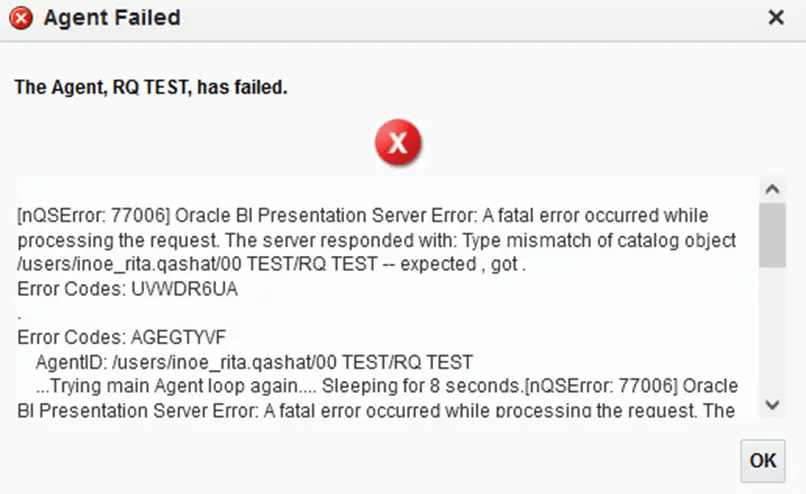
I had hoped to keep a similar organization style in Insight to make it easier to search and lookup reports and their scheduling agent. Accordingly, I attempted to assign the same file name to my report and its scheduling agent. When I went to run the agent, I received this error message:
3 Eloqua Insight User Tips Learned the Hard Way 1

Yes, Eloqua did give me a warning message before saving the agent, but I wrongfully assumed I was safe. Besides receiving this error message, my custom analysis report was gone since the agent overwrote it.

To recap: Whatever you do, do not give your report and agent the same name in Eloqua Insight. You will have to start all over with your analysis!

2.      Reports Cannot Be Moved After They Have Been Scheduled

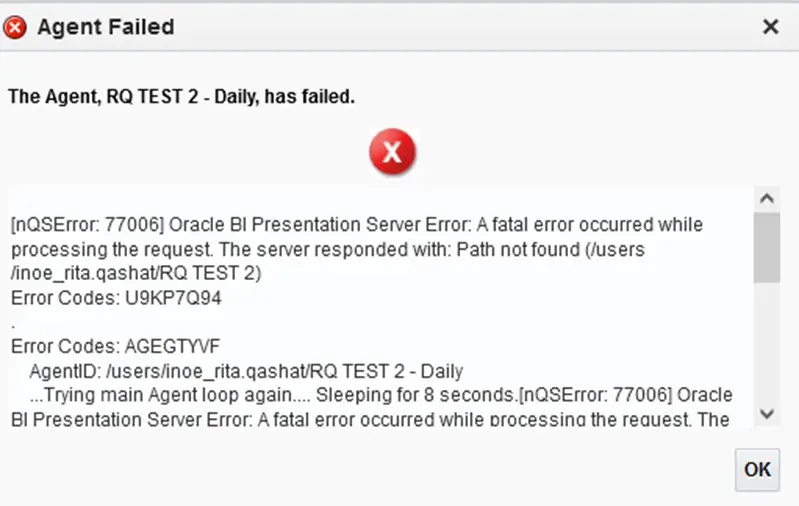
My Insight library was a mess with no rhyme or reason. I attempted to tidy things up by creating folders sorting by time and product. The good news is that my shared library was beginning to look in order. However, the next day I started to receive notices that stakeholders were not receiving their scheduled reports. When I went to check the agent, I received this error message:
3 Eloqua Insight User Tips Learned the Hard Way 2

I was able to modify the agent via the Condition tab to the updated location of the file, but it was a lot of work. This headache could have been avoided had I just followed the correct folder structure from the start.

To avoid making the same mistake I did, I recommend creating folders in Insight following naming conventions and rulesets similar to the ones you use in Eloqua. This makes it much, much easier to find the reports you need. I also keep a running tally of the reports I create in a spreadsheet including the following columns: date, cadence, report name, agent name, distribution list, subject line, and email.  There have been many times I have been asked, for one reason or another, to remove a certain person from receiving scheduled reports. I can easily look up their email in my spreadsheet, locate the agents they are part of, and remove their email address.

3.      Avoid Scheduling Multiple Reports at the Same Time

You can technically do this, and Eloqua will display all the reports as delivered. But as I discovered, when several reports are scheduled at the same time, not all of the reports reach the distribution lists even if they’re marked as delivered. When I began to set the report at random times throughout the hour instead, the queries of people looking for their reports dropped significantly. I began following this rule religiously with my scheduled agents after finding this out. A few extra minutes of work on my end saved me and my contacts a lot more time later on.

The Potential of Eloqua Insight

As you explore, build, and analyze Eloqua Insight, you will find just how powerful this tool can be. Want to see what it can do for your company? Our team of Eloqua experts can get you on the right track. Get in touch with us today to get started.

[Sassy_Social_Share]

Related Posts