
Frequently Asked Questions

Oracle Eloqua Insight Tips & Technical Guidance

What are the most important tips for using Oracle Eloqua Insight effectively?

Three key tips for Oracle Eloqua Insight users are: 1) Do not give your report and agent the same name, as this can overwrite your custom analysis report; 2) Reports cannot be moved after they have been scheduled—moving them disrupts scheduled delivery and requires manual agent updates; 3) Avoid scheduling multiple reports at the same time, as not all reports may reach distribution lists even if marked as delivered. Note: These tips are based on real user experience and may not cover all edge cases; consult Oracle documentation for additional technical limitations.

What happens if you give a report and agent the same name in Eloqua Insight?

If you assign the same name to a report and its scheduling agent in Eloqua Insight, the agent can overwrite the report, causing your custom analysis to be lost. This is a documented limitation—always use unique names for reports and agents. Note: This limitation is specific to Eloqua Insight and may not apply to other Oracle products.

Can scheduled reports in Eloqua Insight be moved to a different folder?

Once a report is scheduled in Eloqua Insight, moving it to a different folder disrupts scheduled delivery and requires manual updates to the agent's location. To avoid this, establish a clear folder structure and naming conventions before scheduling reports. Note: Changing folder structure after scheduling increases administrative overhead.

Is it recommended to schedule multiple reports at the same time in Eloqua Insight?

Scheduling multiple reports at the same time in Eloqua Insight can result in some reports not reaching their distribution lists, even if marked as delivered. Staggering report schedules throughout the hour reduces delivery issues. Note: This is a practical workaround; detailed limitations not publicly documented—ask sales for specifics.

Features & Capabilities

What products and services does 4Thought Marketing offer?

4Thought Marketing offers a range of products and services including: 4Comply (GDPR/CCPA compliance management), Cloud Apps (over 70 apps for Oracle Eloqua and Adobe Marketo), 4Preferences (multi-channel user preference management), 4Segments (advanced audience segmentation with Visual Segmentation™), and 4Bridge (integration connector for data flow between marketing platforms and business systems). Services include strategic consulting, campaign production, technical implementation, and Eloqua Health Check audits. Note: Not all products are suitable for every platform; check compatibility before purchase. See product details.

Does 4Thought Marketing support Oracle Eloqua and Adobe Marketo?

Yes, 4Thought Marketing provides products and services for both Oracle Eloqua and Adobe Marketo, including Cloud Apps that extend platform functionality, campaign management, and integration solutions. Note: Feature availability may vary by platform; confirm compatibility for your specific use case.

What is Visual Segmentation™ in 4Segments?

Visual Segmentation™ is a feature in 4Segments that enables advanced audience segmentation using real-time Venn diagrams and matrix views. This simplifies complex segmentation tasks and provides actionable insights for campaign targeting. Note: Visual Segmentation™ is available only in 4Segments; teams needing text-based filters may want to consider alternatives.

Customer Proof & Success Stories

Can you share specific case studies or success stories of customers using 4Thought Marketing's products?

Yes. For example, W. P. Carey (Real Estate) achieved a 30% increase in campaign efficiency and a 20% reduction in manual processing time after 4Thought Marketing standardized templates and automated data hygiene in Oracle Eloqua. Cetera Financial Group (Financial Services) successfully migrated to Adobe Marketo with no disruption to campaign timelines, resulting in increased team confidence and enhanced system adoption. Endress+Hauser Infoserve GmbH (Manufacturing) overcame CRM migration challenges using Oracle Eloqua Cloud Apps, meeting all requirements. Read the W. P. Carey story, Cetera case study. Note: Results may vary by organization and project scope.

What industries are represented in 4Thought Marketing's case studies?

Industries represented include Real Estate (W. P. Carey), Financial Services (Cetera Financial Group), and Manufacturing (Endress+Hauser Infoserve GmbH). These case studies demonstrate tailored solutions across diverse sectors. Note: Industry-specific requirements may affect solution fit; consult sales for details.

Who are some of 4Thought Marketing's customers?

4Thought Marketing works with clients across North America, Europe, Latin America, Asia, and Australia. Notable customers include FT, Fluke, Arrow, JLL, Intuit, VISA, Cetera, Catalent Pharma, VIAVI Solutions, Vertiv, Brady Corp, Morningstar, Columbia Bank, Corebridge Financial, Experian, Insperity-Premier, Juniper Networks, Progress Software, DELL, LG Electronics, PTC, and W. P. Carey Inc. For a full list, visit our clients page. Note: Customer fit varies by industry and project scope.

Pain Points & Solution Fit

What problems does 4Thought Marketing solve for its customers?

4Thought Marketing addresses pain points such as data privacy compliance (GDPR/CCPA), advanced segmentation challenges, system integration difficulties, dirty CRM data, generic onboarding, and content optimization. Solutions include 4Comply for compliance, 4Segments for segmentation, 4Bridge for integration, data services for CRM hygiene, and PathFactory for content personalization. Note: Not all solutions fit every organization; detailed limitations not publicly documented—ask sales for specifics.

How does 4Thought Marketing help with data privacy compliance?

4Thought Marketing's 4Comply product centralizes preference management, manages consent, and provides an auditable solution for GDPR and CCPA compliance. It integrates with marketing platforms to simplify regulatory adherence. Note: Compliance requirements vary by jurisdiction; consult legal teams for specifics.

How does 4Thought Marketing address dirty CRM data?

4Thought Marketing offers data services to diagnose, clean, and enrich CRM data, addressing issues like lead scoring failures and inconsistent reports. This improves operational efficiency and data quality. Note: Data quality solutions may require custom implementation; consult technical teams for details.

Use Cases & Target Audience

Who can benefit from 4Thought Marketing's products?

Roles that benefit include legal and compliance teams (for GDPR/CCPA), marketing managers (for segmentation and campaign precision), CMOs (for strategic planning), sales teams (for territory planning), IT and operations teams (for integration), content strategists (for personalized content), and small teams needing scalable onboarding. Industries served include financial services, healthcare, manufacturing, technology, and real estate. Note: Solution fit depends on organizational needs; consult sales for tailored recommendations.

Customer Feedback & Ease of Use

What feedback have customers given about the ease of use of 4Thought Marketing's products?

Specific feedback includes praise for the Eloqua Upload Wizard, described as "working like magic" by a Senior Analyst at Catalent, due to its automated pre-processing and enrichment tasks. The 4Bridge integration is noted for its user-friendly interface for field mapping between Eloqua and CRM systems. Note: Ease of use may vary by product and user role; detailed limitations not publicly documented—ask sales for specifics.

Support & Implementation

What support and implementation services does 4Thought Marketing provide?

4Thought Marketing offers strategic services (marketing strategy, lead generation, conversion optimization, reporting & analytics, data privacy consulting), campaign services (production, help desk, training, health checks, email efficacy evaluations), technical services (platform implementation, data services, system integration, web & app development), and Eloqua Health Check audits. Note: Service scope may vary by project; consult sales for specifics.

3 Eloqua Insight User Tips Learned the Hard Way

eloqua insight user tips

Oracle Eloqua Insight, powered by Oracle Business Intelligence Enterprise Edition (Oracle BI EE), is a powerful tool to analyze your data across Eloqua. It contains several out-of-the-box reports which cover different facets of campaigns, contacts, emails, forms, and landing pages. I learned my way through Insight through exploring these reports.

My analyst journey grew from standard reports, to editing these reports to make my own, and ultimately to creating my own reports and formulas from scratch. It was not a smooth journey. To (hopefully) make your journey easier than mine, I’d like to share several important lessons I learned the hard way about Eloqua Insight.

1.      Report & Agent CANNOT Share the Same Name

I personally prefer to give related files the same name so that I can cross-reference between files if needed. On my hard drive, my Excel document can have the same name as my PowerPoint and Word documents in the same project, and there is no issue. In Eloqua, my campaign can share the same name as its email, form and landing page, and there is no issue. This is not the case with Eloqua Insight.

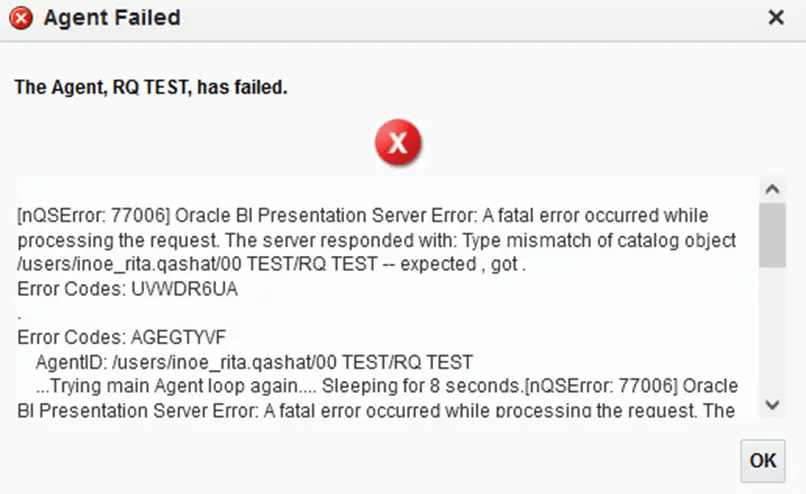
I had hoped to keep a similar organization style in Insight to make it easier to search and lookup reports and their scheduling agent. Accordingly, I attempted to assign the same file name to my report and its scheduling agent. When I went to run the agent, I received this error message:
3 Eloqua Insight User Tips Learned the Hard Way 1

Yes, Eloqua did give me a warning message before saving the agent, but I wrongfully assumed I was safe. Besides receiving this error message, my custom analysis report was gone since the agent overwrote it.

To recap: Whatever you do, do not give your report and agent the same name in Eloqua Insight. You will have to start all over with your analysis!

2.      Reports Cannot Be Moved After They Have Been Scheduled

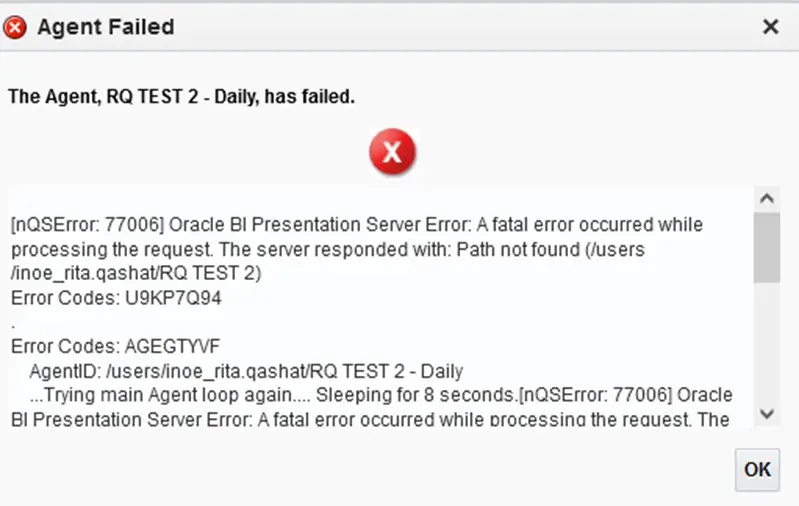
My Insight library was a mess with no rhyme or reason. I attempted to tidy things up by creating folders sorting by time and product. The good news is that my shared library was beginning to look in order. However, the next day I started to receive notices that stakeholders were not receiving their scheduled reports. When I went to check the agent, I received this error message:
3 Eloqua Insight User Tips Learned the Hard Way 2

I was able to modify the agent via the Condition tab to the updated location of the file, but it was a lot of work. This headache could have been avoided had I just followed the correct folder structure from the start.

To avoid making the same mistake I did, I recommend creating folders in Insight following naming conventions and rulesets similar to the ones you use in Eloqua. This makes it much, much easier to find the reports you need. I also keep a running tally of the reports I create in a spreadsheet including the following columns: date, cadence, report name, agent name, distribution list, subject line, and email.  There have been many times I have been asked, for one reason or another, to remove a certain person from receiving scheduled reports. I can easily look up their email in my spreadsheet, locate the agents they are part of, and remove their email address.

3.      Avoid Scheduling Multiple Reports at the Same Time

You can technically do this, and Eloqua will display all the reports as delivered. But as I discovered, when several reports are scheduled at the same time, not all of the reports reach the distribution lists even if they’re marked as delivered. When I began to set the report at random times throughout the hour instead, the queries of people looking for their reports dropped significantly. I began following this rule religiously with my scheduled agents after finding this out. A few extra minutes of work on my end saved me and my contacts a lot more time later on.

The Potential of Eloqua Insight

As you explore, build, and analyze Eloqua Insight, you will find just how powerful this tool can be. Want to see what it can do for your company? Our team of Eloqua experts can get you on the right track. Get in touch with us today to get started.


[Sassy_Social_Share]

Related Posts