Anyone who has ever used Eloqua knows what a powerful tool it is. Combined with the custom cloud apps developed by 4Thought Marketing, the system improves even more. And while the vast majority of the time, systems run smoothly and without errors, nothing is truly perfect and error-free. Problems can occur with any system; for instance, users may make mistakes in data entry, or operational glitches may arise from complex integrations. These issues can stem from various sources, including human error, system updates, or even network connectivity problems. But this doesn’t have to spell the end of your marketing automation setup. You can take proactive steps to troubleshoot and rectify these errors, ensuring that your marketing campaigns continue to run efficiently and effectively. Here’s what you can do to optimize your Eloqua experience and minimize disruption.
What is Eloqua Cloud App Error Routing?
Eloqua apps communicate with Eloqua via its APIs to process information seamlessly. However, communication issues might occasionally disrupt this flow. For instance, in May 2021, Eloqua reported issues with the Bulk API, which is used by various other applications to update and move records to different steps in the campaign canvas. This resulted in records being stuck in an error status on the campaign canvas, which could be frustrating for marketers relying on timely data processing. Despite recent improvements in Eloqua’s error-retry mechanisms, there are instances where a record needs a gentle nudge to get back on track. Understanding how error routing works is crucial for maintaining the integrity of your marketing strategies and ensuring that every lead is followed up on appropriately.
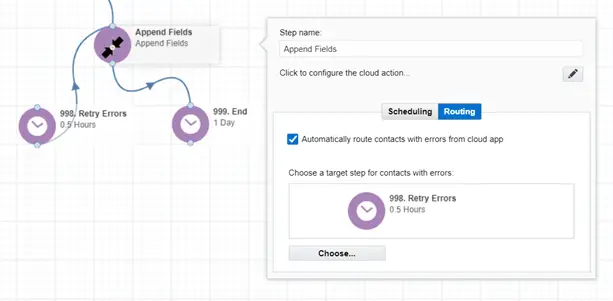
Fortunately, Eloqua has built-in capabilities to reroute records to a previous step, enabling retries of the process. This is essential for maintaining the flow of your marketing automation. In the example below, we’ll guide you through configuring error routing effectively to ensure errors are addressed without manual intervention, streamlining your operations.
- Create a wait step to receive problem records (998. Error).
- Click on the Cloud App step to configure.
- Click on “Automatically route contacts with error from the cloud app”.
- Select the wait step you created earlier.
- Set the delay. This can be as short as .01 hours.
- Then connect the Error step back to the previous cloud app.
How to Keep Eloqua Cloud Apps Running?
Today’s marketing automation systems are incredibly complex and designed to be mostly error-free. However, even the most sophisticated systems occasionally encounter errors that they cannot address on their own. Often, these errors can be quickly resolved by retrying the record using Eloqua’s error routing feature. This feature is not only a time-saver; it also enhances the overall reliability of your marketing automation efforts. To maintain a proactive approach, consider implementing regular training sessions for your team on best practices for using Eloqua. Furthermore, regularly reviewing your system integrations can help identify potential points of failure before they affect your campaigns, enabling smoother operations.
Interested in further training on everything Eloqua can do? Get in touch with 4Thought Marketing to schedule a workshop designed to elevate your Eloqua capabilities and keep your marketing automation error-free.