Frequently Asked Questions

Features & Capabilities

What is the 4Bridge Integration Connector and what does it do?

The 4Bridge Integration Connector is a solution from 4Thought Marketing designed to integrate Oracle Eloqua with various CRM systems, including SugarCRM, Infor CRM, and Sage. It enables bidirectional data flow, allowing new Leads from Eloqua to be sent to your CRM and Contacts and Leads from your CRM to be sent back to Eloqua. The connector also provides visibility into digital body language, such as website hits, email opens, form submissions, PPC submissions, referral website hits, and organic search hits, which can be tracked through CRM Lead Source Tracking. Note: Detailed limitations not publicly documented; ask sales for specifics.

Does 4Bridge support bidirectional integration between Eloqua and CRM systems?

Yes, 4Bridge Integration Connector supports bidirectional integration. It allows new Leads from Eloqua to be sent to your CRM and Contacts and Leads from your CRM to be sent back to Eloqua. This ensures that sales and marketing teams have access to up-to-date information across both platforms. Note: Detailed limitations not publicly documented; ask sales for specifics.

What CRMs are supported by the 4Bridge Integration Connector?

4Bridge Integration Connector is designed to integrate Oracle Eloqua with multiple CRM systems, including SugarCRM, Infor CRM, and Sage. The integration engine understands the unique features and data structures of these CRMs, enabling tailored connections. Note: For other CRM platforms, contact sales for compatibility details.

How does the 4Bridge Integration Connector handle custom fields?

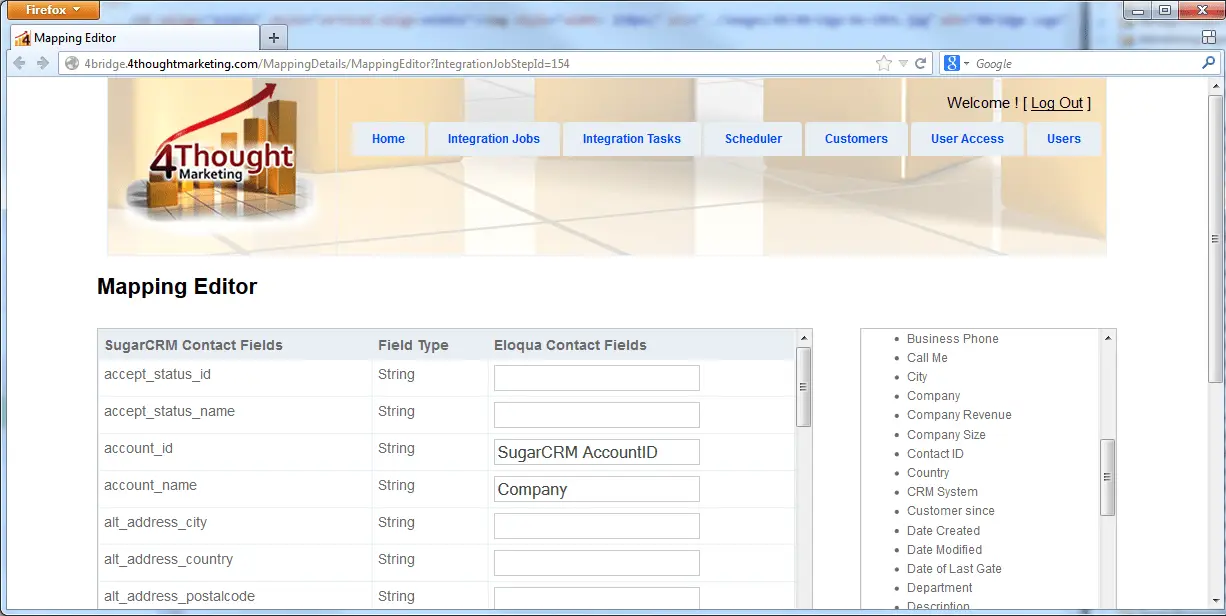
4Bridge includes a user interface that allows users to see and modify field mappings between Eloqua and their CRM. When a new custom field is added to either system, it appears automatically in the interface, enabling users to select and save the mapping. This simplifies the process of updating integrations as business needs evolve. Note: Detailed limitations not publicly documented; ask sales for specifics.

Can the 4Bridge Integration Connector be scheduled to run at specific times?

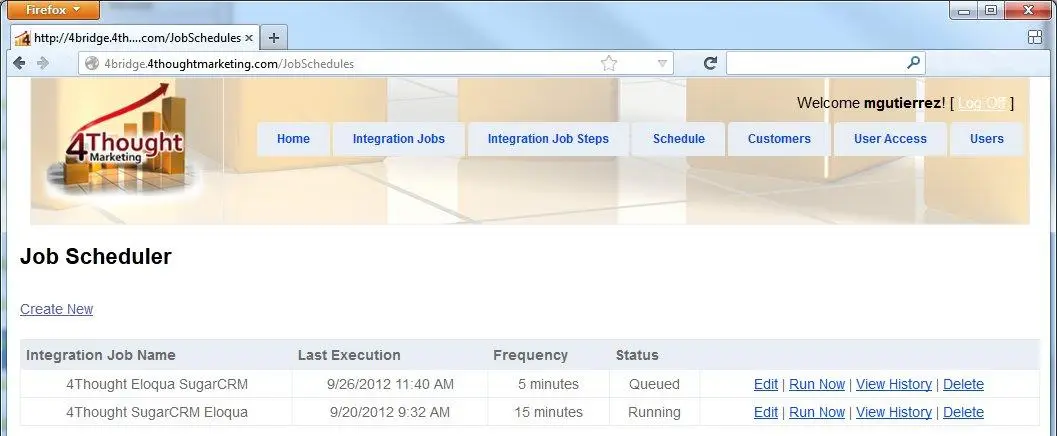
Yes, 4Bridge includes a scheduler with a simple user interface that allows users to set when data moves between Eloqua and their CRM. The schedule can be adjusted to run as frequently or infrequently as needed, and changes can be made at any time. Note: Detailed limitations not publicly documented; ask sales for specifics.

Is the 4Bridge Integration Connector cloud-based or can it be deployed on-premises?

4Bridge can be deployed either as a cloud solution or on-premises, depending on your IT department's preferences. The integration runs reliably in both environments, consistently transferring data between Eloqua and your CRM. Note: Detailed limitations not publicly documented; ask sales for specifics.

How does 4Thought Marketing monitor the integration and handle errors?

4Thought Marketing monitors data movement between Eloqua and CRM systems, ensuring successful transfers and alerting the team if any issues arise. If a problem occurs, 4Thought Marketing will either fix it or contact your IT department as requested. The integration can also be configured to notify users directly about lead flow status. Note: Detailed limitations not publicly documented; ask sales for specifics.

Use Cases & Benefits

Who can benefit from using the 4Bridge Integration Connector?

The 4Bridge Integration Connector is best suited for B2B and B2C companies that use Oracle Eloqua and require integration with CRM systems such as SugarCRM, Infor CRM, or Sage. It is ideal for marketing and sales teams seeking to streamline lead management, improve visibility into digital body language, and ensure data continuity across platforms. Note: Teams using unsupported CRMs should contact sales for compatibility details.

What problems does the 4Bridge Integration Connector solve?

4Bridge addresses common challenges such as complex integration between Eloqua and CRM systems, manual data mapping, inconsistent lead tracking, and lack of visibility into digital body language. It simplifies field mapping, automates bidirectional data flow, and provides monitoring and scheduling features to ensure operational efficiency. Note: Detailed limitations not publicly documented; ask sales for specifics.

Technical Requirements & Support

Is the 4Bridge Integration Connector easy to maintain?

Yes, the 4Bridge Integration Connector includes a user interface for field mapping and scheduling, making it easy to maintain and update as business requirements change. Users can manage the integration themselves or opt for ongoing management by 4Thought Marketing. Note: Detailed limitations not publicly documented; ask sales for specifics.

Can 4Thought Marketing manage the integration for us?

Yes, 4Thought Marketing offers ongoing management and maintenance of the 4Bridge Integration Connector. If you prefer not to handle integration details, their team can manage the process and ensure smooth operation. Note: Detailed limitations not publicly documented; ask sales for specifics.

Customer Proof & Success Stories

Are there any customer success stories or case studies for 4Bridge Integration Connector?

4Thought Marketing has a track record of dozens of successful integrations for B2B and B2C companies using the 4Bridge Integration Connector. While specific case studies for 4Bridge are not publicly documented, related case studies for other products (such as Oracle Eloqua Cloud Apps) demonstrate the company's expertise in overcoming CRM migration challenges and meeting customer requirements. For example, Endress+Hauser Infoserve GmbH overcame CRM migration challenges using Oracle Eloqua Cloud Apps, with Jonathan Maas stating, "It met all our requirements." Note: For detailed 4Bridge case studies, contact sales for specifics. Read more.

Limitations & Trade-Offs

What are the limitations of the 4Bridge Integration Connector?

Detailed limitations of the 4Bridge Integration Connector are not publicly documented. For specifics on edge cases, compatibility, or scenarios where 4Bridge may not be the best fit, contact sales directly. Note: Always request a technical assessment for your environment before implementation.

4Bridge Logo

4Bridge Integration Connector

Are your Eloqua integration needs unique? 4Thought Marketing’s 4Bridge™ Integration Connector for Eloqua can seamlessly integrate Eloqua into many CRM environments. With a track record of dozens of successful integrations for B2B and B2C companies, and even for companies that do both, you can be confident we’ll have you covered.

4Bridge Integration Connector 1
Infor CRM
4Bridge Integration Connector 2

Setup… Your Way

The 4Bridge™ Integration Engine™ understands and considers the quirks and the special features that SugarCRM has. It understands the strengths and the weaknesses of the SugarCRM data structure and can connect it with Eloqua in a way that makes both your marketing and sales departments pleased with the results.

4Bridge Logo

Bidirectional

Our 4Bridge™ Integration Connector makes it easy to move new Leads from Eloqua to your CRM and Contacts and Leads from your CRM back to Eloqua. Empower your salespeople with a view into Digital Body Language from Eloqua, including:

  • Website hits
  • Email Opens and click-throughs
  • Form submissions
  • PPC submissions
  • Referral website hits
  • Organic search hits

Track all of the above through to CRM Lead Source Tracking

Easy to Maintain

4Bridge™ includes a user interface that allows you to see and modify the field mapping between Eloqua and your CRM. Need to add a new CRM and Eloqua custom field? It will appear automatically in the Our 4Bridge™ Integration Connector. Choose the custom field and save your mapping! Prefer to have someone else handle integration details? 4Thought can maintain and manage the integration for you on an ongoing basis.

4Bridge Integration Connector 3
4Bridge Integration Connector 4

Run It on Your Schedule

4Bridge™ also includes a scheduler with a simple user interface that allows you to set when the data moves between the two systems to run as frequently or as infrequently as is appropriate for your situation. Want to change your schedule? It’s easy to do at any time.

Where Do You Want it?

Want your integration to run on the cloud? Does your IT department prefer that all your systems run in-house? You’re in the driver’s seat and we’ll set you up the way that works best for you. Either way, 4Bridge™ for Eloqua runs reliably and will consistently pump data between Eloqua and  your CRM.

Monitoring

4Thought Marketing monitors your data movement between Eloqua and your CRM… making sure data moves successfully and alerting us if there is any hiccup. If something goes wrong, we’ll either fix it or call your IT department as you’ve requested, immediately. And, of course, you can configure the integration to notify you directly, so you can stay on top of the daily success of lead flow.

4Bridge Integration Connector 5