Your MOPs Ticket Queue Is Telling You Something. Are You Listening?
Your MOPs ticket queue is more than a to-do list. It is a diagnostic tool. Learn how marketing operations maturity starts with recognizing the patterns...
Software for maximizing your marketing while ensuring privacy compliance
Innovative solutions to do more with Marketing Automation platforms
Centralize Preference Management Across Your Organization
Visual Segmentation for Marketers
Integration solutions for Eloqua, Marketo, CRM, and other systems
Align corporate and marketing goals
Data capture strategy
Lead scoring, nurturing, segmentation strategy, and funnel framework
Measure results and plan improvements
Ensure compliance with privacy laws
Email, form, and landing page execution. Deliverability and reporting
Eloqua and Marketo specialists
Improve skills and increase productivity with custom online training and videos
Uncover opportunities to improve performance and outcomes
Enhance email impact through expert analysis
Platform installation, change management, and success planning
Data management and stewardship
System integration options using connectors and custom APIs
Custom cloud apps, HTML templates,
JavaScript, and responsive email
Your MOPs ticket queue is more than a to-do list. It is a diagnostic tool. Learn how marketing operations maturity starts with recognizing the patterns...
Before buying new AI marketing tools, run three checks: audit your data quality, assess what your current stack already offers, and review vendor AI roadmaps....
Discover what a preference center is, how good preference center design retains subscribers, and practical examples of building one in Eloqua and Marketo.
Marketo smart campaigns power every automated action in your Marketo instance. Learn how the three-tab architecture, triggers, filters, and batch vs. trigger modes work together...
How does Brady Corporation run Eloqua across multiple brands, regions, and platforms? Hear from their ABM Lead on multi-brand architecture, Contact Level Security, platform integration...
Effective email campaign design in B2B goes beyond visual layout. This guide covers every step: objective-setting, mobile-first structure, personalization, CTA strategy, authentication, and pre-send testing...
Software for maximizing your marketing while ensuring privacy compliance
Innovative solutions to do more with Marketing Automation platforms
Centralize Preference Management Across Your Organization
Visual Segmentation for Marketers
Integration solutions for Eloqua, Marketo, CRM, and other systems
Align corporate and marketing goals
Data capture strategy
Lead scoring, nurturing, segmentation strategy, and funnel framework
Measure results and plan improvements
Ensure compliance with privacy laws
Email, form, and landing page execution. Deliverability and reporting
Eloqua and Marketo specialists
Improve skills and increase productivity with custom online training and videos
Uncover opportunities to improve performance and outcomes
Enhance email impact through expert analysis
Platform installation, change management, and success planning
Data management and stewardship
System integration options using connectors and custom APIs
Custom cloud apps, HTML templates,
JavaScript, and responsive email
Your MOPs ticket queue is more than a to-do list. It is a diagnostic tool. Learn how marketing operations maturity starts with recognizing the patterns...
Before buying new AI marketing tools, run three checks: audit your data quality, assess what your current stack already offers, and review vendor AI roadmaps....
Discover what a preference center is, how good preference center design retains subscribers, and practical examples of building one in Eloqua and Marketo.
Marketo smart campaigns power every automated action in your Marketo instance. Learn how the three-tab architecture, triggers, filters, and batch vs. trigger modes work together...
How does Brady Corporation run Eloqua across multiple brands, regions, and platforms? Hear from their ABM Lead on multi-brand architecture, Contact Level Security, platform integration...
Effective email campaign design in B2B goes beyond visual layout. This guide covers every step: objective-setting, mobile-first structure, personalization, CTA strategy, authentication, and pre-send testing...
The 4Bridge™ Integration Engine™ understands and considers the quirks and the special features that NetSuite has. It knows how to deal with records going inactive. It can work with customers of type “individual”. It understands the strengths and the weaknesses of the NetSuite data structure and can connect it with Eloqua to make both your marketing and sales departments happy.

Our 4Bridge™ Integration Engine™ makes it easy to move new leads from Eloqua to NetSuite, and contacts and leads from NetSuite back to Eloqua. Empower your salespeople with a view into digital body language from Eloqua, including:
Track all of the above through NetSuite lead source tracking.
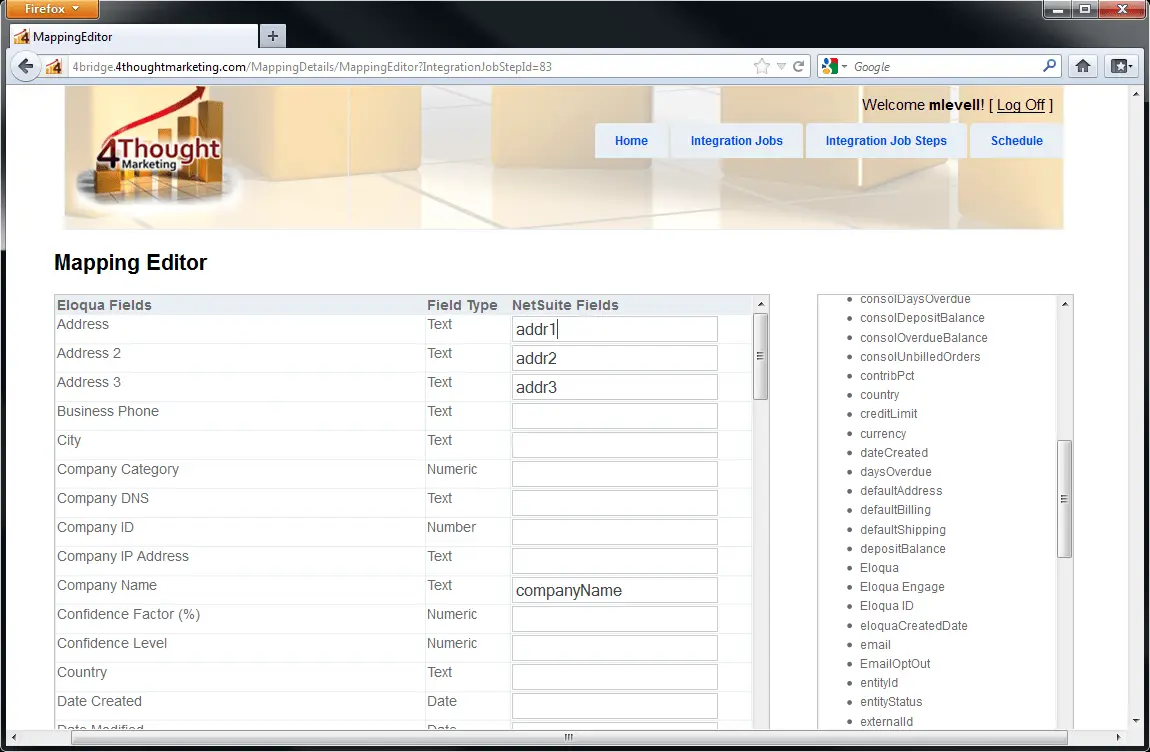
4Bridge™ includes a user interface that allows you to see and modify the field mapping between Eloqua and NetSuite. Need to add a new Netsuite and Eloqua custom field? It will appear automatically in the 4Bridge™ Integration Engine™. Simply choose the custom field and save your mapping! Prefer to have someone else handle integration details? 4Thought Marketing can maintain and manage the integration for you on an ongoing basis.
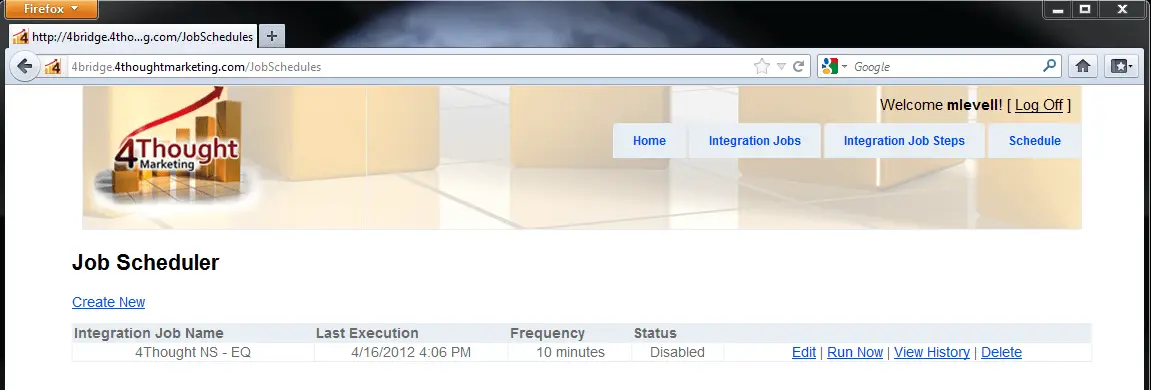
4Bridge™ also includes a scheduler with a simple user interface that allows you to set when the data moves between the two systems to run as frequently or as infrequently as is appropriate for your situation. Want to change your schedule? It’s easy to do at any time.
Want your integration to run on the cloud? Does your IT department prefer that all your systems run in-house? You’re in the driver’s seat and we’ll set you up the way that works best for you. Either way, 4Bridge™ for Eloqua runs reliably and will consistently pump data between Eloqua and NetSuite.
4Thought Marketing monitors your data movement between Eloqua and NetSuite, making sure data moves successfully and alerting us if there is any sort of hiccup. If something goes wrong, we’ll either fix it immediately or call your IT department if you prefer. And of course, you can configure the integration to notify you directly as well, so you can stay on top of the daily success of lead flow.