






Quick Takeaways
- Neither Eloqua nor Marketo has a native expire-this-PDF button.
- Time-limited PDF access control expires the path, not the file.
- Eloqua Page Expiry Redirect closes a landing page automatically.
- In Marketo, a Smart Campaign flow step swaps the asset.
- Always give late clicks a graceful fallback, never a dead link.
- Route every click through a redirect you can revoke later.
Table of Contents
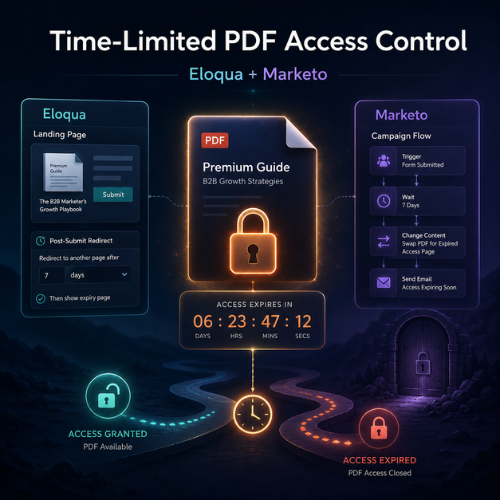
Time-limited PDF access control is the difference between a gated asset that supports a campaign and one that quietly leaks value. Your team gates a research report behind a form, and the downloads roll in.
But that download link never expires on its own. Neither Oracle Eloqua nor Adobe Marketo Engage gives you a one-click way to expire the PDF file itself, so left alone a 48-hour offer keeps converting a week later, and gated PDF content stays in circulation after it goes stale.
This guide shows how practitioners build time-limited PDF access control in both platforms by expiring access rather than the file. Eloqua can automate that natively; Marketo reaches the same result through a configured pattern, so each deserves its own playbook.
What Time-Limited PDF Access Control Actually Means
Time-limited PDF access control is any setup that makes a gated asset reachable only for a defined window, then closes access when that window expires. The distinction that matters: you are not expiring the PDF file itself, you are expiring the path the recipient takes to reach it.
This piece sits under our practitioner’s guide to responsive email design for Eloqua and Marketo; here the focus narrows to expiring gated content in email campaigns cleanly.
You Can’t Expire the File, So Expire the Access Path
Neither platform can expire the PDF file itself, since the hosted file keeps a permanent URL. So time-limited PDF access control works on the access path instead, the landing page and the expiring download link the recipient travels through. Here the two platforms differ in one decisive way: Eloqua can close that path automatically with a native setting, while Marketo reaches the same result through a configured pattern.
Why it matters: Because the file URL is permanent, never expose it directly. Route every click through a link you can change, so revoking access later is a scheduled cutoff or a one-line edit.
How to Expire a Gated PDF in Oracle Eloqua
Eloqua gives you two routes to time-limited PDF access control. Gate the asset behind an Eloqua Landing Page and an Eloqua Form, then pick the mechanism that closes the window.
Option A: Page Expiry Redirect (the genuinely native setting)
Eloqua Landing Pages include a native Page Expiry Redirect in Advanced Settings. Set an expiration date and time and a redirect URL, and after that moment every visitor lands on your fallback page instead of the download. Eloqua enforces the cutoff server-side, no code required. It is the cleanest way to grant time-limited access to gated assets when one shared deadline works for the whole send.
Option B: Redirect link plus a landing page countdown (configured pattern)
When you want a visible countdown or richer tracking, use a configured pattern. Place an Eloqua Redirect Link, a tracked hyperlink asset, in the email rather than a raw URL, so every click is captured in Campaign reporting and the destination stays swappable. Point it at a form-gated asset page showing the download and a countdown before the deadline, then an access-closed message after.
Keep the Campaign Canvas minimal: a segment and the email are enough, because the page carries the timing logic. One honest caution about this form of time-limited PDF access control: a browser countdown reads the visitor’s own clock, and the file URL can still be pulled from page source, so it discourages sharing rather than securing it. Pair it with hosting that lets you unpublish the file once the window closes.
How to Expire a Gated PDF in Adobe Marketo Engage
Marketo builds time-limited PDF access control from its own blocks, so keep the vocabulary straight. Gate the asset behind a Marketo Landing Page and a Marketo Form, then use a Smart Campaign with a flow step to change what the download experience serves once the window closes.
Commonly, a Smart Campaign flips the follow-up page’s content, or swaps the linked asset, on a schedule. Segmentation can vary the window by audience. You can also append an expiry parameter to the query string for the page to check, the closest Marketo gets to an expiring download link without custom hosting. Never place the raw file URL in the email; route the Marketo gated content download through a page you can change. Adobe’s tutorial on building a gated content email program covers the underlying setup.
Avoiding the Traps That Break the Experience
Answer first: time-limited PDF access control fails when it punishes legitimate recipients. A reader who clicks two minutes after a hard cutoff should meet a helpful this-has-expired page with a way to request the content, not a broken link.
- Hard-coded file URLs cannot be revoked once sent, so always route through a redirect or gated page.
- Cached files and CDNs may serve a copy after you unpublish, so set short cache lifetimes.
- Every expiring path needs a graceful fallback destination for late arrivals.
- Client-side timers and query strings deter casual sharing, not determined actors.
For true secure PDF delivery for email, some teams add a dedicated third-party expiry or rights-management service when the content warrants it. AI-assisted QA tools increasingly flag broken or expired links, but a human should still confirm the expired-state experience before launch.
Conclusion
You can’t expire the PDF file itself, so time-limited PDF access control works on the access path, automatically in Eloqua and through a configured pattern in Marketo. In Eloqua, lean on the native Page Expiry Redirect first, and reach for a redirect-link-plus-countdown configuration only when you need the visibility. In Marketo, let a Smart Campaign and a controlled landing page do the same job. Keep the raw file out of the email, give late clicks a soft landing, and be honest about what secure means. If you want help building expiring gated content in email campaigns that hold up across Eloqua and Marketo, contact us at 4Thought Marketing.
About 4Thought Marketing
We're a B2B marketing automation and AI consultancy with a thing for getting complex tech to actually work. Since 2008, we've helped hundreds of organizations across financial services, technology, manufacturing, and real estate get more from Eloqua, Marketo, and their CRM integrations. We serve our clients across marketing automation strategy, lead lifecycle, AI, compliance, preference management, and more. Explore our services or get in touch.
Frequently Asked Questions
What is time-limited PDF access control?
Time-limited PDF access control is a configured pattern that makes a gated PDF reachable only for a set window, then closes access when the window ends. You do not expire the file itself; you expire the landing page and redirect the recipient passes through. Neither Eloqua nor Marketo offers it as a single native feature.
Can Eloqua automatically expire a gated download link?
Yes, with the native Page Expiry Redirect on an Eloqua Landing Page, the simplest form of time-limited PDF access control in the platform. Set an expiration date and time and a redirect URL, and after that moment Eloqua sends every visitor to your fallback page instead of the download. It needs no code.
How do you expire gated content in a Marketo campaign?
Gate the asset behind a Marketo Landing Page and Form, then use a Smart Campaign flow step to swap the content or linked asset on a schedule. Segmentation can vary the window by audience, and a query-string expiry parameter adds another lever.
Will expiring a link break the email for people who already received it?
It can if done carelessly. Route every click through a redirect or gated page rather than a direct file URL, and give expired visitors a friendly page explaining how to request access. Then the email still works and late arrivals are guided.
Is there a truly secure way to deliver a PDF that must expire?
Client-side countdowns and query strings discourage sharing but do not cryptographically secure a file, since the URL can be extracted. For genuine secure PDF delivery for email, unpublish or rotate the hosted file after the window and consider a rights-management service for sensitive content.