



Quick Takeaways
- AI campaign production covers the whole lifecycle, not just copy.
- Eloqua and Marketo already ship native AI drafting tools.
- Neither platform switches its AI features on by default.
- Use AI as a tireless second reviewer before launch.
- After launch, AI should explain what changed, not report it.
- People keep the audience, consent, and activation decisions.
Table of Contents
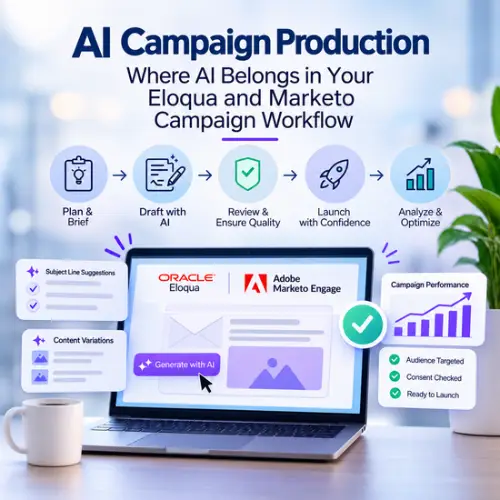
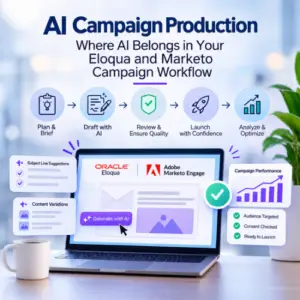
AI campaign production is already inside your Eloqua or Marketo instance: Eloqua suggests five subject lines from a single prompt, and Marketo can draft a full email from a template. Neither tool knows that the segment behind that email pulls in contacts your legal team said not to mail.
Your team is being asked to ship more campaigns with the same headcount, and AI writing tools look like the obvious answer. But most marketing ops teams bolt AI onto one step, usually copy, and leave the rest of the build untouched. The result is faster drafts feeding the same slow reviews, the same last-minute QA scramble, and the same post-launch guesswork.
This guide maps AI campaign production to each stage of the work you already do, from brief to cleanup. For every stage, you will see what AI can take on today with the tools in your own platform, and exactly where a person still has to sign off.
What AI Campaign Production Means for a Marketing Ops Team
AI campaign production is the use of generative and predictive AI to draft, check, analyze, and maintain the assets in a campaign, while people keep approval over what gets sent and to whom. It is not a single tool; it is a way of assigning each step of your build to whoever, or whatever, does it best.
That definition sets the boundary. AI handles volume and pattern-matching, and people handle judgment.
What AI does well: Drafting copy, generating variations, summarizing performance data, and spotting patterns across hundreds of assets.
What people still own: Audience selection, consent and compliance decisions, brand judgment, and the final approval to activate.
If your team already runs a documented build process, AI slots into it rather than replacing it. For the non-AI foundation, this guide to Eloqua campaign production for B2B marketing operations covers standardized assets, data hygiene, and Campaign Canvas setup. AI campaign production speeds up the build, but it does not move accountability for what gets sent.
Where AI Already Lives in Eloqua and Marketo Today
Both platforms now ship native generative AI features, so your first move is to use what you already license before adding outside tools.
In Oracle Eloqua
Oracle groups its AI features under Oracle Eloqua Advanced Intelligence. The classic features are Fatigue Analysis, Account Intelligence, and Send Time Optimization. The generative features are Subject Line Generation and Content Generation, which drafts text for emails and landing pages and creates variations of copy you already have.
Oracle made these features available to all Eloqua customers from June 12, 2025, but they are not switched on automatically. You enable them by opening a service request with Oracle Support, so do that before you plan an AI campaign workflow around them.
In Adobe Marketo Engage
In Marketo, the generative features sit in the Email Designer. The Email Designer AI Assistant can generate subject lines, preheaders, sections, or a full email from a template, with Adobe Firefly handling images. You steer the output by buying group, journey stage, communication strategy, tone, and language, and you can upload brand assets as a reference.
The AI Assistant is not enabled by default either. A Marketo admin grants the Access AI Assistant permission in Roles, and your organization accepts Adobe’s generative AI terms before anyone can use it.
What Neither Platform Does for You
Neither tool decides who should receive the email, checks whether a segment or Smart List matches the brief, or confirms that your consent rules apply. Those checks stay with your team, which is why AI campaign production needs a defined process, not just a feature list.
Step 1: Briefs, Emails and Landing Pages, Drafted Faster
The build stage is where AI campaign production pays off first, because drafting is high-volume, repeatable work.
Start With a Structured Brief
AI output is only as good as the brief behind it. Give the tool the campaign goal, audience, offer, and the single action you want the reader to take. A brief that also states expected results helps here too: some teams now predict campaign ROI before a single asset gets built and only brief AI on campaigns that pass that gate.
Draft Copy and Subject Lines Inside Your Platform
In Eloqua, Subject Line Generation returns five suggestions per prompt and lets you set the purpose as promotional, transactional, or neutral. In Marketo, the AI Assistant drafts subject lines and full emails using your brand assets. Working in the native tools keeps drafts where your templates, field merges, and tracking already live.
A practical rule: Treat every AI draft as a first draft. One person edits for voice and accuracy before the asset moves to review.
Personalization Logic Needs a Human Check
Marketo campaign production often relies on tokens and Velocity scripting for dynamic content inside programs. A general-purpose assistant such as ChatGPT or Claude can draft a starting script, but scripts fail quietly when a field is empty. Learn what Marketo Velocity scripts are and when to use them before letting AI write one, and test every script against real person records.
Step 2: Catching Errors Before Launch With AI
Before launch, use AI as a second reviewer that never gets tired, not as the final sign-off. In AI campaign production, the pre-launch check is where speed gains are easiest to lose.
Most launch errors are not exotic. They are broken links, the wrong segment, a personalization field that renders blank, or a wait step set to days instead of hours. A structured pre-launch review for marketing automation teams already lists what to check; AI helps you check it faster and more consistently.
Where AI fits: Comparing email copy against the brief, flagging inconsistent dates or offers across the emails in one campaign, and summarizing in plain language what a campaign will do.
Where it does not: Final audience approval, consent checks, send timing against other campaigns, and the decision to activate.
Rendering and deliverability still need dedicated testing and a real inbox check. As this look at why email QA testing matters for every campaign explains, the cost of skipping review shows up after the send, when it can no longer be fixed. A dedicated guide on using AI to review an Eloqua campaign before you click Activate goes deeper on this step.
Step 3: Reading Results After Launch
After launch, AI campaign production earns its place by explaining what changed, not just reporting that something did.
Standard reports show open and click rates on a schedule. AI can read the same data and point to a likely cause: a segment that shrank overnight, a send time that drifted, or one email in a nurture dragging the whole flow down. That is the shift described in why your dashboard is the last to know something broke: anomaly detection flags the problem while there is still time to act.
In Eloqua, Fatigue Analysis and Send Time Optimization already apply this idea to contact-level engagement. For broader questions, such as why one campaign underperformed against a similar one last quarter, export the results, ask an assistant to compare them, and verify its explanation against the raw data before you act on it.
Watch for: Confident explanations built on incomplete data. If the export is missing a channel or a date range, the answer will be wrong in a convincing way.
A separate guide on using AI to explain why an Eloqua campaign underperformed walks through this diagnosis step by step.
Step 4: Keeping the Instance Clean
AI campaign production creates more assets, faster, so cleanup has to keep pace or your instance fills with drafts, test emails, and one-off segments.
Every campaign leaves something behind: unused emails, expired landing pages, old forms, and shared filters nobody remembers creating. That clutter slows builders down and raises the risk that someone reuses an outdated asset. AI is well suited to the first pass: grouping assets by naming pattern, flagging items with no recent activity, and drafting a retirement list for a person to approve.
Cleanup works best on a schedule. A regular Eloqua health check gives you the audit framework, and this overview of Oracle Eloqua health checks for optimal performance shows what to measure. Marketo teams can apply the same discipline to unused programs, emails, and Smart Lists. A dedicated guide on using AI to find and retire unused Eloqua assets covers the process in detail.
Where Humans Must Stay in the Loop
Effective AI for marketing operations follows one rule: AI drafts and flags, people approve and send. In AI campaign production, the human checkpoint belongs at the audience and activation steps, because those are the two decisions where a model cannot see the consequences.
Audience and consent: A person confirms the segment or Smart List and that consent rules apply before activation.
Brand and accuracy: A person edits every AI draft for voice, claims, and offers.
Data access: A person decides what data AI tools can see, and contact-level data never goes into a public AI tool.
Activation: A person makes the go or no-go call.
These checkpoints only work if your instance is ready for AI in the first place, with clean data, clear ownership, and a trained team. Getting your instance AI-ready covers those foundations.
This is also the honest answer to whether AI will replace campaign builders. It replaces the slowest parts of their week, such as copy variations and asset hunts, and leaves more time for the judgment calls that cause real damage when they go wrong.
Conclusion
AI campaign production is already inside your Eloqua or Marketo instance, from subject line generation to full email drafts. The teams that get value from it map AI to every step of the build and keep people on the decisions that carry risk. Start with the native tools you already license, add AI checks before and after launch, and schedule cleanup so speed never turns into clutter. To put AI-assisted campaign execution into practice, explore 4Thought Marketing Campaign Services or contact us to talk it through.
About 4Thought Marketing
We're a B2B marketing automation and AI consultancy with a thing for getting complex tech to actually work. Since 2008, we've helped hundreds of organizations across financial services, technology, manufacturing, and real estate get more from Eloqua, Marketo, and their CRM integrations. We serve our clients across marketing automation strategy, lead lifecycle, AI, compliance, preference management, and more. Explore our services or get in touch.
Frequently Asked Questions
What is AI campaign production?
AI campaign production is the use of generative and predictive AI to draft, check, analyze, and maintain campaign assets in a marketing automation platform. People keep control of audience selection, compliance, and final approval. It covers the full campaign lifecycle, not only copywriting.
Does Eloqua have built-in generative AI?
Yes. Oracle Eloqua Advanced Intelligence includes Subject Line Generation, which returns five suggestions per prompt, and Content Generation for email and landing page text. Oracle made these features available to all customers from June 12, 2025, and you enable them through a service request with Oracle Support.
How do I turn on the AI Assistant in Marketo?
The Marketo Engage Email Designer AI Assistant is off by default. An admin grants the Access AI Assistant permission in Roles, and your organization accepts Adobe’s generative AI terms. Users can then generate subject lines, preheaders, sections, or full emails.
Can AI replace campaign QA?
No. AI is a strong second reviewer for copy, consistency, and brief alignment, but it cannot confirm that the audience, consent rules, and timing are right. Keep a person on final review and activation in any AI campaign production process.
Is Marketo campaign production with AI different from Eloqua?
The workflow is the same, but the vocabulary changes. In Marketo, the top-level effort is a program and trigger logic runs in Smart Campaigns, while in Eloqua the effort is a campaign built on the Campaign Canvas. Both platforms offer native AI drafting, so the human checkpoints stay identical.
What is the best first step for Eloqua campaign production with AI?
Enable the native Advanced Intelligence features and use Subject Line Generation on your next email, with a person editing the results. Then add an AI review of copy against the brief before your standard pre-launch checks. Expand only after those two steps run reliably.