Quick Takeaways
- A modern Eloqua preference center beats a lone unsubscribe link.
- Offer topic, frequency, and channel controls, not on-off.
- 4Preferences for Eloqua adds self-service management without custom code.
- Real-time sync keeps subscriber choices consistent across every system.
- Capture zero-party data subscribers freely and intentionally give you.
- Granular best practices cut opt-outs and protect deliverability.
Table of Contents
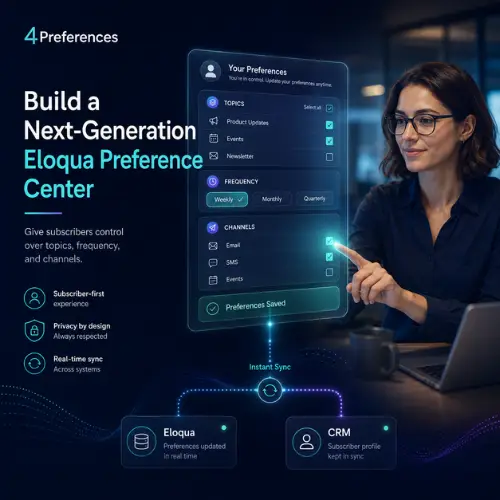
When a subscriber wants fewer emails from you, what do you actually offer them? On many Eloqua instances, the honest answer is a single link at the bottom of the footer that says unsubscribe. A modern Eloqua preference center changes that conversation entirely.
Most marketing operations teams already run sophisticated segmentation, scoring, and nurture campaigns inside Eloqua. Yet the one moment a subscriber tells you exactly what they want, the point where they decide to stay or go, is handled by a blunt all-or-nothing switch. That gap quietly costs you engaged contacts you could have kept.
The fix is not another email. It is giving subscribers real control over topics, frequency, and channels, then acting on those choices immediately. This guide walks through how to build that experience step by step, and how 4Preferences makes it achievable without custom development.
What Is a Next-Generation Eloqua Preference Center?
A next-generation Eloqua preference center is a subscriber-facing page that lets contacts choose which topics they receive, how often, and through which channels, with those choices syncing back to Eloqua automatically. It goes well beyond the standard subscription management page that ships with the platform.
The difference is control. A traditional setup offers a global opt-out or, at best, a list of email groups to check and uncheck. A modern page treats preferences as a two-way relationship: the subscriber tells you what they want, and your campaigns adapt.
Why it matters: The moment a contact reaches your preference page is a retention moment, not an administrative one. Give people a real choice and many will downgrade frequency instead of leaving. For a deeper look at the design principles behind these pages, see our guide to preference center design.
This is also where self-service matters. A page that subscribers manage themselves, without emailing your team or waiting on a form, is the standard modern audiences now expect from any preference management tool.
Before You Begin: What You Need to Build a Preference Center in Eloqua
Before building anything, confirm four foundations are in place. Getting these right first prevents rework later.
Email groups: Eloqua organizes subscriptions into email groups, each representing a communication type such as product news, events, or the monthly newsletter. Map your groups to the topics subscribers actually care about before you design the page. Oracle’s documentation on managing contact subscription pages explains how email groups and the built-in page work together.
Subscription management page: This is Eloqua’s native page for opt-in and opt-out at both the group and global level. A modern build layers a richer experience on top of it rather than discarding it.
A clean data model: Decide which contact fields store frequency and channel choices. Consistent field naming is what makes Eloqua subscription management reliable everywhere downstream.
4Preferences access: This is the purpose-built layer that connects your preference page to Eloqua without custom development. With the foundations set, building a preference center becomes an assembly job rather than a coding project.
Step 1: Map Your Communication Types, Frequency, and Channel Options
Start by defining the choices you will offer, because the architecture of those choices shapes everything downstream. Answer three questions before you touch a page builder.
Topics: What distinct communication types do you send? Group them the way a subscriber thinks, not the way your org chart is structured. A prospect cares about product updates and webinars, not which business unit owns each send.
Frequency: Offer real options such as weekly, monthly, or a quarterly digest. A frequency choice is often the difference between a downgrade and an unsubscribe, because most opt-outs come from volume, not content.
Channels: If you send across email, SMS, and events, let subscribers pick per channel. Every choice a subscriber makes here is zero-party data: information they freely and intentionally give you. It is the most trustworthy data asset you own, because it comes straight from the person with no inference required.
Do not over-ask: Collect only the choices you will actually act on. A page with twenty topic checkboxes looks thorough but overwhelms subscribers and produces noisy data. Start with three to six meaningful topics and expand only when a real campaign needs the distinction.
You also do not have to collect everything on day one. Progressive profiling lets you ask for one additional preference each visit, building a richer picture over time without turning the first interaction into a survey. The choices you gather then power sharper segmentation than behavioral guesswork ever will. A contact who tells you they want monthly product news is a cleaner signal than one you inferred from three link clicks, and that clarity compounds across every campaign you run afterward.
Step 2: Build the Self-Service Layer with 4Preferences
With your choices mapped, build the page subscribers actually interact with. This is where 4Preferences for Eloqua does the heavy lifting.
4Preferences is a purpose-built preference and subscription-management layer that connects a modern preference center to Eloqua without custom development. Instead of hard-coding forms and writing integration scripts, you assemble the page in a drag-and-drop builder and connect it to your Eloqua email groups and contact fields.
Self-service by design: Subscribers land on the page, see their current choices, adjust topics, frequency, and channels, and save. No emails to your team, no support tickets. That self-service experience is what modern audiences expect.
No custom development: Teams often stall on a modern build because it looks like an engineering project. Using dedicated preference center software removes that blocker, so a marketing operations team can own the build end to end. You can review the capabilities on the 4Preferences product page.
Match the look to your brand: Style the page to match your website so subscribers know they are still with you. A preference page that looks like a generic system form raises doubt at the exact moment you are asking for trust.
Step 3: Connect Real-Time Sync to Eloqua and Your CRM
A preference center only earns trust if the choices stick immediately everywhere. That is the job of real-time preference center sync.
The problem with batch updates: If a subscriber sets themselves to monthly and still receives a send queued that morning, you have broken the promise the page just made. Nightly syncs and manual exports create exactly these gaps.
Real-time sync: 4Preferences pushes each change back to Eloqua and onward to your CRM the moment a subscriber saves it, using webhooks and its integration SDK. A contact who opts down at 9:00 a.m. is honored on the 9:15 send.
Test the round trip: Before launch, submit a change yourself, confirm it lands in Eloqua within seconds, and confirm the next send respects it. A sync you have not personally verified is a sync you cannot trust in production.
Why it matters: Consistency across systems is what separates a modern Eloqua preference center from a page that merely looks modern. When Eloqua, your CRM, and every downstream channel agree on a subscriber’s choices instantly, you avoid the contradictory messaging that erodes trust and triggers complaints.
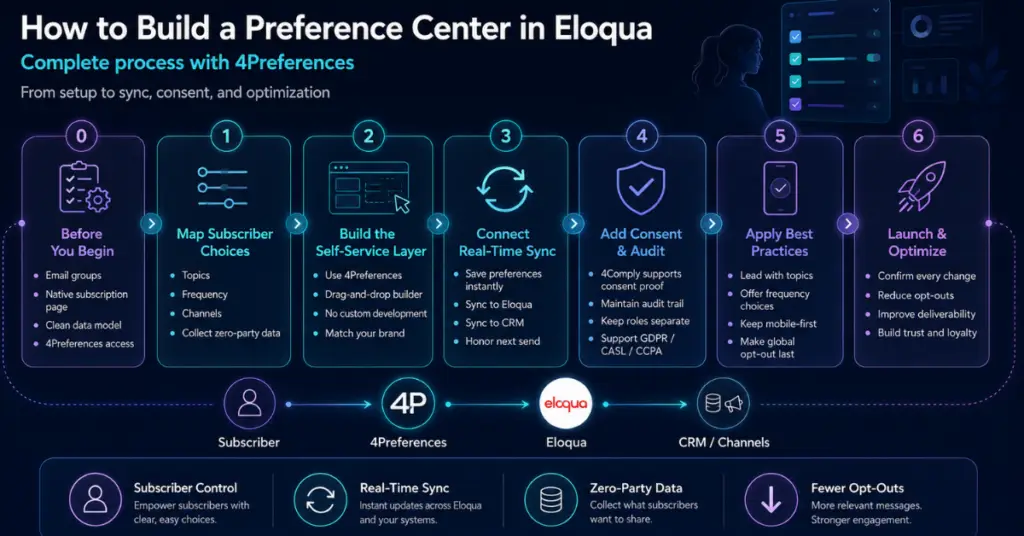
Where Compliance Fits: Consent and Audit (4Comply)
A preference center manages what subscribers want. Compliance is a separate, complementary job: capturing and recording that consent so you can prove it later. Keeping the two roles distinct keeps your build clean.
Preference management vs. consent and audit
4Preferences manages subscriber choices: the topics, frequency, and channels a contact wants, kept in sync across your systems. It answers one question: what does this subscriber want to receive?
4Comply is the complementary consent and audit layer. It captures and records proof of consent and maintains the audit trail needed for regulations such as GDPR, CASL, and CCPA. It answers a different question: can we prove this subscriber agreed, and when?
The two work together and stay in their own lanes. Your preference center drives engagement; your consent records prove compliance. Do not ask either one to do the other’s job.
Why it matters: When preference management and consent are cleanly separated, each does its job well, and your marketing operations team always knows which system owns which answer.
Preference Center Best Practices That Reduce Opt-Outs
Even a well-built page underperforms if the design ignores how subscribers behave. A few habits consistently reduce opt-outs.
Lead with topics, not a global opt-out: A page whose most prominent button is unsubscribe from everything invites exactly that. Put topic and frequency choices first and make the global opt-out the last resort, not the headline.
Default to topic-level unsubscribe: When a subscriber wants out of one thing, let them leave that one thing. Topic-level unsubscribe is the subscriber-respecting default, and it keeps otherwise-engaged contacts on your file. Our article on why unsubscribe wins when email preference management fails covers this trade-off in detail.
Keep it short and mobile-first: Most subscribers open your emails on a phone. A preference page that requires pinching and scrolling gets abandoned before it is saved.
Confirm the change, then stop: After a subscriber saves, show a clear confirmation of exactly what they changed and send nothing else in that moment. A confirmation screen that immediately pitches another subscription reads as tone-deaf and undoes the goodwill you just earned.
Bad design to avoid: A single global unsubscribe link buried in the footer, no topic options, and a dead-end confirmation page. That pattern trains subscribers that leaving entirely is the only exit.
Where AI fits: The declared preferences you collect become the cleanest possible input for AI-driven personalization and send-time optimization. AI models built on zero-party data make sharper predictions than those guessing from behavior alone, because the subscriber already told you the answer.
Conclusion
A modern Eloqua preference center turns your worst retention moment into your best one, replacing a single unsubscribe link with real, subscriber-first control. The building blocks are straightforward: map meaningful choices, build a self-service page, sync it in real time, and keep consent as its own clean layer. Most teams stall not on strategy but on execution, and that is exactly where 4Preferences removes the friction, letting your marketing operations team ship a modern preference center without custom development. If you are ready to build one, contact us to see how 4Preferences fits your Eloqua environment.
About 4Thought Marketing
We're a B2B marketing automation and AI consultancy with a thing for getting complex tech to actually work. Since 2008, we've helped hundreds of organizations across financial services, technology, manufacturing, and real estate get more from Eloqua, Marketo, and their CRM integrations. We serve our clients across marketing automation strategy, lead lifecycle, AI, compliance, preference management, and more. Explore our services or get in touch.
Frequently Asked Questions
What is an Eloqua preference center?
An Eloqua preference center is a subscriber-facing page where contacts choose the topics, frequency, and channels of the emails they receive, with those choices synced back to Eloqua. It replaces a single global unsubscribe link with granular, subscriber-first control, turning an opt-out moment into a retention opportunity.
How is a next-gen Eloqua preference center different from the built-in subscription page?
The native subscription management page handles opt-in and opt-out at the email-group and global level. The modern build layers topic, frequency, and channel choices on top of it and syncs changes in real time. The built-in page is the foundation; the richer layer is the experience subscribers actually engage with, and the one that keeps them subscribed.
Do I need custom development to build a self-service preference center in Eloqua?
No. Using purpose-built email preference center software such as 4Preferences, a marketing operations team can assemble the page with a drag-and-drop builder and connect it to Eloqua email groups without writing integration code. That removes the engineering bottleneck that stalls most builds.
What are the best practices for a preference center that reduces opt-outs?
Lead with topic and frequency choices rather than a global opt-out, default to topic-level unsubscribe, and keep the page short and mobile-first. These habits reduce opt-outs by giving subscribers a reason to downgrade instead of leaving entirely.
How does real-time sync improve preference management?
Real-time sync pushes each subscriber choice back to Eloqua and your CRM the moment it is saved, so a contact who opts down is honored on the very next send. Without it, nightly batch updates create gaps where subscribers receive mail they already declined, which erodes trust.
What kind of data does a preference center collect?
It collects zero-party data: the topic, frequency, and channel choices a subscriber intentionally and explicitly provides. Because the subscriber declares it directly, zero-party data is more accurate than behavioral inference and is the strongest possible signal for segmentation and personalization.