






Key Takeaways
- Practical AI use cases split into two clear buckets.
- Biggest wins: content generation, agentic AI, lead scoring.
- Lowest-risk options never touch your customer data.
- The bucket sets the governance, not the value.
- Start low-risk, then graduate to data-connected AI.
Table of Contents

Every marketing operations team has felt the pull of AI, and most have already run a few experiments. But the conversation usually stalls in the same place: plenty of excitement about what AI could do, but little clarity about which AI use cases a busy Eloqua or Marketo team should adopt first. The result is a lot of pilots and very few production wins. The teams that break through do one simple thing differently.
They stop treating AI as a single capability and start sorting it by the kind of work it does. Therefore, the most useful way to think about AI use cases is not as one big feature to switch on, but as two distinct jobs, and knowing which job you are asking AI to do tells you exactly how careful you need to be with it.
Two Ways to Put AI to Work in Marketing Operations
There are two fundamentally different kinds of AI use cases inside a marketing operations function, and keeping them separate is the single most useful habit a team can build. The line between them is not how advanced the technology is; it is whether the tool touches a real customer record.
The first bucket is AI that works with your customer data, features that read from or write to a contact record, a segment, or a campaign inside your platform. The second bucket is AI that boosts your team’s productivity without touching customer data, tools that help you draft, review, research, and document, but never see a real subscriber. Both are legitimate, and both belong in a modern operation. They just carry very different levels of risk, and that difference should drive how you adopt each one. For a broader view of how these tools are reshaping day-to-day operations, our take on the future of AI and marketing automation integration is a good companion read.
Bucket 1: AI That Works With Your Customer Data
This is the bucket most people picture first, intelligent features living inside Eloqua and Marketo, acting on real customer data. These are the AI use cases that deliver the biggest efficiency gains, and they also demand the most oversight. This is where AI for Eloqua and AI for Marketo start to look different from generic tooling, because the value comes from the platform’s own data rather than a bolt-on.
Content generation inside the platform
The most immediately practical option is content generation. Eloqua’s built-in generative AI can produce subject lines and body copy from a short prompt, giving marketers a fast first draft to refine rather than a blank screen. Oracle’s own documentation on Eloqua AI content generation is worth reading closely, because it makes an important point: the underlying models are pre-trained and are not trained on your customer data.
That distinction matters when you weigh this option against the productivity tools in the second bucket. Content generation is a genuine example of AI for Eloqua earning its keep, it compresses hours of copy iteration into minutes while a human still owns the final word. It is often the first of the data-connected AI use cases a team turns on, precisely because the output is so easy to review. For a closer look at where this feature lives and how to switch it on safely, see our deep dive on AI-generated content in Eloqua’s editors.
Agentic AI and orchestration
The next frontier is agentic AI, systems that do not just recommend an action but carry it out inside defined guardrails. Adobe AI is pushing hard here: Adobe’s work on Marketo agentic AI shows where this is heading, with purpose-built agent skills that clean up lead imports, run automated program QA against your best-practice rules, and even draft multi-step journeys from a brief.
Some of these skills are available now and others are still rolling out, so confirm what has reached your instance before you plan around it. For teams drowning in build work, this is one of the more compelling AI use cases available today, because it targets the repetitive orchestration tasks that quietly eat a marketing ops calendar. This is AI for Marketo at its most ambitious, and because it acts on customer data, it belongs firmly in the high-oversight bucket. We break down the full picture in our guide to Marketo’s agentic AI: Agent Studio, lead orchestration, and buying group intelligence.
Smarter lead scoring and segmentation
The third data-connected option is AI lead scoring and segmentation. Traditional scoring relies on static rules a human sets and forgets; AI lead scoring reads behavioral patterns at scale and adjusts as the data shifts, surfacing the accounts most likely to convert. Segmentation gets the same treatment, spotting micro-segments that a manual export would never reveal. If you want a structured way to fold this in, we walked through how to leverage AI to build a smarter, more structured marketing automation plan in a companion post. This is powerful precisely because it touches your most sensitive data, which, again, is what determines the guardrails these AI use cases need.
Bucket 2: AI That Boosts Productivity Without Touching Customer Data
The second bucket is where most teams should actually start. These AI use cases speed up the humans doing the work without ever exposing a customer record, which makes them the fastest, lowest-risk options you can adopt. This is AI for marketing teams in its most approachable form, and the payback usually shows up in the very first week. Because none of this work sees live data, you can roll it out without a lengthy security review.
Drafting, brainstorming, and repurposing
A general-purpose assistant is superb at turning a rough outline into a first draft, reworking a webinar into five social posts, or brainstorming campaign angles. None of this requires a contact record, you are working with ideas and copy, not customer data. These AI use cases deliver value on day one. Our roundup of practical applications of AI in marketing covers several of these everyday wins.
QA, documentation, and process design
AI is a tireless reviewer. Point it at a campaign build checklist, an email against your brand rules, or a tangle of undocumented processes, and it will produce QA notes and clean documentation faster than any human. Used this way, AI quietly raises quality across the whole operation, and because it never sees live data, it is safe to roll out broadly. The same low-code and AI shift we described in 8 ways low-code and AI have revolutionized marketing automation strategies applies here: small productivity tools compound into a much faster team, and these AI use cases make everything else easier.
Research and summarizing
Finally, AI is a strong research and summarizing partner, digesting a long vendor doc, comparing platform capabilities, or catching your team up on a topic in minutes. It is one of the most underrated options because it saves time without any data-privacy exposure at all, a clear win for AI for marketing teams that want faster answers without new risk.
How to Choose Which AI Use Cases to Start With
With two buckets in front of you, sequencing becomes simple. Start in Bucket 2, where the work carries almost no data risk and pays back immediately, drafting, QA, and research. Get your team comfortable, establish habits, and build trust in the output before anything touches a customer record. Then graduate into Bucket 1, content generation first, then AI lead scoring, then agentic AI, adding governance at each step. A practical rule of thumb: if a mistake would only cost you a rewrite, move fast; if it could reach a customer, slow down and add a checkpoint.
For example, many teams spend the first month letting AI draft and QA their campaigns, then switch on content generation once the workflow is trusted, and connect data-driven features only after that. Mapping your AI use cases to that gradual ramp keeps momentum high and risk low. This crawl-walk-run path lets you capture value fast while reserving your riskiest AI use cases for the moment your guardrails are ready. If you’re fitting this into a wider plan, our enterprise marketing automation strategy for 2026 shows how AI sequencing sits inside the bigger roadmap.
Governance and Guardrails for AI in Eloqua and Marketo
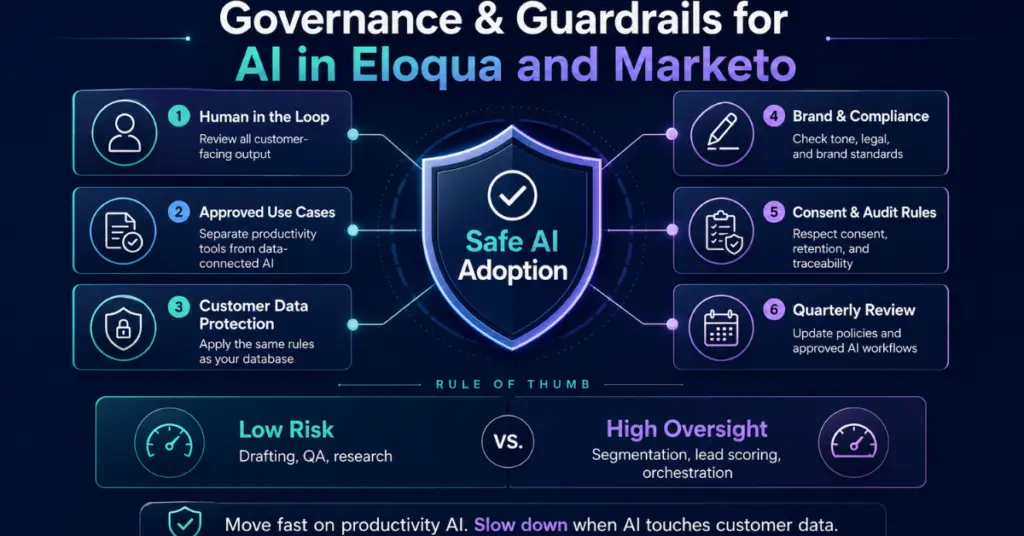
Governance is what separates a durable AI program from a risky one. In Eloqua and Marketo, any AI feature that reads or writes a contact record inherits the same governance obligations as the database it touches, which is why in-platform tools belong in a stricter review lane than a chatbot your team uses to draft a brief. Practically, that means keeping a human in the loop on anything customer-facing, documenting which AI use cases are approved for real data, and treating productivity tools and data-connected tools as two separate policies.
A simple approved-use list, reviewed each quarter, is usually enough to keep teams safe without slowing them down. This is not a reason to hesitate; it is what lets you move fast responsibly. For the bigger-picture shift from manual to AI-driven operations, our piece on classic marketing operations processes versus the new AI world lays out the strategy, and our reminder that automation isn’t autopilot makes the case for keeping human judgment in the loop as you scale.
Conclusion
Practical AI use cases are not a single switch you flip, they are a set of choices about which jobs you hand to AI and how much data each one touches. Split the work into the two buckets, start with the productivity wins that carry no data risk, and graduate into data-connected features like Eloqua AI content generation, AI lead scoring, and Marketo agentic AI as your governance matures. Teams that sequence their AI use cases this way get the speed without the exposure. If you’d like help mapping the right options to your Eloqua or Marketo environment, 4Thought Marketing can help you build the roadmap.
About 4Thought Marketing
We're a B2B marketing automation and AI consultancy with a thing for getting complex tech to actually work. Since 2008, we've helped hundreds of organizations across financial services, technology, manufacturing, and real estate get more from Eloqua, Marketo, and their CRM integrations. We serve our clients across marketing automation strategy, lead lifecycle, AI, compliance, preference management, and more. Explore our services or get in touch.
Frequently Asked Questions
What are the best AI use cases to start with in a marketing automation team?
Start with a productivity option that never touches customer data, drafting, QA, or research. These deliver value immediately and carry almost no risk, which makes them the ideal on-ramp for AI for marketing teams.
Does AI for Eloqua or Marketo train on our customer data?
For the platforms’ native generative features, no. Oracle states Eloqua AI content generation uses pre-trained models that are not trained on customer data. Always confirm the same for any third-party tool before connecting it to real records.
What is Marketo agentic AI?
Marketo agentic AI refers to Adobe AI agents that don’t just recommend actions but carry them out inside defined guardrails, cleaning lead imports, running program QA, and drafting journeys. It acts on customer data, so it needs strong oversight.
How is AI lead scoring different from traditional scoring?
Traditional scoring uses static rules a human maintains. AI lead scoring reads behavioral patterns at scale and adapts as the data changes, surfacing high-intent accounts a fixed rule set would miss.
How much governance do AI use cases actually need?
It depends entirely on the bucket. Productivity work that never sees customer data needs light oversight; any feature that reads or writes a contact record needs the same governance as the database it touches.
Can AI replace my marketing operations team?
No. These tools augment the team, they don’t replace it. Human judgment still owns strategy, creative direction, and final review, especially for anything customer-facing. The goal is a faster, sharper team, not a smaller one.
Are AI use cases in Eloqua and Marketo compliant with GDPR and other privacy laws?
They can be. Treat any data-connected feature with the same consent, retention, and audit rules as the rest of your database. Productivity work that never touches customer data carries far less compliance exposure.
Do I need new tools or budget to try AI?
Not to start. The productivity options, drafting, QA, and research, run on tools most teams already have. The native features for AI for Eloqua and AI for Marketo are built into the platforms you already license.
How do I measure the ROI of AI use cases?
Measure the two buckets differently. For productivity work, track time saved and output volume. For data-connected features, track lift in outcomes, such as AI lead scoring accuracy or conversion rate on AI-optimized segments.
Should marketing or IT own AI in Eloqua and Marketo?
Marketing operations should own the tools inside Eloqua and Marketo, since they know the campaigns and the data. IT and security should partner on governance for anything that touches customer data.