Key Takeaways
- Eloqua AI content generation spans email, landing pages, and subject lines.
- It’s a first-draft engine, not a writer replacement.
- No brand-voice memory, every session starts fresh.
- Models are pre-trained; they aren’t trained on your data.
- Keep a human review checkpoint before every send.
Table of Contents

Oracle quietly built AI-assisted writing into Eloqua’s core editors, and for marketing operations teams it changes the creative loop. Used well, Eloqua AI content generation turns a blank page into a solid first draft in seconds; used carelessly, it ships copy no one checked. Here is where the feature lives, how to switch it on, and the guardrails to set before your team leans on it.
What Eloqua AI Content Generation Offers
Eloqua AI content generation appears natively in three places: the email editor, the landing page editor (via Cloud Components), and the Campaign Canvas subject-line optimizer. Across them it can draft body copy from a short prompt, adjust tone in one click, generate subject-line variants, draft first-pass translations, condense long-form source material to email length, and suggest personalization variations alongside Eloqua’s field merge. It sits right on top of the Eloqua design editor and dynamic content you already use.
How to Turn It On
The feature is free but off by default. An admin opens a service request with Oracle Support, then grants the “Use Generative AI features” permission under the new Advanced Intelligence category, documented in Oracle’s Advanced Intelligence overview. Treat that permission as a deliberate access gate, not an on-switch for everyone.
In the Email Editor
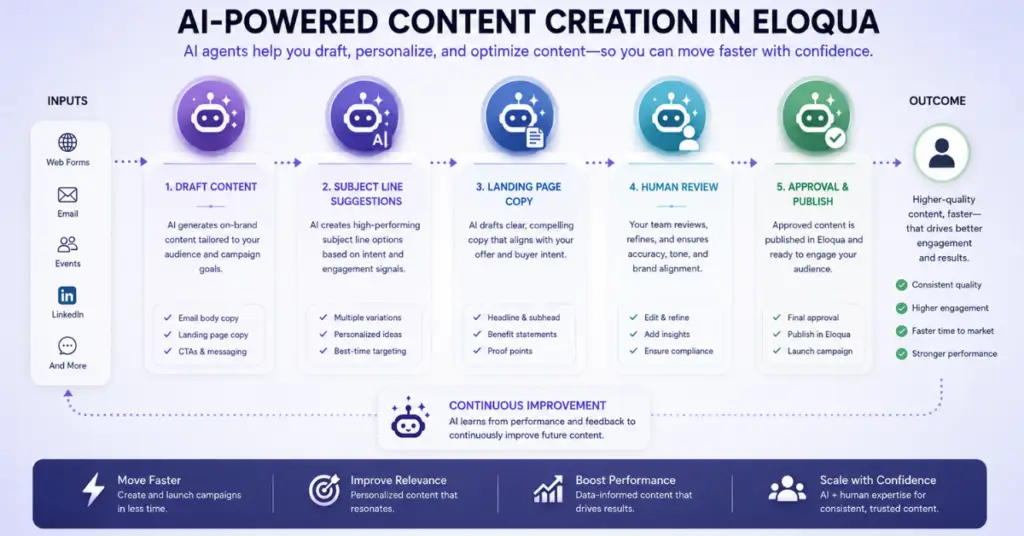
The most mature integration is here. Select a text block, click the AI icon, describe what you want, set a tone and word count, and generate; the copy drops straight in, and you can regenerate up to five times. Eloqua AI content generation shines on boilerplate, disclaimers, event confirmations, nurture intros, templated newsletters, where it is a fast first draft to polish. It struggles with relationship-sensitive copy like renewals or executive outreach, because it has no memory of your brand voice or campaign history. And with no access to your product catalog or pricing, treat any generated claim about features or specs as placeholder text to verify before scheduling, as Oracle’s Content Generation docs explain.
Subject Lines and Pre-headers
For busy teams this is the most useful part of Eloqua AI content generation: up to ten subject-line variants from your topic, campaign type, emotional trigger, and length target, each with a readability score and spam-risk indicator. Those scores are algorithmic, not drawn from your engagement data, so treat them as directional. As Piyush on our team puts it, the generator does not replace A/B testing, it replaces the blank page. Pre-headers follow the same flow, tuned to complement rather than repeat the subject line.
On Landing Pages
Landing-page support runs through Cloud Components via a separate panel: pick a text component, choose a content type, add context, preview up to three variants, and review manually, especially form labels and privacy or GDPR copy, which the AI often mis-formats. Generated copy still has to clear your normal brand-review workflow.
Practical Workflows
Use Eloqua AI content generation as a structured first-draft engine with human checkpoints. The same “AI accelerates, humans decide” pattern runs through practical applications of AI in marketing and building a smarter, AI-assisted plan:
| Use case | AI role | Human role | Time saved |
|---|---|---|---|
| Monthly newsletter | Draft intro & summaries | Tone, fact-check | ~60% |
| Event invitation | Draft body, CTA, pre-header | Logistics review | ~55% |
| Nurture sequence | Variants per stage | Sequencing, personalization | ~40% |
| Compliance notice | Not recommended | Legal-owned entirely | 0% |
Guardrails and Data Safety
Set policy on three fronts. Prompt hygiene: Oracle’s models are pre-trained and not trained on your data, but prompts run through hosted infrastructure, so never paste PII, revenue figures, or confidential performance data. Brand compliance: AI-generated is not pre-approved; route it through the same approval as human copy. Regulated industries: in banking, payments, or fintech, any copy touching eligibility, rates, fees, or disclosures must go to compliance first, because the AI has no regulatory awareness. Fold these guardrails into a wider enterprise marketing automation strategy for 2026 rather than treating them as a one-off. It is the human-in-the-loop discipline we argue for in classic MOps processes vs. the new AI world.
What It Can’t Do Yet
Current gaps: no brand-voice memory across sessions, no campaign-history or segment context, no dynamic-content rule generation, no custom HTML/CSS, no multilingual QA, and no UTM or link generation. These are first-draft limits by design; for AI that acts more autonomously on the Marketo side, see Marketo’s agentic AI. The fix for the biggest gap, lost brand context, is a shared prompt library: tested prompts encoding your voice, restricted terms, and tone, so the first generation lands closer to usable. It is a small investment with compounding returns, much like the wins in low-code and AI in marketing automation.
Conclusion
Eloqua AI content generation is a genuine accelerator, the quality and time savings are real. The risk is the slow erosion of quality when AI output stops being reviewed as rigorously as human copy. Build a prompt library, keep a human checkpoint before every send, and treat drafts as starting points, not final copy. Do that, and Eloqua AI content generation closes the gap from brief to first sendable draft from days to hours. It’s one piece of a wider set of practical AI use cases for Eloqua and Marketo teams. If you would like help with enablement, permissions, and the review workflow, 4Thought Marketing can help.
About 4Thought Marketing
We're a B2B marketing automation and AI consultancy with a thing for getting complex tech to actually work. Since 2008, we've helped hundreds of organizations across financial services, technology, manufacturing, and real estate get more from Eloqua, Marketo, and their CRM integrations. We serve our clients across marketing automation strategy, lead lifecycle, AI, compliance, preference management, and more. Explore our services or get in touch.
Frequently Asked Questions
How do I enable Eloqua AI content generation?
It’s off by default. An admin files a service request with Oracle Support, then grants the u0022Use Generative AI featuresu0022 permission under the Advanced Intelligence category. There is no extra fee.
Does Eloqua AI content generation train on our customer data?
No. Oracle’s models are pre-trained and not trained on your data. Prompts still run through hosted infrastructure, so avoid pasting PII or confidential data into them.
How many subject lines can it generate?
Up to ten per prompt, each with a readability and spam-risk score. Those are algorithmic, not based on your database, so treat them as directional.
Is AI-generated copy safe to send without review?
No. Verify all product claims, run it through brand approval, and route regulated-industry copy through compliance before sending.