




Frequently Asked Questions

Email Preview Text Whitespace & Engagement

What is whitespace in email preview text and why does it matter?

Whitespace, also known as negative space, refers to the empty areas surrounding text and images. In email marketing, whitespace in the preview text improves readability, directs focus to key messages, creates a sense of sophistication, and establishes a visual hierarchy. Using whitespace strategically can increase email open rates and enhance brand perception.

How does whitespace improve email engagement?

Whitespace makes emails easier to digest, especially on mobile devices. It helps highlight key offers, guides the reader's eye, and increases click-through rates by making the preview text more visually appealing and less cluttered.

What happens if you don't use whitespace in your email preview text?

Without whitespace, preview text can become cluttered and overwhelming, leading to immediate deletion by recipients. It can also make your emails appear unprofessional and obscure key messages, resulting in missed engagement opportunities.

How can whitespace be implemented in email preview text?

Whitespace can be added using special HTML characters like Zero-Width Space (ZWSP, ​ or u200B) and Non-Breaking Space (NBSP,  ). These characters create blank spaces in most email clients, padding the preview text and improving its appearance.

Why is testing across email clients important when using whitespace hacks?

Email clients render content differently, so it's essential to test whitespace hacks across platforms like Gmail, Outlook, and Apple Mail to ensure consistency and optimal appearance for all recipients.

What are the best practices for preview text whitespace in Oracle Eloqua?

In Oracle Eloqua, you can use dynamic content with ZWSP and NBSP to easily implement whitespace. Create a dynamic content component and paste the appropriate HTML code to pad your preview text, ensuring a clean and professional look.

How can you implement preview text whitespace in Marketo?

Marketo allows you to control preview text using Velocity scripting language. You can create a Velocity script token to populate the preview text and edit the HTML in the Rich Text Token to include whitespace hacks, offering flexibility for personalized preview text.

What are the key considerations when optimizing preview text whitespace?

Key considerations include testing across email clients, optimizing for both mobile and desktop, respecting character limits, and using whitespace to highlight offers or create urgency. A/B testing different whitespace variations is recommended to maximize engagement.

How does preview text whitespace affect brand perception?

Strategic use of whitespace in preview text elevates brand perception by making emails feel more premium and less like spam. It helps establish a professional image and guides recipients toward key actions.

Features & Capabilities

What marketing automation platforms does 4Thought Marketing support?

4Thought Marketing supports platforms including Oracle Eloqua, Marketo, PathFactory, Microsoft Dynamics, Salesforce, and several AI platforms such as n8n, ChatGPT/OpenAI, Anthropic, and Gemini.

What products does 4Thought Marketing offer for marketing automation?

Products include 4Comply (privacy compliance software), Cloud Apps (innovative solutions for marketing automation), 4Preferences (centralized preference management), 4Segments (visual segmentation for marketers), and 4Bridge (integration solutions for Eloqua, Marketo, CRM, and other systems).

What is the String Deleter Cloud App and how does it help marketers?

The String Deleter Cloud App improves data quality by removing unwanted character strings, such as honorifics, name prefixes or suffixes, company suffixes, or special characters, helping marketers maintain clean and actionable data.

How does the Append Fields Cloud App work?

The Append Fields Cloud App combines two fields plus text and stores the result in another field, enabling marketers to automate data concatenation and streamline data management processes.

What does the Contact Deleter with Archive Cloud App do?

This app removes unwanted contacts in Oracle Eloqua while preserving a data archive, allowing marketers to clean their contact lists without losing historical data.

How does 4Thought Marketing help with integration between marketing and CRM platforms?

4Thought Marketing offers integration solutions through products like 4Bridge, enabling seamless data flow between Eloqua, Marketo, CRM systems, and other platforms using connectors and custom APIs.

Use Cases & Benefits

Who can benefit from preview text whitespace optimization?

Any business or marketer aiming to improve email open rates and engagement can benefit from optimizing preview text whitespace, especially those using marketing automation platforms like Eloqua and Marketo.

How does preview text whitespace help with mobile email engagement?

Whitespace makes emails easier to read on mobile devices, where attention spans are short and screen space is limited. It ensures key messages are visible and increases the likelihood of recipient engagement.

What types of businesses should use 4Thought Marketing's email best practices?

Businesses seeking to maximize their marketing automation ROI, improve deliverability, and enhance customer engagement should use 4Thought Marketing's email best practices, including B2B and B2C organizations.

How does preview text whitespace contribute to conversion rates?

By making emails more visually appealing and guiding recipients to key calls to action, whitespace in preview text can increase click-through and conversion rates, leading to more successful campaigns.

Technical Requirements & Implementation

What HTML code should be used to create whitespace in email preview text?

Use a combination of <br />,  , and ‌ (Zero-Width Non-Joiner) in your HTML to create whitespace. For example: <br />  ‌ ‌ ‌...

How do you test preview text whitespace across different email clients?

Send test emails to accounts on Gmail, Outlook, Apple Mail, and other major clients. Review how the preview text renders and adjust the HTML code as needed to ensure consistent appearance.

What are the character limits for preview text in email clients?

Character limits vary by client and device. It's important to optimize preview text for both mobile and desktop, keeping it concise and ensuring key messages are visible within the limit.

How can you use dynamic content to personalize preview text?

Dynamic content allows you to personalize preview text by including recipient-specific information, such as first names or targeted offers, which can increase open rates and engagement.

Support & Implementation

What services does 4Thought Marketing offer for email campaign production?

4Thought Marketing provides email, form, and landing page execution, deliverability optimization, and reporting services to help clients run effective campaigns.

How can 4Thought Marketing help with email efficacy evaluation?

4Thought Marketing offers expert analysis to enhance email impact, including A/B testing, performance review, and recommendations for improving engagement and conversion rates.

What training options are available from 4Thought Marketing?

4Thought Marketing provides custom online training and videos to help clients improve skills and increase productivity with marketing automation platforms.

How does 4Thought Marketing support privacy compliance?

4Thought Marketing offers data privacy consulting and products like 4Comply to help clients ensure compliance with privacy laws and regulations.

Product Information

What is 4Comply and how does it help marketers?

4Comply is software designed to maximize marketing effectiveness while ensuring privacy compliance. It helps organizations manage consent and comply with data privacy regulations.

What is 4Preferences and what does it offer?

4Preferences centralizes preference management across an organization, allowing marketers to efficiently manage customer communication preferences and improve personalization.

What is 4Segments and how does it help marketers?

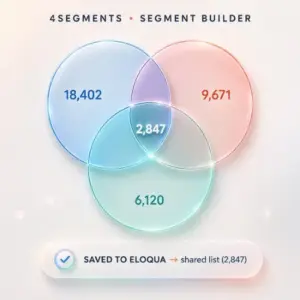
4Segments provides visual segmentation tools for marketers, enabling them to create and manage audience segments more effectively for targeted campaigns.

What is 4Bridge and what integration solutions does it provide?

4Bridge offers integration solutions for Eloqua, Marketo, CRM, and other systems, facilitating seamless data exchange and workflow automation between platforms.

Hacking Preview Text Whitespace

Hacking Preview Text Whitespace 5

Did you know that almost 70% of people decide whether to open an email based on the subject line and preview text? That’s an important space you need to use wisely. A key tip for mastering it is to include whitespace, a line break after the preview text. In this article, we’ll explain white space and show you how to effectively use it to enhance your preview text.

What is Whitespace? & Why it Matters (Even in the Preview)

Whitespace, also known as negative space, refers to the empty areas surrounding text and images. It’s not just about blank space; it’s about creating balance and visual breathing room. In email marketing, this principle applies to both the design of the email body and, crucially, the preview text. Let’s understand why whitespace is crucial, especially in the context of email marketing:

  • Improved Readability: Makes your email easier to digest, especially on mobile with short attention spans.
  • Enhanced Focus: Directs the reader’s eye to your key message or call to action, increasing click-through rates.
  • Creates a Sense of Sophistication: Elevates your brand perception, making your emails feel more premium and less like spam.
  • Sets the Tone: Establishes a visual hierarchy and guides the reader through your email content.

What happens if you don’t use whitespace?

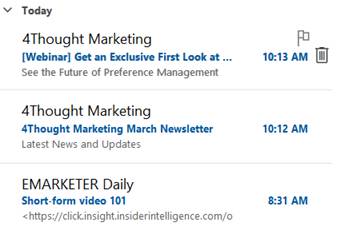
In the example below, the first two items display only the subject line and preview text.  However, in the third example, HTML from the message body bleeds into the preview, making it less valuable.
Hacking Preview Text Whitespace 6

Implementing Preview Text Whitespace: A Best Practice Guide

So, how do we create whitespace in the preview text? The answer lies in using special characters that render as blank spaces in most email clients. Here’s how:

  • The Zero-Width Space (ZWSP): This invisible character, represented by &#8203; or u200B in HTML, is the star of our show. It takes up no visible space but can be used to pad the preview text.
  • The Non-Breaking Space (NBSP), represented by &nbsp; in HTML, prevents line breaks and can also be used to create small, consistent gaps.

The good folks at Litmus have a more complete overview in their article.

Implement the Hack in Oracle Eloqua

The hack can be utilized in Oracle Eloqua through dynamic content with ZWSP and NBSP, making implementation very easy.

  • Create your Dynamic Content

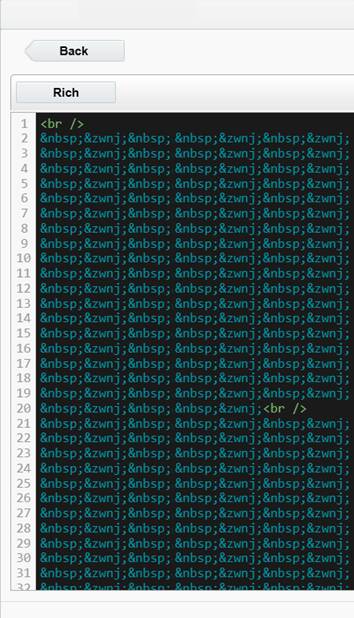
Create a new dynamic content component and paste in the following HTML :

<br /> &nbsp;&zwnj;&nbsp;&zwnj;&nbsp;&zwnj;&nbsp;&zwnj;&nbsp;&zwnj;&nbsp;&zwnj;&nbsp;&zwnj;&nbsp;&zwnj;&nbsp;&zwnj;&nbsp;&zwnj;&nbsp;&zwnj;&nbsp;&zwnj;&nbsp;&zwnj;&nbsp;&zwnj;&nbsp;&zwnj;&nbsp;&zwnj;&nbsp;&zwnj;&nbsp;&zwnj;&nbsp;&zwnj;&nbsp;&zwnj;&nbsp;&zwnj;&nbsp;&zwnj;&nbsp;&zwnj;&nbsp;&zwnj;&nbsp;&zwnj;&nbsp;&zwnj;&nbsp;&zwnj;&nbsp;&zwnj;&nbsp;&zwnj;&nbsp;&zwnj;&nbsp;&zwnj;&nbsp;&zwnj;&nbsp;&zwnj;&nbsp;&zwnj;&nbsp;&zwnj;&nbsp;&zwnj;&nbsp;&zwnj;&nbsp;&zwnj;&nbsp;&zwnj;&nbsp;&zwnj;&nbsp;&zwnj;&nbsp;&zwnj;&nbsp;&zwnj;&nbsp;&zwnj;&nbsp;&zwnj;&nbsp;&zwnj;&nbsp;&zwnj;&nbsp;&zwnj;&nbsp;&zwnj;&nbsp;&zwnj;&nbsp;&zwnj;&nbsp;&zwnj;&nbsp;&zwnj;&nbsp;&zwnj;&nbsp;&zwnj;&nbsp;&zwnj;&nbsp;&zwnj;&nbsp;&zwnj;&nbsp;&zwnj;&nbsp;&zwnj;&nbsp;&zwnj;&nbsp;&zwnj;&nbsp;&zwnj;&nbsp;&zwnj;&nbsp;&zwnj;&nbsp;&zwnj;&nbsp;&zwnj;&nbsp;&zwnj;&nbsp;&zwnj;&nbsp;&zwnj;&nbsp;&zwnj;&nbsp;&zwnj;&nbsp;&zwnj;&nbsp;&zwnj;&nbsp;&zwnj;<br />
&nbsp;&zwnj;&nbsp;&zwnj;&nbsp;&zwnj;&nbsp;&zwnj;&nbsp;&zwnj;&nbsp;&zwnj;&nbsp;&zwnj;&nbsp;&zwnj;&nbsp;&zwnj;&nbsp;&zwnj;&nbsp;&zwnj;&nbsp;&zwnj;&nbsp;&zwnj;&nbsp;&zwnj;&nbsp;&zwnj;&nbsp;&zwnj;&nbsp;&zwnj;&nbsp;&zwnj;&nbsp;&zwnj;&nbsp;&zwnj;&nbsp;&zwnj;&nbsp;&zwnj;&nbsp;&zwnj;&nbsp;&zwnj;&nbsp;&zwnj;&nbsp;&zwnj;&nbsp;&zwnj;&nbsp;&zwnj;&nbsp;&zwnj;&nbsp;&zwnj;&nbsp;&zwnj;&nbsp;&zwnj;&nbsp;&zwnj;&nbsp;&zwnj;&nbsp;&zwnj;&nbsp;&zwnj;&nbsp;&zwnj;&nbsp;&zwnj;&nbsp;&zwnj;&nbsp;&zwnj;&nbsp;&zwnj;&nbsp;&zwnj;&nbsp;&zwnj;&nbsp;&zwnj;&nbsp;&zwnj;&nbsp;&zwnj;&nbsp;&zwnj;&nbsp;&zwnj;&nbsp;&zwnj;&nbsp;&zwnj;&nbsp;&zwnj;&nbsp;&zwnj;&nbsp;&zwnj;&nbsp;&zwnj;&nbsp;&zwnj;&nbsp;&zwnj;&nbsp;&zwnj;&nbsp;&zwnj;&nbsp;&zwnj;&nbsp;&zwnj;&nbsp;&zwnj;&nbsp;&zwnj;&nbsp;&zwnj;&nbsp;&zwnj;&nbsp;&zwnj;&nbsp;&zwnj;&nbsp;&zwnj;&nbsp;&zwnj;&nbsp;&zwnj;&nbsp;&zwnj;&nbsp;&zwnj;&nbsp;&zwnj;&nbsp;&zwnj;&nbsp;&zwnj;&nbsp;&zwnj;
  • When you are done, it should look like this:
Hacking Preview Text Whitespace 7
  • Insert the Preview Hack at the end of your subject line:
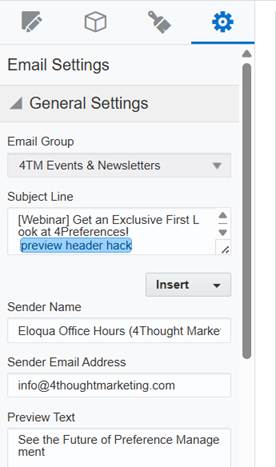
Hacking Preview Text Whitespace 8

Preview Text Hack in Marketo

Marketo, a robust marketing automation platform, offers several ways to control the preview text of your emails. Marketo’s Velocity scripting language allows for dynamic content. You can create a Velocity script token to populate the preview text. This is more advanced but offers greater flexibility for personalized preview text.

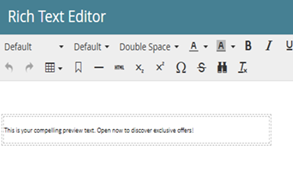
  • Edit the HTML in the Rich Text Token and enter the hack code:
<p><br /> &nbsp;&zwnj;&nbsp;&zwnj;&nbsp;&zwnj;&nbsp;&zwnj;&nbsp;&zwnj;&nbsp;&zwnj;&nbsp;&zwnj;&nbsp;&zwnj;&nbsp;&zwnj;&nbsp;&zwnj;&nbsp;&zwnj;&nbsp;&zwnj;&nbsp;&zwnj;&nbsp;&zwnj;&nbsp;&zwnj;</p> <p>&nbsp;&zwnj;&nbsp;&zwnj;&nbsp;&zwnj;&nbsp;&zwnj;&nbsp;&zwnj;&nbsp;&zwnj;&nbsp;&zwnj;&nbsp;&zwnj;&nbsp;&zwnj;&nbsp;&zwnj;&nbsp;&zwnj;&nbsp;&zwnj;&nbsp;&zwnj;&nbsp;&zwnj;&nbsp;&zwnj;&nbsp;&zwnj;&nbsp;&zwnj;&nbsp;&zwnj;&nbsp;&zwnj;&nbsp;&zwnj;&nbsp;&zwnj;&nbsp;&zwnj;&nbsp;&zwnj;&nbsp;&zwnj;&nbsp;&zwnj;&nbsp;&zwnj;&nbsp;&zwnj;&nbsp;&zwnj;&nbsp;&zwnj;&nbsp;&zwnj;&nbsp;&zwnj;&nbsp;&zwnj;&nbsp;&zwnj;&nbsp;&zwnj;&nbsp;&zwnj;&nbsp;&zwnj;&nbsp;&zwnj;&nbsp;&zwnj;&nbsp;&zwnj;&nbsp;&zwnj;&nbsp;&zwnj;&nbsp;&zwnj;&nbsp;&zwnj;&nbsp;&zwnj;&nbsp;&zwnj;&nbsp;&zwnj;&nbsp;&zwnj;&nbsp;&zwnj;&nbsp;&zwnj;&nbsp;&zwnj;&nbsp;&zwnj;&nbsp;&zwnj;&nbsp;&zwnj;&nbsp;&zwnj;&nbsp;&zwnj;&nbsp;&zwnj;&nbsp;&zwnj;&nbsp;&zwnj;&nbsp;&zwnj;&nbsp;&zwnj;<br /> &nbsp;&zwnj;&nbsp;&zwnj;&nbsp;&zwnj;&nbsp;&zwnj;&nbsp;&zwnj;&nbsp;&zwnj;&nbsp;&zwnj;&nbsp;&zwnj;&nbsp;&zwnj;&nbsp;&zwnj;&nbsp;&zwnj;&nbsp;&zwnj;&nbsp;&zwnj;&nbsp;&zwnj;&nbsp;&zwnj;&nbsp;&zwnj;&nbsp;&zwnj;&nbsp;&zwnj;&nbsp;&zwnj;&nbsp;&zwnj;&nbsp;&zwnj;&nbsp;&zwnj;&nbsp;&zwnj;&nbsp;&zwnj;&nbsp;&zwnj;&nbsp;&zwnj;&nbsp;&zwnj;&nbsp;&zwnj;&nbsp;&zwnj;&nbsp;&zwnj;&nbsp;&zwnj;&nbsp;&zwnj;&nbsp;&zwnj;&nbsp;&zwnj;&nbsp;&zwnj;&nbsp;&zwnj;&nbsp;&zwnj;&nbsp;&zwnj;&nbsp;&zwnj;&nbsp;&zwnj;&nbsp;&zwnj;&nbsp;&zwnj;&nbsp;&zwnj;&nbsp;&zwnj;&nbsp;&zwnj;&nbsp;&zwnj;&nbsp;&zwnj;&nbsp;&zwnj;&nbsp;&zwnj;&nbsp;&zwnj;&nbsp;&zwnj;&nbsp;&zwnj;&nbsp;&zwnj;&nbsp;&zwnj;&nbsp;&zwnj;&nbsp;&zwnj;&nbsp;&zwnj;&nbsp;&zwnj;&nbsp;&zwnj;&nbsp;&zwnj;&nbsp;&zwnj;&nbsp;&zwnj;&nbsp;&zwnj;&nbsp;&zwnj;&nbsp;&zwnj;&nbsp;&zwnj;&nbsp;&zwnj;&nbsp;&zwnj;&nbsp;&zwnj;&nbsp;&zwnj;&nbsp;&zwnj;&nbsp;&zwnj;&nbsp;&zwnj;&nbsp;&zwnj;&nbsp;&zwnj;</p>
<p><span style="font-family: 'Calibri Light',sans-serif;">This is your compelling preview text. Open now to discover exclusive offers!</span></p>
  • Your Rich Text Editor looks like this.
Hacking Preview Text Whitespace 9
  • Change your Email Settings and set the preheader as:
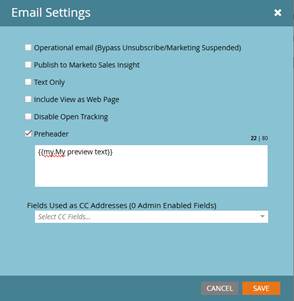
Hacking Preview Text Whitespace 10
  • Your Preview Text is all set.
Hacking Preview Text Whitespace 11

Considerations:

Talking about optimizing email preview text, It’s more than just writing a catchy sentence. A key element is whitespace, and its strategic use can significantly impact open rates. Now, it’s crucial to remember that email clients render content differently. So, we need to test across major platforms—Gmail, Outlook, Apple Mail—to ensure consistency. Also, keep in mind the differences between the mobile and desktop experiences. Character limits and preview text truncation vary, so we need to optimize for both. Don’t just add whitespace arbitrarily. Use it to highlight key offers, create a sense of urgency, or guide the reader’s eye. Think of it as visual pacing. And, of course, the best way to determine what works is through A/B testing. Experiment with different whitespace variations and analyze the results. It’s about leveraging data to refine our approach and maximize engagement.

Beyond the Hack: Elevating Your Preview Text Strategy

While this whitespace hack is a valuable tool, remember that the content of your preview text is still essential. Effective utilization of email preview text necessitates strategic enhancement of the subject line by providing supplementary context or generating curiosity.

For instance, a subject line announcing “New Arrivals” can be enhanced by preview text that details the discovery of recent styles and exclusive promotions. Furthermore, offering subscribers a preliminary glimpse of the email’s content is crucial. This may involve highlighting specific discounts or products within a sale announcement, or teasing key insights from a shared blog post.

Clear directives are essential; subscribers should be explicitly guided toward desired actions through the employment of action-oriented language, such as “Shop Now,” “Learn More,” or “Register Today.” Personalization, facilitated by dynamic content, significantly improves engagement, with even simple first name inclusions demonstrably increasing open rates. Finally, the creation of urgency within the preview text, utilizing phrases such as “Limited Time Offer” or “Don’t Miss Out,” serves to stimulate immediate action from recipients.

The Cost of Neglecting Whitespace

Failing to utilize whitespace effectively in your preview text can have several detrimental effects. A cluttered, dense preview can overwhelm recipients, leading to immediate deletion. It can also project an unprofessional image, damaging your brand’s credibility. Furthermore, a lack of clear visual cues can obscure your key message, resulting in missed opportunities for engagement and conversions.

Conclusion: Unlock Your Email Potential

Mastering the nuances of email marketing, such as the strategic use of preview text whitespace, can significantly impact the success of your campaign. By combining a well-crafted preview text with strategic whitespace, you can create a more engaging and visually appealing email. Optimizing Preview Text Whitespace is a key part of email marketing best practices, and at 4thought Marketing, we understand the intricacies of effective email marketing. We’re dedicated to helping businesses like yours implement best practices and achieve exceptional results. Whether you need assistance with strategy development, campaign execution, or performance optimization, we’re here to help. Ready to take your email marketing to the next level? Contact 4thought Marketing today to discover how we can help you enhance your prospects and drive meaningful results.

[Sassy_Social_Share]

Related Posts
