




Frequently Asked Questions

Features & Capabilities

What is the snooze feature in email campaigns, and how does it work?

The snooze feature allows users to pause their email subscriptions for a set period (one, three, or six months) instead of unsubscribing permanently. This option is integrated into the email preference center, enabling contacts to control the frequency and timing of communications. Users can select their preferred pause duration directly from a pre-populated form, making the process simple and user-friendly. Note: The snooze feature is designed for users overwhelmed by emails or taking temporary breaks; it may not address all disengagement scenarios. Source.

How does the snooze option help reduce permanent unsubscribes?

By offering users the flexibility to pause their subscriptions, the snooze option provides an alternative to permanent unsubscribing. This approach retains subscribers who might otherwise opt out completely, turning previously inactive contacts into active ones through renewed engagement. Note: While effective for some users, others may still choose to unsubscribe if their interests change significantly. Source.

What options are available to users in the email preference center?

Users can choose between re-subscribing, pausing their subscription for one, three, or six months, or unsubscribing entirely. The preference center is designed to be user-friendly, with pre-populated email addresses and simple button selections. Note: The available options may vary depending on the campaign setup and platform integration. Source.

Use Cases & Benefits

Who can benefit from adding a snooze option to their email campaigns?

Organizations with large contact databases, especially those gathering information from live or one-time events, can benefit from the snooze option. It is particularly useful for companies seeking to re-engage inactive users and manage event follow-ups. Note: Best fit for teams aiming to reduce churn and retain subscribers; companies with highly transient audiences may see limited impact. Source.

What results did clients achieve by implementing the snooze feature?

Clients reported successful re-engagement of inactive users and improved management of event follow-ups. Any interaction from previously inactive contacts was considered a win, and the snooze option helped retain a portion of the audience that might have otherwise been lost. Note: Detailed quantitative results for the snooze feature are not publicly documented; ask sales for specifics. Source.

Pain Points & Challenges

What problems does the snooze feature solve for marketing teams?

The snooze feature addresses the challenge of disengaged contacts by providing an option to pause communications rather than unsubscribe. This helps marketing teams retain valuable contacts, reduce wasted resources on inactive users, and improve campaign efficiency. Note: The snooze feature may not fully resolve disengagement caused by irrelevant content or shifting user priorities. Source.

How does 4Thought Marketing help companies manage inactive contacts?

4Thought Marketing provides strategies and tools, such as the snooze feature, to re-engage inactive contacts and manage event follow-ups. By offering flexible subscription options, companies can convert inactive users into active ones and optimize their marketing resources. Note: Effectiveness depends on the quality of content and relevance to user interests. Source.

Product Information

What products and services does 4Thought Marketing offer for marketing automation?

4Thought Marketing offers products such as 4Comply (for GDPR and CCPA compliance), Cloud Apps (over 70 apps for Oracle Eloqua and Adobe Marketo), 4Preferences (multi-channel preference management), 4Segments (advanced audience segmentation), and 4Bridge (integration connector). Services include strategic consulting, campaign production, technical implementation, and Eloqua Health Checks. Note: Not all products are relevant to email snooze campaigns; consult with 4Thought Marketing for specific feature applicability. Source.

Customer Proof & Success Stories

Can you share specific case studies or success stories of customers using 4Thought Marketing's products?

Yes. For example, W. P. Carey (Real Estate) achieved a 30% increase in campaign efficiency and a 20% reduction in manual processing time by standardizing templates and automating data hygiene with Oracle Eloqua. Cetera Financial Group (Financial Services) successfully migrated to Adobe Marketo, resulting in increased team confidence and enhanced system adoption. Endress+Hauser Infoserve GmbH (Manufacturing) overcame CRM migration challenges using Oracle Eloqua Cloud Apps. Note: These case studies demonstrate tailored solutions; results may vary by industry and implementation. Source, Source, Source.

Industries & Audience

Which industries are represented in 4Thought Marketing's case studies?

Industries represented include Real Estate (W. P. Carey), Financial Services (Cetera Financial Group), and Manufacturing (Endress+Hauser Infoserve GmbH). These examples highlight 4Thought Marketing's ability to deliver tailored solutions across diverse sectors. Note: Case studies for other industries may be available upon request. Source, Source, Source.

Who are some of 4Thought Marketing's customers?

4Thought Marketing works with clients across North America, Europe, Latin America, Asia, and Australia. Notable customers include FT, Fluke, Arrow, JLL, Intuit, VISA, Cetera, Catalent Pharma, VIAVI Solutions, Vertiv, Brady Corp, Morningstar, Columbia Bank, Corebridge Financial, Experian, Juniper Networks, DELL, LG Electronics, PTC, Wiygul Automotive Clinic, Altec, Abila/Sage Nonprofit, Agilysys, Black Box, Cengage, Embarcadero Technologies, ServiceNow, Thomson Reuters Trillium Software, UBM Tech Verint Systems, W. P. Carey Inc., Sophos, Eset, Endress+Hauser Group, DNV, BAC Credomatic, Qudos Bank, Arkadin SAS, World Trade Group, ABA Seguros, Alqueria Consorcio Comex, Oracle Mexico, SERO Soluciones Empresariales, Marketing Cube, and Terrapinn Holdings Ltd. Note: Customer logos and additional details are available on the clients page. Source.

Ease of Use & Implementation

What feedback have customers given about the ease of use of 4Thought Marketing's products?

Specific feedback highlights the user-friendly nature of tools like the Eloqua Upload Wizard, which automates pre-processing and enrichment tasks, and the 4Bridge Integration, which offers a user interface for managing field mappings. These features simplify complex tasks and make integration and data management easier for users. Note: General ease-of-use feedback for all products is not documented; ask sales for product-specific details. Source.

Limitations & Trade-Offs

Are there any limitations to the snooze feature or other 4Thought Marketing solutions?

Limitations include the potential for users to remain disengaged if content is not relevant or if their interests have changed. The snooze feature is best suited for users overwhelmed by email volume or taking temporary breaks. Detailed limitations for other products are not publicly documented; ask sales for specifics. Source.

Case Study: Using Snooze to Enhance Re-Engagement Campaigns

snooze option

Maintaining customer engagement is essential for your company’s long-term success. By consistently providing compelling, relevant, and timely information, you are more likely to elicit a response from your customers. However, your current offer, while interesting, may not address their current priorities.

When customers show signs of disengagement, offering them the option to control the type and frequency of content provides the best chance of retaining their interest in the long run. One possible option is adding a snooze feature to your email preference center, allowing customers to slow or pause communication instead of unsubscribing completely.

The Problem: Inactive Users

Our client was focused primarily on contact information gathered from live or one-time events. Their database contained tens of thousands of names. However, when those contacts stopped opening emails or clicking links, retaining all this inactive information became a problem. Time and money went into marketing emails that never got any engagement. By then, any form of engagement—even asking to pause communications—would turn an inactive contact into an active contact again. Our client was determined to do just that.

The Re-Engagement Campaign: A Fresh Approach

The initiative began with a clear objective: reach out to the tens of thousands of inactive users in the client’s database and determine if these users still wished to receive communications. More importantly, they wanted to give these contacts more options than continuing as is or opting out.  So, they decided to add a snooze option to their email preference center.

Crafting the User Experience

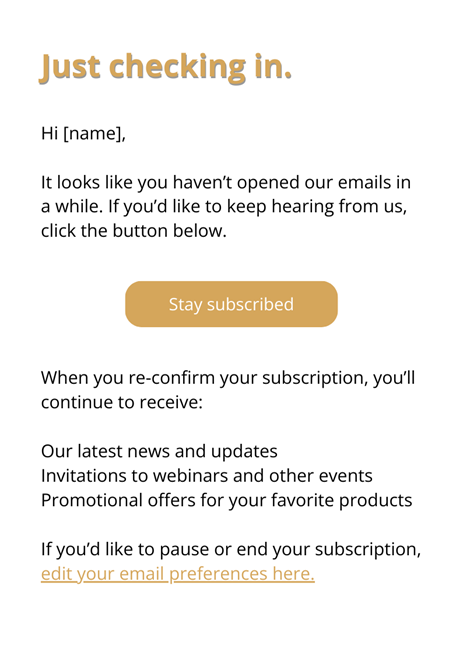
The process began with designing an email to the inactive contact.  The copy clearly showed the reason for this email and that they wanted to serve the customer according to their wishes.
Case Study: Using Snooze to Enhance Re-Engagement Campaigns 1

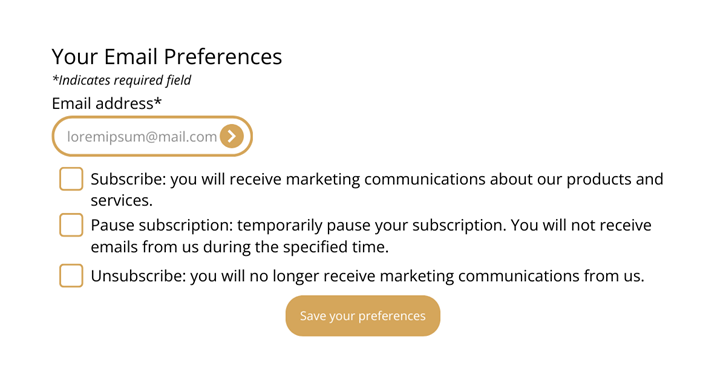
The email allowed customers to re-subscribe immediately or navigate to a redesigned email preferences page, where they could choose between three options.
Case Study: Using Snooze to Enhance Re-Engagement Campaigns 2

Upon receiving the email, users found their email address pre-populated in the form. They could simply click a button to save their preferences. If they chose to adjust their subscription, they had two main options: pause their subscription or unsubscribe.

Subscription Pause: Offering Flexibility

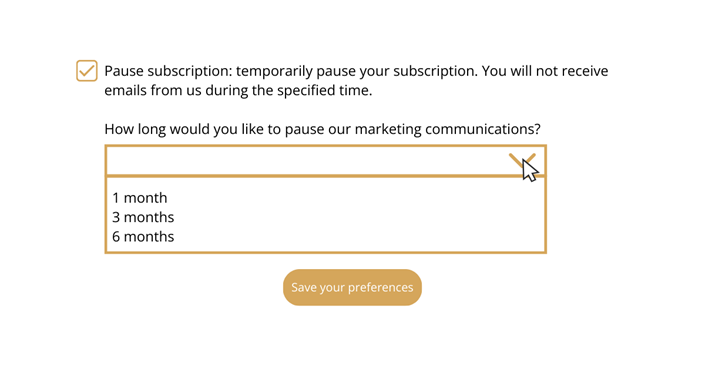
The pause option introduced a layer of flexibility that aimed to reduce permanent unsubscribes.
Case Study: Using Snooze to Enhance Re-Engagement Campaigns 3

Users could pause their subscriptions for one, three, or six months. This feature was designed for those overwhelmed by emails or those taking a temporary break, such as a vacation. By providing this choice, they aimed to retain subscribers who might otherwise opt out permanently.

Our Client’s Results

Our client’s initial focus was re-engaging inactive users and managing event follow-ups. The snooze option allowed customers to select their own preferences. This strategy proved successful, as any interaction from previously inactive users was considered a win.

Adding a snooze option to your email preference is a simple option that added a valuable dimension to our client’s re-engagement campaign. By offering users the flexibility to pause their subscriptions rather than unsubscribe, they were able to retain a portion of the audience that might have otherwise been lost.

Do your inactive contacts need a break? Contact us today to implement a snooze option in your campaigns.

[Sassy_Social_Share]

Related Posts