







Frequently Asked Questions

Features & Capabilities

What are Eloqua content blocks and how do they work?

Eloqua content blocks are reusable layout components saved within the Design Editor's block library. They allow marketing teams to save any email or landing page layout section—such as a two-column content row, CTA button block, or branded footer—and reuse it across campaigns with a simple drag-and-drop. This streamlines email and landing page creation, ensuring consistency and efficiency. Source

How do Eloqua content blocks differ from Shared Content?

Content blocks are layout templates. When you insert a block into an email, Eloqua copies the layout into that email, and later edits to the source block do not affect emails that have already used it. Shared Content is a live asset that updates across all active emails and landing pages when changed. Use blocks for layout reuse and Shared Content for copy that must stay synchronized. Source

Are Eloqua content blocks automatically responsive?

Yes. Because content blocks are created and managed within the Design Editor, they inherit the editor's responsive output. Blocks render correctly across email clients and mobile devices without any additional coding or configuration. Source

Can content blocks be used on landing pages as well as emails?

Yes. Eloqua content blocks work in both the email and landing page environments within the Design Editor. Any block saved to the library is available for use in either context, making them useful for maintaining consistent layout elements across both channels. Source

What types of layout can be saved as content blocks?

Any combination of cell types—text, images, dynamic content, shared content, and more—can be saved as a content block in Eloqua's Design Editor. Examples include two-column image-and-text sections, footer rows with social icons, and single-button CTA layouts. Source

How do you create a content block in Eloqua's Design Editor?

Open any email or landing page in the Design Editor. Build or locate the layout section you want to save. Hover over the layout row, click the block icon in the action menu, and name the block before saving. The block then appears in the library for drag-and-drop use. Source

How can you organize the Eloqua content block library for easy search?

Use a prefix-based naming convention that groups blocks by type and purpose. Examples include Header Standard, Footer Legal, CTA Single Button, and 2-Col Image Left. Consistent naming makes the library searchable and reduces the time new team members need to find the right component. Source

How do you edit an existing content block in Eloqua?

To edit a saved block, open its options menu in the library and click Edit. This opens the Edit Block screen, where you can adjust layouts, change cell types, update padding and spacing, and refine the block's structure. Changes update the block for future use but do not affect emails or landing pages that have already used it. Source

What happens when you update a content block after it's been used in emails?

Edits made to a content block update the block in the library for future use. Emails and landing pages that have already used the block are not affected. If you need those assets to reflect the update, you must manually replace the block in each affected email. Source

How can naming conventions help with block library governance?

Appending a version marker to updated block names (e.g., "Header – Standard v2 2026") prevents confusion when multiple team members build simultaneously. This naming discipline supports governance and simplifies onboarding for new team members. Source

What are the main benefits of using Eloqua content blocks?

The main benefits include faster email and landing page builds, consistent branding across campaigns, reduced manual errors, and easier onboarding for new team members. Content blocks are especially valuable for high-volume production, multi-region teams, and ensuring legal compliance in email footers and disclaimers. Source

How do content blocks help maintain brand consistency?

Multi-region teams use shared blocks to maintain brand consistency. By starting from approved components, teams avoid layout divergence and ensure every campaign adheres to brand standards. Source

What are the best use cases for Eloqua content blocks?

Content blocks deliver the most value in high-volume production (weekly or bi-weekly campaigns), multi-region or multi-team builds, and for brand compliance and legal accuracy (e.g., legal disclaimer footers, physical address blocks, unsubscribe layouts). Source

How do content blocks reduce manual errors in email campaigns?

By saving high-risk sections like legal disclaimers and unsubscribe layouts as approved blocks, marketers eliminate the chance of omitting or modifying required copy under time pressure. This ensures compliance and reduces costly mistakes. Source

How can content blocks be used to streamline onboarding for new team members?

Consistent naming conventions and a well-organized block library make it easy for new team members to find and use approved layout components, reducing onboarding time and ensuring adherence to brand standards. Source

How does 4Thought Marketing support Eloqua users with content block setup?

4Thought Marketing offers hands-on support for Eloqua setup, including content block library creation, naming conventions, and governance practices. Teams ready to build a more structured Eloqua setup can contact 4Thought Marketing for tailored assistance. Source

Where can I find more resources on Eloqua content blocks and email template standardization?

For a broader look at template libraries and email production efficiency, see the guides: Custom Email Templates: Turning Brand Vision into Inbox Reality and Marketing Template Standardization Framework.

How does the block library search function work in Eloqua?

The block library includes a search function, so consistent naming conventions help users quickly locate the right block. Prefix-based naming keeps related blocks grouped alphabetically in search results. Source

What governance practices are recommended for managing a large block library?

Light governance practices, such as version markers in block names and standardized naming conventions, help prevent confusion and ensure that updates are tracked as the library scales. Source

How does Eloqua content block usage compound value over time?

The more consistently content blocks are used, the greater the efficiency and brand consistency achieved. Building the right components once and naming them clearly enables teams of any size to produce brand-consistent emails and landing pages without rebuilding from scratch. Source

Use Cases & Benefits

Who can benefit most from Eloqua content blocks?

Teams running frequent campaigns, multi-region marketing teams, and organizations with strict brand or legal compliance requirements benefit most from Eloqua content blocks. They streamline production, ensure consistency, and reduce manual errors. Source

How do content blocks help with legal compliance in email marketing?

Saving legal disclaimer footers, physical address blocks, and unsubscribe layout sections as approved blocks removes the risk of manual error and ensures compliance with legal requirements in every campaign. Source

What industries are represented in 4Thought Marketing's case studies?

Industries represented include Real Estate (W. P. Carey), Financial Services (Cetera Financial Group), and Manufacturing (Endress+Hauser Infoserve GmbH). These case studies demonstrate tailored solutions across diverse sectors. Source

Can you share specific case studies or success stories of customers using your product?

Yes. W. P. Carey (Real Estate) achieved a 30% increase in campaign efficiency and a 20% reduction in manual processing time with Eloqua. Cetera Financial Group (Financial Services) experienced successful migration to Adobe Marketo, increased team confidence, and enhanced system adoption. Endress+Hauser Infoserve GmbH (Manufacturing) overcame CRM migration challenges using Oracle Eloqua Cloud Apps. Read more

Who are some of your customers?

4Thought Marketing works with clients across North America, Europe, Latin America, Asia, and Australia. Notable customers include FT, Fluke, Arrow, JLL, Intuit, VISA, Cetera, Catalent Pharma, VIAVI Solutions, Vertiv, Brady Corp, Morningstar, Columbia Bank, Corebridge Financial, Experian, Juniper Networks, DELL, LG Electronics, PTC, and W. P. Carey Inc. See full list

What feedback have you received from customers regarding ease of use?

Catalent praised the Eloqua Upload Wizard, stating, "It works like magic. It performs all the required pre-processing and enrichment tasks automatically." The 4Bridge integration is also noted for its easy maintenance and user-friendly interface for field mappings. Source

What problems does 4Thought Marketing solve for its customers?

4Thought Marketing addresses data privacy compliance, advanced segmentation, system integration challenges, dirty CRM data, personalized onboarding, and content optimization. Solutions include 4Comply for GDPR/CCPA compliance, 4Segments for segmentation, 4Bridge for integration, and PathFactory for content optimization. Source

Who is the target audience for 4Thought Marketing's products?

Target audiences include legal and compliance teams, marketing managers, CMOs, sales teams, IT and operations teams, content strategists, and small teams in industries such as financial services, healthcare, manufacturing, technology, and real estate. Source

Why should a customer choose 4Thought Marketing over alternatives?

4Thought Marketing offers tailored solutions for data privacy compliance, advanced segmentation, marketing automation optimization, system integration, personalized onboarding, dirty CRM data cleanup, and content optimization. Unique features include Visual Segmentation™, robust compliance tools, and seamless integrations. Source

What products and services does 4Thought Marketing offer?

Products include 4Comply (compliance solution), Cloud Apps (suite for Oracle Eloqua and Adobe Marketo), 4Preferences (multi-channel preference management), 4Segments (advanced segmentation), and 4Bridge (integration connector). Services include strategic, campaign, technical, and Eloqua health check services. Source

What is 4Thought Marketing's approach to marketing automation?

4Thought Marketing specializes in marketing automation for B2B organizations, focusing on platforms like Oracle Eloqua and Adobe Marketo for campaign management, lead scoring, CRM integration, and custom solutions. Source

How does 4Thought Marketing address dirty CRM data?

4Thought Marketing provides tools and services to diagnose, clean, and enrich CRM data, addressing issues like lead scoring failures and inconsistent reports. This improves operational efficiency and data quality. Source

How does 4Thought Marketing help with personalized onboarding?

4Thought Marketing offers personalized onboarding solutions with role-based pathways, progressive feature disclosure, and behavioral triggers, ensuring faster time-to-value and reduced churn for complex B2B environments. Source

How does 4Thought Marketing operationalize PathFactory for content optimization?

4Thought Marketing operationalizes PathFactory to deliver personalized, bingeable content experiences, boosting lead quality, accelerating the buyer’s journey, and aligning content with campaign goals. Source

Eloqua Content Blocks: The Complete Guide to Faster, Brand-Consistent Email Builds

Eloqua content blocks, Eloqua Design Editor, reusable email blocks, Eloqua email templates, drag-and-drop email builder, brand-consistent email templates.
Quick Takeaways
  • Eloqua content blocks are reusable, drag-and-drop email layout components.
  • Build a layout once and reuse it across emails and landing pages.
  • Save any Design Editor section as a block in under a minute.
  • Multi-region teams use shared blocks to maintain brand consistency.
  • All content blocks are automatically responsive with no coding required.
  • Unlike Shared Content, blocks copy into each email on insert.

Every Eloqua user building email campaigns knows the routine. You open a new email, start from a blank canvas, and spend the first stretch recreating the same header, the same two-column content row, the same CTA layout you built in the last campaign. And the one before that.

Without a system for saving and reusing those layouts, every build becomes a manual assembly job. Inconsistencies accumulate. Teams across regions rebuild the same components independently, and brand standards drift in ways that are slow to catch and costly to fix.

Eloqua content blocks solve this problem at the source. Built directly into the Design Editor, they let you save any layout section as a reusable component and drag it onto any email or landing page in seconds. This guide walks through how they work, how to create and manage them, and where they deliver the most value.

What Are Eloqua Content Blocks?

Eloqua content blocks are groups of layout containers and cells saved within the Design Editor’s block library for repeated use. Think of them as purpose-built modules: a two-column image-and-text section, a footer row with social icons, a single-button CTA layout. Once saved to the library, any of these can be dragged into a new email or landing page with a single action.

Per the Oracle Eloqua documentation, blocks can include any combination of cell types: text, images, dynamic content, shared content, and more. Because they are built and stored within the Design Editor, all content blocks are automatically responsive, rendering correctly across email clients and mobile devices without any additional coding.

How Eloqua Content Blocks Differ from Shared Content

Knowing the distinction between content blocks and Eloqua’s Shared Content feature prevents a common source of confusion.

Shared Content: A live asset. When you update a Shared Content item, that change propagates immediately to every email and landing page actively using it. It is the right choice for legal disclaimer copy, unsubscribe language, or boilerplate that must stay synchronized across live campaigns.

Content blocks: Layout templates. When you drag a block from the library into an email, Eloqua copies that layout into that email at that point in time. Edits made to the source block later do not retroactively update emails that have already used it.

The choice depends on your need: layout consistency points to blocks, live content synchronization points to Shared Content.

How to Create a Content Block in the Eloqua Design Editor

The Design Editor is the native home for content blocks, and the creation process takes under a minute once you know where to look. For a full overview of the Design Editor’s capabilities, see our guide: Eloqua Design Editor: Your Complete Guide to Streamlined Email Creation.

Saving Your First Block

Open any email or landing page in the Design Editor. Build or locate the layout section you want to save. When you hover over a layout row, a small action menu appears on the right side. Click the block icon in that menu.
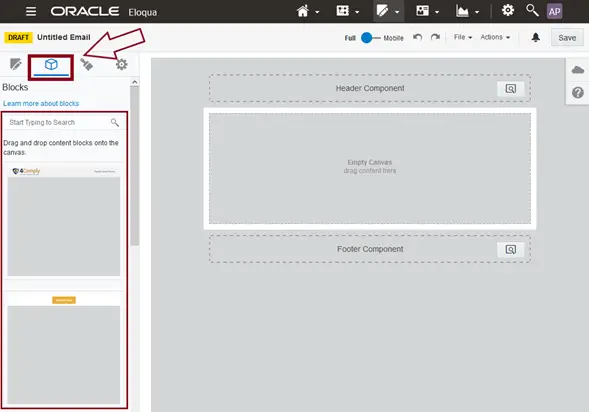
The content blocks section highlighted in the Eloqua Design Editor sidebar
The content blocks section in the Design Editor sidebar, where you search and manage your block library.

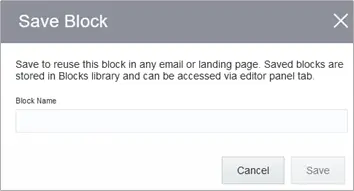
Eloqua will prompt you to name the block before saving. Use a descriptive name. “2-Col Image Left Text Right” is more useful than “Block 1” when your library holds fifty entries. The steps below show a two-column layout being selected and then named before saving.
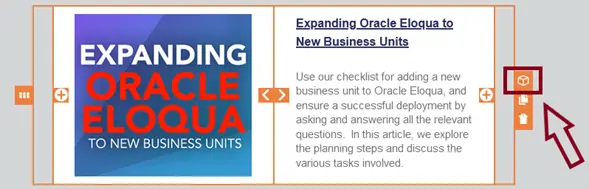
Selecting a two-column layout row in the Design Editor to save as a content block
Selecting the layout row to save as a block.
Naming the Eloqua content block before saving it to the Design Editor library
Naming the block before saving it to the library.

Once named and saved, the block appears in the library and is immediately available for drag-and-drop use on any Design Editor canvas.
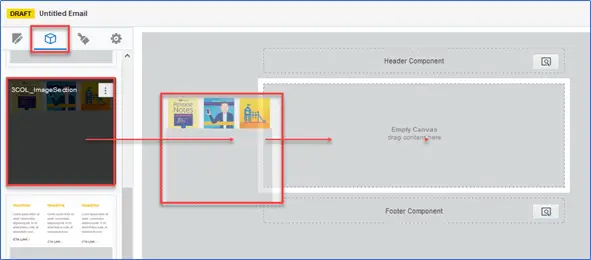
Dragging a saved Eloqua content block from the library onto the email canvas
Dragging a saved block from the library directly onto the email canvas.

Organizing Your Block Library

As the library grows, searchability becomes the practical constraint. The block library includes a search function, so consistent naming conventions pay dividends early. A prefix-based approach works well: “Header – Standard,” “Footer – Legal,” “CTA – Single Button,” “2-Col – Image Right.” This keeps related blocks grouped alphabetically in search results and simplifies onboarding when new team members start building.

Editing Blocks and Governing Your Library

Making Changes to an Existing Block

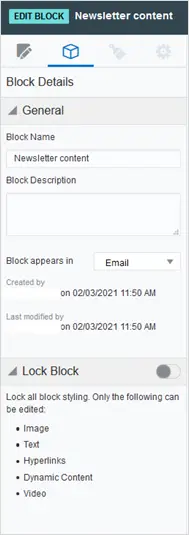
To edit a saved block, open its options menu in the library and click Edit. This opens the Edit Block screen, a standalone workspace where you can adjust layouts, change cell types, update padding and spacing, and refine the block’s structure.
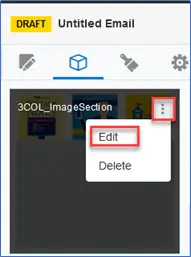
Opening the block options menu and selecting Edit in the Eloqua Design Editor
Opening the block’s options menu and selecting Edit.
The Edit Block workspace in the Eloqua Design Editor for adjusting layouts and cell types
The Edit Block workspace for adjusting layout, cells, and styling.

Changes made here update the block in the library for future use. Emails and landing pages that have already used the block are not affected. If you need those assets to reflect the update, you will need to manually replace the block in each affected email.

Governance Considerations as Your Library Scales

When a brand refresh or template update occurs, a light governance practice around your block library pays off. Appending a version marker to updated block names (“Header – Standard v2 2026”) prevents confusion when multiple team members build simultaneously. This naming discipline is one of the markers covered in the broader guide to marketing template standardization, which is worth reading if your team manages high-volume campaigns.

When Content Blocks Deliver the Most Value

The Use Cases Worth Prioritizing

Content blocks return the highest value in three scenarios.

High-volume production: Teams running weekly or bi-weekly campaigns benefit immediately. Pulling from a block library instead of rebuilding from scratch shaves meaningful time off every send cycle.

Multi-region or multi-team builds: When marketers in different regions or business units build independently, layout divergence is almost inevitable. A shared block library acts as a lightweight governance layer, ensuring every team starts from the same approved components.

Brand compliance and legal accuracy: Legal disclaimer footers, physical address blocks, and unsubscribe layout sections are high-risk areas for manual error. Saving these as approved, tested blocks removes the chance a time-pressured marketer omits or modifies required copy.

For a broader look at how template libraries intersect with email production efficiency and brand consistency, Custom Email Templates: Turning Brand Vision into Inbox Reality covers the full picture.

Eloqua content blocks are one of those platform features that compound in value the more consistently they are used. Build the right components once, name them clearly, and a team of any size can produce brand-consistent emails and landing pages without rebuilding from scratch. The key is understanding where blocks fit alongside tools like Shared Content, maintaining naming conventions as the library grows, and prioritizing block types that carry the most compliance or brand risk. If your team is ready to build a more structured Eloqua setup, contact 4Thought Marketing for hands-on support tailored to your workflow.

Frequently Asked Questions

What are Eloqua content blocks used for?

Eloqua content blocks are reusable layout components saved in the Design Editor’s block library. They let marketing teams save any email or landing page layout section, such as a two-column content row, a CTA button block, or a branded footer, and reuse it across campaigns with a simple drag-and-drop.

How do Eloqua content blocks differ from Shared Content?

Content blocks are layout templates. When you insert a block into an email, Eloqua copies the layout into that email, and later edits to the source block do not affect emails that have already used it. Shared Content is a live asset that updates across all active emails and landing pages when changed. Use blocks for layout reuse and Shared Content for copy that must stay synchronized.

Are Eloqua content blocks automatically responsive?

Yes. Because content blocks are created and managed within the Design Editor, they inherit the editor’s responsive output. Blocks render correctly across email clients and mobile devices without any additional coding or configuration.

Can content blocks be used on landing pages as well as emails?

Yes. Eloqua content blocks work in both the email and landing page environments within the Design Editor. Any block saved to the library is available for use in either context, making them useful for maintaining consistent layout elements across both channels.

What is the best way to organize the Eloqua content block library?

Use a prefix-based naming convention that groups blocks by type and purpose. Examples include Header Standard, Footer Legal, CTA Single Button, and 2-Col Image Left. Consistent naming makes the library searchable and reduces the time new team members need to find the right component.

[Sassy_Social_Share]

Related Posts