Quick Takeaways
- Email bot clicks come from security tools, not your buyers.
- Rapid-fire clicks from one recipient are Oracle’s bot signal.
- Eloqua keeps auto clicks out of Insight click rates.
- Oracle doesn’t document scoring or segment exclusion, so test it.
- Inflated click rates can push unready contacts to sales.
- Report human clicks and auto clicks side by side.
Table of Contents
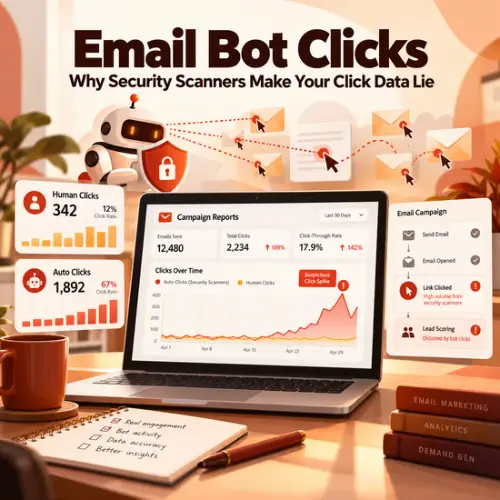
Email bot clicks can make a contact look like your most engaged lead of the week when no person ever read the message. Corporate email security tools such as Microsoft Defender and Mimecast scan the links in incoming email, and that automated activity can show up in your data as clicks nobody made.
Clicks matter because you act on them. They feed your campaign reports, your lead scores, and the decision steps that move contacts through nurture. When some of those clicks come from software, every one of those systems responds to interest that was never there.
This guide shows you how to recognize bot clicks, what Oracle Eloqua does and does not document about handling them, and how to report click numbers your leadership can trust.
What Are Email Bot Clicks?
Email bot clicks are link clicks recorded by automated software instead of the person who received the email. Most come from security tools that check links for threats, either before the email reaches the inbox or when someone clicks.
Here is how two of those tools describe their own link checks:
- Microsoft Defender for Office 365 (Safe Links): Microsoft says URLs are scanned before delivery, and links without a known good reputation are detonated, meaning opened in a safe test space, in the background. Links are checked again when the recipient clicks.
- Mimecast URL Protect: Mimecast rewrites inbound links and scans the destination when a user clicks. Since late 2025, it also offers a pre-delivery scan for high-risk links.
Neither vendor says it clicks every link in every email. But any automated visit to a tracked link can be recorded as a click, and those email security scanner clicks then sit next to real engagement in the contact’s history. Email marketing bot clicks look like interest unless your platform separates them.
How Do You Spot Email Bot Clicks in Your Own Data?
Timing is the strongest documented signal. Oracle’s Bot Click Detection Service, announced in Eloqua release 25D, identifies sequences of link clicks by the same recipient in rapid succession as automated activity.
Practitioners also watch for two patterns, which are rules of thumb rather than Oracle definitions:
- Clicks seconds after delivery: A person needs time to open, read, and decide. A near-instant click deserves a second look.
- Every link clicked: When one recipient clicks every link, including footer links readers rarely touch, a scanner is the more likely explanation.
A click with no open is often cited as a bot sign, but it won’t help you in Eloqua. Eloqua records an assumed open whenever a clickthrough arrives for a recipient with no open on record. No single sign proves a click was automated, so treat one fast click as a question, not a verdict.
What Inflated Click Rates Do to Lead Scoring Accuracy
Inflated click rates do more than flatter a dashboard. If your scoring model awards points for email clicks, email bot clicks can add engagement points to a contact who never read your email. The damage shows up in three places:
- Lead scores: Contacts can cross your MQL threshold on machine activity, and sales spends time on people who are not ready. Our guide to a scalable Eloqua lead scoring model covers how to weight engagement so one signal can’t carry a score alone.
- Nurture decisions: If scanner clicks count toward a “Clicked Email?” decision step in your instance, contacts can take the “yes” path and get follow-up meant for interested buyers. Oracle doesn’t document whether they count.
- Sales alerts: Any alert that tells a rep “this contact just clicked” is only as good as the click behind it.
Clicks aren’t the only signal automation can fake. Bots filling out your forms distort scores in a similar way, so protect lead scoring accuracy across every engagement source, and watch for the ways lead scores drift over time.
Filtering Email Bot Clicks in Eloqua
Eloqua keeps email bot clicks out of your click reporting, but Oracle doesn’t document how they affect everything else. Start with what is documented, then test the rest.
What Eloqua Documents About Auto Clicks
According to Oracle’s Eloqua Insight documentation, Eloqua tracks and stores auto-opens and clicks by email scanning tools separately from activity generated by an actual email contact.
Eloqua auto clicks are not included in Total Clickthroughs or the associated click-through rates in Insight. Eloqua auto opens work the same way for opens and also cover Apple email privacy auto-opens. The 25D Bot Click Detection Service improves how auto clicks are identified, needs no setup, and is rolling out in phases by POD, with timing to be shared in the Eloqua Community.
Find Them in the Auto Activity Analysis Report
Eloqua’s Auto Activity Analysis report, in Insight under Shared folders > Campaign, shows a monthly breakdown of auto-opens and auto-clicks by campaign. Start with your largest campaigns.
Test Your Scoring, Segments, and Canvas Steps
Here is the gap. Oracle’s documentation doesn’t say whether auto clicks are kept out of lead scoring, segment filters, or “Clicked Email?” decision steps. The 25D note says only that there is no change in other workflows. Test it in your own instance:
- Pick a recent campaign that shows auto clicks in the Auto Activity Analysis report.
- Check whether recipients gained engagement points around the send time with no other activity.
- Compare a segment filter based on email clicks with the human click count in Insight.
- Review which path contacts took at any “Clicked Email?” decision step.
Record what you find in your Eloqua data hygiene best practices so the next admin doesn’t have to rediscover it.
Extra Safeguards Some Teams Use
These are practitioner workarounds, not Eloqua features, so test them carefully:
- Honeypot links: A hidden link no person would see or click. A click on it suggests the recipient’s other clicks were automated too. Hidden links carry accessibility and deliverability trade-offs, so weigh those first.
- Time-delay rules: Ignoring clicks that land within seconds of delivery, or waiting for another signal before acting on a click.
- Stronger signals: Giving more scoring weight to actions a scanner is less likely to take, such as meeting requests, and less to a single email click.
Other platforms have their own bot filters. Marketo, for example, has bot activity settings in its email admin area. Whatever your marketing automation platform, know what it filters and test what it doesn’t.
How to Report Clean Click Metrics to Leadership
Leadership needs numbers they can trust and a plain explanation when those numbers move.
- Lead with human clicks: Report Total Clickthroughs and click-through rates from Insight, which already leave out auto clicks.
- Show auto activity separately: Add a line from the Auto Activity Analysis report so leaders see how much activity was automated.
- Explain shifts: If click rates change after the Bot Click Detection Service reaches your POD, better detection may be part of the reason. Oracle hasn’t published exact timing, so present it as a possibility.
- Keep tracking consistent: Mixed tracking methods muddy comparisons. Our guide to clean email tracking explains how UTM parameters and native platform IDs fit together.
When leadership asks about bot clicks, email marketing reports that separate human and automated activity give them a straight answer.
Conclusion
Email bot clicks are a data quality problem hiding inside your engagement metrics. Security tools scan your links, and your job is to keep that activity from posing as buyer interest. Eloqua separates auto clicks from click rates in Insight, but Oracle doesn’t document how they affect scoring, segments, or canvas decisions, so test those yourself and report human and automated activity side by side. That habit is part of running Oracle Eloqua well. To review how your instance handles click data today, contact 4Thought Marketing.
About 4Thought Marketing
We're a B2B marketing automation and AI consultancy with a thing for getting complex tech to actually work. Since 2008, we've helped hundreds of organizations across financial services, technology, manufacturing, and real estate get more from Eloqua, Marketo, and their CRM integrations. We serve our clients across marketing automation strategy, lead lifecycle, AI, compliance, preference management, and more. Explore our services or get in touch.
Frequently Asked Questions
What are email bot clicks?
Email bot clicks are link clicks recorded by automated software, usually email security tools, instead of the person who received the email. They can inflate click rates and engagement scores if your platform doesn’t separate them.
Does Eloqua count bot clicks in click-through rates?
Not in Insight reporting. Oracle states that auto clicks are not included in Total Clickthroughs or the associated click-through rates. They are stored separately and appear in the Auto Activity Analysis report.
Are Eloqua auto clicks excluded from lead scoring?
Oracle’s documentation doesn’t say. It confirms auto clicks are kept out of click totals and rates in Insight, but not whether they are kept out of lead scoring, segment filters, or u0022Clicked Email?u0022 decisions. Test this in your own instance.
Why do security scanners create email bot clicks?
Tools such as Microsoft Defender for Office 365 and Mimecast URL Protect check links for threats, before delivery or when someone clicks, depending on the tool and its settings. An automated visit to a tracked link can be recorded as a click.
Can I see auto click data for older campaigns?
Only for campaigns sent after Eloqua began tracking auto clicks separately in release 22B. Earlier campaigns don’t have that split.
Should I add honeypot links to my emails?
Treat them as an option to test, not a default. Honeypot links are a practitioner workaround, not an Eloqua feature, and hidden links carry accessibility and deliverability trade-offs.