



Frequently Asked Questions

Locked & Unlocked Eloqua Email Templates: Features & Capabilities

What are locked and unlocked Eloqua email templates?

Locked and unlocked Eloqua email templates are two types of templates available in Oracle Eloqua for creating emails and landing pages. Locked templates restrict editing to specific sections designated by an administrator, ensuring brand consistency and preventing accidental code changes. Unlocked templates provide full access to the underlying code, allowing advanced users to customize every aspect of the email or landing page.

What are the main differences between locked and unlocked Eloqua email templates?

Locked templates restrict users to editing only pre-designated sections, preventing changes to layout, logos, or legal disclaimers, and do not allow access to the HTML/CSS code. Unlocked templates, accessible via the Source Editor, give users full control over the code, enabling advanced customization and access to all Eloqua email features.

What features are available in locked Eloqua email templates?

Locked templates allow administrators to specify which sections are editable or removable. Users can only modify designated areas, ensuring that critical elements like layouts, logos, and legal disclaimers remain unchanged. The interface is simplified, and users cannot access the HTML or CSS code, reducing the risk of accidental errors.

What features are available in unlocked Eloqua email templates?

Unlocked templates provide full access to the underlying HTML and CSS code, allowing advanced users to create intricate layouts, use all Eloqua email technologies (such as dynamic content, shared content, and signature layouts), and quickly identify and fix code issues. They offer maximum flexibility for customization.

How do you designate editable sections in a locked Eloqua email template?

Editable sections in a locked template can be designated by right-clicking sections in the preview window, adding elq-edit="true" and elq-delete="true" attributes in the HTML pane, or adjusting settings in the protected content area to control layout and style editing permissions.

Can users access the HTML and CSS code in locked templates?

No, users cannot access the HTML and CSS code in locked templates. This restriction helps prevent accidental changes to the code and ensures brand consistency.

What editing capabilities do unlocked templates provide?

Unlocked templates allow users to edit all aspects of the email, including the underlying HTML and CSS code. This enables advanced customization, use of dynamic content, and rapid troubleshooting of code issues.

Are there any restrictions on using dynamic content in locked templates?

Yes, users can only access dynamic content or other advanced features in locked templates if those features are already included by the template designer. Users cannot add or swap out these components themselves.

What are the advantages of using locked Eloqua email templates?

Locked templates ensure brand consistency, prevent unauthorized changes to critical elements, simplify the user interface, and reduce the risk of accidental code errors. They are ideal for organizations that want to control the look and feel of their emails and landing pages.

What are the advantages of using unlocked Eloqua email templates?

Unlocked templates provide advanced users with total control over the email asset, enabling intricate layouts, full access to all Eloqua features, faster deployment, and easier troubleshooting of code issues.

Use Cases & Decision Criteria

Who should use locked Eloqua email templates?

Locked templates are best for organizations that require strict brand consistency, have users with limited coding experience, or want to prevent accidental changes to email layouts and styles. They are ideal for teams where only certain individuals should control the design and structure of emails.

Who should use unlocked Eloqua email templates?

Unlocked templates are suitable for advanced Eloqua users who need full control over email design, want to implement complex layouts, or require access to all Eloqua features. They are ideal for teams with strong HTML/CSS skills and a need for high customization.

What factors should I consider when choosing between locked and unlocked templates?

Consider your campaign requirements, the level of customization needed, the skill level of your Eloqua users, and the time available for template development. Locked templates are better for consistency and ease of use, while unlocked templates offer flexibility and advanced features.

Can I switch an email asset from a locked to an unlocked template?

The original content does not specify whether you can switch an email asset from a locked to an unlocked template. For guidance on template transitions, contact 4Thought Marketing for expert advice.

How do locked templates help with brand consistency?

Locked templates ensure that only authorized sections can be edited, preventing changes to critical brand elements like logos, layouts, and legal disclaimers. This helps maintain a consistent brand image across all communications.

What are the challenges of using locked Eloqua email templates?

Challenges include limited editing flexibility, the need to anticipate all use cases in advance, restricted access to advanced features unless pre-included, and the inability to quickly fix code issues without rebuilding the asset. Frequent updates may be required due to changes in how email clients render messages.

What are the challenges of using unlocked Eloqua email templates?

Unlocked templates require more business practices to ensure brand standards, can be intimidating for new users, and even small code changes can significantly affect the final layout. Coding for different email clients like Outlook and Gmail can be complex, and mistakes in the code can have major consequences.

How can 4Thought Marketing help with Eloqua email template design?

4Thought Marketing offers expert Eloqua training, campaign production, and consulting services to help you design, implement, and optimize both locked and unlocked email templates. Their team can guide you in choosing the right template type and provide hands-on support for your marketing campaigns.

What services does 4Thought Marketing offer for Eloqua users?

4Thought Marketing provides a range of services for Eloqua users, including implementation, campaign production, training, health checks and analysis, data services, system integration, and web/app development. These services help organizations maximize their marketing automation investment and ensure best practices.

How can I get help with Eloqua template troubleshooting?

You can contact 4Thought Marketing for expert troubleshooting and support with Eloqua templates. Their team can help you resolve issues with both locked and unlocked templates and provide recommendations for best practices.

Does 4Thought Marketing offer Eloqua training for new users?

Yes, 4Thought Marketing offers custom Eloqua training and online videos to help new users improve their skills and increase productivity. Training covers template usage, campaign execution, and best practices for marketing automation.

What is the process for creating a locked Eloqua email template?

To create a locked template, an administrator or designer selects which sections are editable or removable, either by right-clicking in the preview, adding specific attributes in the HTML pane, or adjusting protected content settings. The template is then used by asset creators with a simplified editing experience.

What is the process for creating an unlocked Eloqua email template?

Unlocked templates are created using the Source Editor, which provides full access to the underlying code. Users can customize every aspect of the template, add advanced features, and troubleshoot issues directly in the code.

How do locked templates impact email deliverability?

Locked templates can help maintain consistent formatting and reduce the risk of code errors that might affect deliverability. By restricting access to the code, they help ensure emails render correctly across different clients and devices.

How do unlocked templates impact email deliverability?

Unlocked templates provide flexibility but require careful coding to ensure emails render properly in all clients. Advanced users must test thoroughly, as even small code changes can impact deliverability and appearance in different email clients.

What should I do if I need a template with both flexibility and brand control?

If you need both flexibility and brand control, consider working with 4Thought Marketing to design a hybrid approach or a set of templates tailored to your organization's needs. Their experts can help you balance customization with consistency.

How can I contact 4Thought Marketing for Eloqua template support?

You can contact 4Thought Marketing by phone at 888-356-7824, by email at [email protected], or through their website's contact form to schedule a consultation or request support for Eloqua templates.

Where can I find more resources on Eloqua email templates?

Visit the 4Thought Marketing Resource Center and Documentation pages for articles, guides, and best practices on Eloqua email templates and marketing automation strategies.

Understanding Locked & Unlocked Eloqua Email Templates

eloqua email templates

Templates offer a streamlined approach to producing emails and landing pages, saving valuable time while ensuring brand consistency across communications. By leveraging predefined layouts and designs, marketers can quickly create on-brand assets, focusing on content without worrying about formatting or design standards. This efficiency accelerates the production process and upholds a professional and cohesive brand image in every interaction, making templates essential for effective and efficient marketing campaigns.

When creating landing pages and emails, Eloqua users can use the HTML or Design Editor to create and modify templates. This article will focus on how templates can be locked or unlocked, providing even more control over the look and feel.

Eloqua Email Template Types

Eloqua includes two primary types of templates: locked or unlocked. Unlocked templates give users total control over the finished email by giving them a complete look and feel. All users have to do is update the content. Meanwhile, locked templates offer a more controlled environment that restricts access to the backstage code, preventing changes that may impact how pages and emails are rendered within browsers or email clients.

Both template types have pros and cons, so your choice will depend on your requirements and team skills.

Locked Eloqua Email Template

When using locked email templates, the administrator or template designer selects in advance the parts of the email that will be editable or removable by the user. Then, when the template is used, the asset creator gets a simplified experience. There are three ways to designate template sections editable:

  • Right-click sections of the template in the preview window to designate them as editable.
  • Add two properties to the code in the HTML pane. You can specify which components can be removed or edited by adding the attributes elq-edit=”true” and elq-delete=”true.” Only the HTML source editor offers this option.
  • Move to protected content in settings. From here, you can decide whether users can alter the layout, default style, or email design.
Eloqua email templates

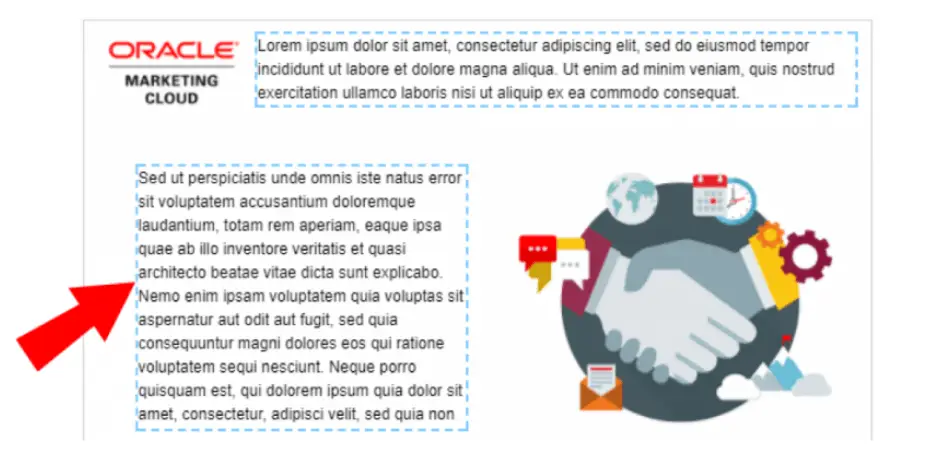
Highlighted sections with dotted lines can be edited when users create a new Oracle Eloqua Email asset.

Advantages of Using a Locked Eloqua Email Template

Locked Eloqua email templates offer several potentially helpful advantages, including:

  • Locked templates let you expressly designate which parts of the cannot be changed. Administrators and designers can then ensure that certain elements, including layouts, logos, or legal disclaimers, cannot be edited.
  • Organizations can ensure that only authorized individuals alter the templates to render correctly on all clients by restricting access to the CSS.
  • Locked templates offer a simple user interface. Users can only point and click on editable areas, immediately informing them of what can be modified and how.
  • Eloqua users cannot access the HTML and CSS backstages of the email designer in a Locked template. Not only does this allow users to make edits without needing to understand coding, but it also prevents accidental edits to the code.

Potential Difficulties With a Locked Eloqua Email Template

Of course, a locked email template may not be the best choice for every campaign. A few potential challenges to consider include:

  • The more complex or intricate the email design becomes, the harder the template will be to edit.
  • Because locked templates don’t allow as much editing flexibility, administrators must anticipate as many use cases as possible and create templates for each one.
  • Users can only access more sophisticated features, such as dynamic content or signatures, if those features are already included in the template. Even then, users cannot swap the component out for another of its kind.
  • To develop locked templates, many users choose to use the source editor. Using tags that Eloqua does not officially support can lead to issues, such as using Eloqua Engage secure templates.
  • There is no way to quickly fix an email asset because there is no access to the underlying code. The only solution is troubleshooting the template and then completely rebuilding the asset.
  • You’ll probably need to make frequent modifications over time because ISPs alter how email clients display messages, which is annoying if you need to send an email out immediately.

Unlocked Email Templates

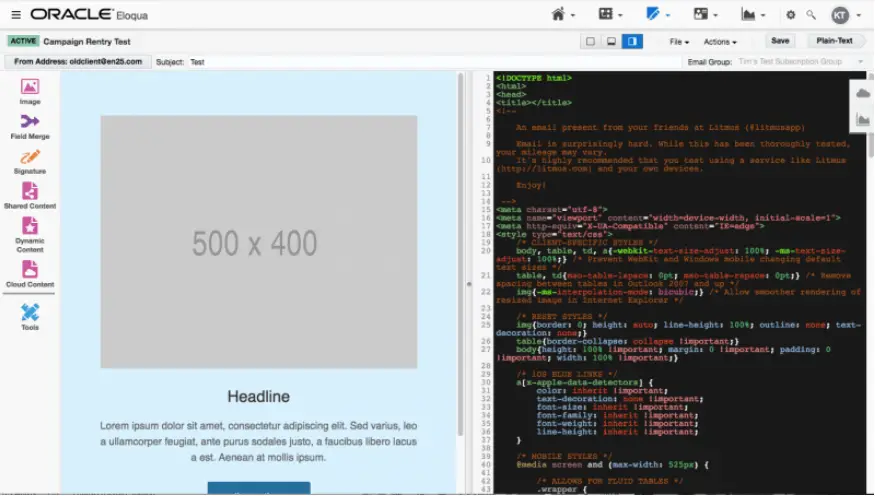
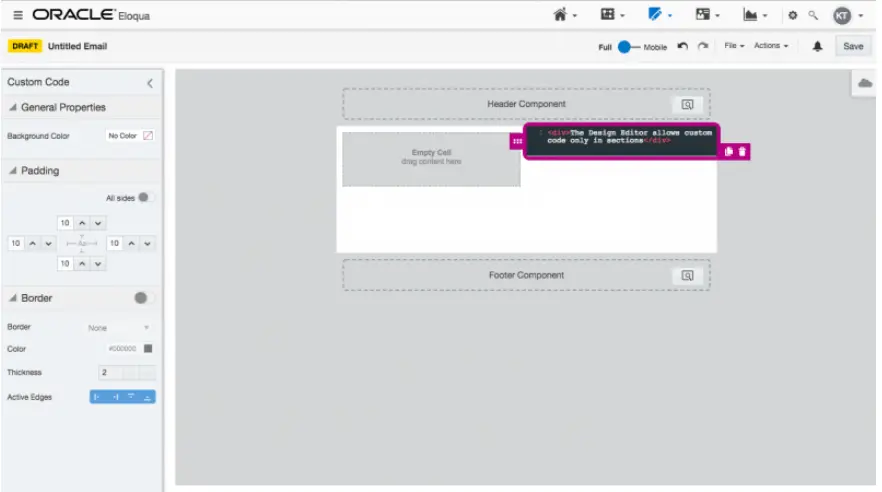
Only the Source Editor, which offers complete access to the underlying code, offers truly unlocked templates. Despite allowing users to apply custom code to editable parts, the new Design Editor does not let you view or modify the overall code.
eloqua email templates

Advantages of Using an Unlocked Eloqua Email Template

More advanced Eloqua users will find many advantages to using an unlocked Eloqua email template. For example:

  • Users with the necessary skills have total control over the email asset since they have access to the underlying code. As a result, the user can design more intricate layouts than those that could be achieved when utilizing locked templates or the Design Editor. The responding behavior of the asset is likewise subject to more user control.
  • All email technologies offered by Eloqua, including dynamic content, shared content, signature layouts, and others, are entirely accessible to users.
  • Unlocked templates can be deployed more quickly and efficiently than Locked templates since they are less complex.
  • When a developer has access to all the underlying code, any flaws can be rapidly identified and fixed.

Potential Difficulties with an Unlocked Eloqua Email Template

Of course, an unlocked email template isn’t for everyone. A few potential hurdles to keep in mind include:

  • Eloqua administrators need to put more business practices in place because users now have total authority over the email, ensuring that outgoing emails adhere to brand standards.
  • It can be intimidating initially because the user interface incorporates all of the Oracle Eloqua email components. Because it is less straightforward, new users must learn what each function accomplishes.
  • Even minor HTML or CSS code modifications can significantly change the final email’s layout. Coding for Outlook and Gmail can be particularly challenging. Some people may make tiny modifications without comprehending the potential consequences because the underlying code is accessible.

Choosing the Right Email Template

Your choice of using locked or unlocked Eloqua email template will depend on several factors: the nature of your campaigns, the amount of required customization, the skill levels of your Eloqua users, and the amount of time you have. Consider your needs at the start of each marketing campaign. Choosing the right templates will make your final campaign smoother.

Want some extra help getting your email design program off the ground? Contact us today to schedule expert Eloqua training.

[Sassy_Social_Share]

Related Posts