Quick Takeaways
- Eloqua campaign monitoring starts at activation, not at reporting.
- Check who entered before you check who clicked.
- Empty No paths early on usually mean timing, not failure.
- Clicked Email? counts any tracked link, never one specific link.
- Eloqua has no pause; deactivate instead, and reactivate within three months.
- Define intervention thresholds before launch, not during a crisis.
Table of Contents
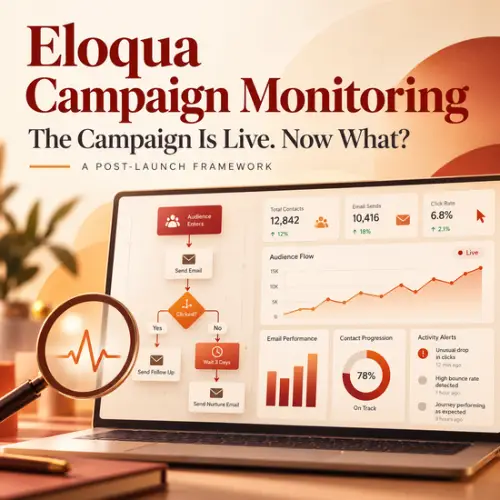
Eloqua campaign monitoring starts the moment you click Activate, not when the first report lands. Picture a campaign built for 5,000 contacts that has 12,000 members two hours after launch. Its open and click rates may look perfectly normal, and that is exactly the problem.
Most teams treat activation as the finish line. But a live campaign behaves differently from a test: segments keep adding members, wait steps start counting, decision steps start evaluating, and data starts flowing to your CRM.
This framework shows you what to check after launch, in what order, and how to tell a real problem from a reporting quirk, so you catch the 12,000-contact surprise before it reaches your sales team.
Why Eloqua Campaign Monitoring Starts at Activation
Reporting tells you what happened. Monitoring tells you whether what is happening is what you expected. Both matter, but the second question comes first: is the campaign behaving as designed?
A typical workflow runs Brief, Build, QA, Activate, Report. The gap between Activate and Report is where campaigns quietly go wrong. Your campaign QA checklist catches problems before launch, while post campaign monitoring catches the ones that only appear under live conditions.
Before launch, describe the expected path in one plain sentence, for example: a contact enters, gets Email 1, waits three days, and is checked for a click. That sentence becomes the baseline for your Eloqua campaign monitoring.
What to Check in the First 24 Hours
A large global launch deserves a structured first-day review, and a small internal send does not. For important campaigns, run Eloqua campaign monitoring in three passes: in the first 15 to 30 minutes, after a few hours, and around the 24-hour mark.
Who Actually Entered?
The first Eloqua campaign monitoring check is simple: compare your expected audience with the number of contacts who entered. On an active campaign, the segment step shows how many contacts entered, and every other step shows how many contacts are on it right now. Double-click a step to open its report, where the status columns show why contacts are there.
Your audience may not be static. A Segment Members step can either add contacts once, when the campaign is first activated, or keep adding new segment members until the campaign is deactivated. With the second option, Eloqua re-evaluates the segment once a day by default. You can change this, but Oracle advises against hourly checks because they can overload the system.
So an audience of 8,000 that grows to 11,500 in three days (an example, not a benchmark) isn’t automatically wrong, as long as you expected the growth. If the numbers don’t make sense, investigate the audience before engagement.
Where Contacts Sit on the Canvas
Compare the count at each step with your baseline sentence. For always-on processes, see how Campaign Canvas differs from Program Canvas.
Large groups sitting at one step deserve a look, but volume alone doesn’t tell you why. Ask how long a contact should reasonably stay there. If a wait step is set to three days and contacts are still there after seven, investigate. The step members report shows a Next Evaluation time for contacts still waiting.
Warning Signs in the First Email
Eloqua reports sends, delivered, hard and soft bounce backs, opens, clickthrough (total and unique), and unsubscribes for every email. Delivered counts can shift for a while after a send, because ISPs report some bounce backs late. Look for the unexpected:
- High sends: An audience larger than planned, continuous segment additions, or a configuration problem.
- High bounce backs: Unexpected Eloqua bounce back volume can point to data quality issues, an unexpected segment population, or a problematic source list.
- High unsubscribes: An audience mismatch, frequency issues, or a message that missed expectations.
By default, Eloqua won’t send the same email to a contact who has already received it, even if they pass through the step again. The exception is when someone has ticked “Allow emails to be re-sent to past recipients” on the email step, which Oracle recommends only for critical corrections.
Decision Paths and Stuck Contacts
Decision steps are where Eloqua campaign monitoring raises the most false alarms. Say you expected about 20% on the Yes path of a Clicked Email? step and see 2% (again, an example). Check timing first. According to Oracle’s Campaign Canvas decisions documentation, Eloqua re-checks a waiting contact every 10 minutes if the evaluation period is 24 hours or less, every 30 minutes if it’s over a day, and hourly if it’s over a week. With an evaluation period of zero, the check happens once, immediately.
A contact who hasn’t met the condition stays in the decision step and is re-checked until the Eloqua evaluation period runs out. Only then do they move down the No path. So an empty No path early in a campaign is often just timing, and a long evaluation period means No-path steps fire later. Ask whether contacts are eligible to move yet.
Then check the condition itself. The Clicked Email? decision step counts a click on any tracked link in the selected email. It can’t target one specific link. If a campaign depends on a particular link, confirm that the link is tracked, and use the link-level click reports to see which links people are actually clicking. Oracle also doesn’t document whether automated clicks from email security tools count toward this step, which our article on email bot clicks covers.
Data Handoffs
Eloqua campaign monitoring shouldn’t stop at the edge of Eloqua, because a campaign can look healthy there while something downstream fails. Depending on the campaign, check form submissions, contact field updates, CRM synchronization, lead status changes, and whether sales receives the records it expects. If you sync to Salesforce, these Eloqua Salesforce integration issues show common places to look.
Around the 24 to 72 hour mark, shift from “Is it working?” to “Is it performing as expected?” That is when monitoring campaign performance becomes the main job.
Why Insight and the Oracle Eloqua Dashboard Don’t Always Match
Many Eloqua campaign monitoring false alarms are really reporting differences. If someone asks why the dashboard shows 200 clicks when another report shows 240, check the report before you check the campaign.
- Operational reports vs. Insight: Insight refreshes every few hours, but it can take up to 24 hours for the latest activity to appear. Operational reports cover the last three months, and they include test sends, which Insight does not.
- Totals vs. unique: Totals count every open or click. Unique count each person once. At campaign level, Eloqua counts a person who clicks five different emails as one unique clicker, so per-email unique won’t add up to the campaign figure.
- Reporting start date: According to Oracle’s Campaign Analysis dashboard documentation, campaign responses are recorded only after the campaign’s reporting start date, which might not be the same as the activation date.
- Highest-priority response only: The dashboard records only the response your Eloqua response rules rank highest for each campaign member, so response counts can sit below raw activity.
- Default date range: The Campaign Analysis dashboard shows active campaigns from the last two weeks by default, but its metrics are not limited to that window.
Know which report you’re reading before you react to it. For more on getting reliable numbers out of Insight, see these Eloqua Insight tips learned the hard way.
When to Monitor, Investigate, or Intervene
Agree on what counts as a problem before launch, so Eloqua campaign monitoring leads to decisions instead of debates. Example triggers, to replace with thresholds from your own history:
- Audience: Membership exceeds the expected population by an agreed margin, such as 20%.
- Delivery: Bounce backs exceed the campaign’s normal range.
- Logic: A decision path receives a much larger or smaller share than expected.
- Timing: Contacts stay on a step well beyond the expected time.
- Conversion: Form submissions or downstream actions fall well below the expected range.
Then sort each issue: monitor when behavior differs from the forecast but the workflow seems fine, investigate when it is unusual enough to check configuration or data, and intervene when contacts get the wrong message or path.
How to Intervene in Eloqua
Eloqua has no pause button. To stop a live campaign, you deactivate it, which returns it to Draft. Contacts stay at whatever step they’re on, and they pick up from there when you reactivate. You can’t edit an active campaign, so any fix means deactivate, edit, then reactivate. Don’t leave a campaign deactivated for long: after three months, Eloqua removes the contacts it was holding.
Check the end date too. Every multi-step campaign has one, set at activation, with a default three months out. When it arrives, Eloqua marks the campaign Completed, makes it read-only, and removes every contact still inside, though activity is tracked for 12 months. A completed campaign can’t be reactivated, so extend the end date while it is still running if you need more time.
Make Monitoring Campaign Performance Repeatable
Eloqua campaign monitoring shouldn’t depend on the person who built the campaign. For every major campaign, document a short plan:
- Owner: Who monitors the campaign, and when the first review happens.
- Expected audience and behavior: How many contacts should enter, and what should happen at each major step.
- Key metrics and thresholds: Which numbers matter, and what triggers an investigation.
- Escalation path and reporting source: Who to contact, and which Eloqua report to trust for each question.
Use the checklist below for each post-campaign monitoring review. Once a campaign ends, the work shifts to analysis. If results disappoint, here is how to find out why a campaign underperformed.
A Post Campaign Monitoring Checklist for Eloqua
- Audience: Expected size confirmed, actual members reviewed, segment re-evaluation behaving as intended.
- Flow: Contacts progressing, no unexpected bottlenecks, decision paths filling within their evaluation periods.
- Email: Sends match expectations, bounce backs and unsubscribes within range, tracked links working.
- Downstream: Forms receiving submissions, contact updates and CRM sync working.
- Reporting: Right report for the question, Insight delay and reporting start date considered, totals and uniques understood.
- Control: Thresholds defined, escalation contacts known, end date checked, findings recorded for the next campaign.
Conclusion
Activation isn’t the finish line. From the moment contacts start moving, your job is to confirm that the right people entered, the right logic is running, and the right data is reaching the systems downstream. Eloqua campaign monitoring gives you that confidence before a small configuration issue reaches thousands of contacts. Once the campaign is stable, monitoring campaign performance takes over. It is one of the habits behind running Oracle Eloqua well. To build a monitoring process that fits your campaigns, contact 4Thought Marketing.
About 4Thought Marketing
We're a B2B marketing automation and AI consultancy with a thing for getting complex tech to actually work. Since 2008, we've helped hundreds of organizations across financial services, technology, manufacturing, and real estate get more from Eloqua, Marketo, and their CRM integrations. We serve our clients across marketing automation strategy, lead lifecycle, AI, compliance, preference management, and more. Explore our services or get in touch.
Frequently Asked Questions
What is Eloqua campaign monitoring?
Eloqua campaign monitoring is checking a live campaign to confirm it behaves as designed: the right contacts entered, they move through the right steps, and data reaches downstream systems. Reporting tells you what already happened.
How often does Eloqua re-evaluate a segment in an active campaign?
If the Segment Members step is set to add members regularly until the campaign is deactivated, Eloqua re-evaluates the segment once a day by default. You can change the frequency, but Oracle advises against hourly checks because they can overload the system.
Can you pause an Eloqua campaign?
Eloqua has no pause option. If Eloqua campaign monitoring shows a problem, you deactivate the campaign, which returns it to Draft and holds contacts at their current step until you reactivate. After three months deactivated, Eloqua removes them.
Why are no contacts on the No path of my decision step?
Usually timing. A contact who hasn’t met the condition is re-checked until the evaluation period runs out, and only then moves down the No path. A long evaluation period means No-path steps fire later.
Why don’t my Insight numbers match the operational reports?
Insight can take up to 24 hours to show the latest activity, and it excludes test sends, which operational reports include. Totals and uniques are also calculated differently at campaign and email level.
What happens when an Eloqua campaign reaches its end date?
Eloqua marks it Completed, makes it read-only, and removes every contact still inside it. Activity continues to be tracked for 12 months, but a completed campaign can’t be reactivated.